Troubleshooting SSO sign-in
Fix common SSO sign-in problems in Atlan, including first-time login errors, username mismatches, provider-specific issues, and group sync behavior.
Common issues you may run into when signing in via SSO, and what to check first. For setup guides, see Set up authentication.
Username cannot be changed after SSO provisioning
A username changed in the SSO provider no longer matches the existing Atlan account, and the user is treated as a new person.
Cause
Atlan uses usernames as a unique identifier across the platform and does not support changing them after provisioning. If a username changes in the SSO provider due to an automation or a migration, the SSO user and the Atlan user are treated as different people.
Solution
Ensure the username in the SSO provider matches the username in Atlan before provisioning. Confirm your SAML application sends a stable username attribute mapped to the value you expect, because Atlan can rewrite the username from SAML attributes during a user's first sign-in. If the mismatch already occurred, or usernames keep getting rewritten on first sign-in, contact Atlan Support to disable first-login profile updates or to run a backend migration.
Group mapping sync is not behaving as expected
Group membership in Atlan does not reflect the current state of the IdP, or users are not added or removed as expected.
Cause
Group mapping changes in the SSO provider are not applied immediately. They propagate to Atlan on the user's next sign-in.
Solution
Ask the affected user to sign out and sign back in to trigger a sync. The sync behavior is as follows:
- If a user is in a mapped IdP group but not in the corresponding Atlan group, they are added on their next sign-in.
- If a user is in a mapped Atlan group but not in the corresponding IdP group, they are removed on their next sign-in.
- Groups in the IdP not mapped to Atlan, and vice versa, are unaffected.
Okta authentication error on first login
A user gets an authentication error the first time they sign in via Okta.
Cause
The Okta account may not be linked to the Atlan account yet, or the service provider metadata details were not copied correctly during setup.
Solution
- Confirm the service provider metadata details (Single sign-on URL and Audience URI) were copied exactly from Atlan into Okta during setup. A mismatch here prevents authentication.
- Ask the user to sign out of Atlan completely, clear their browser cache, then try signing in again.
Google invalid request when logging in from the Google Dashboard
Signing in from the Google Admin app dashboard returns an Invalid request error.
Cause
This is a known Google limitation with IdP-initiated SSO flows through Keycloak-based identity brokers, which Atlan uses. There is no known fix from Google.
Solution
Direct users to sign in from your Atlan workspace URL instead of from the Google Dashboard. IdP-initiated sign-in does not work with this setup; SP-initiated sign-in from your Atlan URL works correctly.
PingFederate 404 error during sign-in
This section covers the PingFederate SAML 404 error for workspace login. For OAuth errors (audience mismatch, invalid token, user not found) when querying Snowflake, see Troubleshooting PingFederate OAuth.
404 returned by PingFederate during the SSO authentication flow.
Cause
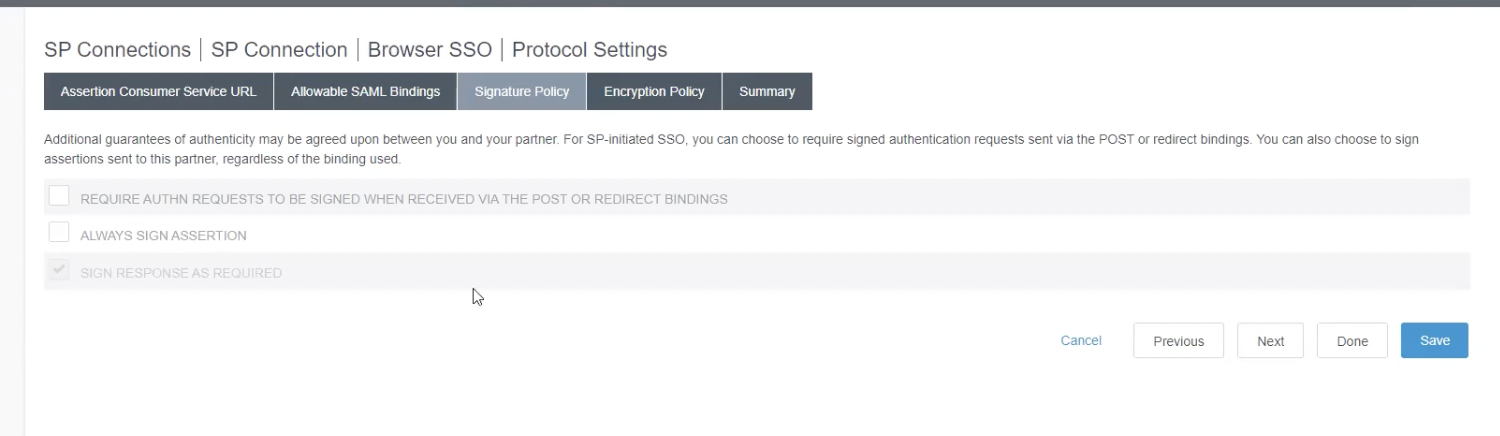
The SP Connection in PingFederate is configured to always sign the assertion. Atlan's authentication request does not expect a signed assertion, which causes PingFederate to reject the request with a 404.
Solution
- In PingFederate, open the SP Connection settings and go to the Signature Policy tab.
- Uncheck Always Sign Assertion.
- Save and retry the sign-in.
Microsoft Defender Atlan login page fails to load
Microsoft Defender shows an error when users try to open the Atlan login page. The URL is wrapped with a Safe Links prefix such as https://nam02.safelinks.protection.outlook.com/.
Cause
The Safe Links scanning feature is rewriting and blocking Atlan's invite links and login URLs before the user can reach them.
Solution
Add a Safe Links policy in Microsoft 365 Defender to allowlist Atlan's domain. If you cannot add an exception, Safe Links will need to be turned off for Atlan URLs.
Snowflake incorrect username or password when using OAuth
Cannot create PoolableConnectionFactory (Incorrect username or password was specified.)
Cause
The Snowflake security integration maps Atlan email addresses to Snowflake login names. If the Snowflake login name is not an email address, the mapping fails and authentication is rejected.
Solution
- Check whether a user with that Atlan email address exists in Snowflake.
- If the Snowflake login name is not an email address, ask a Snowflake administrator to update the security integration to use email mapping:
EXTERNAL_OAUTH_SNOWFLAKE_USER_MAPPING_ATTRIBUTE = 'EMAIL_ADDRESS'
See Snowflake documentation for the full ALTER SECURITY INTEGRATION syntax.
Snowflake role not granted to user when using OAuth
Cannot create PoolableConnectionFactory (Role 'ACCOUNTADMIN'/'ORGADMIN'/'SECURITYADMIN' specified in the connect string isn't granted to this user.)
Cause
Snowflake blocks privileged roles (ACCOUNTADMIN, ORGADMIN, SECURITYADMIN) from being used in external OAuth by default.
Solution
Run the following at the Snowflake account level to allow privileged roles for OAuth-based queries:
ALTER ACCOUNT SET EXTERNAL_OAUTH_ADD_PRIVILEGED_ROLES_TO_BLOCKED_LIST = FALSE;
See Snowflake documentation for details.
Atlan data policies vs. source data policies when using SSO for querying
When a user queries data using SSO credentials, Atlan determines which policy takes precedence:
- If a data policy exists in Atlan and Enable data policies created at source is off, the Atlan policy applies.
- If Enable data policies created at source is on, source-level policies take effect and any Atlan data policies on that connection are deactivated.
- If no Atlan data policy exists but the source has a masking policy, the source policy applies.
Need help?
If the issue persists after checking the above, contact Atlan Support with the error message, the SSO provider, and the time of the failed sign-in.
See also
- Set up authentication: Overview of SSO setup and configuration.
- Troubleshooting PingFederate OAuth: OAuth-specific errors when querying Snowflake.
- Troubleshooting IdP group sync: Issues with group membership not syncing from your IdP.