Run rules on demand
Trigger data quality rules immediately at the table or rule level without waiting for the next scheduled run. Supported for Snowflake and Databricks.
Run data quality rules on demand to get immediate results without waiting for the next scheduled check. Use Run all rules at the table level to run all rules on a table, or use Check current value in the rule editor to preview the current metric value for a single rule while creating or editing it. This is useful for validating data after a pipeline run, tuning thresholds, or investigating a data quality issue.
On-demand rule execution is currently supported for Snowflake and Databricks only.
Prerequisites
Before you begin, make sure you have:
- Data quality enabled on a Snowflake or Databricks connection
- At least one data quality rule configured on the target asset
- Permission to execute data quality rules on the asset
Run all rules on table
Use table-level execution to run every active data quality rule attached to a table in a single action. Rules run in your Snowflake or Databricks environment, and execution time depends on table size, query complexity, and available warehouse compute.
-
Navigate to the table or view where you want to run rules.
-
Open the Data Quality tab.
-
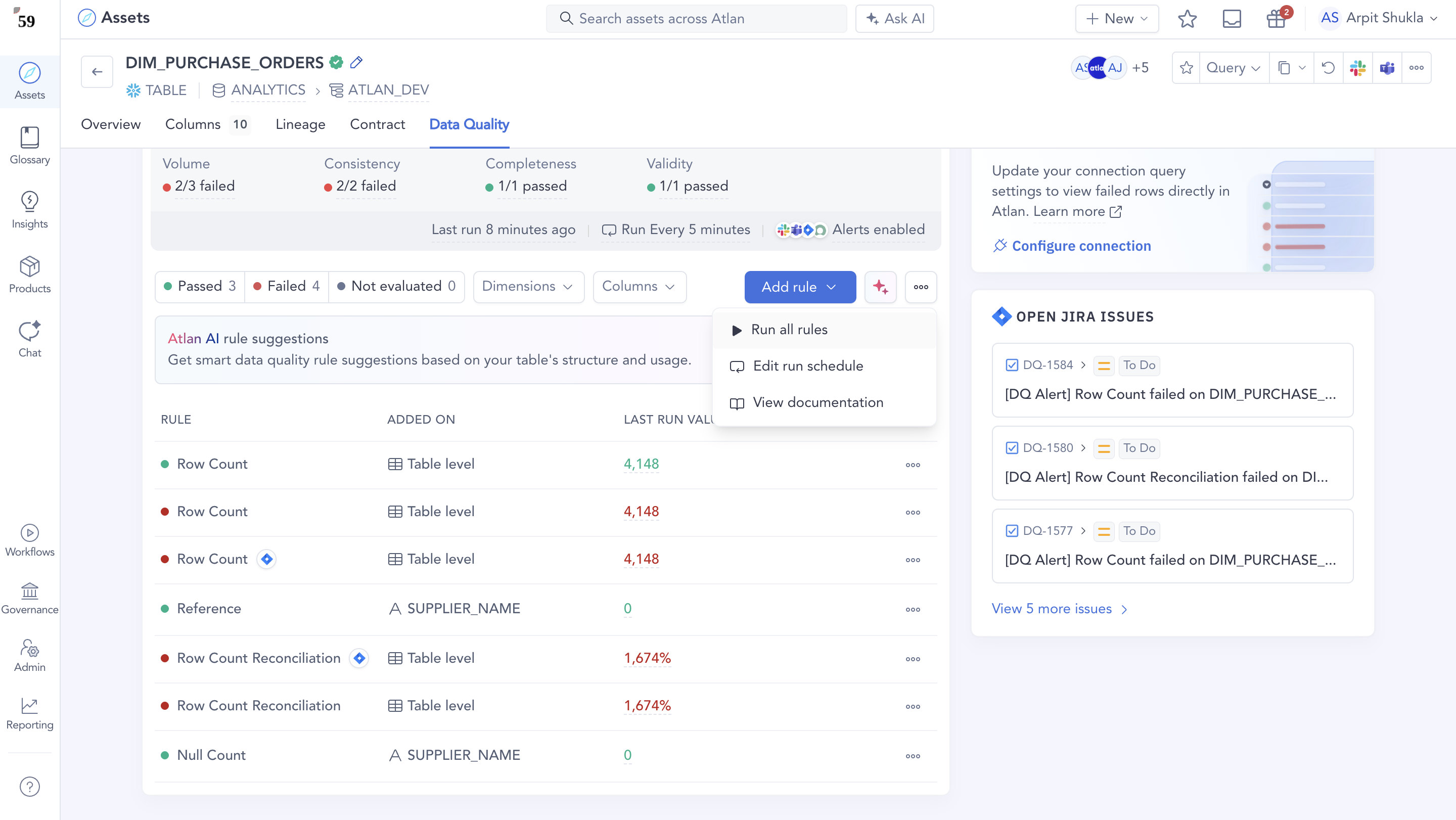
Click Run all rules. Only one on-demand execution can run at a time per table. If an execution is already in progress, the Run all rules action is disabled until the current run completes.
-
Atlan starts running all active rules on the table in your warehouse.
-
When the run finishes, the Data Quality tab updates with the latest statuses and results.
Preview rule’s current metric value
Use Check current value while creating or editing a rule to compute and display the current metric value (a single number) for your dataset. This is a preview to help you tune thresholds based on real data—it doesn't create a scheduled run, trigger alerts, or update the historical rule results for the asset.
-
Navigate to the table or view you want to create a rule for.
-
Open the Data Quality tab and create a new rule (or edit an existing rule).
-
Configure the rule template, column (if applicable), and any filters/conditions.
-
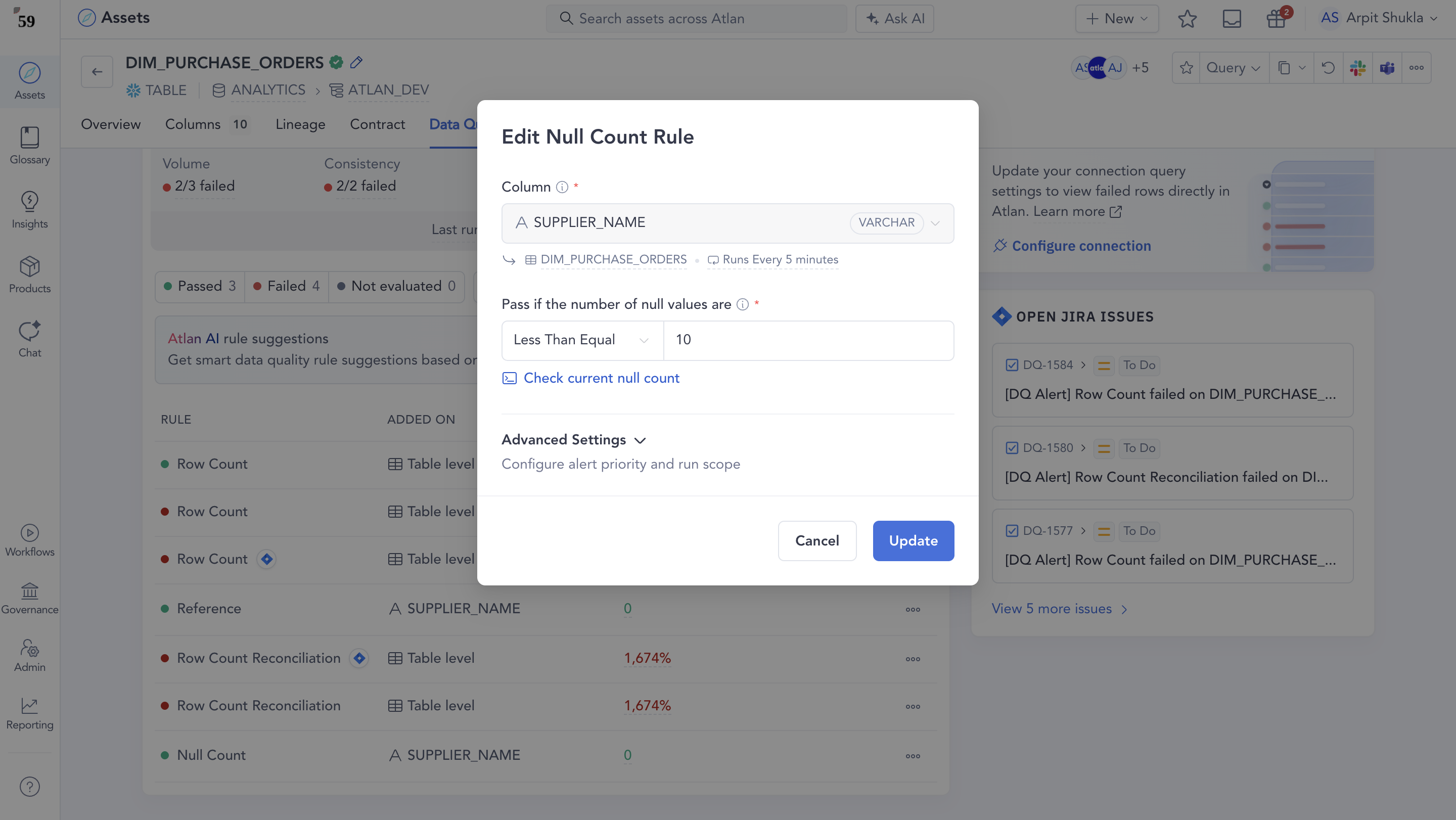
Click Check current value in the rule editor (for example, Check current null count).
-
Atlan runs a query in your warehouse to compute the metric and shows you the current value.
-
Update your threshold and save the rule when you're ready.
Verify execution
-
For table-level execution: When Run all rules completes, the Data Quality tab refreshes with the latest rule statuses and results. If you saved a rule but it hasn't run yet, use Run all rules at the table level to execute all rules immediately and refresh results in Atlan.
-
For rule-level preview: When Check current value completes, Atlan shows the current metric value in the rule editor so you can tune the threshold before saving.
Need help
If you have questions or need assistance with running rules on demand, reach out to Atlan Support by submitting a support request.
See also
- What's Data Quality Studio: Understand how Data Quality Studio works
- Configure alerts: Set up notifications for rule failures
- Rule types and failed rows validations: Reference guide for available rule types
- Operations: Snowflake-specific operations reference