Learn how to enable embedded Atlan metadata in Tableau dashboards for seamless data context and governance.
Enable embedded metadata in Tableau
By default, the browser extension shows Atlan metadata in a sidebar. With embedded metadata enabled, Atlan context appears directly overlaid on your Tableau dashboards—giving users immediate access to descriptions, lineage, and governance information without opening a separate panel.
Prerequisites
Before you begin, make sure you have:
- The Atlan browser extension installed and configured. If not, see Install and set up browser extension.
- The Admin role in Atlan.
- Access to Labs in your Atlan workspace.
Enable embedded metadata in Tableau
To enable the embedded metadata experience for all users in your workspace:
-
In your Atlan workspace, click Settings from the left menu.
If you are using the Old UI (Classic), from the left menu, click Admin.
-
Click Labs.
-
Under Access Control, turn on View embedded metadata in Tableau.
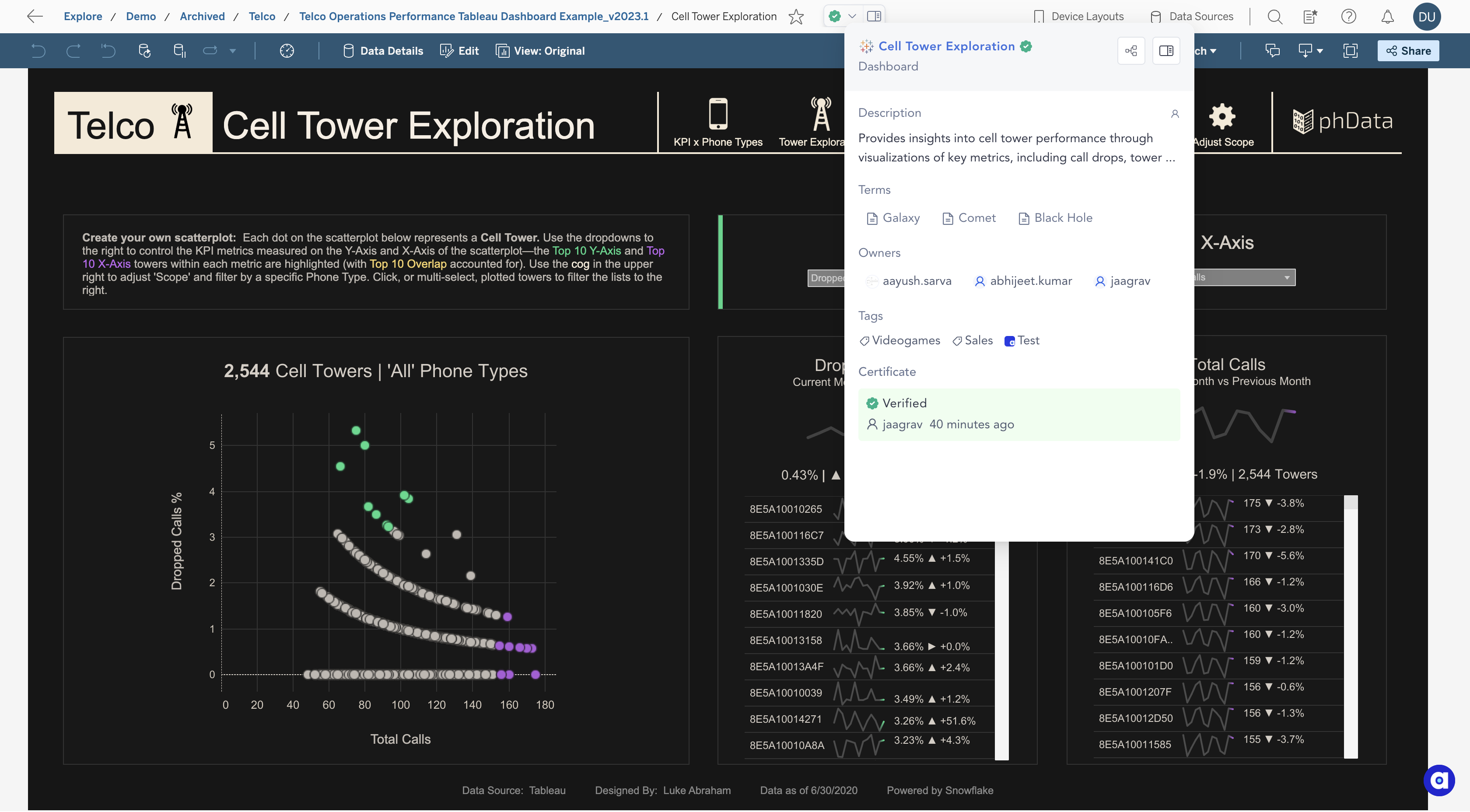
Once enabled, users with the browser extension installed see Atlan metadata overlaid directly in their Tableau dashboards.
Need help?
If you have any issues enabling this feature, contact Atlan Support for assistance.