Self-deployed runtime architecture
Components, app model, run flow, and authentication of Self-Deployed Runtime, and how the architecture changes with the SDR Orchestrator.
SDR requires additional enablement and licensing. Contact your Atlan representative for details.
Self-Deployed Runtime enables secure metadata extraction from enterprise data sources and transfers this metadata to Atlan SaaS for processing and asset management. SDR operates entirely within your infrastructure while maintaining secure communication with Atlan's cloud services.
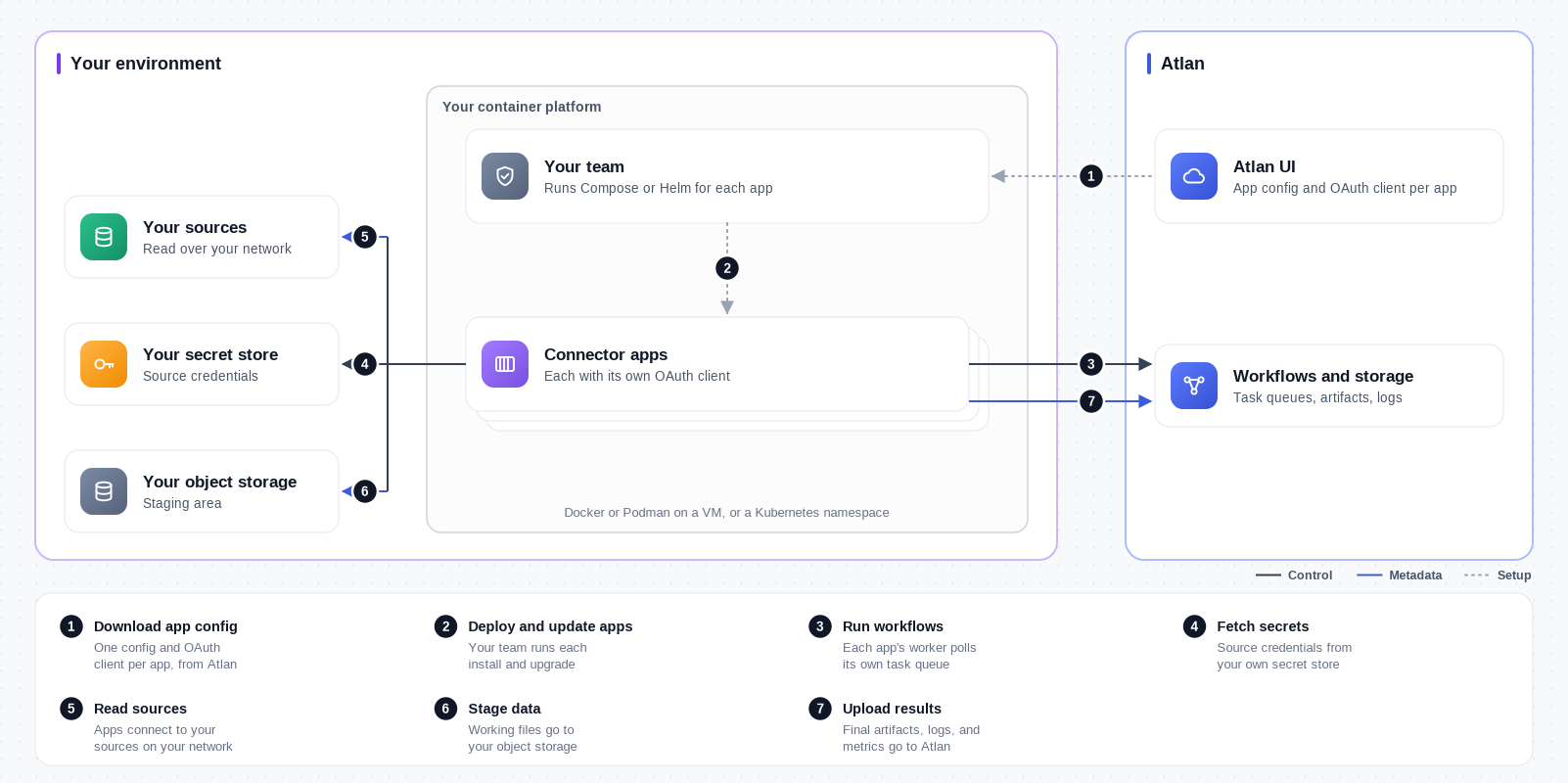
SDR sits next to your sources, secret store, and object storage, and every connection to Atlan starts from SDR:
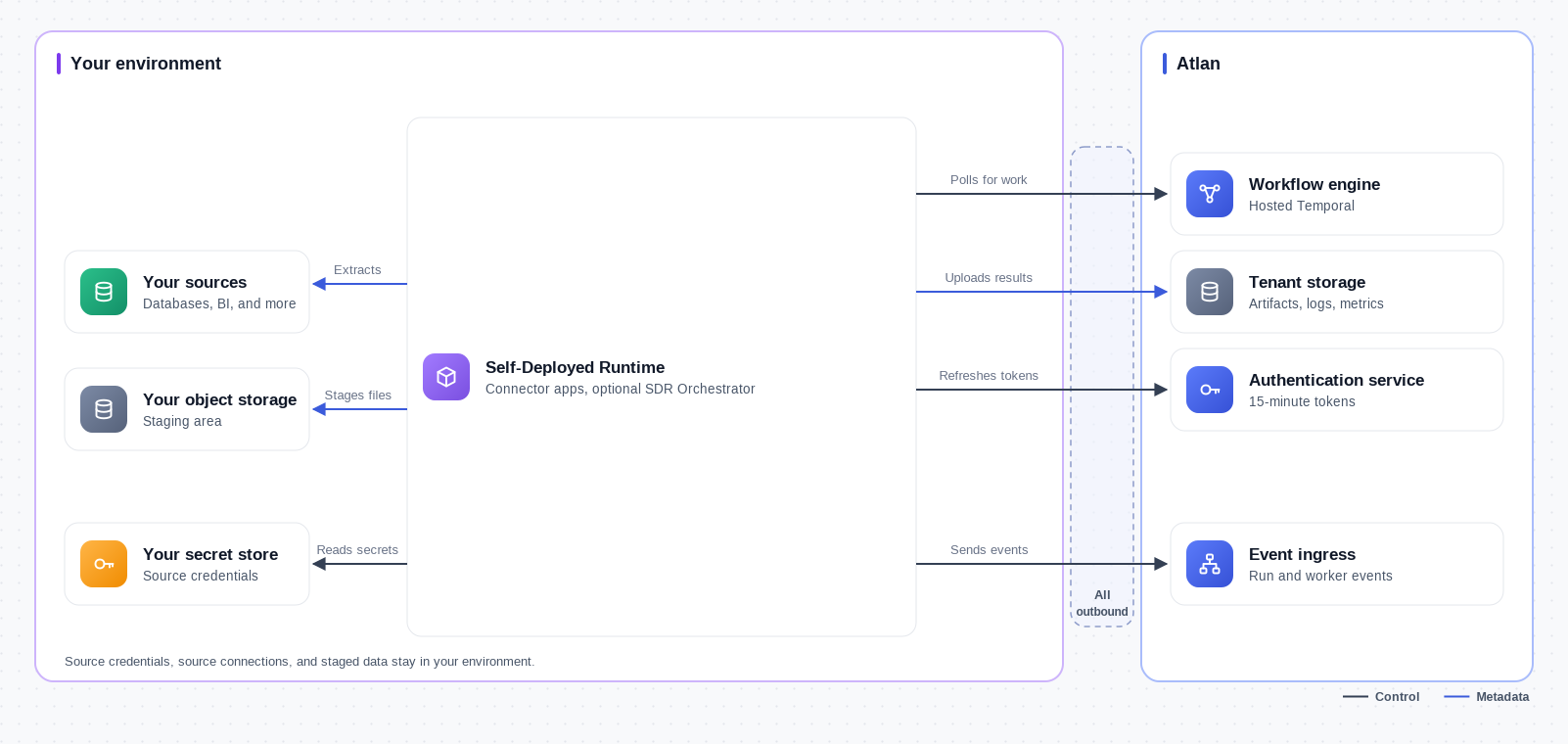
The sections from Components to Authentication apply to both lifecycle modes. Lifecycle mode differences covers what changes when the SDR Orchestrator manages your apps.
Components
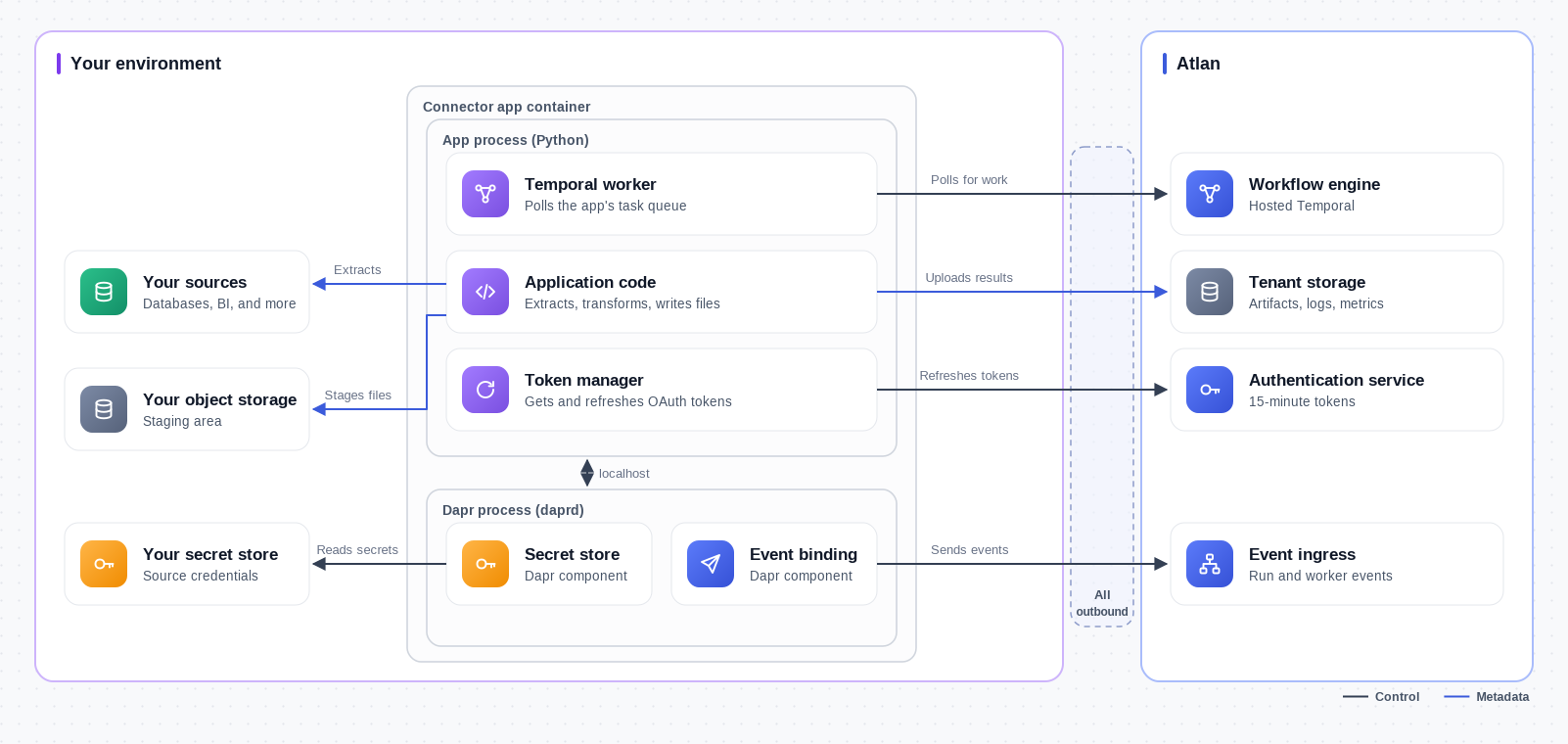
Every connector app runs as one container with the same building blocks. Only the application code differs from one connector to the next:
- Overview
- Temporal worker
- Dapr
- Application code
| Component | Where it runs | What it does |
|---|---|---|
| Temporal worker | App process | Polls Atlan for work over a persistent gRPC connection and runs each task. |
| Application code | App process | Connector-specific logic: connects to your source, extracts metadata, and maps it to Atlan assets. |
| Object storage access | App process | Stages working files in your object storage and uploads results to Atlan over HTTPS. |
| HTTP server | App process | Answers local health checks on port 8000, such as the Kubernetes readiness probe. |
| Token manager | App process | Gets a short-lived OAuth token from Atlan and refreshes it before it expires. See Authentication. |
| Dapr secret store | Dapr process | Reads source credentials and SDR's own OAuth credentials from your secret store. |
| Dapr event binding | Dapr process | Sends run events to Atlan, such as app start and workflow start and end. |
Purpose: Orchestrates metadata extraction workflows through persistent gRPC connections with Atlan's Temporal service.
Temporal workers are long-running processes that orchestrate the entire metadata extraction workflow. These workers establish persistent gRPC connections with the Temporal service hosted in Atlan's environment and continuously poll their task queues, picking up tasks as soon as they're available. Actions you start in the Atlan UI, such as Test authentication and preflight checks, reach the app the same way.
Key responsibilities:
- Poll the task queue for available extraction tasks
- Execute the extraction logic for each task
- Send results back to the Temporal service hosted by Atlan
Technical details:
- Connection type: Persistent gRPC
- Authentication: OAuth 2.0 client credentials flow; see Authentication
- Communication pattern: Worker-initiated; see Outbound-only communication
For more details about Temporal workers, see the Temporal Worker documentation.
Purpose: Reads secrets and sends run events to Atlan.
Dapr (Distributed Application Runtime) runs as a separate process inside each app container, not as a sidecar container. It gives the app one interface to many secret stores, so the same app works with AWS Secrets Manager, Azure Key Vault, GCP Secret Manager, HashiCorp Vault, or environment variables without code changes.
Secret store
- Reads source credentials from your secret store when a run needs them. See Authentication.
- Reads SDR's own OAuth credentials.
Event binding
The event binding sends short lifecycle events to Atlan's event ingress over HTTPS. Atlan uses them to show SDR status and other information in the Atlan UI:
| Event | Sent when | What it tells Atlan |
|---|---|---|
| App start | The app's worker starts | The app's name, deployment name, version, task queue, and which kind of secret store and object storage it uses |
| Workflow start and end | A workflow run starts or finishes | Which run started, and whether it completed or failed |
| Activity start and end | Each step of a run starts or finishes | Progress within a run |
| Token refresh | The app refreshes its OAuth token | The app's version, kept current between restarts |
Events carry names, IDs, versions, timestamps, and states. They never carry source metadata or credentials. If Dapr can't reach Atlan, the app sends the event directly to Atlan over HTTPS instead.
Learn more: Dapr
Purpose: Implements what's specific to one source: how to connect to it, what to read, and how to turn it into Atlan assets.
Every connector app shares the same Temporal worker, Dapr, and object storage access. The application code is the part that differs from one connector to the next. For example, the MySQL app's code contains:
- Connection and authentication: how to open a connection to a MySQL server, with basic, IAM user, or IAM role authentication.
- Checks: the logic behind Test authentication and the preflight checks you run when you set up a workflow, such as confirming the user can read the system tables.
- Extraction queries: the SQL the app runs against MySQL's
information_schemato list databases, schemas, tables, columns, and procedures, filtered by the include and exclude patterns in your workflow. - Asset mapping: how each query result becomes an Atlan asset, such as a row in the tables query becoming a
Tableasset with its schema, row count, and owner.
The app runs this code inside your network, so the queries reach your source directly and only the resulting metadata goes to Atlan.
Apps, sources, and workflows
Self-Deployed Runtime organizes work with three elements:
- App deployment: a containerized connector app, one per connector, such as the MySQL app or the Oracle app. Dapr runs inside it as the layer for secret stores, object storage, and calls to Atlan.
- Data source: a specific system the app extracts from, such as one MySQL server or one Snowflake account.
- Workflow: a configuration in Atlan that defines what to extract from a data source, with its filters, schedule, and parameters.
They scale from one level to the next:

- One app per connector: you deploy the app for a connector once in an SDR, and it serves every data source of that kind.
- One app, many data sources: an app deployment can reach several data sources, as long as your network routing and firewall rules let it reach each one.
- Workflows per data source: each workflow is managed, scheduled, and monitored on its own. How much one workflow covers depends on the connector; for some, each database needs its own workflow. Check your connector's setup guide.
To install an app on an SDR, see Manage deployments › Install app.
How runs work
A run moves metadata in two hops: first to your object storage, which acts as a staging area, and then to Atlan, where it ends up. Control traffic and metadata both travel over connections SDR opens; nothing connects in to your environment.
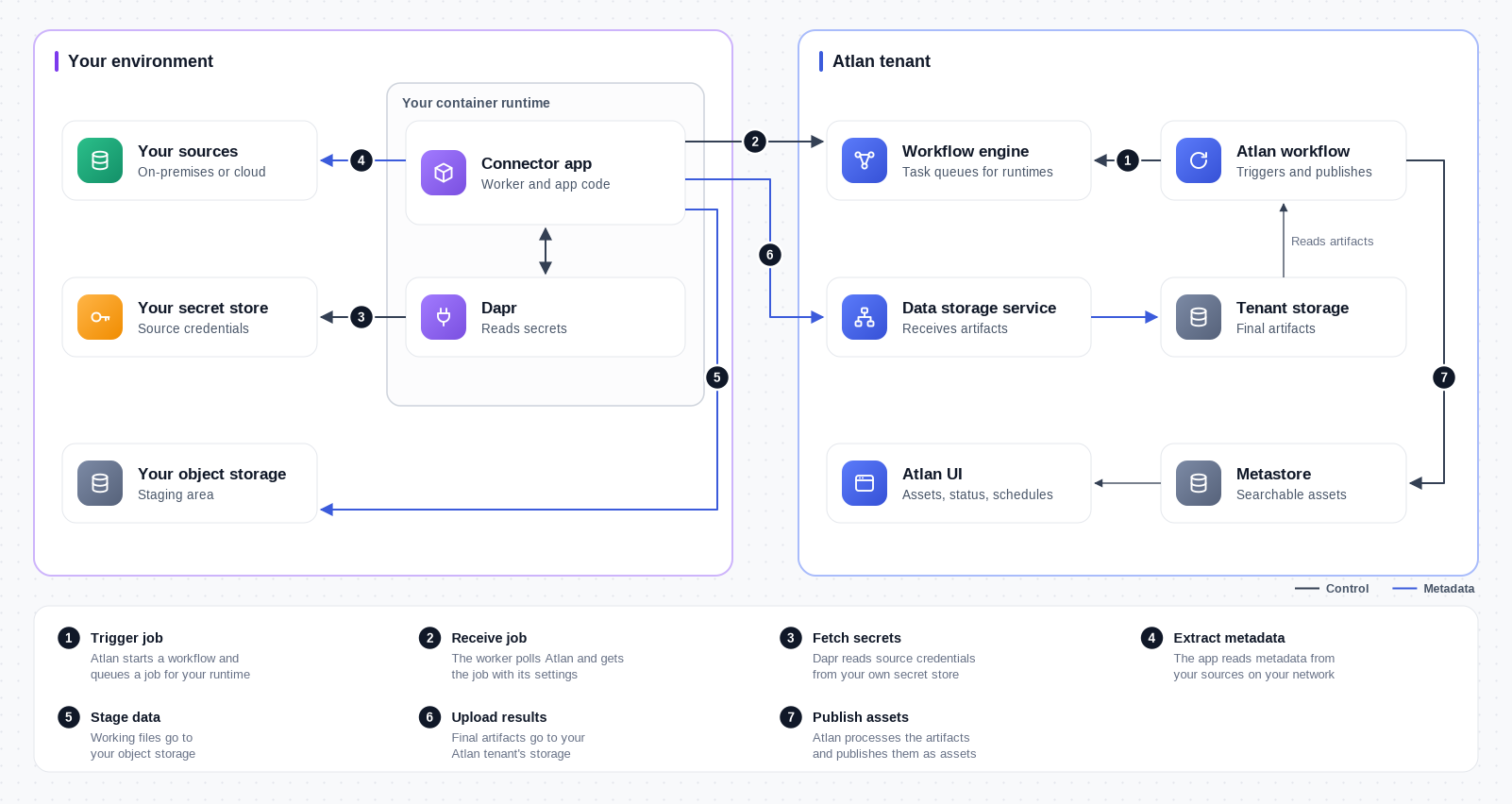
- Register once: When you install SDR, it registers with your Atlan tenant using its OAuth 2.0 client credentials. See Authentication.
- Configure the workflow: In Atlan, a user sets up a workflow for a source: which SDR runs it, the source connection with a reference to its secret, the include and exclude filters, and the schedule.
- Receive the task: When the workflow runs, the app's Temporal worker, which is already polling Atlan over gRPC, picks up the task along with its configuration.
- Fetch the secret and extract: Dapr reads the source credentials from your secret store, and the app connects to the source over your network and runs its extraction logic. See SDR to your source.
- Stage data in your object storage: The app writes its working files, as JSON or Parquet, to the object storage you configured, such as AWS S3, Azure Blob Storage, Google Cloud Storage, or a local volume.
- Upload final artifacts to Atlan: When extraction finishes, the app uploads the final artifacts to your Atlan tenant's storage over HTTPS, authenticated with its OAuth token.
- Atlan processes and publishes: Atlan workflows process the artifacts and persist them in the Atlan metastore, where they become searchable, governed assets.
Self-Deployed Runtime doesn't require a stateful store in your infrastructure; job state is kept on your Atlan tenant. Staged files are needed only during the run that writes them. To clear them out, see Clean up object storage. For how metadata is encrypted in transit and at rest, see Security › Encryption.
Besides metadata, SDR sends its logs and metrics to Atlan for monitoring and support, and also writes them to your object store and container logs. To monitor it, see Monitoring SDR.
Authentication
SDR authenticates in two directions with separate credentials: OAuth client credentials to Atlan, and source credentials from your secret store.
- SDR to Atlan
- SDR to your source
Self-Deployed Runtime applications use OAuth 2.0 client credentials flow for communicating with the Atlan SaaS deployment.
Which Client ID and Client Secret an app uses depends on its lifecycle mode; see Lifecycle mode differences.
The Client ID and Secret are used to generate short-lived tokens for Self-Deployed Runtime to Atlan SaaS interactions.
Token refresh
The authentication process follows a continuous token refresh cycle:
- Application uses Client ID and Client Secret to request a JWT token from Atlan tenant's authentication service
- The JWT token is valid for 15 minutes and is used for all Atlan service communications
- Before token expiration, application requests a new token automatically and uses it for further interactions.
Without a valid token, application can't communicate with the Atlan SaaS deployment.
What tokens enable
The authentication system provides these capabilities:
- Application registration with Atlan SaaS tenant
- Connecting to Atlan's hosted Temporal orchestrator service
- Transferring application outcome (for example metadata) to Atlan
For credential scope, rotation, and storage, see Security › Credentials.
Source credentials are stored in your own secret store, such as AWS Secrets Manager, Azure Key Vault, GCP Secret Manager, HashiCorp Vault, or environment variables. The workflow configuration in Atlan holds only a reference to the secret, its path and key names, never the value.
When a run needs to connect to the source, the app reads the secret from your secret store through Dapr, uses it to authenticate, and keeps it in memory only for that operation. Source credentials never leave your network.
To set up the secret and reference it from a workflow, see Configure secrets for workflow execution. For how secrets are handled, see Security › Credentials.
Lifecycle mode differences
The building blocks of each app are the same in both modes. What changes is who controls SDR. In orchestrator mode, the SDR Orchestrator is a control plane inside your environment: it takes commands from Atlan and acts on your container platform for you. In single-app mode, nothing in your environment acts on its own; every change happens because your team runs it.
- Orchestrator mode
- Single-app mode
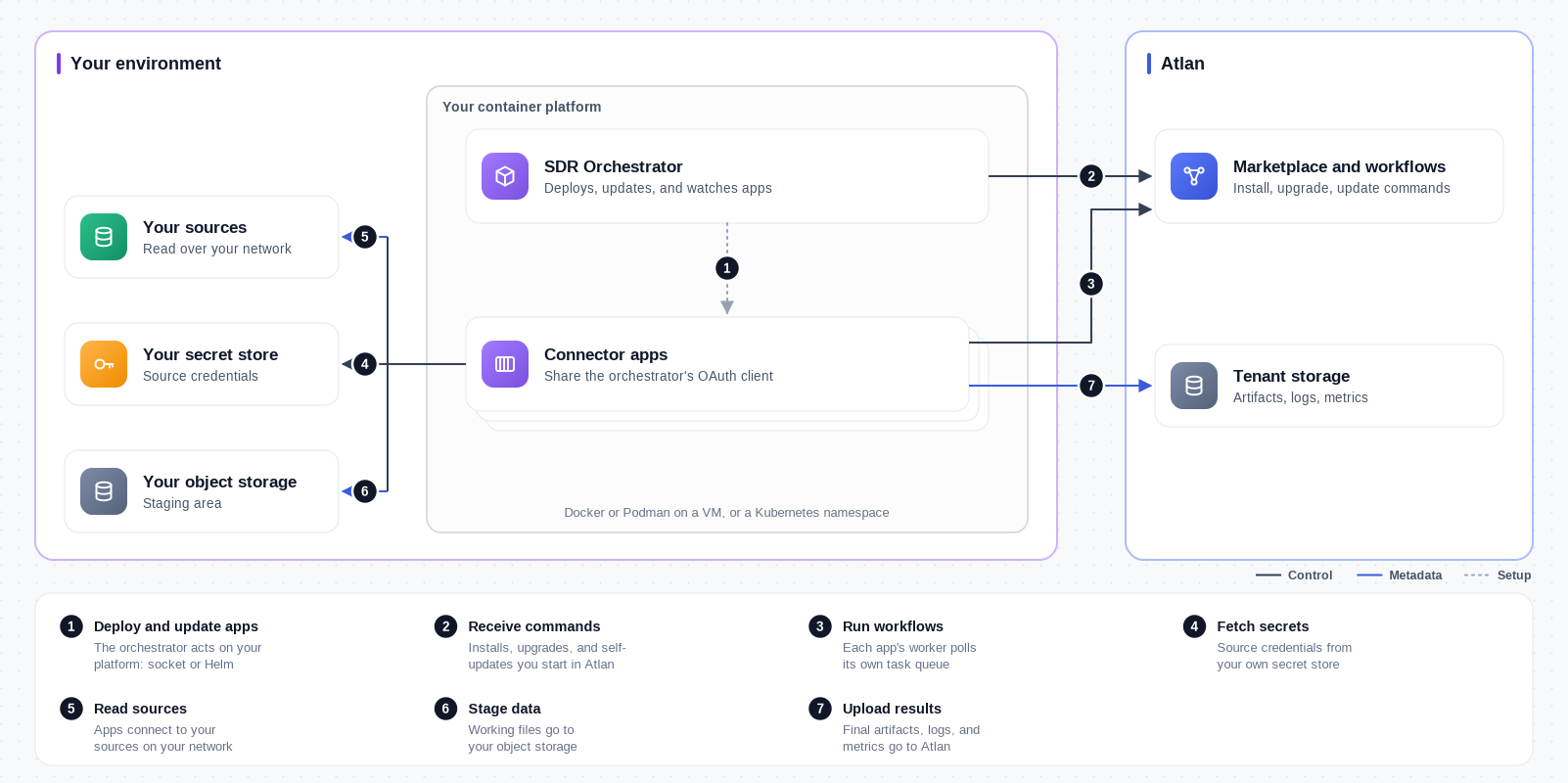
You deploy one component, the SDR Orchestrator, and it manages every connector app in SDR.
- Control plane in your environment: the orchestrator holds its own connection to Atlan and waits for commands. When you install or upgrade an app in Atlan, the command reaches the orchestrator, which deploys the app on your platform. For the sequence, see Workflow lifecycle.
- Acts on your platform: the orchestrator needs permission to create and update containers: the container socket on Docker or Podman, or a Role scoped to its namespace on Kubernetes. For how those permissions are scoped, see Design principles.
- One OAuth client: the orchestrator shares its own Client ID and Client Secret with every app it deploys.
- One configuration: you describe your infrastructure once. The orchestrator generates each app's configuration, including its Dapr component files.
- Automatic updates: the orchestrator updates itself when Atlan detects a newer version, and upgrades apps when you start an upgrade in Atlan.
- Watches the apps: the orchestrator checks that each app it deployed is running and still polling for work, and reports its status to Atlan.
You deploy each connector app yourself, and nothing else runs in your environment.
- No control plane: Atlan can't install, upgrade, or remove anything in your environment. Each change happens when your team runs it.
- No platform permissions: apps need no access to the container socket or the Kubernetes API.
- One OAuth client per app: each app gets its own OAuth client, created when you download the app's config from Atlan.
- One configuration per app: you fill in and keep each app's configuration.
- Manual updates: you update each app when a new version is available; see Update SDR.
For which mode to choose, see Decide deployment options. For how the orchestrator works on each platform, see SDR Orchestrator reference.
See also
- Decide deployment options: Lifecycle modes, platforms, and image sources.
- Orchestrator reference: Permissions, Helm resources, environment variables, and workflow lifecycle for the SDR Orchestrator.
- Security: Security architecture, authentication, encryption, and compliance controls for Self-Deployed Runtime.
- Feature support: Compare Self-Deployed Runtime and Atlan-hosted execution modes.