Direct connectivity
Understand how Atlan connects directly to your data sources over the internet to extract metadata
Direct connectivity establishes a network connection directly from Atlan Cloud to your data source over the internet. When you create a crawler workflow, you provide connection details (hostname, port, credentials). Atlan Cloud executes read-only queries to discover your data structure and catalogs the results.
Your data source accepts inbound network connections from Atlan's IP addresses, controlled through your firewall rules or network security groups. This connectivity model works when your data source can accept connections from the internet and your security policies permit inbound connections from cloud services.
How it works
Atlan Cloud connects directly to your data source using the source's native protocol. The connection originates from Atlan Cloud and travels over the internet to reach your data source. For example, when establishing a connection with an AlloyDB instance, Atlan Cloud connects directly to your AlloyDB host over the internet. You configure firewall rules to enable inbound connections from Atlan's IP addresses, and Atlan uses the connection details you provide to extract metadata.
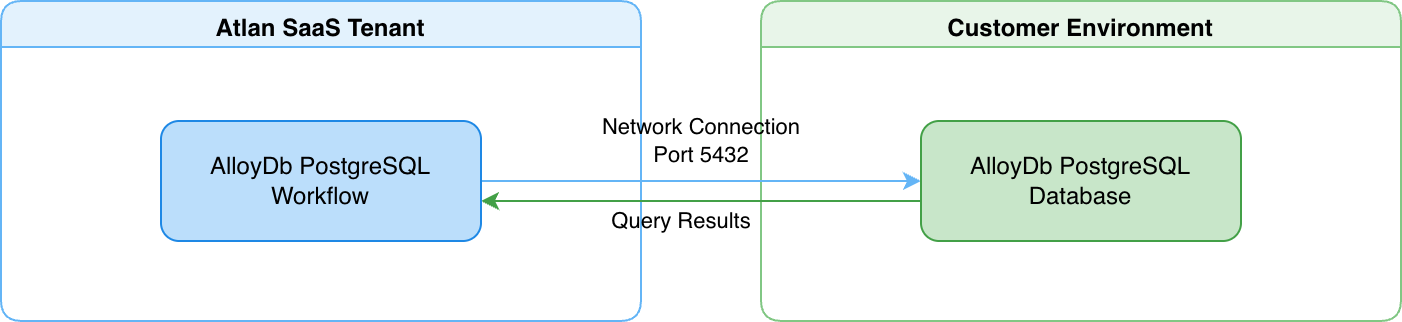
When you configure a crawler workflow, Atlan Cloud uses the connection details you provide to establish the connection and execute read-only queries. The queries discover your data structure: schemas, tables, columns, and their relationships. Atlan catalogs this structural metadata while your business data remains in your source systems.
Security and data protection
Direct connectivity protects your data through multiple security layers:
-
Metadata extraction, not data replication: Atlan extracts only structural metadata: schemas, tables, columns, and their relationships. The actual business data in your tables remains in your source systems. For example, if you have a
CUSTOMERStable with customer records, Atlan discovers the table structure and column definitions. It never queries or stores the customer records themselves. -
Read-only operations: All queries are read-only operations. The connector can't modify data, create or drop objects, or change any configuration. The permissions you grant control exactly what the connector can access.
-
Credential encryption: Connection credentials are encrypted at rest and in transit. Atlan encrypts credentials before storage and uses encrypted connections when communicating with your data sources.
-
Network access control: You control network access through firewall rules or network security groups that enable connections only from Atlan's IP addresses. This restricts access to your data source to only Atlan's infrastructure.
See also
- SDR connectivity: Alternative connectivity model for data sources behind your firewall
- Manage connectivity: Configure and manage connector workflows