Connectivity models
Understand Atlan's three connectivity models—Direct, Private Link, and SDR—and how each one determines where traffic flows, who manages infrastructure, and what your network security requires.
Every Atlan connector needs a path to your data source. A connectivity model defines that path—the network route traffic takes, where the infrastructure lives, and who manages it. The model you use determines not just how Atlan reaches your data, but who controls access and what your security team needs to approve.
Three models exist because data sources live in very different places: a public cloud database, a cloud-hosted warehouse behind a private network, and an air-gapped on-premises system each require a different approach. Regardless of which model you use, Atlan extracts only structural metadata using read-only operations. Your business data stays in your source systems.
- Direct
- Private link
- Self-Deployed Runtime (SDR)
In the Direct model, Atlan Cloud connects to your data source over the public internet using the source's native protocol—JDBC for databases, REST for APIs. You allowlist Atlan's IP addresses, provide credentials, and Atlan handles everything else. This is the default for cloud-hosted sources with public endpoints.
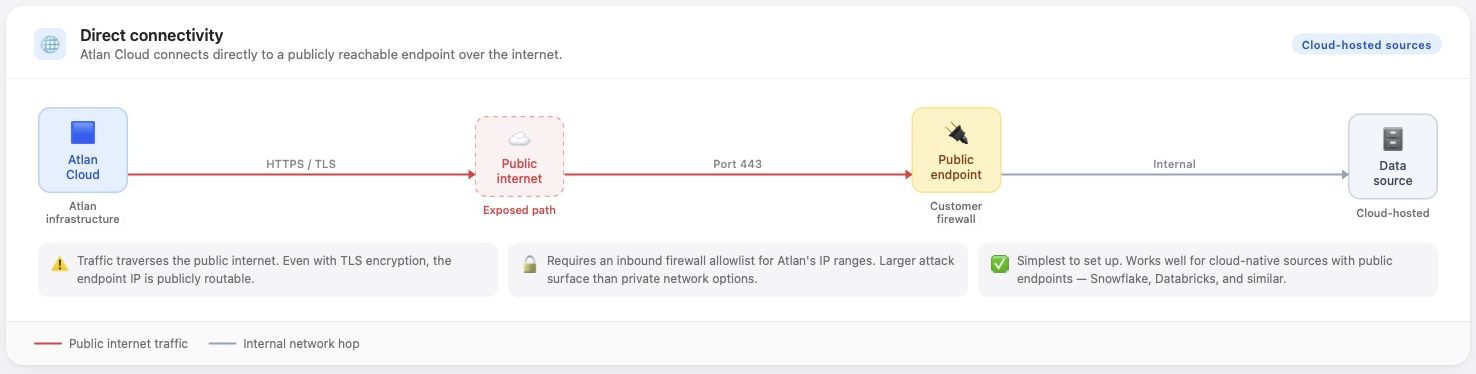
Atlan manages all infrastructure. Credentials are encrypted and stored in HashiCorp Vault. The permissions you grant control exactly what the connector can access—it can't modify data, create or drop objects, or change any configuration. For organizations with strict data residency or compliance requirements, Private Link is the better fit.
For full details, see Direct connectivity.
In the Private Link model, Atlan connects to your data source through your cloud provider's private network—keeping traffic off the public internet. Setup and day-to-day operation are the same as Direct: you provide credentials, Atlan runs the crawlers. Only the traffic path is different.
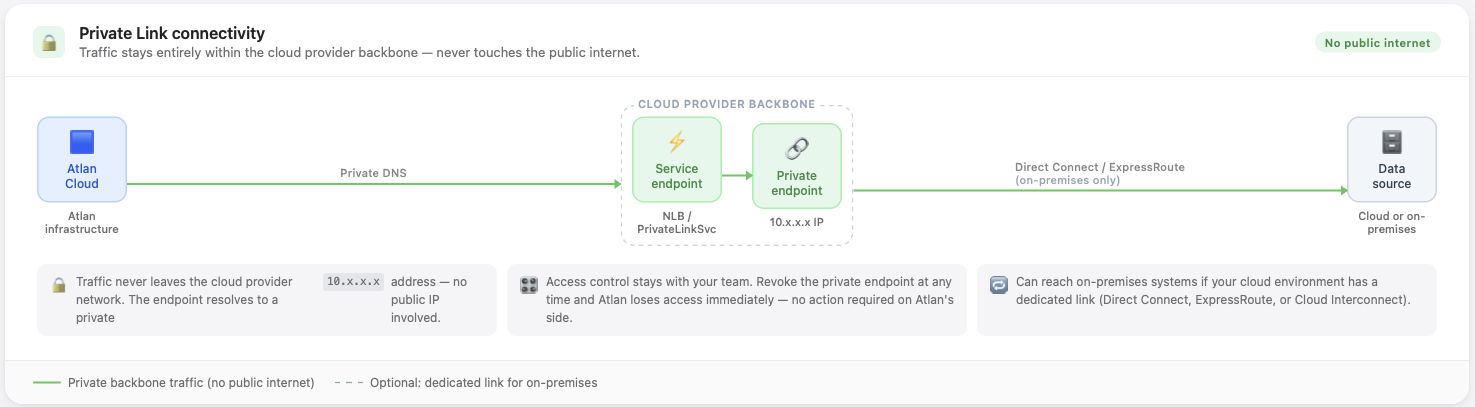
Atlan supports Private Link on AWS (AWS PrivateLink), Azure (Azure Private Link / Private Endpoint), and GCP (Private Service Connect).
Supported sources
Private Link is available for a subset of connectors, including Snowflake, Databricks, Redshift, PostgreSQL, MySQL, SQL Server, Athena, and Tableau. For the full list organized by cloud provider, see Additional connectivity to data sources.
Reaching on-premises systems
If your data source is on-premises but your cloud environment has connectivity to it via AWS Direct Connect, Azure ExpressRoute, or GCP Cloud Interconnect, you can use Private Link as a secure path to reach those systems—without deploying or maintaining the SDR runtime.
Traffic flows from Atlan Cloud through the Private Link endpoint into your cloud VPC, and from there through your existing dedicated connection to your on-premises environment. Nothing crosses the public internet.
This is worth considering when:
- You already have a VPN or dedicated cloud link to your data center
- Your security team requires traffic to stay off the public internet but you want to avoid the operational overhead of running SDR
- You need to reach on-premises systems and Private Link is already in use for your cloud-hosted sources
Contact your Atlan representative or cloud infrastructure team to configure this topology before defaulting to SDR.
In the SDR model, you deploy a runtime agent—also called the SDR agent—inside your own infrastructure. SDR is the only model that can reach data sources with no internet access—systems behind a corporate firewall, in an air-gapped network, or in an on-premises environment with no cloud connectivity.
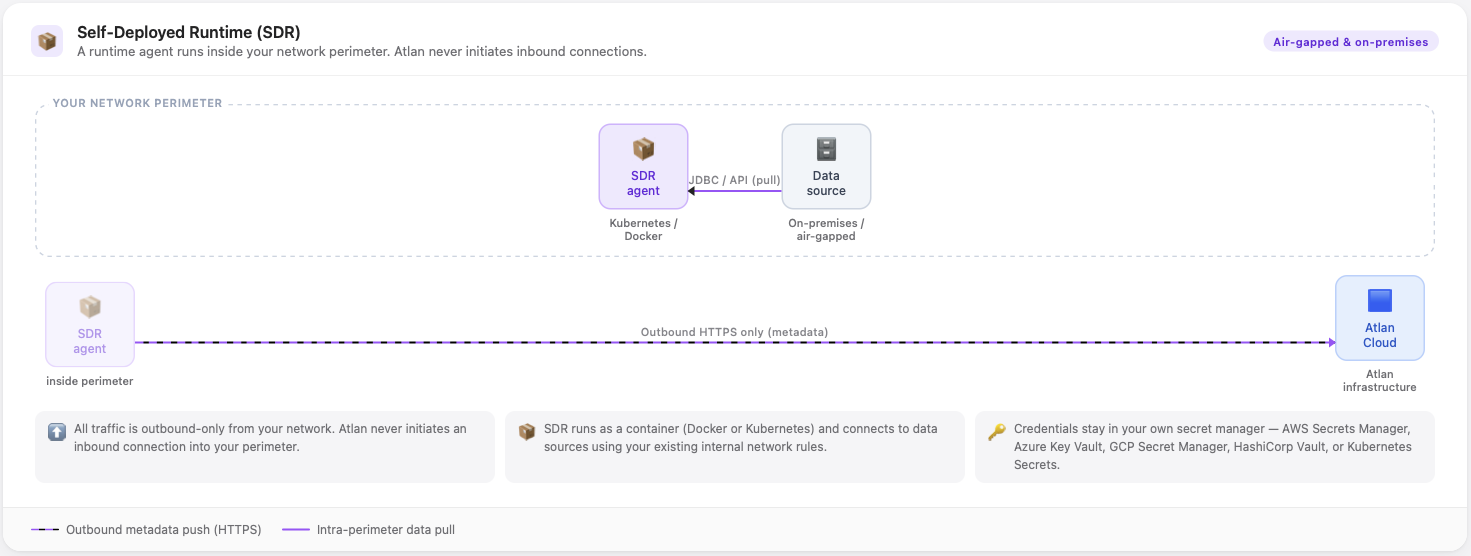
The agent initiates an outbound HTTPS connection to Atlan Cloud, so your network never receives inbound connections from the internet. When a crawler workflow runs, Atlan sends extraction instructions to the agent over that outbound connection; the agent connects to your data source over your internal network, extracts metadata, and returns results to Atlan Cloud.
Credentials are stored in your own secret manager—AWS Secrets Manager, Azure Key Vault, GCP Secret Manager, HashiCorp Vault, or Kubernetes Secrets. They never leave your infrastructure, and Atlan Cloud never receives or stores them.
SDR trade-offs
SDR gives you control that Direct and Private Link don't, but that control comes with responsibility.
Operational (your infrastructure team owns these):
- You deploy and maintain the runtime. Infrastructure costs are yours.
- Setup requires coordination across network, security, and platform teams.
- You own observability for the runtime—monitoring, logging, alerting.
Product (relevant to data engineers and catalog admins):
- Some Atlan features aren't available or work differently in SDR: Test Authentication, Preflight checks, Insights module, sample data preview, and tag reverse sync aren't supported or require manual steps.
- For the full feature comparison, see Feature differences with SDR.
Licensing: SDR requires an additional license. Contact your Atlan representative.
For full details, see SDR connectivity.
Compare connectivity models
| Direct | Private Link | SDR | |
|---|---|---|---|
| Traffic path | Public internet | Cloud provider network | Internal network only |
| Who initiates the connection | Atlan Cloud | Atlan Cloud | Runtime agent (outbound from your network) |
| Infrastructure managed by | Atlan | Atlan | You |
| Setup complexity | Low—provide credentials and allowlist IPs | Low to medium—one-time network config in your cloud account | High—deploy runtime, coordinate teams |
| Credential storage | Atlan (HashiCorp Vault) | Atlan (HashiCorp Vault) | Your own secret manager |
| Reaches air-gapped systems | No | No | Yes |
| Reaches on-premises systems | No | Yes, via cloud connectivity pass-through | Yes |
| Data residency / compliance | Traffic crosses public internet | Traffic stays on cloud provider network | Business data stays on your network; extracted metadata is transferred to Atlan over the public internet |
| All features available | Yes | Yes | No, see SDR trade-offs |
| Additional licensing required | No | Yes | Yes |
Which model fits your situation
1. Can Atlan reach your data source over the public internet?
A source is publicly reachable if it has a public endpoint—no VPN or firewall exception needed to connect.
- Yes → go to step 2
- No → go to step 3
2. Does your organization require that traffic never cross the public internet?
- Yes → use Private Link. Traffic stays on the cloud provider'r private network and never touches the public internet. Requires one-time network configuration and an additional license.
- No → use Direct. Atlan connects over HTTPS; you allowlist Atlan's IP ranges and provide credentials. No additional licensing required.
3. Does your cloud environment have a dedicated link to that data source?
For example: AWS Direct Connect, Azure ExpressRoute, GCP Cloud Interconnect, or a site-to-site VPN to your data center.
- Yes → use Private Link with on-premises pass-through. Traffic routes from Atlan through your Private Link endpoint and over the dedicated link to your data center—nothing crosses the public internet. See Reaching on-premises systems. Requires an additional license.
- No → use SDR. Your source is air-gapped with no cloud connectivity. Deploy the SDR runtime agent inside your network; it connects to your data source over your internal network and pushes metadata to Atlan over an outbound HTTPS connection. Requires an additional license.
Private Link and SDR both require additional licensing. Confirm availability with your Atlan representative before proceeding.
If your source isn't on the Private Link supported list but you can't permit public internet traffic, contact your Atlan representative to discuss SDR or roadmap options.
See also
- Direct connectivity: How Direct connectivity works in detail
- SDR connectivity: How Self-Deployed Runtime works in detail
- Additional connectivity to data sources: Full list of Private Link supported connectors by cloud provider
- Install Self-Deployed Runtime: Deploy the runtime agent on your infrastructure
- Feature differences with SDR: Full table of features available in Atlan-hosted vs SDR execution