Install self-deployed runtime
Answer a few questions and get an install guide tailored to your lifecycle mode, platform, and image procurement.
SDR requires additional enablement and licensing. Contact your Atlan representative for details.
Install Self-Deployed Runtime (SDR) on your preferred platform to connect Atlan to data sources within your infrastructure. The guided install asks how you want to manage app lifecycle, which platform you run on, and how you procure images, then assembles the install steps for your setup. With SDR Orchestrator, you do a one-time orchestrator setup and then install and manage apps from the Atlan UI.
Choose your setup
Answer the questions that follow. Only the choices relevant to your path appear, and a tailored install guide assembles once you've made your selections. Each guide starts with the prerequisites for that setup. Your selections are stored in the URL, so you can bookmark or share the exact guide.
How do you want to manage app lifecycle?
This decides who owns installs, upgrades, and uninstall for the apps you require. Learn more about this choice ↗
Your install guide: SDR Orchestrator (auto-managed) · Docker / Podman · Atlan Docker Hub · Direct outbound
System requirements
- SDR Orchestrator: 0.5 vCPU, 256 MB RAM, ~500 MB disk.
- Each connector app: 0.5–1 vCPU, 512 MB–1 GB RAM, ~1–2 GB disk. You run one app per connector you install; see Apps, sources, and workflows.
- Size the VM for the orchestrator plus one app per connector. For example, the orchestrator and 3 apps need about 2 vCPUs, 4 GB RAM, and 20 GB disk.
Prerequisites
- Crawl assets using Self-Deployed Runtime turned on under Settings > Labs > Connectors in Atlan. Workflows that use Self-Deployed Runtime fail until this option is turned on.
- Linux host (x86_64 or arm64) — Windows/macOS not supported.
- Docker Engine 20.10+ with Compose, or Podman 4.0+ with podman-compose.
- Docker Hub access: your organization's Docker ID, invited from Settings > Integrations in Atlan, and a read-only access token you create for it in Docker Hub. Every
docker loginbelow uses this Docker ID, notatlanhq. - An object storage bucket and a secret store that SDR can reach, ready before you install: the configuration asks for their details. See supported options.
- Outbound access from SDR to Atlan and Docker Hub (or your registry), as listed in Allow outbound connections.
- Host clock synchronized with UTC (NTP enabled). Object-store uploads fail when the clock drifts more than 15 minutes from UTC, and the app reports the failure as an invalid-credentials error (
AAF-STR-006). See Troubleshoot SDR.
Sign in to Docker Hub with your own Docker ID, not as atlanhq. If an existing deployment still uses the token you received from your Atlan representative, link your Docker ID and switch it over before that token is retired.
Download SDR package
- Docker
- Podman
curl -fSL -o sdr-orchestrator-docker.tar.gz \
https://atlan-public.s3.eu-west-1.amazonaws.com/sdr-orchestrator-app/sdr-orchestrator-docker.tar.gz
tar -xzf sdr-orchestrator-docker.tar.gz
cd sdr-orchestrator-docker
curl -fSL -o sdr-orchestrator-podman.tar.gz \
https://atlan-public.s3.eu-west-1.amazonaws.com/sdr-orchestrator-app/sdr-orchestrator-podman.tar.gz
tar -xzf sdr-orchestrator-podman.tar.gz
cd sdr-orchestrator-podman
Prepare host environment
- Docker
- Podman
Log in to Docker Hub. Then, from the package folder, keep the configuration files private:
docker login -u YOUR_DOCKER_ID # enter your Docker Hub access token
Keep containers running after you log out, turn on the Podman socket, and log in to Docker Hub. Then, from the package folder, let the orchestrator write its folders and read its configuration:
sudo loginctl enable-linger $(whoami)
systemctl --user enable --now podman.socket
podman login -u YOUR_DOCKER_ID docker.io # enter your Docker Hub access token
chmod g+w deployments && chmod 640 .env config.yaml
SELinux enforcing (RHEL, Fedora)
If getenforce returns Enforcing, the package already turns off SELinux label separation for the orchestrator. Turn it off for the app containers it deploys too, by adding this to config.yaml. Otherwise app containers fail with No Dapr component named 'objectstore' found in /app/components.
container_host_config:
security_opt:
- "label=disable"
Generate OAuth credentials
SDR uses per-deployment OAuth credentials to authenticate with Atlan. Generate an API token in the Atlan UI, then register this deployment:
curl --location 'https://<tenant>.atlan.com/api/service/oauth-clients' \
--header 'Content-Type: application/json' \
--header 'Authorization: Bearer YOUR_API_TOKEN' \
--data '{
"displayName": "sdr-orchestrator",
"description": "OAuth client for SDR Orchestrator",
"scopes": ["events-app-permissions-scope","temporal-app-permissions-scope"]
}'
Save the clientId and clientSecret from the response — you'll use them in the configuration below.
Configure .env
- Docker
- Podman
Set credentials, a unique SDR_DEPLOYMENT_NAME, your Docker group ID (getent group docker | cut -d: -f3), and the absolute deployments path.
ATLAN_AUTH_CLIENT_ID=oauth-client-xxxxxxxx
ATLAN_AUTH_CLIENT_SECRET=xxxxxxxx
SDR_DEPLOYMENT_NAME=my-env
DOCKER_GID=988
SDR_DEPLOYMENTS_HOST_DIR=/home/ubuntu/sdr-orchestrator-docker/deployments
LOG_LEVEL=INFO
Set credentials, a unique SDR_DEPLOYMENT_NAME, and SDR_DEPLOYMENTS_HOST_DIR, the absolute host path of the deployments folder. It's required on Podman, because Podman resolves app volume paths on the host. To print it, run echo "$PWD/deployments" from the package folder. On RHEL, if the web console (Cockpit) holds port 9090, also set SDR_HOST_PORT_SET=b.
ATLAN_AUTH_CLIENT_ID=oauth-client-xxxxxxxx
ATLAN_AUTH_CLIENT_SECRET=xxxxxxxx
SDR_DEPLOYMENT_NAME=my-env
CONTAINER_RUNTIME_SOCKET=unix:///var/run/docker.sock
SDR_DEPLOYMENTS_HOST_DIR=/home/ubuntu/sdr-orchestrator-podman/deployments
LOG_LEVEL=INFO
Prepare config.yaml
Atlan identity
atlan:
deployment_name: "mycompany-ec2" # must match SDR_DEPLOYMENT_NAME
domain: "mycompany.atlan.com"
Object storage (in config.yaml)
Self-Deployed Runtime needs a store for reading and writing files. Configure the object store that matches your environment.
Dapr supports additional stores beyond those shown here. If yours isn't listed and none of these options fit, as a last resort submit a request.
- AWS S3
- Google Cloud Storage
- Azure Blob Storage
- Local file path
components:
objectstore:
type: bindings.aws.s3
version: v1
metadata:
- name: accessKey # optional, empty for IAM auth
value: ""
- name: secretKey # optional, empty for IAM auth
value: ""
- name: bucket
value: "<bucket-name>"
- name: region
value: "<bucket-region>"
- name: forcePathStyle
value: "true"
When accessKey and secretKey are empty, the SDR uses the EC2 instance role to access S3. Attach this minimum policy to the role:
{
"Version": "2012-10-17",
"Statement": [
{ "Effect": "Allow", "Action": ["s3:ListBucket"], "Resource": "arn:aws:s3:::<bucket-name>" },
{
"Effect": "Allow",
"Action": ["s3:PutObject", "s3:GetObject", "s3:DeleteObject"],
"Resource": "arn:aws:s3:::<bucket-name>/*"
}
]
}
Connection checks pass without these permissions. Extraction activities fail with AccessDenied only when the SDR writes to the bucket during a crawl. If the bucket uses SSE-KMS, also grant kms:GenerateDataKey and kms:Decrypt.
components:
objectstore:
type: bindings.gcp.bucket
version: v1
metadata:
- name: bucket
value: "<your-gcs-bucket-name>"
- name: type
value: "service_account"
- name: project_id
value: "<your-gcp-project-id>"
components:
objectstore:
type: bindings.azure.blobstorage
version: v1
metadata:
- name: accountName
value: "<your-storage-account-name>"
- name: accountKey
value: "<your-storage-account-key>"
- name: containerName
value: "<your-container-name>"
components:
objectstore:
type: bindings.localstorage
version: v1
metadata:
- name: rootPath
value: "/mnt/objectstore"
Local file path. Mount a folder at rootPath in the sdr service of docker-compose.yaml. On Podman, the package has this line commented out: create the folder with mkdir objectstore && chmod g+w objectstore and uncomment it.
services:
sdr:
volumes:
- ./objectstore:/mnt/objectstore
Also turn off the observability sink for app containers:
container_env:
ATLAN_ENABLE_OBSERVABILITY_DAPR_SINK: "false"
Secret store (in config.yaml)
Self-Deployed Runtime fetches source-system credentials from a secret store. Configure the one that aligns with your security infrastructure.
- AWS Secrets Manager
- Azure Key Vault
- GCP Secret Manager
- HashiCorp Vault
- Environment variables
components:
secretstore:
type: secretstores.aws.secretmanager
version: v1
metadata:
- name: region # required
value: "<secret-region>"
- name: accessKey # optional, empty for IAM auth
value: ""
- name: secretKey # optional, empty for IAM auth
value: ""
Leave accessKey/secretKey empty for IAM role / IRSA authentication. For an IAM user, set them to the user's keys and grant:
{
"Version": "2012-10-17",
"Statement": [
{
"Effect": "Allow",
"Action": ["secretsmanager:GetSecretValue", "secretsmanager:DescribeSecret"],
"Resource": "arn:aws:secretsmanager:<region>:<account-id>:secret:<secret-name>*"
}
]
}
Include the trailing * in the secret ARN — AWS appends a random suffix to secret names, so omitting it can cause access failures.
components:
secretstore:
type: secretstores.azure.keyvault
version: v1
metadata:
- name: vaultName
value: "<your-keyvault-name>"
- name: azureTenantId
value: "<your-tenant-id>"
- name: azureClientId
value: "<your-client-id>"
- name: azureClientSecret
value: "<your-client-secret>"
Azure Key Vault supports multiple auth methods: client secret (shown), certificate (azureCertificateFile), or managed identity (omit the auth fields).
components:
secretstore:
type: secretstores.gcp.secretmanager
version: v1
metadata:
- name: type
value: "service_account"
- name: project_id
value: "<project-id>"
- name: private_key_id
value: "<private-key-id>"
- name: private_key
value: "<private-key>"
- name: client_email
value: "<client-email>"
- name: client_id
value: "<client-id>"
components:
secretstore:
type: secretstores.hashicorp.vault
version: v1
metadata:
- name: vaultAddr # Optional
value: "https://127.0.0.1:8200"
- name: caCert # Optional. This or caPath/caPem
value: "[ca_cert]"
- name: skipVerify # Optional
value: "false"
- name: vaultTokenMountPath # or vaultToken
value: "[path_to_token_file]"
- name: vaultToken # or vaultTokenMountPath
value: "[vault_token]"
- name: vaultKVPrefix # Optional
value: "dapr"
- name: enginePath # Optional
value: "secret"
- name: vaultValueType # Optional
value: "map"
components:
secretstore:
type: secretstores.local.env
version: v1
With secretstores.local.env, each source credential is an environment variable in the app container. Set the variables under container_env in config.yaml. The SDR Orchestrator injects every entry into every app container it deploys. Apart from the proxy variables, variables in the orchestrator's own .env don't reach app containers.
components:
secretstore:
type: secretstores.local.env
version: v1
container_env:
MSSQL_DB_USERNAME: "<username>"
MSSQL_DB_PASSWORD: "<password>"
After you change container_env, restart the SDR Orchestrator (docker compose restart or podman compose restart). Environment variables are fixed when a container is created, so on startup the orchestrator recreates each app container whose environment changed.
Values are stored in plain text in config.yaml and are visible to anyone who can inspect the container (docker inspect or podman inspect). Restrict read access to config.yaml, and limit who can run Docker or Podman on the host. For managed secret storage, use one of the other secret store options.
To reference the variables from a workflow, see Use environment variables.
Container registry — Docker Hub
The default config.yaml has no container_registry section. Add one at the end of the file with the credentials the SDR uses to pull private atlanhq/* images:
container_registry:
username: "<your-docker-id>"
password: "<your-docker-hub-access-token>"
Sample config.yaml files
Copy-paste-ready files for common infrastructure combinations:
- AWS
- GCP
- Azure
- On-premises
atlan:
deployment_name: "mycompany-ec2"
domain: "mycompany.atlan.com"
components:
objectstore:
type: bindings.aws.s3
version: v1
metadata:
- name: bucket
value: "<your-bucket-name>"
- name: region
value: "us-east-1"
- name: forcePathStyle
value: "true"
secretstore:
type: secretstores.aws.secretmanager
version: v1
metadata:
- name: region
value: "us-east-1"
container_registry:
username: "<your-docker-id>"
password: "<your-docker-hub-access-token>"
atlan:
deployment_name: "mycompany-gce"
domain: "mycompany.atlan.com"
components:
objectstore:
type: bindings.gcp.bucket
version: v1
metadata:
- name: bucket
value: "<your-gcs-bucket-name>"
- name: type
value: "service_account"
- name: project_id
value: "<your-gcp-project-id>"
secretstore:
type: secretstores.gcp.secretmanager
version: v1
metadata:
- name: type
value: "service_account"
- name: project_id
value: "<your-gcp-project-id>"
- name: private_key_id
value: "<private-key-id>"
- name: private_key
value: "<private-key>"
- name: client_email
value: "<client-email>"
container_registry:
username: "<your-docker-id>"
password: "<your-docker-hub-access-token>"
atlan:
deployment_name: "mycompany-azure"
domain: "mycompany.atlan.com"
components:
objectstore:
type: bindings.azure.blobstorage
version: v1
metadata:
- name: accountName
value: "<your-storage-account-name>"
- name: accountKey
value: "<your-storage-account-key>"
- name: containerName
value: "<your-container-name>"
secretstore:
type: secretstores.azure.keyvault
version: v1
metadata:
- name: vaultName
value: "<your-keyvault-name>"
- name: azureTenantId
value: "<your-tenant-id>"
- name: azureClientId
value: "<your-client-id>"
- name: azureClientSecret
value: "<your-client-secret>"
container_registry:
username: "<your-docker-id>"
password: "<your-docker-hub-access-token>"
atlan:
deployment_name: "mycompany-onprem"
domain: "mycompany.atlan.com"
components:
objectstore:
type: bindings.localstorage
version: v1
metadata:
- name: rootPath
value: "/mnt/objectstore"
secretstore:
type: secretstores.local.env
version: v1
container_env:
ATLAN_ENABLE_OBSERVABILITY_DAPR_SINK: "false"
container_registry:
username: "<your-docker-id>"
password: "<your-docker-hub-access-token>"
Start SDR Orchestrator
- Docker
- Podman
docker compose up -d
podman compose up -d
Verify installation
- Docker
- Podman
docker ps | grep atlan-sdr
docker logs atlan-sdr-<deployment-name>
podman ps | grep atlan-sdr
podman logs atlan-sdr-<deployment-name>
If the orchestrator keeps restarting, see SDR Orchestrator restarts repeatedly.
In Atlan, go to Connector > Deployments — your SDR Orchestrator appears as Healthy.
Install connector apps on SDR
With the orchestrator running, you install every connector app from the Atlan UI. The orchestrator pulls the app's image and starts it on this SDR with its own OAuth credentials. No terminal commands are needed, and the steps are the same for every connector.
- In Connector > Deployments, confirm the SDR Orchestrator shows Healthy.
- Go to Connector > Marketplace and find the connector you need.
- Start the install:
- App not installed yet: click Install.
- App already installed on your Cloud Tenant: open the app in the Marketplace sidebar and click Install on more environments.
- In Choose install environments, select this SDR. The Cloud Tenant always stays selected.
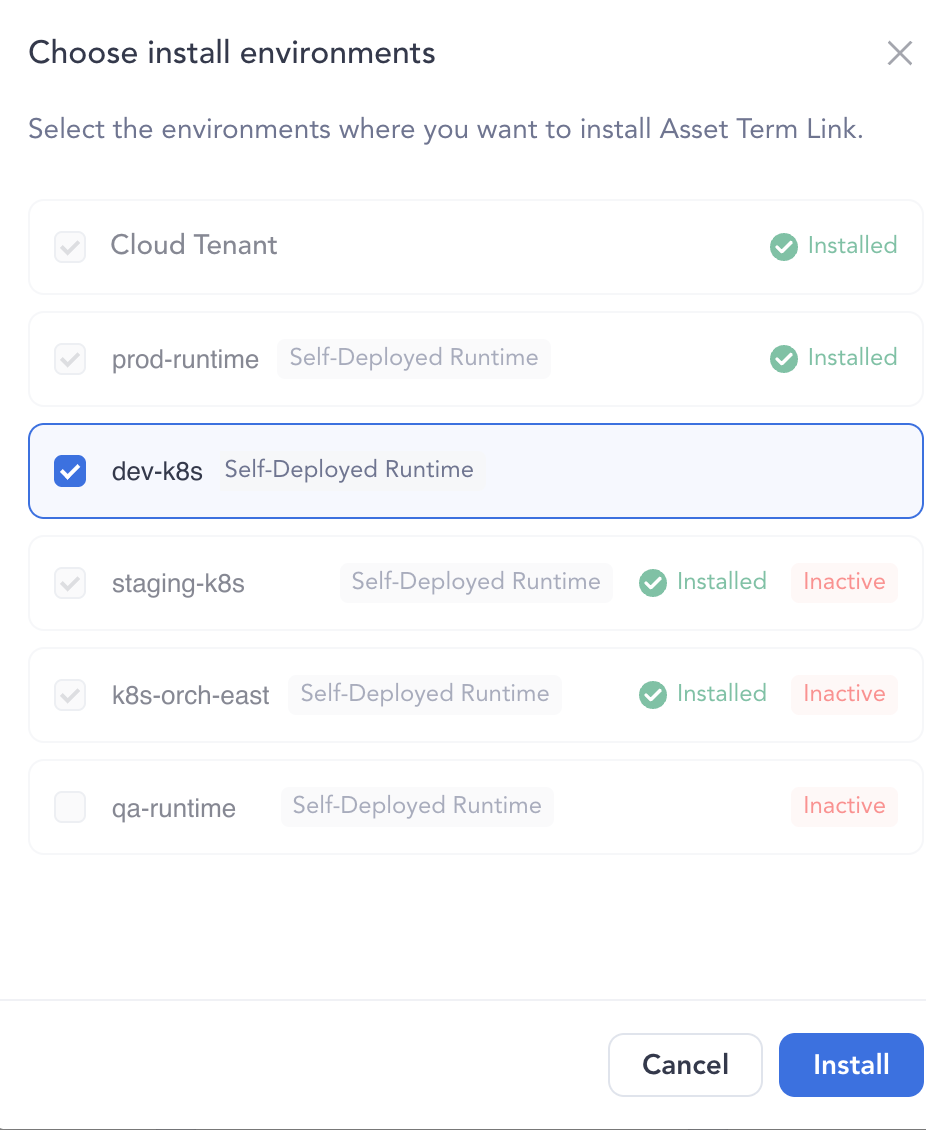
- Click Install.
- In Connector > Deployments, confirm the app appears under its SDR Orchestrator. It shows up once it sends its first heartbeat, and shows Healthy while it's running.
Repeat for each connector you need. Once an app is installed, set up its workflows: see Run workflows on SDR.
Troubleshooting
- ImagePullBackOff or pull failures: check that the Docker Hub card under Settings > Integrations shows CONNECTED, and that you signed in with that Docker ID and a valid access token.
- Connection refused or IP not allowed: check that your network allows the connections listed in Allow outbound connections. If it does and your tenant restricts access by IP, your outbound IP needs allowlisting on the tenant; only then, contact your Atlan representative.
- Auth token refresh failed: recheck the OAuth
clientIdandclientSecret.
For more, see Troubleshoot SDR.
Next steps
- Run workflows on SDR: point connector workflows at this SDR and reference their source credentials.
- Update SDR: the steps for this same setup when a new version ships; your selections carry over.
Your install guide: SDR Orchestrator (auto-managed) · Docker / Podman · Atlan Docker Hub · Through an HTTP proxy
System requirements
- SDR Orchestrator: 0.5 vCPU, 256 MB RAM, ~500 MB disk.
- Each connector app: 0.5–1 vCPU, 512 MB–1 GB RAM, ~1–2 GB disk. You run one app per connector you install; see Apps, sources, and workflows.
- Size the VM for the orchestrator plus one app per connector. For example, the orchestrator and 3 apps need about 2 vCPUs, 4 GB RAM, and 20 GB disk.
Prerequisites
- Crawl assets using Self-Deployed Runtime turned on under Settings > Labs > Connectors in Atlan. Workflows that use Self-Deployed Runtime fail until this option is turned on.
- Linux host (x86_64 or arm64) — Windows/macOS not supported.
- Docker Engine 20.10+ with Compose, or Podman 4.0+ with podman-compose.
- Docker Hub access: your organization's Docker ID, invited from Settings > Integrations in Atlan, and a read-only access token you create for it in Docker Hub. Every
docker loginbelow uses this Docker ID, notatlanhq. - An object storage bucket and a secret store that SDR can reach, ready before you install: the configuration asks for their details. See supported options.
- Outbound access from SDR to Atlan and Docker Hub (or your registry), as listed in Allow outbound connections.
- Host clock synchronized with UTC (NTP enabled). Object-store uploads fail when the clock drifts more than 15 minutes from UTC, and the app reports the failure as an invalid-credentials error (
AAF-STR-006). See Troubleshoot SDR.
Sign in to Docker Hub with your own Docker ID, not as atlanhq. If an existing deployment still uses the token you received from your Atlan representative, link your Docker ID and switch it over before that token is retired.
Download SDR package
- Docker
- Podman
curl -fSL -o sdr-orchestrator-docker.tar.gz \
https://atlan-public.s3.eu-west-1.amazonaws.com/sdr-orchestrator-app/sdr-orchestrator-docker.tar.gz
tar -xzf sdr-orchestrator-docker.tar.gz
cd sdr-orchestrator-docker
curl -fSL -o sdr-orchestrator-podman.tar.gz \
https://atlan-public.s3.eu-west-1.amazonaws.com/sdr-orchestrator-app/sdr-orchestrator-podman.tar.gz
tar -xzf sdr-orchestrator-podman.tar.gz
cd sdr-orchestrator-podman
Prepare host environment
- Docker
- Podman
Log in to Docker Hub. Then, from the package folder, keep the configuration files private:
docker login -u YOUR_DOCKER_ID # enter your Docker Hub access token
Keep containers running after you log out, turn on the Podman socket, and log in to Docker Hub. Then, from the package folder, let the orchestrator write its folders and read its configuration:
sudo loginctl enable-linger $(whoami)
systemctl --user enable --now podman.socket
podman login -u YOUR_DOCKER_ID docker.io # enter your Docker Hub access token
chmod g+w deployments && chmod 640 .env config.yaml
SELinux enforcing (RHEL, Fedora)
If getenforce returns Enforcing, the package already turns off SELinux label separation for the orchestrator. Turn it off for the app containers it deploys too, by adding this to config.yaml. Otherwise app containers fail with No Dapr component named 'objectstore' found in /app/components.
container_host_config:
security_opt:
- "label=disable"
Generate OAuth credentials
SDR uses per-deployment OAuth credentials to authenticate with Atlan. Generate an API token in the Atlan UI, then register this deployment:
curl --location 'https://<tenant>.atlan.com/api/service/oauth-clients' \
--header 'Content-Type: application/json' \
--header 'Authorization: Bearer YOUR_API_TOKEN' \
--data '{
"displayName": "sdr-orchestrator",
"description": "OAuth client for SDR Orchestrator",
"scopes": ["events-app-permissions-scope","temporal-app-permissions-scope"]
}'
Save the clientId and clientSecret from the response — you'll use them in the configuration below.
Configure .env
- Docker
- Podman
Set credentials, a unique SDR_DEPLOYMENT_NAME, your Docker group ID (getent group docker | cut -d: -f3), and the absolute deployments path.
ATLAN_AUTH_CLIENT_ID=oauth-client-xxxxxxxx
ATLAN_AUTH_CLIENT_SECRET=xxxxxxxx
SDR_DEPLOYMENT_NAME=my-env
DOCKER_GID=988
SDR_DEPLOYMENTS_HOST_DIR=/home/ubuntu/sdr-orchestrator-docker/deployments
LOG_LEVEL=INFO
Set credentials, a unique SDR_DEPLOYMENT_NAME, and SDR_DEPLOYMENTS_HOST_DIR, the absolute host path of the deployments folder. It's required on Podman, because Podman resolves app volume paths on the host. To print it, run echo "$PWD/deployments" from the package folder. On RHEL, if the web console (Cockpit) holds port 9090, also set SDR_HOST_PORT_SET=b.
ATLAN_AUTH_CLIENT_ID=oauth-client-xxxxxxxx
ATLAN_AUTH_CLIENT_SECRET=xxxxxxxx
SDR_DEPLOYMENT_NAME=my-env
CONTAINER_RUNTIME_SOCKET=unix:///var/run/docker.sock
SDR_DEPLOYMENTS_HOST_DIR=/home/ubuntu/sdr-orchestrator-podman/deployments
LOG_LEVEL=INFO
HTTP proxy (in .env)
Route the orchestrator and every app it deploys through your forward HTTP/HTTPS proxy. Add the proxy variables to .env. Set both upper- and lower-case names, because different tools read different casings:
HTTP_PROXY=http://proxy.example.com:3128
HTTPS_PROXY=http://proxy.example.com:3128
NO_PROXY=localhost,127.0.0.1,169.254.169.254
http_proxy=http://proxy.example.com:3128
https_proxy=http://proxy.example.com:3128
no_proxy=localhost,127.0.0.1,169.254.169.254
Every app the orchestrator deploys inherits these settings automatically. To override the proxy for one app, set the variables under container_env in config.yaml — values there take precedence.
If your SDR uses a cloud instance role (AWS IAM instance profile, GKE Workload Identity, Azure Managed Identity) for object storage or secrets, always keep the metadata endpoint 169.254.169.254 in NO_PROXY. Routing metadata requests through the proxy breaks credential lookups.
For pass-through versus TLS inspection, the SigV4 and HTTP/2 caveats, and end-to-end verification, see Route egress through proxy.
Prepare config.yaml
Atlan identity
atlan:
deployment_name: "mycompany-ec2" # must match SDR_DEPLOYMENT_NAME
domain: "mycompany.atlan.com"
Object storage (in config.yaml)
Self-Deployed Runtime needs a store for reading and writing files. Configure the object store that matches your environment.
Dapr supports additional stores beyond those shown here. If yours isn't listed and none of these options fit, as a last resort submit a request.
- AWS S3
- Google Cloud Storage
- Azure Blob Storage
- Local file path
components:
objectstore:
type: bindings.aws.s3
version: v1
metadata:
- name: accessKey # optional, empty for IAM auth
value: ""
- name: secretKey # optional, empty for IAM auth
value: ""
- name: bucket
value: "<bucket-name>"
- name: region
value: "<bucket-region>"
- name: forcePathStyle
value: "true"
When accessKey and secretKey are empty, the SDR uses the EC2 instance role to access S3. Attach this minimum policy to the role:
{
"Version": "2012-10-17",
"Statement": [
{ "Effect": "Allow", "Action": ["s3:ListBucket"], "Resource": "arn:aws:s3:::<bucket-name>" },
{
"Effect": "Allow",
"Action": ["s3:PutObject", "s3:GetObject", "s3:DeleteObject"],
"Resource": "arn:aws:s3:::<bucket-name>/*"
}
]
}
Connection checks pass without these permissions. Extraction activities fail with AccessDenied only when the SDR writes to the bucket during a crawl. If the bucket uses SSE-KMS, also grant kms:GenerateDataKey and kms:Decrypt.
components:
objectstore:
type: bindings.gcp.bucket
version: v1
metadata:
- name: bucket
value: "<your-gcs-bucket-name>"
- name: type
value: "service_account"
- name: project_id
value: "<your-gcp-project-id>"
components:
objectstore:
type: bindings.azure.blobstorage
version: v1
metadata:
- name: accountName
value: "<your-storage-account-name>"
- name: accountKey
value: "<your-storage-account-key>"
- name: containerName
value: "<your-container-name>"
components:
objectstore:
type: bindings.localstorage
version: v1
metadata:
- name: rootPath
value: "/mnt/objectstore"
Local file path. Mount a folder at rootPath in the sdr service of docker-compose.yaml. On Podman, the package has this line commented out: create the folder with mkdir objectstore && chmod g+w objectstore and uncomment it.
services:
sdr:
volumes:
- ./objectstore:/mnt/objectstore
Also turn off the observability sink for app containers:
container_env:
ATLAN_ENABLE_OBSERVABILITY_DAPR_SINK: "false"
Secret store (in config.yaml)
Self-Deployed Runtime fetches source-system credentials from a secret store. Configure the one that aligns with your security infrastructure.
- AWS Secrets Manager
- Azure Key Vault
- GCP Secret Manager
- HashiCorp Vault
- Environment variables
components:
secretstore:
type: secretstores.aws.secretmanager
version: v1
metadata:
- name: region # required
value: "<secret-region>"
- name: accessKey # optional, empty for IAM auth
value: ""
- name: secretKey # optional, empty for IAM auth
value: ""
Leave accessKey/secretKey empty for IAM role / IRSA authentication. For an IAM user, set them to the user's keys and grant:
{
"Version": "2012-10-17",
"Statement": [
{
"Effect": "Allow",
"Action": ["secretsmanager:GetSecretValue", "secretsmanager:DescribeSecret"],
"Resource": "arn:aws:secretsmanager:<region>:<account-id>:secret:<secret-name>*"
}
]
}
Include the trailing * in the secret ARN — AWS appends a random suffix to secret names, so omitting it can cause access failures.
components:
secretstore:
type: secretstores.azure.keyvault
version: v1
metadata:
- name: vaultName
value: "<your-keyvault-name>"
- name: azureTenantId
value: "<your-tenant-id>"
- name: azureClientId
value: "<your-client-id>"
- name: azureClientSecret
value: "<your-client-secret>"
Azure Key Vault supports multiple auth methods: client secret (shown), certificate (azureCertificateFile), or managed identity (omit the auth fields).
components:
secretstore:
type: secretstores.gcp.secretmanager
version: v1
metadata:
- name: type
value: "service_account"
- name: project_id
value: "<project-id>"
- name: private_key_id
value: "<private-key-id>"
- name: private_key
value: "<private-key>"
- name: client_email
value: "<client-email>"
- name: client_id
value: "<client-id>"
components:
secretstore:
type: secretstores.hashicorp.vault
version: v1
metadata:
- name: vaultAddr # Optional
value: "https://127.0.0.1:8200"
- name: caCert # Optional. This or caPath/caPem
value: "[ca_cert]"
- name: skipVerify # Optional
value: "false"
- name: vaultTokenMountPath # or vaultToken
value: "[path_to_token_file]"
- name: vaultToken # or vaultTokenMountPath
value: "[vault_token]"
- name: vaultKVPrefix # Optional
value: "dapr"
- name: enginePath # Optional
value: "secret"
- name: vaultValueType # Optional
value: "map"
components:
secretstore:
type: secretstores.local.env
version: v1
With secretstores.local.env, each source credential is an environment variable in the app container. Set the variables under container_env in config.yaml. The SDR Orchestrator injects every entry into every app container it deploys. Apart from the proxy variables, variables in the orchestrator's own .env don't reach app containers.
components:
secretstore:
type: secretstores.local.env
version: v1
container_env:
MSSQL_DB_USERNAME: "<username>"
MSSQL_DB_PASSWORD: "<password>"
After you change container_env, restart the SDR Orchestrator (docker compose restart or podman compose restart). Environment variables are fixed when a container is created, so on startup the orchestrator recreates each app container whose environment changed.
Values are stored in plain text in config.yaml and are visible to anyone who can inspect the container (docker inspect or podman inspect). Restrict read access to config.yaml, and limit who can run Docker or Podman on the host. For managed secret storage, use one of the other secret store options.
To reference the variables from a workflow, see Use environment variables.
Container registry — Docker Hub
The default config.yaml has no container_registry section. Add one at the end of the file with the credentials the SDR uses to pull private atlanhq/* images:
container_registry:
username: "<your-docker-id>"
password: "<your-docker-hub-access-token>"
Sample config.yaml files
Copy-paste-ready files for common infrastructure combinations:
- AWS
- GCP
- Azure
- On-premises
atlan:
deployment_name: "mycompany-ec2"
domain: "mycompany.atlan.com"
components:
objectstore:
type: bindings.aws.s3
version: v1
metadata:
- name: bucket
value: "<your-bucket-name>"
- name: region
value: "us-east-1"
- name: forcePathStyle
value: "true"
secretstore:
type: secretstores.aws.secretmanager
version: v1
metadata:
- name: region
value: "us-east-1"
container_registry:
username: "<your-docker-id>"
password: "<your-docker-hub-access-token>"
atlan:
deployment_name: "mycompany-gce"
domain: "mycompany.atlan.com"
components:
objectstore:
type: bindings.gcp.bucket
version: v1
metadata:
- name: bucket
value: "<your-gcs-bucket-name>"
- name: type
value: "service_account"
- name: project_id
value: "<your-gcp-project-id>"
secretstore:
type: secretstores.gcp.secretmanager
version: v1
metadata:
- name: type
value: "service_account"
- name: project_id
value: "<your-gcp-project-id>"
- name: private_key_id
value: "<private-key-id>"
- name: private_key
value: "<private-key>"
- name: client_email
value: "<client-email>"
container_registry:
username: "<your-docker-id>"
password: "<your-docker-hub-access-token>"
atlan:
deployment_name: "mycompany-azure"
domain: "mycompany.atlan.com"
components:
objectstore:
type: bindings.azure.blobstorage
version: v1
metadata:
- name: accountName
value: "<your-storage-account-name>"
- name: accountKey
value: "<your-storage-account-key>"
- name: containerName
value: "<your-container-name>"
secretstore:
type: secretstores.azure.keyvault
version: v1
metadata:
- name: vaultName
value: "<your-keyvault-name>"
- name: azureTenantId
value: "<your-tenant-id>"
- name: azureClientId
value: "<your-client-id>"
- name: azureClientSecret
value: "<your-client-secret>"
container_registry:
username: "<your-docker-id>"
password: "<your-docker-hub-access-token>"
atlan:
deployment_name: "mycompany-onprem"
domain: "mycompany.atlan.com"
components:
objectstore:
type: bindings.localstorage
version: v1
metadata:
- name: rootPath
value: "/mnt/objectstore"
secretstore:
type: secretstores.local.env
version: v1
container_env:
ATLAN_ENABLE_OBSERVABILITY_DAPR_SINK: "false"
container_registry:
username: "<your-docker-id>"
password: "<your-docker-hub-access-token>"
Start SDR Orchestrator
- Docker
- Podman
docker compose up -d
podman compose up -d
Verify installation
- Docker
- Podman
docker ps | grep atlan-sdr
docker logs atlan-sdr-<deployment-name>
podman ps | grep atlan-sdr
podman logs atlan-sdr-<deployment-name>
If the orchestrator keeps restarting, see SDR Orchestrator restarts repeatedly.
In Atlan, go to Connector > Deployments — your SDR Orchestrator appears as Healthy.
Confirm network egress settings
docker exec atlan-sdr-<deployment-name> env | grep -iE 'proxy|ssl_cert'
If you have access to the proxy's access log, you can watch an app's outbound requests to <your-tenant>.atlan.com pass through it once you run a workflow.
Install connector apps on SDR
With the orchestrator running, you install every connector app from the Atlan UI. The orchestrator pulls the app's image and starts it on this SDR with its own OAuth credentials. No terminal commands are needed, and the steps are the same for every connector.
- In Connector > Deployments, confirm the SDR Orchestrator shows Healthy.
- Go to Connector > Marketplace and find the connector you need.
- Start the install:
- App not installed yet: click Install.
- App already installed on your Cloud Tenant: open the app in the Marketplace sidebar and click Install on more environments.
- In Choose install environments, select this SDR. The Cloud Tenant always stays selected.
- Click Install.
- In Connector > Deployments, confirm the app appears under its SDR Orchestrator. It shows up once it sends its first heartbeat, and shows Healthy while it's running.
Repeat for each connector you need. Once an app is installed, set up its workflows: see Run workflows on SDR.
Troubleshooting
- ImagePullBackOff or pull failures: check that the Docker Hub card under Settings > Integrations shows CONNECTED, and that you signed in with that Docker ID and a valid access token.
- Connection refused or IP not allowed: check that your network allows the connections listed in Allow outbound connections. If it does and your tenant restricts access by IP, your outbound IP needs allowlisting on the tenant; only then, contact your Atlan representative.
- Auth token refresh failed: recheck the OAuth
clientIdandclientSecret.
For more, see Troubleshoot SDR.
Next steps
- Run workflows on SDR: point connector workflows at this SDR and reference their source credentials.
- Update SDR: the steps for this same setup when a new version ships; your selections carry over.
Your install guide: SDR Orchestrator (auto-managed) · Docker / Podman · Atlan Docker Hub · Proxy + private CA
System requirements
- SDR Orchestrator: 0.5 vCPU, 256 MB RAM, ~500 MB disk.
- Each connector app: 0.5–1 vCPU, 512 MB–1 GB RAM, ~1–2 GB disk. You run one app per connector you install; see Apps, sources, and workflows.
- Size the VM for the orchestrator plus one app per connector. For example, the orchestrator and 3 apps need about 2 vCPUs, 4 GB RAM, and 20 GB disk.
Prerequisites
- Crawl assets using Self-Deployed Runtime turned on under Settings > Labs > Connectors in Atlan. Workflows that use Self-Deployed Runtime fail until this option is turned on.
- Linux host (x86_64 or arm64) — Windows/macOS not supported.
- Docker Engine 20.10+ with Compose, or Podman 4.0+ with podman-compose.
- Docker Hub access: your organization's Docker ID, invited from Settings > Integrations in Atlan, and a read-only access token you create for it in Docker Hub. Every
docker loginbelow uses this Docker ID, notatlanhq. - An object storage bucket and a secret store that SDR can reach, ready before you install: the configuration asks for their details. See supported options.
- Outbound access from SDR to Atlan and Docker Hub (or your registry), as listed in Allow outbound connections.
- Host clock synchronized with UTC (NTP enabled). Object-store uploads fail when the clock drifts more than 15 minutes from UTC, and the app reports the failure as an invalid-credentials error (
AAF-STR-006). See Troubleshoot SDR.
Sign in to Docker Hub with your own Docker ID, not as atlanhq. If an existing deployment still uses the token you received from your Atlan representative, link your Docker ID and switch it over before that token is retired.
Download SDR package
- Docker
- Podman
curl -fSL -o sdr-orchestrator-docker.tar.gz \
https://atlan-public.s3.eu-west-1.amazonaws.com/sdr-orchestrator-app/sdr-orchestrator-docker.tar.gz
tar -xzf sdr-orchestrator-docker.tar.gz
cd sdr-orchestrator-docker
curl -fSL -o sdr-orchestrator-podman.tar.gz \
https://atlan-public.s3.eu-west-1.amazonaws.com/sdr-orchestrator-app/sdr-orchestrator-podman.tar.gz
tar -xzf sdr-orchestrator-podman.tar.gz
cd sdr-orchestrator-podman
Prepare host environment
- Docker
- Podman
Log in to Docker Hub. Then, from the package folder, keep the configuration files private:
docker login -u YOUR_DOCKER_ID # enter your Docker Hub access token
Keep containers running after you log out, turn on the Podman socket, and log in to Docker Hub. Then, from the package folder, let the orchestrator write its folders and read its configuration:
sudo loginctl enable-linger $(whoami)
systemctl --user enable --now podman.socket
podman login -u YOUR_DOCKER_ID docker.io # enter your Docker Hub access token
chmod g+w deployments && chmod 640 .env config.yaml
SELinux enforcing (RHEL, Fedora)
If getenforce returns Enforcing, the package already turns off SELinux label separation for the orchestrator. Turn it off for the app containers it deploys too, by adding this to config.yaml. Otherwise app containers fail with No Dapr component named 'objectstore' found in /app/components.
container_host_config:
security_opt:
- "label=disable"
Generate OAuth credentials
SDR uses per-deployment OAuth credentials to authenticate with Atlan. Generate an API token in the Atlan UI, then register this deployment:
curl --location 'https://<tenant>.atlan.com/api/service/oauth-clients' \
--header 'Content-Type: application/json' \
--header 'Authorization: Bearer YOUR_API_TOKEN' \
--data '{
"displayName": "sdr-orchestrator",
"description": "OAuth client for SDR Orchestrator",
"scopes": ["events-app-permissions-scope","temporal-app-permissions-scope"]
}'
Save the clientId and clientSecret from the response — you'll use them in the configuration below.
Configure .env
- Docker
- Podman
Set credentials, a unique SDR_DEPLOYMENT_NAME, your Docker group ID (getent group docker | cut -d: -f3), and the absolute deployments path.
ATLAN_AUTH_CLIENT_ID=oauth-client-xxxxxxxx
ATLAN_AUTH_CLIENT_SECRET=xxxxxxxx
SDR_DEPLOYMENT_NAME=my-env
DOCKER_GID=988
SDR_DEPLOYMENTS_HOST_DIR=/home/ubuntu/sdr-orchestrator-docker/deployments
LOG_LEVEL=INFO
Set credentials, a unique SDR_DEPLOYMENT_NAME, and SDR_DEPLOYMENTS_HOST_DIR, the absolute host path of the deployments folder. It's required on Podman, because Podman resolves app volume paths on the host. To print it, run echo "$PWD/deployments" from the package folder. On RHEL, if the web console (Cockpit) holds port 9090, also set SDR_HOST_PORT_SET=b.
ATLAN_AUTH_CLIENT_ID=oauth-client-xxxxxxxx
ATLAN_AUTH_CLIENT_SECRET=xxxxxxxx
SDR_DEPLOYMENT_NAME=my-env
CONTAINER_RUNTIME_SOCKET=unix:///var/run/docker.sock
SDR_DEPLOYMENTS_HOST_DIR=/home/ubuntu/sdr-orchestrator-podman/deployments
LOG_LEVEL=INFO
HTTP proxy (in .env)
Route the orchestrator and every app it deploys through your forward HTTP/HTTPS proxy. Add the proxy variables to .env. Set both upper- and lower-case names, because different tools read different casings:
HTTP_PROXY=http://proxy.example.com:3128
HTTPS_PROXY=http://proxy.example.com:3128
NO_PROXY=localhost,127.0.0.1,169.254.169.254
http_proxy=http://proxy.example.com:3128
https_proxy=http://proxy.example.com:3128
no_proxy=localhost,127.0.0.1,169.254.169.254
Every app the orchestrator deploys inherits these settings automatically. To override the proxy for one app, set the variables under container_env in config.yaml — values there take precedence.
If your SDR uses a cloud instance role (AWS IAM instance profile, GKE Workload Identity, Azure Managed Identity) for object storage or secrets, always keep the metadata endpoint 169.254.169.254 in NO_PROXY. Routing metadata requests through the proxy breaks credential lookups.
For pass-through versus TLS inspection, the SigV4 and HTTP/2 caveats, and end-to-end verification, see Route egress through proxy.
Prepare config.yaml
Atlan identity
atlan:
deployment_name: "mycompany-ec2" # must match SDR_DEPLOYMENT_NAME
domain: "mycompany.atlan.com"
Object storage (in config.yaml)
Self-Deployed Runtime needs a store for reading and writing files. Configure the object store that matches your environment.
Dapr supports additional stores beyond those shown here. If yours isn't listed and none of these options fit, as a last resort submit a request.
- AWS S3
- Google Cloud Storage
- Azure Blob Storage
- Local file path
components:
objectstore:
type: bindings.aws.s3
version: v1
metadata:
- name: accessKey # optional, empty for IAM auth
value: ""
- name: secretKey # optional, empty for IAM auth
value: ""
- name: bucket
value: "<bucket-name>"
- name: region
value: "<bucket-region>"
- name: forcePathStyle
value: "true"
When accessKey and secretKey are empty, the SDR uses the EC2 instance role to access S3. Attach this minimum policy to the role:
{
"Version": "2012-10-17",
"Statement": [
{ "Effect": "Allow", "Action": ["s3:ListBucket"], "Resource": "arn:aws:s3:::<bucket-name>" },
{
"Effect": "Allow",
"Action": ["s3:PutObject", "s3:GetObject", "s3:DeleteObject"],
"Resource": "arn:aws:s3:::<bucket-name>/*"
}
]
}
Connection checks pass without these permissions. Extraction activities fail with AccessDenied only when the SDR writes to the bucket during a crawl. If the bucket uses SSE-KMS, also grant kms:GenerateDataKey and kms:Decrypt.
components:
objectstore:
type: bindings.gcp.bucket
version: v1
metadata:
- name: bucket
value: "<your-gcs-bucket-name>"
- name: type
value: "service_account"
- name: project_id
value: "<your-gcp-project-id>"
components:
objectstore:
type: bindings.azure.blobstorage
version: v1
metadata:
- name: accountName
value: "<your-storage-account-name>"
- name: accountKey
value: "<your-storage-account-key>"
- name: containerName
value: "<your-container-name>"
components:
objectstore:
type: bindings.localstorage
version: v1
metadata:
- name: rootPath
value: "/mnt/objectstore"
Local file path. Mount a folder at rootPath in the sdr service of docker-compose.yaml. On Podman, the package has this line commented out: create the folder with mkdir objectstore && chmod g+w objectstore and uncomment it.
services:
sdr:
volumes:
- ./objectstore:/mnt/objectstore
Also turn off the observability sink for app containers:
container_env:
ATLAN_ENABLE_OBSERVABILITY_DAPR_SINK: "false"
Secret store (in config.yaml)
Self-Deployed Runtime fetches source-system credentials from a secret store. Configure the one that aligns with your security infrastructure.
- AWS Secrets Manager
- Azure Key Vault
- GCP Secret Manager
- HashiCorp Vault
- Environment variables
components:
secretstore:
type: secretstores.aws.secretmanager
version: v1
metadata:
- name: region # required
value: "<secret-region>"
- name: accessKey # optional, empty for IAM auth
value: ""
- name: secretKey # optional, empty for IAM auth
value: ""
Leave accessKey/secretKey empty for IAM role / IRSA authentication. For an IAM user, set them to the user's keys and grant:
{
"Version": "2012-10-17",
"Statement": [
{
"Effect": "Allow",
"Action": ["secretsmanager:GetSecretValue", "secretsmanager:DescribeSecret"],
"Resource": "arn:aws:secretsmanager:<region>:<account-id>:secret:<secret-name>*"
}
]
}
Include the trailing * in the secret ARN — AWS appends a random suffix to secret names, so omitting it can cause access failures.
components:
secretstore:
type: secretstores.azure.keyvault
version: v1
metadata:
- name: vaultName
value: "<your-keyvault-name>"
- name: azureTenantId
value: "<your-tenant-id>"
- name: azureClientId
value: "<your-client-id>"
- name: azureClientSecret
value: "<your-client-secret>"
Azure Key Vault supports multiple auth methods: client secret (shown), certificate (azureCertificateFile), or managed identity (omit the auth fields).
components:
secretstore:
type: secretstores.gcp.secretmanager
version: v1
metadata:
- name: type
value: "service_account"
- name: project_id
value: "<project-id>"
- name: private_key_id
value: "<private-key-id>"
- name: private_key
value: "<private-key>"
- name: client_email
value: "<client-email>"
- name: client_id
value: "<client-id>"
components:
secretstore:
type: secretstores.hashicorp.vault
version: v1
metadata:
- name: vaultAddr # Optional
value: "https://127.0.0.1:8200"
- name: caCert # Optional. This or caPath/caPem
value: "[ca_cert]"
- name: skipVerify # Optional
value: "false"
- name: vaultTokenMountPath # or vaultToken
value: "[path_to_token_file]"
- name: vaultToken # or vaultTokenMountPath
value: "[vault_token]"
- name: vaultKVPrefix # Optional
value: "dapr"
- name: enginePath # Optional
value: "secret"
- name: vaultValueType # Optional
value: "map"
components:
secretstore:
type: secretstores.local.env
version: v1
With secretstores.local.env, each source credential is an environment variable in the app container. Set the variables under container_env in config.yaml. The SDR Orchestrator injects every entry into every app container it deploys. Apart from the proxy variables, variables in the orchestrator's own .env don't reach app containers.
components:
secretstore:
type: secretstores.local.env
version: v1
container_env:
MSSQL_DB_USERNAME: "<username>"
MSSQL_DB_PASSWORD: "<password>"
After you change container_env, restart the SDR Orchestrator (docker compose restart or podman compose restart). Environment variables are fixed when a container is created, so on startup the orchestrator recreates each app container whose environment changed.
Values are stored in plain text in config.yaml and are visible to anyone who can inspect the container (docker inspect or podman inspect). Restrict read access to config.yaml, and limit who can run Docker or Podman on the host. For managed secret storage, use one of the other secret store options.
To reference the variables from a workflow, see Use environment variables.
Container registry — Docker Hub
The default config.yaml has no container_registry section. Add one at the end of the file with the credentials the SDR uses to pull private atlanhq/* images:
container_registry:
username: "<your-docker-id>"
password: "<your-docker-hub-access-token>"
Custom CA certificate (in config.yaml)
Complete this only if your proxy terminates TLS with a private CA (otherwise apps fail with CERTIFICATE_VERIFY_FAILED). Both the deployed apps and the orchestrator itself must trust the CA; SDR reads it from the SSL_CERT_DIR directory.
For the deployed apps, add a certificates block to config.yaml (already included in the sample below):
certificates:
enabled: true
host_path: /home/ec2-user/ca-certs # absolute host dir holding your CA cert(s)
mount_path: /etc/ssl/atlan-certs # where it mounts inside each app (default)
bundle_file: corp-ca.pem # optional: a single PEM within host_path
The directory is mounted read-only into every app and trusted via SSL_CERT_DIR. bundle_file is optional; setting it additionally sets SSL_CERT_FILE, REQUESTS_CA_BUNDLE, and CURL_CA_BUNDLE.
For the orchestrator itself, mount the CA into its container and point it at the directory. Add a volume to the sdr service in docker-compose.yaml:
services:
sdr:
volumes:
- /home/ec2-user/ca-certs:/etc/ssl/atlan-certs:ro
Then set SSL_CERT_DIR in .env so the orchestrator trusts it:
SSL_CERT_DIR=/etc/ssl/atlan-certs
Sample config.yaml files
Copy-paste-ready files for common infrastructure combinations:
- AWS
- GCP
- Azure
- On-premises
atlan:
deployment_name: "mycompany-ec2"
domain: "mycompany.atlan.com"
components:
objectstore:
type: bindings.aws.s3
version: v1
metadata:
- name: bucket
value: "<your-bucket-name>"
- name: region
value: "us-east-1"
- name: forcePathStyle
value: "true"
secretstore:
type: secretstores.aws.secretmanager
version: v1
metadata:
- name: region
value: "us-east-1"
container_registry:
username: "<your-docker-id>"
password: "<your-docker-hub-access-token>"
certificates:
enabled: true
host_path: /home/ec2-user/ca-certs
mount_path: /etc/ssl/atlan-certs
bundle_file: corp-ca.pem # optional
atlan:
deployment_name: "mycompany-gce"
domain: "mycompany.atlan.com"
components:
objectstore:
type: bindings.gcp.bucket
version: v1
metadata:
- name: bucket
value: "<your-gcs-bucket-name>"
- name: type
value: "service_account"
- name: project_id
value: "<your-gcp-project-id>"
secretstore:
type: secretstores.gcp.secretmanager
version: v1
metadata:
- name: type
value: "service_account"
- name: project_id
value: "<your-gcp-project-id>"
- name: private_key_id
value: "<private-key-id>"
- name: private_key
value: "<private-key>"
- name: client_email
value: "<client-email>"
container_registry:
username: "<your-docker-id>"
password: "<your-docker-hub-access-token>"
certificates:
enabled: true
host_path: /home/ec2-user/ca-certs
mount_path: /etc/ssl/atlan-certs
bundle_file: corp-ca.pem # optional
atlan:
deployment_name: "mycompany-azure"
domain: "mycompany.atlan.com"
components:
objectstore:
type: bindings.azure.blobstorage
version: v1
metadata:
- name: accountName
value: "<your-storage-account-name>"
- name: accountKey
value: "<your-storage-account-key>"
- name: containerName
value: "<your-container-name>"
secretstore:
type: secretstores.azure.keyvault
version: v1
metadata:
- name: vaultName
value: "<your-keyvault-name>"
- name: azureTenantId
value: "<your-tenant-id>"
- name: azureClientId
value: "<your-client-id>"
- name: azureClientSecret
value: "<your-client-secret>"
container_registry:
username: "<your-docker-id>"
password: "<your-docker-hub-access-token>"
certificates:
enabled: true
host_path: /home/ec2-user/ca-certs
mount_path: /etc/ssl/atlan-certs
bundle_file: corp-ca.pem # optional
atlan:
deployment_name: "mycompany-onprem"
domain: "mycompany.atlan.com"
components:
objectstore:
type: bindings.localstorage
version: v1
metadata:
- name: rootPath
value: "/mnt/objectstore"
secretstore:
type: secretstores.local.env
version: v1
container_env:
ATLAN_ENABLE_OBSERVABILITY_DAPR_SINK: "false"
container_registry:
username: "<your-docker-id>"
password: "<your-docker-hub-access-token>"
certificates:
enabled: true
host_path: /home/ec2-user/ca-certs
mount_path: /etc/ssl/atlan-certs
bundle_file: corp-ca.pem # optional
Start SDR Orchestrator
- Docker
- Podman
docker compose up -d
podman compose up -d
Verify installation
- Docker
- Podman
docker ps | grep atlan-sdr
docker logs atlan-sdr-<deployment-name>
podman ps | grep atlan-sdr
podman logs atlan-sdr-<deployment-name>
If the orchestrator keeps restarting, see SDR Orchestrator restarts repeatedly.
In Atlan, go to Connector > Deployments — your SDR Orchestrator appears as Healthy.
Confirm network egress settings
docker exec atlan-sdr-<deployment-name> env | grep -iE 'proxy|ssl_cert'
If you have access to the proxy's access log, you can watch an app's outbound requests to <your-tenant>.atlan.com pass through it once you run a workflow.
Install connector apps on SDR
With the orchestrator running, you install every connector app from the Atlan UI. The orchestrator pulls the app's image and starts it on this SDR with its own OAuth credentials. No terminal commands are needed, and the steps are the same for every connector.
- In Connector > Deployments, confirm the SDR Orchestrator shows Healthy.
- Go to Connector > Marketplace and find the connector you need.
- Start the install:
- App not installed yet: click Install.
- App already installed on your Cloud Tenant: open the app in the Marketplace sidebar and click Install on more environments.
- In Choose install environments, select this SDR. The Cloud Tenant always stays selected.
- Click Install.
- In Connector > Deployments, confirm the app appears under its SDR Orchestrator. It shows up once it sends its first heartbeat, and shows Healthy while it's running.
Repeat for each connector you need. Once an app is installed, set up its workflows: see Run workflows on SDR.
Troubleshooting
- ImagePullBackOff or pull failures: check that the Docker Hub card under Settings > Integrations shows CONNECTED, and that you signed in with that Docker ID and a valid access token.
- Connection refused or IP not allowed: check that your network allows the connections listed in Allow outbound connections. If it does and your tenant restricts access by IP, your outbound IP needs allowlisting on the tenant; only then, contact your Atlan representative.
- Auth token refresh failed: recheck the OAuth
clientIdandclientSecret.
For more, see Troubleshoot SDR.
Next steps
- Run workflows on SDR: point connector workflows at this SDR and reference their source credentials.
- Update SDR: the steps for this same setup when a new version ships; your selections carry over.
Your install guide: SDR Orchestrator (auto-managed) · Docker / Podman · Mirrored, same names/tags · Direct outbound
System requirements
- SDR Orchestrator: 0.5 vCPU, 256 MB RAM, ~500 MB disk.
- Each connector app: 0.5–1 vCPU, 512 MB–1 GB RAM, ~1–2 GB disk. You run one app per connector you install; see Apps, sources, and workflows.
- Size the VM for the orchestrator plus one app per connector. For example, the orchestrator and 3 apps need about 2 vCPUs, 4 GB RAM, and 20 GB disk.
Prerequisites
- Crawl assets using Self-Deployed Runtime turned on under Settings > Labs > Connectors in Atlan. Workflows that use Self-Deployed Runtime fail until this option is turned on.
- Linux host (x86_64 or arm64) — Windows/macOS not supported.
- Docker Engine 20.10+ with Compose, or Podman 4.0+ with podman-compose.
- Docker Hub access: your organization's Docker ID, invited from Settings > Integrations in Atlan, and a read-only access token you create for it in Docker Hub. Every
docker loginbelow uses this Docker ID, notatlanhq. - An object storage bucket and a secret store that SDR can reach, ready before you install: the configuration asks for their details. See supported options.
- Outbound access from SDR to Atlan and Docker Hub (or your registry), as listed in Allow outbound connections.
- Host clock synchronized with UTC (NTP enabled). Object-store uploads fail when the clock drifts more than 15 minutes from UTC, and the app reports the failure as an invalid-credentials error (
AAF-STR-006). See Troubleshoot SDR.
Sign in to Docker Hub with your own Docker ID, not as atlanhq. If an existing deployment still uses the token you received from your Atlan representative, link your Docker ID and switch it over before that token is retired.
Download SDR package
- Docker
- Podman
curl -fSL -o sdr-orchestrator-docker.tar.gz \
https://atlan-public.s3.eu-west-1.amazonaws.com/sdr-orchestrator-app/sdr-orchestrator-docker.tar.gz
tar -xzf sdr-orchestrator-docker.tar.gz
cd sdr-orchestrator-docker
curl -fSL -o sdr-orchestrator-podman.tar.gz \
https://atlan-public.s3.eu-west-1.amazonaws.com/sdr-orchestrator-app/sdr-orchestrator-podman.tar.gz
tar -xzf sdr-orchestrator-podman.tar.gz
cd sdr-orchestrator-podman
Prepare host environment
- Docker
- Podman
Log in to Docker Hub. Then, from the package folder, keep the configuration files private:
docker login -u YOUR_DOCKER_ID # enter your Docker Hub access token
Keep containers running after you log out, turn on the Podman socket, and log in to Docker Hub. Then, from the package folder, let the orchestrator write its folders and read its configuration:
sudo loginctl enable-linger $(whoami)
systemctl --user enable --now podman.socket
podman login -u YOUR_DOCKER_ID docker.io # enter your Docker Hub access token
chmod g+w deployments && chmod 640 .env config.yaml
SELinux enforcing (RHEL, Fedora)
If getenforce returns Enforcing, the package already turns off SELinux label separation for the orchestrator. Turn it off for the app containers it deploys too, by adding this to config.yaml. Otherwise app containers fail with No Dapr component named 'objectstore' found in /app/components.
container_host_config:
security_opt:
- "label=disable"
Generate OAuth credentials
SDR uses per-deployment OAuth credentials to authenticate with Atlan. Generate an API token in the Atlan UI, then register this deployment:
curl --location 'https://<tenant>.atlan.com/api/service/oauth-clients' \
--header 'Content-Type: application/json' \
--header 'Authorization: Bearer YOUR_API_TOKEN' \
--data '{
"displayName": "sdr-orchestrator",
"description": "OAuth client for SDR Orchestrator",
"scopes": ["events-app-permissions-scope","temporal-app-permissions-scope"]
}'
Save the clientId and clientSecret from the response — you'll use them in the configuration below.
Configure .env
- Docker
- Podman
Set credentials, a unique SDR_DEPLOYMENT_NAME, your Docker group ID (getent group docker | cut -d: -f3), and the absolute deployments path.
ATLAN_AUTH_CLIENT_ID=oauth-client-xxxxxxxx
ATLAN_AUTH_CLIENT_SECRET=xxxxxxxx
SDR_DEPLOYMENT_NAME=my-env
DOCKER_GID=988
SDR_DEPLOYMENTS_HOST_DIR=/home/ubuntu/sdr-orchestrator-docker/deployments
LOG_LEVEL=INFO
Set credentials, a unique SDR_DEPLOYMENT_NAME, and SDR_DEPLOYMENTS_HOST_DIR, the absolute host path of the deployments folder. It's required on Podman, because Podman resolves app volume paths on the host. To print it, run echo "$PWD/deployments" from the package folder. On RHEL, if the web console (Cockpit) holds port 9090, also set SDR_HOST_PORT_SET=b.
ATLAN_AUTH_CLIENT_ID=oauth-client-xxxxxxxx
ATLAN_AUTH_CLIENT_SECRET=xxxxxxxx
SDR_DEPLOYMENT_NAME=my-env
CONTAINER_RUNTIME_SOCKET=unix:///var/run/docker.sock
SDR_DEPLOYMENTS_HOST_DIR=/home/ubuntu/sdr-orchestrator-podman/deployments
LOG_LEVEL=INFO
Mirror images
Mirror the images before you start the orchestrator. It can only pull images that are already in your registry, and that includes its own image.
- Find the images to mirror. With an Atlan API token, list every SDR-eligible app image for your tenant, plus the orchestrator image. The
imagefield of each release is the Atlan source to copy from.curl -sS -H "Authorization: Bearer $ATLAN_API_TOKEN" \"https://<your-tenant>.atlan.com/api/service/marketplace/latest-releases" - Verify signatures. Verify each connector app image's Cosign signature before you copy it. See Security › Supply chain.
- Copy every platform of each image to your registry. A plain
docker pullanddocker pushkeeps only the platform of the machine running it. Keep the repository name and tag, so the prefix rewrite finds them.docker login -u YOUR_DOCKER_ID # enter your Docker Hub access tokendocker login registry.mycompany.com # your registry credentialsdocker buildx imagetools create \--tag registry.mycompany.com/atlan/atlan-oracle-app:<tag> \atlanhq/atlan-oracle-app:<tag>With Podman, use
skopeo copy --all docker://<source> docker://<destination>.If a copy fails partway, the destination tag can point at a single platform; run it again until it succeeds. Then confirm the copy lists your hosts' platform, for example
linux/amd64:docker buildx imagetools inspect registry.mycompany.com/atlan/atlan-oracle-app:<tag>
Each new release must be mirrored before it can be installed or updated. To keep the registry current, see Update SDR.
Prepare config.yaml
Atlan identity
atlan:
deployment_name: "mycompany-ec2" # must match SDR_DEPLOYMENT_NAME
domain: "mycompany.atlan.com"
Object storage (in config.yaml)
Self-Deployed Runtime needs a store for reading and writing files. Configure the object store that matches your environment.
Dapr supports additional stores beyond those shown here. If yours isn't listed and none of these options fit, as a last resort submit a request.
- AWS S3
- Google Cloud Storage
- Azure Blob Storage
- Local file path
components:
objectstore:
type: bindings.aws.s3
version: v1
metadata:
- name: accessKey # optional, empty for IAM auth
value: ""
- name: secretKey # optional, empty for IAM auth
value: ""
- name: bucket
value: "<bucket-name>"
- name: region
value: "<bucket-region>"
- name: forcePathStyle
value: "true"
When accessKey and secretKey are empty, the SDR uses the EC2 instance role to access S3. Attach this minimum policy to the role:
{
"Version": "2012-10-17",
"Statement": [
{ "Effect": "Allow", "Action": ["s3:ListBucket"], "Resource": "arn:aws:s3:::<bucket-name>" },
{
"Effect": "Allow",
"Action": ["s3:PutObject", "s3:GetObject", "s3:DeleteObject"],
"Resource": "arn:aws:s3:::<bucket-name>/*"
}
]
}
Connection checks pass without these permissions. Extraction activities fail with AccessDenied only when the SDR writes to the bucket during a crawl. If the bucket uses SSE-KMS, also grant kms:GenerateDataKey and kms:Decrypt.
components:
objectstore:
type: bindings.gcp.bucket
version: v1
metadata:
- name: bucket
value: "<your-gcs-bucket-name>"
- name: type
value: "service_account"
- name: project_id
value: "<your-gcp-project-id>"
components:
objectstore:
type: bindings.azure.blobstorage
version: v1
metadata:
- name: accountName
value: "<your-storage-account-name>"
- name: accountKey
value: "<your-storage-account-key>"
- name: containerName
value: "<your-container-name>"
components:
objectstore:
type: bindings.localstorage
version: v1
metadata:
- name: rootPath
value: "/mnt/objectstore"
Local file path. Mount a folder at rootPath in the sdr service of docker-compose.yaml. On Podman, the package has this line commented out: create the folder with mkdir objectstore && chmod g+w objectstore and uncomment it.
services:
sdr:
volumes:
- ./objectstore:/mnt/objectstore
Also turn off the observability sink for app containers:
container_env:
ATLAN_ENABLE_OBSERVABILITY_DAPR_SINK: "false"
Secret store (in config.yaml)
Self-Deployed Runtime fetches source-system credentials from a secret store. Configure the one that aligns with your security infrastructure.
- AWS Secrets Manager
- Azure Key Vault
- GCP Secret Manager
- HashiCorp Vault
- Environment variables
components:
secretstore:
type: secretstores.aws.secretmanager
version: v1
metadata:
- name: region # required
value: "<secret-region>"
- name: accessKey # optional, empty for IAM auth
value: ""
- name: secretKey # optional, empty for IAM auth
value: ""
Leave accessKey/secretKey empty for IAM role / IRSA authentication. For an IAM user, set them to the user's keys and grant:
{
"Version": "2012-10-17",
"Statement": [
{
"Effect": "Allow",
"Action": ["secretsmanager:GetSecretValue", "secretsmanager:DescribeSecret"],
"Resource": "arn:aws:secretsmanager:<region>:<account-id>:secret:<secret-name>*"
}
]
}
Include the trailing * in the secret ARN — AWS appends a random suffix to secret names, so omitting it can cause access failures.
components:
secretstore:
type: secretstores.azure.keyvault
version: v1
metadata:
- name: vaultName
value: "<your-keyvault-name>"
- name: azureTenantId
value: "<your-tenant-id>"
- name: azureClientId
value: "<your-client-id>"
- name: azureClientSecret
value: "<your-client-secret>"
Azure Key Vault supports multiple auth methods: client secret (shown), certificate (azureCertificateFile), or managed identity (omit the auth fields).
components:
secretstore:
type: secretstores.gcp.secretmanager
version: v1
metadata:
- name: type
value: "service_account"
- name: project_id
value: "<project-id>"
- name: private_key_id
value: "<private-key-id>"
- name: private_key
value: "<private-key>"
- name: client_email
value: "<client-email>"
- name: client_id
value: "<client-id>"
components:
secretstore:
type: secretstores.hashicorp.vault
version: v1
metadata:
- name: vaultAddr # Optional
value: "https://127.0.0.1:8200"
- name: caCert # Optional. This or caPath/caPem
value: "[ca_cert]"
- name: skipVerify # Optional
value: "false"
- name: vaultTokenMountPath # or vaultToken
value: "[path_to_token_file]"
- name: vaultToken # or vaultTokenMountPath
value: "[vault_token]"
- name: vaultKVPrefix # Optional
value: "dapr"
- name: enginePath # Optional
value: "secret"
- name: vaultValueType # Optional
value: "map"
components:
secretstore:
type: secretstores.local.env
version: v1
With secretstores.local.env, each source credential is an environment variable in the app container. Set the variables under container_env in config.yaml. The SDR Orchestrator injects every entry into every app container it deploys. Apart from the proxy variables, variables in the orchestrator's own .env don't reach app containers.
components:
secretstore:
type: secretstores.local.env
version: v1
container_env:
MSSQL_DB_USERNAME: "<username>"
MSSQL_DB_PASSWORD: "<password>"
After you change container_env, restart the SDR Orchestrator (docker compose restart or podman compose restart). Environment variables are fixed when a container is created, so on startup the orchestrator recreates each app container whose environment changed.
Values are stored in plain text in config.yaml and are visible to anyone who can inspect the container (docker inspect or podman inspect). Restrict read access to config.yaml, and limit who can run Docker or Podman on the host. For managed secret storage, use one of the other secret store options.
To reference the variables from a workflow, see Use environment variables.
Container registry — mirrored under a prefix
Set base to your registry prefix to rewrite image references. For example, atlanhq/monte-carlo:1.2.3 becomes registry.mycompany.com/atlan/monte-carlo:1.2.3.
container_registry:
base: "registry.mycompany.com/atlan"
username: "<your-registry-username>"
password: "<your-registry-token>"
The base setting covers the apps the orchestrator deploys, not the orchestrator itself. In the package's docker-compose.yaml, point the sdr service's image at your mirrored orchestrator image:
services:
sdr:
image: registry.mycompany.com/atlan/atlan-sdr-orchestrator:latest
Sample config.yaml files
Copy-paste-ready files for common infrastructure combinations:
- AWS
- GCP
- Azure
- On-premises
atlan:
deployment_name: "mycompany-ec2"
domain: "mycompany.atlan.com"
components:
objectstore:
type: bindings.aws.s3
version: v1
metadata:
- name: bucket
value: "<your-bucket-name>"
- name: region
value: "us-east-1"
- name: forcePathStyle
value: "true"
secretstore:
type: secretstores.aws.secretmanager
version: v1
metadata:
- name: region
value: "us-east-1"
container_registry:
base: "registry.mycompany.com/atlan"
username: "<your-registry-username>"
password: "<your-registry-token>"
atlan:
deployment_name: "mycompany-gce"
domain: "mycompany.atlan.com"
components:
objectstore:
type: bindings.gcp.bucket
version: v1
metadata:
- name: bucket
value: "<your-gcs-bucket-name>"
- name: type
value: "service_account"
- name: project_id
value: "<your-gcp-project-id>"
secretstore:
type: secretstores.gcp.secretmanager
version: v1
metadata:
- name: type
value: "service_account"
- name: project_id
value: "<your-gcp-project-id>"
- name: private_key_id
value: "<private-key-id>"
- name: private_key
value: "<private-key>"
- name: client_email
value: "<client-email>"
container_registry:
base: "registry.mycompany.com/atlan"
username: "<your-registry-username>"
password: "<your-registry-token>"
atlan:
deployment_name: "mycompany-azure"
domain: "mycompany.atlan.com"
components:
objectstore:
type: bindings.azure.blobstorage
version: v1
metadata:
- name: accountName
value: "<your-storage-account-name>"
- name: accountKey
value: "<your-storage-account-key>"
- name: containerName
value: "<your-container-name>"
secretstore:
type: secretstores.azure.keyvault
version: v1
metadata:
- name: vaultName
value: "<your-keyvault-name>"
- name: azureTenantId
value: "<your-tenant-id>"
- name: azureClientId
value: "<your-client-id>"
- name: azureClientSecret
value: "<your-client-secret>"
container_registry:
base: "registry.mycompany.com/atlan"
username: "<your-registry-username>"
password: "<your-registry-token>"
atlan:
deployment_name: "mycompany-onprem"
domain: "mycompany.atlan.com"
components:
objectstore:
type: bindings.localstorage
version: v1
metadata:
- name: rootPath
value: "/mnt/objectstore"
secretstore:
type: secretstores.local.env
version: v1
container_env:
ATLAN_ENABLE_OBSERVABILITY_DAPR_SINK: "false"
container_registry:
base: "registry.mycompany.com/atlan"
username: "<your-registry-username>"
password: "<your-registry-token>"
Start SDR Orchestrator
- Docker
- Podman
docker compose up -d
podman compose up -d
Verify installation
- Docker
- Podman
docker ps | grep atlan-sdr
docker logs atlan-sdr-<deployment-name>
podman ps | grep atlan-sdr
podman logs atlan-sdr-<deployment-name>
If the orchestrator keeps restarting, see SDR Orchestrator restarts repeatedly.
In Atlan, go to Connector > Deployments — your SDR Orchestrator appears as Healthy.
Install connector apps on SDR
With the orchestrator running, you install every connector app from the Atlan UI. The orchestrator pulls the app's image and starts it on this SDR with its own OAuth credentials. No terminal commands are needed, and the steps are the same for every connector.
- Mirror the app's image to your registry first. The orchestrator can only pull images that are already there. Use the same steps as when you mirrored the orchestrator above.
- In Connector > Deployments, confirm the SDR Orchestrator shows Healthy.
- Go to Connector > Marketplace and find the connector you need.
- Start the install:
- App not installed yet: click Install.
- App already installed on your Cloud Tenant: open the app in the Marketplace sidebar and click Install on more environments.
- In Choose install environments, select this SDR. The Cloud Tenant always stays selected.
- Click Install.
- In Connector > Deployments, confirm the app appears under its SDR Orchestrator. It shows up once it sends its first heartbeat, and shows Healthy while it's running.
Repeat for each connector you need. Once an app is installed, set up its workflows: see Run workflows on SDR.
Troubleshooting
- ImagePullBackOff or pull failures: check that the Docker Hub card under Settings > Integrations shows CONNECTED, and that you signed in with that Docker ID and a valid access token.
- Connection refused or IP not allowed: check that your network allows the connections listed in Allow outbound connections. If it does and your tenant restricts access by IP, your outbound IP needs allowlisting on the tenant; only then, contact your Atlan representative.
- Auth token refresh failed: recheck the OAuth
clientIdandclientSecret.
For more, see Troubleshoot SDR.
Next steps
- Run workflows on SDR: point connector workflows at this SDR and reference their source credentials.
- Update SDR: the steps for this same setup when a new version ships; your selections carry over.
Your install guide: SDR Orchestrator (auto-managed) · Docker / Podman · Mirrored, same names/tags · Through an HTTP proxy
System requirements
- SDR Orchestrator: 0.5 vCPU, 256 MB RAM, ~500 MB disk.
- Each connector app: 0.5–1 vCPU, 512 MB–1 GB RAM, ~1–2 GB disk. You run one app per connector you install; see Apps, sources, and workflows.
- Size the VM for the orchestrator plus one app per connector. For example, the orchestrator and 3 apps need about 2 vCPUs, 4 GB RAM, and 20 GB disk.
Prerequisites
- Crawl assets using Self-Deployed Runtime turned on under Settings > Labs > Connectors in Atlan. Workflows that use Self-Deployed Runtime fail until this option is turned on.
- Linux host (x86_64 or arm64) — Windows/macOS not supported.
- Docker Engine 20.10+ with Compose, or Podman 4.0+ with podman-compose.
- Docker Hub access: your organization's Docker ID, invited from Settings > Integrations in Atlan, and a read-only access token you create for it in Docker Hub. Every
docker loginbelow uses this Docker ID, notatlanhq. - An object storage bucket and a secret store that SDR can reach, ready before you install: the configuration asks for their details. See supported options.
- Outbound access from SDR to Atlan and Docker Hub (or your registry), as listed in Allow outbound connections.
- Host clock synchronized with UTC (NTP enabled). Object-store uploads fail when the clock drifts more than 15 minutes from UTC, and the app reports the failure as an invalid-credentials error (
AAF-STR-006). See Troubleshoot SDR.
Sign in to Docker Hub with your own Docker ID, not as atlanhq. If an existing deployment still uses the token you received from your Atlan representative, link your Docker ID and switch it over before that token is retired.
Download SDR package
- Docker
- Podman
curl -fSL -o sdr-orchestrator-docker.tar.gz \
https://atlan-public.s3.eu-west-1.amazonaws.com/sdr-orchestrator-app/sdr-orchestrator-docker.tar.gz
tar -xzf sdr-orchestrator-docker.tar.gz
cd sdr-orchestrator-docker
curl -fSL -o sdr-orchestrator-podman.tar.gz \
https://atlan-public.s3.eu-west-1.amazonaws.com/sdr-orchestrator-app/sdr-orchestrator-podman.tar.gz
tar -xzf sdr-orchestrator-podman.tar.gz
cd sdr-orchestrator-podman
Prepare host environment
- Docker
- Podman
Log in to Docker Hub. Then, from the package folder, keep the configuration files private:
docker login -u YOUR_DOCKER_ID # enter your Docker Hub access token
Keep containers running after you log out, turn on the Podman socket, and log in to Docker Hub. Then, from the package folder, let the orchestrator write its folders and read its configuration:
sudo loginctl enable-linger $(whoami)
systemctl --user enable --now podman.socket
podman login -u YOUR_DOCKER_ID docker.io # enter your Docker Hub access token
chmod g+w deployments && chmod 640 .env config.yaml
SELinux enforcing (RHEL, Fedora)
If getenforce returns Enforcing, the package already turns off SELinux label separation for the orchestrator. Turn it off for the app containers it deploys too, by adding this to config.yaml. Otherwise app containers fail with No Dapr component named 'objectstore' found in /app/components.
container_host_config:
security_opt:
- "label=disable"
Generate OAuth credentials
SDR uses per-deployment OAuth credentials to authenticate with Atlan. Generate an API token in the Atlan UI, then register this deployment:
curl --location 'https://<tenant>.atlan.com/api/service/oauth-clients' \
--header 'Content-Type: application/json' \
--header 'Authorization: Bearer YOUR_API_TOKEN' \
--data '{
"displayName": "sdr-orchestrator",
"description": "OAuth client for SDR Orchestrator",
"scopes": ["events-app-permissions-scope","temporal-app-permissions-scope"]
}'
Save the clientId and clientSecret from the response — you'll use them in the configuration below.
Configure .env
- Docker
- Podman
Set credentials, a unique SDR_DEPLOYMENT_NAME, your Docker group ID (getent group docker | cut -d: -f3), and the absolute deployments path.
ATLAN_AUTH_CLIENT_ID=oauth-client-xxxxxxxx
ATLAN_AUTH_CLIENT_SECRET=xxxxxxxx
SDR_DEPLOYMENT_NAME=my-env
DOCKER_GID=988
SDR_DEPLOYMENTS_HOST_DIR=/home/ubuntu/sdr-orchestrator-docker/deployments
LOG_LEVEL=INFO
Set credentials, a unique SDR_DEPLOYMENT_NAME, and SDR_DEPLOYMENTS_HOST_DIR, the absolute host path of the deployments folder. It's required on Podman, because Podman resolves app volume paths on the host. To print it, run echo "$PWD/deployments" from the package folder. On RHEL, if the web console (Cockpit) holds port 9090, also set SDR_HOST_PORT_SET=b.
ATLAN_AUTH_CLIENT_ID=oauth-client-xxxxxxxx
ATLAN_AUTH_CLIENT_SECRET=xxxxxxxx
SDR_DEPLOYMENT_NAME=my-env
CONTAINER_RUNTIME_SOCKET=unix:///var/run/docker.sock
SDR_DEPLOYMENTS_HOST_DIR=/home/ubuntu/sdr-orchestrator-podman/deployments
LOG_LEVEL=INFO
HTTP proxy (in .env)
Route the orchestrator and every app it deploys through your forward HTTP/HTTPS proxy. Add the proxy variables to .env. Set both upper- and lower-case names, because different tools read different casings:
HTTP_PROXY=http://proxy.example.com:3128
HTTPS_PROXY=http://proxy.example.com:3128
NO_PROXY=localhost,127.0.0.1,169.254.169.254
http_proxy=http://proxy.example.com:3128
https_proxy=http://proxy.example.com:3128
no_proxy=localhost,127.0.0.1,169.254.169.254
Every app the orchestrator deploys inherits these settings automatically. To override the proxy for one app, set the variables under container_env in config.yaml — values there take precedence.
If your SDR uses a cloud instance role (AWS IAM instance profile, GKE Workload Identity, Azure Managed Identity) for object storage or secrets, always keep the metadata endpoint 169.254.169.254 in NO_PROXY. Routing metadata requests through the proxy breaks credential lookups.
For pass-through versus TLS inspection, the SigV4 and HTTP/2 caveats, and end-to-end verification, see Route egress through proxy.
Mirror images
Mirror the images before you start the orchestrator. It can only pull images that are already in your registry, and that includes its own image.
- Find the images to mirror. With an Atlan API token, list every SDR-eligible app image for your tenant, plus the orchestrator image. The
imagefield of each release is the Atlan source to copy from.curl -sS -H "Authorization: Bearer $ATLAN_API_TOKEN" \"https://<your-tenant>.atlan.com/api/service/marketplace/latest-releases" - Verify signatures. Verify each connector app image's Cosign signature before you copy it. See Security › Supply chain.
- Copy every platform of each image to your registry. A plain
docker pullanddocker pushkeeps only the platform of the machine running it. Keep the repository name and tag, so the prefix rewrite finds them.docker login -u YOUR_DOCKER_ID # enter your Docker Hub access tokendocker login registry.mycompany.com # your registry credentialsdocker buildx imagetools create \--tag registry.mycompany.com/atlan/atlan-oracle-app:<tag> \atlanhq/atlan-oracle-app:<tag>With Podman, use
skopeo copy --all docker://<source> docker://<destination>.If a copy fails partway, the destination tag can point at a single platform; run it again until it succeeds. Then confirm the copy lists your hosts' platform, for example
linux/amd64:docker buildx imagetools inspect registry.mycompany.com/atlan/atlan-oracle-app:<tag>
Each new release must be mirrored before it can be installed or updated. To keep the registry current, see Update SDR.
Prepare config.yaml
Atlan identity
atlan:
deployment_name: "mycompany-ec2" # must match SDR_DEPLOYMENT_NAME
domain: "mycompany.atlan.com"
Object storage (in config.yaml)
Self-Deployed Runtime needs a store for reading and writing files. Configure the object store that matches your environment.
Dapr supports additional stores beyond those shown here. If yours isn't listed and none of these options fit, as a last resort submit a request.
- AWS S3
- Google Cloud Storage
- Azure Blob Storage
- Local file path
components:
objectstore:
type: bindings.aws.s3
version: v1
metadata:
- name: accessKey # optional, empty for IAM auth
value: ""
- name: secretKey # optional, empty for IAM auth
value: ""
- name: bucket
value: "<bucket-name>"
- name: region
value: "<bucket-region>"
- name: forcePathStyle
value: "true"
When accessKey and secretKey are empty, the SDR uses the EC2 instance role to access S3. Attach this minimum policy to the role:
{
"Version": "2012-10-17",
"Statement": [
{ "Effect": "Allow", "Action": ["s3:ListBucket"], "Resource": "arn:aws:s3:::<bucket-name>" },
{
"Effect": "Allow",
"Action": ["s3:PutObject", "s3:GetObject", "s3:DeleteObject"],
"Resource": "arn:aws:s3:::<bucket-name>/*"
}
]
}
Connection checks pass without these permissions. Extraction activities fail with AccessDenied only when the SDR writes to the bucket during a crawl. If the bucket uses SSE-KMS, also grant kms:GenerateDataKey and kms:Decrypt.
components:
objectstore:
type: bindings.gcp.bucket
version: v1
metadata:
- name: bucket
value: "<your-gcs-bucket-name>"
- name: type
value: "service_account"
- name: project_id
value: "<your-gcp-project-id>"
components:
objectstore:
type: bindings.azure.blobstorage
version: v1
metadata:
- name: accountName
value: "<your-storage-account-name>"
- name: accountKey
value: "<your-storage-account-key>"
- name: containerName
value: "<your-container-name>"
components:
objectstore:
type: bindings.localstorage
version: v1
metadata:
- name: rootPath
value: "/mnt/objectstore"
Local file path. Mount a folder at rootPath in the sdr service of docker-compose.yaml. On Podman, the package has this line commented out: create the folder with mkdir objectstore && chmod g+w objectstore and uncomment it.
services:
sdr:
volumes:
- ./objectstore:/mnt/objectstore
Also turn off the observability sink for app containers:
container_env:
ATLAN_ENABLE_OBSERVABILITY_DAPR_SINK: "false"
Secret store (in config.yaml)
Self-Deployed Runtime fetches source-system credentials from a secret store. Configure the one that aligns with your security infrastructure.
- AWS Secrets Manager
- Azure Key Vault
- GCP Secret Manager
- HashiCorp Vault
- Environment variables
components:
secretstore:
type: secretstores.aws.secretmanager
version: v1
metadata:
- name: region # required
value: "<secret-region>"
- name: accessKey # optional, empty for IAM auth
value: ""
- name: secretKey # optional, empty for IAM auth
value: ""
Leave accessKey/secretKey empty for IAM role / IRSA authentication. For an IAM user, set them to the user's keys and grant:
{
"Version": "2012-10-17",
"Statement": [
{
"Effect": "Allow",
"Action": ["secretsmanager:GetSecretValue", "secretsmanager:DescribeSecret"],
"Resource": "arn:aws:secretsmanager:<region>:<account-id>:secret:<secret-name>*"
}
]
}
Include the trailing * in the secret ARN — AWS appends a random suffix to secret names, so omitting it can cause access failures.
components:
secretstore:
type: secretstores.azure.keyvault
version: v1
metadata:
- name: vaultName
value: "<your-keyvault-name>"
- name: azureTenantId
value: "<your-tenant-id>"
- name: azureClientId
value: "<your-client-id>"
- name: azureClientSecret
value: "<your-client-secret>"
Azure Key Vault supports multiple auth methods: client secret (shown), certificate (azureCertificateFile), or managed identity (omit the auth fields).
components:
secretstore:
type: secretstores.gcp.secretmanager
version: v1
metadata:
- name: type
value: "service_account"
- name: project_id
value: "<project-id>"
- name: private_key_id
value: "<private-key-id>"
- name: private_key
value: "<private-key>"
- name: client_email
value: "<client-email>"
- name: client_id
value: "<client-id>"
components:
secretstore:
type: secretstores.hashicorp.vault
version: v1
metadata:
- name: vaultAddr # Optional
value: "https://127.0.0.1:8200"
- name: caCert # Optional. This or caPath/caPem
value: "[ca_cert]"
- name: skipVerify # Optional
value: "false"
- name: vaultTokenMountPath # or vaultToken
value: "[path_to_token_file]"
- name: vaultToken # or vaultTokenMountPath
value: "[vault_token]"
- name: vaultKVPrefix # Optional
value: "dapr"
- name: enginePath # Optional
value: "secret"
- name: vaultValueType # Optional
value: "map"
components:
secretstore:
type: secretstores.local.env
version: v1
With secretstores.local.env, each source credential is an environment variable in the app container. Set the variables under container_env in config.yaml. The SDR Orchestrator injects every entry into every app container it deploys. Apart from the proxy variables, variables in the orchestrator's own .env don't reach app containers.
components:
secretstore:
type: secretstores.local.env
version: v1
container_env:
MSSQL_DB_USERNAME: "<username>"
MSSQL_DB_PASSWORD: "<password>"
After you change container_env, restart the SDR Orchestrator (docker compose restart or podman compose restart). Environment variables are fixed when a container is created, so on startup the orchestrator recreates each app container whose environment changed.
Values are stored in plain text in config.yaml and are visible to anyone who can inspect the container (docker inspect or podman inspect). Restrict read access to config.yaml, and limit who can run Docker or Podman on the host. For managed secret storage, use one of the other secret store options.
To reference the variables from a workflow, see Use environment variables.
Container registry — mirrored under a prefix
Set base to your registry prefix to rewrite image references. For example, atlanhq/monte-carlo:1.2.3 becomes registry.mycompany.com/atlan/monte-carlo:1.2.3.
container_registry:
base: "registry.mycompany.com/atlan"
username: "<your-registry-username>"
password: "<your-registry-token>"
The base setting covers the apps the orchestrator deploys, not the orchestrator itself. In the package's docker-compose.yaml, point the sdr service's image at your mirrored orchestrator image:
services:
sdr:
image: registry.mycompany.com/atlan/atlan-sdr-orchestrator:latest
Sample config.yaml files
Copy-paste-ready files for common infrastructure combinations:
- AWS
- GCP
- Azure
- On-premises
atlan:
deployment_name: "mycompany-ec2"
domain: "mycompany.atlan.com"
components:
objectstore:
type: bindings.aws.s3
version: v1
metadata:
- name: bucket
value: "<your-bucket-name>"
- name: region
value: "us-east-1"
- name: forcePathStyle
value: "true"
secretstore:
type: secretstores.aws.secretmanager
version: v1
metadata:
- name: region
value: "us-east-1"
container_registry:
base: "registry.mycompany.com/atlan"
username: "<your-registry-username>"
password: "<your-registry-token>"
atlan:
deployment_name: "mycompany-gce"
domain: "mycompany.atlan.com"
components:
objectstore:
type: bindings.gcp.bucket
version: v1
metadata:
- name: bucket
value: "<your-gcs-bucket-name>"
- name: type
value: "service_account"
- name: project_id
value: "<your-gcp-project-id>"
secretstore:
type: secretstores.gcp.secretmanager
version: v1
metadata:
- name: type
value: "service_account"
- name: project_id
value: "<your-gcp-project-id>"
- name: private_key_id
value: "<private-key-id>"
- name: private_key
value: "<private-key>"
- name: client_email
value: "<client-email>"
container_registry:
base: "registry.mycompany.com/atlan"
username: "<your-registry-username>"
password: "<your-registry-token>"
atlan:
deployment_name: "mycompany-azure"
domain: "mycompany.atlan.com"
components:
objectstore:
type: bindings.azure.blobstorage
version: v1
metadata:
- name: accountName
value: "<your-storage-account-name>"
- name: accountKey
value: "<your-storage-account-key>"
- name: containerName
value: "<your-container-name>"
secretstore:
type: secretstores.azure.keyvault
version: v1
metadata:
- name: vaultName
value: "<your-keyvault-name>"
- name: azureTenantId
value: "<your-tenant-id>"
- name: azureClientId
value: "<your-client-id>"
- name: azureClientSecret
value: "<your-client-secret>"
container_registry:
base: "registry.mycompany.com/atlan"
username: "<your-registry-username>"
password: "<your-registry-token>"
atlan:
deployment_name: "mycompany-onprem"
domain: "mycompany.atlan.com"
components:
objectstore:
type: bindings.localstorage
version: v1
metadata:
- name: rootPath
value: "/mnt/objectstore"
secretstore:
type: secretstores.local.env
version: v1
container_env:
ATLAN_ENABLE_OBSERVABILITY_DAPR_SINK: "false"
container_registry:
base: "registry.mycompany.com/atlan"
username: "<your-registry-username>"
password: "<your-registry-token>"
Start SDR Orchestrator
- Docker
- Podman
docker compose up -d
podman compose up -d
Verify installation
- Docker
- Podman
docker ps | grep atlan-sdr
docker logs atlan-sdr-<deployment-name>
podman ps | grep atlan-sdr
podman logs atlan-sdr-<deployment-name>
If the orchestrator keeps restarting, see SDR Orchestrator restarts repeatedly.
In Atlan, go to Connector > Deployments — your SDR Orchestrator appears as Healthy.
Confirm network egress settings
docker exec atlan-sdr-<deployment-name> env | grep -iE 'proxy|ssl_cert'
If you have access to the proxy's access log, you can watch an app's outbound requests to <your-tenant>.atlan.com pass through it once you run a workflow.
Install connector apps on SDR
With the orchestrator running, you install every connector app from the Atlan UI. The orchestrator pulls the app's image and starts it on this SDR with its own OAuth credentials. No terminal commands are needed, and the steps are the same for every connector.
- Mirror the app's image to your registry first. The orchestrator can only pull images that are already there. Use the same steps as when you mirrored the orchestrator above.
- In Connector > Deployments, confirm the SDR Orchestrator shows Healthy.
- Go to Connector > Marketplace and find the connector you need.
- Start the install:
- App not installed yet: click Install.
- App already installed on your Cloud Tenant: open the app in the Marketplace sidebar and click Install on more environments.
- In Choose install environments, select this SDR. The Cloud Tenant always stays selected.
- Click Install.
- In Connector > Deployments, confirm the app appears under its SDR Orchestrator. It shows up once it sends its first heartbeat, and shows Healthy while it's running.
Repeat for each connector you need. Once an app is installed, set up its workflows: see Run workflows on SDR.
Troubleshooting
- ImagePullBackOff or pull failures: check that the Docker Hub card under Settings > Integrations shows CONNECTED, and that you signed in with that Docker ID and a valid access token.
- Connection refused or IP not allowed: check that your network allows the connections listed in Allow outbound connections. If it does and your tenant restricts access by IP, your outbound IP needs allowlisting on the tenant; only then, contact your Atlan representative.
- Auth token refresh failed: recheck the OAuth
clientIdandclientSecret.
For more, see Troubleshoot SDR.
Next steps
- Run workflows on SDR: point connector workflows at this SDR and reference their source credentials.
- Update SDR: the steps for this same setup when a new version ships; your selections carry over.
Your install guide: SDR Orchestrator (auto-managed) · Docker / Podman · Mirrored, same names/tags · Proxy + private CA
System requirements
- SDR Orchestrator: 0.5 vCPU, 256 MB RAM, ~500 MB disk.
- Each connector app: 0.5–1 vCPU, 512 MB–1 GB RAM, ~1–2 GB disk. You run one app per connector you install; see Apps, sources, and workflows.
- Size the VM for the orchestrator plus one app per connector. For example, the orchestrator and 3 apps need about 2 vCPUs, 4 GB RAM, and 20 GB disk.
Prerequisites
- Crawl assets using Self-Deployed Runtime turned on under Settings > Labs > Connectors in Atlan. Workflows that use Self-Deployed Runtime fail until this option is turned on.
- Linux host (x86_64 or arm64) — Windows/macOS not supported.
- Docker Engine 20.10+ with Compose, or Podman 4.0+ with podman-compose.
- Docker Hub access: your organization's Docker ID, invited from Settings > Integrations in Atlan, and a read-only access token you create for it in Docker Hub. Every
docker loginbelow uses this Docker ID, notatlanhq. - An object storage bucket and a secret store that SDR can reach, ready before you install: the configuration asks for their details. See supported options.
- Outbound access from SDR to Atlan and Docker Hub (or your registry), as listed in Allow outbound connections.
- Host clock synchronized with UTC (NTP enabled). Object-store uploads fail when the clock drifts more than 15 minutes from UTC, and the app reports the failure as an invalid-credentials error (
AAF-STR-006). See Troubleshoot SDR.
Sign in to Docker Hub with your own Docker ID, not as atlanhq. If an existing deployment still uses the token you received from your Atlan representative, link your Docker ID and switch it over before that token is retired.
Download SDR package
- Docker
- Podman
curl -fSL -o sdr-orchestrator-docker.tar.gz \
https://atlan-public.s3.eu-west-1.amazonaws.com/sdr-orchestrator-app/sdr-orchestrator-docker.tar.gz
tar -xzf sdr-orchestrator-docker.tar.gz
cd sdr-orchestrator-docker
curl -fSL -o sdr-orchestrator-podman.tar.gz \
https://atlan-public.s3.eu-west-1.amazonaws.com/sdr-orchestrator-app/sdr-orchestrator-podman.tar.gz
tar -xzf sdr-orchestrator-podman.tar.gz
cd sdr-orchestrator-podman
Prepare host environment
- Docker
- Podman
Log in to Docker Hub. Then, from the package folder, keep the configuration files private:
docker login -u YOUR_DOCKER_ID # enter your Docker Hub access token
Keep containers running after you log out, turn on the Podman socket, and log in to Docker Hub. Then, from the package folder, let the orchestrator write its folders and read its configuration:
sudo loginctl enable-linger $(whoami)
systemctl --user enable --now podman.socket
podman login -u YOUR_DOCKER_ID docker.io # enter your Docker Hub access token
chmod g+w deployments && chmod 640 .env config.yaml
SELinux enforcing (RHEL, Fedora)
If getenforce returns Enforcing, the package already turns off SELinux label separation for the orchestrator. Turn it off for the app containers it deploys too, by adding this to config.yaml. Otherwise app containers fail with No Dapr component named 'objectstore' found in /app/components.
container_host_config:
security_opt:
- "label=disable"
Generate OAuth credentials
SDR uses per-deployment OAuth credentials to authenticate with Atlan. Generate an API token in the Atlan UI, then register this deployment:
curl --location 'https://<tenant>.atlan.com/api/service/oauth-clients' \
--header 'Content-Type: application/json' \
--header 'Authorization: Bearer YOUR_API_TOKEN' \
--data '{
"displayName": "sdr-orchestrator",
"description": "OAuth client for SDR Orchestrator",
"scopes": ["events-app-permissions-scope","temporal-app-permissions-scope"]
}'
Save the clientId and clientSecret from the response — you'll use them in the configuration below.
Configure .env
- Docker
- Podman
Set credentials, a unique SDR_DEPLOYMENT_NAME, your Docker group ID (getent group docker | cut -d: -f3), and the absolute deployments path.
ATLAN_AUTH_CLIENT_ID=oauth-client-xxxxxxxx
ATLAN_AUTH_CLIENT_SECRET=xxxxxxxx
SDR_DEPLOYMENT_NAME=my-env
DOCKER_GID=988
SDR_DEPLOYMENTS_HOST_DIR=/home/ubuntu/sdr-orchestrator-docker/deployments
LOG_LEVEL=INFO
Set credentials, a unique SDR_DEPLOYMENT_NAME, and SDR_DEPLOYMENTS_HOST_DIR, the absolute host path of the deployments folder. It's required on Podman, because Podman resolves app volume paths on the host. To print it, run echo "$PWD/deployments" from the package folder. On RHEL, if the web console (Cockpit) holds port 9090, also set SDR_HOST_PORT_SET=b.
ATLAN_AUTH_CLIENT_ID=oauth-client-xxxxxxxx
ATLAN_AUTH_CLIENT_SECRET=xxxxxxxx
SDR_DEPLOYMENT_NAME=my-env
CONTAINER_RUNTIME_SOCKET=unix:///var/run/docker.sock
SDR_DEPLOYMENTS_HOST_DIR=/home/ubuntu/sdr-orchestrator-podman/deployments
LOG_LEVEL=INFO
HTTP proxy (in .env)
Route the orchestrator and every app it deploys through your forward HTTP/HTTPS proxy. Add the proxy variables to .env. Set both upper- and lower-case names, because different tools read different casings:
HTTP_PROXY=http://proxy.example.com:3128
HTTPS_PROXY=http://proxy.example.com:3128
NO_PROXY=localhost,127.0.0.1,169.254.169.254
http_proxy=http://proxy.example.com:3128
https_proxy=http://proxy.example.com:3128
no_proxy=localhost,127.0.0.1,169.254.169.254
Every app the orchestrator deploys inherits these settings automatically. To override the proxy for one app, set the variables under container_env in config.yaml — values there take precedence.
If your SDR uses a cloud instance role (AWS IAM instance profile, GKE Workload Identity, Azure Managed Identity) for object storage or secrets, always keep the metadata endpoint 169.254.169.254 in NO_PROXY. Routing metadata requests through the proxy breaks credential lookups.
For pass-through versus TLS inspection, the SigV4 and HTTP/2 caveats, and end-to-end verification, see Route egress through proxy.
Mirror images
Mirror the images before you start the orchestrator. It can only pull images that are already in your registry, and that includes its own image.
- Find the images to mirror. With an Atlan API token, list every SDR-eligible app image for your tenant, plus the orchestrator image. The
imagefield of each release is the Atlan source to copy from.curl -sS -H "Authorization: Bearer $ATLAN_API_TOKEN" \"https://<your-tenant>.atlan.com/api/service/marketplace/latest-releases" - Verify signatures. Verify each connector app image's Cosign signature before you copy it. See Security › Supply chain.
- Copy every platform of each image to your registry. A plain
docker pullanddocker pushkeeps only the platform of the machine running it. Keep the repository name and tag, so the prefix rewrite finds them.docker login -u YOUR_DOCKER_ID # enter your Docker Hub access tokendocker login registry.mycompany.com # your registry credentialsdocker buildx imagetools create \--tag registry.mycompany.com/atlan/atlan-oracle-app:<tag> \atlanhq/atlan-oracle-app:<tag>With Podman, use
skopeo copy --all docker://<source> docker://<destination>.If a copy fails partway, the destination tag can point at a single platform; run it again until it succeeds. Then confirm the copy lists your hosts' platform, for example
linux/amd64:docker buildx imagetools inspect registry.mycompany.com/atlan/atlan-oracle-app:<tag>
Each new release must be mirrored before it can be installed or updated. To keep the registry current, see Update SDR.
Prepare config.yaml
Atlan identity
atlan:
deployment_name: "mycompany-ec2" # must match SDR_DEPLOYMENT_NAME
domain: "mycompany.atlan.com"
Object storage (in config.yaml)
Self-Deployed Runtime needs a store for reading and writing files. Configure the object store that matches your environment.
Dapr supports additional stores beyond those shown here. If yours isn't listed and none of these options fit, as a last resort submit a request.
- AWS S3
- Google Cloud Storage
- Azure Blob Storage
- Local file path
components:
objectstore:
type: bindings.aws.s3
version: v1
metadata:
- name: accessKey # optional, empty for IAM auth
value: ""
- name: secretKey # optional, empty for IAM auth
value: ""
- name: bucket
value: "<bucket-name>"
- name: region
value: "<bucket-region>"
- name: forcePathStyle
value: "true"
When accessKey and secretKey are empty, the SDR uses the EC2 instance role to access S3. Attach this minimum policy to the role:
{
"Version": "2012-10-17",
"Statement": [
{ "Effect": "Allow", "Action": ["s3:ListBucket"], "Resource": "arn:aws:s3:::<bucket-name>" },
{
"Effect": "Allow",
"Action": ["s3:PutObject", "s3:GetObject", "s3:DeleteObject"],
"Resource": "arn:aws:s3:::<bucket-name>/*"
}
]
}
Connection checks pass without these permissions. Extraction activities fail with AccessDenied only when the SDR writes to the bucket during a crawl. If the bucket uses SSE-KMS, also grant kms:GenerateDataKey and kms:Decrypt.
components:
objectstore:
type: bindings.gcp.bucket
version: v1
metadata:
- name: bucket
value: "<your-gcs-bucket-name>"
- name: type
value: "service_account"
- name: project_id
value: "<your-gcp-project-id>"
components:
objectstore:
type: bindings.azure.blobstorage
version: v1
metadata:
- name: accountName
value: "<your-storage-account-name>"
- name: accountKey
value: "<your-storage-account-key>"
- name: containerName
value: "<your-container-name>"
components:
objectstore:
type: bindings.localstorage
version: v1
metadata:
- name: rootPath
value: "/mnt/objectstore"
Local file path. Mount a folder at rootPath in the sdr service of docker-compose.yaml. On Podman, the package has this line commented out: create the folder with mkdir objectstore && chmod g+w objectstore and uncomment it.
services:
sdr:
volumes:
- ./objectstore:/mnt/objectstore
Also turn off the observability sink for app containers:
container_env:
ATLAN_ENABLE_OBSERVABILITY_DAPR_SINK: "false"
Secret store (in config.yaml)
Self-Deployed Runtime fetches source-system credentials from a secret store. Configure the one that aligns with your security infrastructure.
- AWS Secrets Manager
- Azure Key Vault
- GCP Secret Manager
- HashiCorp Vault
- Environment variables
components:
secretstore:
type: secretstores.aws.secretmanager
version: v1
metadata:
- name: region # required
value: "<secret-region>"
- name: accessKey # optional, empty for IAM auth
value: ""
- name: secretKey # optional, empty for IAM auth
value: ""
Leave accessKey/secretKey empty for IAM role / IRSA authentication. For an IAM user, set them to the user's keys and grant:
{
"Version": "2012-10-17",
"Statement": [
{
"Effect": "Allow",
"Action": ["secretsmanager:GetSecretValue", "secretsmanager:DescribeSecret"],
"Resource": "arn:aws:secretsmanager:<region>:<account-id>:secret:<secret-name>*"
}
]
}
Include the trailing * in the secret ARN — AWS appends a random suffix to secret names, so omitting it can cause access failures.
components:
secretstore:
type: secretstores.azure.keyvault
version: v1
metadata:
- name: vaultName
value: "<your-keyvault-name>"
- name: azureTenantId
value: "<your-tenant-id>"
- name: azureClientId
value: "<your-client-id>"
- name: azureClientSecret
value: "<your-client-secret>"
Azure Key Vault supports multiple auth methods: client secret (shown), certificate (azureCertificateFile), or managed identity (omit the auth fields).
components:
secretstore:
type: secretstores.gcp.secretmanager
version: v1
metadata:
- name: type
value: "service_account"
- name: project_id
value: "<project-id>"
- name: private_key_id
value: "<private-key-id>"
- name: private_key
value: "<private-key>"
- name: client_email
value: "<client-email>"
- name: client_id
value: "<client-id>"
components:
secretstore:
type: secretstores.hashicorp.vault
version: v1
metadata:
- name: vaultAddr # Optional
value: "https://127.0.0.1:8200"
- name: caCert # Optional. This or caPath/caPem
value: "[ca_cert]"
- name: skipVerify # Optional
value: "false"
- name: vaultTokenMountPath # or vaultToken
value: "[path_to_token_file]"
- name: vaultToken # or vaultTokenMountPath
value: "[vault_token]"
- name: vaultKVPrefix # Optional
value: "dapr"
- name: enginePath # Optional
value: "secret"
- name: vaultValueType # Optional
value: "map"
components:
secretstore:
type: secretstores.local.env
version: v1
With secretstores.local.env, each source credential is an environment variable in the app container. Set the variables under container_env in config.yaml. The SDR Orchestrator injects every entry into every app container it deploys. Apart from the proxy variables, variables in the orchestrator's own .env don't reach app containers.
components:
secretstore:
type: secretstores.local.env
version: v1
container_env:
MSSQL_DB_USERNAME: "<username>"
MSSQL_DB_PASSWORD: "<password>"
After you change container_env, restart the SDR Orchestrator (docker compose restart or podman compose restart). Environment variables are fixed when a container is created, so on startup the orchestrator recreates each app container whose environment changed.
Values are stored in plain text in config.yaml and are visible to anyone who can inspect the container (docker inspect or podman inspect). Restrict read access to config.yaml, and limit who can run Docker or Podman on the host. For managed secret storage, use one of the other secret store options.
To reference the variables from a workflow, see Use environment variables.
Container registry — mirrored under a prefix
Set base to your registry prefix to rewrite image references. For example, atlanhq/monte-carlo:1.2.3 becomes registry.mycompany.com/atlan/monte-carlo:1.2.3.
container_registry:
base: "registry.mycompany.com/atlan"
username: "<your-registry-username>"
password: "<your-registry-token>"
The base setting covers the apps the orchestrator deploys, not the orchestrator itself. In the package's docker-compose.yaml, point the sdr service's image at your mirrored orchestrator image:
services:
sdr:
image: registry.mycompany.com/atlan/atlan-sdr-orchestrator:latest
Custom CA certificate (in config.yaml)
Complete this only if your proxy terminates TLS with a private CA (otherwise apps fail with CERTIFICATE_VERIFY_FAILED). Both the deployed apps and the orchestrator itself must trust the CA; SDR reads it from the SSL_CERT_DIR directory.
For the deployed apps, add a certificates block to config.yaml (already included in the sample below):
certificates:
enabled: true
host_path: /home/ec2-user/ca-certs # absolute host dir holding your CA cert(s)
mount_path: /etc/ssl/atlan-certs # where it mounts inside each app (default)
bundle_file: corp-ca.pem # optional: a single PEM within host_path
The directory is mounted read-only into every app and trusted via SSL_CERT_DIR. bundle_file is optional; setting it additionally sets SSL_CERT_FILE, REQUESTS_CA_BUNDLE, and CURL_CA_BUNDLE.
For the orchestrator itself, mount the CA into its container and point it at the directory. Add a volume to the sdr service in docker-compose.yaml:
services:
sdr:
volumes:
- /home/ec2-user/ca-certs:/etc/ssl/atlan-certs:ro
Then set SSL_CERT_DIR in .env so the orchestrator trusts it:
SSL_CERT_DIR=/etc/ssl/atlan-certs
Sample config.yaml files
Copy-paste-ready files for common infrastructure combinations:
- AWS
- GCP
- Azure
- On-premises
atlan:
deployment_name: "mycompany-ec2"
domain: "mycompany.atlan.com"
components:
objectstore:
type: bindings.aws.s3
version: v1
metadata:
- name: bucket
value: "<your-bucket-name>"
- name: region
value: "us-east-1"
- name: forcePathStyle
value: "true"
secretstore:
type: secretstores.aws.secretmanager
version: v1
metadata:
- name: region
value: "us-east-1"
container_registry:
base: "registry.mycompany.com/atlan"
username: "<your-registry-username>"
password: "<your-registry-token>"
certificates:
enabled: true
host_path: /home/ec2-user/ca-certs
mount_path: /etc/ssl/atlan-certs
bundle_file: corp-ca.pem # optional
atlan:
deployment_name: "mycompany-gce"
domain: "mycompany.atlan.com"
components:
objectstore:
type: bindings.gcp.bucket
version: v1
metadata:
- name: bucket
value: "<your-gcs-bucket-name>"
- name: type
value: "service_account"
- name: project_id
value: "<your-gcp-project-id>"
secretstore:
type: secretstores.gcp.secretmanager
version: v1
metadata:
- name: type
value: "service_account"
- name: project_id
value: "<your-gcp-project-id>"
- name: private_key_id
value: "<private-key-id>"
- name: private_key
value: "<private-key>"
- name: client_email
value: "<client-email>"
container_registry:
base: "registry.mycompany.com/atlan"
username: "<your-registry-username>"
password: "<your-registry-token>"
certificates:
enabled: true
host_path: /home/ec2-user/ca-certs
mount_path: /etc/ssl/atlan-certs
bundle_file: corp-ca.pem # optional
atlan:
deployment_name: "mycompany-azure"
domain: "mycompany.atlan.com"
components:
objectstore:
type: bindings.azure.blobstorage
version: v1
metadata:
- name: accountName
value: "<your-storage-account-name>"
- name: accountKey
value: "<your-storage-account-key>"
- name: containerName
value: "<your-container-name>"
secretstore:
type: secretstores.azure.keyvault
version: v1
metadata:
- name: vaultName
value: "<your-keyvault-name>"
- name: azureTenantId
value: "<your-tenant-id>"
- name: azureClientId
value: "<your-client-id>"
- name: azureClientSecret
value: "<your-client-secret>"
container_registry:
base: "registry.mycompany.com/atlan"
username: "<your-registry-username>"
password: "<your-registry-token>"
certificates:
enabled: true
host_path: /home/ec2-user/ca-certs
mount_path: /etc/ssl/atlan-certs
bundle_file: corp-ca.pem # optional
atlan:
deployment_name: "mycompany-onprem"
domain: "mycompany.atlan.com"
components:
objectstore:
type: bindings.localstorage
version: v1
metadata:
- name: rootPath
value: "/mnt/objectstore"
secretstore:
type: secretstores.local.env
version: v1
container_env:
ATLAN_ENABLE_OBSERVABILITY_DAPR_SINK: "false"
container_registry:
base: "registry.mycompany.com/atlan"
username: "<your-registry-username>"
password: "<your-registry-token>"
certificates:
enabled: true
host_path: /home/ec2-user/ca-certs
mount_path: /etc/ssl/atlan-certs
bundle_file: corp-ca.pem # optional
Start SDR Orchestrator
- Docker
- Podman
docker compose up -d
podman compose up -d
Verify installation
- Docker
- Podman
docker ps | grep atlan-sdr
docker logs atlan-sdr-<deployment-name>
podman ps | grep atlan-sdr
podman logs atlan-sdr-<deployment-name>
If the orchestrator keeps restarting, see SDR Orchestrator restarts repeatedly.
In Atlan, go to Connector > Deployments — your SDR Orchestrator appears as Healthy.
Confirm network egress settings
docker exec atlan-sdr-<deployment-name> env | grep -iE 'proxy|ssl_cert'
If you have access to the proxy's access log, you can watch an app's outbound requests to <your-tenant>.atlan.com pass through it once you run a workflow.
Install connector apps on SDR
With the orchestrator running, you install every connector app from the Atlan UI. The orchestrator pulls the app's image and starts it on this SDR with its own OAuth credentials. No terminal commands are needed, and the steps are the same for every connector.
- Mirror the app's image to your registry first. The orchestrator can only pull images that are already there. Use the same steps as when you mirrored the orchestrator above.
- In Connector > Deployments, confirm the SDR Orchestrator shows Healthy.
- Go to Connector > Marketplace and find the connector you need.
- Start the install:
- App not installed yet: click Install.
- App already installed on your Cloud Tenant: open the app in the Marketplace sidebar and click Install on more environments.
- In Choose install environments, select this SDR. The Cloud Tenant always stays selected.
- Click Install.
- In Connector > Deployments, confirm the app appears under its SDR Orchestrator. It shows up once it sends its first heartbeat, and shows Healthy while it's running.
Repeat for each connector you need. Once an app is installed, set up its workflows: see Run workflows on SDR.
Troubleshooting
- ImagePullBackOff or pull failures: check that the Docker Hub card under Settings > Integrations shows CONNECTED, and that you signed in with that Docker ID and a valid access token.
- Connection refused or IP not allowed: check that your network allows the connections listed in Allow outbound connections. If it does and your tenant restricts access by IP, your outbound IP needs allowlisting on the tenant; only then, contact your Atlan representative.
- Auth token refresh failed: recheck the OAuth
clientIdandclientSecret.
For more, see Troubleshoot SDR.
Next steps
- Run workflows on SDR: point connector workflows at this SDR and reference their source credentials.
- Update SDR: the steps for this same setup when a new version ships; your selections carry over.
Your install guide: SDR Orchestrator (auto-managed) · Docker / Podman · Rebuilt — names/tags differ · Direct outbound
System requirements
- SDR Orchestrator: 0.5 vCPU, 256 MB RAM, ~500 MB disk.
- Each connector app: 0.5–1 vCPU, 512 MB–1 GB RAM, ~1–2 GB disk. You run one app per connector you install; see Apps, sources, and workflows.
- Size the VM for the orchestrator plus one app per connector. For example, the orchestrator and 3 apps need about 2 vCPUs, 4 GB RAM, and 20 GB disk.
Prerequisites
- Crawl assets using Self-Deployed Runtime turned on under Settings > Labs > Connectors in Atlan. Workflows that use Self-Deployed Runtime fail until this option is turned on.
- Linux host (x86_64 or arm64) — Windows/macOS not supported.
- Docker Engine 20.10+ with Compose, or Podman 4.0+ with podman-compose.
- Docker Hub access: your organization's Docker ID, invited from Settings > Integrations in Atlan, and a read-only access token you create for it in Docker Hub. Every
docker loginbelow uses this Docker ID, notatlanhq. - An object storage bucket and a secret store that SDR can reach, ready before you install: the configuration asks for their details. See supported options.
- Outbound access from SDR to Atlan and Docker Hub (or your registry), as listed in Allow outbound connections.
- Host clock synchronized with UTC (NTP enabled). Object-store uploads fail when the clock drifts more than 15 minutes from UTC, and the app reports the failure as an invalid-credentials error (
AAF-STR-006). See Troubleshoot SDR.
Sign in to Docker Hub with your own Docker ID, not as atlanhq. If an existing deployment still uses the token you received from your Atlan representative, link your Docker ID and switch it over before that token is retired.
Download SDR package
- Docker
- Podman
curl -fSL -o sdr-orchestrator-docker.tar.gz \
https://atlan-public.s3.eu-west-1.amazonaws.com/sdr-orchestrator-app/sdr-orchestrator-docker.tar.gz
tar -xzf sdr-orchestrator-docker.tar.gz
cd sdr-orchestrator-docker
curl -fSL -o sdr-orchestrator-podman.tar.gz \
https://atlan-public.s3.eu-west-1.amazonaws.com/sdr-orchestrator-app/sdr-orchestrator-podman.tar.gz
tar -xzf sdr-orchestrator-podman.tar.gz
cd sdr-orchestrator-podman
Prepare host environment
- Docker
- Podman
Log in to Docker Hub. Then, from the package folder, keep the configuration files private:
docker login -u YOUR_DOCKER_ID # enter your Docker Hub access token
Keep containers running after you log out, turn on the Podman socket, and log in to Docker Hub. Then, from the package folder, let the orchestrator write its folders and read its configuration:
sudo loginctl enable-linger $(whoami)
systemctl --user enable --now podman.socket
podman login -u YOUR_DOCKER_ID docker.io # enter your Docker Hub access token
chmod g+w deployments && chmod 640 .env config.yaml
SELinux enforcing (RHEL, Fedora)
If getenforce returns Enforcing, the package already turns off SELinux label separation for the orchestrator. Turn it off for the app containers it deploys too, by adding this to config.yaml. Otherwise app containers fail with No Dapr component named 'objectstore' found in /app/components.
container_host_config:
security_opt:
- "label=disable"
Generate OAuth credentials
SDR uses per-deployment OAuth credentials to authenticate with Atlan. Generate an API token in the Atlan UI, then register this deployment:
curl --location 'https://<tenant>.atlan.com/api/service/oauth-clients' \
--header 'Content-Type: application/json' \
--header 'Authorization: Bearer YOUR_API_TOKEN' \
--data '{
"displayName": "sdr-orchestrator",
"description": "OAuth client for SDR Orchestrator",
"scopes": ["events-app-permissions-scope","temporal-app-permissions-scope"]
}'
Save the clientId and clientSecret from the response — you'll use them in the configuration below.
Configure .env
- Docker
- Podman
Set credentials, a unique SDR_DEPLOYMENT_NAME, your Docker group ID (getent group docker | cut -d: -f3), and the absolute deployments path.
ATLAN_AUTH_CLIENT_ID=oauth-client-xxxxxxxx
ATLAN_AUTH_CLIENT_SECRET=xxxxxxxx
SDR_DEPLOYMENT_NAME=my-env
DOCKER_GID=988
SDR_DEPLOYMENTS_HOST_DIR=/home/ubuntu/sdr-orchestrator-docker/deployments
LOG_LEVEL=INFO
Set credentials, a unique SDR_DEPLOYMENT_NAME, and SDR_DEPLOYMENTS_HOST_DIR, the absolute host path of the deployments folder. It's required on Podman, because Podman resolves app volume paths on the host. To print it, run echo "$PWD/deployments" from the package folder. On RHEL, if the web console (Cockpit) holds port 9090, also set SDR_HOST_PORT_SET=b.
ATLAN_AUTH_CLIENT_ID=oauth-client-xxxxxxxx
ATLAN_AUTH_CLIENT_SECRET=xxxxxxxx
SDR_DEPLOYMENT_NAME=my-env
CONTAINER_RUNTIME_SOCKET=unix:///var/run/docker.sock
SDR_DEPLOYMENTS_HOST_DIR=/home/ubuntu/sdr-orchestrator-podman/deployments
LOG_LEVEL=INFO
Mirror images
Mirror the images before you start the orchestrator. It can only pull images that are already in your registry, and that includes its own image.
- Find the images to mirror. With an Atlan API token, list every SDR-eligible app image for your tenant, plus the orchestrator image. The
imagefield of each release is the Atlan source to copy from.curl -sS -H "Authorization: Bearer $ATLAN_API_TOKEN" \"https://<your-tenant>.atlan.com/api/service/marketplace/latest-releases" - Verify signatures. Verify each connector app image's Cosign signature before you copy it. See Security › Supply chain.
- Copy every platform of each image to your registry. A plain
docker pullanddocker pushkeeps only the platform of the machine running it. You can rename the repository or tag; the image map records the mapping.docker login -u YOUR_DOCKER_ID # enter your Docker Hub access tokendocker login registry.mycompany.com # your registry credentialsdocker buildx imagetools create \--tag registry.mycompany.com/atlan/atlan-oracle-app:<tag> \atlanhq/atlan-oracle-app:<tag>With Podman, use
skopeo copy --all docker://<source> docker://<destination>.If a copy fails partway, the destination tag can point at a single platform; run it again until it succeeds. Then confirm the copy lists your hosts' platform, for example
linux/amd64:docker buildx imagetools inspect registry.mycompany.com/atlan/atlan-oracle-app:<tag> - Write the image map. Upload a YAML file to the object storage SDR already uses, for example at
sdr/image-map.yaml. Each key is the image's catalog reference: theimagefrom step 1 withghcr.io/in front of it. An exactrepo:tagkey wins over a barerepokey. If the mapped value carries a tag, it's used as written; if it's a bare repository, the source tag is kept. An image missing from the map is pulled from Atlan's Docker Hub instead, so without Docker Hub access the pull fails: map every image you mirror.The orchestrator reads the map fresh on every install, upgrade, and self-update, so later changes to the map need no restart.sdr/image-map.yamlimages:# Quote keys and values: they contain colons.# repo -> repo: covers every tag; the source tag is kept"ghcr.io/atlanhq/atlan-oracle-app": "registry.mycompany.com/atlan/atlan-oracle-app""ghcr.io/atlanhq/atlan-sdr-orchestrator": "registry.mycompany.com/atlan/atlan-sdr-orchestrator"# repo:tag -> repo:tag: pins one image you renamed or retagged"ghcr.io/atlanhq/atlan-oracle-app:<tag>": "registry.mycompany.com/atlan/oracle:<tag>-approved"
Each new release must be mirrored before it can be installed or updated. To keep the registry current, see Update SDR.
Prepare config.yaml
Atlan identity
atlan:
deployment_name: "mycompany-ec2" # must match SDR_DEPLOYMENT_NAME
domain: "mycompany.atlan.com"
Object storage (in config.yaml)
Self-Deployed Runtime needs a store for reading and writing files. Configure the object store that matches your environment.
Dapr supports additional stores beyond those shown here. If yours isn't listed and none of these options fit, as a last resort submit a request.
- AWS S3
- Google Cloud Storage
- Azure Blob Storage
- Local file path
components:
objectstore:
type: bindings.aws.s3
version: v1
metadata:
- name: accessKey # optional, empty for IAM auth
value: ""
- name: secretKey # optional, empty for IAM auth
value: ""
- name: bucket
value: "<bucket-name>"
- name: region
value: "<bucket-region>"
- name: forcePathStyle
value: "true"
When accessKey and secretKey are empty, the SDR uses the EC2 instance role to access S3. Attach this minimum policy to the role:
{
"Version": "2012-10-17",
"Statement": [
{ "Effect": "Allow", "Action": ["s3:ListBucket"], "Resource": "arn:aws:s3:::<bucket-name>" },
{
"Effect": "Allow",
"Action": ["s3:PutObject", "s3:GetObject", "s3:DeleteObject"],
"Resource": "arn:aws:s3:::<bucket-name>/*"
}
]
}
Connection checks pass without these permissions. Extraction activities fail with AccessDenied only when the SDR writes to the bucket during a crawl. If the bucket uses SSE-KMS, also grant kms:GenerateDataKey and kms:Decrypt.
components:
objectstore:
type: bindings.gcp.bucket
version: v1
metadata:
- name: bucket
value: "<your-gcs-bucket-name>"
- name: type
value: "service_account"
- name: project_id
value: "<your-gcp-project-id>"
components:
objectstore:
type: bindings.azure.blobstorage
version: v1
metadata:
- name: accountName
value: "<your-storage-account-name>"
- name: accountKey
value: "<your-storage-account-key>"
- name: containerName
value: "<your-container-name>"
components:
objectstore:
type: bindings.localstorage
version: v1
metadata:
- name: rootPath
value: "/mnt/objectstore"
Local file path. Mount a folder at rootPath in the sdr service of docker-compose.yaml. On Podman, the package has this line commented out: create the folder with mkdir objectstore && chmod g+w objectstore and uncomment it.
services:
sdr:
volumes:
- ./objectstore:/mnt/objectstore
Also turn off the observability sink for app containers:
container_env:
ATLAN_ENABLE_OBSERVABILITY_DAPR_SINK: "false"
Secret store (in config.yaml)
Self-Deployed Runtime fetches source-system credentials from a secret store. Configure the one that aligns with your security infrastructure.
- AWS Secrets Manager
- Azure Key Vault
- GCP Secret Manager
- HashiCorp Vault
- Environment variables
components:
secretstore:
type: secretstores.aws.secretmanager
version: v1
metadata:
- name: region # required
value: "<secret-region>"
- name: accessKey # optional, empty for IAM auth
value: ""
- name: secretKey # optional, empty for IAM auth
value: ""
Leave accessKey/secretKey empty for IAM role / IRSA authentication. For an IAM user, set them to the user's keys and grant:
{
"Version": "2012-10-17",
"Statement": [
{
"Effect": "Allow",
"Action": ["secretsmanager:GetSecretValue", "secretsmanager:DescribeSecret"],
"Resource": "arn:aws:secretsmanager:<region>:<account-id>:secret:<secret-name>*"
}
]
}
Include the trailing * in the secret ARN — AWS appends a random suffix to secret names, so omitting it can cause access failures.
components:
secretstore:
type: secretstores.azure.keyvault
version: v1
metadata:
- name: vaultName
value: "<your-keyvault-name>"
- name: azureTenantId
value: "<your-tenant-id>"
- name: azureClientId
value: "<your-client-id>"
- name: azureClientSecret
value: "<your-client-secret>"
Azure Key Vault supports multiple auth methods: client secret (shown), certificate (azureCertificateFile), or managed identity (omit the auth fields).
components:
secretstore:
type: secretstores.gcp.secretmanager
version: v1
metadata:
- name: type
value: "service_account"
- name: project_id
value: "<project-id>"
- name: private_key_id
value: "<private-key-id>"
- name: private_key
value: "<private-key>"
- name: client_email
value: "<client-email>"
- name: client_id
value: "<client-id>"
components:
secretstore:
type: secretstores.hashicorp.vault
version: v1
metadata:
- name: vaultAddr # Optional
value: "https://127.0.0.1:8200"
- name: caCert # Optional. This or caPath/caPem
value: "[ca_cert]"
- name: skipVerify # Optional
value: "false"
- name: vaultTokenMountPath # or vaultToken
value: "[path_to_token_file]"
- name: vaultToken # or vaultTokenMountPath
value: "[vault_token]"
- name: vaultKVPrefix # Optional
value: "dapr"
- name: enginePath # Optional
value: "secret"
- name: vaultValueType # Optional
value: "map"
components:
secretstore:
type: secretstores.local.env
version: v1
With secretstores.local.env, each source credential is an environment variable in the app container. Set the variables under container_env in config.yaml. The SDR Orchestrator injects every entry into every app container it deploys. Apart from the proxy variables, variables in the orchestrator's own .env don't reach app containers.
components:
secretstore:
type: secretstores.local.env
version: v1
container_env:
MSSQL_DB_USERNAME: "<username>"
MSSQL_DB_PASSWORD: "<password>"
After you change container_env, restart the SDR Orchestrator (docker compose restart or podman compose restart). Environment variables are fixed when a container is created, so on startup the orchestrator recreates each app container whose environment changed.
Values are stored in plain text in config.yaml and are visible to anyone who can inspect the container (docker inspect or podman inspect). Restrict read access to config.yaml, and limit who can run Docker or Podman on the host. For managed secret storage, use one of the other secret store options.
To reference the variables from a workflow, see Use environment variables.
Container registry — rebuilt images (image map)
Point the orchestrator at the map. The path is a key in the object storage bucket SDR already uses. It takes precedence over base.
container_registry:
image_map_path: "sdr/image-map.yaml"
username: "<your-registry-username>"
password: "<your-registry-token>"
The image map covers the apps the orchestrator deploys, not the orchestrator itself. In the package's docker-compose.yaml, point the sdr service's image at your mirrored orchestrator image:
services:
sdr:
image: registry.mycompany.com/atlan/atlan-sdr-orchestrator:latest
Sample config.yaml files
Copy-paste-ready files for common infrastructure combinations:
- AWS
- GCP
- Azure
- On-premises
atlan:
deployment_name: "mycompany-ec2"
domain: "mycompany.atlan.com"
components:
objectstore:
type: bindings.aws.s3
version: v1
metadata:
- name: bucket
value: "<your-bucket-name>"
- name: region
value: "us-east-1"
- name: forcePathStyle
value: "true"
secretstore:
type: secretstores.aws.secretmanager
version: v1
metadata:
- name: region
value: "us-east-1"
container_registry:
image_map_path: "sdr/image-map.yaml"
username: "<your-registry-username>"
password: "<your-registry-token>"
atlan:
deployment_name: "mycompany-gce"
domain: "mycompany.atlan.com"
components:
objectstore:
type: bindings.gcp.bucket
version: v1
metadata:
- name: bucket
value: "<your-gcs-bucket-name>"
- name: type
value: "service_account"
- name: project_id
value: "<your-gcp-project-id>"
secretstore:
type: secretstores.gcp.secretmanager
version: v1
metadata:
- name: type
value: "service_account"
- name: project_id
value: "<your-gcp-project-id>"
- name: private_key_id
value: "<private-key-id>"
- name: private_key
value: "<private-key>"
- name: client_email
value: "<client-email>"
container_registry:
image_map_path: "sdr/image-map.yaml"
username: "<your-registry-username>"
password: "<your-registry-token>"
atlan:
deployment_name: "mycompany-azure"
domain: "mycompany.atlan.com"
components:
objectstore:
type: bindings.azure.blobstorage
version: v1
metadata:
- name: accountName
value: "<your-storage-account-name>"
- name: accountKey
value: "<your-storage-account-key>"
- name: containerName
value: "<your-container-name>"
secretstore:
type: secretstores.azure.keyvault
version: v1
metadata:
- name: vaultName
value: "<your-keyvault-name>"
- name: azureTenantId
value: "<your-tenant-id>"
- name: azureClientId
value: "<your-client-id>"
- name: azureClientSecret
value: "<your-client-secret>"
container_registry:
image_map_path: "sdr/image-map.yaml"
username: "<your-registry-username>"
password: "<your-registry-token>"
atlan:
deployment_name: "mycompany-onprem"
domain: "mycompany.atlan.com"
components:
objectstore:
type: bindings.localstorage
version: v1
metadata:
- name: rootPath
value: "/mnt/objectstore"
secretstore:
type: secretstores.local.env
version: v1
container_env:
ATLAN_ENABLE_OBSERVABILITY_DAPR_SINK: "false"
container_registry:
image_map_path: "sdr/image-map.yaml"
username: "<your-registry-username>"
password: "<your-registry-token>"
Start SDR Orchestrator
- Docker
- Podman
docker compose up -d
podman compose up -d
Verify installation
- Docker
- Podman
docker ps | grep atlan-sdr
docker logs atlan-sdr-<deployment-name>
podman ps | grep atlan-sdr
podman logs atlan-sdr-<deployment-name>
If the orchestrator keeps restarting, see SDR Orchestrator restarts repeatedly.
In Atlan, go to Connector > Deployments — your SDR Orchestrator appears as Healthy.
Install connector apps on SDR
With the orchestrator running, you install every connector app from the Atlan UI. The orchestrator pulls the app's image and starts it on this SDR with its own OAuth credentials. No terminal commands are needed, and the steps are the same for every connector.
- Mirror the app's image to your registry first, and add it to your image map. The orchestrator can only pull images that are already there. Use the same steps as when you mirrored the orchestrator above.
- In Connector > Deployments, confirm the SDR Orchestrator shows Healthy.
- Go to Connector > Marketplace and find the connector you need.
- Start the install:
- App not installed yet: click Install.
- App already installed on your Cloud Tenant: open the app in the Marketplace sidebar and click Install on more environments.
- In Choose install environments, select this SDR. The Cloud Tenant always stays selected.
- Click Install.
- In Connector > Deployments, confirm the app appears under its SDR Orchestrator. It shows up once it sends its first heartbeat, and shows Healthy while it's running.
Repeat for each connector you need. Once an app is installed, set up its workflows: see Run workflows on SDR.
Troubleshooting
- ImagePullBackOff or pull failures: check that the Docker Hub card under Settings > Integrations shows CONNECTED, and that you signed in with that Docker ID and a valid access token.
- Connection refused or IP not allowed: check that your network allows the connections listed in Allow outbound connections. If it does and your tenant restricts access by IP, your outbound IP needs allowlisting on the tenant; only then, contact your Atlan representative.
- Auth token refresh failed: recheck the OAuth
clientIdandclientSecret.
For more, see Troubleshoot SDR.
Next steps
- Run workflows on SDR: point connector workflows at this SDR and reference their source credentials.
- Update SDR: the steps for this same setup when a new version ships; your selections carry over.
Your install guide: SDR Orchestrator (auto-managed) · Docker / Podman · Rebuilt — names/tags differ · Through an HTTP proxy
System requirements
- SDR Orchestrator: 0.5 vCPU, 256 MB RAM, ~500 MB disk.
- Each connector app: 0.5–1 vCPU, 512 MB–1 GB RAM, ~1–2 GB disk. You run one app per connector you install; see Apps, sources, and workflows.
- Size the VM for the orchestrator plus one app per connector. For example, the orchestrator and 3 apps need about 2 vCPUs, 4 GB RAM, and 20 GB disk.
Prerequisites
- Crawl assets using Self-Deployed Runtime turned on under Settings > Labs > Connectors in Atlan. Workflows that use Self-Deployed Runtime fail until this option is turned on.
- Linux host (x86_64 or arm64) — Windows/macOS not supported.
- Docker Engine 20.10+ with Compose, or Podman 4.0+ with podman-compose.
- Docker Hub access: your organization's Docker ID, invited from Settings > Integrations in Atlan, and a read-only access token you create for it in Docker Hub. Every
docker loginbelow uses this Docker ID, notatlanhq. - An object storage bucket and a secret store that SDR can reach, ready before you install: the configuration asks for their details. See supported options.
- Outbound access from SDR to Atlan and Docker Hub (or your registry), as listed in Allow outbound connections.
- Host clock synchronized with UTC (NTP enabled). Object-store uploads fail when the clock drifts more than 15 minutes from UTC, and the app reports the failure as an invalid-credentials error (
AAF-STR-006). See Troubleshoot SDR.
Sign in to Docker Hub with your own Docker ID, not as atlanhq. If an existing deployment still uses the token you received from your Atlan representative, link your Docker ID and switch it over before that token is retired.
Download SDR package
- Docker
- Podman
curl -fSL -o sdr-orchestrator-docker.tar.gz \
https://atlan-public.s3.eu-west-1.amazonaws.com/sdr-orchestrator-app/sdr-orchestrator-docker.tar.gz
tar -xzf sdr-orchestrator-docker.tar.gz
cd sdr-orchestrator-docker
curl -fSL -o sdr-orchestrator-podman.tar.gz \
https://atlan-public.s3.eu-west-1.amazonaws.com/sdr-orchestrator-app/sdr-orchestrator-podman.tar.gz
tar -xzf sdr-orchestrator-podman.tar.gz
cd sdr-orchestrator-podman
Prepare host environment
- Docker
- Podman
Log in to Docker Hub. Then, from the package folder, keep the configuration files private:
docker login -u YOUR_DOCKER_ID # enter your Docker Hub access token
Keep containers running after you log out, turn on the Podman socket, and log in to Docker Hub. Then, from the package folder, let the orchestrator write its folders and read its configuration:
sudo loginctl enable-linger $(whoami)
systemctl --user enable --now podman.socket
podman login -u YOUR_DOCKER_ID docker.io # enter your Docker Hub access token
chmod g+w deployments && chmod 640 .env config.yaml
SELinux enforcing (RHEL, Fedora)
If getenforce returns Enforcing, the package already turns off SELinux label separation for the orchestrator. Turn it off for the app containers it deploys too, by adding this to config.yaml. Otherwise app containers fail with No Dapr component named 'objectstore' found in /app/components.
container_host_config:
security_opt:
- "label=disable"
Generate OAuth credentials
SDR uses per-deployment OAuth credentials to authenticate with Atlan. Generate an API token in the Atlan UI, then register this deployment:
curl --location 'https://<tenant>.atlan.com/api/service/oauth-clients' \
--header 'Content-Type: application/json' \
--header 'Authorization: Bearer YOUR_API_TOKEN' \
--data '{
"displayName": "sdr-orchestrator",
"description": "OAuth client for SDR Orchestrator",
"scopes": ["events-app-permissions-scope","temporal-app-permissions-scope"]
}'
Save the clientId and clientSecret from the response — you'll use them in the configuration below.
Configure .env
- Docker
- Podman
Set credentials, a unique SDR_DEPLOYMENT_NAME, your Docker group ID (getent group docker | cut -d: -f3), and the absolute deployments path.
ATLAN_AUTH_CLIENT_ID=oauth-client-xxxxxxxx
ATLAN_AUTH_CLIENT_SECRET=xxxxxxxx
SDR_DEPLOYMENT_NAME=my-env
DOCKER_GID=988
SDR_DEPLOYMENTS_HOST_DIR=/home/ubuntu/sdr-orchestrator-docker/deployments
LOG_LEVEL=INFO
Set credentials, a unique SDR_DEPLOYMENT_NAME, and SDR_DEPLOYMENTS_HOST_DIR, the absolute host path of the deployments folder. It's required on Podman, because Podman resolves app volume paths on the host. To print it, run echo "$PWD/deployments" from the package folder. On RHEL, if the web console (Cockpit) holds port 9090, also set SDR_HOST_PORT_SET=b.
ATLAN_AUTH_CLIENT_ID=oauth-client-xxxxxxxx
ATLAN_AUTH_CLIENT_SECRET=xxxxxxxx
SDR_DEPLOYMENT_NAME=my-env
CONTAINER_RUNTIME_SOCKET=unix:///var/run/docker.sock
SDR_DEPLOYMENTS_HOST_DIR=/home/ubuntu/sdr-orchestrator-podman/deployments
LOG_LEVEL=INFO
HTTP proxy (in .env)
Route the orchestrator and every app it deploys through your forward HTTP/HTTPS proxy. Add the proxy variables to .env. Set both upper- and lower-case names, because different tools read different casings:
HTTP_PROXY=http://proxy.example.com:3128
HTTPS_PROXY=http://proxy.example.com:3128
NO_PROXY=localhost,127.0.0.1,169.254.169.254
http_proxy=http://proxy.example.com:3128
https_proxy=http://proxy.example.com:3128
no_proxy=localhost,127.0.0.1,169.254.169.254
Every app the orchestrator deploys inherits these settings automatically. To override the proxy for one app, set the variables under container_env in config.yaml — values there take precedence.
If your SDR uses a cloud instance role (AWS IAM instance profile, GKE Workload Identity, Azure Managed Identity) for object storage or secrets, always keep the metadata endpoint 169.254.169.254 in NO_PROXY. Routing metadata requests through the proxy breaks credential lookups.
For pass-through versus TLS inspection, the SigV4 and HTTP/2 caveats, and end-to-end verification, see Route egress through proxy.
Mirror images
Mirror the images before you start the orchestrator. It can only pull images that are already in your registry, and that includes its own image.
- Find the images to mirror. With an Atlan API token, list every SDR-eligible app image for your tenant, plus the orchestrator image. The
imagefield of each release is the Atlan source to copy from.curl -sS -H "Authorization: Bearer $ATLAN_API_TOKEN" \"https://<your-tenant>.atlan.com/api/service/marketplace/latest-releases" - Verify signatures. Verify each connector app image's Cosign signature before you copy it. See Security › Supply chain.
- Copy every platform of each image to your registry. A plain
docker pullanddocker pushkeeps only the platform of the machine running it. You can rename the repository or tag; the image map records the mapping.docker login -u YOUR_DOCKER_ID # enter your Docker Hub access tokendocker login registry.mycompany.com # your registry credentialsdocker buildx imagetools create \--tag registry.mycompany.com/atlan/atlan-oracle-app:<tag> \atlanhq/atlan-oracle-app:<tag>With Podman, use
skopeo copy --all docker://<source> docker://<destination>.If a copy fails partway, the destination tag can point at a single platform; run it again until it succeeds. Then confirm the copy lists your hosts' platform, for example
linux/amd64:docker buildx imagetools inspect registry.mycompany.com/atlan/atlan-oracle-app:<tag> - Write the image map. Upload a YAML file to the object storage SDR already uses, for example at
sdr/image-map.yaml. Each key is the image's catalog reference: theimagefrom step 1 withghcr.io/in front of it. An exactrepo:tagkey wins over a barerepokey. If the mapped value carries a tag, it's used as written; if it's a bare repository, the source tag is kept. An image missing from the map is pulled from Atlan's Docker Hub instead, so without Docker Hub access the pull fails: map every image you mirror.The orchestrator reads the map fresh on every install, upgrade, and self-update, so later changes to the map need no restart.sdr/image-map.yamlimages:# Quote keys and values: they contain colons.# repo -> repo: covers every tag; the source tag is kept"ghcr.io/atlanhq/atlan-oracle-app": "registry.mycompany.com/atlan/atlan-oracle-app""ghcr.io/atlanhq/atlan-sdr-orchestrator": "registry.mycompany.com/atlan/atlan-sdr-orchestrator"# repo:tag -> repo:tag: pins one image you renamed or retagged"ghcr.io/atlanhq/atlan-oracle-app:<tag>": "registry.mycompany.com/atlan/oracle:<tag>-approved"
Each new release must be mirrored before it can be installed or updated. To keep the registry current, see Update SDR.
Prepare config.yaml
Atlan identity
atlan:
deployment_name: "mycompany-ec2" # must match SDR_DEPLOYMENT_NAME
domain: "mycompany.atlan.com"
Object storage (in config.yaml)
Self-Deployed Runtime needs a store for reading and writing files. Configure the object store that matches your environment.
Dapr supports additional stores beyond those shown here. If yours isn't listed and none of these options fit, as a last resort submit a request.
- AWS S3
- Google Cloud Storage
- Azure Blob Storage
- Local file path
components:
objectstore:
type: bindings.aws.s3
version: v1
metadata:
- name: accessKey # optional, empty for IAM auth
value: ""
- name: secretKey # optional, empty for IAM auth
value: ""
- name: bucket
value: "<bucket-name>"
- name: region
value: "<bucket-region>"
- name: forcePathStyle
value: "true"
When accessKey and secretKey are empty, the SDR uses the EC2 instance role to access S3. Attach this minimum policy to the role:
{
"Version": "2012-10-17",
"Statement": [
{ "Effect": "Allow", "Action": ["s3:ListBucket"], "Resource": "arn:aws:s3:::<bucket-name>" },
{
"Effect": "Allow",
"Action": ["s3:PutObject", "s3:GetObject", "s3:DeleteObject"],
"Resource": "arn:aws:s3:::<bucket-name>/*"
}
]
}
Connection checks pass without these permissions. Extraction activities fail with AccessDenied only when the SDR writes to the bucket during a crawl. If the bucket uses SSE-KMS, also grant kms:GenerateDataKey and kms:Decrypt.
components:
objectstore:
type: bindings.gcp.bucket
version: v1
metadata:
- name: bucket
value: "<your-gcs-bucket-name>"
- name: type
value: "service_account"
- name: project_id
value: "<your-gcp-project-id>"
components:
objectstore:
type: bindings.azure.blobstorage
version: v1
metadata:
- name: accountName
value: "<your-storage-account-name>"
- name: accountKey
value: "<your-storage-account-key>"
- name: containerName
value: "<your-container-name>"
components:
objectstore:
type: bindings.localstorage
version: v1
metadata:
- name: rootPath
value: "/mnt/objectstore"
Local file path. Mount a folder at rootPath in the sdr service of docker-compose.yaml. On Podman, the package has this line commented out: create the folder with mkdir objectstore && chmod g+w objectstore and uncomment it.
services:
sdr:
volumes:
- ./objectstore:/mnt/objectstore
Also turn off the observability sink for app containers:
container_env:
ATLAN_ENABLE_OBSERVABILITY_DAPR_SINK: "false"
Secret store (in config.yaml)
Self-Deployed Runtime fetches source-system credentials from a secret store. Configure the one that aligns with your security infrastructure.
- AWS Secrets Manager
- Azure Key Vault
- GCP Secret Manager
- HashiCorp Vault
- Environment variables
components:
secretstore:
type: secretstores.aws.secretmanager
version: v1
metadata:
- name: region # required
value: "<secret-region>"
- name: accessKey # optional, empty for IAM auth
value: ""
- name: secretKey # optional, empty for IAM auth
value: ""
Leave accessKey/secretKey empty for IAM role / IRSA authentication. For an IAM user, set them to the user's keys and grant:
{
"Version": "2012-10-17",
"Statement": [
{
"Effect": "Allow",
"Action": ["secretsmanager:GetSecretValue", "secretsmanager:DescribeSecret"],
"Resource": "arn:aws:secretsmanager:<region>:<account-id>:secret:<secret-name>*"
}
]
}
Include the trailing * in the secret ARN — AWS appends a random suffix to secret names, so omitting it can cause access failures.
components:
secretstore:
type: secretstores.azure.keyvault
version: v1
metadata:
- name: vaultName
value: "<your-keyvault-name>"
- name: azureTenantId
value: "<your-tenant-id>"
- name: azureClientId
value: "<your-client-id>"
- name: azureClientSecret
value: "<your-client-secret>"
Azure Key Vault supports multiple auth methods: client secret (shown), certificate (azureCertificateFile), or managed identity (omit the auth fields).
components:
secretstore:
type: secretstores.gcp.secretmanager
version: v1
metadata:
- name: type
value: "service_account"
- name: project_id
value: "<project-id>"
- name: private_key_id
value: "<private-key-id>"
- name: private_key
value: "<private-key>"
- name: client_email
value: "<client-email>"
- name: client_id
value: "<client-id>"
components:
secretstore:
type: secretstores.hashicorp.vault
version: v1
metadata:
- name: vaultAddr # Optional
value: "https://127.0.0.1:8200"
- name: caCert # Optional. This or caPath/caPem
value: "[ca_cert]"
- name: skipVerify # Optional
value: "false"
- name: vaultTokenMountPath # or vaultToken
value: "[path_to_token_file]"
- name: vaultToken # or vaultTokenMountPath
value: "[vault_token]"
- name: vaultKVPrefix # Optional
value: "dapr"
- name: enginePath # Optional
value: "secret"
- name: vaultValueType # Optional
value: "map"
components:
secretstore:
type: secretstores.local.env
version: v1
With secretstores.local.env, each source credential is an environment variable in the app container. Set the variables under container_env in config.yaml. The SDR Orchestrator injects every entry into every app container it deploys. Apart from the proxy variables, variables in the orchestrator's own .env don't reach app containers.
components:
secretstore:
type: secretstores.local.env
version: v1
container_env:
MSSQL_DB_USERNAME: "<username>"
MSSQL_DB_PASSWORD: "<password>"
After you change container_env, restart the SDR Orchestrator (docker compose restart or podman compose restart). Environment variables are fixed when a container is created, so on startup the orchestrator recreates each app container whose environment changed.
Values are stored in plain text in config.yaml and are visible to anyone who can inspect the container (docker inspect or podman inspect). Restrict read access to config.yaml, and limit who can run Docker or Podman on the host. For managed secret storage, use one of the other secret store options.
To reference the variables from a workflow, see Use environment variables.
Container registry — rebuilt images (image map)
Point the orchestrator at the map. The path is a key in the object storage bucket SDR already uses. It takes precedence over base.
container_registry:
image_map_path: "sdr/image-map.yaml"
username: "<your-registry-username>"
password: "<your-registry-token>"
The image map covers the apps the orchestrator deploys, not the orchestrator itself. In the package's docker-compose.yaml, point the sdr service's image at your mirrored orchestrator image:
services:
sdr:
image: registry.mycompany.com/atlan/atlan-sdr-orchestrator:latest
Sample config.yaml files
Copy-paste-ready files for common infrastructure combinations:
- AWS
- GCP
- Azure
- On-premises
atlan:
deployment_name: "mycompany-ec2"
domain: "mycompany.atlan.com"
components:
objectstore:
type: bindings.aws.s3
version: v1
metadata:
- name: bucket
value: "<your-bucket-name>"
- name: region
value: "us-east-1"
- name: forcePathStyle
value: "true"
secretstore:
type: secretstores.aws.secretmanager
version: v1
metadata:
- name: region
value: "us-east-1"
container_registry:
image_map_path: "sdr/image-map.yaml"
username: "<your-registry-username>"
password: "<your-registry-token>"
atlan:
deployment_name: "mycompany-gce"
domain: "mycompany.atlan.com"
components:
objectstore:
type: bindings.gcp.bucket
version: v1
metadata:
- name: bucket
value: "<your-gcs-bucket-name>"
- name: type
value: "service_account"
- name: project_id
value: "<your-gcp-project-id>"
secretstore:
type: secretstores.gcp.secretmanager
version: v1
metadata:
- name: type
value: "service_account"
- name: project_id
value: "<your-gcp-project-id>"
- name: private_key_id
value: "<private-key-id>"
- name: private_key
value: "<private-key>"
- name: client_email
value: "<client-email>"
container_registry:
image_map_path: "sdr/image-map.yaml"
username: "<your-registry-username>"
password: "<your-registry-token>"
atlan:
deployment_name: "mycompany-azure"
domain: "mycompany.atlan.com"
components:
objectstore:
type: bindings.azure.blobstorage
version: v1
metadata:
- name: accountName
value: "<your-storage-account-name>"
- name: accountKey
value: "<your-storage-account-key>"
- name: containerName
value: "<your-container-name>"
secretstore:
type: secretstores.azure.keyvault
version: v1
metadata:
- name: vaultName
value: "<your-keyvault-name>"
- name: azureTenantId
value: "<your-tenant-id>"
- name: azureClientId
value: "<your-client-id>"
- name: azureClientSecret
value: "<your-client-secret>"
container_registry:
image_map_path: "sdr/image-map.yaml"
username: "<your-registry-username>"
password: "<your-registry-token>"
atlan:
deployment_name: "mycompany-onprem"
domain: "mycompany.atlan.com"
components:
objectstore:
type: bindings.localstorage
version: v1
metadata:
- name: rootPath
value: "/mnt/objectstore"
secretstore:
type: secretstores.local.env
version: v1
container_env:
ATLAN_ENABLE_OBSERVABILITY_DAPR_SINK: "false"
container_registry:
image_map_path: "sdr/image-map.yaml"
username: "<your-registry-username>"
password: "<your-registry-token>"
Start SDR Orchestrator
- Docker
- Podman
docker compose up -d
podman compose up -d
Verify installation
- Docker
- Podman
docker ps | grep atlan-sdr
docker logs atlan-sdr-<deployment-name>
podman ps | grep atlan-sdr
podman logs atlan-sdr-<deployment-name>
If the orchestrator keeps restarting, see SDR Orchestrator restarts repeatedly.
In Atlan, go to Connector > Deployments — your SDR Orchestrator appears as Healthy.
Confirm network egress settings
docker exec atlan-sdr-<deployment-name> env | grep -iE 'proxy|ssl_cert'
If you have access to the proxy's access log, you can watch an app's outbound requests to <your-tenant>.atlan.com pass through it once you run a workflow.
Install connector apps on SDR
With the orchestrator running, you install every connector app from the Atlan UI. The orchestrator pulls the app's image and starts it on this SDR with its own OAuth credentials. No terminal commands are needed, and the steps are the same for every connector.
- Mirror the app's image to your registry first, and add it to your image map. The orchestrator can only pull images that are already there. Use the same steps as when you mirrored the orchestrator above.
- In Connector > Deployments, confirm the SDR Orchestrator shows Healthy.
- Go to Connector > Marketplace and find the connector you need.
- Start the install:
- App not installed yet: click Install.
- App already installed on your Cloud Tenant: open the app in the Marketplace sidebar and click Install on more environments.
- In Choose install environments, select this SDR. The Cloud Tenant always stays selected.
- Click Install.
- In Connector > Deployments, confirm the app appears under its SDR Orchestrator. It shows up once it sends its first heartbeat, and shows Healthy while it's running.
Repeat for each connector you need. Once an app is installed, set up its workflows: see Run workflows on SDR.
Troubleshooting
- ImagePullBackOff or pull failures: check that the Docker Hub card under Settings > Integrations shows CONNECTED, and that you signed in with that Docker ID and a valid access token.
- Connection refused or IP not allowed: check that your network allows the connections listed in Allow outbound connections. If it does and your tenant restricts access by IP, your outbound IP needs allowlisting on the tenant; only then, contact your Atlan representative.
- Auth token refresh failed: recheck the OAuth
clientIdandclientSecret.
For more, see Troubleshoot SDR.
Next steps
- Run workflows on SDR: point connector workflows at this SDR and reference their source credentials.
- Update SDR: the steps for this same setup when a new version ships; your selections carry over.
Your install guide: SDR Orchestrator (auto-managed) · Docker / Podman · Rebuilt — names/tags differ · Proxy + private CA
System requirements
- SDR Orchestrator: 0.5 vCPU, 256 MB RAM, ~500 MB disk.
- Each connector app: 0.5–1 vCPU, 512 MB–1 GB RAM, ~1–2 GB disk. You run one app per connector you install; see Apps, sources, and workflows.
- Size the VM for the orchestrator plus one app per connector. For example, the orchestrator and 3 apps need about 2 vCPUs, 4 GB RAM, and 20 GB disk.
Prerequisites
- Crawl assets using Self-Deployed Runtime turned on under Settings > Labs > Connectors in Atlan. Workflows that use Self-Deployed Runtime fail until this option is turned on.
- Linux host (x86_64 or arm64) — Windows/macOS not supported.
- Docker Engine 20.10+ with Compose, or Podman 4.0+ with podman-compose.
- Docker Hub access: your organization's Docker ID, invited from Settings > Integrations in Atlan, and a read-only access token you create for it in Docker Hub. Every
docker loginbelow uses this Docker ID, notatlanhq. - An object storage bucket and a secret store that SDR can reach, ready before you install: the configuration asks for their details. See supported options.
- Outbound access from SDR to Atlan and Docker Hub (or your registry), as listed in Allow outbound connections.
- Host clock synchronized with UTC (NTP enabled). Object-store uploads fail when the clock drifts more than 15 minutes from UTC, and the app reports the failure as an invalid-credentials error (
AAF-STR-006). See Troubleshoot SDR.
Sign in to Docker Hub with your own Docker ID, not as atlanhq. If an existing deployment still uses the token you received from your Atlan representative, link your Docker ID and switch it over before that token is retired.
Download SDR package
- Docker
- Podman
curl -fSL -o sdr-orchestrator-docker.tar.gz \
https://atlan-public.s3.eu-west-1.amazonaws.com/sdr-orchestrator-app/sdr-orchestrator-docker.tar.gz
tar -xzf sdr-orchestrator-docker.tar.gz
cd sdr-orchestrator-docker
curl -fSL -o sdr-orchestrator-podman.tar.gz \
https://atlan-public.s3.eu-west-1.amazonaws.com/sdr-orchestrator-app/sdr-orchestrator-podman.tar.gz
tar -xzf sdr-orchestrator-podman.tar.gz
cd sdr-orchestrator-podman
Prepare host environment
- Docker
- Podman
Log in to Docker Hub. Then, from the package folder, keep the configuration files private:
docker login -u YOUR_DOCKER_ID # enter your Docker Hub access token
Keep containers running after you log out, turn on the Podman socket, and log in to Docker Hub. Then, from the package folder, let the orchestrator write its folders and read its configuration:
sudo loginctl enable-linger $(whoami)
systemctl --user enable --now podman.socket
podman login -u YOUR_DOCKER_ID docker.io # enter your Docker Hub access token
chmod g+w deployments && chmod 640 .env config.yaml
SELinux enforcing (RHEL, Fedora)
If getenforce returns Enforcing, the package already turns off SELinux label separation for the orchestrator. Turn it off for the app containers it deploys too, by adding this to config.yaml. Otherwise app containers fail with No Dapr component named 'objectstore' found in /app/components.
container_host_config:
security_opt:
- "label=disable"
Generate OAuth credentials
SDR uses per-deployment OAuth credentials to authenticate with Atlan. Generate an API token in the Atlan UI, then register this deployment:
curl --location 'https://<tenant>.atlan.com/api/service/oauth-clients' \
--header 'Content-Type: application/json' \
--header 'Authorization: Bearer YOUR_API_TOKEN' \
--data '{
"displayName": "sdr-orchestrator",
"description": "OAuth client for SDR Orchestrator",
"scopes": ["events-app-permissions-scope","temporal-app-permissions-scope"]
}'
Save the clientId and clientSecret from the response — you'll use them in the configuration below.
Configure .env
- Docker
- Podman
Set credentials, a unique SDR_DEPLOYMENT_NAME, your Docker group ID (getent group docker | cut -d: -f3), and the absolute deployments path.
ATLAN_AUTH_CLIENT_ID=oauth-client-xxxxxxxx
ATLAN_AUTH_CLIENT_SECRET=xxxxxxxx
SDR_DEPLOYMENT_NAME=my-env
DOCKER_GID=988
SDR_DEPLOYMENTS_HOST_DIR=/home/ubuntu/sdr-orchestrator-docker/deployments
LOG_LEVEL=INFO
Set credentials, a unique SDR_DEPLOYMENT_NAME, and SDR_DEPLOYMENTS_HOST_DIR, the absolute host path of the deployments folder. It's required on Podman, because Podman resolves app volume paths on the host. To print it, run echo "$PWD/deployments" from the package folder. On RHEL, if the web console (Cockpit) holds port 9090, also set SDR_HOST_PORT_SET=b.
ATLAN_AUTH_CLIENT_ID=oauth-client-xxxxxxxx
ATLAN_AUTH_CLIENT_SECRET=xxxxxxxx
SDR_DEPLOYMENT_NAME=my-env
CONTAINER_RUNTIME_SOCKET=unix:///var/run/docker.sock
SDR_DEPLOYMENTS_HOST_DIR=/home/ubuntu/sdr-orchestrator-podman/deployments
LOG_LEVEL=INFO
HTTP proxy (in .env)
Route the orchestrator and every app it deploys through your forward HTTP/HTTPS proxy. Add the proxy variables to .env. Set both upper- and lower-case names, because different tools read different casings:
HTTP_PROXY=http://proxy.example.com:3128
HTTPS_PROXY=http://proxy.example.com:3128
NO_PROXY=localhost,127.0.0.1,169.254.169.254
http_proxy=http://proxy.example.com:3128
https_proxy=http://proxy.example.com:3128
no_proxy=localhost,127.0.0.1,169.254.169.254
Every app the orchestrator deploys inherits these settings automatically. To override the proxy for one app, set the variables under container_env in config.yaml — values there take precedence.
If your SDR uses a cloud instance role (AWS IAM instance profile, GKE Workload Identity, Azure Managed Identity) for object storage or secrets, always keep the metadata endpoint 169.254.169.254 in NO_PROXY. Routing metadata requests through the proxy breaks credential lookups.
For pass-through versus TLS inspection, the SigV4 and HTTP/2 caveats, and end-to-end verification, see Route egress through proxy.
Mirror images
Mirror the images before you start the orchestrator. It can only pull images that are already in your registry, and that includes its own image.
- Find the images to mirror. With an Atlan API token, list every SDR-eligible app image for your tenant, plus the orchestrator image. The
imagefield of each release is the Atlan source to copy from.curl -sS -H "Authorization: Bearer $ATLAN_API_TOKEN" \"https://<your-tenant>.atlan.com/api/service/marketplace/latest-releases" - Verify signatures. Verify each connector app image's Cosign signature before you copy it. See Security › Supply chain.
- Copy every platform of each image to your registry. A plain
docker pullanddocker pushkeeps only the platform of the machine running it. You can rename the repository or tag; the image map records the mapping.docker login -u YOUR_DOCKER_ID # enter your Docker Hub access tokendocker login registry.mycompany.com # your registry credentialsdocker buildx imagetools create \--tag registry.mycompany.com/atlan/atlan-oracle-app:<tag> \atlanhq/atlan-oracle-app:<tag>With Podman, use
skopeo copy --all docker://<source> docker://<destination>.If a copy fails partway, the destination tag can point at a single platform; run it again until it succeeds. Then confirm the copy lists your hosts' platform, for example
linux/amd64:docker buildx imagetools inspect registry.mycompany.com/atlan/atlan-oracle-app:<tag> - Write the image map. Upload a YAML file to the object storage SDR already uses, for example at
sdr/image-map.yaml. Each key is the image's catalog reference: theimagefrom step 1 withghcr.io/in front of it. An exactrepo:tagkey wins over a barerepokey. If the mapped value carries a tag, it's used as written; if it's a bare repository, the source tag is kept. An image missing from the map is pulled from Atlan's Docker Hub instead, so without Docker Hub access the pull fails: map every image you mirror.The orchestrator reads the map fresh on every install, upgrade, and self-update, so later changes to the map need no restart.sdr/image-map.yamlimages:# Quote keys and values: they contain colons.# repo -> repo: covers every tag; the source tag is kept"ghcr.io/atlanhq/atlan-oracle-app": "registry.mycompany.com/atlan/atlan-oracle-app""ghcr.io/atlanhq/atlan-sdr-orchestrator": "registry.mycompany.com/atlan/atlan-sdr-orchestrator"# repo:tag -> repo:tag: pins one image you renamed or retagged"ghcr.io/atlanhq/atlan-oracle-app:<tag>": "registry.mycompany.com/atlan/oracle:<tag>-approved"
Each new release must be mirrored before it can be installed or updated. To keep the registry current, see Update SDR.
Prepare config.yaml
Atlan identity
atlan:
deployment_name: "mycompany-ec2" # must match SDR_DEPLOYMENT_NAME
domain: "mycompany.atlan.com"
Object storage (in config.yaml)
Self-Deployed Runtime needs a store for reading and writing files. Configure the object store that matches your environment.
Dapr supports additional stores beyond those shown here. If yours isn't listed and none of these options fit, as a last resort submit a request.
- AWS S3
- Google Cloud Storage
- Azure Blob Storage
- Local file path
components:
objectstore:
type: bindings.aws.s3
version: v1
metadata:
- name: accessKey # optional, empty for IAM auth
value: ""
- name: secretKey # optional, empty for IAM auth
value: ""
- name: bucket
value: "<bucket-name>"
- name: region
value: "<bucket-region>"
- name: forcePathStyle
value: "true"
When accessKey and secretKey are empty, the SDR uses the EC2 instance role to access S3. Attach this minimum policy to the role:
{
"Version": "2012-10-17",
"Statement": [
{ "Effect": "Allow", "Action": ["s3:ListBucket"], "Resource": "arn:aws:s3:::<bucket-name>" },
{
"Effect": "Allow",
"Action": ["s3:PutObject", "s3:GetObject", "s3:DeleteObject"],
"Resource": "arn:aws:s3:::<bucket-name>/*"
}
]
}
Connection checks pass without these permissions. Extraction activities fail with AccessDenied only when the SDR writes to the bucket during a crawl. If the bucket uses SSE-KMS, also grant kms:GenerateDataKey and kms:Decrypt.
components:
objectstore:
type: bindings.gcp.bucket
version: v1
metadata:
- name: bucket
value: "<your-gcs-bucket-name>"
- name: type
value: "service_account"
- name: project_id
value: "<your-gcp-project-id>"
components:
objectstore:
type: bindings.azure.blobstorage
version: v1
metadata:
- name: accountName
value: "<your-storage-account-name>"
- name: accountKey
value: "<your-storage-account-key>"
- name: containerName
value: "<your-container-name>"
components:
objectstore:
type: bindings.localstorage
version: v1
metadata:
- name: rootPath
value: "/mnt/objectstore"
Local file path. Mount a folder at rootPath in the sdr service of docker-compose.yaml. On Podman, the package has this line commented out: create the folder with mkdir objectstore && chmod g+w objectstore and uncomment it.
services:
sdr:
volumes:
- ./objectstore:/mnt/objectstore
Also turn off the observability sink for app containers:
container_env:
ATLAN_ENABLE_OBSERVABILITY_DAPR_SINK: "false"
Secret store (in config.yaml)
Self-Deployed Runtime fetches source-system credentials from a secret store. Configure the one that aligns with your security infrastructure.
- AWS Secrets Manager
- Azure Key Vault
- GCP Secret Manager
- HashiCorp Vault
- Environment variables
components:
secretstore:
type: secretstores.aws.secretmanager
version: v1
metadata:
- name: region # required
value: "<secret-region>"
- name: accessKey # optional, empty for IAM auth
value: ""
- name: secretKey # optional, empty for IAM auth
value: ""
Leave accessKey/secretKey empty for IAM role / IRSA authentication. For an IAM user, set them to the user's keys and grant:
{
"Version": "2012-10-17",
"Statement": [
{
"Effect": "Allow",
"Action": ["secretsmanager:GetSecretValue", "secretsmanager:DescribeSecret"],
"Resource": "arn:aws:secretsmanager:<region>:<account-id>:secret:<secret-name>*"
}
]
}
Include the trailing * in the secret ARN — AWS appends a random suffix to secret names, so omitting it can cause access failures.
components:
secretstore:
type: secretstores.azure.keyvault
version: v1
metadata:
- name: vaultName
value: "<your-keyvault-name>"
- name: azureTenantId
value: "<your-tenant-id>"
- name: azureClientId
value: "<your-client-id>"
- name: azureClientSecret
value: "<your-client-secret>"
Azure Key Vault supports multiple auth methods: client secret (shown), certificate (azureCertificateFile), or managed identity (omit the auth fields).
components:
secretstore:
type: secretstores.gcp.secretmanager
version: v1
metadata:
- name: type
value: "service_account"
- name: project_id
value: "<project-id>"
- name: private_key_id
value: "<private-key-id>"
- name: private_key
value: "<private-key>"
- name: client_email
value: "<client-email>"
- name: client_id
value: "<client-id>"
components:
secretstore:
type: secretstores.hashicorp.vault
version: v1
metadata:
- name: vaultAddr # Optional
value: "https://127.0.0.1:8200"
- name: caCert # Optional. This or caPath/caPem
value: "[ca_cert]"
- name: skipVerify # Optional
value: "false"
- name: vaultTokenMountPath # or vaultToken
value: "[path_to_token_file]"
- name: vaultToken # or vaultTokenMountPath
value: "[vault_token]"
- name: vaultKVPrefix # Optional
value: "dapr"
- name: enginePath # Optional
value: "secret"
- name: vaultValueType # Optional
value: "map"
components:
secretstore:
type: secretstores.local.env
version: v1
With secretstores.local.env, each source credential is an environment variable in the app container. Set the variables under container_env in config.yaml. The SDR Orchestrator injects every entry into every app container it deploys. Apart from the proxy variables, variables in the orchestrator's own .env don't reach app containers.
components:
secretstore:
type: secretstores.local.env
version: v1
container_env:
MSSQL_DB_USERNAME: "<username>"
MSSQL_DB_PASSWORD: "<password>"
After you change container_env, restart the SDR Orchestrator (docker compose restart or podman compose restart). Environment variables are fixed when a container is created, so on startup the orchestrator recreates each app container whose environment changed.
Values are stored in plain text in config.yaml and are visible to anyone who can inspect the container (docker inspect or podman inspect). Restrict read access to config.yaml, and limit who can run Docker or Podman on the host. For managed secret storage, use one of the other secret store options.
To reference the variables from a workflow, see Use environment variables.
Container registry — rebuilt images (image map)
Point the orchestrator at the map. The path is a key in the object storage bucket SDR already uses. It takes precedence over base.
container_registry:
image_map_path: "sdr/image-map.yaml"
username: "<your-registry-username>"
password: "<your-registry-token>"
The image map covers the apps the orchestrator deploys, not the orchestrator itself. In the package's docker-compose.yaml, point the sdr service's image at your mirrored orchestrator image:
services:
sdr:
image: registry.mycompany.com/atlan/atlan-sdr-orchestrator:latest
Custom CA certificate (in config.yaml)
Complete this only if your proxy terminates TLS with a private CA (otherwise apps fail with CERTIFICATE_VERIFY_FAILED). Both the deployed apps and the orchestrator itself must trust the CA; SDR reads it from the SSL_CERT_DIR directory.
For the deployed apps, add a certificates block to config.yaml (already included in the sample below):
certificates:
enabled: true
host_path: /home/ec2-user/ca-certs # absolute host dir holding your CA cert(s)
mount_path: /etc/ssl/atlan-certs # where it mounts inside each app (default)
bundle_file: corp-ca.pem # optional: a single PEM within host_path
The directory is mounted read-only into every app and trusted via SSL_CERT_DIR. bundle_file is optional; setting it additionally sets SSL_CERT_FILE, REQUESTS_CA_BUNDLE, and CURL_CA_BUNDLE.
For the orchestrator itself, mount the CA into its container and point it at the directory. Add a volume to the sdr service in docker-compose.yaml:
services:
sdr:
volumes:
- /home/ec2-user/ca-certs:/etc/ssl/atlan-certs:ro
Then set SSL_CERT_DIR in .env so the orchestrator trusts it:
SSL_CERT_DIR=/etc/ssl/atlan-certs
Sample config.yaml files
Copy-paste-ready files for common infrastructure combinations:
- AWS
- GCP
- Azure
- On-premises
atlan:
deployment_name: "mycompany-ec2"
domain: "mycompany.atlan.com"
components:
objectstore:
type: bindings.aws.s3
version: v1
metadata:
- name: bucket
value: "<your-bucket-name>"
- name: region
value: "us-east-1"
- name: forcePathStyle
value: "true"
secretstore:
type: secretstores.aws.secretmanager
version: v1
metadata:
- name: region
value: "us-east-1"
container_registry:
image_map_path: "sdr/image-map.yaml"
username: "<your-registry-username>"
password: "<your-registry-token>"
certificates:
enabled: true
host_path: /home/ec2-user/ca-certs
mount_path: /etc/ssl/atlan-certs
bundle_file: corp-ca.pem # optional
atlan:
deployment_name: "mycompany-gce"
domain: "mycompany.atlan.com"
components:
objectstore:
type: bindings.gcp.bucket
version: v1
metadata:
- name: bucket
value: "<your-gcs-bucket-name>"
- name: type
value: "service_account"
- name: project_id
value: "<your-gcp-project-id>"
secretstore:
type: secretstores.gcp.secretmanager
version: v1
metadata:
- name: type
value: "service_account"
- name: project_id
value: "<your-gcp-project-id>"
- name: private_key_id
value: "<private-key-id>"
- name: private_key
value: "<private-key>"
- name: client_email
value: "<client-email>"
container_registry:
image_map_path: "sdr/image-map.yaml"
username: "<your-registry-username>"
password: "<your-registry-token>"
certificates:
enabled: true
host_path: /home/ec2-user/ca-certs
mount_path: /etc/ssl/atlan-certs
bundle_file: corp-ca.pem # optional
atlan:
deployment_name: "mycompany-azure"
domain: "mycompany.atlan.com"
components:
objectstore:
type: bindings.azure.blobstorage
version: v1
metadata:
- name: accountName
value: "<your-storage-account-name>"
- name: accountKey
value: "<your-storage-account-key>"
- name: containerName
value: "<your-container-name>"
secretstore:
type: secretstores.azure.keyvault
version: v1
metadata:
- name: vaultName
value: "<your-keyvault-name>"
- name: azureTenantId
value: "<your-tenant-id>"
- name: azureClientId
value: "<your-client-id>"
- name: azureClientSecret
value: "<your-client-secret>"
container_registry:
image_map_path: "sdr/image-map.yaml"
username: "<your-registry-username>"
password: "<your-registry-token>"
certificates:
enabled: true
host_path: /home/ec2-user/ca-certs
mount_path: /etc/ssl/atlan-certs
bundle_file: corp-ca.pem # optional
atlan:
deployment_name: "mycompany-onprem"
domain: "mycompany.atlan.com"
components:
objectstore:
type: bindings.localstorage
version: v1
metadata:
- name: rootPath
value: "/mnt/objectstore"
secretstore:
type: secretstores.local.env
version: v1
container_env:
ATLAN_ENABLE_OBSERVABILITY_DAPR_SINK: "false"
container_registry:
image_map_path: "sdr/image-map.yaml"
username: "<your-registry-username>"
password: "<your-registry-token>"
certificates:
enabled: true
host_path: /home/ec2-user/ca-certs
mount_path: /etc/ssl/atlan-certs
bundle_file: corp-ca.pem # optional
Start SDR Orchestrator
- Docker
- Podman
docker compose up -d
podman compose up -d
Verify installation
- Docker
- Podman
docker ps | grep atlan-sdr
docker logs atlan-sdr-<deployment-name>
podman ps | grep atlan-sdr
podman logs atlan-sdr-<deployment-name>
If the orchestrator keeps restarting, see SDR Orchestrator restarts repeatedly.
In Atlan, go to Connector > Deployments — your SDR Orchestrator appears as Healthy.
Confirm network egress settings
docker exec atlan-sdr-<deployment-name> env | grep -iE 'proxy|ssl_cert'
If you have access to the proxy's access log, you can watch an app's outbound requests to <your-tenant>.atlan.com pass through it once you run a workflow.
Install connector apps on SDR
With the orchestrator running, you install every connector app from the Atlan UI. The orchestrator pulls the app's image and starts it on this SDR with its own OAuth credentials. No terminal commands are needed, and the steps are the same for every connector.
- Mirror the app's image to your registry first, and add it to your image map. The orchestrator can only pull images that are already there. Use the same steps as when you mirrored the orchestrator above.
- In Connector > Deployments, confirm the SDR Orchestrator shows Healthy.
- Go to Connector > Marketplace and find the connector you need.
- Start the install:
- App not installed yet: click Install.
- App already installed on your Cloud Tenant: open the app in the Marketplace sidebar and click Install on more environments.
- In Choose install environments, select this SDR. The Cloud Tenant always stays selected.
- Click Install.
- In Connector > Deployments, confirm the app appears under its SDR Orchestrator. It shows up once it sends its first heartbeat, and shows Healthy while it's running.
Repeat for each connector you need. Once an app is installed, set up its workflows: see Run workflows on SDR.
Troubleshooting
- ImagePullBackOff or pull failures: check that the Docker Hub card under Settings > Integrations shows CONNECTED, and that you signed in with that Docker ID and a valid access token.
- Connection refused or IP not allowed: check that your network allows the connections listed in Allow outbound connections. If it does and your tenant restricts access by IP, your outbound IP needs allowlisting on the tenant; only then, contact your Atlan representative.
- Auth token refresh failed: recheck the OAuth
clientIdandclientSecret.
For more, see Troubleshoot SDR.
Next steps
- Run workflows on SDR: point connector workflows at this SDR and reference their source credentials.
- Update SDR: the steps for this same setup when a new version ships; your selections carry over.
Your install guide: SDR Orchestrator (auto-managed) · Kubernetes · Atlan Docker Hub · Direct outbound · A Secret you manage
System requirements
- Any CNCF-conformant cluster (EKS, GKE, AKS, k3s, OpenShift…), v1.24+. On Red Hat OpenShift, if you render the chart offline with
helm template, setcompatibility.openshift.adaptSecurityContexttoforce. kubectland Helm v3+ with admin access.- SDR Orchestrator: requests 0.1 vCPU and 256 MiB of memory, and is limited to 0.5 vCPU and 512 MiB.
- Each connector app: requests 0.25 vCPU and 512 MiB of memory, and is limited to 1 vCPU and about 2 GiB. You run one app per connector you install; see Apps, sources, and workflows.
- Size the cluster for the orchestrator plus one app per connector.
Prerequisites
- Crawl assets using Self-Deployed Runtime turned on under Settings > Labs > Connectors in Atlan. Workflows that use Self-Deployed Runtime fail until this option is turned on.
- Docker Hub access: your organization's Docker ID, invited from Settings > Integrations in Atlan, and a read-only access token you create for it in Docker Hub. Every
docker loginbelow uses this Docker ID, notatlanhq. - An object storage bucket and a secret store that SDR can reach, ready before you install: the configuration asks for their details. See supported options.
- Outbound access from SDR to Atlan and Docker Hub (or your registry), as listed in Allow outbound connections.
- Cluster node clocks synchronized with UTC (NTP enabled on the worker nodes). Object-store uploads fail when a node clock drifts more than 15 minutes from UTC, and the app reports the failure as an invalid-credentials error (
AAF-STR-006). See Troubleshoot SDR.
Sign in to Docker Hub with your own Docker ID, not as atlanhq. If an existing deployment still uses the token you received from your Atlan representative, link your Docker ID and switch it over before that token is retired.
Download SDR package
curl -fSL -o sdr-orchestrator-k8s.tar.gz \
https://atlan-public.s3.eu-west-1.amazonaws.com/sdr-orchestrator-k8s-app/sdr-orchestrator-k8s.tar.gz
tar -xzf sdr-orchestrator-k8s.tar.gz
cd sdr-orchestrator-k8s
Create namespace and registry credentials
kubectl create namespace atlan
kubectl create secret docker-registry atlan-registry-creds \
--namespace atlan \
--docker-server=docker.io \
--docker-username=YOUR_DOCKER_ID \
--docker-password=YOUR_DOCKER_HUB_ACCESS_TOKEN
Generate OAuth credentials
SDR uses per-deployment OAuth credentials to authenticate with Atlan. Generate an API token in the Atlan UI, then register this deployment:
curl --location 'https://<tenant>.atlan.com/api/service/oauth-clients' \
--header 'Content-Type: application/json' \
--header 'Authorization: Bearer YOUR_API_TOKEN' \
--data '{
"displayName": "sdr-orchestrator",
"description": "OAuth client for SDR Orchestrator",
"scopes": ["events-app-permissions-scope","temporal-app-permissions-scope"]
}'
Save the clientId and clientSecret from the response — you'll use them in the configuration below.
Configure values.yaml
Atlan identity
sdr:
enabled: true
deploymentName: "mycompany-eks"
config:
domain: "mycompany.atlan.com"
Atlan credentials (in values.yaml)
Create the Secret in the install namespace first. Anything that produces a Secret works — External Secrets Operator, the Secrets Store CSI driver, Sealed Secrets, or kubectl:
kubectl create secret generic atlan-sdr-oauth \
--namespace atlan \
--from-literal=client-id=YOUR_CLIENT_ID \
--from-literal=client-secret=YOUR_CLIENT_SECRET
Then name it in values.yaml and map your key names onto the two SDR reads. Omit either key to fall back to the default name (ATLAN_AUTH_CLIENT_ID / ATLAN_AUTH_CLIENT_SECRET):
sdr:
credentials:
existingSecret:
name: atlan-sdr-oauth
clientIdKey: client-id
clientSecretKey: client-secret
- The chart only reads the Secret. It creates no Secret of its own and never modifies yours.
sdr.credentials.clientId and clientSecretare ignored. The referenced Secret always wins, so a leftover literal can't quietly override it.- Every app the orchestrator deploys references the same Secret, so no app pod carries the credential either.
- Nothing sensitive appears in values.yaml, in the Helm release, or in
helm get values— only the Secret name and the two key names.
Same Secret, same namespace. Kubernetes Secrets are namespaced, so the Secret must exist in the namespace you install into, which is also the namespace apps are deployed into. After rotating its contents, restart the workloads — Kubernetes doesn't re-inject environment variables from a changed Secret: kubectl rollout restart deployment --namespace atlan. For the orchestrator, this restarts both the orchestrator and the apps it deploys, since they read the same Secret.
For cloud object and secret stores, the simplest way to keep credentials out of values.yaml is to not have any. On EKS, GKE, or AKS, workload identity (IRSA, Workload Identity, or managed identities) lets you omit accessKey and secretKey entirely. Every app the orchestrator deploys runs as the orchestrator's ServiceAccount, so you annotate one ServiceAccount and every app inherits the access.
Keep cloud storage and secret store credentials out of values.yaml
Any metadata entry in a Dapr component can be a secretKeyRef instead of a literal value. Omit key to default it to name. Name the store that resolves the reference with auth.secretStore, and configure that store as a component too:
objectstore:
type: bindings.azure.blobstorage
version: v1
metadata:
- name: accountName
value: "mystorageaccount"
- name: containerName
value: "atlan-data"
- name: accountKey
secretKeyRef:
name: atlan-blob-creds
key: account-key
auth:
secretStore: kubernetes-secrets
- Without
auth.secretStore, a reference resolves against the pod's environment, which is how the OAuth reference above works. That only reaches values already in the pod's environment, so it isn't a route for your own cloud credentials. - For any other environment variable, use
valueFromon anenventry, or load a whole Secret withenvFrom.
Object storage (in values.yaml)
Self-Deployed Runtime needs a store for reading and writing files. Configure the object store that matches your environment.
Dapr supports additional stores beyond those shown here. If yours isn't listed and none of these options fit, as a last resort submit a request.
- AWS S3
- Google Cloud Storage
- Azure Blob Storage
sdr:
config:
components:
objectstore:
type: bindings.aws.s3
version: v1
metadata:
- name: accessKey # optional, empty for IAM auth
value: ""
- name: secretKey # optional, empty for IAM auth
value: ""
- name: bucket
value: "<bucket-name>"
- name: region
value: "<bucket-region>"
- name: forcePathStyle
value: "true"
When accessKey and secretKey are empty, the SDR uses the node's IAM role (or IRSA) to access S3. Attach this minimum policy to the role:
{
"Version": "2012-10-17",
"Statement": [
{ "Effect": "Allow", "Action": ["s3:ListBucket"], "Resource": "arn:aws:s3:::<bucket-name>" },
{
"Effect": "Allow",
"Action": ["s3:PutObject", "s3:GetObject", "s3:DeleteObject"],
"Resource": "arn:aws:s3:::<bucket-name>/*"
}
]
}
Connection checks pass without these permissions. Extraction activities fail with AccessDenied only when the SDR writes to the bucket during a crawl. If the bucket uses SSE-KMS, also grant kms:GenerateDataKey and kms:Decrypt.
sdr:
config:
components:
objectstore:
type: bindings.gcp.bucket
version: v1
metadata:
- name: bucket
value: "<your-gcs-bucket-name>"
- name: type
value: "service_account"
- name: project_id
value: "<your-gcp-project-id>"
sdr:
config:
components:
objectstore:
type: bindings.azure.blobstorage
version: v1
metadata:
- name: accountName
value: "<your-storage-account-name>"
- name: accountKey
value: "<your-storage-account-key>"
- name: containerName
value: "<your-container-name>"
Secret store (in values.yaml)
Self-Deployed Runtime fetches source-system credentials from a secret store. Configure the one that aligns with your security infrastructure.
- AWS Secrets Manager
- Azure Key Vault
- GCP Secret Manager
- HashiCorp Vault
- Environment variables
sdr:
config:
components:
secretstore:
type: secretstores.aws.secretmanager
version: v1
metadata:
- name: region # required
value: "<secret-region>"
- name: accessKey # optional, empty for IAM auth
value: ""
- name: secretKey # optional, empty for IAM auth
value: ""
Leave accessKey/secretKey empty for IAM role / IRSA authentication. For an IAM user, set them to the user's keys and grant:
{
"Version": "2012-10-17",
"Statement": [
{
"Effect": "Allow",
"Action": ["secretsmanager:GetSecretValue", "secretsmanager:DescribeSecret"],
"Resource": "arn:aws:secretsmanager:<region>:<account-id>:secret:<secret-name>*"
}
]
}
Include the trailing * in the secret ARN — AWS appends a random suffix to secret names, so omitting it can cause access failures.
sdr:
config:
components:
secretstore:
type: secretstores.azure.keyvault
version: v1
metadata:
- name: vaultName
value: "<your-keyvault-name>"
- name: azureTenantId
value: "<your-tenant-id>"
- name: azureClientId
value: "<your-client-id>"
- name: azureClientSecret
value: "<your-client-secret>"
Azure Key Vault supports multiple auth methods: client secret (shown), certificate (azureCertificateFile), or managed identity (omit the auth fields).
sdr:
config:
components:
secretstore:
type: secretstores.gcp.secretmanager
version: v1
metadata:
- name: type
value: "service_account"
- name: project_id
value: "<project-id>"
- name: private_key_id
value: "<private-key-id>"
- name: private_key
value: "<private-key>"
- name: client_email
value: "<client-email>"
- name: client_id
value: "<client-id>"
sdr:
config:
components:
secretstore:
type: secretstores.hashicorp.vault
version: v1
metadata:
- name: vaultAddr # Optional
value: "https://127.0.0.1:8200"
- name: caCert # Optional. This or caPath/caPem
value: "[ca_cert]"
- name: skipVerify # Optional
value: "false"
- name: vaultTokenMountPath # or vaultToken
value: "[path_to_token_file]"
- name: vaultToken # or vaultTokenMountPath
value: "[vault_token]"
- name: vaultKVPrefix # Optional
value: "dapr"
- name: enginePath # Optional
value: "secret"
- name: vaultValueType # Optional
value: "map"
sdr:
config:
components:
secretstore:
type: secretstores.local.env
version: v1
With secretstores.local.env, each source credential is an environment variable in the app container. Set the variables under sdr.containerEnv in values.yaml. The SDR Orchestrator injects every entry into every app it deploys.
sdr:
config:
components:
secretstore:
type: secretstores.local.env
version: v1
containerEnv:
MSSQL_DB_USERNAME: "<username>"
MSSQL_DB_PASSWORD: "<password>"
After you change sdr.containerEnv, run helm upgrade and restart the SDR Orchestrator so the app containers are recreated. Environment variables are fixed when a container is created.
Values are stored in plain text in values.yaml and are visible to anyone who can read the pod spec. Restrict read access to values.yaml, and limit who can read pods in the namespace. For managed secret storage, use one of the other secret store options.
To reference the variables from a workflow, see Use environment variables.
Container registry — Atlan Docker Hub
Leave containerRegistryBase unset. The orchestrator pulls images from Docker Hub using the atlan-registry-creds secret you created earlier.
Sample values.yaml
- AWS (EKS)
- GCP (GKE)
- Azure (AKS)
image:
repository: atlanhq/atlan-sdr-orchestrator-k8s
tag: "<tag>" # pre-filled by the Marketplace download
pullPolicy: Always
sdr:
enabled: true
deploymentName: "mycompany-eks"
credentials:
existingSecret:
name: atlan-sdr-oauth
clientIdKey: client-id
clientSecretKey: client-secret
imagePullSecrets:
- name: atlan-registry-creds
config:
domain: "mycompany.atlan.com"
components:
objectstore:
type: bindings.aws.s3
version: v1
metadata:
- name: bucket
value: "<your-bucket-name>"
- name: region
value: "us-east-1"
- name: forcePathStyle
value: "true"
secretstore:
type: secretstores.aws.secretmanager
version: v1
metadata:
- name: region
value: "us-east-1"
image:
repository: atlanhq/atlan-sdr-orchestrator-k8s
tag: "<tag>" # pre-filled by the Marketplace download
pullPolicy: Always
sdr:
enabled: true
deploymentName: "mycompany-gke"
credentials:
existingSecret:
name: atlan-sdr-oauth
clientIdKey: client-id
clientSecretKey: client-secret
imagePullSecrets:
- name: atlan-registry-creds
config:
domain: "mycompany.atlan.com"
components:
objectstore:
type: bindings.gcp.bucket
version: v1
metadata:
- name: bucket
value: "<your-gcs-bucket-name>"
- name: type
value: "service_account"
- name: project_id
value: "<your-gcp-project-id>"
secretstore:
type: secretstores.gcp.secretmanager
version: v1
metadata:
- name: type
value: "service_account"
- name: project_id
value: "<your-gcp-project-id>"
image:
repository: atlanhq/atlan-sdr-orchestrator-k8s
tag: "<tag>" # pre-filled by the Marketplace download
pullPolicy: Always
sdr:
enabled: true
deploymentName: "mycompany-aks"
credentials:
existingSecret:
name: atlan-sdr-oauth
clientIdKey: client-id
clientSecretKey: client-secret
imagePullSecrets:
- name: atlan-registry-creds
config:
domain: "mycompany.atlan.com"
components:
objectstore:
type: bindings.azure.blobstorage
version: v1
metadata:
- name: accountName
value: "<your-storage-account-name>"
- name: accountKey
value: "<your-storage-account-key>"
- name: containerName
value: "<your-container-name>"
secretstore:
type: secretstores.azure.keyvault
version: v1
metadata:
- name: vaultName
value: "<your-keyvault-name>"
- name: azureTenantId
value: "<your-tenant-id>"
- name: azureClientId
value: "<your-client-id>"
- name: azureClientSecret
value: "<your-client-secret>"
Deploy SDR Orchestrator
By default the release name is atlan-sdr-<deployment_name>, which the self-update mechanism relies on. Keep this default unless you've set a custom release name (for example via an externally managed Helm release).
helm install atlan-sdr-<DEPLOYMENT_NAME> ./chart \
--namespace atlan \
-f values.yaml
Helm creates the Deployment, ConfigMap, ServiceAccount, Role, and RoleBinding in one command — and no Secret, because the credentials live in the one you already created.
Verify installation
kubectl get pods -n atlan -l app=atlan-sdr
kubectl logs -n atlan -l app=atlan-sdr --tail=50
Look for K8s SDR worker listening on task_queue, then in Atlan go to Connector > Deployments — your SDR Orchestrator appears as Healthy.
Install connector apps on SDR
With the orchestrator running, you install every connector app from the Atlan UI. The orchestrator pulls the app's image and starts it on this SDR with its own OAuth credentials. No terminal commands are needed, and the steps are the same for every connector.
- In Connector > Deployments, confirm the SDR Orchestrator shows Healthy.
- Go to Connector > Marketplace and find the connector you need.
- Start the install:
- App not installed yet: click Install.
- App already installed on your Cloud Tenant: open the app in the Marketplace sidebar and click Install on more environments.
- In Choose install environments, select this SDR. The Cloud Tenant always stays selected.
- Click Install.
- In Connector > Deployments, confirm the app appears under its SDR Orchestrator. It shows up once it sends its first heartbeat, and shows Healthy while it's running.
Repeat for each connector you need. Once an app is installed, set up its workflows: see Run workflows on SDR.
Troubleshooting
- ImagePullBackOff or pull failures: check that the Docker Hub card under Settings > Integrations shows CONNECTED, and that you signed in with that Docker ID and a valid access token.
- Connection refused or IP not allowed: check that your network allows the connections listed in Allow outbound connections. If it does and your tenant restricts access by IP, your outbound IP needs allowlisting on the tenant; only then, contact your Atlan representative.
- Auth token refresh failed: recheck the OAuth
clientIdandclientSecret.
For more, see Troubleshoot SDR.
Next steps
- Run workflows on SDR: point connector workflows at this SDR and reference their source credentials.
- Update SDR: the steps for this same setup when a new version ships; your selections carry over.
Your install guide: SDR Orchestrator (auto-managed) · Kubernetes · Atlan Docker Hub · Direct outbound · In the values file
System requirements
- Any CNCF-conformant cluster (EKS, GKE, AKS, k3s, OpenShift…), v1.24+. On Red Hat OpenShift, if you render the chart offline with
helm template, setcompatibility.openshift.adaptSecurityContexttoforce. kubectland Helm v3+ with admin access.- SDR Orchestrator: requests 0.1 vCPU and 256 MiB of memory, and is limited to 0.5 vCPU and 512 MiB.
- Each connector app: requests 0.25 vCPU and 512 MiB of memory, and is limited to 1 vCPU and about 2 GiB. You run one app per connector you install; see Apps, sources, and workflows.
- Size the cluster for the orchestrator plus one app per connector.
Prerequisites
- Crawl assets using Self-Deployed Runtime turned on under Settings > Labs > Connectors in Atlan. Workflows that use Self-Deployed Runtime fail until this option is turned on.
- Docker Hub access: your organization's Docker ID, invited from Settings > Integrations in Atlan, and a read-only access token you create for it in Docker Hub. Every
docker loginbelow uses this Docker ID, notatlanhq. - An object storage bucket and a secret store that SDR can reach, ready before you install: the configuration asks for their details. See supported options.
- Outbound access from SDR to Atlan and Docker Hub (or your registry), as listed in Allow outbound connections.
- Cluster node clocks synchronized with UTC (NTP enabled on the worker nodes). Object-store uploads fail when a node clock drifts more than 15 minutes from UTC, and the app reports the failure as an invalid-credentials error (
AAF-STR-006). See Troubleshoot SDR.
Sign in to Docker Hub with your own Docker ID, not as atlanhq. If an existing deployment still uses the token you received from your Atlan representative, link your Docker ID and switch it over before that token is retired.
Download SDR package
curl -fSL -o sdr-orchestrator-k8s.tar.gz \
https://atlan-public.s3.eu-west-1.amazonaws.com/sdr-orchestrator-k8s-app/sdr-orchestrator-k8s.tar.gz
tar -xzf sdr-orchestrator-k8s.tar.gz
cd sdr-orchestrator-k8s
Create namespace and registry credentials
kubectl create namespace atlan
kubectl create secret docker-registry atlan-registry-creds \
--namespace atlan \
--docker-server=docker.io \
--docker-username=YOUR_DOCKER_ID \
--docker-password=YOUR_DOCKER_HUB_ACCESS_TOKEN
Generate OAuth credentials
SDR uses per-deployment OAuth credentials to authenticate with Atlan. Generate an API token in the Atlan UI, then register this deployment:
curl --location 'https://<tenant>.atlan.com/api/service/oauth-clients' \
--header 'Content-Type: application/json' \
--header 'Authorization: Bearer YOUR_API_TOKEN' \
--data '{
"displayName": "sdr-orchestrator",
"description": "OAuth client for SDR Orchestrator",
"scopes": ["events-app-permissions-scope","temporal-app-permissions-scope"]
}'
Save the clientId and clientSecret from the response — you'll use them in the configuration below.
Configure values.yaml
Atlan identity
sdr:
enabled: true
deploymentName: "mycompany-eks"
config:
domain: "mycompany.atlan.com"
Atlan credentials (in values.yaml)
Use the clientId and clientSecret from the OAuth step above. The chart copies them into a Secret it creates. Either way they are stored in your values file and in the Helm release.
sdr:
credentials:
clientId: "oauth-client-xxxxxxxx"
clientSecret: "xxxxxxxx"
Keeping credentials out of the values file. If your policy is that credentials must not appear in a values file, both charts can read them from a Kubernetes Secret you already manage instead. Go back to the Credentials step above and pick A Secret you manage.
Object storage (in values.yaml)
Self-Deployed Runtime needs a store for reading and writing files. Configure the object store that matches your environment.
Dapr supports additional stores beyond those shown here. If yours isn't listed and none of these options fit, as a last resort submit a request.
- AWS S3
- Google Cloud Storage
- Azure Blob Storage
sdr:
config:
components:
objectstore:
type: bindings.aws.s3
version: v1
metadata:
- name: accessKey # optional, empty for IAM auth
value: ""
- name: secretKey # optional, empty for IAM auth
value: ""
- name: bucket
value: "<bucket-name>"
- name: region
value: "<bucket-region>"
- name: forcePathStyle
value: "true"
When accessKey and secretKey are empty, the SDR uses the node's IAM role (or IRSA) to access S3. Attach this minimum policy to the role:
{
"Version": "2012-10-17",
"Statement": [
{ "Effect": "Allow", "Action": ["s3:ListBucket"], "Resource": "arn:aws:s3:::<bucket-name>" },
{
"Effect": "Allow",
"Action": ["s3:PutObject", "s3:GetObject", "s3:DeleteObject"],
"Resource": "arn:aws:s3:::<bucket-name>/*"
}
]
}
Connection checks pass without these permissions. Extraction activities fail with AccessDenied only when the SDR writes to the bucket during a crawl. If the bucket uses SSE-KMS, also grant kms:GenerateDataKey and kms:Decrypt.
sdr:
config:
components:
objectstore:
type: bindings.gcp.bucket
version: v1
metadata:
- name: bucket
value: "<your-gcs-bucket-name>"
- name: type
value: "service_account"
- name: project_id
value: "<your-gcp-project-id>"
sdr:
config:
components:
objectstore:
type: bindings.azure.blobstorage
version: v1
metadata:
- name: accountName
value: "<your-storage-account-name>"
- name: accountKey
value: "<your-storage-account-key>"
- name: containerName
value: "<your-container-name>"
Secret store (in values.yaml)
Self-Deployed Runtime fetches source-system credentials from a secret store. Configure the one that aligns with your security infrastructure.
- AWS Secrets Manager
- Azure Key Vault
- GCP Secret Manager
- HashiCorp Vault
- Environment variables
sdr:
config:
components:
secretstore:
type: secretstores.aws.secretmanager
version: v1
metadata:
- name: region # required
value: "<secret-region>"
- name: accessKey # optional, empty for IAM auth
value: ""
- name: secretKey # optional, empty for IAM auth
value: ""
Leave accessKey/secretKey empty for IAM role / IRSA authentication. For an IAM user, set them to the user's keys and grant:
{
"Version": "2012-10-17",
"Statement": [
{
"Effect": "Allow",
"Action": ["secretsmanager:GetSecretValue", "secretsmanager:DescribeSecret"],
"Resource": "arn:aws:secretsmanager:<region>:<account-id>:secret:<secret-name>*"
}
]
}
Include the trailing * in the secret ARN — AWS appends a random suffix to secret names, so omitting it can cause access failures.
sdr:
config:
components:
secretstore:
type: secretstores.azure.keyvault
version: v1
metadata:
- name: vaultName
value: "<your-keyvault-name>"
- name: azureTenantId
value: "<your-tenant-id>"
- name: azureClientId
value: "<your-client-id>"
- name: azureClientSecret
value: "<your-client-secret>"
Azure Key Vault supports multiple auth methods: client secret (shown), certificate (azureCertificateFile), or managed identity (omit the auth fields).
sdr:
config:
components:
secretstore:
type: secretstores.gcp.secretmanager
version: v1
metadata:
- name: type
value: "service_account"
- name: project_id
value: "<project-id>"
- name: private_key_id
value: "<private-key-id>"
- name: private_key
value: "<private-key>"
- name: client_email
value: "<client-email>"
- name: client_id
value: "<client-id>"
sdr:
config:
components:
secretstore:
type: secretstores.hashicorp.vault
version: v1
metadata:
- name: vaultAddr # Optional
value: "https://127.0.0.1:8200"
- name: caCert # Optional. This or caPath/caPem
value: "[ca_cert]"
- name: skipVerify # Optional
value: "false"
- name: vaultTokenMountPath # or vaultToken
value: "[path_to_token_file]"
- name: vaultToken # or vaultTokenMountPath
value: "[vault_token]"
- name: vaultKVPrefix # Optional
value: "dapr"
- name: enginePath # Optional
value: "secret"
- name: vaultValueType # Optional
value: "map"
sdr:
config:
components:
secretstore:
type: secretstores.local.env
version: v1
With secretstores.local.env, each source credential is an environment variable in the app container. Set the variables under sdr.containerEnv in values.yaml. The SDR Orchestrator injects every entry into every app it deploys.
sdr:
config:
components:
secretstore:
type: secretstores.local.env
version: v1
containerEnv:
MSSQL_DB_USERNAME: "<username>"
MSSQL_DB_PASSWORD: "<password>"
After you change sdr.containerEnv, run helm upgrade and restart the SDR Orchestrator so the app containers are recreated. Environment variables are fixed when a container is created.
Values are stored in plain text in values.yaml and are visible to anyone who can read the pod spec. Restrict read access to values.yaml, and limit who can read pods in the namespace. For managed secret storage, use one of the other secret store options.
To reference the variables from a workflow, see Use environment variables.
Container registry — Atlan Docker Hub
Leave containerRegistryBase unset. The orchestrator pulls images from Docker Hub using the atlan-registry-creds secret you created earlier.
Sample values.yaml
- AWS (EKS)
- GCP (GKE)
- Azure (AKS)
image:
repository: atlanhq/atlan-sdr-orchestrator-k8s
tag: "<tag>" # pre-filled by the Marketplace download
pullPolicy: Always
sdr:
enabled: true
deploymentName: "mycompany-eks"
credentials:
clientId: "oauth-client-xxxxxxxx"
clientSecret: "xxxxxxxx"
imagePullSecrets:
- name: atlan-registry-creds
config:
domain: "mycompany.atlan.com"
components:
objectstore:
type: bindings.aws.s3
version: v1
metadata:
- name: bucket
value: "<your-bucket-name>"
- name: region
value: "us-east-1"
- name: forcePathStyle
value: "true"
secretstore:
type: secretstores.aws.secretmanager
version: v1
metadata:
- name: region
value: "us-east-1"
image:
repository: atlanhq/atlan-sdr-orchestrator-k8s
tag: "<tag>" # pre-filled by the Marketplace download
pullPolicy: Always
sdr:
enabled: true
deploymentName: "mycompany-gke"
credentials:
clientId: "oauth-client-xxxxxxxx"
clientSecret: "xxxxxxxx"
imagePullSecrets:
- name: atlan-registry-creds
config:
domain: "mycompany.atlan.com"
components:
objectstore:
type: bindings.gcp.bucket
version: v1
metadata:
- name: bucket
value: "<your-gcs-bucket-name>"
- name: type
value: "service_account"
- name: project_id
value: "<your-gcp-project-id>"
secretstore:
type: secretstores.gcp.secretmanager
version: v1
metadata:
- name: type
value: "service_account"
- name: project_id
value: "<your-gcp-project-id>"
image:
repository: atlanhq/atlan-sdr-orchestrator-k8s
tag: "<tag>" # pre-filled by the Marketplace download
pullPolicy: Always
sdr:
enabled: true
deploymentName: "mycompany-aks"
credentials:
clientId: "oauth-client-xxxxxxxx"
clientSecret: "xxxxxxxx"
imagePullSecrets:
- name: atlan-registry-creds
config:
domain: "mycompany.atlan.com"
components:
objectstore:
type: bindings.azure.blobstorage
version: v1
metadata:
- name: accountName
value: "<your-storage-account-name>"
- name: accountKey
value: "<your-storage-account-key>"
- name: containerName
value: "<your-container-name>"
secretstore:
type: secretstores.azure.keyvault
version: v1
metadata:
- name: vaultName
value: "<your-keyvault-name>"
- name: azureTenantId
value: "<your-tenant-id>"
- name: azureClientId
value: "<your-client-id>"
- name: azureClientSecret
value: "<your-client-secret>"
Deploy SDR Orchestrator
By default the release name is atlan-sdr-<deployment_name>, which the self-update mechanism relies on. Keep this default unless you've set a custom release name (for example via an externally managed Helm release).
helm install atlan-sdr-<DEPLOYMENT_NAME> ./chart \
--namespace atlan \
-f values.yaml
Helm creates the Deployment, ConfigMap, ServiceAccount, Role, and RoleBinding in one command, along with the Secret holding the credentials you set above.
Verify installation
kubectl get pods -n atlan -l app=atlan-sdr
kubectl logs -n atlan -l app=atlan-sdr --tail=50
Look for K8s SDR worker listening on task_queue, then in Atlan go to Connector > Deployments — your SDR Orchestrator appears as Healthy.
Install connector apps on SDR
With the orchestrator running, you install every connector app from the Atlan UI. The orchestrator pulls the app's image and starts it on this SDR with its own OAuth credentials. No terminal commands are needed, and the steps are the same for every connector.
- In Connector > Deployments, confirm the SDR Orchestrator shows Healthy.
- Go to Connector > Marketplace and find the connector you need.
- Start the install:
- App not installed yet: click Install.
- App already installed on your Cloud Tenant: open the app in the Marketplace sidebar and click Install on more environments.
- In Choose install environments, select this SDR. The Cloud Tenant always stays selected.
- Click Install.
- In Connector > Deployments, confirm the app appears under its SDR Orchestrator. It shows up once it sends its first heartbeat, and shows Healthy while it's running.
Repeat for each connector you need. Once an app is installed, set up its workflows: see Run workflows on SDR.
Troubleshooting
- ImagePullBackOff or pull failures: check that the Docker Hub card under Settings > Integrations shows CONNECTED, and that you signed in with that Docker ID and a valid access token.
- Connection refused or IP not allowed: check that your network allows the connections listed in Allow outbound connections. If it does and your tenant restricts access by IP, your outbound IP needs allowlisting on the tenant; only then, contact your Atlan representative.
- Auth token refresh failed: recheck the OAuth
clientIdandclientSecret.
For more, see Troubleshoot SDR.
Next steps
- Run workflows on SDR: point connector workflows at this SDR and reference their source credentials.
- Update SDR: the steps for this same setup when a new version ships; your selections carry over.
Your install guide: SDR Orchestrator (auto-managed) · Kubernetes · Atlan Docker Hub · Through an HTTP proxy · A Secret you manage
System requirements
- Any CNCF-conformant cluster (EKS, GKE, AKS, k3s, OpenShift…), v1.24+. On Red Hat OpenShift, if you render the chart offline with
helm template, setcompatibility.openshift.adaptSecurityContexttoforce. kubectland Helm v3+ with admin access.- SDR Orchestrator: requests 0.1 vCPU and 256 MiB of memory, and is limited to 0.5 vCPU and 512 MiB.
- Each connector app: requests 0.25 vCPU and 512 MiB of memory, and is limited to 1 vCPU and about 2 GiB. You run one app per connector you install; see Apps, sources, and workflows.
- Size the cluster for the orchestrator plus one app per connector.
Prerequisites
- Crawl assets using Self-Deployed Runtime turned on under Settings > Labs > Connectors in Atlan. Workflows that use Self-Deployed Runtime fail until this option is turned on.
- Docker Hub access: your organization's Docker ID, invited from Settings > Integrations in Atlan, and a read-only access token you create for it in Docker Hub. Every
docker loginbelow uses this Docker ID, notatlanhq. - An object storage bucket and a secret store that SDR can reach, ready before you install: the configuration asks for their details. See supported options.
- Outbound access from SDR to Atlan and Docker Hub (or your registry), as listed in Allow outbound connections.
- Cluster node clocks synchronized with UTC (NTP enabled on the worker nodes). Object-store uploads fail when a node clock drifts more than 15 minutes from UTC, and the app reports the failure as an invalid-credentials error (
AAF-STR-006). See Troubleshoot SDR.
Sign in to Docker Hub with your own Docker ID, not as atlanhq. If an existing deployment still uses the token you received from your Atlan representative, link your Docker ID and switch it over before that token is retired.
Download SDR package
curl -fSL -o sdr-orchestrator-k8s.tar.gz \
https://atlan-public.s3.eu-west-1.amazonaws.com/sdr-orchestrator-k8s-app/sdr-orchestrator-k8s.tar.gz
tar -xzf sdr-orchestrator-k8s.tar.gz
cd sdr-orchestrator-k8s
Create namespace and registry credentials
kubectl create namespace atlan
kubectl create secret docker-registry atlan-registry-creds \
--namespace atlan \
--docker-server=docker.io \
--docker-username=YOUR_DOCKER_ID \
--docker-password=YOUR_DOCKER_HUB_ACCESS_TOKEN
Generate OAuth credentials
SDR uses per-deployment OAuth credentials to authenticate with Atlan. Generate an API token in the Atlan UI, then register this deployment:
curl --location 'https://<tenant>.atlan.com/api/service/oauth-clients' \
--header 'Content-Type: application/json' \
--header 'Authorization: Bearer YOUR_API_TOKEN' \
--data '{
"displayName": "sdr-orchestrator",
"description": "OAuth client for SDR Orchestrator",
"scopes": ["events-app-permissions-scope","temporal-app-permissions-scope"]
}'
Save the clientId and clientSecret from the response — you'll use them in the configuration below.
Configure values.yaml
Atlan identity
sdr:
enabled: true
deploymentName: "mycompany-eks"
config:
domain: "mycompany.atlan.com"
Atlan credentials (in values.yaml)
Create the Secret in the install namespace first. Anything that produces a Secret works — External Secrets Operator, the Secrets Store CSI driver, Sealed Secrets, or kubectl:
kubectl create secret generic atlan-sdr-oauth \
--namespace atlan \
--from-literal=client-id=YOUR_CLIENT_ID \
--from-literal=client-secret=YOUR_CLIENT_SECRET
Then name it in values.yaml and map your key names onto the two SDR reads. Omit either key to fall back to the default name (ATLAN_AUTH_CLIENT_ID / ATLAN_AUTH_CLIENT_SECRET):
sdr:
credentials:
existingSecret:
name: atlan-sdr-oauth
clientIdKey: client-id
clientSecretKey: client-secret
- The chart only reads the Secret. It creates no Secret of its own and never modifies yours.
sdr.credentials.clientId and clientSecretare ignored. The referenced Secret always wins, so a leftover literal can't quietly override it.- Every app the orchestrator deploys references the same Secret, so no app pod carries the credential either.
- Nothing sensitive appears in values.yaml, in the Helm release, or in
helm get values— only the Secret name and the two key names.
Same Secret, same namespace. Kubernetes Secrets are namespaced, so the Secret must exist in the namespace you install into, which is also the namespace apps are deployed into. After rotating its contents, restart the workloads — Kubernetes doesn't re-inject environment variables from a changed Secret: kubectl rollout restart deployment --namespace atlan. For the orchestrator, this restarts both the orchestrator and the apps it deploys, since they read the same Secret.
For cloud object and secret stores, the simplest way to keep credentials out of values.yaml is to not have any. On EKS, GKE, or AKS, workload identity (IRSA, Workload Identity, or managed identities) lets you omit accessKey and secretKey entirely. Every app the orchestrator deploys runs as the orchestrator's ServiceAccount, so you annotate one ServiceAccount and every app inherits the access.
Keep cloud storage and secret store credentials out of values.yaml
Any metadata entry in a Dapr component can be a secretKeyRef instead of a literal value. Omit key to default it to name. Name the store that resolves the reference with auth.secretStore, and configure that store as a component too:
objectstore:
type: bindings.azure.blobstorage
version: v1
metadata:
- name: accountName
value: "mystorageaccount"
- name: containerName
value: "atlan-data"
- name: accountKey
secretKeyRef:
name: atlan-blob-creds
key: account-key
auth:
secretStore: kubernetes-secrets
- Without
auth.secretStore, a reference resolves against the pod's environment, which is how the OAuth reference above works. That only reaches values already in the pod's environment, so it isn't a route for your own cloud credentials. - For any other environment variable, use
valueFromon anenventry, or load a whole Secret withenvFrom.
Object storage (in values.yaml)
Self-Deployed Runtime needs a store for reading and writing files. Configure the object store that matches your environment.
Dapr supports additional stores beyond those shown here. If yours isn't listed and none of these options fit, as a last resort submit a request.
- AWS S3
- Google Cloud Storage
- Azure Blob Storage
sdr:
config:
components:
objectstore:
type: bindings.aws.s3
version: v1
metadata:
- name: accessKey # optional, empty for IAM auth
value: ""
- name: secretKey # optional, empty for IAM auth
value: ""
- name: bucket
value: "<bucket-name>"
- name: region
value: "<bucket-region>"
- name: forcePathStyle
value: "true"
When accessKey and secretKey are empty, the SDR uses the node's IAM role (or IRSA) to access S3. Attach this minimum policy to the role:
{
"Version": "2012-10-17",
"Statement": [
{ "Effect": "Allow", "Action": ["s3:ListBucket"], "Resource": "arn:aws:s3:::<bucket-name>" },
{
"Effect": "Allow",
"Action": ["s3:PutObject", "s3:GetObject", "s3:DeleteObject"],
"Resource": "arn:aws:s3:::<bucket-name>/*"
}
]
}
Connection checks pass without these permissions. Extraction activities fail with AccessDenied only when the SDR writes to the bucket during a crawl. If the bucket uses SSE-KMS, also grant kms:GenerateDataKey and kms:Decrypt.
sdr:
config:
components:
objectstore:
type: bindings.gcp.bucket
version: v1
metadata:
- name: bucket
value: "<your-gcs-bucket-name>"
- name: type
value: "service_account"
- name: project_id
value: "<your-gcp-project-id>"
sdr:
config:
components:
objectstore:
type: bindings.azure.blobstorage
version: v1
metadata:
- name: accountName
value: "<your-storage-account-name>"
- name: accountKey
value: "<your-storage-account-key>"
- name: containerName
value: "<your-container-name>"
Secret store (in values.yaml)
Self-Deployed Runtime fetches source-system credentials from a secret store. Configure the one that aligns with your security infrastructure.
- AWS Secrets Manager
- Azure Key Vault
- GCP Secret Manager
- HashiCorp Vault
- Environment variables
sdr:
config:
components:
secretstore:
type: secretstores.aws.secretmanager
version: v1
metadata:
- name: region # required
value: "<secret-region>"
- name: accessKey # optional, empty for IAM auth
value: ""
- name: secretKey # optional, empty for IAM auth
value: ""
Leave accessKey/secretKey empty for IAM role / IRSA authentication. For an IAM user, set them to the user's keys and grant:
{
"Version": "2012-10-17",
"Statement": [
{
"Effect": "Allow",
"Action": ["secretsmanager:GetSecretValue", "secretsmanager:DescribeSecret"],
"Resource": "arn:aws:secretsmanager:<region>:<account-id>:secret:<secret-name>*"
}
]
}
Include the trailing * in the secret ARN — AWS appends a random suffix to secret names, so omitting it can cause access failures.
sdr:
config:
components:
secretstore:
type: secretstores.azure.keyvault
version: v1
metadata:
- name: vaultName
value: "<your-keyvault-name>"
- name: azureTenantId
value: "<your-tenant-id>"
- name: azureClientId
value: "<your-client-id>"
- name: azureClientSecret
value: "<your-client-secret>"
Azure Key Vault supports multiple auth methods: client secret (shown), certificate (azureCertificateFile), or managed identity (omit the auth fields).
sdr:
config:
components:
secretstore:
type: secretstores.gcp.secretmanager
version: v1
metadata:
- name: type
value: "service_account"
- name: project_id
value: "<project-id>"
- name: private_key_id
value: "<private-key-id>"
- name: private_key
value: "<private-key>"
- name: client_email
value: "<client-email>"
- name: client_id
value: "<client-id>"
sdr:
config:
components:
secretstore:
type: secretstores.hashicorp.vault
version: v1
metadata:
- name: vaultAddr # Optional
value: "https://127.0.0.1:8200"
- name: caCert # Optional. This or caPath/caPem
value: "[ca_cert]"
- name: skipVerify # Optional
value: "false"
- name: vaultTokenMountPath # or vaultToken
value: "[path_to_token_file]"
- name: vaultToken # or vaultTokenMountPath
value: "[vault_token]"
- name: vaultKVPrefix # Optional
value: "dapr"
- name: enginePath # Optional
value: "secret"
- name: vaultValueType # Optional
value: "map"
sdr:
config:
components:
secretstore:
type: secretstores.local.env
version: v1
With secretstores.local.env, each source credential is an environment variable in the app container. Set the variables under sdr.containerEnv in values.yaml. The SDR Orchestrator injects every entry into every app it deploys.
sdr:
config:
components:
secretstore:
type: secretstores.local.env
version: v1
containerEnv:
MSSQL_DB_USERNAME: "<username>"
MSSQL_DB_PASSWORD: "<password>"
After you change sdr.containerEnv, run helm upgrade and restart the SDR Orchestrator so the app containers are recreated. Environment variables are fixed when a container is created.
Values are stored in plain text in values.yaml and are visible to anyone who can read the pod spec. Restrict read access to values.yaml, and limit who can read pods in the namespace. For managed secret storage, use one of the other secret store options.
To reference the variables from a workflow, see Use environment variables.
Container registry — Atlan Docker Hub
Leave containerRegistryBase unset. The orchestrator pulls images from Docker Hub using the atlan-registry-creds secret you created earlier.
HTTP proxy (in values.yaml)
Route the orchestrator and every app it deploys through your forward HTTP/HTTPS proxy. Add the sdr.proxy block:
sdr:
proxy:
httpProxy: "http://proxy.example.com:3128"
httpsProxy: "http://proxy.example.com:3128"
noProxy: "localhost,127.0.0.1,169.254.169.254"
Every app the orchestrator deploys inherits these settings automatically. To override the proxy for one app, set the variables under that app's own env — values there take precedence.
If your SDR uses a cloud instance role (AWS IAM instance profile, GKE Workload Identity, Azure Managed Identity) for object storage or secrets, always keep the metadata endpoint 169.254.169.254 in NO_PROXY. Routing metadata requests through the proxy breaks credential lookups.
For pass-through versus TLS inspection, the SigV4 and HTTP/2 caveats, and end-to-end verification, see Route egress through proxy.
Sample values.yaml
- AWS (EKS)
- GCP (GKE)
- Azure (AKS)
image:
repository: atlanhq/atlan-sdr-orchestrator-k8s
tag: "<tag>" # pre-filled by the Marketplace download
pullPolicy: Always
sdr:
enabled: true
deploymentName: "mycompany-eks"
credentials:
existingSecret:
name: atlan-sdr-oauth
clientIdKey: client-id
clientSecretKey: client-secret
imagePullSecrets:
- name: atlan-registry-creds
proxy:
httpProxy: "http://proxy.example.com:3128"
httpsProxy: "http://proxy.example.com:3128"
noProxy: "localhost,127.0.0.1,169.254.169.254"
config:
domain: "mycompany.atlan.com"
components:
objectstore:
type: bindings.aws.s3
version: v1
metadata:
- name: bucket
value: "<your-bucket-name>"
- name: region
value: "us-east-1"
- name: forcePathStyle
value: "true"
secretstore:
type: secretstores.aws.secretmanager
version: v1
metadata:
- name: region
value: "us-east-1"
image:
repository: atlanhq/atlan-sdr-orchestrator-k8s
tag: "<tag>" # pre-filled by the Marketplace download
pullPolicy: Always
sdr:
enabled: true
deploymentName: "mycompany-gke"
credentials:
existingSecret:
name: atlan-sdr-oauth
clientIdKey: client-id
clientSecretKey: client-secret
imagePullSecrets:
- name: atlan-registry-creds
proxy:
httpProxy: "http://proxy.example.com:3128"
httpsProxy: "http://proxy.example.com:3128"
noProxy: "localhost,127.0.0.1,169.254.169.254"
config:
domain: "mycompany.atlan.com"
components:
objectstore:
type: bindings.gcp.bucket
version: v1
metadata:
- name: bucket
value: "<your-gcs-bucket-name>"
- name: type
value: "service_account"
- name: project_id
value: "<your-gcp-project-id>"
secretstore:
type: secretstores.gcp.secretmanager
version: v1
metadata:
- name: type
value: "service_account"
- name: project_id
value: "<your-gcp-project-id>"
image:
repository: atlanhq/atlan-sdr-orchestrator-k8s
tag: "<tag>" # pre-filled by the Marketplace download
pullPolicy: Always
sdr:
enabled: true
deploymentName: "mycompany-aks"
credentials:
existingSecret:
name: atlan-sdr-oauth
clientIdKey: client-id
clientSecretKey: client-secret
imagePullSecrets:
- name: atlan-registry-creds
proxy:
httpProxy: "http://proxy.example.com:3128"
httpsProxy: "http://proxy.example.com:3128"
noProxy: "localhost,127.0.0.1,169.254.169.254"
config:
domain: "mycompany.atlan.com"
components:
objectstore:
type: bindings.azure.blobstorage
version: v1
metadata:
- name: accountName
value: "<your-storage-account-name>"
- name: accountKey
value: "<your-storage-account-key>"
- name: containerName
value: "<your-container-name>"
secretstore:
type: secretstores.azure.keyvault
version: v1
metadata:
- name: vaultName
value: "<your-keyvault-name>"
- name: azureTenantId
value: "<your-tenant-id>"
- name: azureClientId
value: "<your-client-id>"
- name: azureClientSecret
value: "<your-client-secret>"
Deploy SDR Orchestrator
By default the release name is atlan-sdr-<deployment_name>, which the self-update mechanism relies on. Keep this default unless you've set a custom release name (for example via an externally managed Helm release).
helm install atlan-sdr-<DEPLOYMENT_NAME> ./chart \
--namespace atlan \
-f values.yaml
Helm creates the Deployment, ConfigMap, ServiceAccount, Role, and RoleBinding in one command — and no Secret, because the credentials live in the one you already created.
Verify installation
kubectl get pods -n atlan -l app=atlan-sdr
kubectl logs -n atlan -l app=atlan-sdr --tail=50
Look for K8s SDR worker listening on task_queue, then in Atlan go to Connector > Deployments — your SDR Orchestrator appears as Healthy.
Confirm network egress settings
kubectl exec -n atlan deploy/<app>-app -- env | grep -iE 'proxy|ssl_cert'
If you have access to the proxy's access log, you can watch an app's outbound requests to <your-tenant>.atlan.com pass through it once you run a workflow.
Install connector apps on SDR
With the orchestrator running, you install every connector app from the Atlan UI. The orchestrator pulls the app's image and starts it on this SDR with its own OAuth credentials. No terminal commands are needed, and the steps are the same for every connector.
- In Connector > Deployments, confirm the SDR Orchestrator shows Healthy.
- Go to Connector > Marketplace and find the connector you need.
- Start the install:
- App not installed yet: click Install.
- App already installed on your Cloud Tenant: open the app in the Marketplace sidebar and click Install on more environments.
- In Choose install environments, select this SDR. The Cloud Tenant always stays selected.
- Click Install.
- In Connector > Deployments, confirm the app appears under its SDR Orchestrator. It shows up once it sends its first heartbeat, and shows Healthy while it's running.
Repeat for each connector you need. Once an app is installed, set up its workflows: see Run workflows on SDR.
Troubleshooting
- ImagePullBackOff or pull failures: check that the Docker Hub card under Settings > Integrations shows CONNECTED, and that you signed in with that Docker ID and a valid access token.
- Connection refused or IP not allowed: check that your network allows the connections listed in Allow outbound connections. If it does and your tenant restricts access by IP, your outbound IP needs allowlisting on the tenant; only then, contact your Atlan representative.
- Auth token refresh failed: recheck the OAuth
clientIdandclientSecret.
For more, see Troubleshoot SDR.
Next steps
- Run workflows on SDR: point connector workflows at this SDR and reference their source credentials.
- Update SDR: the steps for this same setup when a new version ships; your selections carry over.
Your install guide: SDR Orchestrator (auto-managed) · Kubernetes · Atlan Docker Hub · Through an HTTP proxy · In the values file
System requirements
- Any CNCF-conformant cluster (EKS, GKE, AKS, k3s, OpenShift…), v1.24+. On Red Hat OpenShift, if you render the chart offline with
helm template, setcompatibility.openshift.adaptSecurityContexttoforce. kubectland Helm v3+ with admin access.- SDR Orchestrator: requests 0.1 vCPU and 256 MiB of memory, and is limited to 0.5 vCPU and 512 MiB.
- Each connector app: requests 0.25 vCPU and 512 MiB of memory, and is limited to 1 vCPU and about 2 GiB. You run one app per connector you install; see Apps, sources, and workflows.
- Size the cluster for the orchestrator plus one app per connector.
Prerequisites
- Crawl assets using Self-Deployed Runtime turned on under Settings > Labs > Connectors in Atlan. Workflows that use Self-Deployed Runtime fail until this option is turned on.
- Docker Hub access: your organization's Docker ID, invited from Settings > Integrations in Atlan, and a read-only access token you create for it in Docker Hub. Every
docker loginbelow uses this Docker ID, notatlanhq. - An object storage bucket and a secret store that SDR can reach, ready before you install: the configuration asks for their details. See supported options.
- Outbound access from SDR to Atlan and Docker Hub (or your registry), as listed in Allow outbound connections.
- Cluster node clocks synchronized with UTC (NTP enabled on the worker nodes). Object-store uploads fail when a node clock drifts more than 15 minutes from UTC, and the app reports the failure as an invalid-credentials error (
AAF-STR-006). See Troubleshoot SDR.
Sign in to Docker Hub with your own Docker ID, not as atlanhq. If an existing deployment still uses the token you received from your Atlan representative, link your Docker ID and switch it over before that token is retired.
Download SDR package
curl -fSL -o sdr-orchestrator-k8s.tar.gz \
https://atlan-public.s3.eu-west-1.amazonaws.com/sdr-orchestrator-k8s-app/sdr-orchestrator-k8s.tar.gz
tar -xzf sdr-orchestrator-k8s.tar.gz
cd sdr-orchestrator-k8s
Create namespace and registry credentials
kubectl create namespace atlan
kubectl create secret docker-registry atlan-registry-creds \
--namespace atlan \
--docker-server=docker.io \
--docker-username=YOUR_DOCKER_ID \
--docker-password=YOUR_DOCKER_HUB_ACCESS_TOKEN
Generate OAuth credentials
SDR uses per-deployment OAuth credentials to authenticate with Atlan. Generate an API token in the Atlan UI, then register this deployment:
curl --location 'https://<tenant>.atlan.com/api/service/oauth-clients' \
--header 'Content-Type: application/json' \
--header 'Authorization: Bearer YOUR_API_TOKEN' \
--data '{
"displayName": "sdr-orchestrator",
"description": "OAuth client for SDR Orchestrator",
"scopes": ["events-app-permissions-scope","temporal-app-permissions-scope"]
}'
Save the clientId and clientSecret from the response — you'll use them in the configuration below.
Configure values.yaml
Atlan identity
sdr:
enabled: true
deploymentName: "mycompany-eks"
config:
domain: "mycompany.atlan.com"
Atlan credentials (in values.yaml)
Use the clientId and clientSecret from the OAuth step above. The chart copies them into a Secret it creates. Either way they are stored in your values file and in the Helm release.
sdr:
credentials:
clientId: "oauth-client-xxxxxxxx"
clientSecret: "xxxxxxxx"
Keeping credentials out of the values file. If your policy is that credentials must not appear in a values file, both charts can read them from a Kubernetes Secret you already manage instead. Go back to the Credentials step above and pick A Secret you manage.
Object storage (in values.yaml)
Self-Deployed Runtime needs a store for reading and writing files. Configure the object store that matches your environment.
Dapr supports additional stores beyond those shown here. If yours isn't listed and none of these options fit, as a last resort submit a request.
- AWS S3
- Google Cloud Storage
- Azure Blob Storage
sdr:
config:
components:
objectstore:
type: bindings.aws.s3
version: v1
metadata:
- name: accessKey # optional, empty for IAM auth
value: ""
- name: secretKey # optional, empty for IAM auth
value: ""
- name: bucket
value: "<bucket-name>"
- name: region
value: "<bucket-region>"
- name: forcePathStyle
value: "true"
When accessKey and secretKey are empty, the SDR uses the node's IAM role (or IRSA) to access S3. Attach this minimum policy to the role:
{
"Version": "2012-10-17",
"Statement": [
{ "Effect": "Allow", "Action": ["s3:ListBucket"], "Resource": "arn:aws:s3:::<bucket-name>" },
{
"Effect": "Allow",
"Action": ["s3:PutObject", "s3:GetObject", "s3:DeleteObject"],
"Resource": "arn:aws:s3:::<bucket-name>/*"
}
]
}
Connection checks pass without these permissions. Extraction activities fail with AccessDenied only when the SDR writes to the bucket during a crawl. If the bucket uses SSE-KMS, also grant kms:GenerateDataKey and kms:Decrypt.
sdr:
config:
components:
objectstore:
type: bindings.gcp.bucket
version: v1
metadata:
- name: bucket
value: "<your-gcs-bucket-name>"
- name: type
value: "service_account"
- name: project_id
value: "<your-gcp-project-id>"
sdr:
config:
components:
objectstore:
type: bindings.azure.blobstorage
version: v1
metadata:
- name: accountName
value: "<your-storage-account-name>"
- name: accountKey
value: "<your-storage-account-key>"
- name: containerName
value: "<your-container-name>"
Secret store (in values.yaml)
Self-Deployed Runtime fetches source-system credentials from a secret store. Configure the one that aligns with your security infrastructure.
- AWS Secrets Manager
- Azure Key Vault
- GCP Secret Manager
- HashiCorp Vault
- Environment variables
sdr:
config:
components:
secretstore:
type: secretstores.aws.secretmanager
version: v1
metadata:
- name: region # required
value: "<secret-region>"
- name: accessKey # optional, empty for IAM auth
value: ""
- name: secretKey # optional, empty for IAM auth
value: ""
Leave accessKey/secretKey empty for IAM role / IRSA authentication. For an IAM user, set them to the user's keys and grant:
{
"Version": "2012-10-17",
"Statement": [
{
"Effect": "Allow",
"Action": ["secretsmanager:GetSecretValue", "secretsmanager:DescribeSecret"],
"Resource": "arn:aws:secretsmanager:<region>:<account-id>:secret:<secret-name>*"
}
]
}
Include the trailing * in the secret ARN — AWS appends a random suffix to secret names, so omitting it can cause access failures.
sdr:
config:
components:
secretstore:
type: secretstores.azure.keyvault
version: v1
metadata:
- name: vaultName
value: "<your-keyvault-name>"
- name: azureTenantId
value: "<your-tenant-id>"
- name: azureClientId
value: "<your-client-id>"
- name: azureClientSecret
value: "<your-client-secret>"
Azure Key Vault supports multiple auth methods: client secret (shown), certificate (azureCertificateFile), or managed identity (omit the auth fields).
sdr:
config:
components:
secretstore:
type: secretstores.gcp.secretmanager
version: v1
metadata:
- name: type
value: "service_account"
- name: project_id
value: "<project-id>"
- name: private_key_id
value: "<private-key-id>"
- name: private_key
value: "<private-key>"
- name: client_email
value: "<client-email>"
- name: client_id
value: "<client-id>"
sdr:
config:
components:
secretstore:
type: secretstores.hashicorp.vault
version: v1
metadata:
- name: vaultAddr # Optional
value: "https://127.0.0.1:8200"
- name: caCert # Optional. This or caPath/caPem
value: "[ca_cert]"
- name: skipVerify # Optional
value: "false"
- name: vaultTokenMountPath # or vaultToken
value: "[path_to_token_file]"
- name: vaultToken # or vaultTokenMountPath
value: "[vault_token]"
- name: vaultKVPrefix # Optional
value: "dapr"
- name: enginePath # Optional
value: "secret"
- name: vaultValueType # Optional
value: "map"
sdr:
config:
components:
secretstore:
type: secretstores.local.env
version: v1
With secretstores.local.env, each source credential is an environment variable in the app container. Set the variables under sdr.containerEnv in values.yaml. The SDR Orchestrator injects every entry into every app it deploys.
sdr:
config:
components:
secretstore:
type: secretstores.local.env
version: v1
containerEnv:
MSSQL_DB_USERNAME: "<username>"
MSSQL_DB_PASSWORD: "<password>"
After you change sdr.containerEnv, run helm upgrade and restart the SDR Orchestrator so the app containers are recreated. Environment variables are fixed when a container is created.
Values are stored in plain text in values.yaml and are visible to anyone who can read the pod spec. Restrict read access to values.yaml, and limit who can read pods in the namespace. For managed secret storage, use one of the other secret store options.
To reference the variables from a workflow, see Use environment variables.
Container registry — Atlan Docker Hub
Leave containerRegistryBase unset. The orchestrator pulls images from Docker Hub using the atlan-registry-creds secret you created earlier.
HTTP proxy (in values.yaml)
Route the orchestrator and every app it deploys through your forward HTTP/HTTPS proxy. Add the sdr.proxy block:
sdr:
proxy:
httpProxy: "http://proxy.example.com:3128"
httpsProxy: "http://proxy.example.com:3128"
noProxy: "localhost,127.0.0.1,169.254.169.254"
Every app the orchestrator deploys inherits these settings automatically. To override the proxy for one app, set the variables under that app's own env — values there take precedence.
If your SDR uses a cloud instance role (AWS IAM instance profile, GKE Workload Identity, Azure Managed Identity) for object storage or secrets, always keep the metadata endpoint 169.254.169.254 in NO_PROXY. Routing metadata requests through the proxy breaks credential lookups.
For pass-through versus TLS inspection, the SigV4 and HTTP/2 caveats, and end-to-end verification, see Route egress through proxy.
Sample values.yaml
- AWS (EKS)
- GCP (GKE)
- Azure (AKS)
image:
repository: atlanhq/atlan-sdr-orchestrator-k8s
tag: "<tag>" # pre-filled by the Marketplace download
pullPolicy: Always
sdr:
enabled: true
deploymentName: "mycompany-eks"
credentials:
clientId: "oauth-client-xxxxxxxx"
clientSecret: "xxxxxxxx"
imagePullSecrets:
- name: atlan-registry-creds
proxy:
httpProxy: "http://proxy.example.com:3128"
httpsProxy: "http://proxy.example.com:3128"
noProxy: "localhost,127.0.0.1,169.254.169.254"
config:
domain: "mycompany.atlan.com"
components:
objectstore:
type: bindings.aws.s3
version: v1
metadata:
- name: bucket
value: "<your-bucket-name>"
- name: region
value: "us-east-1"
- name: forcePathStyle
value: "true"
secretstore:
type: secretstores.aws.secretmanager
version: v1
metadata:
- name: region
value: "us-east-1"
image:
repository: atlanhq/atlan-sdr-orchestrator-k8s
tag: "<tag>" # pre-filled by the Marketplace download
pullPolicy: Always
sdr:
enabled: true
deploymentName: "mycompany-gke"
credentials:
clientId: "oauth-client-xxxxxxxx"
clientSecret: "xxxxxxxx"
imagePullSecrets:
- name: atlan-registry-creds
proxy:
httpProxy: "http://proxy.example.com:3128"
httpsProxy: "http://proxy.example.com:3128"
noProxy: "localhost,127.0.0.1,169.254.169.254"
config:
domain: "mycompany.atlan.com"
components:
objectstore:
type: bindings.gcp.bucket
version: v1
metadata:
- name: bucket
value: "<your-gcs-bucket-name>"
- name: type
value: "service_account"
- name: project_id
value: "<your-gcp-project-id>"
secretstore:
type: secretstores.gcp.secretmanager
version: v1
metadata:
- name: type
value: "service_account"
- name: project_id
value: "<your-gcp-project-id>"
image:
repository: atlanhq/atlan-sdr-orchestrator-k8s
tag: "<tag>" # pre-filled by the Marketplace download
pullPolicy: Always
sdr:
enabled: true
deploymentName: "mycompany-aks"
credentials:
clientId: "oauth-client-xxxxxxxx"
clientSecret: "xxxxxxxx"
imagePullSecrets:
- name: atlan-registry-creds
proxy:
httpProxy: "http://proxy.example.com:3128"
httpsProxy: "http://proxy.example.com:3128"
noProxy: "localhost,127.0.0.1,169.254.169.254"
config:
domain: "mycompany.atlan.com"
components:
objectstore:
type: bindings.azure.blobstorage
version: v1
metadata:
- name: accountName
value: "<your-storage-account-name>"
- name: accountKey
value: "<your-storage-account-key>"
- name: containerName
value: "<your-container-name>"
secretstore:
type: secretstores.azure.keyvault
version: v1
metadata:
- name: vaultName
value: "<your-keyvault-name>"
- name: azureTenantId
value: "<your-tenant-id>"
- name: azureClientId
value: "<your-client-id>"
- name: azureClientSecret
value: "<your-client-secret>"
Deploy SDR Orchestrator
By default the release name is atlan-sdr-<deployment_name>, which the self-update mechanism relies on. Keep this default unless you've set a custom release name (for example via an externally managed Helm release).
helm install atlan-sdr-<DEPLOYMENT_NAME> ./chart \
--namespace atlan \
-f values.yaml
Helm creates the Deployment, ConfigMap, ServiceAccount, Role, and RoleBinding in one command, along with the Secret holding the credentials you set above.
Verify installation
kubectl get pods -n atlan -l app=atlan-sdr
kubectl logs -n atlan -l app=atlan-sdr --tail=50
Look for K8s SDR worker listening on task_queue, then in Atlan go to Connector > Deployments — your SDR Orchestrator appears as Healthy.
Confirm network egress settings
kubectl exec -n atlan deploy/<app>-app -- env | grep -iE 'proxy|ssl_cert'
If you have access to the proxy's access log, you can watch an app's outbound requests to <your-tenant>.atlan.com pass through it once you run a workflow.
Install connector apps on SDR
With the orchestrator running, you install every connector app from the Atlan UI. The orchestrator pulls the app's image and starts it on this SDR with its own OAuth credentials. No terminal commands are needed, and the steps are the same for every connector.
- In Connector > Deployments, confirm the SDR Orchestrator shows Healthy.
- Go to Connector > Marketplace and find the connector you need.
- Start the install:
- App not installed yet: click Install.
- App already installed on your Cloud Tenant: open the app in the Marketplace sidebar and click Install on more environments.
- In Choose install environments, select this SDR. The Cloud Tenant always stays selected.
- Click Install.
- In Connector > Deployments, confirm the app appears under its SDR Orchestrator. It shows up once it sends its first heartbeat, and shows Healthy while it's running.
Repeat for each connector you need. Once an app is installed, set up its workflows: see Run workflows on SDR.
Troubleshooting
- ImagePullBackOff or pull failures: check that the Docker Hub card under Settings > Integrations shows CONNECTED, and that you signed in with that Docker ID and a valid access token.
- Connection refused or IP not allowed: check that your network allows the connections listed in Allow outbound connections. If it does and your tenant restricts access by IP, your outbound IP needs allowlisting on the tenant; only then, contact your Atlan representative.
- Auth token refresh failed: recheck the OAuth
clientIdandclientSecret.
For more, see Troubleshoot SDR.
Next steps
- Run workflows on SDR: point connector workflows at this SDR and reference their source credentials.
- Update SDR: the steps for this same setup when a new version ships; your selections carry over.
Your install guide: SDR Orchestrator (auto-managed) · Kubernetes · Atlan Docker Hub · Proxy + private CA · A Secret you manage
System requirements
- Any CNCF-conformant cluster (EKS, GKE, AKS, k3s, OpenShift…), v1.24+. On Red Hat OpenShift, if you render the chart offline with
helm template, setcompatibility.openshift.adaptSecurityContexttoforce. kubectland Helm v3+ with admin access.- SDR Orchestrator: requests 0.1 vCPU and 256 MiB of memory, and is limited to 0.5 vCPU and 512 MiB.
- Each connector app: requests 0.25 vCPU and 512 MiB of memory, and is limited to 1 vCPU and about 2 GiB. You run one app per connector you install; see Apps, sources, and workflows.
- Size the cluster for the orchestrator plus one app per connector.
Prerequisites
- Crawl assets using Self-Deployed Runtime turned on under Settings > Labs > Connectors in Atlan. Workflows that use Self-Deployed Runtime fail until this option is turned on.
- Docker Hub access: your organization's Docker ID, invited from Settings > Integrations in Atlan, and a read-only access token you create for it in Docker Hub. Every
docker loginbelow uses this Docker ID, notatlanhq. - An object storage bucket and a secret store that SDR can reach, ready before you install: the configuration asks for their details. See supported options.
- Outbound access from SDR to Atlan and Docker Hub (or your registry), as listed in Allow outbound connections.
- Cluster node clocks synchronized with UTC (NTP enabled on the worker nodes). Object-store uploads fail when a node clock drifts more than 15 minutes from UTC, and the app reports the failure as an invalid-credentials error (
AAF-STR-006). See Troubleshoot SDR.
Sign in to Docker Hub with your own Docker ID, not as atlanhq. If an existing deployment still uses the token you received from your Atlan representative, link your Docker ID and switch it over before that token is retired.
Download SDR package
curl -fSL -o sdr-orchestrator-k8s.tar.gz \
https://atlan-public.s3.eu-west-1.amazonaws.com/sdr-orchestrator-k8s-app/sdr-orchestrator-k8s.tar.gz
tar -xzf sdr-orchestrator-k8s.tar.gz
cd sdr-orchestrator-k8s
Create namespace and registry credentials
kubectl create namespace atlan
kubectl create secret docker-registry atlan-registry-creds \
--namespace atlan \
--docker-server=docker.io \
--docker-username=YOUR_DOCKER_ID \
--docker-password=YOUR_DOCKER_HUB_ACCESS_TOKEN
Generate OAuth credentials
SDR uses per-deployment OAuth credentials to authenticate with Atlan. Generate an API token in the Atlan UI, then register this deployment:
curl --location 'https://<tenant>.atlan.com/api/service/oauth-clients' \
--header 'Content-Type: application/json' \
--header 'Authorization: Bearer YOUR_API_TOKEN' \
--data '{
"displayName": "sdr-orchestrator",
"description": "OAuth client for SDR Orchestrator",
"scopes": ["events-app-permissions-scope","temporal-app-permissions-scope"]
}'
Save the clientId and clientSecret from the response — you'll use them in the configuration below.
Configure values.yaml
Atlan identity
sdr:
enabled: true
deploymentName: "mycompany-eks"
config:
domain: "mycompany.atlan.com"
Atlan credentials (in values.yaml)
Create the Secret in the install namespace first. Anything that produces a Secret works — External Secrets Operator, the Secrets Store CSI driver, Sealed Secrets, or kubectl:
kubectl create secret generic atlan-sdr-oauth \
--namespace atlan \
--from-literal=client-id=YOUR_CLIENT_ID \
--from-literal=client-secret=YOUR_CLIENT_SECRET
Then name it in values.yaml and map your key names onto the two SDR reads. Omit either key to fall back to the default name (ATLAN_AUTH_CLIENT_ID / ATLAN_AUTH_CLIENT_SECRET):
sdr:
credentials:
existingSecret:
name: atlan-sdr-oauth
clientIdKey: client-id
clientSecretKey: client-secret
- The chart only reads the Secret. It creates no Secret of its own and never modifies yours.
sdr.credentials.clientId and clientSecretare ignored. The referenced Secret always wins, so a leftover literal can't quietly override it.- Every app the orchestrator deploys references the same Secret, so no app pod carries the credential either.
- Nothing sensitive appears in values.yaml, in the Helm release, or in
helm get values— only the Secret name and the two key names.
Same Secret, same namespace. Kubernetes Secrets are namespaced, so the Secret must exist in the namespace you install into, which is also the namespace apps are deployed into. After rotating its contents, restart the workloads — Kubernetes doesn't re-inject environment variables from a changed Secret: kubectl rollout restart deployment --namespace atlan. For the orchestrator, this restarts both the orchestrator and the apps it deploys, since they read the same Secret.
For cloud object and secret stores, the simplest way to keep credentials out of values.yaml is to not have any. On EKS, GKE, or AKS, workload identity (IRSA, Workload Identity, or managed identities) lets you omit accessKey and secretKey entirely. Every app the orchestrator deploys runs as the orchestrator's ServiceAccount, so you annotate one ServiceAccount and every app inherits the access.
Keep cloud storage and secret store credentials out of values.yaml
Any metadata entry in a Dapr component can be a secretKeyRef instead of a literal value. Omit key to default it to name. Name the store that resolves the reference with auth.secretStore, and configure that store as a component too:
objectstore:
type: bindings.azure.blobstorage
version: v1
metadata:
- name: accountName
value: "mystorageaccount"
- name: containerName
value: "atlan-data"
- name: accountKey
secretKeyRef:
name: atlan-blob-creds
key: account-key
auth:
secretStore: kubernetes-secrets
- Without
auth.secretStore, a reference resolves against the pod's environment, which is how the OAuth reference above works. That only reaches values already in the pod's environment, so it isn't a route for your own cloud credentials. - For any other environment variable, use
valueFromon anenventry, or load a whole Secret withenvFrom.
Object storage (in values.yaml)
Self-Deployed Runtime needs a store for reading and writing files. Configure the object store that matches your environment.
Dapr supports additional stores beyond those shown here. If yours isn't listed and none of these options fit, as a last resort submit a request.
- AWS S3
- Google Cloud Storage
- Azure Blob Storage
sdr:
config:
components:
objectstore:
type: bindings.aws.s3
version: v1
metadata:
- name: accessKey # optional, empty for IAM auth
value: ""
- name: secretKey # optional, empty for IAM auth
value: ""
- name: bucket
value: "<bucket-name>"
- name: region
value: "<bucket-region>"
- name: forcePathStyle
value: "true"
When accessKey and secretKey are empty, the SDR uses the node's IAM role (or IRSA) to access S3. Attach this minimum policy to the role:
{
"Version": "2012-10-17",
"Statement": [
{ "Effect": "Allow", "Action": ["s3:ListBucket"], "Resource": "arn:aws:s3:::<bucket-name>" },
{
"Effect": "Allow",
"Action": ["s3:PutObject", "s3:GetObject", "s3:DeleteObject"],
"Resource": "arn:aws:s3:::<bucket-name>/*"
}
]
}
Connection checks pass without these permissions. Extraction activities fail with AccessDenied only when the SDR writes to the bucket during a crawl. If the bucket uses SSE-KMS, also grant kms:GenerateDataKey and kms:Decrypt.
sdr:
config:
components:
objectstore:
type: bindings.gcp.bucket
version: v1
metadata:
- name: bucket
value: "<your-gcs-bucket-name>"
- name: type
value: "service_account"
- name: project_id
value: "<your-gcp-project-id>"
sdr:
config:
components:
objectstore:
type: bindings.azure.blobstorage
version: v1
metadata:
- name: accountName
value: "<your-storage-account-name>"
- name: accountKey
value: "<your-storage-account-key>"
- name: containerName
value: "<your-container-name>"
Secret store (in values.yaml)
Self-Deployed Runtime fetches source-system credentials from a secret store. Configure the one that aligns with your security infrastructure.
- AWS Secrets Manager
- Azure Key Vault
- GCP Secret Manager
- HashiCorp Vault
- Environment variables
sdr:
config:
components:
secretstore:
type: secretstores.aws.secretmanager
version: v1
metadata:
- name: region # required
value: "<secret-region>"
- name: accessKey # optional, empty for IAM auth
value: ""
- name: secretKey # optional, empty for IAM auth
value: ""
Leave accessKey/secretKey empty for IAM role / IRSA authentication. For an IAM user, set them to the user's keys and grant:
{
"Version": "2012-10-17",
"Statement": [
{
"Effect": "Allow",
"Action": ["secretsmanager:GetSecretValue", "secretsmanager:DescribeSecret"],
"Resource": "arn:aws:secretsmanager:<region>:<account-id>:secret:<secret-name>*"
}
]
}
Include the trailing * in the secret ARN — AWS appends a random suffix to secret names, so omitting it can cause access failures.
sdr:
config:
components:
secretstore:
type: secretstores.azure.keyvault
version: v1
metadata:
- name: vaultName
value: "<your-keyvault-name>"
- name: azureTenantId
value: "<your-tenant-id>"
- name: azureClientId
value: "<your-client-id>"
- name: azureClientSecret
value: "<your-client-secret>"
Azure Key Vault supports multiple auth methods: client secret (shown), certificate (azureCertificateFile), or managed identity (omit the auth fields).
sdr:
config:
components:
secretstore:
type: secretstores.gcp.secretmanager
version: v1
metadata:
- name: type
value: "service_account"
- name: project_id
value: "<project-id>"
- name: private_key_id
value: "<private-key-id>"
- name: private_key
value: "<private-key>"
- name: client_email
value: "<client-email>"
- name: client_id
value: "<client-id>"
sdr:
config:
components:
secretstore:
type: secretstores.hashicorp.vault
version: v1
metadata:
- name: vaultAddr # Optional
value: "https://127.0.0.1:8200"
- name: caCert # Optional. This or caPath/caPem
value: "[ca_cert]"
- name: skipVerify # Optional
value: "false"
- name: vaultTokenMountPath # or vaultToken
value: "[path_to_token_file]"
- name: vaultToken # or vaultTokenMountPath
value: "[vault_token]"
- name: vaultKVPrefix # Optional
value: "dapr"
- name: enginePath # Optional
value: "secret"
- name: vaultValueType # Optional
value: "map"
sdr:
config:
components:
secretstore:
type: secretstores.local.env
version: v1
With secretstores.local.env, each source credential is an environment variable in the app container. Set the variables under sdr.containerEnv in values.yaml. The SDR Orchestrator injects every entry into every app it deploys.
sdr:
config:
components:
secretstore:
type: secretstores.local.env
version: v1
containerEnv:
MSSQL_DB_USERNAME: "<username>"
MSSQL_DB_PASSWORD: "<password>"
After you change sdr.containerEnv, run helm upgrade and restart the SDR Orchestrator so the app containers are recreated. Environment variables are fixed when a container is created.
Values are stored in plain text in values.yaml and are visible to anyone who can read the pod spec. Restrict read access to values.yaml, and limit who can read pods in the namespace. For managed secret storage, use one of the other secret store options.
To reference the variables from a workflow, see Use environment variables.
Container registry — Atlan Docker Hub
Leave containerRegistryBase unset. The orchestrator pulls images from Docker Hub using the atlan-registry-creds secret you created earlier.
HTTP proxy (in values.yaml)
Route the orchestrator and every app it deploys through your forward HTTP/HTTPS proxy. Add the sdr.proxy block:
sdr:
proxy:
httpProxy: "http://proxy.example.com:3128"
httpsProxy: "http://proxy.example.com:3128"
noProxy: "localhost,127.0.0.1,169.254.169.254"
Every app the orchestrator deploys inherits these settings automatically. To override the proxy for one app, set the variables under that app's own env — values there take precedence.
If your SDR uses a cloud instance role (AWS IAM instance profile, GKE Workload Identity, Azure Managed Identity) for object storage or secrets, always keep the metadata endpoint 169.254.169.254 in NO_PROXY. Routing metadata requests through the proxy breaks credential lookups.
For pass-through versus TLS inspection, the SigV4 and HTTP/2 caveats, and end-to-end verification, see Route egress through proxy.
Custom CA certificate (in values.yaml)
Complete this only if your proxy terminates TLS with a private CA (otherwise apps fail with CERTIFICATE_VERIFY_FAILED). Both the deployed apps and the orchestrator itself must trust the CA; SDR reads it from the SSL_CERT_DIR directory. Add a single sdr.certificates block — the chart creates a ConfigMap and mounts it into both the orchestrator and every app it deploys, setting SSL_CERT_DIR on each:
sdr:
certificates:
enabled: true
mountPath: /etc/ssl/atlan-certs
bundleFile: corp-ca.pem # optional: a single PEM key from caCerts
caCerts:
corp-ca.pem: |
-----BEGIN CERTIFICATE-----
YOUR_CA_CERTIFICATE_CONTENT
-----END CERTIFICATE-----
bundleFile is optional; setting it additionally sets SSL_CERT_FILE for the widest client coverage.
Sample values.yaml
- AWS (EKS)
- GCP (GKE)
- Azure (AKS)
image:
repository: atlanhq/atlan-sdr-orchestrator-k8s
tag: "<tag>" # pre-filled by the Marketplace download
pullPolicy: Always
sdr:
enabled: true
deploymentName: "mycompany-eks"
credentials:
existingSecret:
name: atlan-sdr-oauth
clientIdKey: client-id
clientSecretKey: client-secret
imagePullSecrets:
- name: atlan-registry-creds
proxy:
httpProxy: "http://proxy.example.com:3128"
httpsProxy: "http://proxy.example.com:3128"
noProxy: "localhost,127.0.0.1,169.254.169.254"
certificates:
enabled: true
mountPath: /etc/ssl/atlan-certs
bundleFile: corp-ca.pem # optional
caCerts:
corp-ca.pem: |
-----BEGIN CERTIFICATE-----
YOUR_CA_CERTIFICATE_CONTENT
-----END CERTIFICATE-----
config:
domain: "mycompany.atlan.com"
components:
objectstore:
type: bindings.aws.s3
version: v1
metadata:
- name: bucket
value: "<your-bucket-name>"
- name: region
value: "us-east-1"
- name: forcePathStyle
value: "true"
secretstore:
type: secretstores.aws.secretmanager
version: v1
metadata:
- name: region
value: "us-east-1"
image:
repository: atlanhq/atlan-sdr-orchestrator-k8s
tag: "<tag>" # pre-filled by the Marketplace download
pullPolicy: Always
sdr:
enabled: true
deploymentName: "mycompany-gke"
credentials:
existingSecret:
name: atlan-sdr-oauth
clientIdKey: client-id
clientSecretKey: client-secret
imagePullSecrets:
- name: atlan-registry-creds
proxy:
httpProxy: "http://proxy.example.com:3128"
httpsProxy: "http://proxy.example.com:3128"
noProxy: "localhost,127.0.0.1,169.254.169.254"
certificates:
enabled: true
mountPath: /etc/ssl/atlan-certs
bundleFile: corp-ca.pem # optional
caCerts:
corp-ca.pem: |
-----BEGIN CERTIFICATE-----
YOUR_CA_CERTIFICATE_CONTENT
-----END CERTIFICATE-----
config:
domain: "mycompany.atlan.com"
components:
objectstore:
type: bindings.gcp.bucket
version: v1
metadata:
- name: bucket
value: "<your-gcs-bucket-name>"
- name: type
value: "service_account"
- name: project_id
value: "<your-gcp-project-id>"
secretstore:
type: secretstores.gcp.secretmanager
version: v1
metadata:
- name: type
value: "service_account"
- name: project_id
value: "<your-gcp-project-id>"
image:
repository: atlanhq/atlan-sdr-orchestrator-k8s
tag: "<tag>" # pre-filled by the Marketplace download
pullPolicy: Always
sdr:
enabled: true
deploymentName: "mycompany-aks"
credentials:
existingSecret:
name: atlan-sdr-oauth
clientIdKey: client-id
clientSecretKey: client-secret
imagePullSecrets:
- name: atlan-registry-creds
proxy:
httpProxy: "http://proxy.example.com:3128"
httpsProxy: "http://proxy.example.com:3128"
noProxy: "localhost,127.0.0.1,169.254.169.254"
certificates:
enabled: true
mountPath: /etc/ssl/atlan-certs
bundleFile: corp-ca.pem # optional
caCerts:
corp-ca.pem: |
-----BEGIN CERTIFICATE-----
YOUR_CA_CERTIFICATE_CONTENT
-----END CERTIFICATE-----
config:
domain: "mycompany.atlan.com"
components:
objectstore:
type: bindings.azure.blobstorage
version: v1
metadata:
- name: accountName
value: "<your-storage-account-name>"
- name: accountKey
value: "<your-storage-account-key>"
- name: containerName
value: "<your-container-name>"
secretstore:
type: secretstores.azure.keyvault
version: v1
metadata:
- name: vaultName
value: "<your-keyvault-name>"
- name: azureTenantId
value: "<your-tenant-id>"
- name: azureClientId
value: "<your-client-id>"
- name: azureClientSecret
value: "<your-client-secret>"
Deploy SDR Orchestrator
By default the release name is atlan-sdr-<deployment_name>, which the self-update mechanism relies on. Keep this default unless you've set a custom release name (for example via an externally managed Helm release).
helm install atlan-sdr-<DEPLOYMENT_NAME> ./chart \
--namespace atlan \
-f values.yaml
Helm creates the Deployment, ConfigMap, ServiceAccount, Role, and RoleBinding in one command — and no Secret, because the credentials live in the one you already created.
Verify installation
kubectl get pods -n atlan -l app=atlan-sdr
kubectl logs -n atlan -l app=atlan-sdr --tail=50
Look for K8s SDR worker listening on task_queue, then in Atlan go to Connector > Deployments — your SDR Orchestrator appears as Healthy.
Confirm network egress settings
kubectl exec -n atlan deploy/<app>-app -- env | grep -iE 'proxy|ssl_cert'
kubectl get configmap -n atlan atlan-sdr-<deployment-name>-app-ca
If you have access to the proxy's access log, you can watch an app's outbound requests to <your-tenant>.atlan.com pass through it once you run a workflow.
Install connector apps on SDR
With the orchestrator running, you install every connector app from the Atlan UI. The orchestrator pulls the app's image and starts it on this SDR with its own OAuth credentials. No terminal commands are needed, and the steps are the same for every connector.
- In Connector > Deployments, confirm the SDR Orchestrator shows Healthy.
- Go to Connector > Marketplace and find the connector you need.
- Start the install:
- App not installed yet: click Install.
- App already installed on your Cloud Tenant: open the app in the Marketplace sidebar and click Install on more environments.
- In Choose install environments, select this SDR. The Cloud Tenant always stays selected.
- Click Install.
- In Connector > Deployments, confirm the app appears under its SDR Orchestrator. It shows up once it sends its first heartbeat, and shows Healthy while it's running.
Repeat for each connector you need. Once an app is installed, set up its workflows: see Run workflows on SDR.
Troubleshooting
- ImagePullBackOff or pull failures: check that the Docker Hub card under Settings > Integrations shows CONNECTED, and that you signed in with that Docker ID and a valid access token.
- Connection refused or IP not allowed: check that your network allows the connections listed in Allow outbound connections. If it does and your tenant restricts access by IP, your outbound IP needs allowlisting on the tenant; only then, contact your Atlan representative.
- Auth token refresh failed: recheck the OAuth
clientIdandclientSecret.
For more, see Troubleshoot SDR.
Next steps
- Run workflows on SDR: point connector workflows at this SDR and reference their source credentials.
- Update SDR: the steps for this same setup when a new version ships; your selections carry over.
Your install guide: SDR Orchestrator (auto-managed) · Kubernetes · Atlan Docker Hub · Proxy + private CA · In the values file
System requirements
- Any CNCF-conformant cluster (EKS, GKE, AKS, k3s, OpenShift…), v1.24+. On Red Hat OpenShift, if you render the chart offline with
helm template, setcompatibility.openshift.adaptSecurityContexttoforce. kubectland Helm v3+ with admin access.- SDR Orchestrator: requests 0.1 vCPU and 256 MiB of memory, and is limited to 0.5 vCPU and 512 MiB.
- Each connector app: requests 0.25 vCPU and 512 MiB of memory, and is limited to 1 vCPU and about 2 GiB. You run one app per connector you install; see Apps, sources, and workflows.
- Size the cluster for the orchestrator plus one app per connector.
Prerequisites
- Crawl assets using Self-Deployed Runtime turned on under Settings > Labs > Connectors in Atlan. Workflows that use Self-Deployed Runtime fail until this option is turned on.
- Docker Hub access: your organization's Docker ID, invited from Settings > Integrations in Atlan, and a read-only access token you create for it in Docker Hub. Every
docker loginbelow uses this Docker ID, notatlanhq. - An object storage bucket and a secret store that SDR can reach, ready before you install: the configuration asks for their details. See supported options.
- Outbound access from SDR to Atlan and Docker Hub (or your registry), as listed in Allow outbound connections.
- Cluster node clocks synchronized with UTC (NTP enabled on the worker nodes). Object-store uploads fail when a node clock drifts more than 15 minutes from UTC, and the app reports the failure as an invalid-credentials error (
AAF-STR-006). See Troubleshoot SDR.
Sign in to Docker Hub with your own Docker ID, not as atlanhq. If an existing deployment still uses the token you received from your Atlan representative, link your Docker ID and switch it over before that token is retired.
Download SDR package
curl -fSL -o sdr-orchestrator-k8s.tar.gz \
https://atlan-public.s3.eu-west-1.amazonaws.com/sdr-orchestrator-k8s-app/sdr-orchestrator-k8s.tar.gz
tar -xzf sdr-orchestrator-k8s.tar.gz
cd sdr-orchestrator-k8s
Create namespace and registry credentials
kubectl create namespace atlan
kubectl create secret docker-registry atlan-registry-creds \
--namespace atlan \
--docker-server=docker.io \
--docker-username=YOUR_DOCKER_ID \
--docker-password=YOUR_DOCKER_HUB_ACCESS_TOKEN
Generate OAuth credentials
SDR uses per-deployment OAuth credentials to authenticate with Atlan. Generate an API token in the Atlan UI, then register this deployment:
curl --location 'https://<tenant>.atlan.com/api/service/oauth-clients' \
--header 'Content-Type: application/json' \
--header 'Authorization: Bearer YOUR_API_TOKEN' \
--data '{
"displayName": "sdr-orchestrator",
"description": "OAuth client for SDR Orchestrator",
"scopes": ["events-app-permissions-scope","temporal-app-permissions-scope"]
}'
Save the clientId and clientSecret from the response — you'll use them in the configuration below.
Configure values.yaml
Atlan identity
sdr:
enabled: true
deploymentName: "mycompany-eks"
config:
domain: "mycompany.atlan.com"
Atlan credentials (in values.yaml)
Use the clientId and clientSecret from the OAuth step above. The chart copies them into a Secret it creates. Either way they are stored in your values file and in the Helm release.
sdr:
credentials:
clientId: "oauth-client-xxxxxxxx"
clientSecret: "xxxxxxxx"
Keeping credentials out of the values file. If your policy is that credentials must not appear in a values file, both charts can read them from a Kubernetes Secret you already manage instead. Go back to the Credentials step above and pick A Secret you manage.
Object storage (in values.yaml)
Self-Deployed Runtime needs a store for reading and writing files. Configure the object store that matches your environment.
Dapr supports additional stores beyond those shown here. If yours isn't listed and none of these options fit, as a last resort submit a request.
- AWS S3
- Google Cloud Storage
- Azure Blob Storage
sdr:
config:
components:
objectstore:
type: bindings.aws.s3
version: v1
metadata:
- name: accessKey # optional, empty for IAM auth
value: ""
- name: secretKey # optional, empty for IAM auth
value: ""
- name: bucket
value: "<bucket-name>"
- name: region
value: "<bucket-region>"
- name: forcePathStyle
value: "true"
When accessKey and secretKey are empty, the SDR uses the node's IAM role (or IRSA) to access S3. Attach this minimum policy to the role:
{
"Version": "2012-10-17",
"Statement": [
{ "Effect": "Allow", "Action": ["s3:ListBucket"], "Resource": "arn:aws:s3:::<bucket-name>" },
{
"Effect": "Allow",
"Action": ["s3:PutObject", "s3:GetObject", "s3:DeleteObject"],
"Resource": "arn:aws:s3:::<bucket-name>/*"
}
]
}
Connection checks pass without these permissions. Extraction activities fail with AccessDenied only when the SDR writes to the bucket during a crawl. If the bucket uses SSE-KMS, also grant kms:GenerateDataKey and kms:Decrypt.
sdr:
config:
components:
objectstore:
type: bindings.gcp.bucket
version: v1
metadata:
- name: bucket
value: "<your-gcs-bucket-name>"
- name: type
value: "service_account"
- name: project_id
value: "<your-gcp-project-id>"
sdr:
config:
components:
objectstore:
type: bindings.azure.blobstorage
version: v1
metadata:
- name: accountName
value: "<your-storage-account-name>"
- name: accountKey
value: "<your-storage-account-key>"
- name: containerName
value: "<your-container-name>"
Secret store (in values.yaml)
Self-Deployed Runtime fetches source-system credentials from a secret store. Configure the one that aligns with your security infrastructure.
- AWS Secrets Manager
- Azure Key Vault
- GCP Secret Manager
- HashiCorp Vault
- Environment variables
sdr:
config:
components:
secretstore:
type: secretstores.aws.secretmanager
version: v1
metadata:
- name: region # required
value: "<secret-region>"
- name: accessKey # optional, empty for IAM auth
value: ""
- name: secretKey # optional, empty for IAM auth
value: ""
Leave accessKey/secretKey empty for IAM role / IRSA authentication. For an IAM user, set them to the user's keys and grant:
{
"Version": "2012-10-17",
"Statement": [
{
"Effect": "Allow",
"Action": ["secretsmanager:GetSecretValue", "secretsmanager:DescribeSecret"],
"Resource": "arn:aws:secretsmanager:<region>:<account-id>:secret:<secret-name>*"
}
]
}
Include the trailing * in the secret ARN — AWS appends a random suffix to secret names, so omitting it can cause access failures.
sdr:
config:
components:
secretstore:
type: secretstores.azure.keyvault
version: v1
metadata:
- name: vaultName
value: "<your-keyvault-name>"
- name: azureTenantId
value: "<your-tenant-id>"
- name: azureClientId
value: "<your-client-id>"
- name: azureClientSecret
value: "<your-client-secret>"
Azure Key Vault supports multiple auth methods: client secret (shown), certificate (azureCertificateFile), or managed identity (omit the auth fields).
sdr:
config:
components:
secretstore:
type: secretstores.gcp.secretmanager
version: v1
metadata:
- name: type
value: "service_account"
- name: project_id
value: "<project-id>"
- name: private_key_id
value: "<private-key-id>"
- name: private_key
value: "<private-key>"
- name: client_email
value: "<client-email>"
- name: client_id
value: "<client-id>"
sdr:
config:
components:
secretstore:
type: secretstores.hashicorp.vault
version: v1
metadata:
- name: vaultAddr # Optional
value: "https://127.0.0.1:8200"
- name: caCert # Optional. This or caPath/caPem
value: "[ca_cert]"
- name: skipVerify # Optional
value: "false"
- name: vaultTokenMountPath # or vaultToken
value: "[path_to_token_file]"
- name: vaultToken # or vaultTokenMountPath
value: "[vault_token]"
- name: vaultKVPrefix # Optional
value: "dapr"
- name: enginePath # Optional
value: "secret"
- name: vaultValueType # Optional
value: "map"
sdr:
config:
components:
secretstore:
type: secretstores.local.env
version: v1
With secretstores.local.env, each source credential is an environment variable in the app container. Set the variables under sdr.containerEnv in values.yaml. The SDR Orchestrator injects every entry into every app it deploys.
sdr:
config:
components:
secretstore:
type: secretstores.local.env
version: v1
containerEnv:
MSSQL_DB_USERNAME: "<username>"
MSSQL_DB_PASSWORD: "<password>"
After you change sdr.containerEnv, run helm upgrade and restart the SDR Orchestrator so the app containers are recreated. Environment variables are fixed when a container is created.
Values are stored in plain text in values.yaml and are visible to anyone who can read the pod spec. Restrict read access to values.yaml, and limit who can read pods in the namespace. For managed secret storage, use one of the other secret store options.
To reference the variables from a workflow, see Use environment variables.
Container registry — Atlan Docker Hub
Leave containerRegistryBase unset. The orchestrator pulls images from Docker Hub using the atlan-registry-creds secret you created earlier.
HTTP proxy (in values.yaml)
Route the orchestrator and every app it deploys through your forward HTTP/HTTPS proxy. Add the sdr.proxy block:
sdr:
proxy:
httpProxy: "http://proxy.example.com:3128"
httpsProxy: "http://proxy.example.com:3128"
noProxy: "localhost,127.0.0.1,169.254.169.254"
Every app the orchestrator deploys inherits these settings automatically. To override the proxy for one app, set the variables under that app's own env — values there take precedence.
If your SDR uses a cloud instance role (AWS IAM instance profile, GKE Workload Identity, Azure Managed Identity) for object storage or secrets, always keep the metadata endpoint 169.254.169.254 in NO_PROXY. Routing metadata requests through the proxy breaks credential lookups.
For pass-through versus TLS inspection, the SigV4 and HTTP/2 caveats, and end-to-end verification, see Route egress through proxy.
Custom CA certificate (in values.yaml)
Complete this only if your proxy terminates TLS with a private CA (otherwise apps fail with CERTIFICATE_VERIFY_FAILED). Both the deployed apps and the orchestrator itself must trust the CA; SDR reads it from the SSL_CERT_DIR directory. Add a single sdr.certificates block — the chart creates a ConfigMap and mounts it into both the orchestrator and every app it deploys, setting SSL_CERT_DIR on each:
sdr:
certificates:
enabled: true
mountPath: /etc/ssl/atlan-certs
bundleFile: corp-ca.pem # optional: a single PEM key from caCerts
caCerts:
corp-ca.pem: |
-----BEGIN CERTIFICATE-----
YOUR_CA_CERTIFICATE_CONTENT
-----END CERTIFICATE-----
bundleFile is optional; setting it additionally sets SSL_CERT_FILE for the widest client coverage.
Sample values.yaml
- AWS (EKS)
- GCP (GKE)
- Azure (AKS)
image:
repository: atlanhq/atlan-sdr-orchestrator-k8s
tag: "<tag>" # pre-filled by the Marketplace download
pullPolicy: Always
sdr:
enabled: true
deploymentName: "mycompany-eks"
credentials:
clientId: "oauth-client-xxxxxxxx"
clientSecret: "xxxxxxxx"
imagePullSecrets:
- name: atlan-registry-creds
proxy:
httpProxy: "http://proxy.example.com:3128"
httpsProxy: "http://proxy.example.com:3128"
noProxy: "localhost,127.0.0.1,169.254.169.254"
certificates:
enabled: true
mountPath: /etc/ssl/atlan-certs
bundleFile: corp-ca.pem # optional
caCerts:
corp-ca.pem: |
-----BEGIN CERTIFICATE-----
YOUR_CA_CERTIFICATE_CONTENT
-----END CERTIFICATE-----
config:
domain: "mycompany.atlan.com"
components:
objectstore:
type: bindings.aws.s3
version: v1
metadata:
- name: bucket
value: "<your-bucket-name>"
- name: region
value: "us-east-1"
- name: forcePathStyle
value: "true"
secretstore:
type: secretstores.aws.secretmanager
version: v1
metadata:
- name: region
value: "us-east-1"
image:
repository: atlanhq/atlan-sdr-orchestrator-k8s
tag: "<tag>" # pre-filled by the Marketplace download
pullPolicy: Always
sdr:
enabled: true
deploymentName: "mycompany-gke"
credentials:
clientId: "oauth-client-xxxxxxxx"
clientSecret: "xxxxxxxx"
imagePullSecrets:
- name: atlan-registry-creds
proxy:
httpProxy: "http://proxy.example.com:3128"
httpsProxy: "http://proxy.example.com:3128"
noProxy: "localhost,127.0.0.1,169.254.169.254"
certificates:
enabled: true
mountPath: /etc/ssl/atlan-certs
bundleFile: corp-ca.pem # optional
caCerts:
corp-ca.pem: |
-----BEGIN CERTIFICATE-----
YOUR_CA_CERTIFICATE_CONTENT
-----END CERTIFICATE-----
config:
domain: "mycompany.atlan.com"
components:
objectstore:
type: bindings.gcp.bucket
version: v1
metadata:
- name: bucket
value: "<your-gcs-bucket-name>"
- name: type
value: "service_account"
- name: project_id
value: "<your-gcp-project-id>"
secretstore:
type: secretstores.gcp.secretmanager
version: v1
metadata:
- name: type
value: "service_account"
- name: project_id
value: "<your-gcp-project-id>"
image:
repository: atlanhq/atlan-sdr-orchestrator-k8s
tag: "<tag>" # pre-filled by the Marketplace download
pullPolicy: Always
sdr:
enabled: true
deploymentName: "mycompany-aks"
credentials:
clientId: "oauth-client-xxxxxxxx"
clientSecret: "xxxxxxxx"
imagePullSecrets:
- name: atlan-registry-creds
proxy:
httpProxy: "http://proxy.example.com:3128"
httpsProxy: "http://proxy.example.com:3128"
noProxy: "localhost,127.0.0.1,169.254.169.254"
certificates:
enabled: true
mountPath: /etc/ssl/atlan-certs
bundleFile: corp-ca.pem # optional
caCerts:
corp-ca.pem: |
-----BEGIN CERTIFICATE-----
YOUR_CA_CERTIFICATE_CONTENT
-----END CERTIFICATE-----
config:
domain: "mycompany.atlan.com"
components:
objectstore:
type: bindings.azure.blobstorage
version: v1
metadata:
- name: accountName
value: "<your-storage-account-name>"
- name: accountKey
value: "<your-storage-account-key>"
- name: containerName
value: "<your-container-name>"
secretstore:
type: secretstores.azure.keyvault
version: v1
metadata:
- name: vaultName
value: "<your-keyvault-name>"
- name: azureTenantId
value: "<your-tenant-id>"
- name: azureClientId
value: "<your-client-id>"
- name: azureClientSecret
value: "<your-client-secret>"
Deploy SDR Orchestrator
By default the release name is atlan-sdr-<deployment_name>, which the self-update mechanism relies on. Keep this default unless you've set a custom release name (for example via an externally managed Helm release).
helm install atlan-sdr-<DEPLOYMENT_NAME> ./chart \
--namespace atlan \
-f values.yaml
Helm creates the Deployment, ConfigMap, ServiceAccount, Role, and RoleBinding in one command, along with the Secret holding the credentials you set above.
Verify installation
kubectl get pods -n atlan -l app=atlan-sdr
kubectl logs -n atlan -l app=atlan-sdr --tail=50
Look for K8s SDR worker listening on task_queue, then in Atlan go to Connector > Deployments — your SDR Orchestrator appears as Healthy.
Confirm network egress settings
kubectl exec -n atlan deploy/<app>-app -- env | grep -iE 'proxy|ssl_cert'
kubectl get configmap -n atlan atlan-sdr-<deployment-name>-app-ca
If you have access to the proxy's access log, you can watch an app's outbound requests to <your-tenant>.atlan.com pass through it once you run a workflow.
Install connector apps on SDR
With the orchestrator running, you install every connector app from the Atlan UI. The orchestrator pulls the app's image and starts it on this SDR with its own OAuth credentials. No terminal commands are needed, and the steps are the same for every connector.
- In Connector > Deployments, confirm the SDR Orchestrator shows Healthy.
- Go to Connector > Marketplace and find the connector you need.
- Start the install:
- App not installed yet: click Install.
- App already installed on your Cloud Tenant: open the app in the Marketplace sidebar and click Install on more environments.
- In Choose install environments, select this SDR. The Cloud Tenant always stays selected.
- Click Install.
- In Connector > Deployments, confirm the app appears under its SDR Orchestrator. It shows up once it sends its first heartbeat, and shows Healthy while it's running.
Repeat for each connector you need. Once an app is installed, set up its workflows: see Run workflows on SDR.
Troubleshooting
- ImagePullBackOff or pull failures: check that the Docker Hub card under Settings > Integrations shows CONNECTED, and that you signed in with that Docker ID and a valid access token.
- Connection refused or IP not allowed: check that your network allows the connections listed in Allow outbound connections. If it does and your tenant restricts access by IP, your outbound IP needs allowlisting on the tenant; only then, contact your Atlan representative.
- Auth token refresh failed: recheck the OAuth
clientIdandclientSecret.
For more, see Troubleshoot SDR.
Next steps
- Run workflows on SDR: point connector workflows at this SDR and reference their source credentials.
- Update SDR: the steps for this same setup when a new version ships; your selections carry over.
Your install guide: SDR Orchestrator (auto-managed) · Kubernetes · Mirrored, same names/tags · Direct outbound · A Secret you manage
System requirements
- Any CNCF-conformant cluster (EKS, GKE, AKS, k3s, OpenShift…), v1.24+. On Red Hat OpenShift, if you render the chart offline with
helm template, setcompatibility.openshift.adaptSecurityContexttoforce. kubectland Helm v3+ with admin access.- SDR Orchestrator: requests 0.1 vCPU and 256 MiB of memory, and is limited to 0.5 vCPU and 512 MiB.
- Each connector app: requests 0.25 vCPU and 512 MiB of memory, and is limited to 1 vCPU and about 2 GiB. You run one app per connector you install; see Apps, sources, and workflows.
- Size the cluster for the orchestrator plus one app per connector.
Prerequisites
- Crawl assets using Self-Deployed Runtime turned on under Settings > Labs > Connectors in Atlan. Workflows that use Self-Deployed Runtime fail until this option is turned on.
- Docker Hub access: your organization's Docker ID, invited from Settings > Integrations in Atlan, and a read-only access token you create for it in Docker Hub. Every
docker loginbelow uses this Docker ID, notatlanhq. - An object storage bucket and a secret store that SDR can reach, ready before you install: the configuration asks for their details. See supported options.
- Outbound access from SDR to Atlan and Docker Hub (or your registry), as listed in Allow outbound connections.
- Cluster node clocks synchronized with UTC (NTP enabled on the worker nodes). Object-store uploads fail when a node clock drifts more than 15 minutes from UTC, and the app reports the failure as an invalid-credentials error (
AAF-STR-006). See Troubleshoot SDR.
Sign in to Docker Hub with your own Docker ID, not as atlanhq. If an existing deployment still uses the token you received from your Atlan representative, link your Docker ID and switch it over before that token is retired.
Download SDR package
curl -fSL -o sdr-orchestrator-k8s.tar.gz \
https://atlan-public.s3.eu-west-1.amazonaws.com/sdr-orchestrator-k8s-app/sdr-orchestrator-k8s.tar.gz
tar -xzf sdr-orchestrator-k8s.tar.gz
cd sdr-orchestrator-k8s
Create namespace and registry credentials
The orchestrator and its apps pull from your registry, so create the pull secret for registry.mycompany.com:
kubectl create namespace atlan
kubectl create secret docker-registry atlan-registry-creds \
--namespace atlan \
--docker-server=registry.mycompany.com \
--docker-username=<your-registry-username> \
--docker-password=<your-registry-token>
Generate OAuth credentials
SDR uses per-deployment OAuth credentials to authenticate with Atlan. Generate an API token in the Atlan UI, then register this deployment:
curl --location 'https://<tenant>.atlan.com/api/service/oauth-clients' \
--header 'Content-Type: application/json' \
--header 'Authorization: Bearer YOUR_API_TOKEN' \
--data '{
"displayName": "sdr-orchestrator",
"description": "OAuth client for SDR Orchestrator",
"scopes": ["events-app-permissions-scope","temporal-app-permissions-scope"]
}'
Save the clientId and clientSecret from the response — you'll use them in the configuration below.
Mirror images
Mirror the images before you start the orchestrator. It can only pull images that are already in your registry, and that includes its own image.
- Find the images to mirror. With an Atlan API token, list every SDR-eligible app image for your tenant, plus the orchestrator image. The
imagefield of each release is the Atlan source to copy from.curl -sS -H "Authorization: Bearer $ATLAN_API_TOKEN" \"https://<your-tenant>.atlan.com/api/service/marketplace/latest-releases" - Verify signatures. Verify each connector app image's Cosign signature before you copy it. See Security › Supply chain.
- Copy every platform of each image to your registry. A plain
docker pullanddocker pushkeeps only the platform of the machine running it. Keep the repository name and tag, so the prefix rewrite finds them.docker login -u YOUR_DOCKER_ID # enter your Docker Hub access tokendocker login registry.mycompany.com # your registry credentialsdocker buildx imagetools create \--tag registry.mycompany.com/atlan/atlan-oracle-app:<tag> \atlanhq/atlan-oracle-app:<tag>If a copy fails partway, the destination tag can point at a single platform; run it again until it succeeds. Then confirm the copy lists your hosts' platform, for example
linux/amd64:docker buildx imagetools inspect registry.mycompany.com/atlan/atlan-oracle-app:<tag>
Each new release must be mirrored before it can be installed or updated. To keep the registry current, see Update SDR.
Configure values.yaml
Atlan identity
sdr:
enabled: true
deploymentName: "mycompany-eks"
config:
domain: "mycompany.atlan.com"
Atlan credentials (in values.yaml)
Create the Secret in the install namespace first. Anything that produces a Secret works — External Secrets Operator, the Secrets Store CSI driver, Sealed Secrets, or kubectl:
kubectl create secret generic atlan-sdr-oauth \
--namespace atlan \
--from-literal=client-id=YOUR_CLIENT_ID \
--from-literal=client-secret=YOUR_CLIENT_SECRET
Then name it in values.yaml and map your key names onto the two SDR reads. Omit either key to fall back to the default name (ATLAN_AUTH_CLIENT_ID / ATLAN_AUTH_CLIENT_SECRET):
sdr:
credentials:
existingSecret:
name: atlan-sdr-oauth
clientIdKey: client-id
clientSecretKey: client-secret
- The chart only reads the Secret. It creates no Secret of its own and never modifies yours.
sdr.credentials.clientId and clientSecretare ignored. The referenced Secret always wins, so a leftover literal can't quietly override it.- Every app the orchestrator deploys references the same Secret, so no app pod carries the credential either.
- Nothing sensitive appears in values.yaml, in the Helm release, or in
helm get values— only the Secret name and the two key names.
Same Secret, same namespace. Kubernetes Secrets are namespaced, so the Secret must exist in the namespace you install into, which is also the namespace apps are deployed into. After rotating its contents, restart the workloads — Kubernetes doesn't re-inject environment variables from a changed Secret: kubectl rollout restart deployment --namespace atlan. For the orchestrator, this restarts both the orchestrator and the apps it deploys, since they read the same Secret.
For cloud object and secret stores, the simplest way to keep credentials out of values.yaml is to not have any. On EKS, GKE, or AKS, workload identity (IRSA, Workload Identity, or managed identities) lets you omit accessKey and secretKey entirely. Every app the orchestrator deploys runs as the orchestrator's ServiceAccount, so you annotate one ServiceAccount and every app inherits the access.
Keep cloud storage and secret store credentials out of values.yaml
Any metadata entry in a Dapr component can be a secretKeyRef instead of a literal value. Omit key to default it to name. Name the store that resolves the reference with auth.secretStore, and configure that store as a component too:
objectstore:
type: bindings.azure.blobstorage
version: v1
metadata:
- name: accountName
value: "mystorageaccount"
- name: containerName
value: "atlan-data"
- name: accountKey
secretKeyRef:
name: atlan-blob-creds
key: account-key
auth:
secretStore: kubernetes-secrets
- Without
auth.secretStore, a reference resolves against the pod's environment, which is how the OAuth reference above works. That only reaches values already in the pod's environment, so it isn't a route for your own cloud credentials. - For any other environment variable, use
valueFromon anenventry, or load a whole Secret withenvFrom.
Object storage (in values.yaml)
Self-Deployed Runtime needs a store for reading and writing files. Configure the object store that matches your environment.
Dapr supports additional stores beyond those shown here. If yours isn't listed and none of these options fit, as a last resort submit a request.
- AWS S3
- Google Cloud Storage
- Azure Blob Storage
sdr:
config:
components:
objectstore:
type: bindings.aws.s3
version: v1
metadata:
- name: accessKey # optional, empty for IAM auth
value: ""
- name: secretKey # optional, empty for IAM auth
value: ""
- name: bucket
value: "<bucket-name>"
- name: region
value: "<bucket-region>"
- name: forcePathStyle
value: "true"
When accessKey and secretKey are empty, the SDR uses the node's IAM role (or IRSA) to access S3. Attach this minimum policy to the role:
{
"Version": "2012-10-17",
"Statement": [
{ "Effect": "Allow", "Action": ["s3:ListBucket"], "Resource": "arn:aws:s3:::<bucket-name>" },
{
"Effect": "Allow",
"Action": ["s3:PutObject", "s3:GetObject", "s3:DeleteObject"],
"Resource": "arn:aws:s3:::<bucket-name>/*"
}
]
}
Connection checks pass without these permissions. Extraction activities fail with AccessDenied only when the SDR writes to the bucket during a crawl. If the bucket uses SSE-KMS, also grant kms:GenerateDataKey and kms:Decrypt.
sdr:
config:
components:
objectstore:
type: bindings.gcp.bucket
version: v1
metadata:
- name: bucket
value: "<your-gcs-bucket-name>"
- name: type
value: "service_account"
- name: project_id
value: "<your-gcp-project-id>"
sdr:
config:
components:
objectstore:
type: bindings.azure.blobstorage
version: v1
metadata:
- name: accountName
value: "<your-storage-account-name>"
- name: accountKey
value: "<your-storage-account-key>"
- name: containerName
value: "<your-container-name>"
Secret store (in values.yaml)
Self-Deployed Runtime fetches source-system credentials from a secret store. Configure the one that aligns with your security infrastructure.
- AWS Secrets Manager
- Azure Key Vault
- GCP Secret Manager
- HashiCorp Vault
- Environment variables
sdr:
config:
components:
secretstore:
type: secretstores.aws.secretmanager
version: v1
metadata:
- name: region # required
value: "<secret-region>"
- name: accessKey # optional, empty for IAM auth
value: ""
- name: secretKey # optional, empty for IAM auth
value: ""
Leave accessKey/secretKey empty for IAM role / IRSA authentication. For an IAM user, set them to the user's keys and grant:
{
"Version": "2012-10-17",
"Statement": [
{
"Effect": "Allow",
"Action": ["secretsmanager:GetSecretValue", "secretsmanager:DescribeSecret"],
"Resource": "arn:aws:secretsmanager:<region>:<account-id>:secret:<secret-name>*"
}
]
}
Include the trailing * in the secret ARN — AWS appends a random suffix to secret names, so omitting it can cause access failures.
sdr:
config:
components:
secretstore:
type: secretstores.azure.keyvault
version: v1
metadata:
- name: vaultName
value: "<your-keyvault-name>"
- name: azureTenantId
value: "<your-tenant-id>"
- name: azureClientId
value: "<your-client-id>"
- name: azureClientSecret
value: "<your-client-secret>"
Azure Key Vault supports multiple auth methods: client secret (shown), certificate (azureCertificateFile), or managed identity (omit the auth fields).
sdr:
config:
components:
secretstore:
type: secretstores.gcp.secretmanager
version: v1
metadata:
- name: type
value: "service_account"
- name: project_id
value: "<project-id>"
- name: private_key_id
value: "<private-key-id>"
- name: private_key
value: "<private-key>"
- name: client_email
value: "<client-email>"
- name: client_id
value: "<client-id>"
sdr:
config:
components:
secretstore:
type: secretstores.hashicorp.vault
version: v1
metadata:
- name: vaultAddr # Optional
value: "https://127.0.0.1:8200"
- name: caCert # Optional. This or caPath/caPem
value: "[ca_cert]"
- name: skipVerify # Optional
value: "false"
- name: vaultTokenMountPath # or vaultToken
value: "[path_to_token_file]"
- name: vaultToken # or vaultTokenMountPath
value: "[vault_token]"
- name: vaultKVPrefix # Optional
value: "dapr"
- name: enginePath # Optional
value: "secret"
- name: vaultValueType # Optional
value: "map"
sdr:
config:
components:
secretstore:
type: secretstores.local.env
version: v1
With secretstores.local.env, each source credential is an environment variable in the app container. Set the variables under sdr.containerEnv in values.yaml. The SDR Orchestrator injects every entry into every app it deploys.
sdr:
config:
components:
secretstore:
type: secretstores.local.env
version: v1
containerEnv:
MSSQL_DB_USERNAME: "<username>"
MSSQL_DB_PASSWORD: "<password>"
After you change sdr.containerEnv, run helm upgrade and restart the SDR Orchestrator so the app containers are recreated. Environment variables are fixed when a container is created.
Values are stored in plain text in values.yaml and are visible to anyone who can read the pod spec. Restrict read access to values.yaml, and limit who can read pods in the namespace. For managed secret storage, use one of the other secret store options.
To reference the variables from a workflow, see Use environment variables.
Container registry — mirrored under a prefix
Point the orchestrator's own image at your registry, and name the atlan-registry-creds secret you created for registry.mycompany.com under sdr.imagePullSecrets. The orchestrator passes the first entry to every app it deploys, so apps pull with the same secret.
Set containerRegistryBase to rewrite image URLs at deploy time. For example, atlanhq/atlan-oracle-app:1.0 becomes registry.mycompany.com/atlan/atlan-oracle-app:1.0.
image:
repository: "registry.mycompany.com/atlan/atlan-sdr-orchestrator-k8s"
sdr:
imagePullSecrets:
- name: atlan-registry-creds
config:
containerRegistryBase: "registry.mycompany.com/atlan"
Sample values.yaml
- AWS (EKS)
- GCP (GKE)
- Azure (AKS)
image:
repository: "registry.mycompany.com/atlan/atlan-sdr-orchestrator-k8s"
tag: "<tag>" # pre-filled by the Marketplace download
pullPolicy: Always
sdr:
enabled: true
deploymentName: "mycompany-eks"
credentials:
existingSecret:
name: atlan-sdr-oauth
clientIdKey: client-id
clientSecretKey: client-secret
imagePullSecrets:
- name: atlan-registry-creds
config:
domain: "mycompany.atlan.com"
containerRegistryBase: "registry.mycompany.com/atlan"
components:
objectstore:
type: bindings.aws.s3
version: v1
metadata:
- name: bucket
value: "<your-bucket-name>"
- name: region
value: "us-east-1"
- name: forcePathStyle
value: "true"
secretstore:
type: secretstores.aws.secretmanager
version: v1
metadata:
- name: region
value: "us-east-1"
image:
repository: "registry.mycompany.com/atlan/atlan-sdr-orchestrator-k8s"
tag: "<tag>" # pre-filled by the Marketplace download
pullPolicy: Always
sdr:
enabled: true
deploymentName: "mycompany-gke"
credentials:
existingSecret:
name: atlan-sdr-oauth
clientIdKey: client-id
clientSecretKey: client-secret
imagePullSecrets:
- name: atlan-registry-creds
config:
domain: "mycompany.atlan.com"
containerRegistryBase: "registry.mycompany.com/atlan"
components:
objectstore:
type: bindings.gcp.bucket
version: v1
metadata:
- name: bucket
value: "<your-gcs-bucket-name>"
- name: type
value: "service_account"
- name: project_id
value: "<your-gcp-project-id>"
secretstore:
type: secretstores.gcp.secretmanager
version: v1
metadata:
- name: type
value: "service_account"
- name: project_id
value: "<your-gcp-project-id>"
image:
repository: "registry.mycompany.com/atlan/atlan-sdr-orchestrator-k8s"
tag: "<tag>" # pre-filled by the Marketplace download
pullPolicy: Always
sdr:
enabled: true
deploymentName: "mycompany-aks"
credentials:
existingSecret:
name: atlan-sdr-oauth
clientIdKey: client-id
clientSecretKey: client-secret
imagePullSecrets:
- name: atlan-registry-creds
config:
domain: "mycompany.atlan.com"
containerRegistryBase: "registry.mycompany.com/atlan"
components:
objectstore:
type: bindings.azure.blobstorage
version: v1
metadata:
- name: accountName
value: "<your-storage-account-name>"
- name: accountKey
value: "<your-storage-account-key>"
- name: containerName
value: "<your-container-name>"
secretstore:
type: secretstores.azure.keyvault
version: v1
metadata:
- name: vaultName
value: "<your-keyvault-name>"
- name: azureTenantId
value: "<your-tenant-id>"
- name: azureClientId
value: "<your-client-id>"
- name: azureClientSecret
value: "<your-client-secret>"
Deploy SDR Orchestrator
By default the release name is atlan-sdr-<deployment_name>, which the self-update mechanism relies on. Keep this default unless you've set a custom release name (for example via an externally managed Helm release).
helm install atlan-sdr-<DEPLOYMENT_NAME> ./chart \
--namespace atlan \
-f values.yaml
Helm creates the Deployment, ConfigMap, ServiceAccount, Role, and RoleBinding in one command — and no Secret, because the credentials live in the one you already created.
Verify installation
kubectl get pods -n atlan -l app=atlan-sdr
kubectl logs -n atlan -l app=atlan-sdr --tail=50
Look for K8s SDR worker listening on task_queue, then in Atlan go to Connector > Deployments — your SDR Orchestrator appears as Healthy.
Install connector apps on SDR
With the orchestrator running, you install every connector app from the Atlan UI. The orchestrator pulls the app's image and starts it on this SDR with its own OAuth credentials. No terminal commands are needed, and the steps are the same for every connector.
- Mirror the app's image to your registry first. The orchestrator can only pull images that are already there. Use the same steps as when you mirrored the orchestrator above.
- In Connector > Deployments, confirm the SDR Orchestrator shows Healthy.
- Go to Connector > Marketplace and find the connector you need.
- Start the install:
- App not installed yet: click Install.
- App already installed on your Cloud Tenant: open the app in the Marketplace sidebar and click Install on more environments.
- In Choose install environments, select this SDR. The Cloud Tenant always stays selected.
- Click Install.
- In Connector > Deployments, confirm the app appears under its SDR Orchestrator. It shows up once it sends its first heartbeat, and shows Healthy while it's running.
Repeat for each connector you need. Once an app is installed, set up its workflows: see Run workflows on SDR.
Troubleshooting
- ImagePullBackOff or pull failures: check that the Docker Hub card under Settings > Integrations shows CONNECTED, and that you signed in with that Docker ID and a valid access token.
- Connection refused or IP not allowed: check that your network allows the connections listed in Allow outbound connections. If it does and your tenant restricts access by IP, your outbound IP needs allowlisting on the tenant; only then, contact your Atlan representative.
- Auth token refresh failed: recheck the OAuth
clientIdandclientSecret.
For more, see Troubleshoot SDR.
Next steps
- Run workflows on SDR: point connector workflows at this SDR and reference their source credentials.
- Update SDR: the steps for this same setup when a new version ships; your selections carry over.
Your install guide: SDR Orchestrator (auto-managed) · Kubernetes · Mirrored, same names/tags · Direct outbound · In the values file
System requirements
- Any CNCF-conformant cluster (EKS, GKE, AKS, k3s, OpenShift…), v1.24+. On Red Hat OpenShift, if you render the chart offline with
helm template, setcompatibility.openshift.adaptSecurityContexttoforce. kubectland Helm v3+ with admin access.- SDR Orchestrator: requests 0.1 vCPU and 256 MiB of memory, and is limited to 0.5 vCPU and 512 MiB.
- Each connector app: requests 0.25 vCPU and 512 MiB of memory, and is limited to 1 vCPU and about 2 GiB. You run one app per connector you install; see Apps, sources, and workflows.
- Size the cluster for the orchestrator plus one app per connector.
Prerequisites
- Crawl assets using Self-Deployed Runtime turned on under Settings > Labs > Connectors in Atlan. Workflows that use Self-Deployed Runtime fail until this option is turned on.
- Docker Hub access: your organization's Docker ID, invited from Settings > Integrations in Atlan, and a read-only access token you create for it in Docker Hub. Every
docker loginbelow uses this Docker ID, notatlanhq. - An object storage bucket and a secret store that SDR can reach, ready before you install: the configuration asks for their details. See supported options.
- Outbound access from SDR to Atlan and Docker Hub (or your registry), as listed in Allow outbound connections.
- Cluster node clocks synchronized with UTC (NTP enabled on the worker nodes). Object-store uploads fail when a node clock drifts more than 15 minutes from UTC, and the app reports the failure as an invalid-credentials error (
AAF-STR-006). See Troubleshoot SDR.
Sign in to Docker Hub with your own Docker ID, not as atlanhq. If an existing deployment still uses the token you received from your Atlan representative, link your Docker ID and switch it over before that token is retired.
Download SDR package
curl -fSL -o sdr-orchestrator-k8s.tar.gz \
https://atlan-public.s3.eu-west-1.amazonaws.com/sdr-orchestrator-k8s-app/sdr-orchestrator-k8s.tar.gz
tar -xzf sdr-orchestrator-k8s.tar.gz
cd sdr-orchestrator-k8s
Create namespace and registry credentials
The orchestrator and its apps pull from your registry, so create the pull secret for registry.mycompany.com:
kubectl create namespace atlan
kubectl create secret docker-registry atlan-registry-creds \
--namespace atlan \
--docker-server=registry.mycompany.com \
--docker-username=<your-registry-username> \
--docker-password=<your-registry-token>
Generate OAuth credentials
SDR uses per-deployment OAuth credentials to authenticate with Atlan. Generate an API token in the Atlan UI, then register this deployment:
curl --location 'https://<tenant>.atlan.com/api/service/oauth-clients' \
--header 'Content-Type: application/json' \
--header 'Authorization: Bearer YOUR_API_TOKEN' \
--data '{
"displayName": "sdr-orchestrator",
"description": "OAuth client for SDR Orchestrator",
"scopes": ["events-app-permissions-scope","temporal-app-permissions-scope"]
}'
Save the clientId and clientSecret from the response — you'll use them in the configuration below.
Mirror images
Mirror the images before you start the orchestrator. It can only pull images that are already in your registry, and that includes its own image.
- Find the images to mirror. With an Atlan API token, list every SDR-eligible app image for your tenant, plus the orchestrator image. The
imagefield of each release is the Atlan source to copy from.curl -sS -H "Authorization: Bearer $ATLAN_API_TOKEN" \"https://<your-tenant>.atlan.com/api/service/marketplace/latest-releases" - Verify signatures. Verify each connector app image's Cosign signature before you copy it. See Security › Supply chain.
- Copy every platform of each image to your registry. A plain
docker pullanddocker pushkeeps only the platform of the machine running it. Keep the repository name and tag, so the prefix rewrite finds them.docker login -u YOUR_DOCKER_ID # enter your Docker Hub access tokendocker login registry.mycompany.com # your registry credentialsdocker buildx imagetools create \--tag registry.mycompany.com/atlan/atlan-oracle-app:<tag> \atlanhq/atlan-oracle-app:<tag>If a copy fails partway, the destination tag can point at a single platform; run it again until it succeeds. Then confirm the copy lists your hosts' platform, for example
linux/amd64:docker buildx imagetools inspect registry.mycompany.com/atlan/atlan-oracle-app:<tag>
Each new release must be mirrored before it can be installed or updated. To keep the registry current, see Update SDR.
Configure values.yaml
Atlan identity
sdr:
enabled: true
deploymentName: "mycompany-eks"
config:
domain: "mycompany.atlan.com"
Atlan credentials (in values.yaml)
Use the clientId and clientSecret from the OAuth step above. The chart copies them into a Secret it creates. Either way they are stored in your values file and in the Helm release.
sdr:
credentials:
clientId: "oauth-client-xxxxxxxx"
clientSecret: "xxxxxxxx"
Keeping credentials out of the values file. If your policy is that credentials must not appear in a values file, both charts can read them from a Kubernetes Secret you already manage instead. Go back to the Credentials step above and pick A Secret you manage.
Object storage (in values.yaml)
Self-Deployed Runtime needs a store for reading and writing files. Configure the object store that matches your environment.
Dapr supports additional stores beyond those shown here. If yours isn't listed and none of these options fit, as a last resort submit a request.
- AWS S3
- Google Cloud Storage
- Azure Blob Storage
sdr:
config:
components:
objectstore:
type: bindings.aws.s3
version: v1
metadata:
- name: accessKey # optional, empty for IAM auth
value: ""
- name: secretKey # optional, empty for IAM auth
value: ""
- name: bucket
value: "<bucket-name>"
- name: region
value: "<bucket-region>"
- name: forcePathStyle
value: "true"
When accessKey and secretKey are empty, the SDR uses the node's IAM role (or IRSA) to access S3. Attach this minimum policy to the role:
{
"Version": "2012-10-17",
"Statement": [
{ "Effect": "Allow", "Action": ["s3:ListBucket"], "Resource": "arn:aws:s3:::<bucket-name>" },
{
"Effect": "Allow",
"Action": ["s3:PutObject", "s3:GetObject", "s3:DeleteObject"],
"Resource": "arn:aws:s3:::<bucket-name>/*"
}
]
}
Connection checks pass without these permissions. Extraction activities fail with AccessDenied only when the SDR writes to the bucket during a crawl. If the bucket uses SSE-KMS, also grant kms:GenerateDataKey and kms:Decrypt.
sdr:
config:
components:
objectstore:
type: bindings.gcp.bucket
version: v1
metadata:
- name: bucket
value: "<your-gcs-bucket-name>"
- name: type
value: "service_account"
- name: project_id
value: "<your-gcp-project-id>"
sdr:
config:
components:
objectstore:
type: bindings.azure.blobstorage
version: v1
metadata:
- name: accountName
value: "<your-storage-account-name>"
- name: accountKey
value: "<your-storage-account-key>"
- name: containerName
value: "<your-container-name>"
Secret store (in values.yaml)
Self-Deployed Runtime fetches source-system credentials from a secret store. Configure the one that aligns with your security infrastructure.
- AWS Secrets Manager
- Azure Key Vault
- GCP Secret Manager
- HashiCorp Vault
- Environment variables
sdr:
config:
components:
secretstore:
type: secretstores.aws.secretmanager
version: v1
metadata:
- name: region # required
value: "<secret-region>"
- name: accessKey # optional, empty for IAM auth
value: ""
- name: secretKey # optional, empty for IAM auth
value: ""
Leave accessKey/secretKey empty for IAM role / IRSA authentication. For an IAM user, set them to the user's keys and grant:
{
"Version": "2012-10-17",
"Statement": [
{
"Effect": "Allow",
"Action": ["secretsmanager:GetSecretValue", "secretsmanager:DescribeSecret"],
"Resource": "arn:aws:secretsmanager:<region>:<account-id>:secret:<secret-name>*"
}
]
}
Include the trailing * in the secret ARN — AWS appends a random suffix to secret names, so omitting it can cause access failures.
sdr:
config:
components:
secretstore:
type: secretstores.azure.keyvault
version: v1
metadata:
- name: vaultName
value: "<your-keyvault-name>"
- name: azureTenantId
value: "<your-tenant-id>"
- name: azureClientId
value: "<your-client-id>"
- name: azureClientSecret
value: "<your-client-secret>"
Azure Key Vault supports multiple auth methods: client secret (shown), certificate (azureCertificateFile), or managed identity (omit the auth fields).
sdr:
config:
components:
secretstore:
type: secretstores.gcp.secretmanager
version: v1
metadata:
- name: type
value: "service_account"
- name: project_id
value: "<project-id>"
- name: private_key_id
value: "<private-key-id>"
- name: private_key
value: "<private-key>"
- name: client_email
value: "<client-email>"
- name: client_id
value: "<client-id>"
sdr:
config:
components:
secretstore:
type: secretstores.hashicorp.vault
version: v1
metadata:
- name: vaultAddr # Optional
value: "https://127.0.0.1:8200"
- name: caCert # Optional. This or caPath/caPem
value: "[ca_cert]"
- name: skipVerify # Optional
value: "false"
- name: vaultTokenMountPath # or vaultToken
value: "[path_to_token_file]"
- name: vaultToken # or vaultTokenMountPath
value: "[vault_token]"
- name: vaultKVPrefix # Optional
value: "dapr"
- name: enginePath # Optional
value: "secret"
- name: vaultValueType # Optional
value: "map"
sdr:
config:
components:
secretstore:
type: secretstores.local.env
version: v1
With secretstores.local.env, each source credential is an environment variable in the app container. Set the variables under sdr.containerEnv in values.yaml. The SDR Orchestrator injects every entry into every app it deploys.
sdr:
config:
components:
secretstore:
type: secretstores.local.env
version: v1
containerEnv:
MSSQL_DB_USERNAME: "<username>"
MSSQL_DB_PASSWORD: "<password>"
After you change sdr.containerEnv, run helm upgrade and restart the SDR Orchestrator so the app containers are recreated. Environment variables are fixed when a container is created.
Values are stored in plain text in values.yaml and are visible to anyone who can read the pod spec. Restrict read access to values.yaml, and limit who can read pods in the namespace. For managed secret storage, use one of the other secret store options.
To reference the variables from a workflow, see Use environment variables.
Container registry — mirrored under a prefix
Point the orchestrator's own image at your registry, and name the atlan-registry-creds secret you created for registry.mycompany.com under sdr.imagePullSecrets. The orchestrator passes the first entry to every app it deploys, so apps pull with the same secret.
Set containerRegistryBase to rewrite image URLs at deploy time. For example, atlanhq/atlan-oracle-app:1.0 becomes registry.mycompany.com/atlan/atlan-oracle-app:1.0.
image:
repository: "registry.mycompany.com/atlan/atlan-sdr-orchestrator-k8s"
sdr:
imagePullSecrets:
- name: atlan-registry-creds
config:
containerRegistryBase: "registry.mycompany.com/atlan"
Sample values.yaml
- AWS (EKS)
- GCP (GKE)
- Azure (AKS)
image:
repository: "registry.mycompany.com/atlan/atlan-sdr-orchestrator-k8s"
tag: "<tag>" # pre-filled by the Marketplace download
pullPolicy: Always
sdr:
enabled: true
deploymentName: "mycompany-eks"
credentials:
clientId: "oauth-client-xxxxxxxx"
clientSecret: "xxxxxxxx"
imagePullSecrets:
- name: atlan-registry-creds
config:
domain: "mycompany.atlan.com"
containerRegistryBase: "registry.mycompany.com/atlan"
components:
objectstore:
type: bindings.aws.s3
version: v1
metadata:
- name: bucket
value: "<your-bucket-name>"
- name: region
value: "us-east-1"
- name: forcePathStyle
value: "true"
secretstore:
type: secretstores.aws.secretmanager
version: v1
metadata:
- name: region
value: "us-east-1"
image:
repository: "registry.mycompany.com/atlan/atlan-sdr-orchestrator-k8s"
tag: "<tag>" # pre-filled by the Marketplace download
pullPolicy: Always
sdr:
enabled: true
deploymentName: "mycompany-gke"
credentials:
clientId: "oauth-client-xxxxxxxx"
clientSecret: "xxxxxxxx"
imagePullSecrets:
- name: atlan-registry-creds
config:
domain: "mycompany.atlan.com"
containerRegistryBase: "registry.mycompany.com/atlan"
components:
objectstore:
type: bindings.gcp.bucket
version: v1
metadata:
- name: bucket
value: "<your-gcs-bucket-name>"
- name: type
value: "service_account"
- name: project_id
value: "<your-gcp-project-id>"
secretstore:
type: secretstores.gcp.secretmanager
version: v1
metadata:
- name: type
value: "service_account"
- name: project_id
value: "<your-gcp-project-id>"
image:
repository: "registry.mycompany.com/atlan/atlan-sdr-orchestrator-k8s"
tag: "<tag>" # pre-filled by the Marketplace download
pullPolicy: Always
sdr:
enabled: true
deploymentName: "mycompany-aks"
credentials:
clientId: "oauth-client-xxxxxxxx"
clientSecret: "xxxxxxxx"
imagePullSecrets:
- name: atlan-registry-creds
config:
domain: "mycompany.atlan.com"
containerRegistryBase: "registry.mycompany.com/atlan"
components:
objectstore:
type: bindings.azure.blobstorage
version: v1
metadata:
- name: accountName
value: "<your-storage-account-name>"
- name: accountKey
value: "<your-storage-account-key>"
- name: containerName
value: "<your-container-name>"
secretstore:
type: secretstores.azure.keyvault
version: v1
metadata:
- name: vaultName
value: "<your-keyvault-name>"
- name: azureTenantId
value: "<your-tenant-id>"
- name: azureClientId
value: "<your-client-id>"
- name: azureClientSecret
value: "<your-client-secret>"
Deploy SDR Orchestrator
By default the release name is atlan-sdr-<deployment_name>, which the self-update mechanism relies on. Keep this default unless you've set a custom release name (for example via an externally managed Helm release).
helm install atlan-sdr-<DEPLOYMENT_NAME> ./chart \
--namespace atlan \
-f values.yaml
Helm creates the Deployment, ConfigMap, ServiceAccount, Role, and RoleBinding in one command, along with the Secret holding the credentials you set above.
Verify installation
kubectl get pods -n atlan -l app=atlan-sdr
kubectl logs -n atlan -l app=atlan-sdr --tail=50
Look for K8s SDR worker listening on task_queue, then in Atlan go to Connector > Deployments — your SDR Orchestrator appears as Healthy.
Install connector apps on SDR
With the orchestrator running, you install every connector app from the Atlan UI. The orchestrator pulls the app's image and starts it on this SDR with its own OAuth credentials. No terminal commands are needed, and the steps are the same for every connector.
- Mirror the app's image to your registry first. The orchestrator can only pull images that are already there. Use the same steps as when you mirrored the orchestrator above.
- In Connector > Deployments, confirm the SDR Orchestrator shows Healthy.
- Go to Connector > Marketplace and find the connector you need.
- Start the install:
- App not installed yet: click Install.
- App already installed on your Cloud Tenant: open the app in the Marketplace sidebar and click Install on more environments.
- In Choose install environments, select this SDR. The Cloud Tenant always stays selected.
- Click Install.
- In Connector > Deployments, confirm the app appears under its SDR Orchestrator. It shows up once it sends its first heartbeat, and shows Healthy while it's running.
Repeat for each connector you need. Once an app is installed, set up its workflows: see Run workflows on SDR.
Troubleshooting
- ImagePullBackOff or pull failures: check that the Docker Hub card under Settings > Integrations shows CONNECTED, and that you signed in with that Docker ID and a valid access token.
- Connection refused or IP not allowed: check that your network allows the connections listed in Allow outbound connections. If it does and your tenant restricts access by IP, your outbound IP needs allowlisting on the tenant; only then, contact your Atlan representative.
- Auth token refresh failed: recheck the OAuth
clientIdandclientSecret.
For more, see Troubleshoot SDR.
Next steps
- Run workflows on SDR: point connector workflows at this SDR and reference their source credentials.
- Update SDR: the steps for this same setup when a new version ships; your selections carry over.
Your install guide: SDR Orchestrator (auto-managed) · Kubernetes · Mirrored, same names/tags · Through an HTTP proxy · A Secret you manage
System requirements
- Any CNCF-conformant cluster (EKS, GKE, AKS, k3s, OpenShift…), v1.24+. On Red Hat OpenShift, if you render the chart offline with
helm template, setcompatibility.openshift.adaptSecurityContexttoforce. kubectland Helm v3+ with admin access.- SDR Orchestrator: requests 0.1 vCPU and 256 MiB of memory, and is limited to 0.5 vCPU and 512 MiB.
- Each connector app: requests 0.25 vCPU and 512 MiB of memory, and is limited to 1 vCPU and about 2 GiB. You run one app per connector you install; see Apps, sources, and workflows.
- Size the cluster for the orchestrator plus one app per connector.
Prerequisites
- Crawl assets using Self-Deployed Runtime turned on under Settings > Labs > Connectors in Atlan. Workflows that use Self-Deployed Runtime fail until this option is turned on.
- Docker Hub access: your organization's Docker ID, invited from Settings > Integrations in Atlan, and a read-only access token you create for it in Docker Hub. Every
docker loginbelow uses this Docker ID, notatlanhq. - An object storage bucket and a secret store that SDR can reach, ready before you install: the configuration asks for their details. See supported options.
- Outbound access from SDR to Atlan and Docker Hub (or your registry), as listed in Allow outbound connections.
- Cluster node clocks synchronized with UTC (NTP enabled on the worker nodes). Object-store uploads fail when a node clock drifts more than 15 minutes from UTC, and the app reports the failure as an invalid-credentials error (
AAF-STR-006). See Troubleshoot SDR.
Sign in to Docker Hub with your own Docker ID, not as atlanhq. If an existing deployment still uses the token you received from your Atlan representative, link your Docker ID and switch it over before that token is retired.
Download SDR package
curl -fSL -o sdr-orchestrator-k8s.tar.gz \
https://atlan-public.s3.eu-west-1.amazonaws.com/sdr-orchestrator-k8s-app/sdr-orchestrator-k8s.tar.gz
tar -xzf sdr-orchestrator-k8s.tar.gz
cd sdr-orchestrator-k8s
Create namespace and registry credentials
The orchestrator and its apps pull from your registry, so create the pull secret for registry.mycompany.com:
kubectl create namespace atlan
kubectl create secret docker-registry atlan-registry-creds \
--namespace atlan \
--docker-server=registry.mycompany.com \
--docker-username=<your-registry-username> \
--docker-password=<your-registry-token>
Generate OAuth credentials
SDR uses per-deployment OAuth credentials to authenticate with Atlan. Generate an API token in the Atlan UI, then register this deployment:
curl --location 'https://<tenant>.atlan.com/api/service/oauth-clients' \
--header 'Content-Type: application/json' \
--header 'Authorization: Bearer YOUR_API_TOKEN' \
--data '{
"displayName": "sdr-orchestrator",
"description": "OAuth client for SDR Orchestrator",
"scopes": ["events-app-permissions-scope","temporal-app-permissions-scope"]
}'
Save the clientId and clientSecret from the response — you'll use them in the configuration below.
Mirror images
Mirror the images before you start the orchestrator. It can only pull images that are already in your registry, and that includes its own image.
- Find the images to mirror. With an Atlan API token, list every SDR-eligible app image for your tenant, plus the orchestrator image. The
imagefield of each release is the Atlan source to copy from.curl -sS -H "Authorization: Bearer $ATLAN_API_TOKEN" \"https://<your-tenant>.atlan.com/api/service/marketplace/latest-releases" - Verify signatures. Verify each connector app image's Cosign signature before you copy it. See Security › Supply chain.
- Copy every platform of each image to your registry. A plain
docker pullanddocker pushkeeps only the platform of the machine running it. Keep the repository name and tag, so the prefix rewrite finds them.docker login -u YOUR_DOCKER_ID # enter your Docker Hub access tokendocker login registry.mycompany.com # your registry credentialsdocker buildx imagetools create \--tag registry.mycompany.com/atlan/atlan-oracle-app:<tag> \atlanhq/atlan-oracle-app:<tag>If a copy fails partway, the destination tag can point at a single platform; run it again until it succeeds. Then confirm the copy lists your hosts' platform, for example
linux/amd64:docker buildx imagetools inspect registry.mycompany.com/atlan/atlan-oracle-app:<tag>
Each new release must be mirrored before it can be installed or updated. To keep the registry current, see Update SDR.
Configure values.yaml
Atlan identity
sdr:
enabled: true
deploymentName: "mycompany-eks"
config:
domain: "mycompany.atlan.com"
Atlan credentials (in values.yaml)
Create the Secret in the install namespace first. Anything that produces a Secret works — External Secrets Operator, the Secrets Store CSI driver, Sealed Secrets, or kubectl:
kubectl create secret generic atlan-sdr-oauth \
--namespace atlan \
--from-literal=client-id=YOUR_CLIENT_ID \
--from-literal=client-secret=YOUR_CLIENT_SECRET
Then name it in values.yaml and map your key names onto the two SDR reads. Omit either key to fall back to the default name (ATLAN_AUTH_CLIENT_ID / ATLAN_AUTH_CLIENT_SECRET):
sdr:
credentials:
existingSecret:
name: atlan-sdr-oauth
clientIdKey: client-id
clientSecretKey: client-secret
- The chart only reads the Secret. It creates no Secret of its own and never modifies yours.
sdr.credentials.clientId and clientSecretare ignored. The referenced Secret always wins, so a leftover literal can't quietly override it.- Every app the orchestrator deploys references the same Secret, so no app pod carries the credential either.
- Nothing sensitive appears in values.yaml, in the Helm release, or in
helm get values— only the Secret name and the two key names.
Same Secret, same namespace. Kubernetes Secrets are namespaced, so the Secret must exist in the namespace you install into, which is also the namespace apps are deployed into. After rotating its contents, restart the workloads — Kubernetes doesn't re-inject environment variables from a changed Secret: kubectl rollout restart deployment --namespace atlan. For the orchestrator, this restarts both the orchestrator and the apps it deploys, since they read the same Secret.
For cloud object and secret stores, the simplest way to keep credentials out of values.yaml is to not have any. On EKS, GKE, or AKS, workload identity (IRSA, Workload Identity, or managed identities) lets you omit accessKey and secretKey entirely. Every app the orchestrator deploys runs as the orchestrator's ServiceAccount, so you annotate one ServiceAccount and every app inherits the access.
Keep cloud storage and secret store credentials out of values.yaml
Any metadata entry in a Dapr component can be a secretKeyRef instead of a literal value. Omit key to default it to name. Name the store that resolves the reference with auth.secretStore, and configure that store as a component too:
objectstore:
type: bindings.azure.blobstorage
version: v1
metadata:
- name: accountName
value: "mystorageaccount"
- name: containerName
value: "atlan-data"
- name: accountKey
secretKeyRef:
name: atlan-blob-creds
key: account-key
auth:
secretStore: kubernetes-secrets
- Without
auth.secretStore, a reference resolves against the pod's environment, which is how the OAuth reference above works. That only reaches values already in the pod's environment, so it isn't a route for your own cloud credentials. - For any other environment variable, use
valueFromon anenventry, or load a whole Secret withenvFrom.
Object storage (in values.yaml)
Self-Deployed Runtime needs a store for reading and writing files. Configure the object store that matches your environment.
Dapr supports additional stores beyond those shown here. If yours isn't listed and none of these options fit, as a last resort submit a request.
- AWS S3
- Google Cloud Storage
- Azure Blob Storage
sdr:
config:
components:
objectstore:
type: bindings.aws.s3
version: v1
metadata:
- name: accessKey # optional, empty for IAM auth
value: ""
- name: secretKey # optional, empty for IAM auth
value: ""
- name: bucket
value: "<bucket-name>"
- name: region
value: "<bucket-region>"
- name: forcePathStyle
value: "true"
When accessKey and secretKey are empty, the SDR uses the node's IAM role (or IRSA) to access S3. Attach this minimum policy to the role:
{
"Version": "2012-10-17",
"Statement": [
{ "Effect": "Allow", "Action": ["s3:ListBucket"], "Resource": "arn:aws:s3:::<bucket-name>" },
{
"Effect": "Allow",
"Action": ["s3:PutObject", "s3:GetObject", "s3:DeleteObject"],
"Resource": "arn:aws:s3:::<bucket-name>/*"
}
]
}
Connection checks pass without these permissions. Extraction activities fail with AccessDenied only when the SDR writes to the bucket during a crawl. If the bucket uses SSE-KMS, also grant kms:GenerateDataKey and kms:Decrypt.
sdr:
config:
components:
objectstore:
type: bindings.gcp.bucket
version: v1
metadata:
- name: bucket
value: "<your-gcs-bucket-name>"
- name: type
value: "service_account"
- name: project_id
value: "<your-gcp-project-id>"
sdr:
config:
components:
objectstore:
type: bindings.azure.blobstorage
version: v1
metadata:
- name: accountName
value: "<your-storage-account-name>"
- name: accountKey
value: "<your-storage-account-key>"
- name: containerName
value: "<your-container-name>"
Secret store (in values.yaml)
Self-Deployed Runtime fetches source-system credentials from a secret store. Configure the one that aligns with your security infrastructure.
- AWS Secrets Manager
- Azure Key Vault
- GCP Secret Manager
- HashiCorp Vault
- Environment variables
sdr:
config:
components:
secretstore:
type: secretstores.aws.secretmanager
version: v1
metadata:
- name: region # required
value: "<secret-region>"
- name: accessKey # optional, empty for IAM auth
value: ""
- name: secretKey # optional, empty for IAM auth
value: ""
Leave accessKey/secretKey empty for IAM role / IRSA authentication. For an IAM user, set them to the user's keys and grant:
{
"Version": "2012-10-17",
"Statement": [
{
"Effect": "Allow",
"Action": ["secretsmanager:GetSecretValue", "secretsmanager:DescribeSecret"],
"Resource": "arn:aws:secretsmanager:<region>:<account-id>:secret:<secret-name>*"
}
]
}
Include the trailing * in the secret ARN — AWS appends a random suffix to secret names, so omitting it can cause access failures.
sdr:
config:
components:
secretstore:
type: secretstores.azure.keyvault
version: v1
metadata:
- name: vaultName
value: "<your-keyvault-name>"
- name: azureTenantId
value: "<your-tenant-id>"
- name: azureClientId
value: "<your-client-id>"
- name: azureClientSecret
value: "<your-client-secret>"
Azure Key Vault supports multiple auth methods: client secret (shown), certificate (azureCertificateFile), or managed identity (omit the auth fields).
sdr:
config:
components:
secretstore:
type: secretstores.gcp.secretmanager
version: v1
metadata:
- name: type
value: "service_account"
- name: project_id
value: "<project-id>"
- name: private_key_id
value: "<private-key-id>"
- name: private_key
value: "<private-key>"
- name: client_email
value: "<client-email>"
- name: client_id
value: "<client-id>"
sdr:
config:
components:
secretstore:
type: secretstores.hashicorp.vault
version: v1
metadata:
- name: vaultAddr # Optional
value: "https://127.0.0.1:8200"
- name: caCert # Optional. This or caPath/caPem
value: "[ca_cert]"
- name: skipVerify # Optional
value: "false"
- name: vaultTokenMountPath # or vaultToken
value: "[path_to_token_file]"
- name: vaultToken # or vaultTokenMountPath
value: "[vault_token]"
- name: vaultKVPrefix # Optional
value: "dapr"
- name: enginePath # Optional
value: "secret"
- name: vaultValueType # Optional
value: "map"
sdr:
config:
components:
secretstore:
type: secretstores.local.env
version: v1
With secretstores.local.env, each source credential is an environment variable in the app container. Set the variables under sdr.containerEnv in values.yaml. The SDR Orchestrator injects every entry into every app it deploys.
sdr:
config:
components:
secretstore:
type: secretstores.local.env
version: v1
containerEnv:
MSSQL_DB_USERNAME: "<username>"
MSSQL_DB_PASSWORD: "<password>"
After you change sdr.containerEnv, run helm upgrade and restart the SDR Orchestrator so the app containers are recreated. Environment variables are fixed when a container is created.
Values are stored in plain text in values.yaml and are visible to anyone who can read the pod spec. Restrict read access to values.yaml, and limit who can read pods in the namespace. For managed secret storage, use one of the other secret store options.
To reference the variables from a workflow, see Use environment variables.
Container registry — mirrored under a prefix
Point the orchestrator's own image at your registry, and name the atlan-registry-creds secret you created for registry.mycompany.com under sdr.imagePullSecrets. The orchestrator passes the first entry to every app it deploys, so apps pull with the same secret.
Set containerRegistryBase to rewrite image URLs at deploy time. For example, atlanhq/atlan-oracle-app:1.0 becomes registry.mycompany.com/atlan/atlan-oracle-app:1.0.
image:
repository: "registry.mycompany.com/atlan/atlan-sdr-orchestrator-k8s"
sdr:
imagePullSecrets:
- name: atlan-registry-creds
config:
containerRegistryBase: "registry.mycompany.com/atlan"
HTTP proxy (in values.yaml)
Route the orchestrator and every app it deploys through your forward HTTP/HTTPS proxy. Add the sdr.proxy block:
sdr:
proxy:
httpProxy: "http://proxy.example.com:3128"
httpsProxy: "http://proxy.example.com:3128"
noProxy: "localhost,127.0.0.1,169.254.169.254"
Every app the orchestrator deploys inherits these settings automatically. To override the proxy for one app, set the variables under that app's own env — values there take precedence.
If your SDR uses a cloud instance role (AWS IAM instance profile, GKE Workload Identity, Azure Managed Identity) for object storage or secrets, always keep the metadata endpoint 169.254.169.254 in NO_PROXY. Routing metadata requests through the proxy breaks credential lookups.
For pass-through versus TLS inspection, the SigV4 and HTTP/2 caveats, and end-to-end verification, see Route egress through proxy.
Sample values.yaml
- AWS (EKS)
- GCP (GKE)
- Azure (AKS)
image:
repository: "registry.mycompany.com/atlan/atlan-sdr-orchestrator-k8s"
tag: "<tag>" # pre-filled by the Marketplace download
pullPolicy: Always
sdr:
enabled: true
deploymentName: "mycompany-eks"
credentials:
existingSecret:
name: atlan-sdr-oauth
clientIdKey: client-id
clientSecretKey: client-secret
imagePullSecrets:
- name: atlan-registry-creds
proxy:
httpProxy: "http://proxy.example.com:3128"
httpsProxy: "http://proxy.example.com:3128"
noProxy: "localhost,127.0.0.1,169.254.169.254"
config:
domain: "mycompany.atlan.com"
containerRegistryBase: "registry.mycompany.com/atlan"
components:
objectstore:
type: bindings.aws.s3
version: v1
metadata:
- name: bucket
value: "<your-bucket-name>"
- name: region
value: "us-east-1"
- name: forcePathStyle
value: "true"
secretstore:
type: secretstores.aws.secretmanager
version: v1
metadata:
- name: region
value: "us-east-1"
image:
repository: "registry.mycompany.com/atlan/atlan-sdr-orchestrator-k8s"
tag: "<tag>" # pre-filled by the Marketplace download
pullPolicy: Always
sdr:
enabled: true
deploymentName: "mycompany-gke"
credentials:
existingSecret:
name: atlan-sdr-oauth
clientIdKey: client-id
clientSecretKey: client-secret
imagePullSecrets:
- name: atlan-registry-creds
proxy:
httpProxy: "http://proxy.example.com:3128"
httpsProxy: "http://proxy.example.com:3128"
noProxy: "localhost,127.0.0.1,169.254.169.254"
config:
domain: "mycompany.atlan.com"
containerRegistryBase: "registry.mycompany.com/atlan"
components:
objectstore:
type: bindings.gcp.bucket
version: v1
metadata:
- name: bucket
value: "<your-gcs-bucket-name>"
- name: type
value: "service_account"
- name: project_id
value: "<your-gcp-project-id>"
secretstore:
type: secretstores.gcp.secretmanager
version: v1
metadata:
- name: type
value: "service_account"
- name: project_id
value: "<your-gcp-project-id>"
image:
repository: "registry.mycompany.com/atlan/atlan-sdr-orchestrator-k8s"
tag: "<tag>" # pre-filled by the Marketplace download
pullPolicy: Always
sdr:
enabled: true
deploymentName: "mycompany-aks"
credentials:
existingSecret:
name: atlan-sdr-oauth
clientIdKey: client-id
clientSecretKey: client-secret
imagePullSecrets:
- name: atlan-registry-creds
proxy:
httpProxy: "http://proxy.example.com:3128"
httpsProxy: "http://proxy.example.com:3128"
noProxy: "localhost,127.0.0.1,169.254.169.254"
config:
domain: "mycompany.atlan.com"
containerRegistryBase: "registry.mycompany.com/atlan"
components:
objectstore:
type: bindings.azure.blobstorage
version: v1
metadata:
- name: accountName
value: "<your-storage-account-name>"
- name: accountKey
value: "<your-storage-account-key>"
- name: containerName
value: "<your-container-name>"
secretstore:
type: secretstores.azure.keyvault
version: v1
metadata:
- name: vaultName
value: "<your-keyvault-name>"
- name: azureTenantId
value: "<your-tenant-id>"
- name: azureClientId
value: "<your-client-id>"
- name: azureClientSecret
value: "<your-client-secret>"
Deploy SDR Orchestrator
By default the release name is atlan-sdr-<deployment_name>, which the self-update mechanism relies on. Keep this default unless you've set a custom release name (for example via an externally managed Helm release).
helm install atlan-sdr-<DEPLOYMENT_NAME> ./chart \
--namespace atlan \
-f values.yaml
Helm creates the Deployment, ConfigMap, ServiceAccount, Role, and RoleBinding in one command — and no Secret, because the credentials live in the one you already created.
Verify installation
kubectl get pods -n atlan -l app=atlan-sdr
kubectl logs -n atlan -l app=atlan-sdr --tail=50
Look for K8s SDR worker listening on task_queue, then in Atlan go to Connector > Deployments — your SDR Orchestrator appears as Healthy.
Confirm network egress settings
kubectl exec -n atlan deploy/<app>-app -- env | grep -iE 'proxy|ssl_cert'
If you have access to the proxy's access log, you can watch an app's outbound requests to <your-tenant>.atlan.com pass through it once you run a workflow.
Install connector apps on SDR
With the orchestrator running, you install every connector app from the Atlan UI. The orchestrator pulls the app's image and starts it on this SDR with its own OAuth credentials. No terminal commands are needed, and the steps are the same for every connector.
- Mirror the app's image to your registry first. The orchestrator can only pull images that are already there. Use the same steps as when you mirrored the orchestrator above.
- In Connector > Deployments, confirm the SDR Orchestrator shows Healthy.
- Go to Connector > Marketplace and find the connector you need.
- Start the install:
- App not installed yet: click Install.
- App already installed on your Cloud Tenant: open the app in the Marketplace sidebar and click Install on more environments.
- In Choose install environments, select this SDR. The Cloud Tenant always stays selected.
- Click Install.
- In Connector > Deployments, confirm the app appears under its SDR Orchestrator. It shows up once it sends its first heartbeat, and shows Healthy while it's running.
Repeat for each connector you need. Once an app is installed, set up its workflows: see Run workflows on SDR.
Troubleshooting
- ImagePullBackOff or pull failures: check that the Docker Hub card under Settings > Integrations shows CONNECTED, and that you signed in with that Docker ID and a valid access token.
- Connection refused or IP not allowed: check that your network allows the connections listed in Allow outbound connections. If it does and your tenant restricts access by IP, your outbound IP needs allowlisting on the tenant; only then, contact your Atlan representative.
- Auth token refresh failed: recheck the OAuth
clientIdandclientSecret.
For more, see Troubleshoot SDR.
Next steps
- Run workflows on SDR: point connector workflows at this SDR and reference their source credentials.
- Update SDR: the steps for this same setup when a new version ships; your selections carry over.
Your install guide: SDR Orchestrator (auto-managed) · Kubernetes · Mirrored, same names/tags · Through an HTTP proxy · In the values file
System requirements
- Any CNCF-conformant cluster (EKS, GKE, AKS, k3s, OpenShift…), v1.24+. On Red Hat OpenShift, if you render the chart offline with
helm template, setcompatibility.openshift.adaptSecurityContexttoforce. kubectland Helm v3+ with admin access.- SDR Orchestrator: requests 0.1 vCPU and 256 MiB of memory, and is limited to 0.5 vCPU and 512 MiB.
- Each connector app: requests 0.25 vCPU and 512 MiB of memory, and is limited to 1 vCPU and about 2 GiB. You run one app per connector you install; see Apps, sources, and workflows.
- Size the cluster for the orchestrator plus one app per connector.
Prerequisites
- Crawl assets using Self-Deployed Runtime turned on under Settings > Labs > Connectors in Atlan. Workflows that use Self-Deployed Runtime fail until this option is turned on.
- Docker Hub access: your organization's Docker ID, invited from Settings > Integrations in Atlan, and a read-only access token you create for it in Docker Hub. Every
docker loginbelow uses this Docker ID, notatlanhq. - An object storage bucket and a secret store that SDR can reach, ready before you install: the configuration asks for their details. See supported options.
- Outbound access from SDR to Atlan and Docker Hub (or your registry), as listed in Allow outbound connections.
- Cluster node clocks synchronized with UTC (NTP enabled on the worker nodes). Object-store uploads fail when a node clock drifts more than 15 minutes from UTC, and the app reports the failure as an invalid-credentials error (
AAF-STR-006). See Troubleshoot SDR.
Sign in to Docker Hub with your own Docker ID, not as atlanhq. If an existing deployment still uses the token you received from your Atlan representative, link your Docker ID and switch it over before that token is retired.
Download SDR package
curl -fSL -o sdr-orchestrator-k8s.tar.gz \
https://atlan-public.s3.eu-west-1.amazonaws.com/sdr-orchestrator-k8s-app/sdr-orchestrator-k8s.tar.gz
tar -xzf sdr-orchestrator-k8s.tar.gz
cd sdr-orchestrator-k8s
Create namespace and registry credentials
The orchestrator and its apps pull from your registry, so create the pull secret for registry.mycompany.com:
kubectl create namespace atlan
kubectl create secret docker-registry atlan-registry-creds \
--namespace atlan \
--docker-server=registry.mycompany.com \
--docker-username=<your-registry-username> \
--docker-password=<your-registry-token>
Generate OAuth credentials
SDR uses per-deployment OAuth credentials to authenticate with Atlan. Generate an API token in the Atlan UI, then register this deployment:
curl --location 'https://<tenant>.atlan.com/api/service/oauth-clients' \
--header 'Content-Type: application/json' \
--header 'Authorization: Bearer YOUR_API_TOKEN' \
--data '{
"displayName": "sdr-orchestrator",
"description": "OAuth client for SDR Orchestrator",
"scopes": ["events-app-permissions-scope","temporal-app-permissions-scope"]
}'
Save the clientId and clientSecret from the response — you'll use them in the configuration below.
Mirror images
Mirror the images before you start the orchestrator. It can only pull images that are already in your registry, and that includes its own image.
- Find the images to mirror. With an Atlan API token, list every SDR-eligible app image for your tenant, plus the orchestrator image. The
imagefield of each release is the Atlan source to copy from.curl -sS -H "Authorization: Bearer $ATLAN_API_TOKEN" \"https://<your-tenant>.atlan.com/api/service/marketplace/latest-releases" - Verify signatures. Verify each connector app image's Cosign signature before you copy it. See Security › Supply chain.
- Copy every platform of each image to your registry. A plain
docker pullanddocker pushkeeps only the platform of the machine running it. Keep the repository name and tag, so the prefix rewrite finds them.docker login -u YOUR_DOCKER_ID # enter your Docker Hub access tokendocker login registry.mycompany.com # your registry credentialsdocker buildx imagetools create \--tag registry.mycompany.com/atlan/atlan-oracle-app:<tag> \atlanhq/atlan-oracle-app:<tag>If a copy fails partway, the destination tag can point at a single platform; run it again until it succeeds. Then confirm the copy lists your hosts' platform, for example
linux/amd64:docker buildx imagetools inspect registry.mycompany.com/atlan/atlan-oracle-app:<tag>
Each new release must be mirrored before it can be installed or updated. To keep the registry current, see Update SDR.
Configure values.yaml
Atlan identity
sdr:
enabled: true
deploymentName: "mycompany-eks"
config:
domain: "mycompany.atlan.com"
Atlan credentials (in values.yaml)
Use the clientId and clientSecret from the OAuth step above. The chart copies them into a Secret it creates. Either way they are stored in your values file and in the Helm release.
sdr:
credentials:
clientId: "oauth-client-xxxxxxxx"
clientSecret: "xxxxxxxx"
Keeping credentials out of the values file. If your policy is that credentials must not appear in a values file, both charts can read them from a Kubernetes Secret you already manage instead. Go back to the Credentials step above and pick A Secret you manage.
Object storage (in values.yaml)
Self-Deployed Runtime needs a store for reading and writing files. Configure the object store that matches your environment.
Dapr supports additional stores beyond those shown here. If yours isn't listed and none of these options fit, as a last resort submit a request.
- AWS S3
- Google Cloud Storage
- Azure Blob Storage
sdr:
config:
components:
objectstore:
type: bindings.aws.s3
version: v1
metadata:
- name: accessKey # optional, empty for IAM auth
value: ""
- name: secretKey # optional, empty for IAM auth
value: ""
- name: bucket
value: "<bucket-name>"
- name: region
value: "<bucket-region>"
- name: forcePathStyle
value: "true"
When accessKey and secretKey are empty, the SDR uses the node's IAM role (or IRSA) to access S3. Attach this minimum policy to the role:
{
"Version": "2012-10-17",
"Statement": [
{ "Effect": "Allow", "Action": ["s3:ListBucket"], "Resource": "arn:aws:s3:::<bucket-name>" },
{
"Effect": "Allow",
"Action": ["s3:PutObject", "s3:GetObject", "s3:DeleteObject"],
"Resource": "arn:aws:s3:::<bucket-name>/*"
}
]
}
Connection checks pass without these permissions. Extraction activities fail with AccessDenied only when the SDR writes to the bucket during a crawl. If the bucket uses SSE-KMS, also grant kms:GenerateDataKey and kms:Decrypt.
sdr:
config:
components:
objectstore:
type: bindings.gcp.bucket
version: v1
metadata:
- name: bucket
value: "<your-gcs-bucket-name>"
- name: type
value: "service_account"
- name: project_id
value: "<your-gcp-project-id>"
sdr:
config:
components:
objectstore:
type: bindings.azure.blobstorage
version: v1
metadata:
- name: accountName
value: "<your-storage-account-name>"
- name: accountKey
value: "<your-storage-account-key>"
- name: containerName
value: "<your-container-name>"
Secret store (in values.yaml)
Self-Deployed Runtime fetches source-system credentials from a secret store. Configure the one that aligns with your security infrastructure.
- AWS Secrets Manager
- Azure Key Vault
- GCP Secret Manager
- HashiCorp Vault
- Environment variables
sdr:
config:
components:
secretstore:
type: secretstores.aws.secretmanager
version: v1
metadata:
- name: region # required
value: "<secret-region>"
- name: accessKey # optional, empty for IAM auth
value: ""
- name: secretKey # optional, empty for IAM auth
value: ""
Leave accessKey/secretKey empty for IAM role / IRSA authentication. For an IAM user, set them to the user's keys and grant:
{
"Version": "2012-10-17",
"Statement": [
{
"Effect": "Allow",
"Action": ["secretsmanager:GetSecretValue", "secretsmanager:DescribeSecret"],
"Resource": "arn:aws:secretsmanager:<region>:<account-id>:secret:<secret-name>*"
}
]
}
Include the trailing * in the secret ARN — AWS appends a random suffix to secret names, so omitting it can cause access failures.
sdr:
config:
components:
secretstore:
type: secretstores.azure.keyvault
version: v1
metadata:
- name: vaultName
value: "<your-keyvault-name>"
- name: azureTenantId
value: "<your-tenant-id>"
- name: azureClientId
value: "<your-client-id>"
- name: azureClientSecret
value: "<your-client-secret>"
Azure Key Vault supports multiple auth methods: client secret (shown), certificate (azureCertificateFile), or managed identity (omit the auth fields).
sdr:
config:
components:
secretstore:
type: secretstores.gcp.secretmanager
version: v1
metadata:
- name: type
value: "service_account"
- name: project_id
value: "<project-id>"
- name: private_key_id
value: "<private-key-id>"
- name: private_key
value: "<private-key>"
- name: client_email
value: "<client-email>"
- name: client_id
value: "<client-id>"
sdr:
config:
components:
secretstore:
type: secretstores.hashicorp.vault
version: v1
metadata:
- name: vaultAddr # Optional
value: "https://127.0.0.1:8200"
- name: caCert # Optional. This or caPath/caPem
value: "[ca_cert]"
- name: skipVerify # Optional
value: "false"
- name: vaultTokenMountPath # or vaultToken
value: "[path_to_token_file]"
- name: vaultToken # or vaultTokenMountPath
value: "[vault_token]"
- name: vaultKVPrefix # Optional
value: "dapr"
- name: enginePath # Optional
value: "secret"
- name: vaultValueType # Optional
value: "map"
sdr:
config:
components:
secretstore:
type: secretstores.local.env
version: v1
With secretstores.local.env, each source credential is an environment variable in the app container. Set the variables under sdr.containerEnv in values.yaml. The SDR Orchestrator injects every entry into every app it deploys.
sdr:
config:
components:
secretstore:
type: secretstores.local.env
version: v1
containerEnv:
MSSQL_DB_USERNAME: "<username>"
MSSQL_DB_PASSWORD: "<password>"
After you change sdr.containerEnv, run helm upgrade and restart the SDR Orchestrator so the app containers are recreated. Environment variables are fixed when a container is created.
Values are stored in plain text in values.yaml and are visible to anyone who can read the pod spec. Restrict read access to values.yaml, and limit who can read pods in the namespace. For managed secret storage, use one of the other secret store options.
To reference the variables from a workflow, see Use environment variables.
Container registry — mirrored under a prefix
Point the orchestrator's own image at your registry, and name the atlan-registry-creds secret you created for registry.mycompany.com under sdr.imagePullSecrets. The orchestrator passes the first entry to every app it deploys, so apps pull with the same secret.
Set containerRegistryBase to rewrite image URLs at deploy time. For example, atlanhq/atlan-oracle-app:1.0 becomes registry.mycompany.com/atlan/atlan-oracle-app:1.0.
image:
repository: "registry.mycompany.com/atlan/atlan-sdr-orchestrator-k8s"
sdr:
imagePullSecrets:
- name: atlan-registry-creds
config:
containerRegistryBase: "registry.mycompany.com/atlan"
HTTP proxy (in values.yaml)
Route the orchestrator and every app it deploys through your forward HTTP/HTTPS proxy. Add the sdr.proxy block:
sdr:
proxy:
httpProxy: "http://proxy.example.com:3128"
httpsProxy: "http://proxy.example.com:3128"
noProxy: "localhost,127.0.0.1,169.254.169.254"
Every app the orchestrator deploys inherits these settings automatically. To override the proxy for one app, set the variables under that app's own env — values there take precedence.
If your SDR uses a cloud instance role (AWS IAM instance profile, GKE Workload Identity, Azure Managed Identity) for object storage or secrets, always keep the metadata endpoint 169.254.169.254 in NO_PROXY. Routing metadata requests through the proxy breaks credential lookups.
For pass-through versus TLS inspection, the SigV4 and HTTP/2 caveats, and end-to-end verification, see Route egress through proxy.
Sample values.yaml
- AWS (EKS)
- GCP (GKE)
- Azure (AKS)
image:
repository: "registry.mycompany.com/atlan/atlan-sdr-orchestrator-k8s"
tag: "<tag>" # pre-filled by the Marketplace download
pullPolicy: Always
sdr:
enabled: true
deploymentName: "mycompany-eks"
credentials:
clientId: "oauth-client-xxxxxxxx"
clientSecret: "xxxxxxxx"
imagePullSecrets:
- name: atlan-registry-creds
proxy:
httpProxy: "http://proxy.example.com:3128"
httpsProxy: "http://proxy.example.com:3128"
noProxy: "localhost,127.0.0.1,169.254.169.254"
config:
domain: "mycompany.atlan.com"
containerRegistryBase: "registry.mycompany.com/atlan"
components:
objectstore:
type: bindings.aws.s3
version: v1
metadata:
- name: bucket
value: "<your-bucket-name>"
- name: region
value: "us-east-1"
- name: forcePathStyle
value: "true"
secretstore:
type: secretstores.aws.secretmanager
version: v1
metadata:
- name: region
value: "us-east-1"
image:
repository: "registry.mycompany.com/atlan/atlan-sdr-orchestrator-k8s"
tag: "<tag>" # pre-filled by the Marketplace download
pullPolicy: Always
sdr:
enabled: true
deploymentName: "mycompany-gke"
credentials:
clientId: "oauth-client-xxxxxxxx"
clientSecret: "xxxxxxxx"
imagePullSecrets:
- name: atlan-registry-creds
proxy:
httpProxy: "http://proxy.example.com:3128"
httpsProxy: "http://proxy.example.com:3128"
noProxy: "localhost,127.0.0.1,169.254.169.254"
config:
domain: "mycompany.atlan.com"
containerRegistryBase: "registry.mycompany.com/atlan"
components:
objectstore:
type: bindings.gcp.bucket
version: v1
metadata:
- name: bucket
value: "<your-gcs-bucket-name>"
- name: type
value: "service_account"
- name: project_id
value: "<your-gcp-project-id>"
secretstore:
type: secretstores.gcp.secretmanager
version: v1
metadata:
- name: type
value: "service_account"
- name: project_id
value: "<your-gcp-project-id>"
image:
repository: "registry.mycompany.com/atlan/atlan-sdr-orchestrator-k8s"
tag: "<tag>" # pre-filled by the Marketplace download
pullPolicy: Always
sdr:
enabled: true
deploymentName: "mycompany-aks"
credentials:
clientId: "oauth-client-xxxxxxxx"
clientSecret: "xxxxxxxx"
imagePullSecrets:
- name: atlan-registry-creds
proxy:
httpProxy: "http://proxy.example.com:3128"
httpsProxy: "http://proxy.example.com:3128"
noProxy: "localhost,127.0.0.1,169.254.169.254"
config:
domain: "mycompany.atlan.com"
containerRegistryBase: "registry.mycompany.com/atlan"
components:
objectstore:
type: bindings.azure.blobstorage
version: v1
metadata:
- name: accountName
value: "<your-storage-account-name>"
- name: accountKey
value: "<your-storage-account-key>"
- name: containerName
value: "<your-container-name>"
secretstore:
type: secretstores.azure.keyvault
version: v1
metadata:
- name: vaultName
value: "<your-keyvault-name>"
- name: azureTenantId
value: "<your-tenant-id>"
- name: azureClientId
value: "<your-client-id>"
- name: azureClientSecret
value: "<your-client-secret>"
Deploy SDR Orchestrator
By default the release name is atlan-sdr-<deployment_name>, which the self-update mechanism relies on. Keep this default unless you've set a custom release name (for example via an externally managed Helm release).
helm install atlan-sdr-<DEPLOYMENT_NAME> ./chart \
--namespace atlan \
-f values.yaml
Helm creates the Deployment, ConfigMap, ServiceAccount, Role, and RoleBinding in one command, along with the Secret holding the credentials you set above.
Verify installation
kubectl get pods -n atlan -l app=atlan-sdr
kubectl logs -n atlan -l app=atlan-sdr --tail=50
Look for K8s SDR worker listening on task_queue, then in Atlan go to Connector > Deployments — your SDR Orchestrator appears as Healthy.
Confirm network egress settings
kubectl exec -n atlan deploy/<app>-app -- env | grep -iE 'proxy|ssl_cert'
If you have access to the proxy's access log, you can watch an app's outbound requests to <your-tenant>.atlan.com pass through it once you run a workflow.
Install connector apps on SDR
With the orchestrator running, you install every connector app from the Atlan UI. The orchestrator pulls the app's image and starts it on this SDR with its own OAuth credentials. No terminal commands are needed, and the steps are the same for every connector.
- Mirror the app's image to your registry first. The orchestrator can only pull images that are already there. Use the same steps as when you mirrored the orchestrator above.
- In Connector > Deployments, confirm the SDR Orchestrator shows Healthy.
- Go to Connector > Marketplace and find the connector you need.
- Start the install:
- App not installed yet: click Install.
- App already installed on your Cloud Tenant: open the app in the Marketplace sidebar and click Install on more environments.
- In Choose install environments, select this SDR. The Cloud Tenant always stays selected.
- Click Install.
- In Connector > Deployments, confirm the app appears under its SDR Orchestrator. It shows up once it sends its first heartbeat, and shows Healthy while it's running.
Repeat for each connector you need. Once an app is installed, set up its workflows: see Run workflows on SDR.
Troubleshooting
- ImagePullBackOff or pull failures: check that the Docker Hub card under Settings > Integrations shows CONNECTED, and that you signed in with that Docker ID and a valid access token.
- Connection refused or IP not allowed: check that your network allows the connections listed in Allow outbound connections. If it does and your tenant restricts access by IP, your outbound IP needs allowlisting on the tenant; only then, contact your Atlan representative.
- Auth token refresh failed: recheck the OAuth
clientIdandclientSecret.
For more, see Troubleshoot SDR.
Next steps
- Run workflows on SDR: point connector workflows at this SDR and reference their source credentials.
- Update SDR: the steps for this same setup when a new version ships; your selections carry over.
Your install guide: SDR Orchestrator (auto-managed) · Kubernetes · Mirrored, same names/tags · Proxy + private CA · A Secret you manage
System requirements
- Any CNCF-conformant cluster (EKS, GKE, AKS, k3s, OpenShift…), v1.24+. On Red Hat OpenShift, if you render the chart offline with
helm template, setcompatibility.openshift.adaptSecurityContexttoforce. kubectland Helm v3+ with admin access.- SDR Orchestrator: requests 0.1 vCPU and 256 MiB of memory, and is limited to 0.5 vCPU and 512 MiB.
- Each connector app: requests 0.25 vCPU and 512 MiB of memory, and is limited to 1 vCPU and about 2 GiB. You run one app per connector you install; see Apps, sources, and workflows.
- Size the cluster for the orchestrator plus one app per connector.
Prerequisites
- Crawl assets using Self-Deployed Runtime turned on under Settings > Labs > Connectors in Atlan. Workflows that use Self-Deployed Runtime fail until this option is turned on.
- Docker Hub access: your organization's Docker ID, invited from Settings > Integrations in Atlan, and a read-only access token you create for it in Docker Hub. Every
docker loginbelow uses this Docker ID, notatlanhq. - An object storage bucket and a secret store that SDR can reach, ready before you install: the configuration asks for their details. See supported options.
- Outbound access from SDR to Atlan and Docker Hub (or your registry), as listed in Allow outbound connections.
- Cluster node clocks synchronized with UTC (NTP enabled on the worker nodes). Object-store uploads fail when a node clock drifts more than 15 minutes from UTC, and the app reports the failure as an invalid-credentials error (
AAF-STR-006). See Troubleshoot SDR.
Sign in to Docker Hub with your own Docker ID, not as atlanhq. If an existing deployment still uses the token you received from your Atlan representative, link your Docker ID and switch it over before that token is retired.
Download SDR package
curl -fSL -o sdr-orchestrator-k8s.tar.gz \
https://atlan-public.s3.eu-west-1.amazonaws.com/sdr-orchestrator-k8s-app/sdr-orchestrator-k8s.tar.gz
tar -xzf sdr-orchestrator-k8s.tar.gz
cd sdr-orchestrator-k8s
Create namespace and registry credentials
The orchestrator and its apps pull from your registry, so create the pull secret for registry.mycompany.com:
kubectl create namespace atlan
kubectl create secret docker-registry atlan-registry-creds \
--namespace atlan \
--docker-server=registry.mycompany.com \
--docker-username=<your-registry-username> \
--docker-password=<your-registry-token>
Generate OAuth credentials
SDR uses per-deployment OAuth credentials to authenticate with Atlan. Generate an API token in the Atlan UI, then register this deployment:
curl --location 'https://<tenant>.atlan.com/api/service/oauth-clients' \
--header 'Content-Type: application/json' \
--header 'Authorization: Bearer YOUR_API_TOKEN' \
--data '{
"displayName": "sdr-orchestrator",
"description": "OAuth client for SDR Orchestrator",
"scopes": ["events-app-permissions-scope","temporal-app-permissions-scope"]
}'
Save the clientId and clientSecret from the response — you'll use them in the configuration below.
Mirror images
Mirror the images before you start the orchestrator. It can only pull images that are already in your registry, and that includes its own image.
- Find the images to mirror. With an Atlan API token, list every SDR-eligible app image for your tenant, plus the orchestrator image. The
imagefield of each release is the Atlan source to copy from.curl -sS -H "Authorization: Bearer $ATLAN_API_TOKEN" \"https://<your-tenant>.atlan.com/api/service/marketplace/latest-releases" - Verify signatures. Verify each connector app image's Cosign signature before you copy it. See Security › Supply chain.
- Copy every platform of each image to your registry. A plain
docker pullanddocker pushkeeps only the platform of the machine running it. Keep the repository name and tag, so the prefix rewrite finds them.docker login -u YOUR_DOCKER_ID # enter your Docker Hub access tokendocker login registry.mycompany.com # your registry credentialsdocker buildx imagetools create \--tag registry.mycompany.com/atlan/atlan-oracle-app:<tag> \atlanhq/atlan-oracle-app:<tag>If a copy fails partway, the destination tag can point at a single platform; run it again until it succeeds. Then confirm the copy lists your hosts' platform, for example
linux/amd64:docker buildx imagetools inspect registry.mycompany.com/atlan/atlan-oracle-app:<tag>
Each new release must be mirrored before it can be installed or updated. To keep the registry current, see Update SDR.
Configure values.yaml
Atlan identity
sdr:
enabled: true
deploymentName: "mycompany-eks"
config:
domain: "mycompany.atlan.com"
Atlan credentials (in values.yaml)
Create the Secret in the install namespace first. Anything that produces a Secret works — External Secrets Operator, the Secrets Store CSI driver, Sealed Secrets, or kubectl:
kubectl create secret generic atlan-sdr-oauth \
--namespace atlan \
--from-literal=client-id=YOUR_CLIENT_ID \
--from-literal=client-secret=YOUR_CLIENT_SECRET
Then name it in values.yaml and map your key names onto the two SDR reads. Omit either key to fall back to the default name (ATLAN_AUTH_CLIENT_ID / ATLAN_AUTH_CLIENT_SECRET):
sdr:
credentials:
existingSecret:
name: atlan-sdr-oauth
clientIdKey: client-id
clientSecretKey: client-secret
- The chart only reads the Secret. It creates no Secret of its own and never modifies yours.
sdr.credentials.clientId and clientSecretare ignored. The referenced Secret always wins, so a leftover literal can't quietly override it.- Every app the orchestrator deploys references the same Secret, so no app pod carries the credential either.
- Nothing sensitive appears in values.yaml, in the Helm release, or in
helm get values— only the Secret name and the two key names.
Same Secret, same namespace. Kubernetes Secrets are namespaced, so the Secret must exist in the namespace you install into, which is also the namespace apps are deployed into. After rotating its contents, restart the workloads — Kubernetes doesn't re-inject environment variables from a changed Secret: kubectl rollout restart deployment --namespace atlan. For the orchestrator, this restarts both the orchestrator and the apps it deploys, since they read the same Secret.
For cloud object and secret stores, the simplest way to keep credentials out of values.yaml is to not have any. On EKS, GKE, or AKS, workload identity (IRSA, Workload Identity, or managed identities) lets you omit accessKey and secretKey entirely. Every app the orchestrator deploys runs as the orchestrator's ServiceAccount, so you annotate one ServiceAccount and every app inherits the access.
Keep cloud storage and secret store credentials out of values.yaml
Any metadata entry in a Dapr component can be a secretKeyRef instead of a literal value. Omit key to default it to name. Name the store that resolves the reference with auth.secretStore, and configure that store as a component too:
objectstore:
type: bindings.azure.blobstorage
version: v1
metadata:
- name: accountName
value: "mystorageaccount"
- name: containerName
value: "atlan-data"
- name: accountKey
secretKeyRef:
name: atlan-blob-creds
key: account-key
auth:
secretStore: kubernetes-secrets
- Without
auth.secretStore, a reference resolves against the pod's environment, which is how the OAuth reference above works. That only reaches values already in the pod's environment, so it isn't a route for your own cloud credentials. - For any other environment variable, use
valueFromon anenventry, or load a whole Secret withenvFrom.
Object storage (in values.yaml)
Self-Deployed Runtime needs a store for reading and writing files. Configure the object store that matches your environment.
Dapr supports additional stores beyond those shown here. If yours isn't listed and none of these options fit, as a last resort submit a request.
- AWS S3
- Google Cloud Storage
- Azure Blob Storage
sdr:
config:
components:
objectstore:
type: bindings.aws.s3
version: v1
metadata:
- name: accessKey # optional, empty for IAM auth
value: ""
- name: secretKey # optional, empty for IAM auth
value: ""
- name: bucket
value: "<bucket-name>"
- name: region
value: "<bucket-region>"
- name: forcePathStyle
value: "true"
When accessKey and secretKey are empty, the SDR uses the node's IAM role (or IRSA) to access S3. Attach this minimum policy to the role:
{
"Version": "2012-10-17",
"Statement": [
{ "Effect": "Allow", "Action": ["s3:ListBucket"], "Resource": "arn:aws:s3:::<bucket-name>" },
{
"Effect": "Allow",
"Action": ["s3:PutObject", "s3:GetObject", "s3:DeleteObject"],
"Resource": "arn:aws:s3:::<bucket-name>/*"
}
]
}
Connection checks pass without these permissions. Extraction activities fail with AccessDenied only when the SDR writes to the bucket during a crawl. If the bucket uses SSE-KMS, also grant kms:GenerateDataKey and kms:Decrypt.
sdr:
config:
components:
objectstore:
type: bindings.gcp.bucket
version: v1
metadata:
- name: bucket
value: "<your-gcs-bucket-name>"
- name: type
value: "service_account"
- name: project_id
value: "<your-gcp-project-id>"
sdr:
config:
components:
objectstore:
type: bindings.azure.blobstorage
version: v1
metadata:
- name: accountName
value: "<your-storage-account-name>"
- name: accountKey
value: "<your-storage-account-key>"
- name: containerName
value: "<your-container-name>"
Secret store (in values.yaml)
Self-Deployed Runtime fetches source-system credentials from a secret store. Configure the one that aligns with your security infrastructure.
- AWS Secrets Manager
- Azure Key Vault
- GCP Secret Manager
- HashiCorp Vault
- Environment variables
sdr:
config:
components:
secretstore:
type: secretstores.aws.secretmanager
version: v1
metadata:
- name: region # required
value: "<secret-region>"
- name: accessKey # optional, empty for IAM auth
value: ""
- name: secretKey # optional, empty for IAM auth
value: ""
Leave accessKey/secretKey empty for IAM role / IRSA authentication. For an IAM user, set them to the user's keys and grant:
{
"Version": "2012-10-17",
"Statement": [
{
"Effect": "Allow",
"Action": ["secretsmanager:GetSecretValue", "secretsmanager:DescribeSecret"],
"Resource": "arn:aws:secretsmanager:<region>:<account-id>:secret:<secret-name>*"
}
]
}
Include the trailing * in the secret ARN — AWS appends a random suffix to secret names, so omitting it can cause access failures.
sdr:
config:
components:
secretstore:
type: secretstores.azure.keyvault
version: v1
metadata:
- name: vaultName
value: "<your-keyvault-name>"
- name: azureTenantId
value: "<your-tenant-id>"
- name: azureClientId
value: "<your-client-id>"
- name: azureClientSecret
value: "<your-client-secret>"
Azure Key Vault supports multiple auth methods: client secret (shown), certificate (azureCertificateFile), or managed identity (omit the auth fields).
sdr:
config:
components:
secretstore:
type: secretstores.gcp.secretmanager
version: v1
metadata:
- name: type
value: "service_account"
- name: project_id
value: "<project-id>"
- name: private_key_id
value: "<private-key-id>"
- name: private_key
value: "<private-key>"
- name: client_email
value: "<client-email>"
- name: client_id
value: "<client-id>"
sdr:
config:
components:
secretstore:
type: secretstores.hashicorp.vault
version: v1
metadata:
- name: vaultAddr # Optional
value: "https://127.0.0.1:8200"
- name: caCert # Optional. This or caPath/caPem
value: "[ca_cert]"
- name: skipVerify # Optional
value: "false"
- name: vaultTokenMountPath # or vaultToken
value: "[path_to_token_file]"
- name: vaultToken # or vaultTokenMountPath
value: "[vault_token]"
- name: vaultKVPrefix # Optional
value: "dapr"
- name: enginePath # Optional
value: "secret"
- name: vaultValueType # Optional
value: "map"
sdr:
config:
components:
secretstore:
type: secretstores.local.env
version: v1
With secretstores.local.env, each source credential is an environment variable in the app container. Set the variables under sdr.containerEnv in values.yaml. The SDR Orchestrator injects every entry into every app it deploys.
sdr:
config:
components:
secretstore:
type: secretstores.local.env
version: v1
containerEnv:
MSSQL_DB_USERNAME: "<username>"
MSSQL_DB_PASSWORD: "<password>"
After you change sdr.containerEnv, run helm upgrade and restart the SDR Orchestrator so the app containers are recreated. Environment variables are fixed when a container is created.
Values are stored in plain text in values.yaml and are visible to anyone who can read the pod spec. Restrict read access to values.yaml, and limit who can read pods in the namespace. For managed secret storage, use one of the other secret store options.
To reference the variables from a workflow, see Use environment variables.
Container registry — mirrored under a prefix
Point the orchestrator's own image at your registry, and name the atlan-registry-creds secret you created for registry.mycompany.com under sdr.imagePullSecrets. The orchestrator passes the first entry to every app it deploys, so apps pull with the same secret.
Set containerRegistryBase to rewrite image URLs at deploy time. For example, atlanhq/atlan-oracle-app:1.0 becomes registry.mycompany.com/atlan/atlan-oracle-app:1.0.
image:
repository: "registry.mycompany.com/atlan/atlan-sdr-orchestrator-k8s"
sdr:
imagePullSecrets:
- name: atlan-registry-creds
config:
containerRegistryBase: "registry.mycompany.com/atlan"
HTTP proxy (in values.yaml)
Route the orchestrator and every app it deploys through your forward HTTP/HTTPS proxy. Add the sdr.proxy block:
sdr:
proxy:
httpProxy: "http://proxy.example.com:3128"
httpsProxy: "http://proxy.example.com:3128"
noProxy: "localhost,127.0.0.1,169.254.169.254"
Every app the orchestrator deploys inherits these settings automatically. To override the proxy for one app, set the variables under that app's own env — values there take precedence.
If your SDR uses a cloud instance role (AWS IAM instance profile, GKE Workload Identity, Azure Managed Identity) for object storage or secrets, always keep the metadata endpoint 169.254.169.254 in NO_PROXY. Routing metadata requests through the proxy breaks credential lookups.
For pass-through versus TLS inspection, the SigV4 and HTTP/2 caveats, and end-to-end verification, see Route egress through proxy.
Custom CA certificate (in values.yaml)
Complete this only if your proxy terminates TLS with a private CA (otherwise apps fail with CERTIFICATE_VERIFY_FAILED). Both the deployed apps and the orchestrator itself must trust the CA; SDR reads it from the SSL_CERT_DIR directory. Add a single sdr.certificates block — the chart creates a ConfigMap and mounts it into both the orchestrator and every app it deploys, setting SSL_CERT_DIR on each:
sdr:
certificates:
enabled: true
mountPath: /etc/ssl/atlan-certs
bundleFile: corp-ca.pem # optional: a single PEM key from caCerts
caCerts:
corp-ca.pem: |
-----BEGIN CERTIFICATE-----
YOUR_CA_CERTIFICATE_CONTENT
-----END CERTIFICATE-----
bundleFile is optional; setting it additionally sets SSL_CERT_FILE for the widest client coverage.
Sample values.yaml
- AWS (EKS)
- GCP (GKE)
- Azure (AKS)
image:
repository: "registry.mycompany.com/atlan/atlan-sdr-orchestrator-k8s"
tag: "<tag>" # pre-filled by the Marketplace download
pullPolicy: Always
sdr:
enabled: true
deploymentName: "mycompany-eks"
credentials:
existingSecret:
name: atlan-sdr-oauth
clientIdKey: client-id
clientSecretKey: client-secret
imagePullSecrets:
- name: atlan-registry-creds
proxy:
httpProxy: "http://proxy.example.com:3128"
httpsProxy: "http://proxy.example.com:3128"
noProxy: "localhost,127.0.0.1,169.254.169.254"
certificates:
enabled: true
mountPath: /etc/ssl/atlan-certs
bundleFile: corp-ca.pem # optional
caCerts:
corp-ca.pem: |
-----BEGIN CERTIFICATE-----
YOUR_CA_CERTIFICATE_CONTENT
-----END CERTIFICATE-----
config:
domain: "mycompany.atlan.com"
containerRegistryBase: "registry.mycompany.com/atlan"
components:
objectstore:
type: bindings.aws.s3
version: v1
metadata:
- name: bucket
value: "<your-bucket-name>"
- name: region
value: "us-east-1"
- name: forcePathStyle
value: "true"
secretstore:
type: secretstores.aws.secretmanager
version: v1
metadata:
- name: region
value: "us-east-1"
image:
repository: "registry.mycompany.com/atlan/atlan-sdr-orchestrator-k8s"
tag: "<tag>" # pre-filled by the Marketplace download
pullPolicy: Always
sdr:
enabled: true
deploymentName: "mycompany-gke"
credentials:
existingSecret:
name: atlan-sdr-oauth
clientIdKey: client-id
clientSecretKey: client-secret
imagePullSecrets:
- name: atlan-registry-creds
proxy:
httpProxy: "http://proxy.example.com:3128"
httpsProxy: "http://proxy.example.com:3128"
noProxy: "localhost,127.0.0.1,169.254.169.254"
certificates:
enabled: true
mountPath: /etc/ssl/atlan-certs
bundleFile: corp-ca.pem # optional
caCerts:
corp-ca.pem: |
-----BEGIN CERTIFICATE-----
YOUR_CA_CERTIFICATE_CONTENT
-----END CERTIFICATE-----
config:
domain: "mycompany.atlan.com"
containerRegistryBase: "registry.mycompany.com/atlan"
components:
objectstore:
type: bindings.gcp.bucket
version: v1
metadata:
- name: bucket
value: "<your-gcs-bucket-name>"
- name: type
value: "service_account"
- name: project_id
value: "<your-gcp-project-id>"
secretstore:
type: secretstores.gcp.secretmanager
version: v1
metadata:
- name: type
value: "service_account"
- name: project_id
value: "<your-gcp-project-id>"
image:
repository: "registry.mycompany.com/atlan/atlan-sdr-orchestrator-k8s"
tag: "<tag>" # pre-filled by the Marketplace download
pullPolicy: Always
sdr:
enabled: true
deploymentName: "mycompany-aks"
credentials:
existingSecret:
name: atlan-sdr-oauth
clientIdKey: client-id
clientSecretKey: client-secret
imagePullSecrets:
- name: atlan-registry-creds
proxy:
httpProxy: "http://proxy.example.com:3128"
httpsProxy: "http://proxy.example.com:3128"
noProxy: "localhost,127.0.0.1,169.254.169.254"
certificates:
enabled: true
mountPath: /etc/ssl/atlan-certs
bundleFile: corp-ca.pem # optional
caCerts:
corp-ca.pem: |
-----BEGIN CERTIFICATE-----
YOUR_CA_CERTIFICATE_CONTENT
-----END CERTIFICATE-----
config:
domain: "mycompany.atlan.com"
containerRegistryBase: "registry.mycompany.com/atlan"
components:
objectstore:
type: bindings.azure.blobstorage
version: v1
metadata:
- name: accountName
value: "<your-storage-account-name>"
- name: accountKey
value: "<your-storage-account-key>"
- name: containerName
value: "<your-container-name>"
secretstore:
type: secretstores.azure.keyvault
version: v1
metadata:
- name: vaultName
value: "<your-keyvault-name>"
- name: azureTenantId
value: "<your-tenant-id>"
- name: azureClientId
value: "<your-client-id>"
- name: azureClientSecret
value: "<your-client-secret>"
Deploy SDR Orchestrator
By default the release name is atlan-sdr-<deployment_name>, which the self-update mechanism relies on. Keep this default unless you've set a custom release name (for example via an externally managed Helm release).
helm install atlan-sdr-<DEPLOYMENT_NAME> ./chart \
--namespace atlan \
-f values.yaml
Helm creates the Deployment, ConfigMap, ServiceAccount, Role, and RoleBinding in one command — and no Secret, because the credentials live in the one you already created.
Verify installation
kubectl get pods -n atlan -l app=atlan-sdr
kubectl logs -n atlan -l app=atlan-sdr --tail=50
Look for K8s SDR worker listening on task_queue, then in Atlan go to Connector > Deployments — your SDR Orchestrator appears as Healthy.
Confirm network egress settings
kubectl exec -n atlan deploy/<app>-app -- env | grep -iE 'proxy|ssl_cert'
kubectl get configmap -n atlan atlan-sdr-<deployment-name>-app-ca
If you have access to the proxy's access log, you can watch an app's outbound requests to <your-tenant>.atlan.com pass through it once you run a workflow.
Install connector apps on SDR
With the orchestrator running, you install every connector app from the Atlan UI. The orchestrator pulls the app's image and starts it on this SDR with its own OAuth credentials. No terminal commands are needed, and the steps are the same for every connector.
- Mirror the app's image to your registry first. The orchestrator can only pull images that are already there. Use the same steps as when you mirrored the orchestrator above.
- In Connector > Deployments, confirm the SDR Orchestrator shows Healthy.
- Go to Connector > Marketplace and find the connector you need.
- Start the install:
- App not installed yet: click Install.
- App already installed on your Cloud Tenant: open the app in the Marketplace sidebar and click Install on more environments.
- In Choose install environments, select this SDR. The Cloud Tenant always stays selected.
- Click Install.
- In Connector > Deployments, confirm the app appears under its SDR Orchestrator. It shows up once it sends its first heartbeat, and shows Healthy while it's running.
Repeat for each connector you need. Once an app is installed, set up its workflows: see Run workflows on SDR.
Troubleshooting
- ImagePullBackOff or pull failures: check that the Docker Hub card under Settings > Integrations shows CONNECTED, and that you signed in with that Docker ID and a valid access token.
- Connection refused or IP not allowed: check that your network allows the connections listed in Allow outbound connections. If it does and your tenant restricts access by IP, your outbound IP needs allowlisting on the tenant; only then, contact your Atlan representative.
- Auth token refresh failed: recheck the OAuth
clientIdandclientSecret.
For more, see Troubleshoot SDR.
Next steps
- Run workflows on SDR: point connector workflows at this SDR and reference their source credentials.
- Update SDR: the steps for this same setup when a new version ships; your selections carry over.
Your install guide: SDR Orchestrator (auto-managed) · Kubernetes · Mirrored, same names/tags · Proxy + private CA · In the values file
System requirements
- Any CNCF-conformant cluster (EKS, GKE, AKS, k3s, OpenShift…), v1.24+. On Red Hat OpenShift, if you render the chart offline with
helm template, setcompatibility.openshift.adaptSecurityContexttoforce. kubectland Helm v3+ with admin access.- SDR Orchestrator: requests 0.1 vCPU and 256 MiB of memory, and is limited to 0.5 vCPU and 512 MiB.
- Each connector app: requests 0.25 vCPU and 512 MiB of memory, and is limited to 1 vCPU and about 2 GiB. You run one app per connector you install; see Apps, sources, and workflows.
- Size the cluster for the orchestrator plus one app per connector.
Prerequisites
- Crawl assets using Self-Deployed Runtime turned on under Settings > Labs > Connectors in Atlan. Workflows that use Self-Deployed Runtime fail until this option is turned on.
- Docker Hub access: your organization's Docker ID, invited from Settings > Integrations in Atlan, and a read-only access token you create for it in Docker Hub. Every
docker loginbelow uses this Docker ID, notatlanhq. - An object storage bucket and a secret store that SDR can reach, ready before you install: the configuration asks for their details. See supported options.
- Outbound access from SDR to Atlan and Docker Hub (or your registry), as listed in Allow outbound connections.
- Cluster node clocks synchronized with UTC (NTP enabled on the worker nodes). Object-store uploads fail when a node clock drifts more than 15 minutes from UTC, and the app reports the failure as an invalid-credentials error (
AAF-STR-006). See Troubleshoot SDR.
Sign in to Docker Hub with your own Docker ID, not as atlanhq. If an existing deployment still uses the token you received from your Atlan representative, link your Docker ID and switch it over before that token is retired.
Download SDR package
curl -fSL -o sdr-orchestrator-k8s.tar.gz \
https://atlan-public.s3.eu-west-1.amazonaws.com/sdr-orchestrator-k8s-app/sdr-orchestrator-k8s.tar.gz
tar -xzf sdr-orchestrator-k8s.tar.gz
cd sdr-orchestrator-k8s
Create namespace and registry credentials
The orchestrator and its apps pull from your registry, so create the pull secret for registry.mycompany.com:
kubectl create namespace atlan
kubectl create secret docker-registry atlan-registry-creds \
--namespace atlan \
--docker-server=registry.mycompany.com \
--docker-username=<your-registry-username> \
--docker-password=<your-registry-token>
Generate OAuth credentials
SDR uses per-deployment OAuth credentials to authenticate with Atlan. Generate an API token in the Atlan UI, then register this deployment:
curl --location 'https://<tenant>.atlan.com/api/service/oauth-clients' \
--header 'Content-Type: application/json' \
--header 'Authorization: Bearer YOUR_API_TOKEN' \
--data '{
"displayName": "sdr-orchestrator",
"description": "OAuth client for SDR Orchestrator",
"scopes": ["events-app-permissions-scope","temporal-app-permissions-scope"]
}'
Save the clientId and clientSecret from the response — you'll use them in the configuration below.
Mirror images
Mirror the images before you start the orchestrator. It can only pull images that are already in your registry, and that includes its own image.
- Find the images to mirror. With an Atlan API token, list every SDR-eligible app image for your tenant, plus the orchestrator image. The
imagefield of each release is the Atlan source to copy from.curl -sS -H "Authorization: Bearer $ATLAN_API_TOKEN" \"https://<your-tenant>.atlan.com/api/service/marketplace/latest-releases" - Verify signatures. Verify each connector app image's Cosign signature before you copy it. See Security › Supply chain.
- Copy every platform of each image to your registry. A plain
docker pullanddocker pushkeeps only the platform of the machine running it. Keep the repository name and tag, so the prefix rewrite finds them.docker login -u YOUR_DOCKER_ID # enter your Docker Hub access tokendocker login registry.mycompany.com # your registry credentialsdocker buildx imagetools create \--tag registry.mycompany.com/atlan/atlan-oracle-app:<tag> \atlanhq/atlan-oracle-app:<tag>If a copy fails partway, the destination tag can point at a single platform; run it again until it succeeds. Then confirm the copy lists your hosts' platform, for example
linux/amd64:docker buildx imagetools inspect registry.mycompany.com/atlan/atlan-oracle-app:<tag>
Each new release must be mirrored before it can be installed or updated. To keep the registry current, see Update SDR.
Configure values.yaml
Atlan identity
sdr:
enabled: true
deploymentName: "mycompany-eks"
config:
domain: "mycompany.atlan.com"
Atlan credentials (in values.yaml)
Use the clientId and clientSecret from the OAuth step above. The chart copies them into a Secret it creates. Either way they are stored in your values file and in the Helm release.
sdr:
credentials:
clientId: "oauth-client-xxxxxxxx"
clientSecret: "xxxxxxxx"
Keeping credentials out of the values file. If your policy is that credentials must not appear in a values file, both charts can read them from a Kubernetes Secret you already manage instead. Go back to the Credentials step above and pick A Secret you manage.
Object storage (in values.yaml)
Self-Deployed Runtime needs a store for reading and writing files. Configure the object store that matches your environment.
Dapr supports additional stores beyond those shown here. If yours isn't listed and none of these options fit, as a last resort submit a request.
- AWS S3
- Google Cloud Storage
- Azure Blob Storage
sdr:
config:
components:
objectstore:
type: bindings.aws.s3
version: v1
metadata:
- name: accessKey # optional, empty for IAM auth
value: ""
- name: secretKey # optional, empty for IAM auth
value: ""
- name: bucket
value: "<bucket-name>"
- name: region
value: "<bucket-region>"
- name: forcePathStyle
value: "true"
When accessKey and secretKey are empty, the SDR uses the node's IAM role (or IRSA) to access S3. Attach this minimum policy to the role:
{
"Version": "2012-10-17",
"Statement": [
{ "Effect": "Allow", "Action": ["s3:ListBucket"], "Resource": "arn:aws:s3:::<bucket-name>" },
{
"Effect": "Allow",
"Action": ["s3:PutObject", "s3:GetObject", "s3:DeleteObject"],
"Resource": "arn:aws:s3:::<bucket-name>/*"
}
]
}
Connection checks pass without these permissions. Extraction activities fail with AccessDenied only when the SDR writes to the bucket during a crawl. If the bucket uses SSE-KMS, also grant kms:GenerateDataKey and kms:Decrypt.
sdr:
config:
components:
objectstore:
type: bindings.gcp.bucket
version: v1
metadata:
- name: bucket
value: "<your-gcs-bucket-name>"
- name: type
value: "service_account"
- name: project_id
value: "<your-gcp-project-id>"
sdr:
config:
components:
objectstore:
type: bindings.azure.blobstorage
version: v1
metadata:
- name: accountName
value: "<your-storage-account-name>"
- name: accountKey
value: "<your-storage-account-key>"
- name: containerName
value: "<your-container-name>"
Secret store (in values.yaml)
Self-Deployed Runtime fetches source-system credentials from a secret store. Configure the one that aligns with your security infrastructure.
- AWS Secrets Manager
- Azure Key Vault
- GCP Secret Manager
- HashiCorp Vault
- Environment variables
sdr:
config:
components:
secretstore:
type: secretstores.aws.secretmanager
version: v1
metadata:
- name: region # required
value: "<secret-region>"
- name: accessKey # optional, empty for IAM auth
value: ""
- name: secretKey # optional, empty for IAM auth
value: ""
Leave accessKey/secretKey empty for IAM role / IRSA authentication. For an IAM user, set them to the user's keys and grant:
{
"Version": "2012-10-17",
"Statement": [
{
"Effect": "Allow",
"Action": ["secretsmanager:GetSecretValue", "secretsmanager:DescribeSecret"],
"Resource": "arn:aws:secretsmanager:<region>:<account-id>:secret:<secret-name>*"
}
]
}
Include the trailing * in the secret ARN — AWS appends a random suffix to secret names, so omitting it can cause access failures.
sdr:
config:
components:
secretstore:
type: secretstores.azure.keyvault
version: v1
metadata:
- name: vaultName
value: "<your-keyvault-name>"
- name: azureTenantId
value: "<your-tenant-id>"
- name: azureClientId
value: "<your-client-id>"
- name: azureClientSecret
value: "<your-client-secret>"
Azure Key Vault supports multiple auth methods: client secret (shown), certificate (azureCertificateFile), or managed identity (omit the auth fields).
sdr:
config:
components:
secretstore:
type: secretstores.gcp.secretmanager
version: v1
metadata:
- name: type
value: "service_account"
- name: project_id
value: "<project-id>"
- name: private_key_id
value: "<private-key-id>"
- name: private_key
value: "<private-key>"
- name: client_email
value: "<client-email>"
- name: client_id
value: "<client-id>"
sdr:
config:
components:
secretstore:
type: secretstores.hashicorp.vault
version: v1
metadata:
- name: vaultAddr # Optional
value: "https://127.0.0.1:8200"
- name: caCert # Optional. This or caPath/caPem
value: "[ca_cert]"
- name: skipVerify # Optional
value: "false"
- name: vaultTokenMountPath # or vaultToken
value: "[path_to_token_file]"
- name: vaultToken # or vaultTokenMountPath
value: "[vault_token]"
- name: vaultKVPrefix # Optional
value: "dapr"
- name: enginePath # Optional
value: "secret"
- name: vaultValueType # Optional
value: "map"
sdr:
config:
components:
secretstore:
type: secretstores.local.env
version: v1
With secretstores.local.env, each source credential is an environment variable in the app container. Set the variables under sdr.containerEnv in values.yaml. The SDR Orchestrator injects every entry into every app it deploys.
sdr:
config:
components:
secretstore:
type: secretstores.local.env
version: v1
containerEnv:
MSSQL_DB_USERNAME: "<username>"
MSSQL_DB_PASSWORD: "<password>"
After you change sdr.containerEnv, run helm upgrade and restart the SDR Orchestrator so the app containers are recreated. Environment variables are fixed when a container is created.
Values are stored in plain text in values.yaml and are visible to anyone who can read the pod spec. Restrict read access to values.yaml, and limit who can read pods in the namespace. For managed secret storage, use one of the other secret store options.
To reference the variables from a workflow, see Use environment variables.
Container registry — mirrored under a prefix
Point the orchestrator's own image at your registry, and name the atlan-registry-creds secret you created for registry.mycompany.com under sdr.imagePullSecrets. The orchestrator passes the first entry to every app it deploys, so apps pull with the same secret.
Set containerRegistryBase to rewrite image URLs at deploy time. For example, atlanhq/atlan-oracle-app:1.0 becomes registry.mycompany.com/atlan/atlan-oracle-app:1.0.
image:
repository: "registry.mycompany.com/atlan/atlan-sdr-orchestrator-k8s"
sdr:
imagePullSecrets:
- name: atlan-registry-creds
config:
containerRegistryBase: "registry.mycompany.com/atlan"
HTTP proxy (in values.yaml)
Route the orchestrator and every app it deploys through your forward HTTP/HTTPS proxy. Add the sdr.proxy block:
sdr:
proxy:
httpProxy: "http://proxy.example.com:3128"
httpsProxy: "http://proxy.example.com:3128"
noProxy: "localhost,127.0.0.1,169.254.169.254"
Every app the orchestrator deploys inherits these settings automatically. To override the proxy for one app, set the variables under that app's own env — values there take precedence.
If your SDR uses a cloud instance role (AWS IAM instance profile, GKE Workload Identity, Azure Managed Identity) for object storage or secrets, always keep the metadata endpoint 169.254.169.254 in NO_PROXY. Routing metadata requests through the proxy breaks credential lookups.
For pass-through versus TLS inspection, the SigV4 and HTTP/2 caveats, and end-to-end verification, see Route egress through proxy.
Custom CA certificate (in values.yaml)
Complete this only if your proxy terminates TLS with a private CA (otherwise apps fail with CERTIFICATE_VERIFY_FAILED). Both the deployed apps and the orchestrator itself must trust the CA; SDR reads it from the SSL_CERT_DIR directory. Add a single sdr.certificates block — the chart creates a ConfigMap and mounts it into both the orchestrator and every app it deploys, setting SSL_CERT_DIR on each:
sdr:
certificates:
enabled: true
mountPath: /etc/ssl/atlan-certs
bundleFile: corp-ca.pem # optional: a single PEM key from caCerts
caCerts:
corp-ca.pem: |
-----BEGIN CERTIFICATE-----
YOUR_CA_CERTIFICATE_CONTENT
-----END CERTIFICATE-----
bundleFile is optional; setting it additionally sets SSL_CERT_FILE for the widest client coverage.
Sample values.yaml
- AWS (EKS)
- GCP (GKE)
- Azure (AKS)
image:
repository: "registry.mycompany.com/atlan/atlan-sdr-orchestrator-k8s"
tag: "<tag>" # pre-filled by the Marketplace download
pullPolicy: Always
sdr:
enabled: true
deploymentName: "mycompany-eks"
credentials:
clientId: "oauth-client-xxxxxxxx"
clientSecret: "xxxxxxxx"
imagePullSecrets:
- name: atlan-registry-creds
proxy:
httpProxy: "http://proxy.example.com:3128"
httpsProxy: "http://proxy.example.com:3128"
noProxy: "localhost,127.0.0.1,169.254.169.254"
certificates:
enabled: true
mountPath: /etc/ssl/atlan-certs
bundleFile: corp-ca.pem # optional
caCerts:
corp-ca.pem: |
-----BEGIN CERTIFICATE-----
YOUR_CA_CERTIFICATE_CONTENT
-----END CERTIFICATE-----
config:
domain: "mycompany.atlan.com"
containerRegistryBase: "registry.mycompany.com/atlan"
components:
objectstore:
type: bindings.aws.s3
version: v1
metadata:
- name: bucket
value: "<your-bucket-name>"
- name: region
value: "us-east-1"
- name: forcePathStyle
value: "true"
secretstore:
type: secretstores.aws.secretmanager
version: v1
metadata:
- name: region
value: "us-east-1"
image:
repository: "registry.mycompany.com/atlan/atlan-sdr-orchestrator-k8s"
tag: "<tag>" # pre-filled by the Marketplace download
pullPolicy: Always
sdr:
enabled: true
deploymentName: "mycompany-gke"
credentials:
clientId: "oauth-client-xxxxxxxx"
clientSecret: "xxxxxxxx"
imagePullSecrets:
- name: atlan-registry-creds
proxy:
httpProxy: "http://proxy.example.com:3128"
httpsProxy: "http://proxy.example.com:3128"
noProxy: "localhost,127.0.0.1,169.254.169.254"
certificates:
enabled: true
mountPath: /etc/ssl/atlan-certs
bundleFile: corp-ca.pem # optional
caCerts:
corp-ca.pem: |
-----BEGIN CERTIFICATE-----
YOUR_CA_CERTIFICATE_CONTENT
-----END CERTIFICATE-----
config:
domain: "mycompany.atlan.com"
containerRegistryBase: "registry.mycompany.com/atlan"
components:
objectstore:
type: bindings.gcp.bucket
version: v1
metadata:
- name: bucket
value: "<your-gcs-bucket-name>"
- name: type
value: "service_account"
- name: project_id
value: "<your-gcp-project-id>"
secretstore:
type: secretstores.gcp.secretmanager
version: v1
metadata:
- name: type
value: "service_account"
- name: project_id
value: "<your-gcp-project-id>"
image:
repository: "registry.mycompany.com/atlan/atlan-sdr-orchestrator-k8s"
tag: "<tag>" # pre-filled by the Marketplace download
pullPolicy: Always
sdr:
enabled: true
deploymentName: "mycompany-aks"
credentials:
clientId: "oauth-client-xxxxxxxx"
clientSecret: "xxxxxxxx"
imagePullSecrets:
- name: atlan-registry-creds
proxy:
httpProxy: "http://proxy.example.com:3128"
httpsProxy: "http://proxy.example.com:3128"
noProxy: "localhost,127.0.0.1,169.254.169.254"
certificates:
enabled: true
mountPath: /etc/ssl/atlan-certs
bundleFile: corp-ca.pem # optional
caCerts:
corp-ca.pem: |
-----BEGIN CERTIFICATE-----
YOUR_CA_CERTIFICATE_CONTENT
-----END CERTIFICATE-----
config:
domain: "mycompany.atlan.com"
containerRegistryBase: "registry.mycompany.com/atlan"
components:
objectstore:
type: bindings.azure.blobstorage
version: v1
metadata:
- name: accountName
value: "<your-storage-account-name>"
- name: accountKey
value: "<your-storage-account-key>"
- name: containerName
value: "<your-container-name>"
secretstore:
type: secretstores.azure.keyvault
version: v1
metadata:
- name: vaultName
value: "<your-keyvault-name>"
- name: azureTenantId
value: "<your-tenant-id>"
- name: azureClientId
value: "<your-client-id>"
- name: azureClientSecret
value: "<your-client-secret>"
Deploy SDR Orchestrator
By default the release name is atlan-sdr-<deployment_name>, which the self-update mechanism relies on. Keep this default unless you've set a custom release name (for example via an externally managed Helm release).
helm install atlan-sdr-<DEPLOYMENT_NAME> ./chart \
--namespace atlan \
-f values.yaml
Helm creates the Deployment, ConfigMap, ServiceAccount, Role, and RoleBinding in one command, along with the Secret holding the credentials you set above.
Verify installation
kubectl get pods -n atlan -l app=atlan-sdr
kubectl logs -n atlan -l app=atlan-sdr --tail=50
Look for K8s SDR worker listening on task_queue, then in Atlan go to Connector > Deployments — your SDR Orchestrator appears as Healthy.
Confirm network egress settings
kubectl exec -n atlan deploy/<app>-app -- env | grep -iE 'proxy|ssl_cert'
kubectl get configmap -n atlan atlan-sdr-<deployment-name>-app-ca
If you have access to the proxy's access log, you can watch an app's outbound requests to <your-tenant>.atlan.com pass through it once you run a workflow.
Install connector apps on SDR
With the orchestrator running, you install every connector app from the Atlan UI. The orchestrator pulls the app's image and starts it on this SDR with its own OAuth credentials. No terminal commands are needed, and the steps are the same for every connector.
- Mirror the app's image to your registry first. The orchestrator can only pull images that are already there. Use the same steps as when you mirrored the orchestrator above.
- In Connector > Deployments, confirm the SDR Orchestrator shows Healthy.
- Go to Connector > Marketplace and find the connector you need.
- Start the install:
- App not installed yet: click Install.
- App already installed on your Cloud Tenant: open the app in the Marketplace sidebar and click Install on more environments.
- In Choose install environments, select this SDR. The Cloud Tenant always stays selected.
- Click Install.
- In Connector > Deployments, confirm the app appears under its SDR Orchestrator. It shows up once it sends its first heartbeat, and shows Healthy while it's running.
Repeat for each connector you need. Once an app is installed, set up its workflows: see Run workflows on SDR.
Troubleshooting
- ImagePullBackOff or pull failures: check that the Docker Hub card under Settings > Integrations shows CONNECTED, and that you signed in with that Docker ID and a valid access token.
- Connection refused or IP not allowed: check that your network allows the connections listed in Allow outbound connections. If it does and your tenant restricts access by IP, your outbound IP needs allowlisting on the tenant; only then, contact your Atlan representative.
- Auth token refresh failed: recheck the OAuth
clientIdandclientSecret.
For more, see Troubleshoot SDR.
Next steps
- Run workflows on SDR: point connector workflows at this SDR and reference their source credentials.
- Update SDR: the steps for this same setup when a new version ships; your selections carry over.
Your install guide: SDR Orchestrator (auto-managed) · Kubernetes · Rebuilt — names/tags differ · Direct outbound · A Secret you manage
System requirements
- Any CNCF-conformant cluster (EKS, GKE, AKS, k3s, OpenShift…), v1.24+. On Red Hat OpenShift, if you render the chart offline with
helm template, setcompatibility.openshift.adaptSecurityContexttoforce. kubectland Helm v3+ with admin access.- SDR Orchestrator: requests 0.1 vCPU and 256 MiB of memory, and is limited to 0.5 vCPU and 512 MiB.
- Each connector app: requests 0.25 vCPU and 512 MiB of memory, and is limited to 1 vCPU and about 2 GiB. You run one app per connector you install; see Apps, sources, and workflows.
- Size the cluster for the orchestrator plus one app per connector.
Prerequisites
- Crawl assets using Self-Deployed Runtime turned on under Settings > Labs > Connectors in Atlan. Workflows that use Self-Deployed Runtime fail until this option is turned on.
- Docker Hub access: your organization's Docker ID, invited from Settings > Integrations in Atlan, and a read-only access token you create for it in Docker Hub. Every
docker loginbelow uses this Docker ID, notatlanhq. - An object storage bucket and a secret store that SDR can reach, ready before you install: the configuration asks for their details. See supported options.
- Outbound access from SDR to Atlan and Docker Hub (or your registry), as listed in Allow outbound connections.
- Cluster node clocks synchronized with UTC (NTP enabled on the worker nodes). Object-store uploads fail when a node clock drifts more than 15 minutes from UTC, and the app reports the failure as an invalid-credentials error (
AAF-STR-006). See Troubleshoot SDR.
Sign in to Docker Hub with your own Docker ID, not as atlanhq. If an existing deployment still uses the token you received from your Atlan representative, link your Docker ID and switch it over before that token is retired.
Download SDR package
curl -fSL -o sdr-orchestrator-k8s.tar.gz \
https://atlan-public.s3.eu-west-1.amazonaws.com/sdr-orchestrator-k8s-app/sdr-orchestrator-k8s.tar.gz
tar -xzf sdr-orchestrator-k8s.tar.gz
cd sdr-orchestrator-k8s
Create namespace and registry credentials
The orchestrator and its apps pull from your registry, so create the pull secret for registry.mycompany.com:
kubectl create namespace atlan
kubectl create secret docker-registry atlan-registry-creds \
--namespace atlan \
--docker-server=registry.mycompany.com \
--docker-username=<your-registry-username> \
--docker-password=<your-registry-token>
Generate OAuth credentials
SDR uses per-deployment OAuth credentials to authenticate with Atlan. Generate an API token in the Atlan UI, then register this deployment:
curl --location 'https://<tenant>.atlan.com/api/service/oauth-clients' \
--header 'Content-Type: application/json' \
--header 'Authorization: Bearer YOUR_API_TOKEN' \
--data '{
"displayName": "sdr-orchestrator",
"description": "OAuth client for SDR Orchestrator",
"scopes": ["events-app-permissions-scope","temporal-app-permissions-scope"]
}'
Save the clientId and clientSecret from the response — you'll use them in the configuration below.
Mirror images
Mirror the images before you start the orchestrator. It can only pull images that are already in your registry, and that includes its own image.
- Find the images to mirror. With an Atlan API token, list every SDR-eligible app image for your tenant, plus the orchestrator image. The
imagefield of each release is the Atlan source to copy from.curl -sS -H "Authorization: Bearer $ATLAN_API_TOKEN" \"https://<your-tenant>.atlan.com/api/service/marketplace/latest-releases" - Verify signatures. Verify each connector app image's Cosign signature before you copy it. See Security › Supply chain.
- Copy every platform of each image to your registry. A plain
docker pullanddocker pushkeeps only the platform of the machine running it. You can rename the repository or tag; the image map records the mapping.docker login -u YOUR_DOCKER_ID # enter your Docker Hub access tokendocker login registry.mycompany.com # your registry credentialsdocker buildx imagetools create \--tag registry.mycompany.com/atlan/atlan-oracle-app:<tag> \atlanhq/atlan-oracle-app:<tag>If a copy fails partway, the destination tag can point at a single platform; run it again until it succeeds. Then confirm the copy lists your hosts' platform, for example
linux/amd64:docker buildx imagetools inspect registry.mycompany.com/atlan/atlan-oracle-app:<tag> - Write the image map. Upload a YAML file to the object storage SDR already uses, for example at
sdr/image-map.yaml. Each key is the image's catalog reference: theimagefrom step 1 withghcr.io/in front of it. An exactrepo:tagkey wins over a barerepokey. If the mapped value carries a tag, it's used as written; if it's a bare repository, the source tag is kept. An image missing from the map is pulled from Atlan's Docker Hub instead, so without Docker Hub access the pull fails: map every image you mirror.The orchestrator reads the map fresh on every install, upgrade, and self-update, so later changes to the map need no restart.sdr/image-map.yamlimages:# Quote keys and values: they contain colons.# repo -> repo: covers every tag; the source tag is kept"ghcr.io/atlanhq/atlan-oracle-app": "registry.mycompany.com/atlan/atlan-oracle-app""ghcr.io/atlanhq/atlan-sdr-orchestrator": "registry.mycompany.com/atlan/atlan-sdr-orchestrator-k8s"# repo:tag -> repo:tag: pins one image you renamed or retagged"ghcr.io/atlanhq/atlan-oracle-app:<tag>": "registry.mycompany.com/atlan/oracle:<tag>-approved"Orchestrator release managed by another tool
If an external tool such as Flux manages the orchestrator's Helm release under a different name or namespace, add a
releaseblock to the map so self-update targets the right release:sdr/image-map.yamlrelease:name: my-sdr-release # default: atlan-sdr-<deployment_name>storage_namespace: flux-system # namespace holding the Helm release record
Each new release must be mirrored before it can be installed or updated. To keep the registry current, see Update SDR.
Configure values.yaml
Atlan identity
sdr:
enabled: true
deploymentName: "mycompany-eks"
config:
domain: "mycompany.atlan.com"
Atlan credentials (in values.yaml)
Create the Secret in the install namespace first. Anything that produces a Secret works — External Secrets Operator, the Secrets Store CSI driver, Sealed Secrets, or kubectl:
kubectl create secret generic atlan-sdr-oauth \
--namespace atlan \
--from-literal=client-id=YOUR_CLIENT_ID \
--from-literal=client-secret=YOUR_CLIENT_SECRET
Then name it in values.yaml and map your key names onto the two SDR reads. Omit either key to fall back to the default name (ATLAN_AUTH_CLIENT_ID / ATLAN_AUTH_CLIENT_SECRET):
sdr:
credentials:
existingSecret:
name: atlan-sdr-oauth
clientIdKey: client-id
clientSecretKey: client-secret
- The chart only reads the Secret. It creates no Secret of its own and never modifies yours.
sdr.credentials.clientId and clientSecretare ignored. The referenced Secret always wins, so a leftover literal can't quietly override it.- Every app the orchestrator deploys references the same Secret, so no app pod carries the credential either.
- Nothing sensitive appears in values.yaml, in the Helm release, or in
helm get values— only the Secret name and the two key names.
Same Secret, same namespace. Kubernetes Secrets are namespaced, so the Secret must exist in the namespace you install into, which is also the namespace apps are deployed into. After rotating its contents, restart the workloads — Kubernetes doesn't re-inject environment variables from a changed Secret: kubectl rollout restart deployment --namespace atlan. For the orchestrator, this restarts both the orchestrator and the apps it deploys, since they read the same Secret.
For cloud object and secret stores, the simplest way to keep credentials out of values.yaml is to not have any. On EKS, GKE, or AKS, workload identity (IRSA, Workload Identity, or managed identities) lets you omit accessKey and secretKey entirely. Every app the orchestrator deploys runs as the orchestrator's ServiceAccount, so you annotate one ServiceAccount and every app inherits the access.
Keep cloud storage and secret store credentials out of values.yaml
Any metadata entry in a Dapr component can be a secretKeyRef instead of a literal value. Omit key to default it to name. Name the store that resolves the reference with auth.secretStore, and configure that store as a component too:
objectstore:
type: bindings.azure.blobstorage
version: v1
metadata:
- name: accountName
value: "mystorageaccount"
- name: containerName
value: "atlan-data"
- name: accountKey
secretKeyRef:
name: atlan-blob-creds
key: account-key
auth:
secretStore: kubernetes-secrets
- Without
auth.secretStore, a reference resolves against the pod's environment, which is how the OAuth reference above works. That only reaches values already in the pod's environment, so it isn't a route for your own cloud credentials. - For any other environment variable, use
valueFromon anenventry, or load a whole Secret withenvFrom.
Object storage (in values.yaml)
Self-Deployed Runtime needs a store for reading and writing files. Configure the object store that matches your environment.
Dapr supports additional stores beyond those shown here. If yours isn't listed and none of these options fit, as a last resort submit a request.
- AWS S3
- Google Cloud Storage
- Azure Blob Storage
sdr:
config:
components:
objectstore:
type: bindings.aws.s3
version: v1
metadata:
- name: accessKey # optional, empty for IAM auth
value: ""
- name: secretKey # optional, empty for IAM auth
value: ""
- name: bucket
value: "<bucket-name>"
- name: region
value: "<bucket-region>"
- name: forcePathStyle
value: "true"
When accessKey and secretKey are empty, the SDR uses the node's IAM role (or IRSA) to access S3. Attach this minimum policy to the role:
{
"Version": "2012-10-17",
"Statement": [
{ "Effect": "Allow", "Action": ["s3:ListBucket"], "Resource": "arn:aws:s3:::<bucket-name>" },
{
"Effect": "Allow",
"Action": ["s3:PutObject", "s3:GetObject", "s3:DeleteObject"],
"Resource": "arn:aws:s3:::<bucket-name>/*"
}
]
}
Connection checks pass without these permissions. Extraction activities fail with AccessDenied only when the SDR writes to the bucket during a crawl. If the bucket uses SSE-KMS, also grant kms:GenerateDataKey and kms:Decrypt.
sdr:
config:
components:
objectstore:
type: bindings.gcp.bucket
version: v1
metadata:
- name: bucket
value: "<your-gcs-bucket-name>"
- name: type
value: "service_account"
- name: project_id
value: "<your-gcp-project-id>"
sdr:
config:
components:
objectstore:
type: bindings.azure.blobstorage
version: v1
metadata:
- name: accountName
value: "<your-storage-account-name>"
- name: accountKey
value: "<your-storage-account-key>"
- name: containerName
value: "<your-container-name>"
Secret store (in values.yaml)
Self-Deployed Runtime fetches source-system credentials from a secret store. Configure the one that aligns with your security infrastructure.
- AWS Secrets Manager
- Azure Key Vault
- GCP Secret Manager
- HashiCorp Vault
- Environment variables
sdr:
config:
components:
secretstore:
type: secretstores.aws.secretmanager
version: v1
metadata:
- name: region # required
value: "<secret-region>"
- name: accessKey # optional, empty for IAM auth
value: ""
- name: secretKey # optional, empty for IAM auth
value: ""
Leave accessKey/secretKey empty for IAM role / IRSA authentication. For an IAM user, set them to the user's keys and grant:
{
"Version": "2012-10-17",
"Statement": [
{
"Effect": "Allow",
"Action": ["secretsmanager:GetSecretValue", "secretsmanager:DescribeSecret"],
"Resource": "arn:aws:secretsmanager:<region>:<account-id>:secret:<secret-name>*"
}
]
}
Include the trailing * in the secret ARN — AWS appends a random suffix to secret names, so omitting it can cause access failures.
sdr:
config:
components:
secretstore:
type: secretstores.azure.keyvault
version: v1
metadata:
- name: vaultName
value: "<your-keyvault-name>"
- name: azureTenantId
value: "<your-tenant-id>"
- name: azureClientId
value: "<your-client-id>"
- name: azureClientSecret
value: "<your-client-secret>"
Azure Key Vault supports multiple auth methods: client secret (shown), certificate (azureCertificateFile), or managed identity (omit the auth fields).
sdr:
config:
components:
secretstore:
type: secretstores.gcp.secretmanager
version: v1
metadata:
- name: type
value: "service_account"
- name: project_id
value: "<project-id>"
- name: private_key_id
value: "<private-key-id>"
- name: private_key
value: "<private-key>"
- name: client_email
value: "<client-email>"
- name: client_id
value: "<client-id>"
sdr:
config:
components:
secretstore:
type: secretstores.hashicorp.vault
version: v1
metadata:
- name: vaultAddr # Optional
value: "https://127.0.0.1:8200"
- name: caCert # Optional. This or caPath/caPem
value: "[ca_cert]"
- name: skipVerify # Optional
value: "false"
- name: vaultTokenMountPath # or vaultToken
value: "[path_to_token_file]"
- name: vaultToken # or vaultTokenMountPath
value: "[vault_token]"
- name: vaultKVPrefix # Optional
value: "dapr"
- name: enginePath # Optional
value: "secret"
- name: vaultValueType # Optional
value: "map"
sdr:
config:
components:
secretstore:
type: secretstores.local.env
version: v1
With secretstores.local.env, each source credential is an environment variable in the app container. Set the variables under sdr.containerEnv in values.yaml. The SDR Orchestrator injects every entry into every app it deploys.
sdr:
config:
components:
secretstore:
type: secretstores.local.env
version: v1
containerEnv:
MSSQL_DB_USERNAME: "<username>"
MSSQL_DB_PASSWORD: "<password>"
After you change sdr.containerEnv, run helm upgrade and restart the SDR Orchestrator so the app containers are recreated. Environment variables are fixed when a container is created.
Values are stored in plain text in values.yaml and are visible to anyone who can read the pod spec. Restrict read access to values.yaml, and limit who can read pods in the namespace. For managed secret storage, use one of the other secret store options.
To reference the variables from a workflow, see Use environment variables.
Container registry — rebuilt images (image map)
Point the orchestrator's own image at your registry, and name the atlan-registry-creds secret you created for registry.mycompany.com under sdr.imagePullSecrets. The orchestrator passes the first entry to every app it deploys, so apps pull with the same secret.
Point the orchestrator at the map with the SDR_IMAGE_MAP_PATH environment variable. The path is a key in the object storage bucket SDR already uses. The map takes precedence over containerRegistryBase.
image:
repository: "registry.mycompany.com/atlan/atlan-sdr-orchestrator-k8s"
sdr:
imagePullSecrets:
- name: atlan-registry-creds
extraEnv:
- name: SDR_IMAGE_MAP_PATH
value: "sdr/image-map.yaml"
Sample values.yaml
- AWS (EKS)
- GCP (GKE)
- Azure (AKS)
image:
repository: "registry.mycompany.com/atlan/atlan-sdr-orchestrator-k8s"
tag: "<tag>" # pre-filled by the Marketplace download
pullPolicy: Always
sdr:
enabled: true
deploymentName: "mycompany-eks"
credentials:
existingSecret:
name: atlan-sdr-oauth
clientIdKey: client-id
clientSecretKey: client-secret
imagePullSecrets:
- name: atlan-registry-creds
extraEnv:
- name: SDR_IMAGE_MAP_PATH
value: "sdr/image-map.yaml"
config:
domain: "mycompany.atlan.com"
components:
objectstore:
type: bindings.aws.s3
version: v1
metadata:
- name: bucket
value: "<your-bucket-name>"
- name: region
value: "us-east-1"
- name: forcePathStyle
value: "true"
secretstore:
type: secretstores.aws.secretmanager
version: v1
metadata:
- name: region
value: "us-east-1"
image:
repository: "registry.mycompany.com/atlan/atlan-sdr-orchestrator-k8s"
tag: "<tag>" # pre-filled by the Marketplace download
pullPolicy: Always
sdr:
enabled: true
deploymentName: "mycompany-gke"
credentials:
existingSecret:
name: atlan-sdr-oauth
clientIdKey: client-id
clientSecretKey: client-secret
imagePullSecrets:
- name: atlan-registry-creds
extraEnv:
- name: SDR_IMAGE_MAP_PATH
value: "sdr/image-map.yaml"
config:
domain: "mycompany.atlan.com"
components:
objectstore:
type: bindings.gcp.bucket
version: v1
metadata:
- name: bucket
value: "<your-gcs-bucket-name>"
- name: type
value: "service_account"
- name: project_id
value: "<your-gcp-project-id>"
secretstore:
type: secretstores.gcp.secretmanager
version: v1
metadata:
- name: type
value: "service_account"
- name: project_id
value: "<your-gcp-project-id>"
image:
repository: "registry.mycompany.com/atlan/atlan-sdr-orchestrator-k8s"
tag: "<tag>" # pre-filled by the Marketplace download
pullPolicy: Always
sdr:
enabled: true
deploymentName: "mycompany-aks"
credentials:
existingSecret:
name: atlan-sdr-oauth
clientIdKey: client-id
clientSecretKey: client-secret
imagePullSecrets:
- name: atlan-registry-creds
extraEnv:
- name: SDR_IMAGE_MAP_PATH
value: "sdr/image-map.yaml"
config:
domain: "mycompany.atlan.com"
components:
objectstore:
type: bindings.azure.blobstorage
version: v1
metadata:
- name: accountName
value: "<your-storage-account-name>"
- name: accountKey
value: "<your-storage-account-key>"
- name: containerName
value: "<your-container-name>"
secretstore:
type: secretstores.azure.keyvault
version: v1
metadata:
- name: vaultName
value: "<your-keyvault-name>"
- name: azureTenantId
value: "<your-tenant-id>"
- name: azureClientId
value: "<your-client-id>"
- name: azureClientSecret
value: "<your-client-secret>"
Deploy SDR Orchestrator
By default the release name is atlan-sdr-<deployment_name>, which the self-update mechanism relies on. Keep this default unless you've set a custom release name (for example via an externally managed Helm release).
helm install atlan-sdr-<DEPLOYMENT_NAME> ./chart \
--namespace atlan \
-f values.yaml
Helm creates the Deployment, ConfigMap, ServiceAccount, Role, and RoleBinding in one command — and no Secret, because the credentials live in the one you already created.
Verify installation
kubectl get pods -n atlan -l app=atlan-sdr
kubectl logs -n atlan -l app=atlan-sdr --tail=50
Look for K8s SDR worker listening on task_queue, then in Atlan go to Connector > Deployments — your SDR Orchestrator appears as Healthy.
Install connector apps on SDR
With the orchestrator running, you install every connector app from the Atlan UI. The orchestrator pulls the app's image and starts it on this SDR with its own OAuth credentials. No terminal commands are needed, and the steps are the same for every connector.
- Mirror the app's image to your registry first, and add it to your image map. The orchestrator can only pull images that are already there. Use the same steps as when you mirrored the orchestrator above.
- In Connector > Deployments, confirm the SDR Orchestrator shows Healthy.
- Go to Connector > Marketplace and find the connector you need.
- Start the install:
- App not installed yet: click Install.
- App already installed on your Cloud Tenant: open the app in the Marketplace sidebar and click Install on more environments.
- In Choose install environments, select this SDR. The Cloud Tenant always stays selected.
- Click Install.
- In Connector > Deployments, confirm the app appears under its SDR Orchestrator. It shows up once it sends its first heartbeat, and shows Healthy while it's running.
Repeat for each connector you need. Once an app is installed, set up its workflows: see Run workflows on SDR.
Troubleshooting
- ImagePullBackOff or pull failures: check that the Docker Hub card under Settings > Integrations shows CONNECTED, and that you signed in with that Docker ID and a valid access token.
- Connection refused or IP not allowed: check that your network allows the connections listed in Allow outbound connections. If it does and your tenant restricts access by IP, your outbound IP needs allowlisting on the tenant; only then, contact your Atlan representative.
- Auth token refresh failed: recheck the OAuth
clientIdandclientSecret.
For more, see Troubleshoot SDR.
Next steps
- Run workflows on SDR: point connector workflows at this SDR and reference their source credentials.
- Update SDR: the steps for this same setup when a new version ships; your selections carry over.
Your install guide: SDR Orchestrator (auto-managed) · Kubernetes · Rebuilt — names/tags differ · Direct outbound · In the values file
System requirements
- Any CNCF-conformant cluster (EKS, GKE, AKS, k3s, OpenShift…), v1.24+. On Red Hat OpenShift, if you render the chart offline with
helm template, setcompatibility.openshift.adaptSecurityContexttoforce. kubectland Helm v3+ with admin access.- SDR Orchestrator: requests 0.1 vCPU and 256 MiB of memory, and is limited to 0.5 vCPU and 512 MiB.
- Each connector app: requests 0.25 vCPU and 512 MiB of memory, and is limited to 1 vCPU and about 2 GiB. You run one app per connector you install; see Apps, sources, and workflows.
- Size the cluster for the orchestrator plus one app per connector.
Prerequisites
- Crawl assets using Self-Deployed Runtime turned on under Settings > Labs > Connectors in Atlan. Workflows that use Self-Deployed Runtime fail until this option is turned on.
- Docker Hub access: your organization's Docker ID, invited from Settings > Integrations in Atlan, and a read-only access token you create for it in Docker Hub. Every
docker loginbelow uses this Docker ID, notatlanhq. - An object storage bucket and a secret store that SDR can reach, ready before you install: the configuration asks for their details. See supported options.
- Outbound access from SDR to Atlan and Docker Hub (or your registry), as listed in Allow outbound connections.
- Cluster node clocks synchronized with UTC (NTP enabled on the worker nodes). Object-store uploads fail when a node clock drifts more than 15 minutes from UTC, and the app reports the failure as an invalid-credentials error (
AAF-STR-006). See Troubleshoot SDR.
Sign in to Docker Hub with your own Docker ID, not as atlanhq. If an existing deployment still uses the token you received from your Atlan representative, link your Docker ID and switch it over before that token is retired.
Download SDR package
curl -fSL -o sdr-orchestrator-k8s.tar.gz \
https://atlan-public.s3.eu-west-1.amazonaws.com/sdr-orchestrator-k8s-app/sdr-orchestrator-k8s.tar.gz
tar -xzf sdr-orchestrator-k8s.tar.gz
cd sdr-orchestrator-k8s
Create namespace and registry credentials
The orchestrator and its apps pull from your registry, so create the pull secret for registry.mycompany.com:
kubectl create namespace atlan
kubectl create secret docker-registry atlan-registry-creds \
--namespace atlan \
--docker-server=registry.mycompany.com \
--docker-username=<your-registry-username> \
--docker-password=<your-registry-token>
Generate OAuth credentials
SDR uses per-deployment OAuth credentials to authenticate with Atlan. Generate an API token in the Atlan UI, then register this deployment:
curl --location 'https://<tenant>.atlan.com/api/service/oauth-clients' \
--header 'Content-Type: application/json' \
--header 'Authorization: Bearer YOUR_API_TOKEN' \
--data '{
"displayName": "sdr-orchestrator",
"description": "OAuth client for SDR Orchestrator",
"scopes": ["events-app-permissions-scope","temporal-app-permissions-scope"]
}'
Save the clientId and clientSecret from the response — you'll use them in the configuration below.
Mirror images
Mirror the images before you start the orchestrator. It can only pull images that are already in your registry, and that includes its own image.
- Find the images to mirror. With an Atlan API token, list every SDR-eligible app image for your tenant, plus the orchestrator image. The
imagefield of each release is the Atlan source to copy from.curl -sS -H "Authorization: Bearer $ATLAN_API_TOKEN" \"https://<your-tenant>.atlan.com/api/service/marketplace/latest-releases" - Verify signatures. Verify each connector app image's Cosign signature before you copy it. See Security › Supply chain.
- Copy every platform of each image to your registry. A plain
docker pullanddocker pushkeeps only the platform of the machine running it. You can rename the repository or tag; the image map records the mapping.docker login -u YOUR_DOCKER_ID # enter your Docker Hub access tokendocker login registry.mycompany.com # your registry credentialsdocker buildx imagetools create \--tag registry.mycompany.com/atlan/atlan-oracle-app:<tag> \atlanhq/atlan-oracle-app:<tag>If a copy fails partway, the destination tag can point at a single platform; run it again until it succeeds. Then confirm the copy lists your hosts' platform, for example
linux/amd64:docker buildx imagetools inspect registry.mycompany.com/atlan/atlan-oracle-app:<tag> - Write the image map. Upload a YAML file to the object storage SDR already uses, for example at
sdr/image-map.yaml. Each key is the image's catalog reference: theimagefrom step 1 withghcr.io/in front of it. An exactrepo:tagkey wins over a barerepokey. If the mapped value carries a tag, it's used as written; if it's a bare repository, the source tag is kept. An image missing from the map is pulled from Atlan's Docker Hub instead, so without Docker Hub access the pull fails: map every image you mirror.The orchestrator reads the map fresh on every install, upgrade, and self-update, so later changes to the map need no restart.sdr/image-map.yamlimages:# Quote keys and values: they contain colons.# repo -> repo: covers every tag; the source tag is kept"ghcr.io/atlanhq/atlan-oracle-app": "registry.mycompany.com/atlan/atlan-oracle-app""ghcr.io/atlanhq/atlan-sdr-orchestrator": "registry.mycompany.com/atlan/atlan-sdr-orchestrator-k8s"# repo:tag -> repo:tag: pins one image you renamed or retagged"ghcr.io/atlanhq/atlan-oracle-app:<tag>": "registry.mycompany.com/atlan/oracle:<tag>-approved"Orchestrator release managed by another tool
If an external tool such as Flux manages the orchestrator's Helm release under a different name or namespace, add a
releaseblock to the map so self-update targets the right release:sdr/image-map.yamlrelease:name: my-sdr-release # default: atlan-sdr-<deployment_name>storage_namespace: flux-system # namespace holding the Helm release record
Each new release must be mirrored before it can be installed or updated. To keep the registry current, see Update SDR.
Configure values.yaml
Atlan identity
sdr:
enabled: true
deploymentName: "mycompany-eks"
config:
domain: "mycompany.atlan.com"
Atlan credentials (in values.yaml)
Use the clientId and clientSecret from the OAuth step above. The chart copies them into a Secret it creates. Either way they are stored in your values file and in the Helm release.
sdr:
credentials:
clientId: "oauth-client-xxxxxxxx"
clientSecret: "xxxxxxxx"
Keeping credentials out of the values file. If your policy is that credentials must not appear in a values file, both charts can read them from a Kubernetes Secret you already manage instead. Go back to the Credentials step above and pick A Secret you manage.
Object storage (in values.yaml)
Self-Deployed Runtime needs a store for reading and writing files. Configure the object store that matches your environment.
Dapr supports additional stores beyond those shown here. If yours isn't listed and none of these options fit, as a last resort submit a request.
- AWS S3
- Google Cloud Storage
- Azure Blob Storage
sdr:
config:
components:
objectstore:
type: bindings.aws.s3
version: v1
metadata:
- name: accessKey # optional, empty for IAM auth
value: ""
- name: secretKey # optional, empty for IAM auth
value: ""
- name: bucket
value: "<bucket-name>"
- name: region
value: "<bucket-region>"
- name: forcePathStyle
value: "true"
When accessKey and secretKey are empty, the SDR uses the node's IAM role (or IRSA) to access S3. Attach this minimum policy to the role:
{
"Version": "2012-10-17",
"Statement": [
{ "Effect": "Allow", "Action": ["s3:ListBucket"], "Resource": "arn:aws:s3:::<bucket-name>" },
{
"Effect": "Allow",
"Action": ["s3:PutObject", "s3:GetObject", "s3:DeleteObject"],
"Resource": "arn:aws:s3:::<bucket-name>/*"
}
]
}
Connection checks pass without these permissions. Extraction activities fail with AccessDenied only when the SDR writes to the bucket during a crawl. If the bucket uses SSE-KMS, also grant kms:GenerateDataKey and kms:Decrypt.
sdr:
config:
components:
objectstore:
type: bindings.gcp.bucket
version: v1
metadata:
- name: bucket
value: "<your-gcs-bucket-name>"
- name: type
value: "service_account"
- name: project_id
value: "<your-gcp-project-id>"
sdr:
config:
components:
objectstore:
type: bindings.azure.blobstorage
version: v1
metadata:
- name: accountName
value: "<your-storage-account-name>"
- name: accountKey
value: "<your-storage-account-key>"
- name: containerName
value: "<your-container-name>"
Secret store (in values.yaml)
Self-Deployed Runtime fetches source-system credentials from a secret store. Configure the one that aligns with your security infrastructure.
- AWS Secrets Manager
- Azure Key Vault
- GCP Secret Manager
- HashiCorp Vault
- Environment variables
sdr:
config:
components:
secretstore:
type: secretstores.aws.secretmanager
version: v1
metadata:
- name: region # required
value: "<secret-region>"
- name: accessKey # optional, empty for IAM auth
value: ""
- name: secretKey # optional, empty for IAM auth
value: ""
Leave accessKey/secretKey empty for IAM role / IRSA authentication. For an IAM user, set them to the user's keys and grant:
{
"Version": "2012-10-17",
"Statement": [
{
"Effect": "Allow",
"Action": ["secretsmanager:GetSecretValue", "secretsmanager:DescribeSecret"],
"Resource": "arn:aws:secretsmanager:<region>:<account-id>:secret:<secret-name>*"
}
]
}
Include the trailing * in the secret ARN — AWS appends a random suffix to secret names, so omitting it can cause access failures.
sdr:
config:
components:
secretstore:
type: secretstores.azure.keyvault
version: v1
metadata:
- name: vaultName
value: "<your-keyvault-name>"
- name: azureTenantId
value: "<your-tenant-id>"
- name: azureClientId
value: "<your-client-id>"
- name: azureClientSecret
value: "<your-client-secret>"
Azure Key Vault supports multiple auth methods: client secret (shown), certificate (azureCertificateFile), or managed identity (omit the auth fields).
sdr:
config:
components:
secretstore:
type: secretstores.gcp.secretmanager
version: v1
metadata:
- name: type
value: "service_account"
- name: project_id
value: "<project-id>"
- name: private_key_id
value: "<private-key-id>"
- name: private_key
value: "<private-key>"
- name: client_email
value: "<client-email>"
- name: client_id
value: "<client-id>"
sdr:
config:
components:
secretstore:
type: secretstores.hashicorp.vault
version: v1
metadata:
- name: vaultAddr # Optional
value: "https://127.0.0.1:8200"
- name: caCert # Optional. This or caPath/caPem
value: "[ca_cert]"
- name: skipVerify # Optional
value: "false"
- name: vaultTokenMountPath # or vaultToken
value: "[path_to_token_file]"
- name: vaultToken # or vaultTokenMountPath
value: "[vault_token]"
- name: vaultKVPrefix # Optional
value: "dapr"
- name: enginePath # Optional
value: "secret"
- name: vaultValueType # Optional
value: "map"
sdr:
config:
components:
secretstore:
type: secretstores.local.env
version: v1
With secretstores.local.env, each source credential is an environment variable in the app container. Set the variables under sdr.containerEnv in values.yaml. The SDR Orchestrator injects every entry into every app it deploys.
sdr:
config:
components:
secretstore:
type: secretstores.local.env
version: v1
containerEnv:
MSSQL_DB_USERNAME: "<username>"
MSSQL_DB_PASSWORD: "<password>"
After you change sdr.containerEnv, run helm upgrade and restart the SDR Orchestrator so the app containers are recreated. Environment variables are fixed when a container is created.
Values are stored in plain text in values.yaml and are visible to anyone who can read the pod spec. Restrict read access to values.yaml, and limit who can read pods in the namespace. For managed secret storage, use one of the other secret store options.
To reference the variables from a workflow, see Use environment variables.
Container registry — rebuilt images (image map)
Point the orchestrator's own image at your registry, and name the atlan-registry-creds secret you created for registry.mycompany.com under sdr.imagePullSecrets. The orchestrator passes the first entry to every app it deploys, so apps pull with the same secret.
Point the orchestrator at the map with the SDR_IMAGE_MAP_PATH environment variable. The path is a key in the object storage bucket SDR already uses. The map takes precedence over containerRegistryBase.
image:
repository: "registry.mycompany.com/atlan/atlan-sdr-orchestrator-k8s"
sdr:
imagePullSecrets:
- name: atlan-registry-creds
extraEnv:
- name: SDR_IMAGE_MAP_PATH
value: "sdr/image-map.yaml"
Sample values.yaml
- AWS (EKS)
- GCP (GKE)
- Azure (AKS)
image:
repository: "registry.mycompany.com/atlan/atlan-sdr-orchestrator-k8s"
tag: "<tag>" # pre-filled by the Marketplace download
pullPolicy: Always
sdr:
enabled: true
deploymentName: "mycompany-eks"
credentials:
clientId: "oauth-client-xxxxxxxx"
clientSecret: "xxxxxxxx"
imagePullSecrets:
- name: atlan-registry-creds
extraEnv:
- name: SDR_IMAGE_MAP_PATH
value: "sdr/image-map.yaml"
config:
domain: "mycompany.atlan.com"
components:
objectstore:
type: bindings.aws.s3
version: v1
metadata:
- name: bucket
value: "<your-bucket-name>"
- name: region
value: "us-east-1"
- name: forcePathStyle
value: "true"
secretstore:
type: secretstores.aws.secretmanager
version: v1
metadata:
- name: region
value: "us-east-1"
image:
repository: "registry.mycompany.com/atlan/atlan-sdr-orchestrator-k8s"
tag: "<tag>" # pre-filled by the Marketplace download
pullPolicy: Always
sdr:
enabled: true
deploymentName: "mycompany-gke"
credentials:
clientId: "oauth-client-xxxxxxxx"
clientSecret: "xxxxxxxx"
imagePullSecrets:
- name: atlan-registry-creds
extraEnv:
- name: SDR_IMAGE_MAP_PATH
value: "sdr/image-map.yaml"
config:
domain: "mycompany.atlan.com"
components:
objectstore:
type: bindings.gcp.bucket
version: v1
metadata:
- name: bucket
value: "<your-gcs-bucket-name>"
- name: type
value: "service_account"
- name: project_id
value: "<your-gcp-project-id>"
secretstore:
type: secretstores.gcp.secretmanager
version: v1
metadata:
- name: type
value: "service_account"
- name: project_id
value: "<your-gcp-project-id>"
image:
repository: "registry.mycompany.com/atlan/atlan-sdr-orchestrator-k8s"
tag: "<tag>" # pre-filled by the Marketplace download
pullPolicy: Always
sdr:
enabled: true
deploymentName: "mycompany-aks"
credentials:
clientId: "oauth-client-xxxxxxxx"
clientSecret: "xxxxxxxx"
imagePullSecrets:
- name: atlan-registry-creds
extraEnv:
- name: SDR_IMAGE_MAP_PATH
value: "sdr/image-map.yaml"
config:
domain: "mycompany.atlan.com"
components:
objectstore:
type: bindings.azure.blobstorage
version: v1
metadata:
- name: accountName
value: "<your-storage-account-name>"
- name: accountKey
value: "<your-storage-account-key>"
- name: containerName
value: "<your-container-name>"
secretstore:
type: secretstores.azure.keyvault
version: v1
metadata:
- name: vaultName
value: "<your-keyvault-name>"
- name: azureTenantId
value: "<your-tenant-id>"
- name: azureClientId
value: "<your-client-id>"
- name: azureClientSecret
value: "<your-client-secret>"
Deploy SDR Orchestrator
By default the release name is atlan-sdr-<deployment_name>, which the self-update mechanism relies on. Keep this default unless you've set a custom release name (for example via an externally managed Helm release).
helm install atlan-sdr-<DEPLOYMENT_NAME> ./chart \
--namespace atlan \
-f values.yaml
Helm creates the Deployment, ConfigMap, ServiceAccount, Role, and RoleBinding in one command, along with the Secret holding the credentials you set above.
Verify installation
kubectl get pods -n atlan -l app=atlan-sdr
kubectl logs -n atlan -l app=atlan-sdr --tail=50
Look for K8s SDR worker listening on task_queue, then in Atlan go to Connector > Deployments — your SDR Orchestrator appears as Healthy.
Install connector apps on SDR
With the orchestrator running, you install every connector app from the Atlan UI. The orchestrator pulls the app's image and starts it on this SDR with its own OAuth credentials. No terminal commands are needed, and the steps are the same for every connector.
- Mirror the app's image to your registry first, and add it to your image map. The orchestrator can only pull images that are already there. Use the same steps as when you mirrored the orchestrator above.
- In Connector > Deployments, confirm the SDR Orchestrator shows Healthy.
- Go to Connector > Marketplace and find the connector you need.
- Start the install:
- App not installed yet: click Install.
- App already installed on your Cloud Tenant: open the app in the Marketplace sidebar and click Install on more environments.
- In Choose install environments, select this SDR. The Cloud Tenant always stays selected.
- Click Install.
- In Connector > Deployments, confirm the app appears under its SDR Orchestrator. It shows up once it sends its first heartbeat, and shows Healthy while it's running.
Repeat for each connector you need. Once an app is installed, set up its workflows: see Run workflows on SDR.
Troubleshooting
- ImagePullBackOff or pull failures: check that the Docker Hub card under Settings > Integrations shows CONNECTED, and that you signed in with that Docker ID and a valid access token.
- Connection refused or IP not allowed: check that your network allows the connections listed in Allow outbound connections. If it does and your tenant restricts access by IP, your outbound IP needs allowlisting on the tenant; only then, contact your Atlan representative.
- Auth token refresh failed: recheck the OAuth
clientIdandclientSecret.
For more, see Troubleshoot SDR.
Next steps
- Run workflows on SDR: point connector workflows at this SDR and reference their source credentials.
- Update SDR: the steps for this same setup when a new version ships; your selections carry over.
Your install guide: SDR Orchestrator (auto-managed) · Kubernetes · Rebuilt — names/tags differ · Through an HTTP proxy · A Secret you manage
System requirements
- Any CNCF-conformant cluster (EKS, GKE, AKS, k3s, OpenShift…), v1.24+. On Red Hat OpenShift, if you render the chart offline with
helm template, setcompatibility.openshift.adaptSecurityContexttoforce. kubectland Helm v3+ with admin access.- SDR Orchestrator: requests 0.1 vCPU and 256 MiB of memory, and is limited to 0.5 vCPU and 512 MiB.
- Each connector app: requests 0.25 vCPU and 512 MiB of memory, and is limited to 1 vCPU and about 2 GiB. You run one app per connector you install; see Apps, sources, and workflows.
- Size the cluster for the orchestrator plus one app per connector.
Prerequisites
- Crawl assets using Self-Deployed Runtime turned on under Settings > Labs > Connectors in Atlan. Workflows that use Self-Deployed Runtime fail until this option is turned on.
- Docker Hub access: your organization's Docker ID, invited from Settings > Integrations in Atlan, and a read-only access token you create for it in Docker Hub. Every
docker loginbelow uses this Docker ID, notatlanhq. - An object storage bucket and a secret store that SDR can reach, ready before you install: the configuration asks for their details. See supported options.
- Outbound access from SDR to Atlan and Docker Hub (or your registry), as listed in Allow outbound connections.
- Cluster node clocks synchronized with UTC (NTP enabled on the worker nodes). Object-store uploads fail when a node clock drifts more than 15 minutes from UTC, and the app reports the failure as an invalid-credentials error (
AAF-STR-006). See Troubleshoot SDR.
Sign in to Docker Hub with your own Docker ID, not as atlanhq. If an existing deployment still uses the token you received from your Atlan representative, link your Docker ID and switch it over before that token is retired.
Download SDR package
curl -fSL -o sdr-orchestrator-k8s.tar.gz \
https://atlan-public.s3.eu-west-1.amazonaws.com/sdr-orchestrator-k8s-app/sdr-orchestrator-k8s.tar.gz
tar -xzf sdr-orchestrator-k8s.tar.gz
cd sdr-orchestrator-k8s
Create namespace and registry credentials
The orchestrator and its apps pull from your registry, so create the pull secret for registry.mycompany.com:
kubectl create namespace atlan
kubectl create secret docker-registry atlan-registry-creds \
--namespace atlan \
--docker-server=registry.mycompany.com \
--docker-username=<your-registry-username> \
--docker-password=<your-registry-token>
Generate OAuth credentials
SDR uses per-deployment OAuth credentials to authenticate with Atlan. Generate an API token in the Atlan UI, then register this deployment:
curl --location 'https://<tenant>.atlan.com/api/service/oauth-clients' \
--header 'Content-Type: application/json' \
--header 'Authorization: Bearer YOUR_API_TOKEN' \
--data '{
"displayName": "sdr-orchestrator",
"description": "OAuth client for SDR Orchestrator",
"scopes": ["events-app-permissions-scope","temporal-app-permissions-scope"]
}'
Save the clientId and clientSecret from the response — you'll use them in the configuration below.
Mirror images
Mirror the images before you start the orchestrator. It can only pull images that are already in your registry, and that includes its own image.
- Find the images to mirror. With an Atlan API token, list every SDR-eligible app image for your tenant, plus the orchestrator image. The
imagefield of each release is the Atlan source to copy from.curl -sS -H "Authorization: Bearer $ATLAN_API_TOKEN" \"https://<your-tenant>.atlan.com/api/service/marketplace/latest-releases" - Verify signatures. Verify each connector app image's Cosign signature before you copy it. See Security › Supply chain.
- Copy every platform of each image to your registry. A plain
docker pullanddocker pushkeeps only the platform of the machine running it. You can rename the repository or tag; the image map records the mapping.docker login -u YOUR_DOCKER_ID # enter your Docker Hub access tokendocker login registry.mycompany.com # your registry credentialsdocker buildx imagetools create \--tag registry.mycompany.com/atlan/atlan-oracle-app:<tag> \atlanhq/atlan-oracle-app:<tag>If a copy fails partway, the destination tag can point at a single platform; run it again until it succeeds. Then confirm the copy lists your hosts' platform, for example
linux/amd64:docker buildx imagetools inspect registry.mycompany.com/atlan/atlan-oracle-app:<tag> - Write the image map. Upload a YAML file to the object storage SDR already uses, for example at
sdr/image-map.yaml. Each key is the image's catalog reference: theimagefrom step 1 withghcr.io/in front of it. An exactrepo:tagkey wins over a barerepokey. If the mapped value carries a tag, it's used as written; if it's a bare repository, the source tag is kept. An image missing from the map is pulled from Atlan's Docker Hub instead, so without Docker Hub access the pull fails: map every image you mirror.The orchestrator reads the map fresh on every install, upgrade, and self-update, so later changes to the map need no restart.sdr/image-map.yamlimages:# Quote keys and values: they contain colons.# repo -> repo: covers every tag; the source tag is kept"ghcr.io/atlanhq/atlan-oracle-app": "registry.mycompany.com/atlan/atlan-oracle-app""ghcr.io/atlanhq/atlan-sdr-orchestrator": "registry.mycompany.com/atlan/atlan-sdr-orchestrator-k8s"# repo:tag -> repo:tag: pins one image you renamed or retagged"ghcr.io/atlanhq/atlan-oracle-app:<tag>": "registry.mycompany.com/atlan/oracle:<tag>-approved"Orchestrator release managed by another tool
If an external tool such as Flux manages the orchestrator's Helm release under a different name or namespace, add a
releaseblock to the map so self-update targets the right release:sdr/image-map.yamlrelease:name: my-sdr-release # default: atlan-sdr-<deployment_name>storage_namespace: flux-system # namespace holding the Helm release record
Each new release must be mirrored before it can be installed or updated. To keep the registry current, see Update SDR.
Configure values.yaml
Atlan identity
sdr:
enabled: true
deploymentName: "mycompany-eks"
config:
domain: "mycompany.atlan.com"
Atlan credentials (in values.yaml)
Create the Secret in the install namespace first. Anything that produces a Secret works — External Secrets Operator, the Secrets Store CSI driver, Sealed Secrets, or kubectl:
kubectl create secret generic atlan-sdr-oauth \
--namespace atlan \
--from-literal=client-id=YOUR_CLIENT_ID \
--from-literal=client-secret=YOUR_CLIENT_SECRET
Then name it in values.yaml and map your key names onto the two SDR reads. Omit either key to fall back to the default name (ATLAN_AUTH_CLIENT_ID / ATLAN_AUTH_CLIENT_SECRET):
sdr:
credentials:
existingSecret:
name: atlan-sdr-oauth
clientIdKey: client-id
clientSecretKey: client-secret
- The chart only reads the Secret. It creates no Secret of its own and never modifies yours.
sdr.credentials.clientId and clientSecretare ignored. The referenced Secret always wins, so a leftover literal can't quietly override it.- Every app the orchestrator deploys references the same Secret, so no app pod carries the credential either.
- Nothing sensitive appears in values.yaml, in the Helm release, or in
helm get values— only the Secret name and the two key names.
Same Secret, same namespace. Kubernetes Secrets are namespaced, so the Secret must exist in the namespace you install into, which is also the namespace apps are deployed into. After rotating its contents, restart the workloads — Kubernetes doesn't re-inject environment variables from a changed Secret: kubectl rollout restart deployment --namespace atlan. For the orchestrator, this restarts both the orchestrator and the apps it deploys, since they read the same Secret.
For cloud object and secret stores, the simplest way to keep credentials out of values.yaml is to not have any. On EKS, GKE, or AKS, workload identity (IRSA, Workload Identity, or managed identities) lets you omit accessKey and secretKey entirely. Every app the orchestrator deploys runs as the orchestrator's ServiceAccount, so you annotate one ServiceAccount and every app inherits the access.
Keep cloud storage and secret store credentials out of values.yaml
Any metadata entry in a Dapr component can be a secretKeyRef instead of a literal value. Omit key to default it to name. Name the store that resolves the reference with auth.secretStore, and configure that store as a component too:
objectstore:
type: bindings.azure.blobstorage
version: v1
metadata:
- name: accountName
value: "mystorageaccount"
- name: containerName
value: "atlan-data"
- name: accountKey
secretKeyRef:
name: atlan-blob-creds
key: account-key
auth:
secretStore: kubernetes-secrets
- Without
auth.secretStore, a reference resolves against the pod's environment, which is how the OAuth reference above works. That only reaches values already in the pod's environment, so it isn't a route for your own cloud credentials. - For any other environment variable, use
valueFromon anenventry, or load a whole Secret withenvFrom.
Object storage (in values.yaml)
Self-Deployed Runtime needs a store for reading and writing files. Configure the object store that matches your environment.
Dapr supports additional stores beyond those shown here. If yours isn't listed and none of these options fit, as a last resort submit a request.
- AWS S3
- Google Cloud Storage
- Azure Blob Storage
sdr:
config:
components:
objectstore:
type: bindings.aws.s3
version: v1
metadata:
- name: accessKey # optional, empty for IAM auth
value: ""
- name: secretKey # optional, empty for IAM auth
value: ""
- name: bucket
value: "<bucket-name>"
- name: region
value: "<bucket-region>"
- name: forcePathStyle
value: "true"
When accessKey and secretKey are empty, the SDR uses the node's IAM role (or IRSA) to access S3. Attach this minimum policy to the role:
{
"Version": "2012-10-17",
"Statement": [
{ "Effect": "Allow", "Action": ["s3:ListBucket"], "Resource": "arn:aws:s3:::<bucket-name>" },
{
"Effect": "Allow",
"Action": ["s3:PutObject", "s3:GetObject", "s3:DeleteObject"],
"Resource": "arn:aws:s3:::<bucket-name>/*"
}
]
}
Connection checks pass without these permissions. Extraction activities fail with AccessDenied only when the SDR writes to the bucket during a crawl. If the bucket uses SSE-KMS, also grant kms:GenerateDataKey and kms:Decrypt.
sdr:
config:
components:
objectstore:
type: bindings.gcp.bucket
version: v1
metadata:
- name: bucket
value: "<your-gcs-bucket-name>"
- name: type
value: "service_account"
- name: project_id
value: "<your-gcp-project-id>"
sdr:
config:
components:
objectstore:
type: bindings.azure.blobstorage
version: v1
metadata:
- name: accountName
value: "<your-storage-account-name>"
- name: accountKey
value: "<your-storage-account-key>"
- name: containerName
value: "<your-container-name>"
Secret store (in values.yaml)
Self-Deployed Runtime fetches source-system credentials from a secret store. Configure the one that aligns with your security infrastructure.
- AWS Secrets Manager
- Azure Key Vault
- GCP Secret Manager
- HashiCorp Vault
- Environment variables
sdr:
config:
components:
secretstore:
type: secretstores.aws.secretmanager
version: v1
metadata:
- name: region # required
value: "<secret-region>"
- name: accessKey # optional, empty for IAM auth
value: ""
- name: secretKey # optional, empty for IAM auth
value: ""
Leave accessKey/secretKey empty for IAM role / IRSA authentication. For an IAM user, set them to the user's keys and grant:
{
"Version": "2012-10-17",
"Statement": [
{
"Effect": "Allow",
"Action": ["secretsmanager:GetSecretValue", "secretsmanager:DescribeSecret"],
"Resource": "arn:aws:secretsmanager:<region>:<account-id>:secret:<secret-name>*"
}
]
}
Include the trailing * in the secret ARN — AWS appends a random suffix to secret names, so omitting it can cause access failures.
sdr:
config:
components:
secretstore:
type: secretstores.azure.keyvault
version: v1
metadata:
- name: vaultName
value: "<your-keyvault-name>"
- name: azureTenantId
value: "<your-tenant-id>"
- name: azureClientId
value: "<your-client-id>"
- name: azureClientSecret
value: "<your-client-secret>"
Azure Key Vault supports multiple auth methods: client secret (shown), certificate (azureCertificateFile), or managed identity (omit the auth fields).
sdr:
config:
components:
secretstore:
type: secretstores.gcp.secretmanager
version: v1
metadata:
- name: type
value: "service_account"
- name: project_id
value: "<project-id>"
- name: private_key_id
value: "<private-key-id>"
- name: private_key
value: "<private-key>"
- name: client_email
value: "<client-email>"
- name: client_id
value: "<client-id>"
sdr:
config:
components:
secretstore:
type: secretstores.hashicorp.vault
version: v1
metadata:
- name: vaultAddr # Optional
value: "https://127.0.0.1:8200"
- name: caCert # Optional. This or caPath/caPem
value: "[ca_cert]"
- name: skipVerify # Optional
value: "false"
- name: vaultTokenMountPath # or vaultToken
value: "[path_to_token_file]"
- name: vaultToken # or vaultTokenMountPath
value: "[vault_token]"
- name: vaultKVPrefix # Optional
value: "dapr"
- name: enginePath # Optional
value: "secret"
- name: vaultValueType # Optional
value: "map"
sdr:
config:
components:
secretstore:
type: secretstores.local.env
version: v1
With secretstores.local.env, each source credential is an environment variable in the app container. Set the variables under sdr.containerEnv in values.yaml. The SDR Orchestrator injects every entry into every app it deploys.
sdr:
config:
components:
secretstore:
type: secretstores.local.env
version: v1
containerEnv:
MSSQL_DB_USERNAME: "<username>"
MSSQL_DB_PASSWORD: "<password>"
After you change sdr.containerEnv, run helm upgrade and restart the SDR Orchestrator so the app containers are recreated. Environment variables are fixed when a container is created.
Values are stored in plain text in values.yaml and are visible to anyone who can read the pod spec. Restrict read access to values.yaml, and limit who can read pods in the namespace. For managed secret storage, use one of the other secret store options.
To reference the variables from a workflow, see Use environment variables.
Container registry — rebuilt images (image map)
Point the orchestrator's own image at your registry, and name the atlan-registry-creds secret you created for registry.mycompany.com under sdr.imagePullSecrets. The orchestrator passes the first entry to every app it deploys, so apps pull with the same secret.
Point the orchestrator at the map with the SDR_IMAGE_MAP_PATH environment variable. The path is a key in the object storage bucket SDR already uses. The map takes precedence over containerRegistryBase.
image:
repository: "registry.mycompany.com/atlan/atlan-sdr-orchestrator-k8s"
sdr:
imagePullSecrets:
- name: atlan-registry-creds
extraEnv:
- name: SDR_IMAGE_MAP_PATH
value: "sdr/image-map.yaml"
HTTP proxy (in values.yaml)
Route the orchestrator and every app it deploys through your forward HTTP/HTTPS proxy. Add the sdr.proxy block:
sdr:
proxy:
httpProxy: "http://proxy.example.com:3128"
httpsProxy: "http://proxy.example.com:3128"
noProxy: "localhost,127.0.0.1,169.254.169.254"
Every app the orchestrator deploys inherits these settings automatically. To override the proxy for one app, set the variables under that app's own env — values there take precedence.
If your SDR uses a cloud instance role (AWS IAM instance profile, GKE Workload Identity, Azure Managed Identity) for object storage or secrets, always keep the metadata endpoint 169.254.169.254 in NO_PROXY. Routing metadata requests through the proxy breaks credential lookups.
For pass-through versus TLS inspection, the SigV4 and HTTP/2 caveats, and end-to-end verification, see Route egress through proxy.
Sample values.yaml
- AWS (EKS)
- GCP (GKE)
- Azure (AKS)
image:
repository: "registry.mycompany.com/atlan/atlan-sdr-orchestrator-k8s"
tag: "<tag>" # pre-filled by the Marketplace download
pullPolicy: Always
sdr:
enabled: true
deploymentName: "mycompany-eks"
credentials:
existingSecret:
name: atlan-sdr-oauth
clientIdKey: client-id
clientSecretKey: client-secret
imagePullSecrets:
- name: atlan-registry-creds
extraEnv:
- name: SDR_IMAGE_MAP_PATH
value: "sdr/image-map.yaml"
proxy:
httpProxy: "http://proxy.example.com:3128"
httpsProxy: "http://proxy.example.com:3128"
noProxy: "localhost,127.0.0.1,169.254.169.254"
config:
domain: "mycompany.atlan.com"
components:
objectstore:
type: bindings.aws.s3
version: v1
metadata:
- name: bucket
value: "<your-bucket-name>"
- name: region
value: "us-east-1"
- name: forcePathStyle
value: "true"
secretstore:
type: secretstores.aws.secretmanager
version: v1
metadata:
- name: region
value: "us-east-1"
image:
repository: "registry.mycompany.com/atlan/atlan-sdr-orchestrator-k8s"
tag: "<tag>" # pre-filled by the Marketplace download
pullPolicy: Always
sdr:
enabled: true
deploymentName: "mycompany-gke"
credentials:
existingSecret:
name: atlan-sdr-oauth
clientIdKey: client-id
clientSecretKey: client-secret
imagePullSecrets:
- name: atlan-registry-creds
extraEnv:
- name: SDR_IMAGE_MAP_PATH
value: "sdr/image-map.yaml"
proxy:
httpProxy: "http://proxy.example.com:3128"
httpsProxy: "http://proxy.example.com:3128"
noProxy: "localhost,127.0.0.1,169.254.169.254"
config:
domain: "mycompany.atlan.com"
components:
objectstore:
type: bindings.gcp.bucket
version: v1
metadata:
- name: bucket
value: "<your-gcs-bucket-name>"
- name: type
value: "service_account"
- name: project_id
value: "<your-gcp-project-id>"
secretstore:
type: secretstores.gcp.secretmanager
version: v1
metadata:
- name: type
value: "service_account"
- name: project_id
value: "<your-gcp-project-id>"
image:
repository: "registry.mycompany.com/atlan/atlan-sdr-orchestrator-k8s"
tag: "<tag>" # pre-filled by the Marketplace download
pullPolicy: Always
sdr:
enabled: true
deploymentName: "mycompany-aks"
credentials:
existingSecret:
name: atlan-sdr-oauth
clientIdKey: client-id
clientSecretKey: client-secret
imagePullSecrets:
- name: atlan-registry-creds
extraEnv:
- name: SDR_IMAGE_MAP_PATH
value: "sdr/image-map.yaml"
proxy:
httpProxy: "http://proxy.example.com:3128"
httpsProxy: "http://proxy.example.com:3128"
noProxy: "localhost,127.0.0.1,169.254.169.254"
config:
domain: "mycompany.atlan.com"
components:
objectstore:
type: bindings.azure.blobstorage
version: v1
metadata:
- name: accountName
value: "<your-storage-account-name>"
- name: accountKey
value: "<your-storage-account-key>"
- name: containerName
value: "<your-container-name>"
secretstore:
type: secretstores.azure.keyvault
version: v1
metadata:
- name: vaultName
value: "<your-keyvault-name>"
- name: azureTenantId
value: "<your-tenant-id>"
- name: azureClientId
value: "<your-client-id>"
- name: azureClientSecret
value: "<your-client-secret>"
Deploy SDR Orchestrator
By default the release name is atlan-sdr-<deployment_name>, which the self-update mechanism relies on. Keep this default unless you've set a custom release name (for example via an externally managed Helm release).
helm install atlan-sdr-<DEPLOYMENT_NAME> ./chart \
--namespace atlan \
-f values.yaml
Helm creates the Deployment, ConfigMap, ServiceAccount, Role, and RoleBinding in one command — and no Secret, because the credentials live in the one you already created.
Verify installation
kubectl get pods -n atlan -l app=atlan-sdr
kubectl logs -n atlan -l app=atlan-sdr --tail=50
Look for K8s SDR worker listening on task_queue, then in Atlan go to Connector > Deployments — your SDR Orchestrator appears as Healthy.
Confirm network egress settings
kubectl exec -n atlan deploy/<app>-app -- env | grep -iE 'proxy|ssl_cert'
If you have access to the proxy's access log, you can watch an app's outbound requests to <your-tenant>.atlan.com pass through it once you run a workflow.
Install connector apps on SDR
With the orchestrator running, you install every connector app from the Atlan UI. The orchestrator pulls the app's image and starts it on this SDR with its own OAuth credentials. No terminal commands are needed, and the steps are the same for every connector.
- Mirror the app's image to your registry first, and add it to your image map. The orchestrator can only pull images that are already there. Use the same steps as when you mirrored the orchestrator above.
- In Connector > Deployments, confirm the SDR Orchestrator shows Healthy.
- Go to Connector > Marketplace and find the connector you need.
- Start the install:
- App not installed yet: click Install.
- App already installed on your Cloud Tenant: open the app in the Marketplace sidebar and click Install on more environments.
- In Choose install environments, select this SDR. The Cloud Tenant always stays selected.
- Click Install.
- In Connector > Deployments, confirm the app appears under its SDR Orchestrator. It shows up once it sends its first heartbeat, and shows Healthy while it's running.
Repeat for each connector you need. Once an app is installed, set up its workflows: see Run workflows on SDR.
Troubleshooting
- ImagePullBackOff or pull failures: check that the Docker Hub card under Settings > Integrations shows CONNECTED, and that you signed in with that Docker ID and a valid access token.
- Connection refused or IP not allowed: check that your network allows the connections listed in Allow outbound connections. If it does and your tenant restricts access by IP, your outbound IP needs allowlisting on the tenant; only then, contact your Atlan representative.
- Auth token refresh failed: recheck the OAuth
clientIdandclientSecret.
For more, see Troubleshoot SDR.
Next steps
- Run workflows on SDR: point connector workflows at this SDR and reference their source credentials.
- Update SDR: the steps for this same setup when a new version ships; your selections carry over.
Your install guide: SDR Orchestrator (auto-managed) · Kubernetes · Rebuilt — names/tags differ · Through an HTTP proxy · In the values file
System requirements
- Any CNCF-conformant cluster (EKS, GKE, AKS, k3s, OpenShift…), v1.24+. On Red Hat OpenShift, if you render the chart offline with
helm template, setcompatibility.openshift.adaptSecurityContexttoforce. kubectland Helm v3+ with admin access.- SDR Orchestrator: requests 0.1 vCPU and 256 MiB of memory, and is limited to 0.5 vCPU and 512 MiB.
- Each connector app: requests 0.25 vCPU and 512 MiB of memory, and is limited to 1 vCPU and about 2 GiB. You run one app per connector you install; see Apps, sources, and workflows.
- Size the cluster for the orchestrator plus one app per connector.
Prerequisites
- Crawl assets using Self-Deployed Runtime turned on under Settings > Labs > Connectors in Atlan. Workflows that use Self-Deployed Runtime fail until this option is turned on.
- Docker Hub access: your organization's Docker ID, invited from Settings > Integrations in Atlan, and a read-only access token you create for it in Docker Hub. Every
docker loginbelow uses this Docker ID, notatlanhq. - An object storage bucket and a secret store that SDR can reach, ready before you install: the configuration asks for their details. See supported options.
- Outbound access from SDR to Atlan and Docker Hub (or your registry), as listed in Allow outbound connections.
- Cluster node clocks synchronized with UTC (NTP enabled on the worker nodes). Object-store uploads fail when a node clock drifts more than 15 minutes from UTC, and the app reports the failure as an invalid-credentials error (
AAF-STR-006). See Troubleshoot SDR.
Sign in to Docker Hub with your own Docker ID, not as atlanhq. If an existing deployment still uses the token you received from your Atlan representative, link your Docker ID and switch it over before that token is retired.
Download SDR package
curl -fSL -o sdr-orchestrator-k8s.tar.gz \
https://atlan-public.s3.eu-west-1.amazonaws.com/sdr-orchestrator-k8s-app/sdr-orchestrator-k8s.tar.gz
tar -xzf sdr-orchestrator-k8s.tar.gz
cd sdr-orchestrator-k8s
Create namespace and registry credentials
The orchestrator and its apps pull from your registry, so create the pull secret for registry.mycompany.com:
kubectl create namespace atlan
kubectl create secret docker-registry atlan-registry-creds \
--namespace atlan \
--docker-server=registry.mycompany.com \
--docker-username=<your-registry-username> \
--docker-password=<your-registry-token>
Generate OAuth credentials
SDR uses per-deployment OAuth credentials to authenticate with Atlan. Generate an API token in the Atlan UI, then register this deployment:
curl --location 'https://<tenant>.atlan.com/api/service/oauth-clients' \
--header 'Content-Type: application/json' \
--header 'Authorization: Bearer YOUR_API_TOKEN' \
--data '{
"displayName": "sdr-orchestrator",
"description": "OAuth client for SDR Orchestrator",
"scopes": ["events-app-permissions-scope","temporal-app-permissions-scope"]
}'
Save the clientId and clientSecret from the response — you'll use them in the configuration below.
Mirror images
Mirror the images before you start the orchestrator. It can only pull images that are already in your registry, and that includes its own image.
- Find the images to mirror. With an Atlan API token, list every SDR-eligible app image for your tenant, plus the orchestrator image. The
imagefield of each release is the Atlan source to copy from.curl -sS -H "Authorization: Bearer $ATLAN_API_TOKEN" \"https://<your-tenant>.atlan.com/api/service/marketplace/latest-releases" - Verify signatures. Verify each connector app image's Cosign signature before you copy it. See Security › Supply chain.
- Copy every platform of each image to your registry. A plain
docker pullanddocker pushkeeps only the platform of the machine running it. You can rename the repository or tag; the image map records the mapping.docker login -u YOUR_DOCKER_ID # enter your Docker Hub access tokendocker login registry.mycompany.com # your registry credentialsdocker buildx imagetools create \--tag registry.mycompany.com/atlan/atlan-oracle-app:<tag> \atlanhq/atlan-oracle-app:<tag>If a copy fails partway, the destination tag can point at a single platform; run it again until it succeeds. Then confirm the copy lists your hosts' platform, for example
linux/amd64:docker buildx imagetools inspect registry.mycompany.com/atlan/atlan-oracle-app:<tag> - Write the image map. Upload a YAML file to the object storage SDR already uses, for example at
sdr/image-map.yaml. Each key is the image's catalog reference: theimagefrom step 1 withghcr.io/in front of it. An exactrepo:tagkey wins over a barerepokey. If the mapped value carries a tag, it's used as written; if it's a bare repository, the source tag is kept. An image missing from the map is pulled from Atlan's Docker Hub instead, so without Docker Hub access the pull fails: map every image you mirror.The orchestrator reads the map fresh on every install, upgrade, and self-update, so later changes to the map need no restart.sdr/image-map.yamlimages:# Quote keys and values: they contain colons.# repo -> repo: covers every tag; the source tag is kept"ghcr.io/atlanhq/atlan-oracle-app": "registry.mycompany.com/atlan/atlan-oracle-app""ghcr.io/atlanhq/atlan-sdr-orchestrator": "registry.mycompany.com/atlan/atlan-sdr-orchestrator-k8s"# repo:tag -> repo:tag: pins one image you renamed or retagged"ghcr.io/atlanhq/atlan-oracle-app:<tag>": "registry.mycompany.com/atlan/oracle:<tag>-approved"Orchestrator release managed by another tool
If an external tool such as Flux manages the orchestrator's Helm release under a different name or namespace, add a
releaseblock to the map so self-update targets the right release:sdr/image-map.yamlrelease:name: my-sdr-release # default: atlan-sdr-<deployment_name>storage_namespace: flux-system # namespace holding the Helm release record
Each new release must be mirrored before it can be installed or updated. To keep the registry current, see Update SDR.
Configure values.yaml
Atlan identity
sdr:
enabled: true
deploymentName: "mycompany-eks"
config:
domain: "mycompany.atlan.com"
Atlan credentials (in values.yaml)
Use the clientId and clientSecret from the OAuth step above. The chart copies them into a Secret it creates. Either way they are stored in your values file and in the Helm release.
sdr:
credentials:
clientId: "oauth-client-xxxxxxxx"
clientSecret: "xxxxxxxx"
Keeping credentials out of the values file. If your policy is that credentials must not appear in a values file, both charts can read them from a Kubernetes Secret you already manage instead. Go back to the Credentials step above and pick A Secret you manage.
Object storage (in values.yaml)
Self-Deployed Runtime needs a store for reading and writing files. Configure the object store that matches your environment.
Dapr supports additional stores beyond those shown here. If yours isn't listed and none of these options fit, as a last resort submit a request.
- AWS S3
- Google Cloud Storage
- Azure Blob Storage
sdr:
config:
components:
objectstore:
type: bindings.aws.s3
version: v1
metadata:
- name: accessKey # optional, empty for IAM auth
value: ""
- name: secretKey # optional, empty for IAM auth
value: ""
- name: bucket
value: "<bucket-name>"
- name: region
value: "<bucket-region>"
- name: forcePathStyle
value: "true"
When accessKey and secretKey are empty, the SDR uses the node's IAM role (or IRSA) to access S3. Attach this minimum policy to the role:
{
"Version": "2012-10-17",
"Statement": [
{ "Effect": "Allow", "Action": ["s3:ListBucket"], "Resource": "arn:aws:s3:::<bucket-name>" },
{
"Effect": "Allow",
"Action": ["s3:PutObject", "s3:GetObject", "s3:DeleteObject"],
"Resource": "arn:aws:s3:::<bucket-name>/*"
}
]
}
Connection checks pass without these permissions. Extraction activities fail with AccessDenied only when the SDR writes to the bucket during a crawl. If the bucket uses SSE-KMS, also grant kms:GenerateDataKey and kms:Decrypt.
sdr:
config:
components:
objectstore:
type: bindings.gcp.bucket
version: v1
metadata:
- name: bucket
value: "<your-gcs-bucket-name>"
- name: type
value: "service_account"
- name: project_id
value: "<your-gcp-project-id>"
sdr:
config:
components:
objectstore:
type: bindings.azure.blobstorage
version: v1
metadata:
- name: accountName
value: "<your-storage-account-name>"
- name: accountKey
value: "<your-storage-account-key>"
- name: containerName
value: "<your-container-name>"
Secret store (in values.yaml)
Self-Deployed Runtime fetches source-system credentials from a secret store. Configure the one that aligns with your security infrastructure.
- AWS Secrets Manager
- Azure Key Vault
- GCP Secret Manager
- HashiCorp Vault
- Environment variables
sdr:
config:
components:
secretstore:
type: secretstores.aws.secretmanager
version: v1
metadata:
- name: region # required
value: "<secret-region>"
- name: accessKey # optional, empty for IAM auth
value: ""
- name: secretKey # optional, empty for IAM auth
value: ""
Leave accessKey/secretKey empty for IAM role / IRSA authentication. For an IAM user, set them to the user's keys and grant:
{
"Version": "2012-10-17",
"Statement": [
{
"Effect": "Allow",
"Action": ["secretsmanager:GetSecretValue", "secretsmanager:DescribeSecret"],
"Resource": "arn:aws:secretsmanager:<region>:<account-id>:secret:<secret-name>*"
}
]
}
Include the trailing * in the secret ARN — AWS appends a random suffix to secret names, so omitting it can cause access failures.
sdr:
config:
components:
secretstore:
type: secretstores.azure.keyvault
version: v1
metadata:
- name: vaultName
value: "<your-keyvault-name>"
- name: azureTenantId
value: "<your-tenant-id>"
- name: azureClientId
value: "<your-client-id>"
- name: azureClientSecret
value: "<your-client-secret>"
Azure Key Vault supports multiple auth methods: client secret (shown), certificate (azureCertificateFile), or managed identity (omit the auth fields).
sdr:
config:
components:
secretstore:
type: secretstores.gcp.secretmanager
version: v1
metadata:
- name: type
value: "service_account"
- name: project_id
value: "<project-id>"
- name: private_key_id
value: "<private-key-id>"
- name: private_key
value: "<private-key>"
- name: client_email
value: "<client-email>"
- name: client_id
value: "<client-id>"
sdr:
config:
components:
secretstore:
type: secretstores.hashicorp.vault
version: v1
metadata:
- name: vaultAddr # Optional
value: "https://127.0.0.1:8200"
- name: caCert # Optional. This or caPath/caPem
value: "[ca_cert]"
- name: skipVerify # Optional
value: "false"
- name: vaultTokenMountPath # or vaultToken
value: "[path_to_token_file]"
- name: vaultToken # or vaultTokenMountPath
value: "[vault_token]"
- name: vaultKVPrefix # Optional
value: "dapr"
- name: enginePath # Optional
value: "secret"
- name: vaultValueType # Optional
value: "map"
sdr:
config:
components:
secretstore:
type: secretstores.local.env
version: v1
With secretstores.local.env, each source credential is an environment variable in the app container. Set the variables under sdr.containerEnv in values.yaml. The SDR Orchestrator injects every entry into every app it deploys.
sdr:
config:
components:
secretstore:
type: secretstores.local.env
version: v1
containerEnv:
MSSQL_DB_USERNAME: "<username>"
MSSQL_DB_PASSWORD: "<password>"
After you change sdr.containerEnv, run helm upgrade and restart the SDR Orchestrator so the app containers are recreated. Environment variables are fixed when a container is created.
Values are stored in plain text in values.yaml and are visible to anyone who can read the pod spec. Restrict read access to values.yaml, and limit who can read pods in the namespace. For managed secret storage, use one of the other secret store options.
To reference the variables from a workflow, see Use environment variables.
Container registry — rebuilt images (image map)
Point the orchestrator's own image at your registry, and name the atlan-registry-creds secret you created for registry.mycompany.com under sdr.imagePullSecrets. The orchestrator passes the first entry to every app it deploys, so apps pull with the same secret.
Point the orchestrator at the map with the SDR_IMAGE_MAP_PATH environment variable. The path is a key in the object storage bucket SDR already uses. The map takes precedence over containerRegistryBase.
image:
repository: "registry.mycompany.com/atlan/atlan-sdr-orchestrator-k8s"
sdr:
imagePullSecrets:
- name: atlan-registry-creds
extraEnv:
- name: SDR_IMAGE_MAP_PATH
value: "sdr/image-map.yaml"
HTTP proxy (in values.yaml)
Route the orchestrator and every app it deploys through your forward HTTP/HTTPS proxy. Add the sdr.proxy block:
sdr:
proxy:
httpProxy: "http://proxy.example.com:3128"
httpsProxy: "http://proxy.example.com:3128"
noProxy: "localhost,127.0.0.1,169.254.169.254"
Every app the orchestrator deploys inherits these settings automatically. To override the proxy for one app, set the variables under that app's own env — values there take precedence.
If your SDR uses a cloud instance role (AWS IAM instance profile, GKE Workload Identity, Azure Managed Identity) for object storage or secrets, always keep the metadata endpoint 169.254.169.254 in NO_PROXY. Routing metadata requests through the proxy breaks credential lookups.
For pass-through versus TLS inspection, the SigV4 and HTTP/2 caveats, and end-to-end verification, see Route egress through proxy.
Sample values.yaml
- AWS (EKS)
- GCP (GKE)
- Azure (AKS)
image:
repository: "registry.mycompany.com/atlan/atlan-sdr-orchestrator-k8s"
tag: "<tag>" # pre-filled by the Marketplace download
pullPolicy: Always
sdr:
enabled: true
deploymentName: "mycompany-eks"
credentials:
clientId: "oauth-client-xxxxxxxx"
clientSecret: "xxxxxxxx"
imagePullSecrets:
- name: atlan-registry-creds
extraEnv:
- name: SDR_IMAGE_MAP_PATH
value: "sdr/image-map.yaml"
proxy:
httpProxy: "http://proxy.example.com:3128"
httpsProxy: "http://proxy.example.com:3128"
noProxy: "localhost,127.0.0.1,169.254.169.254"
config:
domain: "mycompany.atlan.com"
components:
objectstore:
type: bindings.aws.s3
version: v1
metadata:
- name: bucket
value: "<your-bucket-name>"
- name: region
value: "us-east-1"
- name: forcePathStyle
value: "true"
secretstore:
type: secretstores.aws.secretmanager
version: v1
metadata:
- name: region
value: "us-east-1"
image:
repository: "registry.mycompany.com/atlan/atlan-sdr-orchestrator-k8s"
tag: "<tag>" # pre-filled by the Marketplace download
pullPolicy: Always
sdr:
enabled: true
deploymentName: "mycompany-gke"
credentials:
clientId: "oauth-client-xxxxxxxx"
clientSecret: "xxxxxxxx"
imagePullSecrets:
- name: atlan-registry-creds
extraEnv:
- name: SDR_IMAGE_MAP_PATH
value: "sdr/image-map.yaml"
proxy:
httpProxy: "http://proxy.example.com:3128"
httpsProxy: "http://proxy.example.com:3128"
noProxy: "localhost,127.0.0.1,169.254.169.254"
config:
domain: "mycompany.atlan.com"
components:
objectstore:
type: bindings.gcp.bucket
version: v1
metadata:
- name: bucket
value: "<your-gcs-bucket-name>"
- name: type
value: "service_account"
- name: project_id
value: "<your-gcp-project-id>"
secretstore:
type: secretstores.gcp.secretmanager
version: v1
metadata:
- name: type
value: "service_account"
- name: project_id
value: "<your-gcp-project-id>"
image:
repository: "registry.mycompany.com/atlan/atlan-sdr-orchestrator-k8s"
tag: "<tag>" # pre-filled by the Marketplace download
pullPolicy: Always
sdr:
enabled: true
deploymentName: "mycompany-aks"
credentials:
clientId: "oauth-client-xxxxxxxx"
clientSecret: "xxxxxxxx"
imagePullSecrets:
- name: atlan-registry-creds
extraEnv:
- name: SDR_IMAGE_MAP_PATH
value: "sdr/image-map.yaml"
proxy:
httpProxy: "http://proxy.example.com:3128"
httpsProxy: "http://proxy.example.com:3128"
noProxy: "localhost,127.0.0.1,169.254.169.254"
config:
domain: "mycompany.atlan.com"
components:
objectstore:
type: bindings.azure.blobstorage
version: v1
metadata:
- name: accountName
value: "<your-storage-account-name>"
- name: accountKey
value: "<your-storage-account-key>"
- name: containerName
value: "<your-container-name>"
secretstore:
type: secretstores.azure.keyvault
version: v1
metadata:
- name: vaultName
value: "<your-keyvault-name>"
- name: azureTenantId
value: "<your-tenant-id>"
- name: azureClientId
value: "<your-client-id>"
- name: azureClientSecret
value: "<your-client-secret>"
Deploy SDR Orchestrator
By default the release name is atlan-sdr-<deployment_name>, which the self-update mechanism relies on. Keep this default unless you've set a custom release name (for example via an externally managed Helm release).
helm install atlan-sdr-<DEPLOYMENT_NAME> ./chart \
--namespace atlan \
-f values.yaml
Helm creates the Deployment, ConfigMap, ServiceAccount, Role, and RoleBinding in one command, along with the Secret holding the credentials you set above.
Verify installation
kubectl get pods -n atlan -l app=atlan-sdr
kubectl logs -n atlan -l app=atlan-sdr --tail=50
Look for K8s SDR worker listening on task_queue, then in Atlan go to Connector > Deployments — your SDR Orchestrator appears as Healthy.
Confirm network egress settings
kubectl exec -n atlan deploy/<app>-app -- env | grep -iE 'proxy|ssl_cert'
If you have access to the proxy's access log, you can watch an app's outbound requests to <your-tenant>.atlan.com pass through it once you run a workflow.
Install connector apps on SDR
With the orchestrator running, you install every connector app from the Atlan UI. The orchestrator pulls the app's image and starts it on this SDR with its own OAuth credentials. No terminal commands are needed, and the steps are the same for every connector.
- Mirror the app's image to your registry first, and add it to your image map. The orchestrator can only pull images that are already there. Use the same steps as when you mirrored the orchestrator above.
- In Connector > Deployments, confirm the SDR Orchestrator shows Healthy.
- Go to Connector > Marketplace and find the connector you need.
- Start the install:
- App not installed yet: click Install.
- App already installed on your Cloud Tenant: open the app in the Marketplace sidebar and click Install on more environments.
- In Choose install environments, select this SDR. The Cloud Tenant always stays selected.
- Click Install.
- In Connector > Deployments, confirm the app appears under its SDR Orchestrator. It shows up once it sends its first heartbeat, and shows Healthy while it's running.
Repeat for each connector you need. Once an app is installed, set up its workflows: see Run workflows on SDR.
Troubleshooting
- ImagePullBackOff or pull failures: check that the Docker Hub card under Settings > Integrations shows CONNECTED, and that you signed in with that Docker ID and a valid access token.
- Connection refused or IP not allowed: check that your network allows the connections listed in Allow outbound connections. If it does and your tenant restricts access by IP, your outbound IP needs allowlisting on the tenant; only then, contact your Atlan representative.
- Auth token refresh failed: recheck the OAuth
clientIdandclientSecret.
For more, see Troubleshoot SDR.
Next steps
- Run workflows on SDR: point connector workflows at this SDR and reference their source credentials.
- Update SDR: the steps for this same setup when a new version ships; your selections carry over.
Your install guide: SDR Orchestrator (auto-managed) · Kubernetes · Rebuilt — names/tags differ · Proxy + private CA · A Secret you manage
System requirements
- Any CNCF-conformant cluster (EKS, GKE, AKS, k3s, OpenShift…), v1.24+. On Red Hat OpenShift, if you render the chart offline with
helm template, setcompatibility.openshift.adaptSecurityContexttoforce. kubectland Helm v3+ with admin access.- SDR Orchestrator: requests 0.1 vCPU and 256 MiB of memory, and is limited to 0.5 vCPU and 512 MiB.
- Each connector app: requests 0.25 vCPU and 512 MiB of memory, and is limited to 1 vCPU and about 2 GiB. You run one app per connector you install; see Apps, sources, and workflows.
- Size the cluster for the orchestrator plus one app per connector.
Prerequisites
- Crawl assets using Self-Deployed Runtime turned on under Settings > Labs > Connectors in Atlan. Workflows that use Self-Deployed Runtime fail until this option is turned on.
- Docker Hub access: your organization's Docker ID, invited from Settings > Integrations in Atlan, and a read-only access token you create for it in Docker Hub. Every
docker loginbelow uses this Docker ID, notatlanhq. - An object storage bucket and a secret store that SDR can reach, ready before you install: the configuration asks for their details. See supported options.
- Outbound access from SDR to Atlan and Docker Hub (or your registry), as listed in Allow outbound connections.
- Cluster node clocks synchronized with UTC (NTP enabled on the worker nodes). Object-store uploads fail when a node clock drifts more than 15 minutes from UTC, and the app reports the failure as an invalid-credentials error (
AAF-STR-006). See Troubleshoot SDR.
Sign in to Docker Hub with your own Docker ID, not as atlanhq. If an existing deployment still uses the token you received from your Atlan representative, link your Docker ID and switch it over before that token is retired.
Download SDR package
curl -fSL -o sdr-orchestrator-k8s.tar.gz \
https://atlan-public.s3.eu-west-1.amazonaws.com/sdr-orchestrator-k8s-app/sdr-orchestrator-k8s.tar.gz
tar -xzf sdr-orchestrator-k8s.tar.gz
cd sdr-orchestrator-k8s
Create namespace and registry credentials
The orchestrator and its apps pull from your registry, so create the pull secret for registry.mycompany.com:
kubectl create namespace atlan
kubectl create secret docker-registry atlan-registry-creds \
--namespace atlan \
--docker-server=registry.mycompany.com \
--docker-username=<your-registry-username> \
--docker-password=<your-registry-token>
Generate OAuth credentials
SDR uses per-deployment OAuth credentials to authenticate with Atlan. Generate an API token in the Atlan UI, then register this deployment:
curl --location 'https://<tenant>.atlan.com/api/service/oauth-clients' \
--header 'Content-Type: application/json' \
--header 'Authorization: Bearer YOUR_API_TOKEN' \
--data '{
"displayName": "sdr-orchestrator",
"description": "OAuth client for SDR Orchestrator",
"scopes": ["events-app-permissions-scope","temporal-app-permissions-scope"]
}'
Save the clientId and clientSecret from the response — you'll use them in the configuration below.
Mirror images
Mirror the images before you start the orchestrator. It can only pull images that are already in your registry, and that includes its own image.
- Find the images to mirror. With an Atlan API token, list every SDR-eligible app image for your tenant, plus the orchestrator image. The
imagefield of each release is the Atlan source to copy from.curl -sS -H "Authorization: Bearer $ATLAN_API_TOKEN" \"https://<your-tenant>.atlan.com/api/service/marketplace/latest-releases" - Verify signatures. Verify each connector app image's Cosign signature before you copy it. See Security › Supply chain.
- Copy every platform of each image to your registry. A plain
docker pullanddocker pushkeeps only the platform of the machine running it. You can rename the repository or tag; the image map records the mapping.docker login -u YOUR_DOCKER_ID # enter your Docker Hub access tokendocker login registry.mycompany.com # your registry credentialsdocker buildx imagetools create \--tag registry.mycompany.com/atlan/atlan-oracle-app:<tag> \atlanhq/atlan-oracle-app:<tag>If a copy fails partway, the destination tag can point at a single platform; run it again until it succeeds. Then confirm the copy lists your hosts' platform, for example
linux/amd64:docker buildx imagetools inspect registry.mycompany.com/atlan/atlan-oracle-app:<tag> - Write the image map. Upload a YAML file to the object storage SDR already uses, for example at
sdr/image-map.yaml. Each key is the image's catalog reference: theimagefrom step 1 withghcr.io/in front of it. An exactrepo:tagkey wins over a barerepokey. If the mapped value carries a tag, it's used as written; if it's a bare repository, the source tag is kept. An image missing from the map is pulled from Atlan's Docker Hub instead, so without Docker Hub access the pull fails: map every image you mirror.The orchestrator reads the map fresh on every install, upgrade, and self-update, so later changes to the map need no restart.sdr/image-map.yamlimages:# Quote keys and values: they contain colons.# repo -> repo: covers every tag; the source tag is kept"ghcr.io/atlanhq/atlan-oracle-app": "registry.mycompany.com/atlan/atlan-oracle-app""ghcr.io/atlanhq/atlan-sdr-orchestrator": "registry.mycompany.com/atlan/atlan-sdr-orchestrator-k8s"# repo:tag -> repo:tag: pins one image you renamed or retagged"ghcr.io/atlanhq/atlan-oracle-app:<tag>": "registry.mycompany.com/atlan/oracle:<tag>-approved"Orchestrator release managed by another tool
If an external tool such as Flux manages the orchestrator's Helm release under a different name or namespace, add a
releaseblock to the map so self-update targets the right release:sdr/image-map.yamlrelease:name: my-sdr-release # default: atlan-sdr-<deployment_name>storage_namespace: flux-system # namespace holding the Helm release record
Each new release must be mirrored before it can be installed or updated. To keep the registry current, see Update SDR.
Configure values.yaml
Atlan identity
sdr:
enabled: true
deploymentName: "mycompany-eks"
config:
domain: "mycompany.atlan.com"
Atlan credentials (in values.yaml)
Create the Secret in the install namespace first. Anything that produces a Secret works — External Secrets Operator, the Secrets Store CSI driver, Sealed Secrets, or kubectl:
kubectl create secret generic atlan-sdr-oauth \
--namespace atlan \
--from-literal=client-id=YOUR_CLIENT_ID \
--from-literal=client-secret=YOUR_CLIENT_SECRET
Then name it in values.yaml and map your key names onto the two SDR reads. Omit either key to fall back to the default name (ATLAN_AUTH_CLIENT_ID / ATLAN_AUTH_CLIENT_SECRET):
sdr:
credentials:
existingSecret:
name: atlan-sdr-oauth
clientIdKey: client-id
clientSecretKey: client-secret
- The chart only reads the Secret. It creates no Secret of its own and never modifies yours.
sdr.credentials.clientId and clientSecretare ignored. The referenced Secret always wins, so a leftover literal can't quietly override it.- Every app the orchestrator deploys references the same Secret, so no app pod carries the credential either.
- Nothing sensitive appears in values.yaml, in the Helm release, or in
helm get values— only the Secret name and the two key names.
Same Secret, same namespace. Kubernetes Secrets are namespaced, so the Secret must exist in the namespace you install into, which is also the namespace apps are deployed into. After rotating its contents, restart the workloads — Kubernetes doesn't re-inject environment variables from a changed Secret: kubectl rollout restart deployment --namespace atlan. For the orchestrator, this restarts both the orchestrator and the apps it deploys, since they read the same Secret.
For cloud object and secret stores, the simplest way to keep credentials out of values.yaml is to not have any. On EKS, GKE, or AKS, workload identity (IRSA, Workload Identity, or managed identities) lets you omit accessKey and secretKey entirely. Every app the orchestrator deploys runs as the orchestrator's ServiceAccount, so you annotate one ServiceAccount and every app inherits the access.
Keep cloud storage and secret store credentials out of values.yaml
Any metadata entry in a Dapr component can be a secretKeyRef instead of a literal value. Omit key to default it to name. Name the store that resolves the reference with auth.secretStore, and configure that store as a component too:
objectstore:
type: bindings.azure.blobstorage
version: v1
metadata:
- name: accountName
value: "mystorageaccount"
- name: containerName
value: "atlan-data"
- name: accountKey
secretKeyRef:
name: atlan-blob-creds
key: account-key
auth:
secretStore: kubernetes-secrets
- Without
auth.secretStore, a reference resolves against the pod's environment, which is how the OAuth reference above works. That only reaches values already in the pod's environment, so it isn't a route for your own cloud credentials. - For any other environment variable, use
valueFromon anenventry, or load a whole Secret withenvFrom.
Object storage (in values.yaml)
Self-Deployed Runtime needs a store for reading and writing files. Configure the object store that matches your environment.
Dapr supports additional stores beyond those shown here. If yours isn't listed and none of these options fit, as a last resort submit a request.
- AWS S3
- Google Cloud Storage
- Azure Blob Storage
sdr:
config:
components:
objectstore:
type: bindings.aws.s3
version: v1
metadata:
- name: accessKey # optional, empty for IAM auth
value: ""
- name: secretKey # optional, empty for IAM auth
value: ""
- name: bucket
value: "<bucket-name>"
- name: region
value: "<bucket-region>"
- name: forcePathStyle
value: "true"
When accessKey and secretKey are empty, the SDR uses the node's IAM role (or IRSA) to access S3. Attach this minimum policy to the role:
{
"Version": "2012-10-17",
"Statement": [
{ "Effect": "Allow", "Action": ["s3:ListBucket"], "Resource": "arn:aws:s3:::<bucket-name>" },
{
"Effect": "Allow",
"Action": ["s3:PutObject", "s3:GetObject", "s3:DeleteObject"],
"Resource": "arn:aws:s3:::<bucket-name>/*"
}
]
}
Connection checks pass without these permissions. Extraction activities fail with AccessDenied only when the SDR writes to the bucket during a crawl. If the bucket uses SSE-KMS, also grant kms:GenerateDataKey and kms:Decrypt.
sdr:
config:
components:
objectstore:
type: bindings.gcp.bucket
version: v1
metadata:
- name: bucket
value: "<your-gcs-bucket-name>"
- name: type
value: "service_account"
- name: project_id
value: "<your-gcp-project-id>"
sdr:
config:
components:
objectstore:
type: bindings.azure.blobstorage
version: v1
metadata:
- name: accountName
value: "<your-storage-account-name>"
- name: accountKey
value: "<your-storage-account-key>"
- name: containerName
value: "<your-container-name>"
Secret store (in values.yaml)
Self-Deployed Runtime fetches source-system credentials from a secret store. Configure the one that aligns with your security infrastructure.
- AWS Secrets Manager
- Azure Key Vault
- GCP Secret Manager
- HashiCorp Vault
- Environment variables
sdr:
config:
components:
secretstore:
type: secretstores.aws.secretmanager
version: v1
metadata:
- name: region # required
value: "<secret-region>"
- name: accessKey # optional, empty for IAM auth
value: ""
- name: secretKey # optional, empty for IAM auth
value: ""
Leave accessKey/secretKey empty for IAM role / IRSA authentication. For an IAM user, set them to the user's keys and grant:
{
"Version": "2012-10-17",
"Statement": [
{
"Effect": "Allow",
"Action": ["secretsmanager:GetSecretValue", "secretsmanager:DescribeSecret"],
"Resource": "arn:aws:secretsmanager:<region>:<account-id>:secret:<secret-name>*"
}
]
}
Include the trailing * in the secret ARN — AWS appends a random suffix to secret names, so omitting it can cause access failures.
sdr:
config:
components:
secretstore:
type: secretstores.azure.keyvault
version: v1
metadata:
- name: vaultName
value: "<your-keyvault-name>"
- name: azureTenantId
value: "<your-tenant-id>"
- name: azureClientId
value: "<your-client-id>"
- name: azureClientSecret
value: "<your-client-secret>"
Azure Key Vault supports multiple auth methods: client secret (shown), certificate (azureCertificateFile), or managed identity (omit the auth fields).
sdr:
config:
components:
secretstore:
type: secretstores.gcp.secretmanager
version: v1
metadata:
- name: type
value: "service_account"
- name: project_id
value: "<project-id>"
- name: private_key_id
value: "<private-key-id>"
- name: private_key
value: "<private-key>"
- name: client_email
value: "<client-email>"
- name: client_id
value: "<client-id>"
sdr:
config:
components:
secretstore:
type: secretstores.hashicorp.vault
version: v1
metadata:
- name: vaultAddr # Optional
value: "https://127.0.0.1:8200"
- name: caCert # Optional. This or caPath/caPem
value: "[ca_cert]"
- name: skipVerify # Optional
value: "false"
- name: vaultTokenMountPath # or vaultToken
value: "[path_to_token_file]"
- name: vaultToken # or vaultTokenMountPath
value: "[vault_token]"
- name: vaultKVPrefix # Optional
value: "dapr"
- name: enginePath # Optional
value: "secret"
- name: vaultValueType # Optional
value: "map"
sdr:
config:
components:
secretstore:
type: secretstores.local.env
version: v1
With secretstores.local.env, each source credential is an environment variable in the app container. Set the variables under sdr.containerEnv in values.yaml. The SDR Orchestrator injects every entry into every app it deploys.
sdr:
config:
components:
secretstore:
type: secretstores.local.env
version: v1
containerEnv:
MSSQL_DB_USERNAME: "<username>"
MSSQL_DB_PASSWORD: "<password>"
After you change sdr.containerEnv, run helm upgrade and restart the SDR Orchestrator so the app containers are recreated. Environment variables are fixed when a container is created.
Values are stored in plain text in values.yaml and are visible to anyone who can read the pod spec. Restrict read access to values.yaml, and limit who can read pods in the namespace. For managed secret storage, use one of the other secret store options.
To reference the variables from a workflow, see Use environment variables.
Container registry — rebuilt images (image map)
Point the orchestrator's own image at your registry, and name the atlan-registry-creds secret you created for registry.mycompany.com under sdr.imagePullSecrets. The orchestrator passes the first entry to every app it deploys, so apps pull with the same secret.
Point the orchestrator at the map with the SDR_IMAGE_MAP_PATH environment variable. The path is a key in the object storage bucket SDR already uses. The map takes precedence over containerRegistryBase.
image:
repository: "registry.mycompany.com/atlan/atlan-sdr-orchestrator-k8s"
sdr:
imagePullSecrets:
- name: atlan-registry-creds
extraEnv:
- name: SDR_IMAGE_MAP_PATH
value: "sdr/image-map.yaml"
HTTP proxy (in values.yaml)
Route the orchestrator and every app it deploys through your forward HTTP/HTTPS proxy. Add the sdr.proxy block:
sdr:
proxy:
httpProxy: "http://proxy.example.com:3128"
httpsProxy: "http://proxy.example.com:3128"
noProxy: "localhost,127.0.0.1,169.254.169.254"
Every app the orchestrator deploys inherits these settings automatically. To override the proxy for one app, set the variables under that app's own env — values there take precedence.
If your SDR uses a cloud instance role (AWS IAM instance profile, GKE Workload Identity, Azure Managed Identity) for object storage or secrets, always keep the metadata endpoint 169.254.169.254 in NO_PROXY. Routing metadata requests through the proxy breaks credential lookups.
For pass-through versus TLS inspection, the SigV4 and HTTP/2 caveats, and end-to-end verification, see Route egress through proxy.
Custom CA certificate (in values.yaml)
Complete this only if your proxy terminates TLS with a private CA (otherwise apps fail with CERTIFICATE_VERIFY_FAILED). Both the deployed apps and the orchestrator itself must trust the CA; SDR reads it from the SSL_CERT_DIR directory. Add a single sdr.certificates block — the chart creates a ConfigMap and mounts it into both the orchestrator and every app it deploys, setting SSL_CERT_DIR on each:
sdr:
certificates:
enabled: true
mountPath: /etc/ssl/atlan-certs
bundleFile: corp-ca.pem # optional: a single PEM key from caCerts
caCerts:
corp-ca.pem: |
-----BEGIN CERTIFICATE-----
YOUR_CA_CERTIFICATE_CONTENT
-----END CERTIFICATE-----
bundleFile is optional; setting it additionally sets SSL_CERT_FILE for the widest client coverage.
Sample values.yaml
- AWS (EKS)
- GCP (GKE)
- Azure (AKS)
image:
repository: "registry.mycompany.com/atlan/atlan-sdr-orchestrator-k8s"
tag: "<tag>" # pre-filled by the Marketplace download
pullPolicy: Always
sdr:
enabled: true
deploymentName: "mycompany-eks"
credentials:
existingSecret:
name: atlan-sdr-oauth
clientIdKey: client-id
clientSecretKey: client-secret
imagePullSecrets:
- name: atlan-registry-creds
extraEnv:
- name: SDR_IMAGE_MAP_PATH
value: "sdr/image-map.yaml"
proxy:
httpProxy: "http://proxy.example.com:3128"
httpsProxy: "http://proxy.example.com:3128"
noProxy: "localhost,127.0.0.1,169.254.169.254"
certificates:
enabled: true
mountPath: /etc/ssl/atlan-certs
bundleFile: corp-ca.pem # optional
caCerts:
corp-ca.pem: |
-----BEGIN CERTIFICATE-----
YOUR_CA_CERTIFICATE_CONTENT
-----END CERTIFICATE-----
config:
domain: "mycompany.atlan.com"
components:
objectstore:
type: bindings.aws.s3
version: v1
metadata:
- name: bucket
value: "<your-bucket-name>"
- name: region
value: "us-east-1"
- name: forcePathStyle
value: "true"
secretstore:
type: secretstores.aws.secretmanager
version: v1
metadata:
- name: region
value: "us-east-1"
image:
repository: "registry.mycompany.com/atlan/atlan-sdr-orchestrator-k8s"
tag: "<tag>" # pre-filled by the Marketplace download
pullPolicy: Always
sdr:
enabled: true
deploymentName: "mycompany-gke"
credentials:
existingSecret:
name: atlan-sdr-oauth
clientIdKey: client-id
clientSecretKey: client-secret
imagePullSecrets:
- name: atlan-registry-creds
extraEnv:
- name: SDR_IMAGE_MAP_PATH
value: "sdr/image-map.yaml"
proxy:
httpProxy: "http://proxy.example.com:3128"
httpsProxy: "http://proxy.example.com:3128"
noProxy: "localhost,127.0.0.1,169.254.169.254"
certificates:
enabled: true
mountPath: /etc/ssl/atlan-certs
bundleFile: corp-ca.pem # optional
caCerts:
corp-ca.pem: |
-----BEGIN CERTIFICATE-----
YOUR_CA_CERTIFICATE_CONTENT
-----END CERTIFICATE-----
config:
domain: "mycompany.atlan.com"
components:
objectstore:
type: bindings.gcp.bucket
version: v1
metadata:
- name: bucket
value: "<your-gcs-bucket-name>"
- name: type
value: "service_account"
- name: project_id
value: "<your-gcp-project-id>"
secretstore:
type: secretstores.gcp.secretmanager
version: v1
metadata:
- name: type
value: "service_account"
- name: project_id
value: "<your-gcp-project-id>"
image:
repository: "registry.mycompany.com/atlan/atlan-sdr-orchestrator-k8s"
tag: "<tag>" # pre-filled by the Marketplace download
pullPolicy: Always
sdr:
enabled: true
deploymentName: "mycompany-aks"
credentials:
existingSecret:
name: atlan-sdr-oauth
clientIdKey: client-id
clientSecretKey: client-secret
imagePullSecrets:
- name: atlan-registry-creds
extraEnv:
- name: SDR_IMAGE_MAP_PATH
value: "sdr/image-map.yaml"
proxy:
httpProxy: "http://proxy.example.com:3128"
httpsProxy: "http://proxy.example.com:3128"
noProxy: "localhost,127.0.0.1,169.254.169.254"
certificates:
enabled: true
mountPath: /etc/ssl/atlan-certs
bundleFile: corp-ca.pem # optional
caCerts:
corp-ca.pem: |
-----BEGIN CERTIFICATE-----
YOUR_CA_CERTIFICATE_CONTENT
-----END CERTIFICATE-----
config:
domain: "mycompany.atlan.com"
components:
objectstore:
type: bindings.azure.blobstorage
version: v1
metadata:
- name: accountName
value: "<your-storage-account-name>"
- name: accountKey
value: "<your-storage-account-key>"
- name: containerName
value: "<your-container-name>"
secretstore:
type: secretstores.azure.keyvault
version: v1
metadata:
- name: vaultName
value: "<your-keyvault-name>"
- name: azureTenantId
value: "<your-tenant-id>"
- name: azureClientId
value: "<your-client-id>"
- name: azureClientSecret
value: "<your-client-secret>"
Deploy SDR Orchestrator
By default the release name is atlan-sdr-<deployment_name>, which the self-update mechanism relies on. Keep this default unless you've set a custom release name (for example via an externally managed Helm release).
helm install atlan-sdr-<DEPLOYMENT_NAME> ./chart \
--namespace atlan \
-f values.yaml
Helm creates the Deployment, ConfigMap, ServiceAccount, Role, and RoleBinding in one command — and no Secret, because the credentials live in the one you already created.
Verify installation
kubectl get pods -n atlan -l app=atlan-sdr
kubectl logs -n atlan -l app=atlan-sdr --tail=50
Look for K8s SDR worker listening on task_queue, then in Atlan go to Connector > Deployments — your SDR Orchestrator appears as Healthy.
Confirm network egress settings
kubectl exec -n atlan deploy/<app>-app -- env | grep -iE 'proxy|ssl_cert'
kubectl get configmap -n atlan atlan-sdr-<deployment-name>-app-ca
If you have access to the proxy's access log, you can watch an app's outbound requests to <your-tenant>.atlan.com pass through it once you run a workflow.
Install connector apps on SDR
With the orchestrator running, you install every connector app from the Atlan UI. The orchestrator pulls the app's image and starts it on this SDR with its own OAuth credentials. No terminal commands are needed, and the steps are the same for every connector.
- Mirror the app's image to your registry first, and add it to your image map. The orchestrator can only pull images that are already there. Use the same steps as when you mirrored the orchestrator above.
- In Connector > Deployments, confirm the SDR Orchestrator shows Healthy.
- Go to Connector > Marketplace and find the connector you need.
- Start the install:
- App not installed yet: click Install.
- App already installed on your Cloud Tenant: open the app in the Marketplace sidebar and click Install on more environments.
- In Choose install environments, select this SDR. The Cloud Tenant always stays selected.
- Click Install.
- In Connector > Deployments, confirm the app appears under its SDR Orchestrator. It shows up once it sends its first heartbeat, and shows Healthy while it's running.
Repeat for each connector you need. Once an app is installed, set up its workflows: see Run workflows on SDR.
Troubleshooting
- ImagePullBackOff or pull failures: check that the Docker Hub card under Settings > Integrations shows CONNECTED, and that you signed in with that Docker ID and a valid access token.
- Connection refused or IP not allowed: check that your network allows the connections listed in Allow outbound connections. If it does and your tenant restricts access by IP, your outbound IP needs allowlisting on the tenant; only then, contact your Atlan representative.
- Auth token refresh failed: recheck the OAuth
clientIdandclientSecret.
For more, see Troubleshoot SDR.
Next steps
- Run workflows on SDR: point connector workflows at this SDR and reference their source credentials.
- Update SDR: the steps for this same setup when a new version ships; your selections carry over.
Your install guide: SDR Orchestrator (auto-managed) · Kubernetes · Rebuilt — names/tags differ · Proxy + private CA · In the values file
System requirements
- Any CNCF-conformant cluster (EKS, GKE, AKS, k3s, OpenShift…), v1.24+. On Red Hat OpenShift, if you render the chart offline with
helm template, setcompatibility.openshift.adaptSecurityContexttoforce. kubectland Helm v3+ with admin access.- SDR Orchestrator: requests 0.1 vCPU and 256 MiB of memory, and is limited to 0.5 vCPU and 512 MiB.
- Each connector app: requests 0.25 vCPU and 512 MiB of memory, and is limited to 1 vCPU and about 2 GiB. You run one app per connector you install; see Apps, sources, and workflows.
- Size the cluster for the orchestrator plus one app per connector.
Prerequisites
- Crawl assets using Self-Deployed Runtime turned on under Settings > Labs > Connectors in Atlan. Workflows that use Self-Deployed Runtime fail until this option is turned on.
- Docker Hub access: your organization's Docker ID, invited from Settings > Integrations in Atlan, and a read-only access token you create for it in Docker Hub. Every
docker loginbelow uses this Docker ID, notatlanhq. - An object storage bucket and a secret store that SDR can reach, ready before you install: the configuration asks for their details. See supported options.
- Outbound access from SDR to Atlan and Docker Hub (or your registry), as listed in Allow outbound connections.
- Cluster node clocks synchronized with UTC (NTP enabled on the worker nodes). Object-store uploads fail when a node clock drifts more than 15 minutes from UTC, and the app reports the failure as an invalid-credentials error (
AAF-STR-006). See Troubleshoot SDR.
Sign in to Docker Hub with your own Docker ID, not as atlanhq. If an existing deployment still uses the token you received from your Atlan representative, link your Docker ID and switch it over before that token is retired.
Download SDR package
curl -fSL -o sdr-orchestrator-k8s.tar.gz \
https://atlan-public.s3.eu-west-1.amazonaws.com/sdr-orchestrator-k8s-app/sdr-orchestrator-k8s.tar.gz
tar -xzf sdr-orchestrator-k8s.tar.gz
cd sdr-orchestrator-k8s
Create namespace and registry credentials
The orchestrator and its apps pull from your registry, so create the pull secret for registry.mycompany.com:
kubectl create namespace atlan
kubectl create secret docker-registry atlan-registry-creds \
--namespace atlan \
--docker-server=registry.mycompany.com \
--docker-username=<your-registry-username> \
--docker-password=<your-registry-token>
Generate OAuth credentials
SDR uses per-deployment OAuth credentials to authenticate with Atlan. Generate an API token in the Atlan UI, then register this deployment:
curl --location 'https://<tenant>.atlan.com/api/service/oauth-clients' \
--header 'Content-Type: application/json' \
--header 'Authorization: Bearer YOUR_API_TOKEN' \
--data '{
"displayName": "sdr-orchestrator",
"description": "OAuth client for SDR Orchestrator",
"scopes": ["events-app-permissions-scope","temporal-app-permissions-scope"]
}'
Save the clientId and clientSecret from the response — you'll use them in the configuration below.
Mirror images
Mirror the images before you start the orchestrator. It can only pull images that are already in your registry, and that includes its own image.
- Find the images to mirror. With an Atlan API token, list every SDR-eligible app image for your tenant, plus the orchestrator image. The
imagefield of each release is the Atlan source to copy from.curl -sS -H "Authorization: Bearer $ATLAN_API_TOKEN" \"https://<your-tenant>.atlan.com/api/service/marketplace/latest-releases" - Verify signatures. Verify each connector app image's Cosign signature before you copy it. See Security › Supply chain.
- Copy every platform of each image to your registry. A plain
docker pullanddocker pushkeeps only the platform of the machine running it. You can rename the repository or tag; the image map records the mapping.docker login -u YOUR_DOCKER_ID # enter your Docker Hub access tokendocker login registry.mycompany.com # your registry credentialsdocker buildx imagetools create \--tag registry.mycompany.com/atlan/atlan-oracle-app:<tag> \atlanhq/atlan-oracle-app:<tag>If a copy fails partway, the destination tag can point at a single platform; run it again until it succeeds. Then confirm the copy lists your hosts' platform, for example
linux/amd64:docker buildx imagetools inspect registry.mycompany.com/atlan/atlan-oracle-app:<tag> - Write the image map. Upload a YAML file to the object storage SDR already uses, for example at
sdr/image-map.yaml. Each key is the image's catalog reference: theimagefrom step 1 withghcr.io/in front of it. An exactrepo:tagkey wins over a barerepokey. If the mapped value carries a tag, it's used as written; if it's a bare repository, the source tag is kept. An image missing from the map is pulled from Atlan's Docker Hub instead, so without Docker Hub access the pull fails: map every image you mirror.The orchestrator reads the map fresh on every install, upgrade, and self-update, so later changes to the map need no restart.sdr/image-map.yamlimages:# Quote keys and values: they contain colons.# repo -> repo: covers every tag; the source tag is kept"ghcr.io/atlanhq/atlan-oracle-app": "registry.mycompany.com/atlan/atlan-oracle-app""ghcr.io/atlanhq/atlan-sdr-orchestrator": "registry.mycompany.com/atlan/atlan-sdr-orchestrator-k8s"# repo:tag -> repo:tag: pins one image you renamed or retagged"ghcr.io/atlanhq/atlan-oracle-app:<tag>": "registry.mycompany.com/atlan/oracle:<tag>-approved"Orchestrator release managed by another tool
If an external tool such as Flux manages the orchestrator's Helm release under a different name or namespace, add a
releaseblock to the map so self-update targets the right release:sdr/image-map.yamlrelease:name: my-sdr-release # default: atlan-sdr-<deployment_name>storage_namespace: flux-system # namespace holding the Helm release record
Each new release must be mirrored before it can be installed or updated. To keep the registry current, see Update SDR.
Configure values.yaml
Atlan identity
sdr:
enabled: true
deploymentName: "mycompany-eks"
config:
domain: "mycompany.atlan.com"
Atlan credentials (in values.yaml)
Use the clientId and clientSecret from the OAuth step above. The chart copies them into a Secret it creates. Either way they are stored in your values file and in the Helm release.
sdr:
credentials:
clientId: "oauth-client-xxxxxxxx"
clientSecret: "xxxxxxxx"
Keeping credentials out of the values file. If your policy is that credentials must not appear in a values file, both charts can read them from a Kubernetes Secret you already manage instead. Go back to the Credentials step above and pick A Secret you manage.
Object storage (in values.yaml)
Self-Deployed Runtime needs a store for reading and writing files. Configure the object store that matches your environment.
Dapr supports additional stores beyond those shown here. If yours isn't listed and none of these options fit, as a last resort submit a request.
- AWS S3
- Google Cloud Storage
- Azure Blob Storage
sdr:
config:
components:
objectstore:
type: bindings.aws.s3
version: v1
metadata:
- name: accessKey # optional, empty for IAM auth
value: ""
- name: secretKey # optional, empty for IAM auth
value: ""
- name: bucket
value: "<bucket-name>"
- name: region
value: "<bucket-region>"
- name: forcePathStyle
value: "true"
When accessKey and secretKey are empty, the SDR uses the node's IAM role (or IRSA) to access S3. Attach this minimum policy to the role:
{
"Version": "2012-10-17",
"Statement": [
{ "Effect": "Allow", "Action": ["s3:ListBucket"], "Resource": "arn:aws:s3:::<bucket-name>" },
{
"Effect": "Allow",
"Action": ["s3:PutObject", "s3:GetObject", "s3:DeleteObject"],
"Resource": "arn:aws:s3:::<bucket-name>/*"
}
]
}
Connection checks pass without these permissions. Extraction activities fail with AccessDenied only when the SDR writes to the bucket during a crawl. If the bucket uses SSE-KMS, also grant kms:GenerateDataKey and kms:Decrypt.
sdr:
config:
components:
objectstore:
type: bindings.gcp.bucket
version: v1
metadata:
- name: bucket
value: "<your-gcs-bucket-name>"
- name: type
value: "service_account"
- name: project_id
value: "<your-gcp-project-id>"
sdr:
config:
components:
objectstore:
type: bindings.azure.blobstorage
version: v1
metadata:
- name: accountName
value: "<your-storage-account-name>"
- name: accountKey
value: "<your-storage-account-key>"
- name: containerName
value: "<your-container-name>"
Secret store (in values.yaml)
Self-Deployed Runtime fetches source-system credentials from a secret store. Configure the one that aligns with your security infrastructure.
- AWS Secrets Manager
- Azure Key Vault
- GCP Secret Manager
- HashiCorp Vault
- Environment variables
sdr:
config:
components:
secretstore:
type: secretstores.aws.secretmanager
version: v1
metadata:
- name: region # required
value: "<secret-region>"
- name: accessKey # optional, empty for IAM auth
value: ""
- name: secretKey # optional, empty for IAM auth
value: ""
Leave accessKey/secretKey empty for IAM role / IRSA authentication. For an IAM user, set them to the user's keys and grant:
{
"Version": "2012-10-17",
"Statement": [
{
"Effect": "Allow",
"Action": ["secretsmanager:GetSecretValue", "secretsmanager:DescribeSecret"],
"Resource": "arn:aws:secretsmanager:<region>:<account-id>:secret:<secret-name>*"
}
]
}
Include the trailing * in the secret ARN — AWS appends a random suffix to secret names, so omitting it can cause access failures.
sdr:
config:
components:
secretstore:
type: secretstores.azure.keyvault
version: v1
metadata:
- name: vaultName
value: "<your-keyvault-name>"
- name: azureTenantId
value: "<your-tenant-id>"
- name: azureClientId
value: "<your-client-id>"
- name: azureClientSecret
value: "<your-client-secret>"
Azure Key Vault supports multiple auth methods: client secret (shown), certificate (azureCertificateFile), or managed identity (omit the auth fields).
sdr:
config:
components:
secretstore:
type: secretstores.gcp.secretmanager
version: v1
metadata:
- name: type
value: "service_account"
- name: project_id
value: "<project-id>"
- name: private_key_id
value: "<private-key-id>"
- name: private_key
value: "<private-key>"
- name: client_email
value: "<client-email>"
- name: client_id
value: "<client-id>"
sdr:
config:
components:
secretstore:
type: secretstores.hashicorp.vault
version: v1
metadata:
- name: vaultAddr # Optional
value: "https://127.0.0.1:8200"
- name: caCert # Optional. This or caPath/caPem
value: "[ca_cert]"
- name: skipVerify # Optional
value: "false"
- name: vaultTokenMountPath # or vaultToken
value: "[path_to_token_file]"
- name: vaultToken # or vaultTokenMountPath
value: "[vault_token]"
- name: vaultKVPrefix # Optional
value: "dapr"
- name: enginePath # Optional
value: "secret"
- name: vaultValueType # Optional
value: "map"
sdr:
config:
components:
secretstore:
type: secretstores.local.env
version: v1
With secretstores.local.env, each source credential is an environment variable in the app container. Set the variables under sdr.containerEnv in values.yaml. The SDR Orchestrator injects every entry into every app it deploys.
sdr:
config:
components:
secretstore:
type: secretstores.local.env
version: v1
containerEnv:
MSSQL_DB_USERNAME: "<username>"
MSSQL_DB_PASSWORD: "<password>"
After you change sdr.containerEnv, run helm upgrade and restart the SDR Orchestrator so the app containers are recreated. Environment variables are fixed when a container is created.
Values are stored in plain text in values.yaml and are visible to anyone who can read the pod spec. Restrict read access to values.yaml, and limit who can read pods in the namespace. For managed secret storage, use one of the other secret store options.
To reference the variables from a workflow, see Use environment variables.
Container registry — rebuilt images (image map)
Point the orchestrator's own image at your registry, and name the atlan-registry-creds secret you created for registry.mycompany.com under sdr.imagePullSecrets. The orchestrator passes the first entry to every app it deploys, so apps pull with the same secret.
Point the orchestrator at the map with the SDR_IMAGE_MAP_PATH environment variable. The path is a key in the object storage bucket SDR already uses. The map takes precedence over containerRegistryBase.
image:
repository: "registry.mycompany.com/atlan/atlan-sdr-orchestrator-k8s"
sdr:
imagePullSecrets:
- name: atlan-registry-creds
extraEnv:
- name: SDR_IMAGE_MAP_PATH
value: "sdr/image-map.yaml"
HTTP proxy (in values.yaml)
Route the orchestrator and every app it deploys through your forward HTTP/HTTPS proxy. Add the sdr.proxy block:
sdr:
proxy:
httpProxy: "http://proxy.example.com:3128"
httpsProxy: "http://proxy.example.com:3128"
noProxy: "localhost,127.0.0.1,169.254.169.254"
Every app the orchestrator deploys inherits these settings automatically. To override the proxy for one app, set the variables under that app's own env — values there take precedence.
If your SDR uses a cloud instance role (AWS IAM instance profile, GKE Workload Identity, Azure Managed Identity) for object storage or secrets, always keep the metadata endpoint 169.254.169.254 in NO_PROXY. Routing metadata requests through the proxy breaks credential lookups.
For pass-through versus TLS inspection, the SigV4 and HTTP/2 caveats, and end-to-end verification, see Route egress through proxy.
Custom CA certificate (in values.yaml)
Complete this only if your proxy terminates TLS with a private CA (otherwise apps fail with CERTIFICATE_VERIFY_FAILED). Both the deployed apps and the orchestrator itself must trust the CA; SDR reads it from the SSL_CERT_DIR directory. Add a single sdr.certificates block — the chart creates a ConfigMap and mounts it into both the orchestrator and every app it deploys, setting SSL_CERT_DIR on each:
sdr:
certificates:
enabled: true
mountPath: /etc/ssl/atlan-certs
bundleFile: corp-ca.pem # optional: a single PEM key from caCerts
caCerts:
corp-ca.pem: |
-----BEGIN CERTIFICATE-----
YOUR_CA_CERTIFICATE_CONTENT
-----END CERTIFICATE-----
bundleFile is optional; setting it additionally sets SSL_CERT_FILE for the widest client coverage.
Sample values.yaml
- AWS (EKS)
- GCP (GKE)
- Azure (AKS)
image:
repository: "registry.mycompany.com/atlan/atlan-sdr-orchestrator-k8s"
tag: "<tag>" # pre-filled by the Marketplace download
pullPolicy: Always
sdr:
enabled: true
deploymentName: "mycompany-eks"
credentials:
clientId: "oauth-client-xxxxxxxx"
clientSecret: "xxxxxxxx"
imagePullSecrets:
- name: atlan-registry-creds
extraEnv:
- name: SDR_IMAGE_MAP_PATH
value: "sdr/image-map.yaml"
proxy:
httpProxy: "http://proxy.example.com:3128"
httpsProxy: "http://proxy.example.com:3128"
noProxy: "localhost,127.0.0.1,169.254.169.254"
certificates:
enabled: true
mountPath: /etc/ssl/atlan-certs
bundleFile: corp-ca.pem # optional
caCerts:
corp-ca.pem: |
-----BEGIN CERTIFICATE-----
YOUR_CA_CERTIFICATE_CONTENT
-----END CERTIFICATE-----
config:
domain: "mycompany.atlan.com"
components:
objectstore:
type: bindings.aws.s3
version: v1
metadata:
- name: bucket
value: "<your-bucket-name>"
- name: region
value: "us-east-1"
- name: forcePathStyle
value: "true"
secretstore:
type: secretstores.aws.secretmanager
version: v1
metadata:
- name: region
value: "us-east-1"
image:
repository: "registry.mycompany.com/atlan/atlan-sdr-orchestrator-k8s"
tag: "<tag>" # pre-filled by the Marketplace download
pullPolicy: Always
sdr:
enabled: true
deploymentName: "mycompany-gke"
credentials:
clientId: "oauth-client-xxxxxxxx"
clientSecret: "xxxxxxxx"
imagePullSecrets:
- name: atlan-registry-creds
extraEnv:
- name: SDR_IMAGE_MAP_PATH
value: "sdr/image-map.yaml"
proxy:
httpProxy: "http://proxy.example.com:3128"
httpsProxy: "http://proxy.example.com:3128"
noProxy: "localhost,127.0.0.1,169.254.169.254"
certificates:
enabled: true
mountPath: /etc/ssl/atlan-certs
bundleFile: corp-ca.pem # optional
caCerts:
corp-ca.pem: |
-----BEGIN CERTIFICATE-----
YOUR_CA_CERTIFICATE_CONTENT
-----END CERTIFICATE-----
config:
domain: "mycompany.atlan.com"
components:
objectstore:
type: bindings.gcp.bucket
version: v1
metadata:
- name: bucket
value: "<your-gcs-bucket-name>"
- name: type
value: "service_account"
- name: project_id
value: "<your-gcp-project-id>"
secretstore:
type: secretstores.gcp.secretmanager
version: v1
metadata:
- name: type
value: "service_account"
- name: project_id
value: "<your-gcp-project-id>"
image:
repository: "registry.mycompany.com/atlan/atlan-sdr-orchestrator-k8s"
tag: "<tag>" # pre-filled by the Marketplace download
pullPolicy: Always
sdr:
enabled: true
deploymentName: "mycompany-aks"
credentials:
clientId: "oauth-client-xxxxxxxx"
clientSecret: "xxxxxxxx"
imagePullSecrets:
- name: atlan-registry-creds
extraEnv:
- name: SDR_IMAGE_MAP_PATH
value: "sdr/image-map.yaml"
proxy:
httpProxy: "http://proxy.example.com:3128"
httpsProxy: "http://proxy.example.com:3128"
noProxy: "localhost,127.0.0.1,169.254.169.254"
certificates:
enabled: true
mountPath: /etc/ssl/atlan-certs
bundleFile: corp-ca.pem # optional
caCerts:
corp-ca.pem: |
-----BEGIN CERTIFICATE-----
YOUR_CA_CERTIFICATE_CONTENT
-----END CERTIFICATE-----
config:
domain: "mycompany.atlan.com"
components:
objectstore:
type: bindings.azure.blobstorage
version: v1
metadata:
- name: accountName
value: "<your-storage-account-name>"
- name: accountKey
value: "<your-storage-account-key>"
- name: containerName
value: "<your-container-name>"
secretstore:
type: secretstores.azure.keyvault
version: v1
metadata:
- name: vaultName
value: "<your-keyvault-name>"
- name: azureTenantId
value: "<your-tenant-id>"
- name: azureClientId
value: "<your-client-id>"
- name: azureClientSecret
value: "<your-client-secret>"
Deploy SDR Orchestrator
By default the release name is atlan-sdr-<deployment_name>, which the self-update mechanism relies on. Keep this default unless you've set a custom release name (for example via an externally managed Helm release).
helm install atlan-sdr-<DEPLOYMENT_NAME> ./chart \
--namespace atlan \
-f values.yaml
Helm creates the Deployment, ConfigMap, ServiceAccount, Role, and RoleBinding in one command, along with the Secret holding the credentials you set above.
Verify installation
kubectl get pods -n atlan -l app=atlan-sdr
kubectl logs -n atlan -l app=atlan-sdr --tail=50
Look for K8s SDR worker listening on task_queue, then in Atlan go to Connector > Deployments — your SDR Orchestrator appears as Healthy.
Confirm network egress settings
kubectl exec -n atlan deploy/<app>-app -- env | grep -iE 'proxy|ssl_cert'
kubectl get configmap -n atlan atlan-sdr-<deployment-name>-app-ca
If you have access to the proxy's access log, you can watch an app's outbound requests to <your-tenant>.atlan.com pass through it once you run a workflow.
Install connector apps on SDR
With the orchestrator running, you install every connector app from the Atlan UI. The orchestrator pulls the app's image and starts it on this SDR with its own OAuth credentials. No terminal commands are needed, and the steps are the same for every connector.
- Mirror the app's image to your registry first, and add it to your image map. The orchestrator can only pull images that are already there. Use the same steps as when you mirrored the orchestrator above.
- In Connector > Deployments, confirm the SDR Orchestrator shows Healthy.
- Go to Connector > Marketplace and find the connector you need.
- Start the install:
- App not installed yet: click Install.
- App already installed on your Cloud Tenant: open the app in the Marketplace sidebar and click Install on more environments.
- In Choose install environments, select this SDR. The Cloud Tenant always stays selected.
- Click Install.
- In Connector > Deployments, confirm the app appears under its SDR Orchestrator. It shows up once it sends its first heartbeat, and shows Healthy while it's running.
Repeat for each connector you need. Once an app is installed, set up its workflows: see Run workflows on SDR.
Troubleshooting
- ImagePullBackOff or pull failures: check that the Docker Hub card under Settings > Integrations shows CONNECTED, and that you signed in with that Docker ID and a valid access token.
- Connection refused or IP not allowed: check that your network allows the connections listed in Allow outbound connections. If it does and your tenant restricts access by IP, your outbound IP needs allowlisting on the tenant; only then, contact your Atlan representative.
- Auth token refresh failed: recheck the OAuth
clientIdandclientSecret.
For more, see Troubleshoot SDR.
Next steps
- Run workflows on SDR: point connector workflows at this SDR and reference their source credentials.
- Update SDR: the steps for this same setup when a new version ships; your selections carry over.
Your install guide: Single-app (you manage) · Docker / Podman · Atlan Docker Hub · Direct outbound
These steps are the same for every connector. The Helm chart name, image, and tag come from the config you download from the Marketplace (the image tag is also shown in the Atlan UI). For connector-specific requirements, see that connector's own documentation.
Prerequisites
- Crawl assets using Self-Deployed Runtime turned on under Settings > Labs > Connectors in Atlan. Workflows that use Self-Deployed Runtime fail until this option is turned on.
- Docker Engine 20.10+ with Compose.
- Docker Hub access: your organization's Docker ID, invited from Settings > Integrations in Atlan, and a read-only access token you create for it in Docker Hub. Every
docker loginbelow uses this Docker ID, notatlanhq. - An object storage bucket and a secret store that SDR can reach, ready before you install: the configuration asks for their details. See supported options.
- Outbound access from SDR to Atlan and Docker Hub (or your registry), as listed in Allow outbound connections.
- Host clock synchronized with UTC (NTP enabled). Object-store uploads fail when the clock drifts more than 15 minutes from UTC, and the app reports the failure as an invalid-credentials error (
AAF-STR-006). See Troubleshoot SDR. - The connector's system requirements — see that connector's documentation.
Sign in to Docker Hub with your own Docker ID, not as atlanhq. If an existing deployment still uses the token you received from your Atlan representative, link your Docker ID and switch it over before that token is retired.
Download deployment configuration
In Atlan, open Connector > Marketplace, select the app, and click Download config for Self-Deployed Runtime. Keep New deployment selected, choose Docker Compose and a deployment name, then Generate. Atlan produces config.yaml (auth + store placeholders) and a per-app YAML (app metadata, including the image and tag). Save both into a working directory.
Prepare deployment environment
Authenticate with Docker Hub, then download the configurator binary for your platform:
docker login -u YOUR_DOCKER_ID # enter your Docker Hub access token
- Linux AMD64
- Linux ARM64
- macOS ARM64
- macOS Intel
curl -O https://atlan-public.s3.amazonaws.com/apps/docker-compose-configurator-amd64.tgz
tar -xvf docker-compose-configurator-amd64.tgz
curl -O https://atlan-public.s3.amazonaws.com/apps/docker-compose-configurator-arm64.tgz
tar -xvf docker-compose-configurator-arm64.tgz
curl -O https://atlan-public.s3.amazonaws.com/apps/docker-compose-configurator-macos-aarch64.tgz
tar -xvf docker-compose-configurator-macos-aarch64.tgz
curl -O https://atlan-public.s3.amazonaws.com/apps/docker-compose-configurator-macos-intel.tgz
tar -xvf docker-compose-configurator-macos-intel.tgz
Configure deployment files
Object storage (in config.yaml)
Self-Deployed Runtime needs a store for reading and writing files. Configure the object store that matches your environment.
Dapr supports additional stores beyond those shown here. If yours isn't listed and none of these options fit, as a last resort submit a request.
- AWS S3
- Google Cloud Storage
- Azure Blob Storage
- Local file path
objectstore:
type: bindings.aws.s3
version: v1
metadata:
- name: accessKey # optional, empty for IAM auth
value: ""
- name: secretKey # optional, empty for IAM auth
value: ""
- name: bucket
value: "<bucket-name>"
- name: region
value: "<bucket-region>"
- name: forcePathStyle
value: "true"
objectstore:
type: bindings.gcp.bucket
version: v1
metadata:
- name: bucket
value: "<your-gcs-bucket-name>"
- name: type
value: "service_account"
- name: project_id
value: "<your-gcp-project-id>"
objectstore:
type: bindings.azure.blobstorage
version: v1
metadata:
- name: accountName
value: "<your-storage-account-name>"
- name: accountKey
value: "<your-storage-account-key>"
- name: containerName
value: "<your-container-name>"
objectstore:
type: bindings.localstorage
version: v1
metadata:
- name: rootPath
value: "/mnt/objectstore"
Mount a folder at rootPath in your compose file, for example:
volumes:
- ./objectstore:/mnt/objectstore
Secret store (in config.yaml)
Self-Deployed Runtime fetches source-system credentials from a secret store. Configure the one that aligns with your security infrastructure.
- AWS Secrets Manager
- Azure Key Vault
- GCP Secret Manager
- HashiCorp Vault
- Environment variables
secretstore:
type: secretstores.aws.secretmanager
version: v1
metadata:
- name: region # required
value: "<secret-region>"
- name: accessKey # optional, empty for IAM auth
value: ""
- name: secretKey # optional, empty for IAM auth
value: ""
Leave accessKey/secretKey empty for IAM role / IRSA authentication. For an IAM user, set them to the user's keys and grant:
{
"Version": "2012-10-17",
"Statement": [
{
"Effect": "Allow",
"Action": ["secretsmanager:GetSecretValue", "secretsmanager:DescribeSecret"],
"Resource": "arn:aws:secretsmanager:<region>:<account-id>:secret:<secret-name>*"
}
]
}
Include the trailing * in the secret ARN — AWS appends a random suffix to secret names, so omitting it can cause access failures.
secretstore:
type: secretstores.azure.keyvault
version: v1
metadata:
- name: vaultName
value: "<your-keyvault-name>"
- name: azureTenantId
value: "<your-tenant-id>"
- name: azureClientId
value: "<your-client-id>"
- name: azureClientSecret
value: "<your-client-secret>"
Azure Key Vault supports multiple auth methods: client secret (shown), certificate (azureCertificateFile), or managed identity (omit the auth fields).
secretstore:
type: secretstores.gcp.secretmanager
version: v1
metadata:
- name: type
value: "service_account"
- name: project_id
value: "<project-id>"
- name: private_key_id
value: "<private-key-id>"
- name: private_key
value: "<private-key>"
- name: client_email
value: "<client-email>"
- name: client_id
value: "<client-id>"
secretstore:
type: secretstores.hashicorp.vault
version: v1
metadata:
- name: vaultAddr # Optional
value: "https://127.0.0.1:8200"
- name: caCert # Optional. This or caPath/caPem
value: "[ca_cert]"
- name: skipVerify # Optional
value: "false"
- name: vaultTokenMountPath # or vaultToken
value: "[path_to_token_file]"
- name: vaultToken # or vaultTokenMountPath
value: "[vault_token]"
- name: vaultKVPrefix # Optional
value: "dapr"
- name: enginePath # Optional
value: "secret"
- name: vaultValueType # Optional
value: "map"
secretstore:
type: secretstores.local.env
version: v1
With secretstores.local.env, each source credential is an environment variable in the app container. After you generate the deployment files, add the variables to the generated .env file in <app-name>-deployment, before you deploy the app. The configurator's docker-compose.yaml loads it into the app container.
MSSQL_DB_USERNAME=<username>
MSSQL_DB_PASSWORD=<password>
After a later change to the variables, run docker compose up -d so the app container is recreated. Environment variables are fixed when a container is created.
Values are stored in plain text in .env and are visible to anyone who can inspect the container (docker inspect). Restrict read access to .env, and limit who can run Docker on the host. For managed secret storage, use one of the other secret store options.
To reference the variables from a workflow, see Use environment variables.
Image source — Atlan Docker Hub
You authenticated with Docker Hub earlier (docker login), so no extra configuration is needed — the generated compose pulls atlanhq/<image-name>:<tag> directly.
Sample config.yaml files
Copy-paste-ready files for common infrastructure combinations:
- AWS
- GCP
- Azure
# Atlan auth (client_id / client_secret) is pre-filled by the Marketplace
# download — leave those fields as they are.
objectstore:
type: bindings.aws.s3
version: v1
metadata:
- name: accessKey # optional, empty for IAM auth
value: ""
- name: secretKey # optional, empty for IAM auth
value: ""
- name: bucket
value: "<bucket-name>"
- name: region
value: "<bucket-region>"
- name: forcePathStyle
value: "true"
secretstore:
type: secretstores.aws.secretmanager
version: v1
metadata:
- name: region # required
value: "<secret-region>"
- name: accessKey # optional, empty for IAM auth
value: ""
- name: secretKey # optional, empty for IAM auth
value: ""
# Atlan auth (client_id / client_secret) is pre-filled by the Marketplace
# download — leave those fields as they are.
objectstore:
type: bindings.gcp.bucket
version: v1
metadata:
- name: bucket
value: "<your-gcs-bucket-name>"
- name: type
value: "service_account"
- name: project_id
value: "<your-gcp-project-id>"
secretstore:
type: secretstores.gcp.secretmanager
version: v1
metadata:
- name: type
value: "service_account"
- name: project_id
value: "<project-id>"
- name: private_key_id
value: "<private-key-id>"
- name: private_key
value: "<private-key>"
- name: client_email
value: "<client-email>"
- name: client_id
value: "<client-id>"
# Atlan auth (client_id / client_secret) is pre-filled by the Marketplace
# download — leave those fields as they are.
objectstore:
type: bindings.azure.blobstorage
version: v1
metadata:
- name: accountName
value: "<your-storage-account-name>"
- name: accountKey
value: "<your-storage-account-key>"
- name: containerName
value: "<your-container-name>"
secretstore:
type: secretstores.azure.keyvault
version: v1
metadata:
- name: vaultName
value: "<your-keyvault-name>"
- name: azureTenantId
value: "<your-tenant-id>"
- name: azureClientId
value: "<your-client-id>"
- name: azureClientSecret
value: "<your-client-secret>"
Generate deployment files
Run the configurator from your working directory. It writes the <app-name>-deployment folder, including docker-compose.yaml and .env.
./docker-compose-generator/generate --app <package>.yaml --config config.yaml
If you chose the Environment variables secret store, add the source credential variables to the generated .env file now.
Deploy app
cd <app-name>-deployment
docker compose up -d
Verify the app
docker compose ps
docker logs <package> --tail=50 -f
Look for Uvicorn running on http://0.0.0.0:8000, dapr initialized. Status: Running, and GET /server/ready 200 in the logs.
Verify registration in Atlan
Once deployed, the app registers itself with your tenant. In Atlan, go to Connector > Deployments and confirm an entry named <app-name>-<deployment-name> shows as Healthy (takes a couple of minutes).
Troubleshooting
- ImagePullBackOff or pull failures: check that the Docker Hub card under Settings > Integrations shows CONNECTED, and that you signed in with that Docker ID and a valid access token.
- Connection refused or IP not allowed: check that your network allows the connections listed in Allow outbound connections. If it does and your tenant restricts access by IP, your outbound IP needs allowlisting on the tenant; only then, contact your Atlan representative.
- Auth token refresh failed: recheck the OAuth
clientIdandclientSecret.
For more, see Troubleshoot SDR.
Next steps
- Run workflows on SDR: point connector workflows at this SDR and reference their source credentials.
- Update SDR: apps in single-app mode don't update automatically. When Connector > Deployments shows an update, follow the steps for this same setup; your selections carry over.
Your install guide: Single-app (you manage) · Docker / Podman · Atlan Docker Hub · Through an HTTP proxy
These steps are the same for every connector. The Helm chart name, image, and tag come from the config you download from the Marketplace (the image tag is also shown in the Atlan UI). For connector-specific requirements, see that connector's own documentation.
Prerequisites
- Crawl assets using Self-Deployed Runtime turned on under Settings > Labs > Connectors in Atlan. Workflows that use Self-Deployed Runtime fail until this option is turned on.
- Docker Engine 20.10+ with Compose.
- Docker Hub access: your organization's Docker ID, invited from Settings > Integrations in Atlan, and a read-only access token you create for it in Docker Hub. Every
docker loginbelow uses this Docker ID, notatlanhq. - An object storage bucket and a secret store that SDR can reach, ready before you install: the configuration asks for their details. See supported options.
- Outbound access from SDR to Atlan and Docker Hub (or your registry), as listed in Allow outbound connections.
- Host clock synchronized with UTC (NTP enabled). Object-store uploads fail when the clock drifts more than 15 minutes from UTC, and the app reports the failure as an invalid-credentials error (
AAF-STR-006). See Troubleshoot SDR. - The connector's system requirements — see that connector's documentation.
Sign in to Docker Hub with your own Docker ID, not as atlanhq. If an existing deployment still uses the token you received from your Atlan representative, link your Docker ID and switch it over before that token is retired.
Download deployment configuration
In Atlan, open Connector > Marketplace, select the app, and click Download config for Self-Deployed Runtime. Keep New deployment selected, choose Docker Compose and a deployment name, then Generate. Atlan produces config.yaml (auth + store placeholders) and a per-app YAML (app metadata, including the image and tag). Save both into a working directory.
Prepare deployment environment
Authenticate with Docker Hub, then download the configurator binary for your platform:
docker login -u YOUR_DOCKER_ID # enter your Docker Hub access token
- Linux AMD64
- Linux ARM64
- macOS ARM64
- macOS Intel
curl -O https://atlan-public.s3.amazonaws.com/apps/docker-compose-configurator-amd64.tgz
tar -xvf docker-compose-configurator-amd64.tgz
curl -O https://atlan-public.s3.amazonaws.com/apps/docker-compose-configurator-arm64.tgz
tar -xvf docker-compose-configurator-arm64.tgz
curl -O https://atlan-public.s3.amazonaws.com/apps/docker-compose-configurator-macos-aarch64.tgz
tar -xvf docker-compose-configurator-macos-aarch64.tgz
curl -O https://atlan-public.s3.amazonaws.com/apps/docker-compose-configurator-macos-intel.tgz
tar -xvf docker-compose-configurator-macos-intel.tgz
Configure deployment files
Object storage (in config.yaml)
Self-Deployed Runtime needs a store for reading and writing files. Configure the object store that matches your environment.
Dapr supports additional stores beyond those shown here. If yours isn't listed and none of these options fit, as a last resort submit a request.
- AWS S3
- Google Cloud Storage
- Azure Blob Storage
- Local file path
objectstore:
type: bindings.aws.s3
version: v1
metadata:
- name: accessKey # optional, empty for IAM auth
value: ""
- name: secretKey # optional, empty for IAM auth
value: ""
- name: bucket
value: "<bucket-name>"
- name: region
value: "<bucket-region>"
- name: forcePathStyle
value: "true"
objectstore:
type: bindings.gcp.bucket
version: v1
metadata:
- name: bucket
value: "<your-gcs-bucket-name>"
- name: type
value: "service_account"
- name: project_id
value: "<your-gcp-project-id>"
objectstore:
type: bindings.azure.blobstorage
version: v1
metadata:
- name: accountName
value: "<your-storage-account-name>"
- name: accountKey
value: "<your-storage-account-key>"
- name: containerName
value: "<your-container-name>"
objectstore:
type: bindings.localstorage
version: v1
metadata:
- name: rootPath
value: "/mnt/objectstore"
Mount a folder at rootPath in your compose file, for example:
volumes:
- ./objectstore:/mnt/objectstore
Secret store (in config.yaml)
Self-Deployed Runtime fetches source-system credentials from a secret store. Configure the one that aligns with your security infrastructure.
- AWS Secrets Manager
- Azure Key Vault
- GCP Secret Manager
- HashiCorp Vault
- Environment variables
secretstore:
type: secretstores.aws.secretmanager
version: v1
metadata:
- name: region # required
value: "<secret-region>"
- name: accessKey # optional, empty for IAM auth
value: ""
- name: secretKey # optional, empty for IAM auth
value: ""
Leave accessKey/secretKey empty for IAM role / IRSA authentication. For an IAM user, set them to the user's keys and grant:
{
"Version": "2012-10-17",
"Statement": [
{
"Effect": "Allow",
"Action": ["secretsmanager:GetSecretValue", "secretsmanager:DescribeSecret"],
"Resource": "arn:aws:secretsmanager:<region>:<account-id>:secret:<secret-name>*"
}
]
}
Include the trailing * in the secret ARN — AWS appends a random suffix to secret names, so omitting it can cause access failures.
secretstore:
type: secretstores.azure.keyvault
version: v1
metadata:
- name: vaultName
value: "<your-keyvault-name>"
- name: azureTenantId
value: "<your-tenant-id>"
- name: azureClientId
value: "<your-client-id>"
- name: azureClientSecret
value: "<your-client-secret>"
Azure Key Vault supports multiple auth methods: client secret (shown), certificate (azureCertificateFile), or managed identity (omit the auth fields).
secretstore:
type: secretstores.gcp.secretmanager
version: v1
metadata:
- name: type
value: "service_account"
- name: project_id
value: "<project-id>"
- name: private_key_id
value: "<private-key-id>"
- name: private_key
value: "<private-key>"
- name: client_email
value: "<client-email>"
- name: client_id
value: "<client-id>"
secretstore:
type: secretstores.hashicorp.vault
version: v1
metadata:
- name: vaultAddr # Optional
value: "https://127.0.0.1:8200"
- name: caCert # Optional. This or caPath/caPem
value: "[ca_cert]"
- name: skipVerify # Optional
value: "false"
- name: vaultTokenMountPath # or vaultToken
value: "[path_to_token_file]"
- name: vaultToken # or vaultTokenMountPath
value: "[vault_token]"
- name: vaultKVPrefix # Optional
value: "dapr"
- name: enginePath # Optional
value: "secret"
- name: vaultValueType # Optional
value: "map"
secretstore:
type: secretstores.local.env
version: v1
With secretstores.local.env, each source credential is an environment variable in the app container. After you generate the deployment files, add the variables to the generated .env file in <app-name>-deployment, before you deploy the app. The configurator's docker-compose.yaml loads it into the app container.
MSSQL_DB_USERNAME=<username>
MSSQL_DB_PASSWORD=<password>
After a later change to the variables, run docker compose up -d so the app container is recreated. Environment variables are fixed when a container is created.
Values are stored in plain text in .env and are visible to anyone who can inspect the container (docker inspect). Restrict read access to .env, and limit who can run Docker on the host. For managed secret storage, use one of the other secret store options.
To reference the variables from a workflow, see Use environment variables.
Image source — Atlan Docker Hub
You authenticated with Docker Hub earlier (docker login), so no extra configuration is needed — the generated compose pulls atlanhq/<image-name>:<tag> directly.
Sample config.yaml files
Copy-paste-ready files for common infrastructure combinations:
- AWS
- GCP
- Azure
# Atlan auth (client_id / client_secret) is pre-filled by the Marketplace
# download — leave those fields as they are.
objectstore:
type: bindings.aws.s3
version: v1
metadata:
- name: accessKey # optional, empty for IAM auth
value: ""
- name: secretKey # optional, empty for IAM auth
value: ""
- name: bucket
value: "<bucket-name>"
- name: region
value: "<bucket-region>"
- name: forcePathStyle
value: "true"
secretstore:
type: secretstores.aws.secretmanager
version: v1
metadata:
- name: region # required
value: "<secret-region>"
- name: accessKey # optional, empty for IAM auth
value: ""
- name: secretKey # optional, empty for IAM auth
value: ""
# Atlan auth (client_id / client_secret) is pre-filled by the Marketplace
# download — leave those fields as they are.
objectstore:
type: bindings.gcp.bucket
version: v1
metadata:
- name: bucket
value: "<your-gcs-bucket-name>"
- name: type
value: "service_account"
- name: project_id
value: "<your-gcp-project-id>"
secretstore:
type: secretstores.gcp.secretmanager
version: v1
metadata:
- name: type
value: "service_account"
- name: project_id
value: "<project-id>"
- name: private_key_id
value: "<private-key-id>"
- name: private_key
value: "<private-key>"
- name: client_email
value: "<client-email>"
- name: client_id
value: "<client-id>"
# Atlan auth (client_id / client_secret) is pre-filled by the Marketplace
# download — leave those fields as they are.
objectstore:
type: bindings.azure.blobstorage
version: v1
metadata:
- name: accountName
value: "<your-storage-account-name>"
- name: accountKey
value: "<your-storage-account-key>"
- name: containerName
value: "<your-container-name>"
secretstore:
type: secretstores.azure.keyvault
version: v1
metadata:
- name: vaultName
value: "<your-keyvault-name>"
- name: azureTenantId
value: "<your-tenant-id>"
- name: azureClientId
value: "<your-client-id>"
- name: azureClientSecret
value: "<your-client-secret>"
Generate deployment files
Run the configurator from your working directory. It writes the <app-name>-deployment folder, including docker-compose.yaml and .env.
./docker-compose-generator/generate --app <package>.yaml --config config.yaml
Edit the generated files
Make these edits in <app-name>-deployment before you deploy the app.
If you chose the Environment variables secret store, add the source credential variables to the generated .env file now.
HTTP proxy (in .env)
Route the app through your forward HTTP/HTTPS proxy. Add the proxy variables to the generated .env file — the configurator's docker-compose.yaml loads it into the app container. Set both upper- and lower-case names, because different tools read different casings:
HTTP_PROXY=http://proxy.example.com:3128
HTTPS_PROXY=http://proxy.example.com:3128
NO_PROXY=localhost,127.0.0.1,169.254.169.254
http_proxy=http://proxy.example.com:3128
https_proxy=http://proxy.example.com:3128
no_proxy=localhost,127.0.0.1,169.254.169.254
If your SDR uses a cloud instance role (AWS IAM instance profile, GKE Workload Identity, Azure Managed Identity) for object storage or secrets, always keep the metadata endpoint 169.254.169.254 in NO_PROXY. Routing metadata requests through the proxy breaks credential lookups.
For pass-through versus TLS inspection, the SigV4 and HTTP/2 caveats, and end-to-end verification, see Route egress through proxy.
Deploy app
cd <app-name>-deployment
docker compose up -d
Verify the app
docker compose ps
docker logs <package> --tail=50 -f
Look for Uvicorn running on http://0.0.0.0:8000, dapr initialized. Status: Running, and GET /server/ready 200 in the logs.
Verify registration in Atlan
Once deployed, the app registers itself with your tenant. In Atlan, go to Connector > Deployments and confirm an entry named <app-name>-<deployment-name> shows as Healthy (takes a couple of minutes).
Confirm network egress settings
docker compose exec <app> env | grep -iE 'proxy|ssl_cert'
If you have access to the proxy's access log, you can watch the app's outbound requests to <your-tenant>.atlan.com pass through it once you run a workflow.
Troubleshooting
- ImagePullBackOff or pull failures: check that the Docker Hub card under Settings > Integrations shows CONNECTED, and that you signed in with that Docker ID and a valid access token.
- Connection refused or IP not allowed: check that your network allows the connections listed in Allow outbound connections. If it does and your tenant restricts access by IP, your outbound IP needs allowlisting on the tenant; only then, contact your Atlan representative.
- Auth token refresh failed: recheck the OAuth
clientIdandclientSecret.
For more, see Troubleshoot SDR.
Next steps
- Run workflows on SDR: point connector workflows at this SDR and reference their source credentials.
- Update SDR: apps in single-app mode don't update automatically. When Connector > Deployments shows an update, follow the steps for this same setup; your selections carry over.
Your install guide: Single-app (you manage) · Docker / Podman · Atlan Docker Hub · Proxy + private CA
These steps are the same for every connector. The Helm chart name, image, and tag come from the config you download from the Marketplace (the image tag is also shown in the Atlan UI). For connector-specific requirements, see that connector's own documentation.
Prerequisites
- Crawl assets using Self-Deployed Runtime turned on under Settings > Labs > Connectors in Atlan. Workflows that use Self-Deployed Runtime fail until this option is turned on.
- Docker Engine 20.10+ with Compose.
- Docker Hub access: your organization's Docker ID, invited from Settings > Integrations in Atlan, and a read-only access token you create for it in Docker Hub. Every
docker loginbelow uses this Docker ID, notatlanhq. - An object storage bucket and a secret store that SDR can reach, ready before you install: the configuration asks for their details. See supported options.
- Outbound access from SDR to Atlan and Docker Hub (or your registry), as listed in Allow outbound connections.
- Host clock synchronized with UTC (NTP enabled). Object-store uploads fail when the clock drifts more than 15 minutes from UTC, and the app reports the failure as an invalid-credentials error (
AAF-STR-006). See Troubleshoot SDR. - The connector's system requirements — see that connector's documentation.
Sign in to Docker Hub with your own Docker ID, not as atlanhq. If an existing deployment still uses the token you received from your Atlan representative, link your Docker ID and switch it over before that token is retired.
Download deployment configuration
In Atlan, open Connector > Marketplace, select the app, and click Download config for Self-Deployed Runtime. Keep New deployment selected, choose Docker Compose and a deployment name, then Generate. Atlan produces config.yaml (auth + store placeholders) and a per-app YAML (app metadata, including the image and tag). Save both into a working directory.
Prepare deployment environment
Authenticate with Docker Hub, then download the configurator binary for your platform:
docker login -u YOUR_DOCKER_ID # enter your Docker Hub access token
- Linux AMD64
- Linux ARM64
- macOS ARM64
- macOS Intel
curl -O https://atlan-public.s3.amazonaws.com/apps/docker-compose-configurator-amd64.tgz
tar -xvf docker-compose-configurator-amd64.tgz
curl -O https://atlan-public.s3.amazonaws.com/apps/docker-compose-configurator-arm64.tgz
tar -xvf docker-compose-configurator-arm64.tgz
curl -O https://atlan-public.s3.amazonaws.com/apps/docker-compose-configurator-macos-aarch64.tgz
tar -xvf docker-compose-configurator-macos-aarch64.tgz
curl -O https://atlan-public.s3.amazonaws.com/apps/docker-compose-configurator-macos-intel.tgz
tar -xvf docker-compose-configurator-macos-intel.tgz
Configure deployment files
Object storage (in config.yaml)
Self-Deployed Runtime needs a store for reading and writing files. Configure the object store that matches your environment.
Dapr supports additional stores beyond those shown here. If yours isn't listed and none of these options fit, as a last resort submit a request.
- AWS S3
- Google Cloud Storage
- Azure Blob Storage
- Local file path
objectstore:
type: bindings.aws.s3
version: v1
metadata:
- name: accessKey # optional, empty for IAM auth
value: ""
- name: secretKey # optional, empty for IAM auth
value: ""
- name: bucket
value: "<bucket-name>"
- name: region
value: "<bucket-region>"
- name: forcePathStyle
value: "true"
objectstore:
type: bindings.gcp.bucket
version: v1
metadata:
- name: bucket
value: "<your-gcs-bucket-name>"
- name: type
value: "service_account"
- name: project_id
value: "<your-gcp-project-id>"
objectstore:
type: bindings.azure.blobstorage
version: v1
metadata:
- name: accountName
value: "<your-storage-account-name>"
- name: accountKey
value: "<your-storage-account-key>"
- name: containerName
value: "<your-container-name>"
objectstore:
type: bindings.localstorage
version: v1
metadata:
- name: rootPath
value: "/mnt/objectstore"
Mount a folder at rootPath in your compose file, for example:
volumes:
- ./objectstore:/mnt/objectstore
Secret store (in config.yaml)
Self-Deployed Runtime fetches source-system credentials from a secret store. Configure the one that aligns with your security infrastructure.
- AWS Secrets Manager
- Azure Key Vault
- GCP Secret Manager
- HashiCorp Vault
- Environment variables
secretstore:
type: secretstores.aws.secretmanager
version: v1
metadata:
- name: region # required
value: "<secret-region>"
- name: accessKey # optional, empty for IAM auth
value: ""
- name: secretKey # optional, empty for IAM auth
value: ""
Leave accessKey/secretKey empty for IAM role / IRSA authentication. For an IAM user, set them to the user's keys and grant:
{
"Version": "2012-10-17",
"Statement": [
{
"Effect": "Allow",
"Action": ["secretsmanager:GetSecretValue", "secretsmanager:DescribeSecret"],
"Resource": "arn:aws:secretsmanager:<region>:<account-id>:secret:<secret-name>*"
}
]
}
Include the trailing * in the secret ARN — AWS appends a random suffix to secret names, so omitting it can cause access failures.
secretstore:
type: secretstores.azure.keyvault
version: v1
metadata:
- name: vaultName
value: "<your-keyvault-name>"
- name: azureTenantId
value: "<your-tenant-id>"
- name: azureClientId
value: "<your-client-id>"
- name: azureClientSecret
value: "<your-client-secret>"
Azure Key Vault supports multiple auth methods: client secret (shown), certificate (azureCertificateFile), or managed identity (omit the auth fields).
secretstore:
type: secretstores.gcp.secretmanager
version: v1
metadata:
- name: type
value: "service_account"
- name: project_id
value: "<project-id>"
- name: private_key_id
value: "<private-key-id>"
- name: private_key
value: "<private-key>"
- name: client_email
value: "<client-email>"
- name: client_id
value: "<client-id>"
secretstore:
type: secretstores.hashicorp.vault
version: v1
metadata:
- name: vaultAddr # Optional
value: "https://127.0.0.1:8200"
- name: caCert # Optional. This or caPath/caPem
value: "[ca_cert]"
- name: skipVerify # Optional
value: "false"
- name: vaultTokenMountPath # or vaultToken
value: "[path_to_token_file]"
- name: vaultToken # or vaultTokenMountPath
value: "[vault_token]"
- name: vaultKVPrefix # Optional
value: "dapr"
- name: enginePath # Optional
value: "secret"
- name: vaultValueType # Optional
value: "map"
secretstore:
type: secretstores.local.env
version: v1
With secretstores.local.env, each source credential is an environment variable in the app container. After you generate the deployment files, add the variables to the generated .env file in <app-name>-deployment, before you deploy the app. The configurator's docker-compose.yaml loads it into the app container.
MSSQL_DB_USERNAME=<username>
MSSQL_DB_PASSWORD=<password>
After a later change to the variables, run docker compose up -d so the app container is recreated. Environment variables are fixed when a container is created.
Values are stored in plain text in .env and are visible to anyone who can inspect the container (docker inspect). Restrict read access to .env, and limit who can run Docker on the host. For managed secret storage, use one of the other secret store options.
To reference the variables from a workflow, see Use environment variables.
Image source — Atlan Docker Hub
You authenticated with Docker Hub earlier (docker login), so no extra configuration is needed — the generated compose pulls atlanhq/<image-name>:<tag> directly.
Sample config.yaml files
Copy-paste-ready files for common infrastructure combinations:
- AWS
- GCP
- Azure
# Atlan auth (client_id / client_secret) is pre-filled by the Marketplace
# download — leave those fields as they are.
objectstore:
type: bindings.aws.s3
version: v1
metadata:
- name: accessKey # optional, empty for IAM auth
value: ""
- name: secretKey # optional, empty for IAM auth
value: ""
- name: bucket
value: "<bucket-name>"
- name: region
value: "<bucket-region>"
- name: forcePathStyle
value: "true"
secretstore:
type: secretstores.aws.secretmanager
version: v1
metadata:
- name: region # required
value: "<secret-region>"
- name: accessKey # optional, empty for IAM auth
value: ""
- name: secretKey # optional, empty for IAM auth
value: ""
# Atlan auth (client_id / client_secret) is pre-filled by the Marketplace
# download — leave those fields as they are.
objectstore:
type: bindings.gcp.bucket
version: v1
metadata:
- name: bucket
value: "<your-gcs-bucket-name>"
- name: type
value: "service_account"
- name: project_id
value: "<your-gcp-project-id>"
secretstore:
type: secretstores.gcp.secretmanager
version: v1
metadata:
- name: type
value: "service_account"
- name: project_id
value: "<project-id>"
- name: private_key_id
value: "<private-key-id>"
- name: private_key
value: "<private-key>"
- name: client_email
value: "<client-email>"
- name: client_id
value: "<client-id>"
# Atlan auth (client_id / client_secret) is pre-filled by the Marketplace
# download — leave those fields as they are.
objectstore:
type: bindings.azure.blobstorage
version: v1
metadata:
- name: accountName
value: "<your-storage-account-name>"
- name: accountKey
value: "<your-storage-account-key>"
- name: containerName
value: "<your-container-name>"
secretstore:
type: secretstores.azure.keyvault
version: v1
metadata:
- name: vaultName
value: "<your-keyvault-name>"
- name: azureTenantId
value: "<your-tenant-id>"
- name: azureClientId
value: "<your-client-id>"
- name: azureClientSecret
value: "<your-client-secret>"
Generate deployment files
Run the configurator from your working directory. It writes the <app-name>-deployment folder, including docker-compose.yaml and .env.
./docker-compose-generator/generate --app <package>.yaml --config config.yaml
Edit the generated files
Make these edits in <app-name>-deployment before you deploy the app.
If you chose the Environment variables secret store, add the source credential variables to the generated .env file now.
HTTP proxy (in .env)
Route the app through your forward HTTP/HTTPS proxy. Add the proxy variables to the generated .env file — the configurator's docker-compose.yaml loads it into the app container. Set both upper- and lower-case names, because different tools read different casings:
HTTP_PROXY=http://proxy.example.com:3128
HTTPS_PROXY=http://proxy.example.com:3128
NO_PROXY=localhost,127.0.0.1,169.254.169.254
http_proxy=http://proxy.example.com:3128
https_proxy=http://proxy.example.com:3128
no_proxy=localhost,127.0.0.1,169.254.169.254
If your SDR uses a cloud instance role (AWS IAM instance profile, GKE Workload Identity, Azure Managed Identity) for object storage or secrets, always keep the metadata endpoint 169.254.169.254 in NO_PROXY. Routing metadata requests through the proxy breaks credential lookups.
For pass-through versus TLS inspection, the SigV4 and HTTP/2 caveats, and end-to-end verification, see Route egress through proxy.
Custom CA certificate
Complete this only if your proxy terminates TLS with a private CA (otherwise the app fails with CERTIFICATE_VERIFY_FAILED). The app reads the CA from the SSL_CERT_DIR directory.
Mount your host CA directory into the app by adding a volume to the atlan-app service in the generated docker-compose.yaml:
services:
atlan-app:
volumes:
- /home/ec2-user/ca-certs:/etc/ssl/atlan-certs:ro
Then point the app at it by setting SSL_CERT_DIR in .env:
SSL_CERT_DIR=/etc/ssl/atlan-certs
Deploy app
cd <app-name>-deployment
docker compose up -d
Verify the app
docker compose ps
docker logs <package> --tail=50 -f
Look for Uvicorn running on http://0.0.0.0:8000, dapr initialized. Status: Running, and GET /server/ready 200 in the logs.
Verify registration in Atlan
Once deployed, the app registers itself with your tenant. In Atlan, go to Connector > Deployments and confirm an entry named <app-name>-<deployment-name> shows as Healthy (takes a couple of minutes).
Confirm network egress settings
docker compose exec <app> env | grep -iE 'proxy|ssl_cert'
If you have access to the proxy's access log, you can watch the app's outbound requests to <your-tenant>.atlan.com pass through it once you run a workflow.
Troubleshooting
- ImagePullBackOff or pull failures: check that the Docker Hub card under Settings > Integrations shows CONNECTED, and that you signed in with that Docker ID and a valid access token.
- Connection refused or IP not allowed: check that your network allows the connections listed in Allow outbound connections. If it does and your tenant restricts access by IP, your outbound IP needs allowlisting on the tenant; only then, contact your Atlan representative.
- Auth token refresh failed: recheck the OAuth
clientIdandclientSecret.
For more, see Troubleshoot SDR.
Next steps
- Run workflows on SDR: point connector workflows at this SDR and reference their source credentials.
- Update SDR: apps in single-app mode don't update automatically. When Connector > Deployments shows an update, follow the steps for this same setup; your selections carry over.
Your install guide: Single-app (you manage) · Docker / Podman · Mirrored to your registry · Direct outbound
These steps are the same for every connector. The Helm chart name, image, and tag come from the config you download from the Marketplace (the image tag is also shown in the Atlan UI). For connector-specific requirements, see that connector's own documentation.
Prerequisites
- Crawl assets using Self-Deployed Runtime turned on under Settings > Labs > Connectors in Atlan. Workflows that use Self-Deployed Runtime fail until this option is turned on.
- Docker Engine 20.10+ with Compose.
- Docker Hub access: your organization's Docker ID, invited from Settings > Integrations in Atlan, and a read-only access token you create for it in Docker Hub. Every
docker loginbelow uses this Docker ID, notatlanhq. - An object storage bucket and a secret store that SDR can reach, ready before you install: the configuration asks for their details. See supported options.
- Outbound access from SDR to Atlan and Docker Hub (or your registry), as listed in Allow outbound connections.
- Host clock synchronized with UTC (NTP enabled). Object-store uploads fail when the clock drifts more than 15 minutes from UTC, and the app reports the failure as an invalid-credentials error (
AAF-STR-006). See Troubleshoot SDR. - The connector's system requirements — see that connector's documentation.
Sign in to Docker Hub with your own Docker ID, not as atlanhq. If an existing deployment still uses the token you received from your Atlan representative, link your Docker ID and switch it over before that token is retired.
Download deployment configuration
In Atlan, open Connector > Marketplace, select the app, and click Download config for Self-Deployed Runtime. Keep New deployment selected, choose Docker Compose and a deployment name, then Generate. Atlan produces config.yaml (auth + store placeholders) and a per-app YAML (app metadata, including the image and tag). Save both into a working directory.
Prepare deployment environment
Authenticate with Docker Hub, then download the configurator binary for your platform:
docker login -u YOUR_DOCKER_ID # enter your Docker Hub access token
- Linux AMD64
- Linux ARM64
- macOS ARM64
- macOS Intel
curl -O https://atlan-public.s3.amazonaws.com/apps/docker-compose-configurator-amd64.tgz
tar -xvf docker-compose-configurator-amd64.tgz
curl -O https://atlan-public.s3.amazonaws.com/apps/docker-compose-configurator-arm64.tgz
tar -xvf docker-compose-configurator-arm64.tgz
curl -O https://atlan-public.s3.amazonaws.com/apps/docker-compose-configurator-macos-aarch64.tgz
tar -xvf docker-compose-configurator-macos-aarch64.tgz
curl -O https://atlan-public.s3.amazonaws.com/apps/docker-compose-configurator-macos-intel.tgz
tar -xvf docker-compose-configurator-macos-intel.tgz
Configure deployment files
Object storage (in config.yaml)
Self-Deployed Runtime needs a store for reading and writing files. Configure the object store that matches your environment.
Dapr supports additional stores beyond those shown here. If yours isn't listed and none of these options fit, as a last resort submit a request.
- AWS S3
- Google Cloud Storage
- Azure Blob Storage
- Local file path
objectstore:
type: bindings.aws.s3
version: v1
metadata:
- name: accessKey # optional, empty for IAM auth
value: ""
- name: secretKey # optional, empty for IAM auth
value: ""
- name: bucket
value: "<bucket-name>"
- name: region
value: "<bucket-region>"
- name: forcePathStyle
value: "true"
objectstore:
type: bindings.gcp.bucket
version: v1
metadata:
- name: bucket
value: "<your-gcs-bucket-name>"
- name: type
value: "service_account"
- name: project_id
value: "<your-gcp-project-id>"
objectstore:
type: bindings.azure.blobstorage
version: v1
metadata:
- name: accountName
value: "<your-storage-account-name>"
- name: accountKey
value: "<your-storage-account-key>"
- name: containerName
value: "<your-container-name>"
objectstore:
type: bindings.localstorage
version: v1
metadata:
- name: rootPath
value: "/mnt/objectstore"
Mount a folder at rootPath in your compose file, for example:
volumes:
- ./objectstore:/mnt/objectstore
Secret store (in config.yaml)
Self-Deployed Runtime fetches source-system credentials from a secret store. Configure the one that aligns with your security infrastructure.
- AWS Secrets Manager
- Azure Key Vault
- GCP Secret Manager
- HashiCorp Vault
- Environment variables
secretstore:
type: secretstores.aws.secretmanager
version: v1
metadata:
- name: region # required
value: "<secret-region>"
- name: accessKey # optional, empty for IAM auth
value: ""
- name: secretKey # optional, empty for IAM auth
value: ""
Leave accessKey/secretKey empty for IAM role / IRSA authentication. For an IAM user, set them to the user's keys and grant:
{
"Version": "2012-10-17",
"Statement": [
{
"Effect": "Allow",
"Action": ["secretsmanager:GetSecretValue", "secretsmanager:DescribeSecret"],
"Resource": "arn:aws:secretsmanager:<region>:<account-id>:secret:<secret-name>*"
}
]
}
Include the trailing * in the secret ARN — AWS appends a random suffix to secret names, so omitting it can cause access failures.
secretstore:
type: secretstores.azure.keyvault
version: v1
metadata:
- name: vaultName
value: "<your-keyvault-name>"
- name: azureTenantId
value: "<your-tenant-id>"
- name: azureClientId
value: "<your-client-id>"
- name: azureClientSecret
value: "<your-client-secret>"
Azure Key Vault supports multiple auth methods: client secret (shown), certificate (azureCertificateFile), or managed identity (omit the auth fields).
secretstore:
type: secretstores.gcp.secretmanager
version: v1
metadata:
- name: type
value: "service_account"
- name: project_id
value: "<project-id>"
- name: private_key_id
value: "<private-key-id>"
- name: private_key
value: "<private-key>"
- name: client_email
value: "<client-email>"
- name: client_id
value: "<client-id>"
secretstore:
type: secretstores.hashicorp.vault
version: v1
metadata:
- name: vaultAddr # Optional
value: "https://127.0.0.1:8200"
- name: caCert # Optional. This or caPath/caPem
value: "[ca_cert]"
- name: skipVerify # Optional
value: "false"
- name: vaultTokenMountPath # or vaultToken
value: "[path_to_token_file]"
- name: vaultToken # or vaultTokenMountPath
value: "[vault_token]"
- name: vaultKVPrefix # Optional
value: "dapr"
- name: enginePath # Optional
value: "secret"
- name: vaultValueType # Optional
value: "map"
secretstore:
type: secretstores.local.env
version: v1
With secretstores.local.env, each source credential is an environment variable in the app container. After you generate the deployment files, add the variables to the generated .env file in <app-name>-deployment, before you deploy the app. The configurator's docker-compose.yaml loads it into the app container.
MSSQL_DB_USERNAME=<username>
MSSQL_DB_PASSWORD=<password>
After a later change to the variables, run docker compose up -d so the app container is recreated. Environment variables are fixed when a container is created.
Values are stored in plain text in .env and are visible to anyone who can inspect the container (docker inspect). Restrict read access to .env, and limit who can run Docker on the host. For managed secret storage, use one of the other secret store options.
To reference the variables from a workflow, see Use environment variables.
Image source — mirrored / rebuilt (in <package>.yaml)
Replicate the image to your registry, then set app_image in your per-app YAML to the mirrored reference. Use the image and tag from the app_image field of your downloaded config.
docker login -u YOUR_DOCKER_ID # enter your Docker Hub access token
docker login registry.mycompany.com # your registry credentials
docker buildx imagetools create \
--tag registry.mycompany.com/atlan/<image-name>:<tag> \
atlanhq/<image-name>:<tag>
--tag is the destination in your registry and the last argument is Atlan's source image. Don't mirror with docker pull and docker push: a pull keeps only the platform of the machine running it, so hosts on another platform reject the copy. docker buildx imagetools create copies every platform directly between registries.
If a copy fails partway, the destination tag can point at a single platform; run it again until it succeeds. Then confirm the copy lists your hosts' platform, for example linux/amd64:
docker buildx imagetools inspect registry.mycompany.com/atlan/<image-name>:<tag>
app_image: "registry.mycompany.com/atlan/<image-name>:<tag>"
Keep your registry in sync. Poll the latest-releases endpoint so new images are mirrored before they're needed. To verify connector app images with Cosign before you push them, see Security › Supply chain.
curl -sS -H "Authorization: Bearer $ATLAN_API_TOKEN" \
"https://<your-tenant>.atlan.com/api/service/marketplace/latest-releases"
Sample config.yaml files
Copy-paste-ready files for common infrastructure combinations:
- AWS
- GCP
- Azure
# Atlan auth (client_id / client_secret) is pre-filled by the Marketplace
# download — leave those fields as they are.
objectstore:
type: bindings.aws.s3
version: v1
metadata:
- name: accessKey # optional, empty for IAM auth
value: ""
- name: secretKey # optional, empty for IAM auth
value: ""
- name: bucket
value: "<bucket-name>"
- name: region
value: "<bucket-region>"
- name: forcePathStyle
value: "true"
secretstore:
type: secretstores.aws.secretmanager
version: v1
metadata:
- name: region # required
value: "<secret-region>"
- name: accessKey # optional, empty for IAM auth
value: ""
- name: secretKey # optional, empty for IAM auth
value: ""
# Atlan auth (client_id / client_secret) is pre-filled by the Marketplace
# download — leave those fields as they are.
objectstore:
type: bindings.gcp.bucket
version: v1
metadata:
- name: bucket
value: "<your-gcs-bucket-name>"
- name: type
value: "service_account"
- name: project_id
value: "<your-gcp-project-id>"
secretstore:
type: secretstores.gcp.secretmanager
version: v1
metadata:
- name: type
value: "service_account"
- name: project_id
value: "<project-id>"
- name: private_key_id
value: "<private-key-id>"
- name: private_key
value: "<private-key>"
- name: client_email
value: "<client-email>"
- name: client_id
value: "<client-id>"
# Atlan auth (client_id / client_secret) is pre-filled by the Marketplace
# download — leave those fields as they are.
objectstore:
type: bindings.azure.blobstorage
version: v1
metadata:
- name: accountName
value: "<your-storage-account-name>"
- name: accountKey
value: "<your-storage-account-key>"
- name: containerName
value: "<your-container-name>"
secretstore:
type: secretstores.azure.keyvault
version: v1
metadata:
- name: vaultName
value: "<your-keyvault-name>"
- name: azureTenantId
value: "<your-tenant-id>"
- name: azureClientId
value: "<your-client-id>"
- name: azureClientSecret
value: "<your-client-secret>"
Generate deployment files
Run the configurator from your working directory. It writes the <app-name>-deployment folder, including docker-compose.yaml and .env.
./docker-compose-generator/generate --app <package>.yaml --config config.yaml
If you chose the Environment variables secret store, add the source credential variables to the generated .env file now.
Deploy app
cd <app-name>-deployment
docker compose up -d
Verify the app
docker compose ps
docker logs <package> --tail=50 -f
Look for Uvicorn running on http://0.0.0.0:8000, dapr initialized. Status: Running, and GET /server/ready 200 in the logs.
Verify registration in Atlan
Once deployed, the app registers itself with your tenant. In Atlan, go to Connector > Deployments and confirm an entry named <app-name>-<deployment-name> shows as Healthy (takes a couple of minutes).
Troubleshooting
- ImagePullBackOff or pull failures: check that the Docker Hub card under Settings > Integrations shows CONNECTED, and that you signed in with that Docker ID and a valid access token.
- Connection refused or IP not allowed: check that your network allows the connections listed in Allow outbound connections. If it does and your tenant restricts access by IP, your outbound IP needs allowlisting on the tenant; only then, contact your Atlan representative.
- Auth token refresh failed: recheck the OAuth
clientIdandclientSecret.
For more, see Troubleshoot SDR.
Next steps
- Run workflows on SDR: point connector workflows at this SDR and reference their source credentials.
- Update SDR: apps in single-app mode don't update automatically. When Connector > Deployments shows an update, follow the steps for this same setup; your selections carry over.
Your install guide: Single-app (you manage) · Docker / Podman · Mirrored to your registry · Through an HTTP proxy
These steps are the same for every connector. The Helm chart name, image, and tag come from the config you download from the Marketplace (the image tag is also shown in the Atlan UI). For connector-specific requirements, see that connector's own documentation.
Prerequisites
- Crawl assets using Self-Deployed Runtime turned on under Settings > Labs > Connectors in Atlan. Workflows that use Self-Deployed Runtime fail until this option is turned on.
- Docker Engine 20.10+ with Compose.
- Docker Hub access: your organization's Docker ID, invited from Settings > Integrations in Atlan, and a read-only access token you create for it in Docker Hub. Every
docker loginbelow uses this Docker ID, notatlanhq. - An object storage bucket and a secret store that SDR can reach, ready before you install: the configuration asks for their details. See supported options.
- Outbound access from SDR to Atlan and Docker Hub (or your registry), as listed in Allow outbound connections.
- Host clock synchronized with UTC (NTP enabled). Object-store uploads fail when the clock drifts more than 15 minutes from UTC, and the app reports the failure as an invalid-credentials error (
AAF-STR-006). See Troubleshoot SDR. - The connector's system requirements — see that connector's documentation.
Sign in to Docker Hub with your own Docker ID, not as atlanhq. If an existing deployment still uses the token you received from your Atlan representative, link your Docker ID and switch it over before that token is retired.
Download deployment configuration
In Atlan, open Connector > Marketplace, select the app, and click Download config for Self-Deployed Runtime. Keep New deployment selected, choose Docker Compose and a deployment name, then Generate. Atlan produces config.yaml (auth + store placeholders) and a per-app YAML (app metadata, including the image and tag). Save both into a working directory.
Prepare deployment environment
Authenticate with Docker Hub, then download the configurator binary for your platform:
docker login -u YOUR_DOCKER_ID # enter your Docker Hub access token
- Linux AMD64
- Linux ARM64
- macOS ARM64
- macOS Intel
curl -O https://atlan-public.s3.amazonaws.com/apps/docker-compose-configurator-amd64.tgz
tar -xvf docker-compose-configurator-amd64.tgz
curl -O https://atlan-public.s3.amazonaws.com/apps/docker-compose-configurator-arm64.tgz
tar -xvf docker-compose-configurator-arm64.tgz
curl -O https://atlan-public.s3.amazonaws.com/apps/docker-compose-configurator-macos-aarch64.tgz
tar -xvf docker-compose-configurator-macos-aarch64.tgz
curl -O https://atlan-public.s3.amazonaws.com/apps/docker-compose-configurator-macos-intel.tgz
tar -xvf docker-compose-configurator-macos-intel.tgz
Configure deployment files
Object storage (in config.yaml)
Self-Deployed Runtime needs a store for reading and writing files. Configure the object store that matches your environment.
Dapr supports additional stores beyond those shown here. If yours isn't listed and none of these options fit, as a last resort submit a request.
- AWS S3
- Google Cloud Storage
- Azure Blob Storage
- Local file path
objectstore:
type: bindings.aws.s3
version: v1
metadata:
- name: accessKey # optional, empty for IAM auth
value: ""
- name: secretKey # optional, empty for IAM auth
value: ""
- name: bucket
value: "<bucket-name>"
- name: region
value: "<bucket-region>"
- name: forcePathStyle
value: "true"
objectstore:
type: bindings.gcp.bucket
version: v1
metadata:
- name: bucket
value: "<your-gcs-bucket-name>"
- name: type
value: "service_account"
- name: project_id
value: "<your-gcp-project-id>"
objectstore:
type: bindings.azure.blobstorage
version: v1
metadata:
- name: accountName
value: "<your-storage-account-name>"
- name: accountKey
value: "<your-storage-account-key>"
- name: containerName
value: "<your-container-name>"
objectstore:
type: bindings.localstorage
version: v1
metadata:
- name: rootPath
value: "/mnt/objectstore"
Mount a folder at rootPath in your compose file, for example:
volumes:
- ./objectstore:/mnt/objectstore
Secret store (in config.yaml)
Self-Deployed Runtime fetches source-system credentials from a secret store. Configure the one that aligns with your security infrastructure.
- AWS Secrets Manager
- Azure Key Vault
- GCP Secret Manager
- HashiCorp Vault
- Environment variables
secretstore:
type: secretstores.aws.secretmanager
version: v1
metadata:
- name: region # required
value: "<secret-region>"
- name: accessKey # optional, empty for IAM auth
value: ""
- name: secretKey # optional, empty for IAM auth
value: ""
Leave accessKey/secretKey empty for IAM role / IRSA authentication. For an IAM user, set them to the user's keys and grant:
{
"Version": "2012-10-17",
"Statement": [
{
"Effect": "Allow",
"Action": ["secretsmanager:GetSecretValue", "secretsmanager:DescribeSecret"],
"Resource": "arn:aws:secretsmanager:<region>:<account-id>:secret:<secret-name>*"
}
]
}
Include the trailing * in the secret ARN — AWS appends a random suffix to secret names, so omitting it can cause access failures.
secretstore:
type: secretstores.azure.keyvault
version: v1
metadata:
- name: vaultName
value: "<your-keyvault-name>"
- name: azureTenantId
value: "<your-tenant-id>"
- name: azureClientId
value: "<your-client-id>"
- name: azureClientSecret
value: "<your-client-secret>"
Azure Key Vault supports multiple auth methods: client secret (shown), certificate (azureCertificateFile), or managed identity (omit the auth fields).
secretstore:
type: secretstores.gcp.secretmanager
version: v1
metadata:
- name: type
value: "service_account"
- name: project_id
value: "<project-id>"
- name: private_key_id
value: "<private-key-id>"
- name: private_key
value: "<private-key>"
- name: client_email
value: "<client-email>"
- name: client_id
value: "<client-id>"
secretstore:
type: secretstores.hashicorp.vault
version: v1
metadata:
- name: vaultAddr # Optional
value: "https://127.0.0.1:8200"
- name: caCert # Optional. This or caPath/caPem
value: "[ca_cert]"
- name: skipVerify # Optional
value: "false"
- name: vaultTokenMountPath # or vaultToken
value: "[path_to_token_file]"
- name: vaultToken # or vaultTokenMountPath
value: "[vault_token]"
- name: vaultKVPrefix # Optional
value: "dapr"
- name: enginePath # Optional
value: "secret"
- name: vaultValueType # Optional
value: "map"
secretstore:
type: secretstores.local.env
version: v1
With secretstores.local.env, each source credential is an environment variable in the app container. After you generate the deployment files, add the variables to the generated .env file in <app-name>-deployment, before you deploy the app. The configurator's docker-compose.yaml loads it into the app container.
MSSQL_DB_USERNAME=<username>
MSSQL_DB_PASSWORD=<password>
After a later change to the variables, run docker compose up -d so the app container is recreated. Environment variables are fixed when a container is created.
Values are stored in plain text in .env and are visible to anyone who can inspect the container (docker inspect). Restrict read access to .env, and limit who can run Docker on the host. For managed secret storage, use one of the other secret store options.
To reference the variables from a workflow, see Use environment variables.
Image source — mirrored / rebuilt (in <package>.yaml)
Replicate the image to your registry, then set app_image in your per-app YAML to the mirrored reference. Use the image and tag from the app_image field of your downloaded config.
docker login -u YOUR_DOCKER_ID # enter your Docker Hub access token
docker login registry.mycompany.com # your registry credentials
docker buildx imagetools create \
--tag registry.mycompany.com/atlan/<image-name>:<tag> \
atlanhq/<image-name>:<tag>
--tag is the destination in your registry and the last argument is Atlan's source image. Don't mirror with docker pull and docker push: a pull keeps only the platform of the machine running it, so hosts on another platform reject the copy. docker buildx imagetools create copies every platform directly between registries.
If a copy fails partway, the destination tag can point at a single platform; run it again until it succeeds. Then confirm the copy lists your hosts' platform, for example linux/amd64:
docker buildx imagetools inspect registry.mycompany.com/atlan/<image-name>:<tag>
app_image: "registry.mycompany.com/atlan/<image-name>:<tag>"
Keep your registry in sync. Poll the latest-releases endpoint so new images are mirrored before they're needed. To verify connector app images with Cosign before you push them, see Security › Supply chain.
curl -sS -H "Authorization: Bearer $ATLAN_API_TOKEN" \
"https://<your-tenant>.atlan.com/api/service/marketplace/latest-releases"
Sample config.yaml files
Copy-paste-ready files for common infrastructure combinations:
- AWS
- GCP
- Azure
# Atlan auth (client_id / client_secret) is pre-filled by the Marketplace
# download — leave those fields as they are.
objectstore:
type: bindings.aws.s3
version: v1
metadata:
- name: accessKey # optional, empty for IAM auth
value: ""
- name: secretKey # optional, empty for IAM auth
value: ""
- name: bucket
value: "<bucket-name>"
- name: region
value: "<bucket-region>"
- name: forcePathStyle
value: "true"
secretstore:
type: secretstores.aws.secretmanager
version: v1
metadata:
- name: region # required
value: "<secret-region>"
- name: accessKey # optional, empty for IAM auth
value: ""
- name: secretKey # optional, empty for IAM auth
value: ""
# Atlan auth (client_id / client_secret) is pre-filled by the Marketplace
# download — leave those fields as they are.
objectstore:
type: bindings.gcp.bucket
version: v1
metadata:
- name: bucket
value: "<your-gcs-bucket-name>"
- name: type
value: "service_account"
- name: project_id
value: "<your-gcp-project-id>"
secretstore:
type: secretstores.gcp.secretmanager
version: v1
metadata:
- name: type
value: "service_account"
- name: project_id
value: "<project-id>"
- name: private_key_id
value: "<private-key-id>"
- name: private_key
value: "<private-key>"
- name: client_email
value: "<client-email>"
- name: client_id
value: "<client-id>"
# Atlan auth (client_id / client_secret) is pre-filled by the Marketplace
# download — leave those fields as they are.
objectstore:
type: bindings.azure.blobstorage
version: v1
metadata:
- name: accountName
value: "<your-storage-account-name>"
- name: accountKey
value: "<your-storage-account-key>"
- name: containerName
value: "<your-container-name>"
secretstore:
type: secretstores.azure.keyvault
version: v1
metadata:
- name: vaultName
value: "<your-keyvault-name>"
- name: azureTenantId
value: "<your-tenant-id>"
- name: azureClientId
value: "<your-client-id>"
- name: azureClientSecret
value: "<your-client-secret>"
Generate deployment files
Run the configurator from your working directory. It writes the <app-name>-deployment folder, including docker-compose.yaml and .env.
./docker-compose-generator/generate --app <package>.yaml --config config.yaml
Edit the generated files
Make these edits in <app-name>-deployment before you deploy the app.
If you chose the Environment variables secret store, add the source credential variables to the generated .env file now.
HTTP proxy (in .env)
Route the app through your forward HTTP/HTTPS proxy. Add the proxy variables to the generated .env file — the configurator's docker-compose.yaml loads it into the app container. Set both upper- and lower-case names, because different tools read different casings:
HTTP_PROXY=http://proxy.example.com:3128
HTTPS_PROXY=http://proxy.example.com:3128
NO_PROXY=localhost,127.0.0.1,169.254.169.254
http_proxy=http://proxy.example.com:3128
https_proxy=http://proxy.example.com:3128
no_proxy=localhost,127.0.0.1,169.254.169.254
If your SDR uses a cloud instance role (AWS IAM instance profile, GKE Workload Identity, Azure Managed Identity) for object storage or secrets, always keep the metadata endpoint 169.254.169.254 in NO_PROXY. Routing metadata requests through the proxy breaks credential lookups.
For pass-through versus TLS inspection, the SigV4 and HTTP/2 caveats, and end-to-end verification, see Route egress through proxy.
Deploy app
cd <app-name>-deployment
docker compose up -d
Verify the app
docker compose ps
docker logs <package> --tail=50 -f
Look for Uvicorn running on http://0.0.0.0:8000, dapr initialized. Status: Running, and GET /server/ready 200 in the logs.
Verify registration in Atlan
Once deployed, the app registers itself with your tenant. In Atlan, go to Connector > Deployments and confirm an entry named <app-name>-<deployment-name> shows as Healthy (takes a couple of minutes).
Confirm network egress settings
docker compose exec <app> env | grep -iE 'proxy|ssl_cert'
If you have access to the proxy's access log, you can watch the app's outbound requests to <your-tenant>.atlan.com pass through it once you run a workflow.
Troubleshooting
- ImagePullBackOff or pull failures: check that the Docker Hub card under Settings > Integrations shows CONNECTED, and that you signed in with that Docker ID and a valid access token.
- Connection refused or IP not allowed: check that your network allows the connections listed in Allow outbound connections. If it does and your tenant restricts access by IP, your outbound IP needs allowlisting on the tenant; only then, contact your Atlan representative.
- Auth token refresh failed: recheck the OAuth
clientIdandclientSecret.
For more, see Troubleshoot SDR.
Next steps
- Run workflows on SDR: point connector workflows at this SDR and reference their source credentials.
- Update SDR: apps in single-app mode don't update automatically. When Connector > Deployments shows an update, follow the steps for this same setup; your selections carry over.
Your install guide: Single-app (you manage) · Docker / Podman · Mirrored to your registry · Proxy + private CA
These steps are the same for every connector. The Helm chart name, image, and tag come from the config you download from the Marketplace (the image tag is also shown in the Atlan UI). For connector-specific requirements, see that connector's own documentation.
Prerequisites
- Crawl assets using Self-Deployed Runtime turned on under Settings > Labs > Connectors in Atlan. Workflows that use Self-Deployed Runtime fail until this option is turned on.
- Docker Engine 20.10+ with Compose.
- Docker Hub access: your organization's Docker ID, invited from Settings > Integrations in Atlan, and a read-only access token you create for it in Docker Hub. Every
docker loginbelow uses this Docker ID, notatlanhq. - An object storage bucket and a secret store that SDR can reach, ready before you install: the configuration asks for their details. See supported options.
- Outbound access from SDR to Atlan and Docker Hub (or your registry), as listed in Allow outbound connections.
- Host clock synchronized with UTC (NTP enabled). Object-store uploads fail when the clock drifts more than 15 minutes from UTC, and the app reports the failure as an invalid-credentials error (
AAF-STR-006). See Troubleshoot SDR. - The connector's system requirements — see that connector's documentation.
Sign in to Docker Hub with your own Docker ID, not as atlanhq. If an existing deployment still uses the token you received from your Atlan representative, link your Docker ID and switch it over before that token is retired.
Download deployment configuration
In Atlan, open Connector > Marketplace, select the app, and click Download config for Self-Deployed Runtime. Keep New deployment selected, choose Docker Compose and a deployment name, then Generate. Atlan produces config.yaml (auth + store placeholders) and a per-app YAML (app metadata, including the image and tag). Save both into a working directory.
Prepare deployment environment
Authenticate with Docker Hub, then download the configurator binary for your platform:
docker login -u YOUR_DOCKER_ID # enter your Docker Hub access token
- Linux AMD64
- Linux ARM64
- macOS ARM64
- macOS Intel
curl -O https://atlan-public.s3.amazonaws.com/apps/docker-compose-configurator-amd64.tgz
tar -xvf docker-compose-configurator-amd64.tgz
curl -O https://atlan-public.s3.amazonaws.com/apps/docker-compose-configurator-arm64.tgz
tar -xvf docker-compose-configurator-arm64.tgz
curl -O https://atlan-public.s3.amazonaws.com/apps/docker-compose-configurator-macos-aarch64.tgz
tar -xvf docker-compose-configurator-macos-aarch64.tgz
curl -O https://atlan-public.s3.amazonaws.com/apps/docker-compose-configurator-macos-intel.tgz
tar -xvf docker-compose-configurator-macos-intel.tgz
Configure deployment files
Object storage (in config.yaml)
Self-Deployed Runtime needs a store for reading and writing files. Configure the object store that matches your environment.
Dapr supports additional stores beyond those shown here. If yours isn't listed and none of these options fit, as a last resort submit a request.
- AWS S3
- Google Cloud Storage
- Azure Blob Storage
- Local file path
objectstore:
type: bindings.aws.s3
version: v1
metadata:
- name: accessKey # optional, empty for IAM auth
value: ""
- name: secretKey # optional, empty for IAM auth
value: ""
- name: bucket
value: "<bucket-name>"
- name: region
value: "<bucket-region>"
- name: forcePathStyle
value: "true"
objectstore:
type: bindings.gcp.bucket
version: v1
metadata:
- name: bucket
value: "<your-gcs-bucket-name>"
- name: type
value: "service_account"
- name: project_id
value: "<your-gcp-project-id>"
objectstore:
type: bindings.azure.blobstorage
version: v1
metadata:
- name: accountName
value: "<your-storage-account-name>"
- name: accountKey
value: "<your-storage-account-key>"
- name: containerName
value: "<your-container-name>"
objectstore:
type: bindings.localstorage
version: v1
metadata:
- name: rootPath
value: "/mnt/objectstore"
Mount a folder at rootPath in your compose file, for example:
volumes:
- ./objectstore:/mnt/objectstore
Secret store (in config.yaml)
Self-Deployed Runtime fetches source-system credentials from a secret store. Configure the one that aligns with your security infrastructure.
- AWS Secrets Manager
- Azure Key Vault
- GCP Secret Manager
- HashiCorp Vault
- Environment variables
secretstore:
type: secretstores.aws.secretmanager
version: v1
metadata:
- name: region # required
value: "<secret-region>"
- name: accessKey # optional, empty for IAM auth
value: ""
- name: secretKey # optional, empty for IAM auth
value: ""
Leave accessKey/secretKey empty for IAM role / IRSA authentication. For an IAM user, set them to the user's keys and grant:
{
"Version": "2012-10-17",
"Statement": [
{
"Effect": "Allow",
"Action": ["secretsmanager:GetSecretValue", "secretsmanager:DescribeSecret"],
"Resource": "arn:aws:secretsmanager:<region>:<account-id>:secret:<secret-name>*"
}
]
}
Include the trailing * in the secret ARN — AWS appends a random suffix to secret names, so omitting it can cause access failures.
secretstore:
type: secretstores.azure.keyvault
version: v1
metadata:
- name: vaultName
value: "<your-keyvault-name>"
- name: azureTenantId
value: "<your-tenant-id>"
- name: azureClientId
value: "<your-client-id>"
- name: azureClientSecret
value: "<your-client-secret>"
Azure Key Vault supports multiple auth methods: client secret (shown), certificate (azureCertificateFile), or managed identity (omit the auth fields).
secretstore:
type: secretstores.gcp.secretmanager
version: v1
metadata:
- name: type
value: "service_account"
- name: project_id
value: "<project-id>"
- name: private_key_id
value: "<private-key-id>"
- name: private_key
value: "<private-key>"
- name: client_email
value: "<client-email>"
- name: client_id
value: "<client-id>"
secretstore:
type: secretstores.hashicorp.vault
version: v1
metadata:
- name: vaultAddr # Optional
value: "https://127.0.0.1:8200"
- name: caCert # Optional. This or caPath/caPem
value: "[ca_cert]"
- name: skipVerify # Optional
value: "false"
- name: vaultTokenMountPath # or vaultToken
value: "[path_to_token_file]"
- name: vaultToken # or vaultTokenMountPath
value: "[vault_token]"
- name: vaultKVPrefix # Optional
value: "dapr"
- name: enginePath # Optional
value: "secret"
- name: vaultValueType # Optional
value: "map"
secretstore:
type: secretstores.local.env
version: v1
With secretstores.local.env, each source credential is an environment variable in the app container. After you generate the deployment files, add the variables to the generated .env file in <app-name>-deployment, before you deploy the app. The configurator's docker-compose.yaml loads it into the app container.
MSSQL_DB_USERNAME=<username>
MSSQL_DB_PASSWORD=<password>
After a later change to the variables, run docker compose up -d so the app container is recreated. Environment variables are fixed when a container is created.
Values are stored in plain text in .env and are visible to anyone who can inspect the container (docker inspect). Restrict read access to .env, and limit who can run Docker on the host. For managed secret storage, use one of the other secret store options.
To reference the variables from a workflow, see Use environment variables.
Image source — mirrored / rebuilt (in <package>.yaml)
Replicate the image to your registry, then set app_image in your per-app YAML to the mirrored reference. Use the image and tag from the app_image field of your downloaded config.
docker login -u YOUR_DOCKER_ID # enter your Docker Hub access token
docker login registry.mycompany.com # your registry credentials
docker buildx imagetools create \
--tag registry.mycompany.com/atlan/<image-name>:<tag> \
atlanhq/<image-name>:<tag>
--tag is the destination in your registry and the last argument is Atlan's source image. Don't mirror with docker pull and docker push: a pull keeps only the platform of the machine running it, so hosts on another platform reject the copy. docker buildx imagetools create copies every platform directly between registries.
If a copy fails partway, the destination tag can point at a single platform; run it again until it succeeds. Then confirm the copy lists your hosts' platform, for example linux/amd64:
docker buildx imagetools inspect registry.mycompany.com/atlan/<image-name>:<tag>
app_image: "registry.mycompany.com/atlan/<image-name>:<tag>"
Keep your registry in sync. Poll the latest-releases endpoint so new images are mirrored before they're needed. To verify connector app images with Cosign before you push them, see Security › Supply chain.
curl -sS -H "Authorization: Bearer $ATLAN_API_TOKEN" \
"https://<your-tenant>.atlan.com/api/service/marketplace/latest-releases"
Sample config.yaml files
Copy-paste-ready files for common infrastructure combinations:
- AWS
- GCP
- Azure
# Atlan auth (client_id / client_secret) is pre-filled by the Marketplace
# download — leave those fields as they are.
objectstore:
type: bindings.aws.s3
version: v1
metadata:
- name: accessKey # optional, empty for IAM auth
value: ""
- name: secretKey # optional, empty for IAM auth
value: ""
- name: bucket
value: "<bucket-name>"
- name: region
value: "<bucket-region>"
- name: forcePathStyle
value: "true"
secretstore:
type: secretstores.aws.secretmanager
version: v1
metadata:
- name: region # required
value: "<secret-region>"
- name: accessKey # optional, empty for IAM auth
value: ""
- name: secretKey # optional, empty for IAM auth
value: ""
# Atlan auth (client_id / client_secret) is pre-filled by the Marketplace
# download — leave those fields as they are.
objectstore:
type: bindings.gcp.bucket
version: v1
metadata:
- name: bucket
value: "<your-gcs-bucket-name>"
- name: type
value: "service_account"
- name: project_id
value: "<your-gcp-project-id>"
secretstore:
type: secretstores.gcp.secretmanager
version: v1
metadata:
- name: type
value: "service_account"
- name: project_id
value: "<project-id>"
- name: private_key_id
value: "<private-key-id>"
- name: private_key
value: "<private-key>"
- name: client_email
value: "<client-email>"
- name: client_id
value: "<client-id>"
# Atlan auth (client_id / client_secret) is pre-filled by the Marketplace
# download — leave those fields as they are.
objectstore:
type: bindings.azure.blobstorage
version: v1
metadata:
- name: accountName
value: "<your-storage-account-name>"
- name: accountKey
value: "<your-storage-account-key>"
- name: containerName
value: "<your-container-name>"
secretstore:
type: secretstores.azure.keyvault
version: v1
metadata:
- name: vaultName
value: "<your-keyvault-name>"
- name: azureTenantId
value: "<your-tenant-id>"
- name: azureClientId
value: "<your-client-id>"
- name: azureClientSecret
value: "<your-client-secret>"
Generate deployment files
Run the configurator from your working directory. It writes the <app-name>-deployment folder, including docker-compose.yaml and .env.
./docker-compose-generator/generate --app <package>.yaml --config config.yaml
Edit the generated files
Make these edits in <app-name>-deployment before you deploy the app.
If you chose the Environment variables secret store, add the source credential variables to the generated .env file now.
HTTP proxy (in .env)
Route the app through your forward HTTP/HTTPS proxy. Add the proxy variables to the generated .env file — the configurator's docker-compose.yaml loads it into the app container. Set both upper- and lower-case names, because different tools read different casings:
HTTP_PROXY=http://proxy.example.com:3128
HTTPS_PROXY=http://proxy.example.com:3128
NO_PROXY=localhost,127.0.0.1,169.254.169.254
http_proxy=http://proxy.example.com:3128
https_proxy=http://proxy.example.com:3128
no_proxy=localhost,127.0.0.1,169.254.169.254
If your SDR uses a cloud instance role (AWS IAM instance profile, GKE Workload Identity, Azure Managed Identity) for object storage or secrets, always keep the metadata endpoint 169.254.169.254 in NO_PROXY. Routing metadata requests through the proxy breaks credential lookups.
For pass-through versus TLS inspection, the SigV4 and HTTP/2 caveats, and end-to-end verification, see Route egress through proxy.
Custom CA certificate
Complete this only if your proxy terminates TLS with a private CA (otherwise the app fails with CERTIFICATE_VERIFY_FAILED). The app reads the CA from the SSL_CERT_DIR directory.
Mount your host CA directory into the app by adding a volume to the atlan-app service in the generated docker-compose.yaml:
services:
atlan-app:
volumes:
- /home/ec2-user/ca-certs:/etc/ssl/atlan-certs:ro
Then point the app at it by setting SSL_CERT_DIR in .env:
SSL_CERT_DIR=/etc/ssl/atlan-certs
Deploy app
cd <app-name>-deployment
docker compose up -d
Verify the app
docker compose ps
docker logs <package> --tail=50 -f
Look for Uvicorn running on http://0.0.0.0:8000, dapr initialized. Status: Running, and GET /server/ready 200 in the logs.
Verify registration in Atlan
Once deployed, the app registers itself with your tenant. In Atlan, go to Connector > Deployments and confirm an entry named <app-name>-<deployment-name> shows as Healthy (takes a couple of minutes).
Confirm network egress settings
docker compose exec <app> env | grep -iE 'proxy|ssl_cert'
If you have access to the proxy's access log, you can watch the app's outbound requests to <your-tenant>.atlan.com pass through it once you run a workflow.
Troubleshooting
- ImagePullBackOff or pull failures: check that the Docker Hub card under Settings > Integrations shows CONNECTED, and that you signed in with that Docker ID and a valid access token.
- Connection refused or IP not allowed: check that your network allows the connections listed in Allow outbound connections. If it does and your tenant restricts access by IP, your outbound IP needs allowlisting on the tenant; only then, contact your Atlan representative.
- Auth token refresh failed: recheck the OAuth
clientIdandclientSecret.
For more, see Troubleshoot SDR.
Next steps
- Run workflows on SDR: point connector workflows at this SDR and reference their source credentials.
- Update SDR: apps in single-app mode don't update automatically. When Connector > Deployments shows an update, follow the steps for this same setup; your selections carry over.
Your install guide: Single-app (you manage) · Kubernetes · Atlan Docker Hub · Direct outbound · A Secret you manage
These steps are the same for every connector. The Helm chart name, image, and tag come from the config you download from the Marketplace (the image tag is also shown in the Atlan UI). For connector-specific requirements, see that connector's own documentation.
Prerequisites
- Crawl assets using Self-Deployed Runtime turned on under Settings > Labs > Connectors in Atlan. Workflows that use Self-Deployed Runtime fail until this option is turned on.
kubectland Helm v3+ with admin access to the target cluster.- Docker Hub access: your organization's Docker ID, invited from Settings > Integrations in Atlan, and a read-only access token you create for it in Docker Hub. Every
docker loginbelow uses this Docker ID, notatlanhq. - The connector's Helm chart name (find it in that connector's documentation or the Marketplace).
- An object storage bucket and a secret store that SDR can reach, ready before you install: the configuration asks for their details. See supported options.
- Outbound access from SDR to Atlan and Docker Hub (or your registry), as listed in Allow outbound connections.
- Cluster node clocks synchronized with UTC (NTP enabled on the worker nodes). Object-store uploads fail when a node clock drifts more than 15 minutes from UTC, and the app reports the failure as an invalid-credentials error (
AAF-STR-006). See Troubleshoot SDR. - The connector's system requirements — see that connector's documentation.
Sign in to Docker Hub with your own Docker ID, not as atlanhq. If an existing deployment still uses the token you received from your Atlan representative, link your Docker ID and switch it over before that token is retired.
Download required files
Pull the Helm chart, then download your Marketplace-generated values.yaml:
helm pull oci://registry-1.docker.io/atlanhq/<chart> --untar
In Atlan, open Connector > Marketplace, select the app, click Download config for Self-Deployed Runtime, keep New deployment selected, choose Kubernetes (Helm), and Generate. Replace the default values.yaml inside ./<chart>/ with the downloaded one. Make all further edits there.
Modify values.yaml
Atlan credentials (in values.yaml)
Create the Secret in the install namespace first. Anything that produces a Secret works — External Secrets Operator, the Secrets Store CSI driver, Sealed Secrets, or kubectl:
kubectl create secret generic atlan-sdr-oauth \
--namespace atlan \
--from-literal=client-id=YOUR_CLIENT_ID \
--from-literal=client-secret=YOUR_CLIENT_SECRET
Then name it in values.yaml and map your key names onto the two SDR reads. Omit either key to fall back to the default name (ATLAN_AUTH_CLIENT_ID / ATLAN_AUTH_CLIENT_SECRET):
global:
credentialsSecret:
name: atlan-sdr-oauth
clientIdKey: client-id
clientSecretKey: client-secret
- The chart only reads the Secret. It creates no Secret of its own and never modifies yours.
global.clientId and global.clientSecretare ignored. The referenced Secret always wins, so a leftover literal can't quietly override it.- Nothing sensitive appears in values.yaml, in the Helm release, or in
helm get values— only the Secret name and the two key names.
Same Secret, same namespace. Kubernetes Secrets are namespaced, so the Secret must exist in the namespace you install into. After rotating its contents, restart the workloads — Kubernetes doesn't re-inject environment variables from a changed Secret: kubectl rollout restart deployment --namespace atlan.
For cloud object and secret stores, the simplest way to keep credentials out of values.yaml is to not have any. On EKS, GKE, or AKS, workload identity (IRSA, Workload Identity, or managed identities) lets you omit accessKey and secretKey entirely.
Keep cloud storage and secret store credentials out of values.yaml
Any metadata entry in a Dapr component can be a secretKeyRef instead of a literal value. Omit key to default it to name. Name the store that resolves the reference with auth.secretStore, and configure that store as a component too:
objectstore:
type: bindings.azure.blobstorage
version: v1
metadata:
- name: accountName
value: "mystorageaccount"
- name: containerName
value: "atlan-data"
- name: accountKey
secretKeyRef:
name: atlan-blob-creds
key: account-key
auth:
secretStore: kubernetes-secrets
- Without
auth.secretStore, a reference resolves against the pod's environment, which is how the OAuth reference above works. It reaches only values already in the pod's environment, such as a Kubernetes Secret you load into the app pod withenvFromorvalueFrom(next item). Values outside the pod's environment can't be reached this way. - For any other environment variable, use
valueFromon anenventry, or load a whole Secret withenvFrom.
Object storage (in values.yaml)
Self-Deployed Runtime needs a store for reading and writing files. Configure the object store that matches your environment.
Dapr supports additional stores beyond those shown here. If yours isn't listed and none of these options fit, as a last resort submit a request.
- AWS S3
- Google Cloud Storage
- Azure Blob Storage
objectstore:
enabled: true
spec:
type: bindings.aws.s3
version: v1
metadata:
- name: accessKey # optional, empty for IAM auth
value: ""
- name: secretKey # optional, empty for IAM auth
value: ""
- name: bucket
value: "<bucket-name>"
- name: region
value: "<bucket-region>"
- name: forcePathStyle
value: "true"
objectstore:
enabled: true
spec:
type: bindings.gcp.bucket
version: v1
metadata:
- name: bucket
value: "<your-gcs-bucket-name>"
- name: type
value: "service_account"
- name: project_id
value: "<your-gcp-project-id>"
objectstore:
enabled: true
spec:
type: bindings.azure.blobstorage
version: v1
metadata:
- name: accountName
value: "<your-storage-account-name>"
- name: accountKey
value: "<your-storage-account-key>"
- name: containerName
value: "<your-container-name>"
Secret store (in values.yaml)
Self-Deployed Runtime fetches source-system credentials from a secret store. Configure the one that aligns with your security infrastructure.
- AWS Secrets Manager
- Azure Key Vault
- GCP Secret Manager
- HashiCorp Vault
- Environment variables
secretstore:
enabled: true
spec:
type: secretstores.aws.secretmanager
version: v1
metadata:
- name: region # required
value: "<secret-region>"
- name: accessKey # optional, empty for IAM auth
value: ""
- name: secretKey # optional, empty for IAM auth
value: ""
Leave accessKey/secretKey empty for IAM role / IRSA authentication. For an IAM user, set them to the user's keys and grant:
{
"Version": "2012-10-17",
"Statement": [
{
"Effect": "Allow",
"Action": ["secretsmanager:GetSecretValue", "secretsmanager:DescribeSecret"],
"Resource": "arn:aws:secretsmanager:<region>:<account-id>:secret:<secret-name>*"
}
]
}
Include the trailing * in the secret ARN — AWS appends a random suffix to secret names, so omitting it can cause access failures.
secretstore:
enabled: true
spec:
type: secretstores.azure.keyvault
version: v1
metadata:
- name: vaultName
value: "<your-keyvault-name>"
- name: azureTenantId
value: "<your-tenant-id>"
- name: azureClientId
value: "<your-client-id>"
- name: azureClientSecret
value: "<your-client-secret>"
Azure Key Vault supports multiple auth methods: client secret (shown), certificate (azureCertificateFile), or managed identity (omit the auth fields).
secretstore:
enabled: true
spec:
type: secretstores.gcp.secretmanager
version: v1
metadata:
- name: type
value: "service_account"
- name: project_id
value: "<project-id>"
- name: private_key_id
value: "<private-key-id>"
- name: private_key
value: "<private-key>"
- name: client_email
value: "<client-email>"
- name: client_id
value: "<client-id>"
secretstore:
enabled: true
spec:
type: secretstores.hashicorp.vault
version: v1
metadata:
- name: vaultAddr # Optional
value: "https://127.0.0.1:8200"
- name: caCert # Optional. This or caPath/caPem
value: "[ca_cert]"
- name: skipVerify # Optional
value: "false"
- name: vaultTokenMountPath # or vaultToken
value: "[path_to_token_file]"
- name: vaultToken # or vaultTokenMountPath
value: "[vault_token]"
- name: vaultKVPrefix # Optional
value: "dapr"
- name: enginePath # Optional
value: "secret"
- name: vaultValueType # Optional
value: "map"
secretstore:
enabled: true
spec:
type: secretstores.local.env
version: v1
With secretstores.local.env, each source credential is an environment variable in the app container. Set the variables in the connector chart's env in values.yaml.
env:
- name: MSSQL_DB_USERNAME
value: "<username>"
- name: MSSQL_DB_PASSWORD
value: "<password>"
After you change the variables, run helm upgrade so the app pod is recreated. Environment variables are fixed when a container is created.
Values are stored in plain text in values.yaml and are visible to anyone who can read the pod spec. Restrict read access to values.yaml, and limit who can read pods in the namespace. For managed secret storage, use one of the other secret store options.
To reference the variables from a workflow, see Use environment variables.
Image source — Atlan Docker Hub
The chart pulls the app image from Atlan's Docker Hub. Create a pull secret:
kubectl create secret docker-registry atlan-docker-secret \
--docker-server=docker.io \
--docker-username=YOUR_DOCKER_ID \
--docker-password=YOUR_DOCKER_HUB_ACCESS_TOKEN \
-n <namespace>
The downloaded values.yaml already references this secret under imagePullSecrets. The secret and the release must live in the same namespace, or the pod fails with ImagePullBackOff.
Sample values.yaml
Copy-paste-ready files for common infrastructure combinations:
- AWS (EKS)
- GCP (GKE)
- Azure (AKS)
global:
atlanBaseUrl: "https://mycompany.atlan.com"
credentialsSecret:
name: atlan-sdr-oauth
clientIdKey: client-id
clientSecretKey: client-secret
image:
repository: atlanhq/<image-name>
tag: "<tag>" # pre-filled by the Marketplace download
imagePullSecrets:
- name: atlan-docker-secret
objectstore:
enabled: true
spec:
type: bindings.aws.s3
version: v1
metadata:
- name: accessKey # optional, empty for IAM auth
value: ""
- name: secretKey # optional, empty for IAM auth
value: ""
- name: bucket
value: "<bucket-name>"
- name: region
value: "<bucket-region>"
- name: forcePathStyle
value: "true"
secretstore:
enabled: true
spec:
type: secretstores.aws.secretmanager
version: v1
metadata:
- name: region # required
value: "<secret-region>"
- name: accessKey # optional, empty for IAM auth
value: ""
- name: secretKey # optional, empty for IAM auth
value: ""
global:
atlanBaseUrl: "https://mycompany.atlan.com"
credentialsSecret:
name: atlan-sdr-oauth
clientIdKey: client-id
clientSecretKey: client-secret
image:
repository: atlanhq/<image-name>
tag: "<tag>" # pre-filled by the Marketplace download
imagePullSecrets:
- name: atlan-docker-secret
objectstore:
enabled: true
spec:
type: bindings.gcp.bucket
version: v1
metadata:
- name: bucket
value: "<your-gcs-bucket-name>"
- name: type
value: "service_account"
- name: project_id
value: "<your-gcp-project-id>"
secretstore:
enabled: true
spec:
type: secretstores.gcp.secretmanager
version: v1
metadata:
- name: type
value: "service_account"
- name: project_id
value: "<project-id>"
- name: private_key_id
value: "<private-key-id>"
- name: private_key
value: "<private-key>"
- name: client_email
value: "<client-email>"
- name: client_id
value: "<client-id>"
global:
atlanBaseUrl: "https://mycompany.atlan.com"
credentialsSecret:
name: atlan-sdr-oauth
clientIdKey: client-id
clientSecretKey: client-secret
image:
repository: atlanhq/<image-name>
tag: "<tag>" # pre-filled by the Marketplace download
imagePullSecrets:
- name: atlan-docker-secret
objectstore:
enabled: true
spec:
type: bindings.azure.blobstorage
version: v1
metadata:
- name: accountName
value: "<your-storage-account-name>"
- name: accountKey
value: "<your-storage-account-key>"
- name: containerName
value: "<your-container-name>"
secretstore:
enabled: true
spec:
type: secretstores.azure.keyvault
version: v1
metadata:
- name: vaultName
value: "<your-keyvault-name>"
- name: azureTenantId
value: "<your-tenant-id>"
- name: azureClientId
value: "<your-client-id>"
- name: azureClientSecret
value: "<your-client-secret>"
Running on Red Hat OpenShift
OpenShift's default security policy (restricted-v2) assigns each pod a random user ID, while the chart runs pods as user 1000. Without a change, OpenShift rejects the pod with an error like runAsUser: Invalid value: 1000: must be in the ranges: [...]. Add this to your values.yaml:
# Pod-level security context (in this chart, securityContext -> spec.securityContext)
securityContext:
runAsNonRoot: true
runAsUser: null # must be an explicit null; leaving it out keeps the chart default (1000)
# Container-level security context (in this chart, podSecurityContext -> containers[].securityContext)
podSecurityContext:
allowPrivilegeEscalation: false
capabilities:
drop:
- ALL
seccompProfile:
type: RuntimeDefault
runAsUser: nullis the line that matters. Helm merges your values over the chart defaults, and only an explicitnullremoves the default1000.- In this chart,
securityContextis the pod context andpodSecurityContextis the container context. Put each setting in the block shown. - The chart's
emptyDirvolumes at/tmpand/app/local, and any PVCs, are writable by the assigned user ID with no extra setup.
Deploy app
helm install <chart>-release ./<chart> -n <namespace>
Verify the app
kubectl get pods -n <namespace>
kubectl logs -n <namespace> -l app.kubernetes.io/name=<chart> --tail=50 -f
The pod should be Running with 1/1 ready.
Verify registration in Atlan
Once deployed, the app registers itself with your tenant. In Atlan, go to Connector > Deployments and confirm an entry named <app-name>-<deployment-name> shows as Healthy (takes a couple of minutes).
Troubleshooting
- ImagePullBackOff or pull failures: check that the Docker Hub card under Settings > Integrations shows CONNECTED, and that you signed in with that Docker ID and a valid access token.
- Connection refused or IP not allowed: check that your network allows the connections listed in Allow outbound connections. If it does and your tenant restricts access by IP, your outbound IP needs allowlisting on the tenant; only then, contact your Atlan representative.
- Auth token refresh failed: recheck the OAuth
clientIdandclientSecret.
For more, see Troubleshoot SDR.
Next steps
- Run workflows on SDR: point connector workflows at this SDR and reference their source credentials.
- Update SDR: apps in single-app mode don't update automatically. When Connector > Deployments shows an update, follow the steps for this same setup; your selections carry over.
Your install guide: Single-app (you manage) · Kubernetes · Atlan Docker Hub · Direct outbound · In the values file
These steps are the same for every connector. The Helm chart name, image, and tag come from the config you download from the Marketplace (the image tag is also shown in the Atlan UI). For connector-specific requirements, see that connector's own documentation.
Prerequisites
- Crawl assets using Self-Deployed Runtime turned on under Settings > Labs > Connectors in Atlan. Workflows that use Self-Deployed Runtime fail until this option is turned on.
kubectland Helm v3+ with admin access to the target cluster.- Docker Hub access: your organization's Docker ID, invited from Settings > Integrations in Atlan, and a read-only access token you create for it in Docker Hub. Every
docker loginbelow uses this Docker ID, notatlanhq. - The connector's Helm chart name (find it in that connector's documentation or the Marketplace).
- An object storage bucket and a secret store that SDR can reach, ready before you install: the configuration asks for their details. See supported options.
- Outbound access from SDR to Atlan and Docker Hub (or your registry), as listed in Allow outbound connections.
- Cluster node clocks synchronized with UTC (NTP enabled on the worker nodes). Object-store uploads fail when a node clock drifts more than 15 minutes from UTC, and the app reports the failure as an invalid-credentials error (
AAF-STR-006). See Troubleshoot SDR. - The connector's system requirements — see that connector's documentation.
Sign in to Docker Hub with your own Docker ID, not as atlanhq. If an existing deployment still uses the token you received from your Atlan representative, link your Docker ID and switch it over before that token is retired.
Download required files
Pull the Helm chart, then download your Marketplace-generated values.yaml:
helm pull oci://registry-1.docker.io/atlanhq/<chart> --untar
In Atlan, open Connector > Marketplace, select the app, click Download config for Self-Deployed Runtime, keep New deployment selected, choose Kubernetes (Helm), and Generate. Replace the default values.yaml inside ./<chart>/ with the downloaded one. Make all further edits there.
Modify values.yaml
Atlan credentials (in values.yaml)
The Marketplace download already fills these in — leave them as they are. The chart renders them into the pod spec and the Dapr components ConfigMap. Either way they are stored in your values file and in the Helm release.
global:
clientId: "oauth-client-xxxxxxxx" # pre-filled by the Marketplace download
clientSecret: "xxxxxxxx"
Keeping credentials out of the values file. If your policy is that credentials must not appear in a values file, both charts can read them from a Kubernetes Secret you already manage instead. Go back to the Credentials step above and pick A Secret you manage.
Object storage (in values.yaml)
Self-Deployed Runtime needs a store for reading and writing files. Configure the object store that matches your environment.
Dapr supports additional stores beyond those shown here. If yours isn't listed and none of these options fit, as a last resort submit a request.
- AWS S3
- Google Cloud Storage
- Azure Blob Storage
objectstore:
enabled: true
spec:
type: bindings.aws.s3
version: v1
metadata:
- name: accessKey # optional, empty for IAM auth
value: ""
- name: secretKey # optional, empty for IAM auth
value: ""
- name: bucket
value: "<bucket-name>"
- name: region
value: "<bucket-region>"
- name: forcePathStyle
value: "true"
objectstore:
enabled: true
spec:
type: bindings.gcp.bucket
version: v1
metadata:
- name: bucket
value: "<your-gcs-bucket-name>"
- name: type
value: "service_account"
- name: project_id
value: "<your-gcp-project-id>"
objectstore:
enabled: true
spec:
type: bindings.azure.blobstorage
version: v1
metadata:
- name: accountName
value: "<your-storage-account-name>"
- name: accountKey
value: "<your-storage-account-key>"
- name: containerName
value: "<your-container-name>"
Secret store (in values.yaml)
Self-Deployed Runtime fetches source-system credentials from a secret store. Configure the one that aligns with your security infrastructure.
- AWS Secrets Manager
- Azure Key Vault
- GCP Secret Manager
- HashiCorp Vault
- Environment variables
secretstore:
enabled: true
spec:
type: secretstores.aws.secretmanager
version: v1
metadata:
- name: region # required
value: "<secret-region>"
- name: accessKey # optional, empty for IAM auth
value: ""
- name: secretKey # optional, empty for IAM auth
value: ""
Leave accessKey/secretKey empty for IAM role / IRSA authentication. For an IAM user, set them to the user's keys and grant:
{
"Version": "2012-10-17",
"Statement": [
{
"Effect": "Allow",
"Action": ["secretsmanager:GetSecretValue", "secretsmanager:DescribeSecret"],
"Resource": "arn:aws:secretsmanager:<region>:<account-id>:secret:<secret-name>*"
}
]
}
Include the trailing * in the secret ARN — AWS appends a random suffix to secret names, so omitting it can cause access failures.
secretstore:
enabled: true
spec:
type: secretstores.azure.keyvault
version: v1
metadata:
- name: vaultName
value: "<your-keyvault-name>"
- name: azureTenantId
value: "<your-tenant-id>"
- name: azureClientId
value: "<your-client-id>"
- name: azureClientSecret
value: "<your-client-secret>"
Azure Key Vault supports multiple auth methods: client secret (shown), certificate (azureCertificateFile), or managed identity (omit the auth fields).
secretstore:
enabled: true
spec:
type: secretstores.gcp.secretmanager
version: v1
metadata:
- name: type
value: "service_account"
- name: project_id
value: "<project-id>"
- name: private_key_id
value: "<private-key-id>"
- name: private_key
value: "<private-key>"
- name: client_email
value: "<client-email>"
- name: client_id
value: "<client-id>"
secretstore:
enabled: true
spec:
type: secretstores.hashicorp.vault
version: v1
metadata:
- name: vaultAddr # Optional
value: "https://127.0.0.1:8200"
- name: caCert # Optional. This or caPath/caPem
value: "[ca_cert]"
- name: skipVerify # Optional
value: "false"
- name: vaultTokenMountPath # or vaultToken
value: "[path_to_token_file]"
- name: vaultToken # or vaultTokenMountPath
value: "[vault_token]"
- name: vaultKVPrefix # Optional
value: "dapr"
- name: enginePath # Optional
value: "secret"
- name: vaultValueType # Optional
value: "map"
secretstore:
enabled: true
spec:
type: secretstores.local.env
version: v1
With secretstores.local.env, each source credential is an environment variable in the app container. Set the variables in the connector chart's env in values.yaml.
env:
- name: MSSQL_DB_USERNAME
value: "<username>"
- name: MSSQL_DB_PASSWORD
value: "<password>"
After you change the variables, run helm upgrade so the app pod is recreated. Environment variables are fixed when a container is created.
Values are stored in plain text in values.yaml and are visible to anyone who can read the pod spec. Restrict read access to values.yaml, and limit who can read pods in the namespace. For managed secret storage, use one of the other secret store options.
To reference the variables from a workflow, see Use environment variables.
Image source — Atlan Docker Hub
The chart pulls the app image from Atlan's Docker Hub. Create a pull secret:
kubectl create secret docker-registry atlan-docker-secret \
--docker-server=docker.io \
--docker-username=YOUR_DOCKER_ID \
--docker-password=YOUR_DOCKER_HUB_ACCESS_TOKEN \
-n <namespace>
The downloaded values.yaml already references this secret under imagePullSecrets. The secret and the release must live in the same namespace, or the pod fails with ImagePullBackOff.
Sample values.yaml
Copy-paste-ready files for common infrastructure combinations:
- AWS (EKS)
- GCP (GKE)
- Azure (AKS)
global:
atlanBaseUrl: "https://mycompany.atlan.com"
clientId: "oauth-client-xxxxxxxx" # pre-filled by the Marketplace download
clientSecret: "xxxxxxxx"
image:
repository: atlanhq/<image-name>
tag: "<tag>" # pre-filled by the Marketplace download
imagePullSecrets:
- name: atlan-docker-secret
objectstore:
enabled: true
spec:
type: bindings.aws.s3
version: v1
metadata:
- name: accessKey # optional, empty for IAM auth
value: ""
- name: secretKey # optional, empty for IAM auth
value: ""
- name: bucket
value: "<bucket-name>"
- name: region
value: "<bucket-region>"
- name: forcePathStyle
value: "true"
secretstore:
enabled: true
spec:
type: secretstores.aws.secretmanager
version: v1
metadata:
- name: region # required
value: "<secret-region>"
- name: accessKey # optional, empty for IAM auth
value: ""
- name: secretKey # optional, empty for IAM auth
value: ""
global:
atlanBaseUrl: "https://mycompany.atlan.com"
clientId: "oauth-client-xxxxxxxx" # pre-filled by the Marketplace download
clientSecret: "xxxxxxxx"
image:
repository: atlanhq/<image-name>
tag: "<tag>" # pre-filled by the Marketplace download
imagePullSecrets:
- name: atlan-docker-secret
objectstore:
enabled: true
spec:
type: bindings.gcp.bucket
version: v1
metadata:
- name: bucket
value: "<your-gcs-bucket-name>"
- name: type
value: "service_account"
- name: project_id
value: "<your-gcp-project-id>"
secretstore:
enabled: true
spec:
type: secretstores.gcp.secretmanager
version: v1
metadata:
- name: type
value: "service_account"
- name: project_id
value: "<project-id>"
- name: private_key_id
value: "<private-key-id>"
- name: private_key
value: "<private-key>"
- name: client_email
value: "<client-email>"
- name: client_id
value: "<client-id>"
global:
atlanBaseUrl: "https://mycompany.atlan.com"
clientId: "oauth-client-xxxxxxxx" # pre-filled by the Marketplace download
clientSecret: "xxxxxxxx"
image:
repository: atlanhq/<image-name>
tag: "<tag>" # pre-filled by the Marketplace download
imagePullSecrets:
- name: atlan-docker-secret
objectstore:
enabled: true
spec:
type: bindings.azure.blobstorage
version: v1
metadata:
- name: accountName
value: "<your-storage-account-name>"
- name: accountKey
value: "<your-storage-account-key>"
- name: containerName
value: "<your-container-name>"
secretstore:
enabled: true
spec:
type: secretstores.azure.keyvault
version: v1
metadata:
- name: vaultName
value: "<your-keyvault-name>"
- name: azureTenantId
value: "<your-tenant-id>"
- name: azureClientId
value: "<your-client-id>"
- name: azureClientSecret
value: "<your-client-secret>"
Running on Red Hat OpenShift
OpenShift's default security policy (restricted-v2) assigns each pod a random user ID, while the chart runs pods as user 1000. Without a change, OpenShift rejects the pod with an error like runAsUser: Invalid value: 1000: must be in the ranges: [...]. Add this to your values.yaml:
# Pod-level security context (in this chart, securityContext -> spec.securityContext)
securityContext:
runAsNonRoot: true
runAsUser: null # must be an explicit null; leaving it out keeps the chart default (1000)
# Container-level security context (in this chart, podSecurityContext -> containers[].securityContext)
podSecurityContext:
allowPrivilegeEscalation: false
capabilities:
drop:
- ALL
seccompProfile:
type: RuntimeDefault
runAsUser: nullis the line that matters. Helm merges your values over the chart defaults, and only an explicitnullremoves the default1000.- In this chart,
securityContextis the pod context andpodSecurityContextis the container context. Put each setting in the block shown. - The chart's
emptyDirvolumes at/tmpand/app/local, and any PVCs, are writable by the assigned user ID with no extra setup.
Deploy app
helm install <chart>-release ./<chart> -n <namespace>
Verify the app
kubectl get pods -n <namespace>
kubectl logs -n <namespace> -l app.kubernetes.io/name=<chart> --tail=50 -f
The pod should be Running with 1/1 ready.
Verify registration in Atlan
Once deployed, the app registers itself with your tenant. In Atlan, go to Connector > Deployments and confirm an entry named <app-name>-<deployment-name> shows as Healthy (takes a couple of minutes).
Troubleshooting
- ImagePullBackOff or pull failures: check that the Docker Hub card under Settings > Integrations shows CONNECTED, and that you signed in with that Docker ID and a valid access token.
- Connection refused or IP not allowed: check that your network allows the connections listed in Allow outbound connections. If it does and your tenant restricts access by IP, your outbound IP needs allowlisting on the tenant; only then, contact your Atlan representative.
- Auth token refresh failed: recheck the OAuth
clientIdandclientSecret.
For more, see Troubleshoot SDR.
Next steps
- Run workflows on SDR: point connector workflows at this SDR and reference their source credentials.
- Update SDR: apps in single-app mode don't update automatically. When Connector > Deployments shows an update, follow the steps for this same setup; your selections carry over.
Your install guide: Single-app (you manage) · Kubernetes · Atlan Docker Hub · Through an HTTP proxy · A Secret you manage
These steps are the same for every connector. The Helm chart name, image, and tag come from the config you download from the Marketplace (the image tag is also shown in the Atlan UI). For connector-specific requirements, see that connector's own documentation.
Prerequisites
- Crawl assets using Self-Deployed Runtime turned on under Settings > Labs > Connectors in Atlan. Workflows that use Self-Deployed Runtime fail until this option is turned on.
kubectland Helm v3+ with admin access to the target cluster.- Docker Hub access: your organization's Docker ID, invited from Settings > Integrations in Atlan, and a read-only access token you create for it in Docker Hub. Every
docker loginbelow uses this Docker ID, notatlanhq. - The connector's Helm chart name (find it in that connector's documentation or the Marketplace).
- An object storage bucket and a secret store that SDR can reach, ready before you install: the configuration asks for their details. See supported options.
- Outbound access from SDR to Atlan and Docker Hub (or your registry), as listed in Allow outbound connections.
- Cluster node clocks synchronized with UTC (NTP enabled on the worker nodes). Object-store uploads fail when a node clock drifts more than 15 minutes from UTC, and the app reports the failure as an invalid-credentials error (
AAF-STR-006). See Troubleshoot SDR. - The connector's system requirements — see that connector's documentation.
Sign in to Docker Hub with your own Docker ID, not as atlanhq. If an existing deployment still uses the token you received from your Atlan representative, link your Docker ID and switch it over before that token is retired.
Download required files
Pull the Helm chart, then download your Marketplace-generated values.yaml:
helm pull oci://registry-1.docker.io/atlanhq/<chart> --untar
In Atlan, open Connector > Marketplace, select the app, click Download config for Self-Deployed Runtime, keep New deployment selected, choose Kubernetes (Helm), and Generate. Replace the default values.yaml inside ./<chart>/ with the downloaded one. Make all further edits there.
Modify values.yaml
Atlan credentials (in values.yaml)
Create the Secret in the install namespace first. Anything that produces a Secret works — External Secrets Operator, the Secrets Store CSI driver, Sealed Secrets, or kubectl:
kubectl create secret generic atlan-sdr-oauth \
--namespace atlan \
--from-literal=client-id=YOUR_CLIENT_ID \
--from-literal=client-secret=YOUR_CLIENT_SECRET
Then name it in values.yaml and map your key names onto the two SDR reads. Omit either key to fall back to the default name (ATLAN_AUTH_CLIENT_ID / ATLAN_AUTH_CLIENT_SECRET):
global:
credentialsSecret:
name: atlan-sdr-oauth
clientIdKey: client-id
clientSecretKey: client-secret
- The chart only reads the Secret. It creates no Secret of its own and never modifies yours.
global.clientId and global.clientSecretare ignored. The referenced Secret always wins, so a leftover literal can't quietly override it.- Nothing sensitive appears in values.yaml, in the Helm release, or in
helm get values— only the Secret name and the two key names.
Same Secret, same namespace. Kubernetes Secrets are namespaced, so the Secret must exist in the namespace you install into. After rotating its contents, restart the workloads — Kubernetes doesn't re-inject environment variables from a changed Secret: kubectl rollout restart deployment --namespace atlan.
For cloud object and secret stores, the simplest way to keep credentials out of values.yaml is to not have any. On EKS, GKE, or AKS, workload identity (IRSA, Workload Identity, or managed identities) lets you omit accessKey and secretKey entirely.
Keep cloud storage and secret store credentials out of values.yaml
Any metadata entry in a Dapr component can be a secretKeyRef instead of a literal value. Omit key to default it to name. Name the store that resolves the reference with auth.secretStore, and configure that store as a component too:
objectstore:
type: bindings.azure.blobstorage
version: v1
metadata:
- name: accountName
value: "mystorageaccount"
- name: containerName
value: "atlan-data"
- name: accountKey
secretKeyRef:
name: atlan-blob-creds
key: account-key
auth:
secretStore: kubernetes-secrets
- Without
auth.secretStore, a reference resolves against the pod's environment, which is how the OAuth reference above works. It reaches only values already in the pod's environment, such as a Kubernetes Secret you load into the app pod withenvFromorvalueFrom(next item). Values outside the pod's environment can't be reached this way. - For any other environment variable, use
valueFromon anenventry, or load a whole Secret withenvFrom.
Object storage (in values.yaml)
Self-Deployed Runtime needs a store for reading and writing files. Configure the object store that matches your environment.
Dapr supports additional stores beyond those shown here. If yours isn't listed and none of these options fit, as a last resort submit a request.
- AWS S3
- Google Cloud Storage
- Azure Blob Storage
objectstore:
enabled: true
spec:
type: bindings.aws.s3
version: v1
metadata:
- name: accessKey # optional, empty for IAM auth
value: ""
- name: secretKey # optional, empty for IAM auth
value: ""
- name: bucket
value: "<bucket-name>"
- name: region
value: "<bucket-region>"
- name: forcePathStyle
value: "true"
objectstore:
enabled: true
spec:
type: bindings.gcp.bucket
version: v1
metadata:
- name: bucket
value: "<your-gcs-bucket-name>"
- name: type
value: "service_account"
- name: project_id
value: "<your-gcp-project-id>"
objectstore:
enabled: true
spec:
type: bindings.azure.blobstorage
version: v1
metadata:
- name: accountName
value: "<your-storage-account-name>"
- name: accountKey
value: "<your-storage-account-key>"
- name: containerName
value: "<your-container-name>"
Secret store (in values.yaml)
Self-Deployed Runtime fetches source-system credentials from a secret store. Configure the one that aligns with your security infrastructure.
- AWS Secrets Manager
- Azure Key Vault
- GCP Secret Manager
- HashiCorp Vault
- Environment variables
secretstore:
enabled: true
spec:
type: secretstores.aws.secretmanager
version: v1
metadata:
- name: region # required
value: "<secret-region>"
- name: accessKey # optional, empty for IAM auth
value: ""
- name: secretKey # optional, empty for IAM auth
value: ""
Leave accessKey/secretKey empty for IAM role / IRSA authentication. For an IAM user, set them to the user's keys and grant:
{
"Version": "2012-10-17",
"Statement": [
{
"Effect": "Allow",
"Action": ["secretsmanager:GetSecretValue", "secretsmanager:DescribeSecret"],
"Resource": "arn:aws:secretsmanager:<region>:<account-id>:secret:<secret-name>*"
}
]
}
Include the trailing * in the secret ARN — AWS appends a random suffix to secret names, so omitting it can cause access failures.
secretstore:
enabled: true
spec:
type: secretstores.azure.keyvault
version: v1
metadata:
- name: vaultName
value: "<your-keyvault-name>"
- name: azureTenantId
value: "<your-tenant-id>"
- name: azureClientId
value: "<your-client-id>"
- name: azureClientSecret
value: "<your-client-secret>"
Azure Key Vault supports multiple auth methods: client secret (shown), certificate (azureCertificateFile), or managed identity (omit the auth fields).
secretstore:
enabled: true
spec:
type: secretstores.gcp.secretmanager
version: v1
metadata:
- name: type
value: "service_account"
- name: project_id
value: "<project-id>"
- name: private_key_id
value: "<private-key-id>"
- name: private_key
value: "<private-key>"
- name: client_email
value: "<client-email>"
- name: client_id
value: "<client-id>"
secretstore:
enabled: true
spec:
type: secretstores.hashicorp.vault
version: v1
metadata:
- name: vaultAddr # Optional
value: "https://127.0.0.1:8200"
- name: caCert # Optional. This or caPath/caPem
value: "[ca_cert]"
- name: skipVerify # Optional
value: "false"
- name: vaultTokenMountPath # or vaultToken
value: "[path_to_token_file]"
- name: vaultToken # or vaultTokenMountPath
value: "[vault_token]"
- name: vaultKVPrefix # Optional
value: "dapr"
- name: enginePath # Optional
value: "secret"
- name: vaultValueType # Optional
value: "map"
secretstore:
enabled: true
spec:
type: secretstores.local.env
version: v1
With secretstores.local.env, each source credential is an environment variable in the app container. Set the variables in the connector chart's env in values.yaml.
env:
- name: MSSQL_DB_USERNAME
value: "<username>"
- name: MSSQL_DB_PASSWORD
value: "<password>"
After you change the variables, run helm upgrade so the app pod is recreated. Environment variables are fixed when a container is created.
Values are stored in plain text in values.yaml and are visible to anyone who can read the pod spec. Restrict read access to values.yaml, and limit who can read pods in the namespace. For managed secret storage, use one of the other secret store options.
To reference the variables from a workflow, see Use environment variables.
Image source — Atlan Docker Hub
The chart pulls the app image from Atlan's Docker Hub. Create a pull secret:
kubectl create secret docker-registry atlan-docker-secret \
--docker-server=docker.io \
--docker-username=YOUR_DOCKER_ID \
--docker-password=YOUR_DOCKER_HUB_ACCESS_TOKEN \
-n <namespace>
The downloaded values.yaml already references this secret under imagePullSecrets. The secret and the release must live in the same namespace, or the pod fails with ImagePullBackOff.
HTTP proxy (in values.yaml)
Route the app through your forward HTTP/HTTPS proxy. The app reads the standard proxy variables from its environment — set them in the connector chart's env in values.yaml:
env:
- name: HTTP_PROXY
value: "http://proxy.example.com:3128"
- name: HTTPS_PROXY
value: "http://proxy.example.com:3128"
- name: NO_PROXY
value: "localhost,127.0.0.1,169.254.169.254"
If your SDR uses a cloud instance role (AWS IAM instance profile, GKE Workload Identity, Azure Managed Identity) for object storage or secrets, always keep the metadata endpoint 169.254.169.254 in NO_PROXY. Routing metadata requests through the proxy breaks credential lookups.
For pass-through versus TLS inspection, the SigV4 and HTTP/2 caveats, and end-to-end verification, see Route egress through proxy.
Sample values.yaml
Copy-paste-ready files for common infrastructure combinations:
- AWS (EKS)
- GCP (GKE)
- Azure (AKS)
global:
atlanBaseUrl: "https://mycompany.atlan.com"
credentialsSecret:
name: atlan-sdr-oauth
clientIdKey: client-id
clientSecretKey: client-secret
image:
repository: atlanhq/<image-name>
tag: "<tag>" # pre-filled by the Marketplace download
imagePullSecrets:
- name: atlan-docker-secret
objectstore:
enabled: true
spec:
type: bindings.aws.s3
version: v1
metadata:
- name: accessKey # optional, empty for IAM auth
value: ""
- name: secretKey # optional, empty for IAM auth
value: ""
- name: bucket
value: "<bucket-name>"
- name: region
value: "<bucket-region>"
- name: forcePathStyle
value: "true"
secretstore:
enabled: true
spec:
type: secretstores.aws.secretmanager
version: v1
metadata:
- name: region # required
value: "<secret-region>"
- name: accessKey # optional, empty for IAM auth
value: ""
- name: secretKey # optional, empty for IAM auth
value: ""
env:
- name: HTTP_PROXY
value: "http://proxy.example.com:3128"
- name: HTTPS_PROXY
value: "http://proxy.example.com:3128"
- name: NO_PROXY
value: "localhost,127.0.0.1,169.254.169.254"
global:
atlanBaseUrl: "https://mycompany.atlan.com"
credentialsSecret:
name: atlan-sdr-oauth
clientIdKey: client-id
clientSecretKey: client-secret
image:
repository: atlanhq/<image-name>
tag: "<tag>" # pre-filled by the Marketplace download
imagePullSecrets:
- name: atlan-docker-secret
objectstore:
enabled: true
spec:
type: bindings.gcp.bucket
version: v1
metadata:
- name: bucket
value: "<your-gcs-bucket-name>"
- name: type
value: "service_account"
- name: project_id
value: "<your-gcp-project-id>"
secretstore:
enabled: true
spec:
type: secretstores.gcp.secretmanager
version: v1
metadata:
- name: type
value: "service_account"
- name: project_id
value: "<project-id>"
- name: private_key_id
value: "<private-key-id>"
- name: private_key
value: "<private-key>"
- name: client_email
value: "<client-email>"
- name: client_id
value: "<client-id>"
env:
- name: HTTP_PROXY
value: "http://proxy.example.com:3128"
- name: HTTPS_PROXY
value: "http://proxy.example.com:3128"
- name: NO_PROXY
value: "localhost,127.0.0.1,169.254.169.254"
global:
atlanBaseUrl: "https://mycompany.atlan.com"
credentialsSecret:
name: atlan-sdr-oauth
clientIdKey: client-id
clientSecretKey: client-secret
image:
repository: atlanhq/<image-name>
tag: "<tag>" # pre-filled by the Marketplace download
imagePullSecrets:
- name: atlan-docker-secret
objectstore:
enabled: true
spec:
type: bindings.azure.blobstorage
version: v1
metadata:
- name: accountName
value: "<your-storage-account-name>"
- name: accountKey
value: "<your-storage-account-key>"
- name: containerName
value: "<your-container-name>"
secretstore:
enabled: true
spec:
type: secretstores.azure.keyvault
version: v1
metadata:
- name: vaultName
value: "<your-keyvault-name>"
- name: azureTenantId
value: "<your-tenant-id>"
- name: azureClientId
value: "<your-client-id>"
- name: azureClientSecret
value: "<your-client-secret>"
env:
- name: HTTP_PROXY
value: "http://proxy.example.com:3128"
- name: HTTPS_PROXY
value: "http://proxy.example.com:3128"
- name: NO_PROXY
value: "localhost,127.0.0.1,169.254.169.254"
Running on Red Hat OpenShift
OpenShift's default security policy (restricted-v2) assigns each pod a random user ID, while the chart runs pods as user 1000. Without a change, OpenShift rejects the pod with an error like runAsUser: Invalid value: 1000: must be in the ranges: [...]. Add this to your values.yaml:
# Pod-level security context (in this chart, securityContext -> spec.securityContext)
securityContext:
runAsNonRoot: true
runAsUser: null # must be an explicit null; leaving it out keeps the chart default (1000)
# Container-level security context (in this chart, podSecurityContext -> containers[].securityContext)
podSecurityContext:
allowPrivilegeEscalation: false
capabilities:
drop:
- ALL
seccompProfile:
type: RuntimeDefault
runAsUser: nullis the line that matters. Helm merges your values over the chart defaults, and only an explicitnullremoves the default1000.- In this chart,
securityContextis the pod context andpodSecurityContextis the container context. Put each setting in the block shown. - The chart's
emptyDirvolumes at/tmpand/app/local, and any PVCs, are writable by the assigned user ID with no extra setup.
Deploy app
helm install <chart>-release ./<chart> -n <namespace>
Verify the app
kubectl get pods -n <namespace>
kubectl logs -n <namespace> -l app.kubernetes.io/name=<chart> --tail=50 -f
The pod should be Running with 1/1 ready.
Verify registration in Atlan
Once deployed, the app registers itself with your tenant. In Atlan, go to Connector > Deployments and confirm an entry named <app-name>-<deployment-name> shows as Healthy (takes a couple of minutes).
Confirm network egress settings
kubectl get pods -n <namespace> -l app.kubernetes.io/name=<chart>
kubectl exec -n <namespace> <app-pod> -- env | grep -iE 'proxy|ssl_cert'
If you have access to the proxy's access log, you can watch the app's outbound requests to <your-tenant>.atlan.com pass through it once you run a workflow.
Troubleshooting
- ImagePullBackOff or pull failures: check that the Docker Hub card under Settings > Integrations shows CONNECTED, and that you signed in with that Docker ID and a valid access token.
- Connection refused or IP not allowed: check that your network allows the connections listed in Allow outbound connections. If it does and your tenant restricts access by IP, your outbound IP needs allowlisting on the tenant; only then, contact your Atlan representative.
- Auth token refresh failed: recheck the OAuth
clientIdandclientSecret.
For more, see Troubleshoot SDR.
Next steps
- Run workflows on SDR: point connector workflows at this SDR and reference their source credentials.
- Update SDR: apps in single-app mode don't update automatically. When Connector > Deployments shows an update, follow the steps for this same setup; your selections carry over.
Your install guide: Single-app (you manage) · Kubernetes · Atlan Docker Hub · Through an HTTP proxy · In the values file
These steps are the same for every connector. The Helm chart name, image, and tag come from the config you download from the Marketplace (the image tag is also shown in the Atlan UI). For connector-specific requirements, see that connector's own documentation.
Prerequisites
- Crawl assets using Self-Deployed Runtime turned on under Settings > Labs > Connectors in Atlan. Workflows that use Self-Deployed Runtime fail until this option is turned on.
kubectland Helm v3+ with admin access to the target cluster.- Docker Hub access: your organization's Docker ID, invited from Settings > Integrations in Atlan, and a read-only access token you create for it in Docker Hub. Every
docker loginbelow uses this Docker ID, notatlanhq. - The connector's Helm chart name (find it in that connector's documentation or the Marketplace).
- An object storage bucket and a secret store that SDR can reach, ready before you install: the configuration asks for their details. See supported options.
- Outbound access from SDR to Atlan and Docker Hub (or your registry), as listed in Allow outbound connections.
- Cluster node clocks synchronized with UTC (NTP enabled on the worker nodes). Object-store uploads fail when a node clock drifts more than 15 minutes from UTC, and the app reports the failure as an invalid-credentials error (
AAF-STR-006). See Troubleshoot SDR. - The connector's system requirements — see that connector's documentation.
Sign in to Docker Hub with your own Docker ID, not as atlanhq. If an existing deployment still uses the token you received from your Atlan representative, link your Docker ID and switch it over before that token is retired.
Download required files
Pull the Helm chart, then download your Marketplace-generated values.yaml:
helm pull oci://registry-1.docker.io/atlanhq/<chart> --untar
In Atlan, open Connector > Marketplace, select the app, click Download config for Self-Deployed Runtime, keep New deployment selected, choose Kubernetes (Helm), and Generate. Replace the default values.yaml inside ./<chart>/ with the downloaded one. Make all further edits there.
Modify values.yaml
Atlan credentials (in values.yaml)
The Marketplace download already fills these in — leave them as they are. The chart renders them into the pod spec and the Dapr components ConfigMap. Either way they are stored in your values file and in the Helm release.
global:
clientId: "oauth-client-xxxxxxxx" # pre-filled by the Marketplace download
clientSecret: "xxxxxxxx"
Keeping credentials out of the values file. If your policy is that credentials must not appear in a values file, both charts can read them from a Kubernetes Secret you already manage instead. Go back to the Credentials step above and pick A Secret you manage.
Object storage (in values.yaml)
Self-Deployed Runtime needs a store for reading and writing files. Configure the object store that matches your environment.
Dapr supports additional stores beyond those shown here. If yours isn't listed and none of these options fit, as a last resort submit a request.
- AWS S3
- Google Cloud Storage
- Azure Blob Storage
objectstore:
enabled: true
spec:
type: bindings.aws.s3
version: v1
metadata:
- name: accessKey # optional, empty for IAM auth
value: ""
- name: secretKey # optional, empty for IAM auth
value: ""
- name: bucket
value: "<bucket-name>"
- name: region
value: "<bucket-region>"
- name: forcePathStyle
value: "true"
objectstore:
enabled: true
spec:
type: bindings.gcp.bucket
version: v1
metadata:
- name: bucket
value: "<your-gcs-bucket-name>"
- name: type
value: "service_account"
- name: project_id
value: "<your-gcp-project-id>"
objectstore:
enabled: true
spec:
type: bindings.azure.blobstorage
version: v1
metadata:
- name: accountName
value: "<your-storage-account-name>"
- name: accountKey
value: "<your-storage-account-key>"
- name: containerName
value: "<your-container-name>"
Secret store (in values.yaml)
Self-Deployed Runtime fetches source-system credentials from a secret store. Configure the one that aligns with your security infrastructure.
- AWS Secrets Manager
- Azure Key Vault
- GCP Secret Manager
- HashiCorp Vault
- Environment variables
secretstore:
enabled: true
spec:
type: secretstores.aws.secretmanager
version: v1
metadata:
- name: region # required
value: "<secret-region>"
- name: accessKey # optional, empty for IAM auth
value: ""
- name: secretKey # optional, empty for IAM auth
value: ""
Leave accessKey/secretKey empty for IAM role / IRSA authentication. For an IAM user, set them to the user's keys and grant:
{
"Version": "2012-10-17",
"Statement": [
{
"Effect": "Allow",
"Action": ["secretsmanager:GetSecretValue", "secretsmanager:DescribeSecret"],
"Resource": "arn:aws:secretsmanager:<region>:<account-id>:secret:<secret-name>*"
}
]
}
Include the trailing * in the secret ARN — AWS appends a random suffix to secret names, so omitting it can cause access failures.
secretstore:
enabled: true
spec:
type: secretstores.azure.keyvault
version: v1
metadata:
- name: vaultName
value: "<your-keyvault-name>"
- name: azureTenantId
value: "<your-tenant-id>"
- name: azureClientId
value: "<your-client-id>"
- name: azureClientSecret
value: "<your-client-secret>"
Azure Key Vault supports multiple auth methods: client secret (shown), certificate (azureCertificateFile), or managed identity (omit the auth fields).
secretstore:
enabled: true
spec:
type: secretstores.gcp.secretmanager
version: v1
metadata:
- name: type
value: "service_account"
- name: project_id
value: "<project-id>"
- name: private_key_id
value: "<private-key-id>"
- name: private_key
value: "<private-key>"
- name: client_email
value: "<client-email>"
- name: client_id
value: "<client-id>"
secretstore:
enabled: true
spec:
type: secretstores.hashicorp.vault
version: v1
metadata:
- name: vaultAddr # Optional
value: "https://127.0.0.1:8200"
- name: caCert # Optional. This or caPath/caPem
value: "[ca_cert]"
- name: skipVerify # Optional
value: "false"
- name: vaultTokenMountPath # or vaultToken
value: "[path_to_token_file]"
- name: vaultToken # or vaultTokenMountPath
value: "[vault_token]"
- name: vaultKVPrefix # Optional
value: "dapr"
- name: enginePath # Optional
value: "secret"
- name: vaultValueType # Optional
value: "map"
secretstore:
enabled: true
spec:
type: secretstores.local.env
version: v1
With secretstores.local.env, each source credential is an environment variable in the app container. Set the variables in the connector chart's env in values.yaml.
env:
- name: MSSQL_DB_USERNAME
value: "<username>"
- name: MSSQL_DB_PASSWORD
value: "<password>"
After you change the variables, run helm upgrade so the app pod is recreated. Environment variables are fixed when a container is created.
Values are stored in plain text in values.yaml and are visible to anyone who can read the pod spec. Restrict read access to values.yaml, and limit who can read pods in the namespace. For managed secret storage, use one of the other secret store options.
To reference the variables from a workflow, see Use environment variables.
Image source — Atlan Docker Hub
The chart pulls the app image from Atlan's Docker Hub. Create a pull secret:
kubectl create secret docker-registry atlan-docker-secret \
--docker-server=docker.io \
--docker-username=YOUR_DOCKER_ID \
--docker-password=YOUR_DOCKER_HUB_ACCESS_TOKEN \
-n <namespace>
The downloaded values.yaml already references this secret under imagePullSecrets. The secret and the release must live in the same namespace, or the pod fails with ImagePullBackOff.
HTTP proxy (in values.yaml)
Route the app through your forward HTTP/HTTPS proxy. The app reads the standard proxy variables from its environment — set them in the connector chart's env in values.yaml:
env:
- name: HTTP_PROXY
value: "http://proxy.example.com:3128"
- name: HTTPS_PROXY
value: "http://proxy.example.com:3128"
- name: NO_PROXY
value: "localhost,127.0.0.1,169.254.169.254"
If your SDR uses a cloud instance role (AWS IAM instance profile, GKE Workload Identity, Azure Managed Identity) for object storage or secrets, always keep the metadata endpoint 169.254.169.254 in NO_PROXY. Routing metadata requests through the proxy breaks credential lookups.
For pass-through versus TLS inspection, the SigV4 and HTTP/2 caveats, and end-to-end verification, see Route egress through proxy.
Sample values.yaml
Copy-paste-ready files for common infrastructure combinations:
- AWS (EKS)
- GCP (GKE)
- Azure (AKS)
global:
atlanBaseUrl: "https://mycompany.atlan.com"
clientId: "oauth-client-xxxxxxxx" # pre-filled by the Marketplace download
clientSecret: "xxxxxxxx"
image:
repository: atlanhq/<image-name>
tag: "<tag>" # pre-filled by the Marketplace download
imagePullSecrets:
- name: atlan-docker-secret
objectstore:
enabled: true
spec:
type: bindings.aws.s3
version: v1
metadata:
- name: accessKey # optional, empty for IAM auth
value: ""
- name: secretKey # optional, empty for IAM auth
value: ""
- name: bucket
value: "<bucket-name>"
- name: region
value: "<bucket-region>"
- name: forcePathStyle
value: "true"
secretstore:
enabled: true
spec:
type: secretstores.aws.secretmanager
version: v1
metadata:
- name: region # required
value: "<secret-region>"
- name: accessKey # optional, empty for IAM auth
value: ""
- name: secretKey # optional, empty for IAM auth
value: ""
env:
- name: HTTP_PROXY
value: "http://proxy.example.com:3128"
- name: HTTPS_PROXY
value: "http://proxy.example.com:3128"
- name: NO_PROXY
value: "localhost,127.0.0.1,169.254.169.254"
global:
atlanBaseUrl: "https://mycompany.atlan.com"
clientId: "oauth-client-xxxxxxxx" # pre-filled by the Marketplace download
clientSecret: "xxxxxxxx"
image:
repository: atlanhq/<image-name>
tag: "<tag>" # pre-filled by the Marketplace download
imagePullSecrets:
- name: atlan-docker-secret
objectstore:
enabled: true
spec:
type: bindings.gcp.bucket
version: v1
metadata:
- name: bucket
value: "<your-gcs-bucket-name>"
- name: type
value: "service_account"
- name: project_id
value: "<your-gcp-project-id>"
secretstore:
enabled: true
spec:
type: secretstores.gcp.secretmanager
version: v1
metadata:
- name: type
value: "service_account"
- name: project_id
value: "<project-id>"
- name: private_key_id
value: "<private-key-id>"
- name: private_key
value: "<private-key>"
- name: client_email
value: "<client-email>"
- name: client_id
value: "<client-id>"
env:
- name: HTTP_PROXY
value: "http://proxy.example.com:3128"
- name: HTTPS_PROXY
value: "http://proxy.example.com:3128"
- name: NO_PROXY
value: "localhost,127.0.0.1,169.254.169.254"
global:
atlanBaseUrl: "https://mycompany.atlan.com"
clientId: "oauth-client-xxxxxxxx" # pre-filled by the Marketplace download
clientSecret: "xxxxxxxx"
image:
repository: atlanhq/<image-name>
tag: "<tag>" # pre-filled by the Marketplace download
imagePullSecrets:
- name: atlan-docker-secret
objectstore:
enabled: true
spec:
type: bindings.azure.blobstorage
version: v1
metadata:
- name: accountName
value: "<your-storage-account-name>"
- name: accountKey
value: "<your-storage-account-key>"
- name: containerName
value: "<your-container-name>"
secretstore:
enabled: true
spec:
type: secretstores.azure.keyvault
version: v1
metadata:
- name: vaultName
value: "<your-keyvault-name>"
- name: azureTenantId
value: "<your-tenant-id>"
- name: azureClientId
value: "<your-client-id>"
- name: azureClientSecret
value: "<your-client-secret>"
env:
- name: HTTP_PROXY
value: "http://proxy.example.com:3128"
- name: HTTPS_PROXY
value: "http://proxy.example.com:3128"
- name: NO_PROXY
value: "localhost,127.0.0.1,169.254.169.254"
Running on Red Hat OpenShift
OpenShift's default security policy (restricted-v2) assigns each pod a random user ID, while the chart runs pods as user 1000. Without a change, OpenShift rejects the pod with an error like runAsUser: Invalid value: 1000: must be in the ranges: [...]. Add this to your values.yaml:
# Pod-level security context (in this chart, securityContext -> spec.securityContext)
securityContext:
runAsNonRoot: true
runAsUser: null # must be an explicit null; leaving it out keeps the chart default (1000)
# Container-level security context (in this chart, podSecurityContext -> containers[].securityContext)
podSecurityContext:
allowPrivilegeEscalation: false
capabilities:
drop:
- ALL
seccompProfile:
type: RuntimeDefault
runAsUser: nullis the line that matters. Helm merges your values over the chart defaults, and only an explicitnullremoves the default1000.- In this chart,
securityContextis the pod context andpodSecurityContextis the container context. Put each setting in the block shown. - The chart's
emptyDirvolumes at/tmpand/app/local, and any PVCs, are writable by the assigned user ID with no extra setup.
Deploy app
helm install <chart>-release ./<chart> -n <namespace>
Verify the app
kubectl get pods -n <namespace>
kubectl logs -n <namespace> -l app.kubernetes.io/name=<chart> --tail=50 -f
The pod should be Running with 1/1 ready.
Verify registration in Atlan
Once deployed, the app registers itself with your tenant. In Atlan, go to Connector > Deployments and confirm an entry named <app-name>-<deployment-name> shows as Healthy (takes a couple of minutes).
Confirm network egress settings
kubectl get pods -n <namespace> -l app.kubernetes.io/name=<chart>
kubectl exec -n <namespace> <app-pod> -- env | grep -iE 'proxy|ssl_cert'
If you have access to the proxy's access log, you can watch the app's outbound requests to <your-tenant>.atlan.com pass through it once you run a workflow.
Troubleshooting
- ImagePullBackOff or pull failures: check that the Docker Hub card under Settings > Integrations shows CONNECTED, and that you signed in with that Docker ID and a valid access token.
- Connection refused or IP not allowed: check that your network allows the connections listed in Allow outbound connections. If it does and your tenant restricts access by IP, your outbound IP needs allowlisting on the tenant; only then, contact your Atlan representative.
- Auth token refresh failed: recheck the OAuth
clientIdandclientSecret.
For more, see Troubleshoot SDR.
Next steps
- Run workflows on SDR: point connector workflows at this SDR and reference their source credentials.
- Update SDR: apps in single-app mode don't update automatically. When Connector > Deployments shows an update, follow the steps for this same setup; your selections carry over.
Your install guide: Single-app (you manage) · Kubernetes · Atlan Docker Hub · Proxy + private CA · A Secret you manage
These steps are the same for every connector. The Helm chart name, image, and tag come from the config you download from the Marketplace (the image tag is also shown in the Atlan UI). For connector-specific requirements, see that connector's own documentation.
Prerequisites
- Crawl assets using Self-Deployed Runtime turned on under Settings > Labs > Connectors in Atlan. Workflows that use Self-Deployed Runtime fail until this option is turned on.
kubectland Helm v3+ with admin access to the target cluster.- Docker Hub access: your organization's Docker ID, invited from Settings > Integrations in Atlan, and a read-only access token you create for it in Docker Hub. Every
docker loginbelow uses this Docker ID, notatlanhq. - The connector's Helm chart name (find it in that connector's documentation or the Marketplace).
- An object storage bucket and a secret store that SDR can reach, ready before you install: the configuration asks for their details. See supported options.
- Outbound access from SDR to Atlan and Docker Hub (or your registry), as listed in Allow outbound connections.
- Cluster node clocks synchronized with UTC (NTP enabled on the worker nodes). Object-store uploads fail when a node clock drifts more than 15 minutes from UTC, and the app reports the failure as an invalid-credentials error (
AAF-STR-006). See Troubleshoot SDR. - The connector's system requirements — see that connector's documentation.
Sign in to Docker Hub with your own Docker ID, not as atlanhq. If an existing deployment still uses the token you received from your Atlan representative, link your Docker ID and switch it over before that token is retired.
Download required files
Pull the Helm chart, then download your Marketplace-generated values.yaml:
helm pull oci://registry-1.docker.io/atlanhq/<chart> --untar
In Atlan, open Connector > Marketplace, select the app, click Download config for Self-Deployed Runtime, keep New deployment selected, choose Kubernetes (Helm), and Generate. Replace the default values.yaml inside ./<chart>/ with the downloaded one. Make all further edits there.
Modify values.yaml
Atlan credentials (in values.yaml)
Create the Secret in the install namespace first. Anything that produces a Secret works — External Secrets Operator, the Secrets Store CSI driver, Sealed Secrets, or kubectl:
kubectl create secret generic atlan-sdr-oauth \
--namespace atlan \
--from-literal=client-id=YOUR_CLIENT_ID \
--from-literal=client-secret=YOUR_CLIENT_SECRET
Then name it in values.yaml and map your key names onto the two SDR reads. Omit either key to fall back to the default name (ATLAN_AUTH_CLIENT_ID / ATLAN_AUTH_CLIENT_SECRET):
global:
credentialsSecret:
name: atlan-sdr-oauth
clientIdKey: client-id
clientSecretKey: client-secret
- The chart only reads the Secret. It creates no Secret of its own and never modifies yours.
global.clientId and global.clientSecretare ignored. The referenced Secret always wins, so a leftover literal can't quietly override it.- Nothing sensitive appears in values.yaml, in the Helm release, or in
helm get values— only the Secret name and the two key names.
Same Secret, same namespace. Kubernetes Secrets are namespaced, so the Secret must exist in the namespace you install into. After rotating its contents, restart the workloads — Kubernetes doesn't re-inject environment variables from a changed Secret: kubectl rollout restart deployment --namespace atlan.
For cloud object and secret stores, the simplest way to keep credentials out of values.yaml is to not have any. On EKS, GKE, or AKS, workload identity (IRSA, Workload Identity, or managed identities) lets you omit accessKey and secretKey entirely.
Keep cloud storage and secret store credentials out of values.yaml
Any metadata entry in a Dapr component can be a secretKeyRef instead of a literal value. Omit key to default it to name. Name the store that resolves the reference with auth.secretStore, and configure that store as a component too:
objectstore:
type: bindings.azure.blobstorage
version: v1
metadata:
- name: accountName
value: "mystorageaccount"
- name: containerName
value: "atlan-data"
- name: accountKey
secretKeyRef:
name: atlan-blob-creds
key: account-key
auth:
secretStore: kubernetes-secrets
- Without
auth.secretStore, a reference resolves against the pod's environment, which is how the OAuth reference above works. It reaches only values already in the pod's environment, such as a Kubernetes Secret you load into the app pod withenvFromorvalueFrom(next item). Values outside the pod's environment can't be reached this way. - For any other environment variable, use
valueFromon anenventry, or load a whole Secret withenvFrom.
Object storage (in values.yaml)
Self-Deployed Runtime needs a store for reading and writing files. Configure the object store that matches your environment.
Dapr supports additional stores beyond those shown here. If yours isn't listed and none of these options fit, as a last resort submit a request.
- AWS S3
- Google Cloud Storage
- Azure Blob Storage
objectstore:
enabled: true
spec:
type: bindings.aws.s3
version: v1
metadata:
- name: accessKey # optional, empty for IAM auth
value: ""
- name: secretKey # optional, empty for IAM auth
value: ""
- name: bucket
value: "<bucket-name>"
- name: region
value: "<bucket-region>"
- name: forcePathStyle
value: "true"
objectstore:
enabled: true
spec:
type: bindings.gcp.bucket
version: v1
metadata:
- name: bucket
value: "<your-gcs-bucket-name>"
- name: type
value: "service_account"
- name: project_id
value: "<your-gcp-project-id>"
objectstore:
enabled: true
spec:
type: bindings.azure.blobstorage
version: v1
metadata:
- name: accountName
value: "<your-storage-account-name>"
- name: accountKey
value: "<your-storage-account-key>"
- name: containerName
value: "<your-container-name>"
Secret store (in values.yaml)
Self-Deployed Runtime fetches source-system credentials from a secret store. Configure the one that aligns with your security infrastructure.
- AWS Secrets Manager
- Azure Key Vault
- GCP Secret Manager
- HashiCorp Vault
- Environment variables
secretstore:
enabled: true
spec:
type: secretstores.aws.secretmanager
version: v1
metadata:
- name: region # required
value: "<secret-region>"
- name: accessKey # optional, empty for IAM auth
value: ""
- name: secretKey # optional, empty for IAM auth
value: ""
Leave accessKey/secretKey empty for IAM role / IRSA authentication. For an IAM user, set them to the user's keys and grant:
{
"Version": "2012-10-17",
"Statement": [
{
"Effect": "Allow",
"Action": ["secretsmanager:GetSecretValue", "secretsmanager:DescribeSecret"],
"Resource": "arn:aws:secretsmanager:<region>:<account-id>:secret:<secret-name>*"
}
]
}
Include the trailing * in the secret ARN — AWS appends a random suffix to secret names, so omitting it can cause access failures.
secretstore:
enabled: true
spec:
type: secretstores.azure.keyvault
version: v1
metadata:
- name: vaultName
value: "<your-keyvault-name>"
- name: azureTenantId
value: "<your-tenant-id>"
- name: azureClientId
value: "<your-client-id>"
- name: azureClientSecret
value: "<your-client-secret>"
Azure Key Vault supports multiple auth methods: client secret (shown), certificate (azureCertificateFile), or managed identity (omit the auth fields).
secretstore:
enabled: true
spec:
type: secretstores.gcp.secretmanager
version: v1
metadata:
- name: type
value: "service_account"
- name: project_id
value: "<project-id>"
- name: private_key_id
value: "<private-key-id>"
- name: private_key
value: "<private-key>"
- name: client_email
value: "<client-email>"
- name: client_id
value: "<client-id>"
secretstore:
enabled: true
spec:
type: secretstores.hashicorp.vault
version: v1
metadata:
- name: vaultAddr # Optional
value: "https://127.0.0.1:8200"
- name: caCert # Optional. This or caPath/caPem
value: "[ca_cert]"
- name: skipVerify # Optional
value: "false"
- name: vaultTokenMountPath # or vaultToken
value: "[path_to_token_file]"
- name: vaultToken # or vaultTokenMountPath
value: "[vault_token]"
- name: vaultKVPrefix # Optional
value: "dapr"
- name: enginePath # Optional
value: "secret"
- name: vaultValueType # Optional
value: "map"
secretstore:
enabled: true
spec:
type: secretstores.local.env
version: v1
With secretstores.local.env, each source credential is an environment variable in the app container. Set the variables in the connector chart's env in values.yaml.
env:
- name: MSSQL_DB_USERNAME
value: "<username>"
- name: MSSQL_DB_PASSWORD
value: "<password>"
After you change the variables, run helm upgrade so the app pod is recreated. Environment variables are fixed when a container is created.
Values are stored in plain text in values.yaml and are visible to anyone who can read the pod spec. Restrict read access to values.yaml, and limit who can read pods in the namespace. For managed secret storage, use one of the other secret store options.
To reference the variables from a workflow, see Use environment variables.
Image source — Atlan Docker Hub
The chart pulls the app image from Atlan's Docker Hub. Create a pull secret:
kubectl create secret docker-registry atlan-docker-secret \
--docker-server=docker.io \
--docker-username=YOUR_DOCKER_ID \
--docker-password=YOUR_DOCKER_HUB_ACCESS_TOKEN \
-n <namespace>
The downloaded values.yaml already references this secret under imagePullSecrets. The secret and the release must live in the same namespace, or the pod fails with ImagePullBackOff.
HTTP proxy (in values.yaml)
Route the app through your forward HTTP/HTTPS proxy. The app reads the standard proxy variables from its environment — set them in the connector chart's env in values.yaml:
env:
- name: HTTP_PROXY
value: "http://proxy.example.com:3128"
- name: HTTPS_PROXY
value: "http://proxy.example.com:3128"
- name: NO_PROXY
value: "localhost,127.0.0.1,169.254.169.254"
If your SDR uses a cloud instance role (AWS IAM instance profile, GKE Workload Identity, Azure Managed Identity) for object storage or secrets, always keep the metadata endpoint 169.254.169.254 in NO_PROXY. Routing metadata requests through the proxy breaks credential lookups.
For pass-through versus TLS inspection, the SigV4 and HTTP/2 caveats, and end-to-end verification, see Route egress through proxy.
Custom CA certificate (in values.yaml)
Complete this only if your proxy terminates TLS with a private CA (otherwise the app fails with CERTIFICATE_VERIFY_FAILED). First create a ConfigMap holding your CA certificate(s) as individual files:
kubectl create configmap atlan-ca-certs \
--from-file=corp-ca.pem \
-n <namespace>
Then enable the chart's certificates block — it mounts the ConfigMap and sets SSL_CERT_DIR to the mount path:
certificates:
enabled: true
configMapName: atlan-ca-certs
mountPath: /etc/ssl/certs/custom
Sample values.yaml
Copy-paste-ready files for common infrastructure combinations:
- AWS (EKS)
- GCP (GKE)
- Azure (AKS)
global:
atlanBaseUrl: "https://mycompany.atlan.com"
credentialsSecret:
name: atlan-sdr-oauth
clientIdKey: client-id
clientSecretKey: client-secret
image:
repository: atlanhq/<image-name>
tag: "<tag>" # pre-filled by the Marketplace download
imagePullSecrets:
- name: atlan-docker-secret
objectstore:
enabled: true
spec:
type: bindings.aws.s3
version: v1
metadata:
- name: accessKey # optional, empty for IAM auth
value: ""
- name: secretKey # optional, empty for IAM auth
value: ""
- name: bucket
value: "<bucket-name>"
- name: region
value: "<bucket-region>"
- name: forcePathStyle
value: "true"
secretstore:
enabled: true
spec:
type: secretstores.aws.secretmanager
version: v1
metadata:
- name: region # required
value: "<secret-region>"
- name: accessKey # optional, empty for IAM auth
value: ""
- name: secretKey # optional, empty for IAM auth
value: ""
env:
- name: HTTP_PROXY
value: "http://proxy.example.com:3128"
- name: HTTPS_PROXY
value: "http://proxy.example.com:3128"
- name: NO_PROXY
value: "localhost,127.0.0.1,169.254.169.254"
certificates:
enabled: true
configMapName: atlan-ca-certs
mountPath: /etc/ssl/certs/custom
global:
atlanBaseUrl: "https://mycompany.atlan.com"
credentialsSecret:
name: atlan-sdr-oauth
clientIdKey: client-id
clientSecretKey: client-secret
image:
repository: atlanhq/<image-name>
tag: "<tag>" # pre-filled by the Marketplace download
imagePullSecrets:
- name: atlan-docker-secret
objectstore:
enabled: true
spec:
type: bindings.gcp.bucket
version: v1
metadata:
- name: bucket
value: "<your-gcs-bucket-name>"
- name: type
value: "service_account"
- name: project_id
value: "<your-gcp-project-id>"
secretstore:
enabled: true
spec:
type: secretstores.gcp.secretmanager
version: v1
metadata:
- name: type
value: "service_account"
- name: project_id
value: "<project-id>"
- name: private_key_id
value: "<private-key-id>"
- name: private_key
value: "<private-key>"
- name: client_email
value: "<client-email>"
- name: client_id
value: "<client-id>"
env:
- name: HTTP_PROXY
value: "http://proxy.example.com:3128"
- name: HTTPS_PROXY
value: "http://proxy.example.com:3128"
- name: NO_PROXY
value: "localhost,127.0.0.1,169.254.169.254"
certificates:
enabled: true
configMapName: atlan-ca-certs
mountPath: /etc/ssl/certs/custom
global:
atlanBaseUrl: "https://mycompany.atlan.com"
credentialsSecret:
name: atlan-sdr-oauth
clientIdKey: client-id
clientSecretKey: client-secret
image:
repository: atlanhq/<image-name>
tag: "<tag>" # pre-filled by the Marketplace download
imagePullSecrets:
- name: atlan-docker-secret
objectstore:
enabled: true
spec:
type: bindings.azure.blobstorage
version: v1
metadata:
- name: accountName
value: "<your-storage-account-name>"
- name: accountKey
value: "<your-storage-account-key>"
- name: containerName
value: "<your-container-name>"
secretstore:
enabled: true
spec:
type: secretstores.azure.keyvault
version: v1
metadata:
- name: vaultName
value: "<your-keyvault-name>"
- name: azureTenantId
value: "<your-tenant-id>"
- name: azureClientId
value: "<your-client-id>"
- name: azureClientSecret
value: "<your-client-secret>"
env:
- name: HTTP_PROXY
value: "http://proxy.example.com:3128"
- name: HTTPS_PROXY
value: "http://proxy.example.com:3128"
- name: NO_PROXY
value: "localhost,127.0.0.1,169.254.169.254"
certificates:
enabled: true
configMapName: atlan-ca-certs
mountPath: /etc/ssl/certs/custom
Running on Red Hat OpenShift
OpenShift's default security policy (restricted-v2) assigns each pod a random user ID, while the chart runs pods as user 1000. Without a change, OpenShift rejects the pod with an error like runAsUser: Invalid value: 1000: must be in the ranges: [...]. Add this to your values.yaml:
# Pod-level security context (in this chart, securityContext -> spec.securityContext)
securityContext:
runAsNonRoot: true
runAsUser: null # must be an explicit null; leaving it out keeps the chart default (1000)
# Container-level security context (in this chart, podSecurityContext -> containers[].securityContext)
podSecurityContext:
allowPrivilegeEscalation: false
capabilities:
drop:
- ALL
seccompProfile:
type: RuntimeDefault
runAsUser: nullis the line that matters. Helm merges your values over the chart defaults, and only an explicitnullremoves the default1000.- In this chart,
securityContextis the pod context andpodSecurityContextis the container context. Put each setting in the block shown. - The chart's
emptyDirvolumes at/tmpand/app/local, and any PVCs, are writable by the assigned user ID with no extra setup.
Deploy app
helm install <chart>-release ./<chart> -n <namespace>
Verify the app
kubectl get pods -n <namespace>
kubectl logs -n <namespace> -l app.kubernetes.io/name=<chart> --tail=50 -f
The pod should be Running with 1/1 ready.
Verify registration in Atlan
Once deployed, the app registers itself with your tenant. In Atlan, go to Connector > Deployments and confirm an entry named <app-name>-<deployment-name> shows as Healthy (takes a couple of minutes).
Confirm network egress settings
kubectl get pods -n <namespace> -l app.kubernetes.io/name=<chart>
kubectl exec -n <namespace> <app-pod> -- env | grep -iE 'proxy|ssl_cert'
If you have access to the proxy's access log, you can watch the app's outbound requests to <your-tenant>.atlan.com pass through it once you run a workflow.
Troubleshooting
- ImagePullBackOff or pull failures: check that the Docker Hub card under Settings > Integrations shows CONNECTED, and that you signed in with that Docker ID and a valid access token.
- Connection refused or IP not allowed: check that your network allows the connections listed in Allow outbound connections. If it does and your tenant restricts access by IP, your outbound IP needs allowlisting on the tenant; only then, contact your Atlan representative.
- Auth token refresh failed: recheck the OAuth
clientIdandclientSecret.
For more, see Troubleshoot SDR.
Next steps
- Run workflows on SDR: point connector workflows at this SDR and reference their source credentials.
- Update SDR: apps in single-app mode don't update automatically. When Connector > Deployments shows an update, follow the steps for this same setup; your selections carry over.
Your install guide: Single-app (you manage) · Kubernetes · Atlan Docker Hub · Proxy + private CA · In the values file
These steps are the same for every connector. The Helm chart name, image, and tag come from the config you download from the Marketplace (the image tag is also shown in the Atlan UI). For connector-specific requirements, see that connector's own documentation.
Prerequisites
- Crawl assets using Self-Deployed Runtime turned on under Settings > Labs > Connectors in Atlan. Workflows that use Self-Deployed Runtime fail until this option is turned on.
kubectland Helm v3+ with admin access to the target cluster.- Docker Hub access: your organization's Docker ID, invited from Settings > Integrations in Atlan, and a read-only access token you create for it in Docker Hub. Every
docker loginbelow uses this Docker ID, notatlanhq. - The connector's Helm chart name (find it in that connector's documentation or the Marketplace).
- An object storage bucket and a secret store that SDR can reach, ready before you install: the configuration asks for their details. See supported options.
- Outbound access from SDR to Atlan and Docker Hub (or your registry), as listed in Allow outbound connections.
- Cluster node clocks synchronized with UTC (NTP enabled on the worker nodes). Object-store uploads fail when a node clock drifts more than 15 minutes from UTC, and the app reports the failure as an invalid-credentials error (
AAF-STR-006). See Troubleshoot SDR. - The connector's system requirements — see that connector's documentation.
Sign in to Docker Hub with your own Docker ID, not as atlanhq. If an existing deployment still uses the token you received from your Atlan representative, link your Docker ID and switch it over before that token is retired.
Download required files
Pull the Helm chart, then download your Marketplace-generated values.yaml:
helm pull oci://registry-1.docker.io/atlanhq/<chart> --untar
In Atlan, open Connector > Marketplace, select the app, click Download config for Self-Deployed Runtime, keep New deployment selected, choose Kubernetes (Helm), and Generate. Replace the default values.yaml inside ./<chart>/ with the downloaded one. Make all further edits there.
Modify values.yaml
Atlan credentials (in values.yaml)
The Marketplace download already fills these in — leave them as they are. The chart renders them into the pod spec and the Dapr components ConfigMap. Either way they are stored in your values file and in the Helm release.
global:
clientId: "oauth-client-xxxxxxxx" # pre-filled by the Marketplace download
clientSecret: "xxxxxxxx"
Keeping credentials out of the values file. If your policy is that credentials must not appear in a values file, both charts can read them from a Kubernetes Secret you already manage instead. Go back to the Credentials step above and pick A Secret you manage.
Object storage (in values.yaml)
Self-Deployed Runtime needs a store for reading and writing files. Configure the object store that matches your environment.
Dapr supports additional stores beyond those shown here. If yours isn't listed and none of these options fit, as a last resort submit a request.
- AWS S3
- Google Cloud Storage
- Azure Blob Storage
objectstore:
enabled: true
spec:
type: bindings.aws.s3
version: v1
metadata:
- name: accessKey # optional, empty for IAM auth
value: ""
- name: secretKey # optional, empty for IAM auth
value: ""
- name: bucket
value: "<bucket-name>"
- name: region
value: "<bucket-region>"
- name: forcePathStyle
value: "true"
objectstore:
enabled: true
spec:
type: bindings.gcp.bucket
version: v1
metadata:
- name: bucket
value: "<your-gcs-bucket-name>"
- name: type
value: "service_account"
- name: project_id
value: "<your-gcp-project-id>"
objectstore:
enabled: true
spec:
type: bindings.azure.blobstorage
version: v1
metadata:
- name: accountName
value: "<your-storage-account-name>"
- name: accountKey
value: "<your-storage-account-key>"
- name: containerName
value: "<your-container-name>"
Secret store (in values.yaml)
Self-Deployed Runtime fetches source-system credentials from a secret store. Configure the one that aligns with your security infrastructure.
- AWS Secrets Manager
- Azure Key Vault
- GCP Secret Manager
- HashiCorp Vault
- Environment variables
secretstore:
enabled: true
spec:
type: secretstores.aws.secretmanager
version: v1
metadata:
- name: region # required
value: "<secret-region>"
- name: accessKey # optional, empty for IAM auth
value: ""
- name: secretKey # optional, empty for IAM auth
value: ""
Leave accessKey/secretKey empty for IAM role / IRSA authentication. For an IAM user, set them to the user's keys and grant:
{
"Version": "2012-10-17",
"Statement": [
{
"Effect": "Allow",
"Action": ["secretsmanager:GetSecretValue", "secretsmanager:DescribeSecret"],
"Resource": "arn:aws:secretsmanager:<region>:<account-id>:secret:<secret-name>*"
}
]
}
Include the trailing * in the secret ARN — AWS appends a random suffix to secret names, so omitting it can cause access failures.
secretstore:
enabled: true
spec:
type: secretstores.azure.keyvault
version: v1
metadata:
- name: vaultName
value: "<your-keyvault-name>"
- name: azureTenantId
value: "<your-tenant-id>"
- name: azureClientId
value: "<your-client-id>"
- name: azureClientSecret
value: "<your-client-secret>"
Azure Key Vault supports multiple auth methods: client secret (shown), certificate (azureCertificateFile), or managed identity (omit the auth fields).
secretstore:
enabled: true
spec:
type: secretstores.gcp.secretmanager
version: v1
metadata:
- name: type
value: "service_account"
- name: project_id
value: "<project-id>"
- name: private_key_id
value: "<private-key-id>"
- name: private_key
value: "<private-key>"
- name: client_email
value: "<client-email>"
- name: client_id
value: "<client-id>"
secretstore:
enabled: true
spec:
type: secretstores.hashicorp.vault
version: v1
metadata:
- name: vaultAddr # Optional
value: "https://127.0.0.1:8200"
- name: caCert # Optional. This or caPath/caPem
value: "[ca_cert]"
- name: skipVerify # Optional
value: "false"
- name: vaultTokenMountPath # or vaultToken
value: "[path_to_token_file]"
- name: vaultToken # or vaultTokenMountPath
value: "[vault_token]"
- name: vaultKVPrefix # Optional
value: "dapr"
- name: enginePath # Optional
value: "secret"
- name: vaultValueType # Optional
value: "map"
secretstore:
enabled: true
spec:
type: secretstores.local.env
version: v1
With secretstores.local.env, each source credential is an environment variable in the app container. Set the variables in the connector chart's env in values.yaml.
env:
- name: MSSQL_DB_USERNAME
value: "<username>"
- name: MSSQL_DB_PASSWORD
value: "<password>"
After you change the variables, run helm upgrade so the app pod is recreated. Environment variables are fixed when a container is created.
Values are stored in plain text in values.yaml and are visible to anyone who can read the pod spec. Restrict read access to values.yaml, and limit who can read pods in the namespace. For managed secret storage, use one of the other secret store options.
To reference the variables from a workflow, see Use environment variables.
Image source — Atlan Docker Hub
The chart pulls the app image from Atlan's Docker Hub. Create a pull secret:
kubectl create secret docker-registry atlan-docker-secret \
--docker-server=docker.io \
--docker-username=YOUR_DOCKER_ID \
--docker-password=YOUR_DOCKER_HUB_ACCESS_TOKEN \
-n <namespace>
The downloaded values.yaml already references this secret under imagePullSecrets. The secret and the release must live in the same namespace, or the pod fails with ImagePullBackOff.
HTTP proxy (in values.yaml)
Route the app through your forward HTTP/HTTPS proxy. The app reads the standard proxy variables from its environment — set them in the connector chart's env in values.yaml:
env:
- name: HTTP_PROXY
value: "http://proxy.example.com:3128"
- name: HTTPS_PROXY
value: "http://proxy.example.com:3128"
- name: NO_PROXY
value: "localhost,127.0.0.1,169.254.169.254"
If your SDR uses a cloud instance role (AWS IAM instance profile, GKE Workload Identity, Azure Managed Identity) for object storage or secrets, always keep the metadata endpoint 169.254.169.254 in NO_PROXY. Routing metadata requests through the proxy breaks credential lookups.
For pass-through versus TLS inspection, the SigV4 and HTTP/2 caveats, and end-to-end verification, see Route egress through proxy.
Custom CA certificate (in values.yaml)
Complete this only if your proxy terminates TLS with a private CA (otherwise the app fails with CERTIFICATE_VERIFY_FAILED). First create a ConfigMap holding your CA certificate(s) as individual files:
kubectl create configmap atlan-ca-certs \
--from-file=corp-ca.pem \
-n <namespace>
Then enable the chart's certificates block — it mounts the ConfigMap and sets SSL_CERT_DIR to the mount path:
certificates:
enabled: true
configMapName: atlan-ca-certs
mountPath: /etc/ssl/certs/custom
Sample values.yaml
Copy-paste-ready files for common infrastructure combinations:
- AWS (EKS)
- GCP (GKE)
- Azure (AKS)
global:
atlanBaseUrl: "https://mycompany.atlan.com"
clientId: "oauth-client-xxxxxxxx" # pre-filled by the Marketplace download
clientSecret: "xxxxxxxx"
image:
repository: atlanhq/<image-name>
tag: "<tag>" # pre-filled by the Marketplace download
imagePullSecrets:
- name: atlan-docker-secret
objectstore:
enabled: true
spec:
type: bindings.aws.s3
version: v1
metadata:
- name: accessKey # optional, empty for IAM auth
value: ""
- name: secretKey # optional, empty for IAM auth
value: ""
- name: bucket
value: "<bucket-name>"
- name: region
value: "<bucket-region>"
- name: forcePathStyle
value: "true"
secretstore:
enabled: true
spec:
type: secretstores.aws.secretmanager
version: v1
metadata:
- name: region # required
value: "<secret-region>"
- name: accessKey # optional, empty for IAM auth
value: ""
- name: secretKey # optional, empty for IAM auth
value: ""
env:
- name: HTTP_PROXY
value: "http://proxy.example.com:3128"
- name: HTTPS_PROXY
value: "http://proxy.example.com:3128"
- name: NO_PROXY
value: "localhost,127.0.0.1,169.254.169.254"
certificates:
enabled: true
configMapName: atlan-ca-certs
mountPath: /etc/ssl/certs/custom
global:
atlanBaseUrl: "https://mycompany.atlan.com"
clientId: "oauth-client-xxxxxxxx" # pre-filled by the Marketplace download
clientSecret: "xxxxxxxx"
image:
repository: atlanhq/<image-name>
tag: "<tag>" # pre-filled by the Marketplace download
imagePullSecrets:
- name: atlan-docker-secret
objectstore:
enabled: true
spec:
type: bindings.gcp.bucket
version: v1
metadata:
- name: bucket
value: "<your-gcs-bucket-name>"
- name: type
value: "service_account"
- name: project_id
value: "<your-gcp-project-id>"
secretstore:
enabled: true
spec:
type: secretstores.gcp.secretmanager
version: v1
metadata:
- name: type
value: "service_account"
- name: project_id
value: "<project-id>"
- name: private_key_id
value: "<private-key-id>"
- name: private_key
value: "<private-key>"
- name: client_email
value: "<client-email>"
- name: client_id
value: "<client-id>"
env:
- name: HTTP_PROXY
value: "http://proxy.example.com:3128"
- name: HTTPS_PROXY
value: "http://proxy.example.com:3128"
- name: NO_PROXY
value: "localhost,127.0.0.1,169.254.169.254"
certificates:
enabled: true
configMapName: atlan-ca-certs
mountPath: /etc/ssl/certs/custom
global:
atlanBaseUrl: "https://mycompany.atlan.com"
clientId: "oauth-client-xxxxxxxx" # pre-filled by the Marketplace download
clientSecret: "xxxxxxxx"
image:
repository: atlanhq/<image-name>
tag: "<tag>" # pre-filled by the Marketplace download
imagePullSecrets:
- name: atlan-docker-secret
objectstore:
enabled: true
spec:
type: bindings.azure.blobstorage
version: v1
metadata:
- name: accountName
value: "<your-storage-account-name>"
- name: accountKey
value: "<your-storage-account-key>"
- name: containerName
value: "<your-container-name>"
secretstore:
enabled: true
spec:
type: secretstores.azure.keyvault
version: v1
metadata:
- name: vaultName
value: "<your-keyvault-name>"
- name: azureTenantId
value: "<your-tenant-id>"
- name: azureClientId
value: "<your-client-id>"
- name: azureClientSecret
value: "<your-client-secret>"
env:
- name: HTTP_PROXY
value: "http://proxy.example.com:3128"
- name: HTTPS_PROXY
value: "http://proxy.example.com:3128"
- name: NO_PROXY
value: "localhost,127.0.0.1,169.254.169.254"
certificates:
enabled: true
configMapName: atlan-ca-certs
mountPath: /etc/ssl/certs/custom
Running on Red Hat OpenShift
OpenShift's default security policy (restricted-v2) assigns each pod a random user ID, while the chart runs pods as user 1000. Without a change, OpenShift rejects the pod with an error like runAsUser: Invalid value: 1000: must be in the ranges: [...]. Add this to your values.yaml:
# Pod-level security context (in this chart, securityContext -> spec.securityContext)
securityContext:
runAsNonRoot: true
runAsUser: null # must be an explicit null; leaving it out keeps the chart default (1000)
# Container-level security context (in this chart, podSecurityContext -> containers[].securityContext)
podSecurityContext:
allowPrivilegeEscalation: false
capabilities:
drop:
- ALL
seccompProfile:
type: RuntimeDefault
runAsUser: nullis the line that matters. Helm merges your values over the chart defaults, and only an explicitnullremoves the default1000.- In this chart,
securityContextis the pod context andpodSecurityContextis the container context. Put each setting in the block shown. - The chart's
emptyDirvolumes at/tmpand/app/local, and any PVCs, are writable by the assigned user ID with no extra setup.
Deploy app
helm install <chart>-release ./<chart> -n <namespace>
Verify the app
kubectl get pods -n <namespace>
kubectl logs -n <namespace> -l app.kubernetes.io/name=<chart> --tail=50 -f
The pod should be Running with 1/1 ready.
Verify registration in Atlan
Once deployed, the app registers itself with your tenant. In Atlan, go to Connector > Deployments and confirm an entry named <app-name>-<deployment-name> shows as Healthy (takes a couple of minutes).
Confirm network egress settings
kubectl get pods -n <namespace> -l app.kubernetes.io/name=<chart>
kubectl exec -n <namespace> <app-pod> -- env | grep -iE 'proxy|ssl_cert'
If you have access to the proxy's access log, you can watch the app's outbound requests to <your-tenant>.atlan.com pass through it once you run a workflow.
Troubleshooting
- ImagePullBackOff or pull failures: check that the Docker Hub card under Settings > Integrations shows CONNECTED, and that you signed in with that Docker ID and a valid access token.
- Connection refused or IP not allowed: check that your network allows the connections listed in Allow outbound connections. If it does and your tenant restricts access by IP, your outbound IP needs allowlisting on the tenant; only then, contact your Atlan representative.
- Auth token refresh failed: recheck the OAuth
clientIdandclientSecret.
For more, see Troubleshoot SDR.
Next steps
- Run workflows on SDR: point connector workflows at this SDR and reference their source credentials.
- Update SDR: apps in single-app mode don't update automatically. When Connector > Deployments shows an update, follow the steps for this same setup; your selections carry over.
Your install guide: Single-app (you manage) · Kubernetes · Mirrored to your registry · Direct outbound · A Secret you manage
These steps are the same for every connector. The Helm chart name, image, and tag come from the config you download from the Marketplace (the image tag is also shown in the Atlan UI). For connector-specific requirements, see that connector's own documentation.
Prerequisites
- Crawl assets using Self-Deployed Runtime turned on under Settings > Labs > Connectors in Atlan. Workflows that use Self-Deployed Runtime fail until this option is turned on.
kubectland Helm v3+ with admin access to the target cluster.- Docker Hub access: your organization's Docker ID, invited from Settings > Integrations in Atlan, and a read-only access token you create for it in Docker Hub. Every
docker loginbelow uses this Docker ID, notatlanhq. - The connector's Helm chart name (find it in that connector's documentation or the Marketplace).
- An object storage bucket and a secret store that SDR can reach, ready before you install: the configuration asks for their details. See supported options.
- Outbound access from SDR to Atlan and Docker Hub (or your registry), as listed in Allow outbound connections.
- Cluster node clocks synchronized with UTC (NTP enabled on the worker nodes). Object-store uploads fail when a node clock drifts more than 15 minutes from UTC, and the app reports the failure as an invalid-credentials error (
AAF-STR-006). See Troubleshoot SDR. - The connector's system requirements — see that connector's documentation.
Sign in to Docker Hub with your own Docker ID, not as atlanhq. If an existing deployment still uses the token you received from your Atlan representative, link your Docker ID and switch it over before that token is retired.
Download required files
Pull the Helm chart, then download your Marketplace-generated values.yaml:
helm pull oci://registry-1.docker.io/atlanhq/<chart> --untar
In Atlan, open Connector > Marketplace, select the app, click Download config for Self-Deployed Runtime, keep New deployment selected, choose Kubernetes (Helm), and Generate. Replace the default values.yaml inside ./<chart>/ with the downloaded one. Make all further edits there.
Modify values.yaml
Atlan credentials (in values.yaml)
Create the Secret in the install namespace first. Anything that produces a Secret works — External Secrets Operator, the Secrets Store CSI driver, Sealed Secrets, or kubectl:
kubectl create secret generic atlan-sdr-oauth \
--namespace atlan \
--from-literal=client-id=YOUR_CLIENT_ID \
--from-literal=client-secret=YOUR_CLIENT_SECRET
Then name it in values.yaml and map your key names onto the two SDR reads. Omit either key to fall back to the default name (ATLAN_AUTH_CLIENT_ID / ATLAN_AUTH_CLIENT_SECRET):
global:
credentialsSecret:
name: atlan-sdr-oauth
clientIdKey: client-id
clientSecretKey: client-secret
- The chart only reads the Secret. It creates no Secret of its own and never modifies yours.
global.clientId and global.clientSecretare ignored. The referenced Secret always wins, so a leftover literal can't quietly override it.- Nothing sensitive appears in values.yaml, in the Helm release, or in
helm get values— only the Secret name and the two key names.
Same Secret, same namespace. Kubernetes Secrets are namespaced, so the Secret must exist in the namespace you install into. After rotating its contents, restart the workloads — Kubernetes doesn't re-inject environment variables from a changed Secret: kubectl rollout restart deployment --namespace atlan.
For cloud object and secret stores, the simplest way to keep credentials out of values.yaml is to not have any. On EKS, GKE, or AKS, workload identity (IRSA, Workload Identity, or managed identities) lets you omit accessKey and secretKey entirely.
Keep cloud storage and secret store credentials out of values.yaml
Any metadata entry in a Dapr component can be a secretKeyRef instead of a literal value. Omit key to default it to name. Name the store that resolves the reference with auth.secretStore, and configure that store as a component too:
objectstore:
type: bindings.azure.blobstorage
version: v1
metadata:
- name: accountName
value: "mystorageaccount"
- name: containerName
value: "atlan-data"
- name: accountKey
secretKeyRef:
name: atlan-blob-creds
key: account-key
auth:
secretStore: kubernetes-secrets
- Without
auth.secretStore, a reference resolves against the pod's environment, which is how the OAuth reference above works. It reaches only values already in the pod's environment, such as a Kubernetes Secret you load into the app pod withenvFromorvalueFrom(next item). Values outside the pod's environment can't be reached this way. - For any other environment variable, use
valueFromon anenventry, or load a whole Secret withenvFrom.
Object storage (in values.yaml)
Self-Deployed Runtime needs a store for reading and writing files. Configure the object store that matches your environment.
Dapr supports additional stores beyond those shown here. If yours isn't listed and none of these options fit, as a last resort submit a request.
- AWS S3
- Google Cloud Storage
- Azure Blob Storage
objectstore:
enabled: true
spec:
type: bindings.aws.s3
version: v1
metadata:
- name: accessKey # optional, empty for IAM auth
value: ""
- name: secretKey # optional, empty for IAM auth
value: ""
- name: bucket
value: "<bucket-name>"
- name: region
value: "<bucket-region>"
- name: forcePathStyle
value: "true"
objectstore:
enabled: true
spec:
type: bindings.gcp.bucket
version: v1
metadata:
- name: bucket
value: "<your-gcs-bucket-name>"
- name: type
value: "service_account"
- name: project_id
value: "<your-gcp-project-id>"
objectstore:
enabled: true
spec:
type: bindings.azure.blobstorage
version: v1
metadata:
- name: accountName
value: "<your-storage-account-name>"
- name: accountKey
value: "<your-storage-account-key>"
- name: containerName
value: "<your-container-name>"
Secret store (in values.yaml)
Self-Deployed Runtime fetches source-system credentials from a secret store. Configure the one that aligns with your security infrastructure.
- AWS Secrets Manager
- Azure Key Vault
- GCP Secret Manager
- HashiCorp Vault
- Environment variables
secretstore:
enabled: true
spec:
type: secretstores.aws.secretmanager
version: v1
metadata:
- name: region # required
value: "<secret-region>"
- name: accessKey # optional, empty for IAM auth
value: ""
- name: secretKey # optional, empty for IAM auth
value: ""
Leave accessKey/secretKey empty for IAM role / IRSA authentication. For an IAM user, set them to the user's keys and grant:
{
"Version": "2012-10-17",
"Statement": [
{
"Effect": "Allow",
"Action": ["secretsmanager:GetSecretValue", "secretsmanager:DescribeSecret"],
"Resource": "arn:aws:secretsmanager:<region>:<account-id>:secret:<secret-name>*"
}
]
}
Include the trailing * in the secret ARN — AWS appends a random suffix to secret names, so omitting it can cause access failures.
secretstore:
enabled: true
spec:
type: secretstores.azure.keyvault
version: v1
metadata:
- name: vaultName
value: "<your-keyvault-name>"
- name: azureTenantId
value: "<your-tenant-id>"
- name: azureClientId
value: "<your-client-id>"
- name: azureClientSecret
value: "<your-client-secret>"
Azure Key Vault supports multiple auth methods: client secret (shown), certificate (azureCertificateFile), or managed identity (omit the auth fields).
secretstore:
enabled: true
spec:
type: secretstores.gcp.secretmanager
version: v1
metadata:
- name: type
value: "service_account"
- name: project_id
value: "<project-id>"
- name: private_key_id
value: "<private-key-id>"
- name: private_key
value: "<private-key>"
- name: client_email
value: "<client-email>"
- name: client_id
value: "<client-id>"
secretstore:
enabled: true
spec:
type: secretstores.hashicorp.vault
version: v1
metadata:
- name: vaultAddr # Optional
value: "https://127.0.0.1:8200"
- name: caCert # Optional. This or caPath/caPem
value: "[ca_cert]"
- name: skipVerify # Optional
value: "false"
- name: vaultTokenMountPath # or vaultToken
value: "[path_to_token_file]"
- name: vaultToken # or vaultTokenMountPath
value: "[vault_token]"
- name: vaultKVPrefix # Optional
value: "dapr"
- name: enginePath # Optional
value: "secret"
- name: vaultValueType # Optional
value: "map"
secretstore:
enabled: true
spec:
type: secretstores.local.env
version: v1
With secretstores.local.env, each source credential is an environment variable in the app container. Set the variables in the connector chart's env in values.yaml.
env:
- name: MSSQL_DB_USERNAME
value: "<username>"
- name: MSSQL_DB_PASSWORD
value: "<password>"
After you change the variables, run helm upgrade so the app pod is recreated. Environment variables are fixed when a container is created.
Values are stored in plain text in values.yaml and are visible to anyone who can read the pod spec. Restrict read access to values.yaml, and limit who can read pods in the namespace. For managed secret storage, use one of the other secret store options.
To reference the variables from a workflow, see Use environment variables.
Image source — mirrored / rebuilt
Mirror the Atlan image to your registry and point values.yaml at it. Because you author the reference yourself, a changed prefix, name, tag, or SHA is handled the same way.
docker login -u YOUR_DOCKER_ID # enter your Docker Hub access token
docker login registry.mycompany.com # your registry credentials
docker buildx imagetools create \
--tag registry.mycompany.com/atlan/<image-name>:<tag> \
atlanhq/<image-name>:<tag>
--tag is the destination in your registry and the last argument is Atlan's source image. Don't mirror with docker pull and docker push: a pull keeps only the platform of the machine running it, so hosts on another platform reject the copy. docker buildx imagetools create copies every platform directly between registries.
If a copy fails partway, the destination tag can point at a single platform; run it again until it succeeds. Then confirm the copy lists your hosts' platform, for example linux/amd64:
docker buildx imagetools inspect registry.mycompany.com/atlan/<image-name>:<tag>
Create a pull secret for your registry in the install namespace:
kubectl create secret docker-registry my-registry-secret \
--docker-server=registry.mycompany.com \
--docker-username=<your-registry-username> \
--docker-password=<your-registry-token> \
-n <namespace>
Then point the image at your registry and name that secret under imagePullSecrets, replacing atlan-docker-secret. The secret and the release must live in the same namespace, or the pod fails with ImagePullBackOff.
image:
repository: "registry.mycompany.com/atlan/<image-name>"
tag: "<tag>"
imagePullSecrets:
- name: my-registry-secret
Keep your registry in sync. Poll the latest-releases endpoint so new images are mirrored before they're needed. To verify connector app images with Cosign before you push them, see Security › Supply chain.
curl -sS -H "Authorization: Bearer $ATLAN_API_TOKEN" \
"https://<your-tenant>.atlan.com/api/service/marketplace/latest-releases"
Sample values.yaml
Copy-paste-ready files for common infrastructure combinations:
- AWS (EKS)
- GCP (GKE)
- Azure (AKS)
global:
atlanBaseUrl: "https://mycompany.atlan.com"
credentialsSecret:
name: atlan-sdr-oauth
clientIdKey: client-id
clientSecretKey: client-secret
image:
repository: "registry.mycompany.com/atlan/<image-name>"
tag: "<tag>" # pre-filled by the Marketplace download
imagePullSecrets:
- name: my-registry-secret
objectstore:
enabled: true
spec:
type: bindings.aws.s3
version: v1
metadata:
- name: accessKey # optional, empty for IAM auth
value: ""
- name: secretKey # optional, empty for IAM auth
value: ""
- name: bucket
value: "<bucket-name>"
- name: region
value: "<bucket-region>"
- name: forcePathStyle
value: "true"
secretstore:
enabled: true
spec:
type: secretstores.aws.secretmanager
version: v1
metadata:
- name: region # required
value: "<secret-region>"
- name: accessKey # optional, empty for IAM auth
value: ""
- name: secretKey # optional, empty for IAM auth
value: ""
global:
atlanBaseUrl: "https://mycompany.atlan.com"
credentialsSecret:
name: atlan-sdr-oauth
clientIdKey: client-id
clientSecretKey: client-secret
image:
repository: "registry.mycompany.com/atlan/<image-name>"
tag: "<tag>" # pre-filled by the Marketplace download
imagePullSecrets:
- name: my-registry-secret
objectstore:
enabled: true
spec:
type: bindings.gcp.bucket
version: v1
metadata:
- name: bucket
value: "<your-gcs-bucket-name>"
- name: type
value: "service_account"
- name: project_id
value: "<your-gcp-project-id>"
secretstore:
enabled: true
spec:
type: secretstores.gcp.secretmanager
version: v1
metadata:
- name: type
value: "service_account"
- name: project_id
value: "<project-id>"
- name: private_key_id
value: "<private-key-id>"
- name: private_key
value: "<private-key>"
- name: client_email
value: "<client-email>"
- name: client_id
value: "<client-id>"
global:
atlanBaseUrl: "https://mycompany.atlan.com"
credentialsSecret:
name: atlan-sdr-oauth
clientIdKey: client-id
clientSecretKey: client-secret
image:
repository: "registry.mycompany.com/atlan/<image-name>"
tag: "<tag>" # pre-filled by the Marketplace download
imagePullSecrets:
- name: my-registry-secret
objectstore:
enabled: true
spec:
type: bindings.azure.blobstorage
version: v1
metadata:
- name: accountName
value: "<your-storage-account-name>"
- name: accountKey
value: "<your-storage-account-key>"
- name: containerName
value: "<your-container-name>"
secretstore:
enabled: true
spec:
type: secretstores.azure.keyvault
version: v1
metadata:
- name: vaultName
value: "<your-keyvault-name>"
- name: azureTenantId
value: "<your-tenant-id>"
- name: azureClientId
value: "<your-client-id>"
- name: azureClientSecret
value: "<your-client-secret>"
Running on Red Hat OpenShift
OpenShift's default security policy (restricted-v2) assigns each pod a random user ID, while the chart runs pods as user 1000. Without a change, OpenShift rejects the pod with an error like runAsUser: Invalid value: 1000: must be in the ranges: [...]. Add this to your values.yaml:
# Pod-level security context (in this chart, securityContext -> spec.securityContext)
securityContext:
runAsNonRoot: true
runAsUser: null # must be an explicit null; leaving it out keeps the chart default (1000)
# Container-level security context (in this chart, podSecurityContext -> containers[].securityContext)
podSecurityContext:
allowPrivilegeEscalation: false
capabilities:
drop:
- ALL
seccompProfile:
type: RuntimeDefault
runAsUser: nullis the line that matters. Helm merges your values over the chart defaults, and only an explicitnullremoves the default1000.- In this chart,
securityContextis the pod context andpodSecurityContextis the container context. Put each setting in the block shown. - The chart's
emptyDirvolumes at/tmpand/app/local, and any PVCs, are writable by the assigned user ID with no extra setup.
Deploy app
helm install <chart>-release ./<chart> -n <namespace>
Verify the app
kubectl get pods -n <namespace>
kubectl logs -n <namespace> -l app.kubernetes.io/name=<chart> --tail=50 -f
The pod should be Running with 1/1 ready.
Verify registration in Atlan
Once deployed, the app registers itself with your tenant. In Atlan, go to Connector > Deployments and confirm an entry named <app-name>-<deployment-name> shows as Healthy (takes a couple of minutes).
Troubleshooting
- ImagePullBackOff or pull failures: check that the Docker Hub card under Settings > Integrations shows CONNECTED, and that you signed in with that Docker ID and a valid access token.
- Connection refused or IP not allowed: check that your network allows the connections listed in Allow outbound connections. If it does and your tenant restricts access by IP, your outbound IP needs allowlisting on the tenant; only then, contact your Atlan representative.
- Auth token refresh failed: recheck the OAuth
clientIdandclientSecret.
For more, see Troubleshoot SDR.
Next steps
- Run workflows on SDR: point connector workflows at this SDR and reference their source credentials.
- Update SDR: apps in single-app mode don't update automatically. When Connector > Deployments shows an update, follow the steps for this same setup; your selections carry over.
Your install guide: Single-app (you manage) · Kubernetes · Mirrored to your registry · Direct outbound · In the values file
These steps are the same for every connector. The Helm chart name, image, and tag come from the config you download from the Marketplace (the image tag is also shown in the Atlan UI). For connector-specific requirements, see that connector's own documentation.
Prerequisites
- Crawl assets using Self-Deployed Runtime turned on under Settings > Labs > Connectors in Atlan. Workflows that use Self-Deployed Runtime fail until this option is turned on.
kubectland Helm v3+ with admin access to the target cluster.- Docker Hub access: your organization's Docker ID, invited from Settings > Integrations in Atlan, and a read-only access token you create for it in Docker Hub. Every
docker loginbelow uses this Docker ID, notatlanhq. - The connector's Helm chart name (find it in that connector's documentation or the Marketplace).
- An object storage bucket and a secret store that SDR can reach, ready before you install: the configuration asks for their details. See supported options.
- Outbound access from SDR to Atlan and Docker Hub (or your registry), as listed in Allow outbound connections.
- Cluster node clocks synchronized with UTC (NTP enabled on the worker nodes). Object-store uploads fail when a node clock drifts more than 15 minutes from UTC, and the app reports the failure as an invalid-credentials error (
AAF-STR-006). See Troubleshoot SDR. - The connector's system requirements — see that connector's documentation.
Sign in to Docker Hub with your own Docker ID, not as atlanhq. If an existing deployment still uses the token you received from your Atlan representative, link your Docker ID and switch it over before that token is retired.
Download required files
Pull the Helm chart, then download your Marketplace-generated values.yaml:
helm pull oci://registry-1.docker.io/atlanhq/<chart> --untar
In Atlan, open Connector > Marketplace, select the app, click Download config for Self-Deployed Runtime, keep New deployment selected, choose Kubernetes (Helm), and Generate. Replace the default values.yaml inside ./<chart>/ with the downloaded one. Make all further edits there.
Modify values.yaml
Atlan credentials (in values.yaml)
The Marketplace download already fills these in — leave them as they are. The chart renders them into the pod spec and the Dapr components ConfigMap. Either way they are stored in your values file and in the Helm release.
global:
clientId: "oauth-client-xxxxxxxx" # pre-filled by the Marketplace download
clientSecret: "xxxxxxxx"
Keeping credentials out of the values file. If your policy is that credentials must not appear in a values file, both charts can read them from a Kubernetes Secret you already manage instead. Go back to the Credentials step above and pick A Secret you manage.
Object storage (in values.yaml)
Self-Deployed Runtime needs a store for reading and writing files. Configure the object store that matches your environment.
Dapr supports additional stores beyond those shown here. If yours isn't listed and none of these options fit, as a last resort submit a request.
- AWS S3
- Google Cloud Storage
- Azure Blob Storage
objectstore:
enabled: true
spec:
type: bindings.aws.s3
version: v1
metadata:
- name: accessKey # optional, empty for IAM auth
value: ""
- name: secretKey # optional, empty for IAM auth
value: ""
- name: bucket
value: "<bucket-name>"
- name: region
value: "<bucket-region>"
- name: forcePathStyle
value: "true"
objectstore:
enabled: true
spec:
type: bindings.gcp.bucket
version: v1
metadata:
- name: bucket
value: "<your-gcs-bucket-name>"
- name: type
value: "service_account"
- name: project_id
value: "<your-gcp-project-id>"
objectstore:
enabled: true
spec:
type: bindings.azure.blobstorage
version: v1
metadata:
- name: accountName
value: "<your-storage-account-name>"
- name: accountKey
value: "<your-storage-account-key>"
- name: containerName
value: "<your-container-name>"
Secret store (in values.yaml)
Self-Deployed Runtime fetches source-system credentials from a secret store. Configure the one that aligns with your security infrastructure.
- AWS Secrets Manager
- Azure Key Vault
- GCP Secret Manager
- HashiCorp Vault
- Environment variables
secretstore:
enabled: true
spec:
type: secretstores.aws.secretmanager
version: v1
metadata:
- name: region # required
value: "<secret-region>"
- name: accessKey # optional, empty for IAM auth
value: ""
- name: secretKey # optional, empty for IAM auth
value: ""
Leave accessKey/secretKey empty for IAM role / IRSA authentication. For an IAM user, set them to the user's keys and grant:
{
"Version": "2012-10-17",
"Statement": [
{
"Effect": "Allow",
"Action": ["secretsmanager:GetSecretValue", "secretsmanager:DescribeSecret"],
"Resource": "arn:aws:secretsmanager:<region>:<account-id>:secret:<secret-name>*"
}
]
}
Include the trailing * in the secret ARN — AWS appends a random suffix to secret names, so omitting it can cause access failures.
secretstore:
enabled: true
spec:
type: secretstores.azure.keyvault
version: v1
metadata:
- name: vaultName
value: "<your-keyvault-name>"
- name: azureTenantId
value: "<your-tenant-id>"
- name: azureClientId
value: "<your-client-id>"
- name: azureClientSecret
value: "<your-client-secret>"
Azure Key Vault supports multiple auth methods: client secret (shown), certificate (azureCertificateFile), or managed identity (omit the auth fields).
secretstore:
enabled: true
spec:
type: secretstores.gcp.secretmanager
version: v1
metadata:
- name: type
value: "service_account"
- name: project_id
value: "<project-id>"
- name: private_key_id
value: "<private-key-id>"
- name: private_key
value: "<private-key>"
- name: client_email
value: "<client-email>"
- name: client_id
value: "<client-id>"
secretstore:
enabled: true
spec:
type: secretstores.hashicorp.vault
version: v1
metadata:
- name: vaultAddr # Optional
value: "https://127.0.0.1:8200"
- name: caCert # Optional. This or caPath/caPem
value: "[ca_cert]"
- name: skipVerify # Optional
value: "false"
- name: vaultTokenMountPath # or vaultToken
value: "[path_to_token_file]"
- name: vaultToken # or vaultTokenMountPath
value: "[vault_token]"
- name: vaultKVPrefix # Optional
value: "dapr"
- name: enginePath # Optional
value: "secret"
- name: vaultValueType # Optional
value: "map"
secretstore:
enabled: true
spec:
type: secretstores.local.env
version: v1
With secretstores.local.env, each source credential is an environment variable in the app container. Set the variables in the connector chart's env in values.yaml.
env:
- name: MSSQL_DB_USERNAME
value: "<username>"
- name: MSSQL_DB_PASSWORD
value: "<password>"
After you change the variables, run helm upgrade so the app pod is recreated. Environment variables are fixed when a container is created.
Values are stored in plain text in values.yaml and are visible to anyone who can read the pod spec. Restrict read access to values.yaml, and limit who can read pods in the namespace. For managed secret storage, use one of the other secret store options.
To reference the variables from a workflow, see Use environment variables.
Image source — mirrored / rebuilt
Mirror the Atlan image to your registry and point values.yaml at it. Because you author the reference yourself, a changed prefix, name, tag, or SHA is handled the same way.
docker login -u YOUR_DOCKER_ID # enter your Docker Hub access token
docker login registry.mycompany.com # your registry credentials
docker buildx imagetools create \
--tag registry.mycompany.com/atlan/<image-name>:<tag> \
atlanhq/<image-name>:<tag>
--tag is the destination in your registry and the last argument is Atlan's source image. Don't mirror with docker pull and docker push: a pull keeps only the platform of the machine running it, so hosts on another platform reject the copy. docker buildx imagetools create copies every platform directly between registries.
If a copy fails partway, the destination tag can point at a single platform; run it again until it succeeds. Then confirm the copy lists your hosts' platform, for example linux/amd64:
docker buildx imagetools inspect registry.mycompany.com/atlan/<image-name>:<tag>
Create a pull secret for your registry in the install namespace:
kubectl create secret docker-registry my-registry-secret \
--docker-server=registry.mycompany.com \
--docker-username=<your-registry-username> \
--docker-password=<your-registry-token> \
-n <namespace>
Then point the image at your registry and name that secret under imagePullSecrets, replacing atlan-docker-secret. The secret and the release must live in the same namespace, or the pod fails with ImagePullBackOff.
image:
repository: "registry.mycompany.com/atlan/<image-name>"
tag: "<tag>"
imagePullSecrets:
- name: my-registry-secret
Keep your registry in sync. Poll the latest-releases endpoint so new images are mirrored before they're needed. To verify connector app images with Cosign before you push them, see Security › Supply chain.
curl -sS -H "Authorization: Bearer $ATLAN_API_TOKEN" \
"https://<your-tenant>.atlan.com/api/service/marketplace/latest-releases"
Sample values.yaml
Copy-paste-ready files for common infrastructure combinations:
- AWS (EKS)
- GCP (GKE)
- Azure (AKS)
global:
atlanBaseUrl: "https://mycompany.atlan.com"
clientId: "oauth-client-xxxxxxxx" # pre-filled by the Marketplace download
clientSecret: "xxxxxxxx"
image:
repository: "registry.mycompany.com/atlan/<image-name>"
tag: "<tag>" # pre-filled by the Marketplace download
imagePullSecrets:
- name: my-registry-secret
objectstore:
enabled: true
spec:
type: bindings.aws.s3
version: v1
metadata:
- name: accessKey # optional, empty for IAM auth
value: ""
- name: secretKey # optional, empty for IAM auth
value: ""
- name: bucket
value: "<bucket-name>"
- name: region
value: "<bucket-region>"
- name: forcePathStyle
value: "true"
secretstore:
enabled: true
spec:
type: secretstores.aws.secretmanager
version: v1
metadata:
- name: region # required
value: "<secret-region>"
- name: accessKey # optional, empty for IAM auth
value: ""
- name: secretKey # optional, empty for IAM auth
value: ""
global:
atlanBaseUrl: "https://mycompany.atlan.com"
clientId: "oauth-client-xxxxxxxx" # pre-filled by the Marketplace download
clientSecret: "xxxxxxxx"
image:
repository: "registry.mycompany.com/atlan/<image-name>"
tag: "<tag>" # pre-filled by the Marketplace download
imagePullSecrets:
- name: my-registry-secret
objectstore:
enabled: true
spec:
type: bindings.gcp.bucket
version: v1
metadata:
- name: bucket
value: "<your-gcs-bucket-name>"
- name: type
value: "service_account"
- name: project_id
value: "<your-gcp-project-id>"
secretstore:
enabled: true
spec:
type: secretstores.gcp.secretmanager
version: v1
metadata:
- name: type
value: "service_account"
- name: project_id
value: "<project-id>"
- name: private_key_id
value: "<private-key-id>"
- name: private_key
value: "<private-key>"
- name: client_email
value: "<client-email>"
- name: client_id
value: "<client-id>"
global:
atlanBaseUrl: "https://mycompany.atlan.com"
clientId: "oauth-client-xxxxxxxx" # pre-filled by the Marketplace download
clientSecret: "xxxxxxxx"
image:
repository: "registry.mycompany.com/atlan/<image-name>"
tag: "<tag>" # pre-filled by the Marketplace download
imagePullSecrets:
- name: my-registry-secret
objectstore:
enabled: true
spec:
type: bindings.azure.blobstorage
version: v1
metadata:
- name: accountName
value: "<your-storage-account-name>"
- name: accountKey
value: "<your-storage-account-key>"
- name: containerName
value: "<your-container-name>"
secretstore:
enabled: true
spec:
type: secretstores.azure.keyvault
version: v1
metadata:
- name: vaultName
value: "<your-keyvault-name>"
- name: azureTenantId
value: "<your-tenant-id>"
- name: azureClientId
value: "<your-client-id>"
- name: azureClientSecret
value: "<your-client-secret>"
Running on Red Hat OpenShift
OpenShift's default security policy (restricted-v2) assigns each pod a random user ID, while the chart runs pods as user 1000. Without a change, OpenShift rejects the pod with an error like runAsUser: Invalid value: 1000: must be in the ranges: [...]. Add this to your values.yaml:
# Pod-level security context (in this chart, securityContext -> spec.securityContext)
securityContext:
runAsNonRoot: true
runAsUser: null # must be an explicit null; leaving it out keeps the chart default (1000)
# Container-level security context (in this chart, podSecurityContext -> containers[].securityContext)
podSecurityContext:
allowPrivilegeEscalation: false
capabilities:
drop:
- ALL
seccompProfile:
type: RuntimeDefault
runAsUser: nullis the line that matters. Helm merges your values over the chart defaults, and only an explicitnullremoves the default1000.- In this chart,
securityContextis the pod context andpodSecurityContextis the container context. Put each setting in the block shown. - The chart's
emptyDirvolumes at/tmpand/app/local, and any PVCs, are writable by the assigned user ID with no extra setup.
Deploy app
helm install <chart>-release ./<chart> -n <namespace>
Verify the app
kubectl get pods -n <namespace>
kubectl logs -n <namespace> -l app.kubernetes.io/name=<chart> --tail=50 -f
The pod should be Running with 1/1 ready.
Verify registration in Atlan
Once deployed, the app registers itself with your tenant. In Atlan, go to Connector > Deployments and confirm an entry named <app-name>-<deployment-name> shows as Healthy (takes a couple of minutes).
Troubleshooting
- ImagePullBackOff or pull failures: check that the Docker Hub card under Settings > Integrations shows CONNECTED, and that you signed in with that Docker ID and a valid access token.
- Connection refused or IP not allowed: check that your network allows the connections listed in Allow outbound connections. If it does and your tenant restricts access by IP, your outbound IP needs allowlisting on the tenant; only then, contact your Atlan representative.
- Auth token refresh failed: recheck the OAuth
clientIdandclientSecret.
For more, see Troubleshoot SDR.
Next steps
- Run workflows on SDR: point connector workflows at this SDR and reference their source credentials.
- Update SDR: apps in single-app mode don't update automatically. When Connector > Deployments shows an update, follow the steps for this same setup; your selections carry over.
Your install guide: Single-app (you manage) · Kubernetes · Mirrored to your registry · Through an HTTP proxy · A Secret you manage
These steps are the same for every connector. The Helm chart name, image, and tag come from the config you download from the Marketplace (the image tag is also shown in the Atlan UI). For connector-specific requirements, see that connector's own documentation.
Prerequisites
- Crawl assets using Self-Deployed Runtime turned on under Settings > Labs > Connectors in Atlan. Workflows that use Self-Deployed Runtime fail until this option is turned on.
kubectland Helm v3+ with admin access to the target cluster.- Docker Hub access: your organization's Docker ID, invited from Settings > Integrations in Atlan, and a read-only access token you create for it in Docker Hub. Every
docker loginbelow uses this Docker ID, notatlanhq. - The connector's Helm chart name (find it in that connector's documentation or the Marketplace).
- An object storage bucket and a secret store that SDR can reach, ready before you install: the configuration asks for their details. See supported options.
- Outbound access from SDR to Atlan and Docker Hub (or your registry), as listed in Allow outbound connections.
- Cluster node clocks synchronized with UTC (NTP enabled on the worker nodes). Object-store uploads fail when a node clock drifts more than 15 minutes from UTC, and the app reports the failure as an invalid-credentials error (
AAF-STR-006). See Troubleshoot SDR. - The connector's system requirements — see that connector's documentation.
Sign in to Docker Hub with your own Docker ID, not as atlanhq. If an existing deployment still uses the token you received from your Atlan representative, link your Docker ID and switch it over before that token is retired.
Download required files
Pull the Helm chart, then download your Marketplace-generated values.yaml:
helm pull oci://registry-1.docker.io/atlanhq/<chart> --untar
In Atlan, open Connector > Marketplace, select the app, click Download config for Self-Deployed Runtime, keep New deployment selected, choose Kubernetes (Helm), and Generate. Replace the default values.yaml inside ./<chart>/ with the downloaded one. Make all further edits there.
Modify values.yaml
Atlan credentials (in values.yaml)
Create the Secret in the install namespace first. Anything that produces a Secret works — External Secrets Operator, the Secrets Store CSI driver, Sealed Secrets, or kubectl:
kubectl create secret generic atlan-sdr-oauth \
--namespace atlan \
--from-literal=client-id=YOUR_CLIENT_ID \
--from-literal=client-secret=YOUR_CLIENT_SECRET
Then name it in values.yaml and map your key names onto the two SDR reads. Omit either key to fall back to the default name (ATLAN_AUTH_CLIENT_ID / ATLAN_AUTH_CLIENT_SECRET):
global:
credentialsSecret:
name: atlan-sdr-oauth
clientIdKey: client-id
clientSecretKey: client-secret
- The chart only reads the Secret. It creates no Secret of its own and never modifies yours.
global.clientId and global.clientSecretare ignored. The referenced Secret always wins, so a leftover literal can't quietly override it.- Nothing sensitive appears in values.yaml, in the Helm release, or in
helm get values— only the Secret name and the two key names.
Same Secret, same namespace. Kubernetes Secrets are namespaced, so the Secret must exist in the namespace you install into. After rotating its contents, restart the workloads — Kubernetes doesn't re-inject environment variables from a changed Secret: kubectl rollout restart deployment --namespace atlan.
For cloud object and secret stores, the simplest way to keep credentials out of values.yaml is to not have any. On EKS, GKE, or AKS, workload identity (IRSA, Workload Identity, or managed identities) lets you omit accessKey and secretKey entirely.
Keep cloud storage and secret store credentials out of values.yaml
Any metadata entry in a Dapr component can be a secretKeyRef instead of a literal value. Omit key to default it to name. Name the store that resolves the reference with auth.secretStore, and configure that store as a component too:
objectstore:
type: bindings.azure.blobstorage
version: v1
metadata:
- name: accountName
value: "mystorageaccount"
- name: containerName
value: "atlan-data"
- name: accountKey
secretKeyRef:
name: atlan-blob-creds
key: account-key
auth:
secretStore: kubernetes-secrets
- Without
auth.secretStore, a reference resolves against the pod's environment, which is how the OAuth reference above works. It reaches only values already in the pod's environment, such as a Kubernetes Secret you load into the app pod withenvFromorvalueFrom(next item). Values outside the pod's environment can't be reached this way. - For any other environment variable, use
valueFromon anenventry, or load a whole Secret withenvFrom.
Object storage (in values.yaml)
Self-Deployed Runtime needs a store for reading and writing files. Configure the object store that matches your environment.
Dapr supports additional stores beyond those shown here. If yours isn't listed and none of these options fit, as a last resort submit a request.
- AWS S3
- Google Cloud Storage
- Azure Blob Storage
objectstore:
enabled: true
spec:
type: bindings.aws.s3
version: v1
metadata:
- name: accessKey # optional, empty for IAM auth
value: ""
- name: secretKey # optional, empty for IAM auth
value: ""
- name: bucket
value: "<bucket-name>"
- name: region
value: "<bucket-region>"
- name: forcePathStyle
value: "true"
objectstore:
enabled: true
spec:
type: bindings.gcp.bucket
version: v1
metadata:
- name: bucket
value: "<your-gcs-bucket-name>"
- name: type
value: "service_account"
- name: project_id
value: "<your-gcp-project-id>"
objectstore:
enabled: true
spec:
type: bindings.azure.blobstorage
version: v1
metadata:
- name: accountName
value: "<your-storage-account-name>"
- name: accountKey
value: "<your-storage-account-key>"
- name: containerName
value: "<your-container-name>"
Secret store (in values.yaml)
Self-Deployed Runtime fetches source-system credentials from a secret store. Configure the one that aligns with your security infrastructure.
- AWS Secrets Manager
- Azure Key Vault
- GCP Secret Manager
- HashiCorp Vault
- Environment variables
secretstore:
enabled: true
spec:
type: secretstores.aws.secretmanager
version: v1
metadata:
- name: region # required
value: "<secret-region>"
- name: accessKey # optional, empty for IAM auth
value: ""
- name: secretKey # optional, empty for IAM auth
value: ""
Leave accessKey/secretKey empty for IAM role / IRSA authentication. For an IAM user, set them to the user's keys and grant:
{
"Version": "2012-10-17",
"Statement": [
{
"Effect": "Allow",
"Action": ["secretsmanager:GetSecretValue", "secretsmanager:DescribeSecret"],
"Resource": "arn:aws:secretsmanager:<region>:<account-id>:secret:<secret-name>*"
}
]
}
Include the trailing * in the secret ARN — AWS appends a random suffix to secret names, so omitting it can cause access failures.
secretstore:
enabled: true
spec:
type: secretstores.azure.keyvault
version: v1
metadata:
- name: vaultName
value: "<your-keyvault-name>"
- name: azureTenantId
value: "<your-tenant-id>"
- name: azureClientId
value: "<your-client-id>"
- name: azureClientSecret
value: "<your-client-secret>"
Azure Key Vault supports multiple auth methods: client secret (shown), certificate (azureCertificateFile), or managed identity (omit the auth fields).
secretstore:
enabled: true
spec:
type: secretstores.gcp.secretmanager
version: v1
metadata:
- name: type
value: "service_account"
- name: project_id
value: "<project-id>"
- name: private_key_id
value: "<private-key-id>"
- name: private_key
value: "<private-key>"
- name: client_email
value: "<client-email>"
- name: client_id
value: "<client-id>"
secretstore:
enabled: true
spec:
type: secretstores.hashicorp.vault
version: v1
metadata:
- name: vaultAddr # Optional
value: "https://127.0.0.1:8200"
- name: caCert # Optional. This or caPath/caPem
value: "[ca_cert]"
- name: skipVerify # Optional
value: "false"
- name: vaultTokenMountPath # or vaultToken
value: "[path_to_token_file]"
- name: vaultToken # or vaultTokenMountPath
value: "[vault_token]"
- name: vaultKVPrefix # Optional
value: "dapr"
- name: enginePath # Optional
value: "secret"
- name: vaultValueType # Optional
value: "map"
secretstore:
enabled: true
spec:
type: secretstores.local.env
version: v1
With secretstores.local.env, each source credential is an environment variable in the app container. Set the variables in the connector chart's env in values.yaml.
env:
- name: MSSQL_DB_USERNAME
value: "<username>"
- name: MSSQL_DB_PASSWORD
value: "<password>"
After you change the variables, run helm upgrade so the app pod is recreated. Environment variables are fixed when a container is created.
Values are stored in plain text in values.yaml and are visible to anyone who can read the pod spec. Restrict read access to values.yaml, and limit who can read pods in the namespace. For managed secret storage, use one of the other secret store options.
To reference the variables from a workflow, see Use environment variables.
Image source — mirrored / rebuilt
Mirror the Atlan image to your registry and point values.yaml at it. Because you author the reference yourself, a changed prefix, name, tag, or SHA is handled the same way.
docker login -u YOUR_DOCKER_ID # enter your Docker Hub access token
docker login registry.mycompany.com # your registry credentials
docker buildx imagetools create \
--tag registry.mycompany.com/atlan/<image-name>:<tag> \
atlanhq/<image-name>:<tag>
--tag is the destination in your registry and the last argument is Atlan's source image. Don't mirror with docker pull and docker push: a pull keeps only the platform of the machine running it, so hosts on another platform reject the copy. docker buildx imagetools create copies every platform directly between registries.
If a copy fails partway, the destination tag can point at a single platform; run it again until it succeeds. Then confirm the copy lists your hosts' platform, for example linux/amd64:
docker buildx imagetools inspect registry.mycompany.com/atlan/<image-name>:<tag>
Create a pull secret for your registry in the install namespace:
kubectl create secret docker-registry my-registry-secret \
--docker-server=registry.mycompany.com \
--docker-username=<your-registry-username> \
--docker-password=<your-registry-token> \
-n <namespace>
Then point the image at your registry and name that secret under imagePullSecrets, replacing atlan-docker-secret. The secret and the release must live in the same namespace, or the pod fails with ImagePullBackOff.
image:
repository: "registry.mycompany.com/atlan/<image-name>"
tag: "<tag>"
imagePullSecrets:
- name: my-registry-secret
Keep your registry in sync. Poll the latest-releases endpoint so new images are mirrored before they're needed. To verify connector app images with Cosign before you push them, see Security › Supply chain.
curl -sS -H "Authorization: Bearer $ATLAN_API_TOKEN" \
"https://<your-tenant>.atlan.com/api/service/marketplace/latest-releases"
HTTP proxy (in values.yaml)
Route the app through your forward HTTP/HTTPS proxy. The app reads the standard proxy variables from its environment — set them in the connector chart's env in values.yaml:
env:
- name: HTTP_PROXY
value: "http://proxy.example.com:3128"
- name: HTTPS_PROXY
value: "http://proxy.example.com:3128"
- name: NO_PROXY
value: "localhost,127.0.0.1,169.254.169.254"
If your SDR uses a cloud instance role (AWS IAM instance profile, GKE Workload Identity, Azure Managed Identity) for object storage or secrets, always keep the metadata endpoint 169.254.169.254 in NO_PROXY. Routing metadata requests through the proxy breaks credential lookups.
For pass-through versus TLS inspection, the SigV4 and HTTP/2 caveats, and end-to-end verification, see Route egress through proxy.
Sample values.yaml
Copy-paste-ready files for common infrastructure combinations:
- AWS (EKS)
- GCP (GKE)
- Azure (AKS)
global:
atlanBaseUrl: "https://mycompany.atlan.com"
credentialsSecret:
name: atlan-sdr-oauth
clientIdKey: client-id
clientSecretKey: client-secret
image:
repository: "registry.mycompany.com/atlan/<image-name>"
tag: "<tag>" # pre-filled by the Marketplace download
imagePullSecrets:
- name: my-registry-secret
objectstore:
enabled: true
spec:
type: bindings.aws.s3
version: v1
metadata:
- name: accessKey # optional, empty for IAM auth
value: ""
- name: secretKey # optional, empty for IAM auth
value: ""
- name: bucket
value: "<bucket-name>"
- name: region
value: "<bucket-region>"
- name: forcePathStyle
value: "true"
secretstore:
enabled: true
spec:
type: secretstores.aws.secretmanager
version: v1
metadata:
- name: region # required
value: "<secret-region>"
- name: accessKey # optional, empty for IAM auth
value: ""
- name: secretKey # optional, empty for IAM auth
value: ""
env:
- name: HTTP_PROXY
value: "http://proxy.example.com:3128"
- name: HTTPS_PROXY
value: "http://proxy.example.com:3128"
- name: NO_PROXY
value: "localhost,127.0.0.1,169.254.169.254"
global:
atlanBaseUrl: "https://mycompany.atlan.com"
credentialsSecret:
name: atlan-sdr-oauth
clientIdKey: client-id
clientSecretKey: client-secret
image:
repository: "registry.mycompany.com/atlan/<image-name>"
tag: "<tag>" # pre-filled by the Marketplace download
imagePullSecrets:
- name: my-registry-secret
objectstore:
enabled: true
spec:
type: bindings.gcp.bucket
version: v1
metadata:
- name: bucket
value: "<your-gcs-bucket-name>"
- name: type
value: "service_account"
- name: project_id
value: "<your-gcp-project-id>"
secretstore:
enabled: true
spec:
type: secretstores.gcp.secretmanager
version: v1
metadata:
- name: type
value: "service_account"
- name: project_id
value: "<project-id>"
- name: private_key_id
value: "<private-key-id>"
- name: private_key
value: "<private-key>"
- name: client_email
value: "<client-email>"
- name: client_id
value: "<client-id>"
env:
- name: HTTP_PROXY
value: "http://proxy.example.com:3128"
- name: HTTPS_PROXY
value: "http://proxy.example.com:3128"
- name: NO_PROXY
value: "localhost,127.0.0.1,169.254.169.254"
global:
atlanBaseUrl: "https://mycompany.atlan.com"
credentialsSecret:
name: atlan-sdr-oauth
clientIdKey: client-id
clientSecretKey: client-secret
image:
repository: "registry.mycompany.com/atlan/<image-name>"
tag: "<tag>" # pre-filled by the Marketplace download
imagePullSecrets:
- name: my-registry-secret
objectstore:
enabled: true
spec:
type: bindings.azure.blobstorage
version: v1
metadata:
- name: accountName
value: "<your-storage-account-name>"
- name: accountKey
value: "<your-storage-account-key>"
- name: containerName
value: "<your-container-name>"
secretstore:
enabled: true
spec:
type: secretstores.azure.keyvault
version: v1
metadata:
- name: vaultName
value: "<your-keyvault-name>"
- name: azureTenantId
value: "<your-tenant-id>"
- name: azureClientId
value: "<your-client-id>"
- name: azureClientSecret
value: "<your-client-secret>"
env:
- name: HTTP_PROXY
value: "http://proxy.example.com:3128"
- name: HTTPS_PROXY
value: "http://proxy.example.com:3128"
- name: NO_PROXY
value: "localhost,127.0.0.1,169.254.169.254"
Running on Red Hat OpenShift
OpenShift's default security policy (restricted-v2) assigns each pod a random user ID, while the chart runs pods as user 1000. Without a change, OpenShift rejects the pod with an error like runAsUser: Invalid value: 1000: must be in the ranges: [...]. Add this to your values.yaml:
# Pod-level security context (in this chart, securityContext -> spec.securityContext)
securityContext:
runAsNonRoot: true
runAsUser: null # must be an explicit null; leaving it out keeps the chart default (1000)
# Container-level security context (in this chart, podSecurityContext -> containers[].securityContext)
podSecurityContext:
allowPrivilegeEscalation: false
capabilities:
drop:
- ALL
seccompProfile:
type: RuntimeDefault
runAsUser: nullis the line that matters. Helm merges your values over the chart defaults, and only an explicitnullremoves the default1000.- In this chart,
securityContextis the pod context andpodSecurityContextis the container context. Put each setting in the block shown. - The chart's
emptyDirvolumes at/tmpand/app/local, and any PVCs, are writable by the assigned user ID with no extra setup.
Deploy app
helm install <chart>-release ./<chart> -n <namespace>
Verify the app
kubectl get pods -n <namespace>
kubectl logs -n <namespace> -l app.kubernetes.io/name=<chart> --tail=50 -f
The pod should be Running with 1/1 ready.
Verify registration in Atlan
Once deployed, the app registers itself with your tenant. In Atlan, go to Connector > Deployments and confirm an entry named <app-name>-<deployment-name> shows as Healthy (takes a couple of minutes).
Confirm network egress settings
kubectl get pods -n <namespace> -l app.kubernetes.io/name=<chart>
kubectl exec -n <namespace> <app-pod> -- env | grep -iE 'proxy|ssl_cert'
If you have access to the proxy's access log, you can watch the app's outbound requests to <your-tenant>.atlan.com pass through it once you run a workflow.
Troubleshooting
- ImagePullBackOff or pull failures: check that the Docker Hub card under Settings > Integrations shows CONNECTED, and that you signed in with that Docker ID and a valid access token.
- Connection refused or IP not allowed: check that your network allows the connections listed in Allow outbound connections. If it does and your tenant restricts access by IP, your outbound IP needs allowlisting on the tenant; only then, contact your Atlan representative.
- Auth token refresh failed: recheck the OAuth
clientIdandclientSecret.
For more, see Troubleshoot SDR.
Next steps
- Run workflows on SDR: point connector workflows at this SDR and reference their source credentials.
- Update SDR: apps in single-app mode don't update automatically. When Connector > Deployments shows an update, follow the steps for this same setup; your selections carry over.
Your install guide: Single-app (you manage) · Kubernetes · Mirrored to your registry · Through an HTTP proxy · In the values file
These steps are the same for every connector. The Helm chart name, image, and tag come from the config you download from the Marketplace (the image tag is also shown in the Atlan UI). For connector-specific requirements, see that connector's own documentation.
Prerequisites
- Crawl assets using Self-Deployed Runtime turned on under Settings > Labs > Connectors in Atlan. Workflows that use Self-Deployed Runtime fail until this option is turned on.
kubectland Helm v3+ with admin access to the target cluster.- Docker Hub access: your organization's Docker ID, invited from Settings > Integrations in Atlan, and a read-only access token you create for it in Docker Hub. Every
docker loginbelow uses this Docker ID, notatlanhq. - The connector's Helm chart name (find it in that connector's documentation or the Marketplace).
- An object storage bucket and a secret store that SDR can reach, ready before you install: the configuration asks for their details. See supported options.
- Outbound access from SDR to Atlan and Docker Hub (or your registry), as listed in Allow outbound connections.
- Cluster node clocks synchronized with UTC (NTP enabled on the worker nodes). Object-store uploads fail when a node clock drifts more than 15 minutes from UTC, and the app reports the failure as an invalid-credentials error (
AAF-STR-006). See Troubleshoot SDR. - The connector's system requirements — see that connector's documentation.
Sign in to Docker Hub with your own Docker ID, not as atlanhq. If an existing deployment still uses the token you received from your Atlan representative, link your Docker ID and switch it over before that token is retired.
Download required files
Pull the Helm chart, then download your Marketplace-generated values.yaml:
helm pull oci://registry-1.docker.io/atlanhq/<chart> --untar
In Atlan, open Connector > Marketplace, select the app, click Download config for Self-Deployed Runtime, keep New deployment selected, choose Kubernetes (Helm), and Generate. Replace the default values.yaml inside ./<chart>/ with the downloaded one. Make all further edits there.
Modify values.yaml
Atlan credentials (in values.yaml)
The Marketplace download already fills these in — leave them as they are. The chart renders them into the pod spec and the Dapr components ConfigMap. Either way they are stored in your values file and in the Helm release.
global:
clientId: "oauth-client-xxxxxxxx" # pre-filled by the Marketplace download
clientSecret: "xxxxxxxx"
Keeping credentials out of the values file. If your policy is that credentials must not appear in a values file, both charts can read them from a Kubernetes Secret you already manage instead. Go back to the Credentials step above and pick A Secret you manage.
Object storage (in values.yaml)
Self-Deployed Runtime needs a store for reading and writing files. Configure the object store that matches your environment.
Dapr supports additional stores beyond those shown here. If yours isn't listed and none of these options fit, as a last resort submit a request.
- AWS S3
- Google Cloud Storage
- Azure Blob Storage
objectstore:
enabled: true
spec:
type: bindings.aws.s3
version: v1
metadata:
- name: accessKey # optional, empty for IAM auth
value: ""
- name: secretKey # optional, empty for IAM auth
value: ""
- name: bucket
value: "<bucket-name>"
- name: region
value: "<bucket-region>"
- name: forcePathStyle
value: "true"
objectstore:
enabled: true
spec:
type: bindings.gcp.bucket
version: v1
metadata:
- name: bucket
value: "<your-gcs-bucket-name>"
- name: type
value: "service_account"
- name: project_id
value: "<your-gcp-project-id>"
objectstore:
enabled: true
spec:
type: bindings.azure.blobstorage
version: v1
metadata:
- name: accountName
value: "<your-storage-account-name>"
- name: accountKey
value: "<your-storage-account-key>"
- name: containerName
value: "<your-container-name>"
Secret store (in values.yaml)
Self-Deployed Runtime fetches source-system credentials from a secret store. Configure the one that aligns with your security infrastructure.
- AWS Secrets Manager
- Azure Key Vault
- GCP Secret Manager
- HashiCorp Vault
- Environment variables
secretstore:
enabled: true
spec:
type: secretstores.aws.secretmanager
version: v1
metadata:
- name: region # required
value: "<secret-region>"
- name: accessKey # optional, empty for IAM auth
value: ""
- name: secretKey # optional, empty for IAM auth
value: ""
Leave accessKey/secretKey empty for IAM role / IRSA authentication. For an IAM user, set them to the user's keys and grant:
{
"Version": "2012-10-17",
"Statement": [
{
"Effect": "Allow",
"Action": ["secretsmanager:GetSecretValue", "secretsmanager:DescribeSecret"],
"Resource": "arn:aws:secretsmanager:<region>:<account-id>:secret:<secret-name>*"
}
]
}
Include the trailing * in the secret ARN — AWS appends a random suffix to secret names, so omitting it can cause access failures.
secretstore:
enabled: true
spec:
type: secretstores.azure.keyvault
version: v1
metadata:
- name: vaultName
value: "<your-keyvault-name>"
- name: azureTenantId
value: "<your-tenant-id>"
- name: azureClientId
value: "<your-client-id>"
- name: azureClientSecret
value: "<your-client-secret>"
Azure Key Vault supports multiple auth methods: client secret (shown), certificate (azureCertificateFile), or managed identity (omit the auth fields).
secretstore:
enabled: true
spec:
type: secretstores.gcp.secretmanager
version: v1
metadata:
- name: type
value: "service_account"
- name: project_id
value: "<project-id>"
- name: private_key_id
value: "<private-key-id>"
- name: private_key
value: "<private-key>"
- name: client_email
value: "<client-email>"
- name: client_id
value: "<client-id>"
secretstore:
enabled: true
spec:
type: secretstores.hashicorp.vault
version: v1
metadata:
- name: vaultAddr # Optional
value: "https://127.0.0.1:8200"
- name: caCert # Optional. This or caPath/caPem
value: "[ca_cert]"
- name: skipVerify # Optional
value: "false"
- name: vaultTokenMountPath # or vaultToken
value: "[path_to_token_file]"
- name: vaultToken # or vaultTokenMountPath
value: "[vault_token]"
- name: vaultKVPrefix # Optional
value: "dapr"
- name: enginePath # Optional
value: "secret"
- name: vaultValueType # Optional
value: "map"
secretstore:
enabled: true
spec:
type: secretstores.local.env
version: v1
With secretstores.local.env, each source credential is an environment variable in the app container. Set the variables in the connector chart's env in values.yaml.
env:
- name: MSSQL_DB_USERNAME
value: "<username>"
- name: MSSQL_DB_PASSWORD
value: "<password>"
After you change the variables, run helm upgrade so the app pod is recreated. Environment variables are fixed when a container is created.
Values are stored in plain text in values.yaml and are visible to anyone who can read the pod spec. Restrict read access to values.yaml, and limit who can read pods in the namespace. For managed secret storage, use one of the other secret store options.
To reference the variables from a workflow, see Use environment variables.
Image source — mirrored / rebuilt
Mirror the Atlan image to your registry and point values.yaml at it. Because you author the reference yourself, a changed prefix, name, tag, or SHA is handled the same way.
docker login -u YOUR_DOCKER_ID # enter your Docker Hub access token
docker login registry.mycompany.com # your registry credentials
docker buildx imagetools create \
--tag registry.mycompany.com/atlan/<image-name>:<tag> \
atlanhq/<image-name>:<tag>
--tag is the destination in your registry and the last argument is Atlan's source image. Don't mirror with docker pull and docker push: a pull keeps only the platform of the machine running it, so hosts on another platform reject the copy. docker buildx imagetools create copies every platform directly between registries.
If a copy fails partway, the destination tag can point at a single platform; run it again until it succeeds. Then confirm the copy lists your hosts' platform, for example linux/amd64:
docker buildx imagetools inspect registry.mycompany.com/atlan/<image-name>:<tag>
Create a pull secret for your registry in the install namespace:
kubectl create secret docker-registry my-registry-secret \
--docker-server=registry.mycompany.com \
--docker-username=<your-registry-username> \
--docker-password=<your-registry-token> \
-n <namespace>
Then point the image at your registry and name that secret under imagePullSecrets, replacing atlan-docker-secret. The secret and the release must live in the same namespace, or the pod fails with ImagePullBackOff.
image:
repository: "registry.mycompany.com/atlan/<image-name>"
tag: "<tag>"
imagePullSecrets:
- name: my-registry-secret
Keep your registry in sync. Poll the latest-releases endpoint so new images are mirrored before they're needed. To verify connector app images with Cosign before you push them, see Security › Supply chain.
curl -sS -H "Authorization: Bearer $ATLAN_API_TOKEN" \
"https://<your-tenant>.atlan.com/api/service/marketplace/latest-releases"
HTTP proxy (in values.yaml)
Route the app through your forward HTTP/HTTPS proxy. The app reads the standard proxy variables from its environment — set them in the connector chart's env in values.yaml:
env:
- name: HTTP_PROXY
value: "http://proxy.example.com:3128"
- name: HTTPS_PROXY
value: "http://proxy.example.com:3128"
- name: NO_PROXY
value: "localhost,127.0.0.1,169.254.169.254"
If your SDR uses a cloud instance role (AWS IAM instance profile, GKE Workload Identity, Azure Managed Identity) for object storage or secrets, always keep the metadata endpoint 169.254.169.254 in NO_PROXY. Routing metadata requests through the proxy breaks credential lookups.
For pass-through versus TLS inspection, the SigV4 and HTTP/2 caveats, and end-to-end verification, see Route egress through proxy.
Sample values.yaml
Copy-paste-ready files for common infrastructure combinations:
- AWS (EKS)
- GCP (GKE)
- Azure (AKS)
global:
atlanBaseUrl: "https://mycompany.atlan.com"
clientId: "oauth-client-xxxxxxxx" # pre-filled by the Marketplace download
clientSecret: "xxxxxxxx"
image:
repository: "registry.mycompany.com/atlan/<image-name>"
tag: "<tag>" # pre-filled by the Marketplace download
imagePullSecrets:
- name: my-registry-secret
objectstore:
enabled: true
spec:
type: bindings.aws.s3
version: v1
metadata:
- name: accessKey # optional, empty for IAM auth
value: ""
- name: secretKey # optional, empty for IAM auth
value: ""
- name: bucket
value: "<bucket-name>"
- name: region
value: "<bucket-region>"
- name: forcePathStyle
value: "true"
secretstore:
enabled: true
spec:
type: secretstores.aws.secretmanager
version: v1
metadata:
- name: region # required
value: "<secret-region>"
- name: accessKey # optional, empty for IAM auth
value: ""
- name: secretKey # optional, empty for IAM auth
value: ""
env:
- name: HTTP_PROXY
value: "http://proxy.example.com:3128"
- name: HTTPS_PROXY
value: "http://proxy.example.com:3128"
- name: NO_PROXY
value: "localhost,127.0.0.1,169.254.169.254"
global:
atlanBaseUrl: "https://mycompany.atlan.com"
clientId: "oauth-client-xxxxxxxx" # pre-filled by the Marketplace download
clientSecret: "xxxxxxxx"
image:
repository: "registry.mycompany.com/atlan/<image-name>"
tag: "<tag>" # pre-filled by the Marketplace download
imagePullSecrets:
- name: my-registry-secret
objectstore:
enabled: true
spec:
type: bindings.gcp.bucket
version: v1
metadata:
- name: bucket
value: "<your-gcs-bucket-name>"
- name: type
value: "service_account"
- name: project_id
value: "<your-gcp-project-id>"
secretstore:
enabled: true
spec:
type: secretstores.gcp.secretmanager
version: v1
metadata:
- name: type
value: "service_account"
- name: project_id
value: "<project-id>"
- name: private_key_id
value: "<private-key-id>"
- name: private_key
value: "<private-key>"
- name: client_email
value: "<client-email>"
- name: client_id
value: "<client-id>"
env:
- name: HTTP_PROXY
value: "http://proxy.example.com:3128"
- name: HTTPS_PROXY
value: "http://proxy.example.com:3128"
- name: NO_PROXY
value: "localhost,127.0.0.1,169.254.169.254"
global:
atlanBaseUrl: "https://mycompany.atlan.com"
clientId: "oauth-client-xxxxxxxx" # pre-filled by the Marketplace download
clientSecret: "xxxxxxxx"
image:
repository: "registry.mycompany.com/atlan/<image-name>"
tag: "<tag>" # pre-filled by the Marketplace download
imagePullSecrets:
- name: my-registry-secret
objectstore:
enabled: true
spec:
type: bindings.azure.blobstorage
version: v1
metadata:
- name: accountName
value: "<your-storage-account-name>"
- name: accountKey
value: "<your-storage-account-key>"
- name: containerName
value: "<your-container-name>"
secretstore:
enabled: true
spec:
type: secretstores.azure.keyvault
version: v1
metadata:
- name: vaultName
value: "<your-keyvault-name>"
- name: azureTenantId
value: "<your-tenant-id>"
- name: azureClientId
value: "<your-client-id>"
- name: azureClientSecret
value: "<your-client-secret>"
env:
- name: HTTP_PROXY
value: "http://proxy.example.com:3128"
- name: HTTPS_PROXY
value: "http://proxy.example.com:3128"
- name: NO_PROXY
value: "localhost,127.0.0.1,169.254.169.254"
Running on Red Hat OpenShift
OpenShift's default security policy (restricted-v2) assigns each pod a random user ID, while the chart runs pods as user 1000. Without a change, OpenShift rejects the pod with an error like runAsUser: Invalid value: 1000: must be in the ranges: [...]. Add this to your values.yaml:
# Pod-level security context (in this chart, securityContext -> spec.securityContext)
securityContext:
runAsNonRoot: true
runAsUser: null # must be an explicit null; leaving it out keeps the chart default (1000)
# Container-level security context (in this chart, podSecurityContext -> containers[].securityContext)
podSecurityContext:
allowPrivilegeEscalation: false
capabilities:
drop:
- ALL
seccompProfile:
type: RuntimeDefault
runAsUser: nullis the line that matters. Helm merges your values over the chart defaults, and only an explicitnullremoves the default1000.- In this chart,
securityContextis the pod context andpodSecurityContextis the container context. Put each setting in the block shown. - The chart's
emptyDirvolumes at/tmpand/app/local, and any PVCs, are writable by the assigned user ID with no extra setup.
Deploy app
helm install <chart>-release ./<chart> -n <namespace>
Verify the app
kubectl get pods -n <namespace>
kubectl logs -n <namespace> -l app.kubernetes.io/name=<chart> --tail=50 -f
The pod should be Running with 1/1 ready.
Verify registration in Atlan
Once deployed, the app registers itself with your tenant. In Atlan, go to Connector > Deployments and confirm an entry named <app-name>-<deployment-name> shows as Healthy (takes a couple of minutes).
Confirm network egress settings
kubectl get pods -n <namespace> -l app.kubernetes.io/name=<chart>
kubectl exec -n <namespace> <app-pod> -- env | grep -iE 'proxy|ssl_cert'
If you have access to the proxy's access log, you can watch the app's outbound requests to <your-tenant>.atlan.com pass through it once you run a workflow.
Troubleshooting
- ImagePullBackOff or pull failures: check that the Docker Hub card under Settings > Integrations shows CONNECTED, and that you signed in with that Docker ID and a valid access token.
- Connection refused or IP not allowed: check that your network allows the connections listed in Allow outbound connections. If it does and your tenant restricts access by IP, your outbound IP needs allowlisting on the tenant; only then, contact your Atlan representative.
- Auth token refresh failed: recheck the OAuth
clientIdandclientSecret.
For more, see Troubleshoot SDR.
Next steps
- Run workflows on SDR: point connector workflows at this SDR and reference their source credentials.
- Update SDR: apps in single-app mode don't update automatically. When Connector > Deployments shows an update, follow the steps for this same setup; your selections carry over.
Your install guide: Single-app (you manage) · Kubernetes · Mirrored to your registry · Proxy + private CA · A Secret you manage
These steps are the same for every connector. The Helm chart name, image, and tag come from the config you download from the Marketplace (the image tag is also shown in the Atlan UI). For connector-specific requirements, see that connector's own documentation.
Prerequisites
- Crawl assets using Self-Deployed Runtime turned on under Settings > Labs > Connectors in Atlan. Workflows that use Self-Deployed Runtime fail until this option is turned on.
kubectland Helm v3+ with admin access to the target cluster.- Docker Hub access: your organization's Docker ID, invited from Settings > Integrations in Atlan, and a read-only access token you create for it in Docker Hub. Every
docker loginbelow uses this Docker ID, notatlanhq. - The connector's Helm chart name (find it in that connector's documentation or the Marketplace).
- An object storage bucket and a secret store that SDR can reach, ready before you install: the configuration asks for their details. See supported options.
- Outbound access from SDR to Atlan and Docker Hub (or your registry), as listed in Allow outbound connections.
- Cluster node clocks synchronized with UTC (NTP enabled on the worker nodes). Object-store uploads fail when a node clock drifts more than 15 minutes from UTC, and the app reports the failure as an invalid-credentials error (
AAF-STR-006). See Troubleshoot SDR. - The connector's system requirements — see that connector's documentation.
Sign in to Docker Hub with your own Docker ID, not as atlanhq. If an existing deployment still uses the token you received from your Atlan representative, link your Docker ID and switch it over before that token is retired.
Download required files
Pull the Helm chart, then download your Marketplace-generated values.yaml:
helm pull oci://registry-1.docker.io/atlanhq/<chart> --untar
In Atlan, open Connector > Marketplace, select the app, click Download config for Self-Deployed Runtime, keep New deployment selected, choose Kubernetes (Helm), and Generate. Replace the default values.yaml inside ./<chart>/ with the downloaded one. Make all further edits there.
Modify values.yaml
Atlan credentials (in values.yaml)
Create the Secret in the install namespace first. Anything that produces a Secret works — External Secrets Operator, the Secrets Store CSI driver, Sealed Secrets, or kubectl:
kubectl create secret generic atlan-sdr-oauth \
--namespace atlan \
--from-literal=client-id=YOUR_CLIENT_ID \
--from-literal=client-secret=YOUR_CLIENT_SECRET
Then name it in values.yaml and map your key names onto the two SDR reads. Omit either key to fall back to the default name (ATLAN_AUTH_CLIENT_ID / ATLAN_AUTH_CLIENT_SECRET):
global:
credentialsSecret:
name: atlan-sdr-oauth
clientIdKey: client-id
clientSecretKey: client-secret
- The chart only reads the Secret. It creates no Secret of its own and never modifies yours.
global.clientId and global.clientSecretare ignored. The referenced Secret always wins, so a leftover literal can't quietly override it.- Nothing sensitive appears in values.yaml, in the Helm release, or in
helm get values— only the Secret name and the two key names.
Same Secret, same namespace. Kubernetes Secrets are namespaced, so the Secret must exist in the namespace you install into. After rotating its contents, restart the workloads — Kubernetes doesn't re-inject environment variables from a changed Secret: kubectl rollout restart deployment --namespace atlan.
For cloud object and secret stores, the simplest way to keep credentials out of values.yaml is to not have any. On EKS, GKE, or AKS, workload identity (IRSA, Workload Identity, or managed identities) lets you omit accessKey and secretKey entirely.
Keep cloud storage and secret store credentials out of values.yaml
Any metadata entry in a Dapr component can be a secretKeyRef instead of a literal value. Omit key to default it to name. Name the store that resolves the reference with auth.secretStore, and configure that store as a component too:
objectstore:
type: bindings.azure.blobstorage
version: v1
metadata:
- name: accountName
value: "mystorageaccount"
- name: containerName
value: "atlan-data"
- name: accountKey
secretKeyRef:
name: atlan-blob-creds
key: account-key
auth:
secretStore: kubernetes-secrets
- Without
auth.secretStore, a reference resolves against the pod's environment, which is how the OAuth reference above works. It reaches only values already in the pod's environment, such as a Kubernetes Secret you load into the app pod withenvFromorvalueFrom(next item). Values outside the pod's environment can't be reached this way. - For any other environment variable, use
valueFromon anenventry, or load a whole Secret withenvFrom.
Object storage (in values.yaml)
Self-Deployed Runtime needs a store for reading and writing files. Configure the object store that matches your environment.
Dapr supports additional stores beyond those shown here. If yours isn't listed and none of these options fit, as a last resort submit a request.
- AWS S3
- Google Cloud Storage
- Azure Blob Storage
objectstore:
enabled: true
spec:
type: bindings.aws.s3
version: v1
metadata:
- name: accessKey # optional, empty for IAM auth
value: ""
- name: secretKey # optional, empty for IAM auth
value: ""
- name: bucket
value: "<bucket-name>"
- name: region
value: "<bucket-region>"
- name: forcePathStyle
value: "true"
objectstore:
enabled: true
spec:
type: bindings.gcp.bucket
version: v1
metadata:
- name: bucket
value: "<your-gcs-bucket-name>"
- name: type
value: "service_account"
- name: project_id
value: "<your-gcp-project-id>"
objectstore:
enabled: true
spec:
type: bindings.azure.blobstorage
version: v1
metadata:
- name: accountName
value: "<your-storage-account-name>"
- name: accountKey
value: "<your-storage-account-key>"
- name: containerName
value: "<your-container-name>"
Secret store (in values.yaml)
Self-Deployed Runtime fetches source-system credentials from a secret store. Configure the one that aligns with your security infrastructure.
- AWS Secrets Manager
- Azure Key Vault
- GCP Secret Manager
- HashiCorp Vault
- Environment variables
secretstore:
enabled: true
spec:
type: secretstores.aws.secretmanager
version: v1
metadata:
- name: region # required
value: "<secret-region>"
- name: accessKey # optional, empty for IAM auth
value: ""
- name: secretKey # optional, empty for IAM auth
value: ""
Leave accessKey/secretKey empty for IAM role / IRSA authentication. For an IAM user, set them to the user's keys and grant:
{
"Version": "2012-10-17",
"Statement": [
{
"Effect": "Allow",
"Action": ["secretsmanager:GetSecretValue", "secretsmanager:DescribeSecret"],
"Resource": "arn:aws:secretsmanager:<region>:<account-id>:secret:<secret-name>*"
}
]
}
Include the trailing * in the secret ARN — AWS appends a random suffix to secret names, so omitting it can cause access failures.
secretstore:
enabled: true
spec:
type: secretstores.azure.keyvault
version: v1
metadata:
- name: vaultName
value: "<your-keyvault-name>"
- name: azureTenantId
value: "<your-tenant-id>"
- name: azureClientId
value: "<your-client-id>"
- name: azureClientSecret
value: "<your-client-secret>"
Azure Key Vault supports multiple auth methods: client secret (shown), certificate (azureCertificateFile), or managed identity (omit the auth fields).
secretstore:
enabled: true
spec:
type: secretstores.gcp.secretmanager
version: v1
metadata:
- name: type
value: "service_account"
- name: project_id
value: "<project-id>"
- name: private_key_id
value: "<private-key-id>"
- name: private_key
value: "<private-key>"
- name: client_email
value: "<client-email>"
- name: client_id
value: "<client-id>"
secretstore:
enabled: true
spec:
type: secretstores.hashicorp.vault
version: v1
metadata:
- name: vaultAddr # Optional
value: "https://127.0.0.1:8200"
- name: caCert # Optional. This or caPath/caPem
value: "[ca_cert]"
- name: skipVerify # Optional
value: "false"
- name: vaultTokenMountPath # or vaultToken
value: "[path_to_token_file]"
- name: vaultToken # or vaultTokenMountPath
value: "[vault_token]"
- name: vaultKVPrefix # Optional
value: "dapr"
- name: enginePath # Optional
value: "secret"
- name: vaultValueType # Optional
value: "map"
secretstore:
enabled: true
spec:
type: secretstores.local.env
version: v1
With secretstores.local.env, each source credential is an environment variable in the app container. Set the variables in the connector chart's env in values.yaml.
env:
- name: MSSQL_DB_USERNAME
value: "<username>"
- name: MSSQL_DB_PASSWORD
value: "<password>"
After you change the variables, run helm upgrade so the app pod is recreated. Environment variables are fixed when a container is created.
Values are stored in plain text in values.yaml and are visible to anyone who can read the pod spec. Restrict read access to values.yaml, and limit who can read pods in the namespace. For managed secret storage, use one of the other secret store options.
To reference the variables from a workflow, see Use environment variables.
Image source — mirrored / rebuilt
Mirror the Atlan image to your registry and point values.yaml at it. Because you author the reference yourself, a changed prefix, name, tag, or SHA is handled the same way.
docker login -u YOUR_DOCKER_ID # enter your Docker Hub access token
docker login registry.mycompany.com # your registry credentials
docker buildx imagetools create \
--tag registry.mycompany.com/atlan/<image-name>:<tag> \
atlanhq/<image-name>:<tag>
--tag is the destination in your registry and the last argument is Atlan's source image. Don't mirror with docker pull and docker push: a pull keeps only the platform of the machine running it, so hosts on another platform reject the copy. docker buildx imagetools create copies every platform directly between registries.
If a copy fails partway, the destination tag can point at a single platform; run it again until it succeeds. Then confirm the copy lists your hosts' platform, for example linux/amd64:
docker buildx imagetools inspect registry.mycompany.com/atlan/<image-name>:<tag>
Create a pull secret for your registry in the install namespace:
kubectl create secret docker-registry my-registry-secret \
--docker-server=registry.mycompany.com \
--docker-username=<your-registry-username> \
--docker-password=<your-registry-token> \
-n <namespace>
Then point the image at your registry and name that secret under imagePullSecrets, replacing atlan-docker-secret. The secret and the release must live in the same namespace, or the pod fails with ImagePullBackOff.
image:
repository: "registry.mycompany.com/atlan/<image-name>"
tag: "<tag>"
imagePullSecrets:
- name: my-registry-secret
Keep your registry in sync. Poll the latest-releases endpoint so new images are mirrored before they're needed. To verify connector app images with Cosign before you push them, see Security › Supply chain.
curl -sS -H "Authorization: Bearer $ATLAN_API_TOKEN" \
"https://<your-tenant>.atlan.com/api/service/marketplace/latest-releases"
HTTP proxy (in values.yaml)
Route the app through your forward HTTP/HTTPS proxy. The app reads the standard proxy variables from its environment — set them in the connector chart's env in values.yaml:
env:
- name: HTTP_PROXY
value: "http://proxy.example.com:3128"
- name: HTTPS_PROXY
value: "http://proxy.example.com:3128"
- name: NO_PROXY
value: "localhost,127.0.0.1,169.254.169.254"
If your SDR uses a cloud instance role (AWS IAM instance profile, GKE Workload Identity, Azure Managed Identity) for object storage or secrets, always keep the metadata endpoint 169.254.169.254 in NO_PROXY. Routing metadata requests through the proxy breaks credential lookups.
For pass-through versus TLS inspection, the SigV4 and HTTP/2 caveats, and end-to-end verification, see Route egress through proxy.
Custom CA certificate (in values.yaml)
Complete this only if your proxy terminates TLS with a private CA (otherwise the app fails with CERTIFICATE_VERIFY_FAILED). First create a ConfigMap holding your CA certificate(s) as individual files:
kubectl create configmap atlan-ca-certs \
--from-file=corp-ca.pem \
-n <namespace>
Then enable the chart's certificates block — it mounts the ConfigMap and sets SSL_CERT_DIR to the mount path:
certificates:
enabled: true
configMapName: atlan-ca-certs
mountPath: /etc/ssl/certs/custom
Sample values.yaml
Copy-paste-ready files for common infrastructure combinations:
- AWS (EKS)
- GCP (GKE)
- Azure (AKS)
global:
atlanBaseUrl: "https://mycompany.atlan.com"
credentialsSecret:
name: atlan-sdr-oauth
clientIdKey: client-id
clientSecretKey: client-secret
image:
repository: "registry.mycompany.com/atlan/<image-name>"
tag: "<tag>" # pre-filled by the Marketplace download
imagePullSecrets:
- name: my-registry-secret
objectstore:
enabled: true
spec:
type: bindings.aws.s3
version: v1
metadata:
- name: accessKey # optional, empty for IAM auth
value: ""
- name: secretKey # optional, empty for IAM auth
value: ""
- name: bucket
value: "<bucket-name>"
- name: region
value: "<bucket-region>"
- name: forcePathStyle
value: "true"
secretstore:
enabled: true
spec:
type: secretstores.aws.secretmanager
version: v1
metadata:
- name: region # required
value: "<secret-region>"
- name: accessKey # optional, empty for IAM auth
value: ""
- name: secretKey # optional, empty for IAM auth
value: ""
env:
- name: HTTP_PROXY
value: "http://proxy.example.com:3128"
- name: HTTPS_PROXY
value: "http://proxy.example.com:3128"
- name: NO_PROXY
value: "localhost,127.0.0.1,169.254.169.254"
certificates:
enabled: true
configMapName: atlan-ca-certs
mountPath: /etc/ssl/certs/custom
global:
atlanBaseUrl: "https://mycompany.atlan.com"
credentialsSecret:
name: atlan-sdr-oauth
clientIdKey: client-id
clientSecretKey: client-secret
image:
repository: "registry.mycompany.com/atlan/<image-name>"
tag: "<tag>" # pre-filled by the Marketplace download
imagePullSecrets:
- name: my-registry-secret
objectstore:
enabled: true
spec:
type: bindings.gcp.bucket
version: v1
metadata:
- name: bucket
value: "<your-gcs-bucket-name>"
- name: type
value: "service_account"
- name: project_id
value: "<your-gcp-project-id>"
secretstore:
enabled: true
spec:
type: secretstores.gcp.secretmanager
version: v1
metadata:
- name: type
value: "service_account"
- name: project_id
value: "<project-id>"
- name: private_key_id
value: "<private-key-id>"
- name: private_key
value: "<private-key>"
- name: client_email
value: "<client-email>"
- name: client_id
value: "<client-id>"
env:
- name: HTTP_PROXY
value: "http://proxy.example.com:3128"
- name: HTTPS_PROXY
value: "http://proxy.example.com:3128"
- name: NO_PROXY
value: "localhost,127.0.0.1,169.254.169.254"
certificates:
enabled: true
configMapName: atlan-ca-certs
mountPath: /etc/ssl/certs/custom
global:
atlanBaseUrl: "https://mycompany.atlan.com"
credentialsSecret:
name: atlan-sdr-oauth
clientIdKey: client-id
clientSecretKey: client-secret
image:
repository: "registry.mycompany.com/atlan/<image-name>"
tag: "<tag>" # pre-filled by the Marketplace download
imagePullSecrets:
- name: my-registry-secret
objectstore:
enabled: true
spec:
type: bindings.azure.blobstorage
version: v1
metadata:
- name: accountName
value: "<your-storage-account-name>"
- name: accountKey
value: "<your-storage-account-key>"
- name: containerName
value: "<your-container-name>"
secretstore:
enabled: true
spec:
type: secretstores.azure.keyvault
version: v1
metadata:
- name: vaultName
value: "<your-keyvault-name>"
- name: azureTenantId
value: "<your-tenant-id>"
- name: azureClientId
value: "<your-client-id>"
- name: azureClientSecret
value: "<your-client-secret>"
env:
- name: HTTP_PROXY
value: "http://proxy.example.com:3128"
- name: HTTPS_PROXY
value: "http://proxy.example.com:3128"
- name: NO_PROXY
value: "localhost,127.0.0.1,169.254.169.254"
certificates:
enabled: true
configMapName: atlan-ca-certs
mountPath: /etc/ssl/certs/custom
Running on Red Hat OpenShift
OpenShift's default security policy (restricted-v2) assigns each pod a random user ID, while the chart runs pods as user 1000. Without a change, OpenShift rejects the pod with an error like runAsUser: Invalid value: 1000: must be in the ranges: [...]. Add this to your values.yaml:
# Pod-level security context (in this chart, securityContext -> spec.securityContext)
securityContext:
runAsNonRoot: true
runAsUser: null # must be an explicit null; leaving it out keeps the chart default (1000)
# Container-level security context (in this chart, podSecurityContext -> containers[].securityContext)
podSecurityContext:
allowPrivilegeEscalation: false
capabilities:
drop:
- ALL
seccompProfile:
type: RuntimeDefault
runAsUser: nullis the line that matters. Helm merges your values over the chart defaults, and only an explicitnullremoves the default1000.- In this chart,
securityContextis the pod context andpodSecurityContextis the container context. Put each setting in the block shown. - The chart's
emptyDirvolumes at/tmpand/app/local, and any PVCs, are writable by the assigned user ID with no extra setup.
Deploy app
helm install <chart>-release ./<chart> -n <namespace>
Verify the app
kubectl get pods -n <namespace>
kubectl logs -n <namespace> -l app.kubernetes.io/name=<chart> --tail=50 -f
The pod should be Running with 1/1 ready.
Verify registration in Atlan
Once deployed, the app registers itself with your tenant. In Atlan, go to Connector > Deployments and confirm an entry named <app-name>-<deployment-name> shows as Healthy (takes a couple of minutes).
Confirm network egress settings
kubectl get pods -n <namespace> -l app.kubernetes.io/name=<chart>
kubectl exec -n <namespace> <app-pod> -- env | grep -iE 'proxy|ssl_cert'
If you have access to the proxy's access log, you can watch the app's outbound requests to <your-tenant>.atlan.com pass through it once you run a workflow.
Troubleshooting
- ImagePullBackOff or pull failures: check that the Docker Hub card under Settings > Integrations shows CONNECTED, and that you signed in with that Docker ID and a valid access token.
- Connection refused or IP not allowed: check that your network allows the connections listed in Allow outbound connections. If it does and your tenant restricts access by IP, your outbound IP needs allowlisting on the tenant; only then, contact your Atlan representative.
- Auth token refresh failed: recheck the OAuth
clientIdandclientSecret.
For more, see Troubleshoot SDR.
Next steps
- Run workflows on SDR: point connector workflows at this SDR and reference their source credentials.
- Update SDR: apps in single-app mode don't update automatically. When Connector > Deployments shows an update, follow the steps for this same setup; your selections carry over.
Your install guide: Single-app (you manage) · Kubernetes · Mirrored to your registry · Proxy + private CA · In the values file
These steps are the same for every connector. The Helm chart name, image, and tag come from the config you download from the Marketplace (the image tag is also shown in the Atlan UI). For connector-specific requirements, see that connector's own documentation.
Prerequisites
- Crawl assets using Self-Deployed Runtime turned on under Settings > Labs > Connectors in Atlan. Workflows that use Self-Deployed Runtime fail until this option is turned on.
kubectland Helm v3+ with admin access to the target cluster.- Docker Hub access: your organization's Docker ID, invited from Settings > Integrations in Atlan, and a read-only access token you create for it in Docker Hub. Every
docker loginbelow uses this Docker ID, notatlanhq. - The connector's Helm chart name (find it in that connector's documentation or the Marketplace).
- An object storage bucket and a secret store that SDR can reach, ready before you install: the configuration asks for their details. See supported options.
- Outbound access from SDR to Atlan and Docker Hub (or your registry), as listed in Allow outbound connections.
- Cluster node clocks synchronized with UTC (NTP enabled on the worker nodes). Object-store uploads fail when a node clock drifts more than 15 minutes from UTC, and the app reports the failure as an invalid-credentials error (
AAF-STR-006). See Troubleshoot SDR. - The connector's system requirements — see that connector's documentation.
Sign in to Docker Hub with your own Docker ID, not as atlanhq. If an existing deployment still uses the token you received from your Atlan representative, link your Docker ID and switch it over before that token is retired.
Download required files
Pull the Helm chart, then download your Marketplace-generated values.yaml:
helm pull oci://registry-1.docker.io/atlanhq/<chart> --untar
In Atlan, open Connector > Marketplace, select the app, click Download config for Self-Deployed Runtime, keep New deployment selected, choose Kubernetes (Helm), and Generate. Replace the default values.yaml inside ./<chart>/ with the downloaded one. Make all further edits there.
Modify values.yaml
Atlan credentials (in values.yaml)
The Marketplace download already fills these in — leave them as they are. The chart renders them into the pod spec and the Dapr components ConfigMap. Either way they are stored in your values file and in the Helm release.
global:
clientId: "oauth-client-xxxxxxxx" # pre-filled by the Marketplace download
clientSecret: "xxxxxxxx"
Keeping credentials out of the values file. If your policy is that credentials must not appear in a values file, both charts can read them from a Kubernetes Secret you already manage instead. Go back to the Credentials step above and pick A Secret you manage.
Object storage (in values.yaml)
Self-Deployed Runtime needs a store for reading and writing files. Configure the object store that matches your environment.
Dapr supports additional stores beyond those shown here. If yours isn't listed and none of these options fit, as a last resort submit a request.
- AWS S3
- Google Cloud Storage
- Azure Blob Storage
objectstore:
enabled: true
spec:
type: bindings.aws.s3
version: v1
metadata:
- name: accessKey # optional, empty for IAM auth
value: ""
- name: secretKey # optional, empty for IAM auth
value: ""
- name: bucket
value: "<bucket-name>"
- name: region
value: "<bucket-region>"
- name: forcePathStyle
value: "true"
objectstore:
enabled: true
spec:
type: bindings.gcp.bucket
version: v1
metadata:
- name: bucket
value: "<your-gcs-bucket-name>"
- name: type
value: "service_account"
- name: project_id
value: "<your-gcp-project-id>"
objectstore:
enabled: true
spec:
type: bindings.azure.blobstorage
version: v1
metadata:
- name: accountName
value: "<your-storage-account-name>"
- name: accountKey
value: "<your-storage-account-key>"
- name: containerName
value: "<your-container-name>"
Secret store (in values.yaml)
Self-Deployed Runtime fetches source-system credentials from a secret store. Configure the one that aligns with your security infrastructure.
- AWS Secrets Manager
- Azure Key Vault
- GCP Secret Manager
- HashiCorp Vault
- Environment variables
secretstore:
enabled: true
spec:
type: secretstores.aws.secretmanager
version: v1
metadata:
- name: region # required
value: "<secret-region>"
- name: accessKey # optional, empty for IAM auth
value: ""
- name: secretKey # optional, empty for IAM auth
value: ""
Leave accessKey/secretKey empty for IAM role / IRSA authentication. For an IAM user, set them to the user's keys and grant:
{
"Version": "2012-10-17",
"Statement": [
{
"Effect": "Allow",
"Action": ["secretsmanager:GetSecretValue", "secretsmanager:DescribeSecret"],
"Resource": "arn:aws:secretsmanager:<region>:<account-id>:secret:<secret-name>*"
}
]
}
Include the trailing * in the secret ARN — AWS appends a random suffix to secret names, so omitting it can cause access failures.
secretstore:
enabled: true
spec:
type: secretstores.azure.keyvault
version: v1
metadata:
- name: vaultName
value: "<your-keyvault-name>"
- name: azureTenantId
value: "<your-tenant-id>"
- name: azureClientId
value: "<your-client-id>"
- name: azureClientSecret
value: "<your-client-secret>"
Azure Key Vault supports multiple auth methods: client secret (shown), certificate (azureCertificateFile), or managed identity (omit the auth fields).
secretstore:
enabled: true
spec:
type: secretstores.gcp.secretmanager
version: v1
metadata:
- name: type
value: "service_account"
- name: project_id
value: "<project-id>"
- name: private_key_id
value: "<private-key-id>"
- name: private_key
value: "<private-key>"
- name: client_email
value: "<client-email>"
- name: client_id
value: "<client-id>"
secretstore:
enabled: true
spec:
type: secretstores.hashicorp.vault
version: v1
metadata:
- name: vaultAddr # Optional
value: "https://127.0.0.1:8200"
- name: caCert # Optional. This or caPath/caPem
value: "[ca_cert]"
- name: skipVerify # Optional
value: "false"
- name: vaultTokenMountPath # or vaultToken
value: "[path_to_token_file]"
- name: vaultToken # or vaultTokenMountPath
value: "[vault_token]"
- name: vaultKVPrefix # Optional
value: "dapr"
- name: enginePath # Optional
value: "secret"
- name: vaultValueType # Optional
value: "map"
secretstore:
enabled: true
spec:
type: secretstores.local.env
version: v1
With secretstores.local.env, each source credential is an environment variable in the app container. Set the variables in the connector chart's env in values.yaml.
env:
- name: MSSQL_DB_USERNAME
value: "<username>"
- name: MSSQL_DB_PASSWORD
value: "<password>"
After you change the variables, run helm upgrade so the app pod is recreated. Environment variables are fixed when a container is created.
Values are stored in plain text in values.yaml and are visible to anyone who can read the pod spec. Restrict read access to values.yaml, and limit who can read pods in the namespace. For managed secret storage, use one of the other secret store options.
To reference the variables from a workflow, see Use environment variables.
Image source — mirrored / rebuilt
Mirror the Atlan image to your registry and point values.yaml at it. Because you author the reference yourself, a changed prefix, name, tag, or SHA is handled the same way.
docker login -u YOUR_DOCKER_ID # enter your Docker Hub access token
docker login registry.mycompany.com # your registry credentials
docker buildx imagetools create \
--tag registry.mycompany.com/atlan/<image-name>:<tag> \
atlanhq/<image-name>:<tag>
--tag is the destination in your registry and the last argument is Atlan's source image. Don't mirror with docker pull and docker push: a pull keeps only the platform of the machine running it, so hosts on another platform reject the copy. docker buildx imagetools create copies every platform directly between registries.
If a copy fails partway, the destination tag can point at a single platform; run it again until it succeeds. Then confirm the copy lists your hosts' platform, for example linux/amd64:
docker buildx imagetools inspect registry.mycompany.com/atlan/<image-name>:<tag>
Create a pull secret for your registry in the install namespace:
kubectl create secret docker-registry my-registry-secret \
--docker-server=registry.mycompany.com \
--docker-username=<your-registry-username> \
--docker-password=<your-registry-token> \
-n <namespace>
Then point the image at your registry and name that secret under imagePullSecrets, replacing atlan-docker-secret. The secret and the release must live in the same namespace, or the pod fails with ImagePullBackOff.
image:
repository: "registry.mycompany.com/atlan/<image-name>"
tag: "<tag>"
imagePullSecrets:
- name: my-registry-secret
Keep your registry in sync. Poll the latest-releases endpoint so new images are mirrored before they're needed. To verify connector app images with Cosign before you push them, see Security › Supply chain.
curl -sS -H "Authorization: Bearer $ATLAN_API_TOKEN" \
"https://<your-tenant>.atlan.com/api/service/marketplace/latest-releases"
HTTP proxy (in values.yaml)
Route the app through your forward HTTP/HTTPS proxy. The app reads the standard proxy variables from its environment — set them in the connector chart's env in values.yaml:
env:
- name: HTTP_PROXY
value: "http://proxy.example.com:3128"
- name: HTTPS_PROXY
value: "http://proxy.example.com:3128"
- name: NO_PROXY
value: "localhost,127.0.0.1,169.254.169.254"
If your SDR uses a cloud instance role (AWS IAM instance profile, GKE Workload Identity, Azure Managed Identity) for object storage or secrets, always keep the metadata endpoint 169.254.169.254 in NO_PROXY. Routing metadata requests through the proxy breaks credential lookups.
For pass-through versus TLS inspection, the SigV4 and HTTP/2 caveats, and end-to-end verification, see Route egress through proxy.
Custom CA certificate (in values.yaml)
Complete this only if your proxy terminates TLS with a private CA (otherwise the app fails with CERTIFICATE_VERIFY_FAILED). First create a ConfigMap holding your CA certificate(s) as individual files:
kubectl create configmap atlan-ca-certs \
--from-file=corp-ca.pem \
-n <namespace>
Then enable the chart's certificates block — it mounts the ConfigMap and sets SSL_CERT_DIR to the mount path:
certificates:
enabled: true
configMapName: atlan-ca-certs
mountPath: /etc/ssl/certs/custom
Sample values.yaml
Copy-paste-ready files for common infrastructure combinations:
- AWS (EKS)
- GCP (GKE)
- Azure (AKS)
global:
atlanBaseUrl: "https://mycompany.atlan.com"
clientId: "oauth-client-xxxxxxxx" # pre-filled by the Marketplace download
clientSecret: "xxxxxxxx"
image:
repository: "registry.mycompany.com/atlan/<image-name>"
tag: "<tag>" # pre-filled by the Marketplace download
imagePullSecrets:
- name: my-registry-secret
objectstore:
enabled: true
spec:
type: bindings.aws.s3
version: v1
metadata:
- name: accessKey # optional, empty for IAM auth
value: ""
- name: secretKey # optional, empty for IAM auth
value: ""
- name: bucket
value: "<bucket-name>"
- name: region
value: "<bucket-region>"
- name: forcePathStyle
value: "true"
secretstore:
enabled: true
spec:
type: secretstores.aws.secretmanager
version: v1
metadata:
- name: region # required
value: "<secret-region>"
- name: accessKey # optional, empty for IAM auth
value: ""
- name: secretKey # optional, empty for IAM auth
value: ""
env:
- name: HTTP_PROXY
value: "http://proxy.example.com:3128"
- name: HTTPS_PROXY
value: "http://proxy.example.com:3128"
- name: NO_PROXY
value: "localhost,127.0.0.1,169.254.169.254"
certificates:
enabled: true
configMapName: atlan-ca-certs
mountPath: /etc/ssl/certs/custom
global:
atlanBaseUrl: "https://mycompany.atlan.com"
clientId: "oauth-client-xxxxxxxx" # pre-filled by the Marketplace download
clientSecret: "xxxxxxxx"
image:
repository: "registry.mycompany.com/atlan/<image-name>"
tag: "<tag>" # pre-filled by the Marketplace download
imagePullSecrets:
- name: my-registry-secret
objectstore:
enabled: true
spec:
type: bindings.gcp.bucket
version: v1
metadata:
- name: bucket
value: "<your-gcs-bucket-name>"
- name: type
value: "service_account"
- name: project_id
value: "<your-gcp-project-id>"
secretstore:
enabled: true
spec:
type: secretstores.gcp.secretmanager
version: v1
metadata:
- name: type
value: "service_account"
- name: project_id
value: "<project-id>"
- name: private_key_id
value: "<private-key-id>"
- name: private_key
value: "<private-key>"
- name: client_email
value: "<client-email>"
- name: client_id
value: "<client-id>"
env:
- name: HTTP_PROXY
value: "http://proxy.example.com:3128"
- name: HTTPS_PROXY
value: "http://proxy.example.com:3128"
- name: NO_PROXY
value: "localhost,127.0.0.1,169.254.169.254"
certificates:
enabled: true
configMapName: atlan-ca-certs
mountPath: /etc/ssl/certs/custom
global:
atlanBaseUrl: "https://mycompany.atlan.com"
clientId: "oauth-client-xxxxxxxx" # pre-filled by the Marketplace download
clientSecret: "xxxxxxxx"
image:
repository: "registry.mycompany.com/atlan/<image-name>"
tag: "<tag>" # pre-filled by the Marketplace download
imagePullSecrets:
- name: my-registry-secret
objectstore:
enabled: true
spec:
type: bindings.azure.blobstorage
version: v1
metadata:
- name: accountName
value: "<your-storage-account-name>"
- name: accountKey
value: "<your-storage-account-key>"
- name: containerName
value: "<your-container-name>"
secretstore:
enabled: true
spec:
type: secretstores.azure.keyvault
version: v1
metadata:
- name: vaultName
value: "<your-keyvault-name>"
- name: azureTenantId
value: "<your-tenant-id>"
- name: azureClientId
value: "<your-client-id>"
- name: azureClientSecret
value: "<your-client-secret>"
env:
- name: HTTP_PROXY
value: "http://proxy.example.com:3128"
- name: HTTPS_PROXY
value: "http://proxy.example.com:3128"
- name: NO_PROXY
value: "localhost,127.0.0.1,169.254.169.254"
certificates:
enabled: true
configMapName: atlan-ca-certs
mountPath: /etc/ssl/certs/custom
Running on Red Hat OpenShift
OpenShift's default security policy (restricted-v2) assigns each pod a random user ID, while the chart runs pods as user 1000. Without a change, OpenShift rejects the pod with an error like runAsUser: Invalid value: 1000: must be in the ranges: [...]. Add this to your values.yaml:
# Pod-level security context (in this chart, securityContext -> spec.securityContext)
securityContext:
runAsNonRoot: true
runAsUser: null # must be an explicit null; leaving it out keeps the chart default (1000)
# Container-level security context (in this chart, podSecurityContext -> containers[].securityContext)
podSecurityContext:
allowPrivilegeEscalation: false
capabilities:
drop:
- ALL
seccompProfile:
type: RuntimeDefault
runAsUser: nullis the line that matters. Helm merges your values over the chart defaults, and only an explicitnullremoves the default1000.- In this chart,
securityContextis the pod context andpodSecurityContextis the container context. Put each setting in the block shown. - The chart's
emptyDirvolumes at/tmpand/app/local, and any PVCs, are writable by the assigned user ID with no extra setup.
Deploy app
helm install <chart>-release ./<chart> -n <namespace>
Verify the app
kubectl get pods -n <namespace>
kubectl logs -n <namespace> -l app.kubernetes.io/name=<chart> --tail=50 -f
The pod should be Running with 1/1 ready.
Verify registration in Atlan
Once deployed, the app registers itself with your tenant. In Atlan, go to Connector > Deployments and confirm an entry named <app-name>-<deployment-name> shows as Healthy (takes a couple of minutes).
Confirm network egress settings
kubectl get pods -n <namespace> -l app.kubernetes.io/name=<chart>
kubectl exec -n <namespace> <app-pod> -- env | grep -iE 'proxy|ssl_cert'
If you have access to the proxy's access log, you can watch the app's outbound requests to <your-tenant>.atlan.com pass through it once you run a workflow.
Troubleshooting
- ImagePullBackOff or pull failures: check that the Docker Hub card under Settings > Integrations shows CONNECTED, and that you signed in with that Docker ID and a valid access token.
- Connection refused or IP not allowed: check that your network allows the connections listed in Allow outbound connections. If it does and your tenant restricts access by IP, your outbound IP needs allowlisting on the tenant; only then, contact your Atlan representative.
- Auth token refresh failed: recheck the OAuth
clientIdandclientSecret.
For more, see Troubleshoot SDR.
Next steps
- Run workflows on SDR: point connector workflows at this SDR and reference their source credentials.
- Update SDR: apps in single-app mode don't update automatically. When Connector > Deployments shows an update, follow the steps for this same setup; your selections carry over.