Decide self-deployed runtime deployment options
The decisions to make before you install Self-Deployed Runtime: lifecycle mode, platform, secret store and object storage, and image source.
SDR requires additional enablement and licensing. Contact your Atlan representative for details.
Self-Deployed Runtime uses containerization to run across any OCI-compliant environment. Each connector or application is packaged as a container image, so you can deploy on your existing infrastructure without changing your operational practices. Before you install, make these decisions. Each one is independent of the others:
| Decision | What it decides | Options | Atlan's recommendation |
|---|---|---|---|
| Lifecycle mode | Who installs, updates, and stops connector apps | • SDR Orchestrator • Single-app | SDR Orchestrator |
| Platform | Where SDR and its apps run | • Docker or Podman on a VM • Kubernetes | Follow your enterprise practices |
| Secret store and object storage | Where SDR reads source credentials and keeps working data | • AWS Secrets Manager • GCP Secret Manager • Environment variables • AWS S3 or Google Cloud Storage • All options | Follow your enterprise practices |
| Image source | Where SDR pulls container images from | • Atlan's Docker Hub • Your own registry | Atlan's Docker Hub, unless your policy requires a mirror |
Lifecycle mode
Self-Deployed Runtime (SDR) connector apps run in one of two lifecycle modes. Both modes run entirely on your infrastructure and share the same core architecture. The difference is who owns install, start, stop, and upgrade after the initial deployment.
- Orchestrator mode
- Single-app mode
You deploy the SDR Orchestrator once, as one container (or pod) on a Linux VM or Kubernetes cluster. After that, every connector app is installed, upgraded, and automatically updated from the Atlan UI—no per-app terminal work. The orchestrator passes its own OAuth credentials to each app it manages, and handles health checks and lifecycle management.
You own the full lifecycle of each app. Every connector is a separate deployment unit that you install, upgrade, and stop yourself using docker compose or helm install. The app runs either as a Docker container (Docker Compose) or as a Helm release in a Kubernetes namespace; separate apps don't share a process or a container. This mode fits environments that require full manual control or where app versions and rollouts must be managed through existing IaC or GitOps pipelines.
In single-app mode, every operational step is yours, per app:
- Install: download the app's config from Atlan, which creates an OAuth client for that app, fill in configuration, and run
docker compose uporhelm install. - Start and stop: manage the container or Helm release with your existing tools.
- Upgrade: pull the new app image and redeploy. Running workflows resume on the new container through Temporal; a step that was interrupted re-runs.
- OAuth credentials: store and rotate the OAuth client credentials of each app.
- Configuration: maintain the
docker-compose.yaml/values.yamland any environment or secret store settings. - Monitoring: collect logs and metrics from each app using your existing observability stack.
Each app runs independently—updating one app doesn't affect the others.
Compare modes
| Aspect | Orchestrator mode | Single-app mode |
|---|---|---|
| Lifecycle owner | SDR Orchestrator | You |
| Per-app setup | One bootstrap; apps deployed from Atlan UI | Manual (compose/helm) for every app |
| Install | One docker compose up or helm install for the orchestrator | docker compose up / helm install per app |
| Upgrade | Triggered from Atlan UI; orchestrator handles | Pull new image, redeploy per app |
| Rollback | No prior-version rollback—remediation is fix-forward; see Images and versions | Self-service—redeploy a previous image tag |
| OAuth credentials | Automatic—the orchestrator's OAuth client is shared with every app it deploys | One OAuth client per app, created when you download the app's config |
| Terminal access after install | No—UI-driven | Yes, for every app |
| Best for | Multi-app deployments, automated lifecycle, minimizing ops overhead | Single-app evaluations, full manual control, existing IaC/GitOps |
Atlan's recommendation
Start with orchestrator mode. It's the recommended default: one bootstrap, UI-driven installs and upgrades for every app, one set of OAuth credentials for all apps, and self-updates. If you're deploying more than one connector or want to minimize ops overhead, this is the path.
Choose single-app mode only if you have a specific constraint: evaluating a single connector with the fewest moving parts, requiring app versions to be pinned and rolled out through existing IaC or GitOps pipelines, or needing version-by-version manual control. This includes environments that standardize on a specific deployment workflow (for example, Argo CD, Flux, or Terraform) that you want to reuse for SDR apps.
You can start in single-app mode and move to orchestrator mode later—both modes use the same app images and core architecture.
Platform
Both Docker/Podman and Kubernetes run the same Self-Deployed Runtime app images and share the same core architecture. The platform you pick changes only the operational wrapper (how SDR is hosted, scaled, and maintained), not what SDR can do.
Self-Deployed Runtime images run on any OCI-compatible container runtime, including Podman, Docker, Amazon ECS, Azure Container Instances, Google Cloud Run, and Kubernetes. Docker Compose and Helm charts are provided for easier deployment.
The generated deployment artifacts include sections where you can modify infrastructure-specific attributes like security context, resource constraints, labels and annotations, and environment variables.
- Docker or Podman
- Kubernetes
Run SDR on a Linux VM with Docker or Podman, deployed with Docker Compose.
- Hosting: one VM that you size and maintain. To add redundancy, you add hosts yourself.
- Podman: runs rootless, so the container socket is scoped to a single non-root user.
- Object storage: besides AWS S3, Google Cloud Storage, and Azure Blob Storage, you can use a local file path on the VM.
Atlan certifies Self-Deployed Runtime on managed Kubernetes (Amazon EKS, Azure AKS, and Google Kubernetes Engine (GKE)) and on Red Hat OpenShift. Kubernetes 1.24 and later is supported. The Helm charts are also compatible with self-hosted Kubernetes.
Run SDR in a namespace on your cluster, deployed with Helm.
Differences at glance
| Dimension | Docker / Podman | Kubernetes |
|---|---|---|
| Best fit | VM-based hosting, evaluation, full manual control | Production scale, HA, existing K8s platform team |
| High availability | Single-node; you add redundancy yourself | Built-in rescheduling, multi-node, self-healing |
| Scaling | Manual (resize VM, add hosts) | Horizontal autoscaling, scheduling across nodes |
| Operational model | docker/podman + Compose | Helm releases, namespaces, RBAC |
| Ops overhead | Low to start | Higher, but amortized if you already run Kubernetes |
| Security model | Docker socket access (members of the docker group) | Namespace-scoped RBAC, no privileged access |
For how the SDR Orchestrator works on each platform, see Orchestrator reference. For platform-level comparisons from the official project documentation, see the Docker, Podman, and Kubernetes docs.
Atlan's recommendation
Make the decision in this order—stop at the first step that gives you a clear answer:
- Match how you already host similar vendor solutions. Look at how other third-party or vendor-provided software (data agents, connectors, collectors, ETL workers) is deployed in your environment today. If those run on VMs, host SDR on Docker/Podman; if they run on your Kubernetes clusters, host SDR on Kubernetes. Reusing your established pattern means you inherit the security review, networking, monitoring, patching, and on-call practices you already have—this is usually the deciding factor.
- Then weigh enterprise requirements. If your organization mandates high availability, centralized RBAC, policy enforcement, GitOps/IaC-managed rollouts, or already has a platform team operating Kubernetes, lean Kubernetes. If you need the fewest moving parts, a single VM you fully control, or you're evaluating SDR, lean Docker/Podman.
- Then consider scale and the differences that follow. The more connectors you run and the higher the throughput, the more Kubernetes' scheduling, autoscaling, and self-healing pay off.
If none of these considerations points decisively one way, start on Docker/Podman on a single VM—it's the simplest path to a working SDR, and you can move to Kubernetes later since both use the same images.
Secret store and object storage
Every lifecycle mode and platform supports the same secret stores and nearly the same object storage backends, and the setup is the same for every connector:
- Secret stores: AWS Secrets Manager, Azure Key Vault, GCP Secret Manager, HashiCorp Vault, or environment variables.
- Object storage: AWS S3, Google Cloud Storage, or Azure Blob Storage. Docker/Podman also supports a local file path.
To configure them, open Install SDR, choose your lifecycle mode and platform, and follow the Object storage and Secret store sections of the generated guide. Each section shows the configuration for every supported option.
Image source
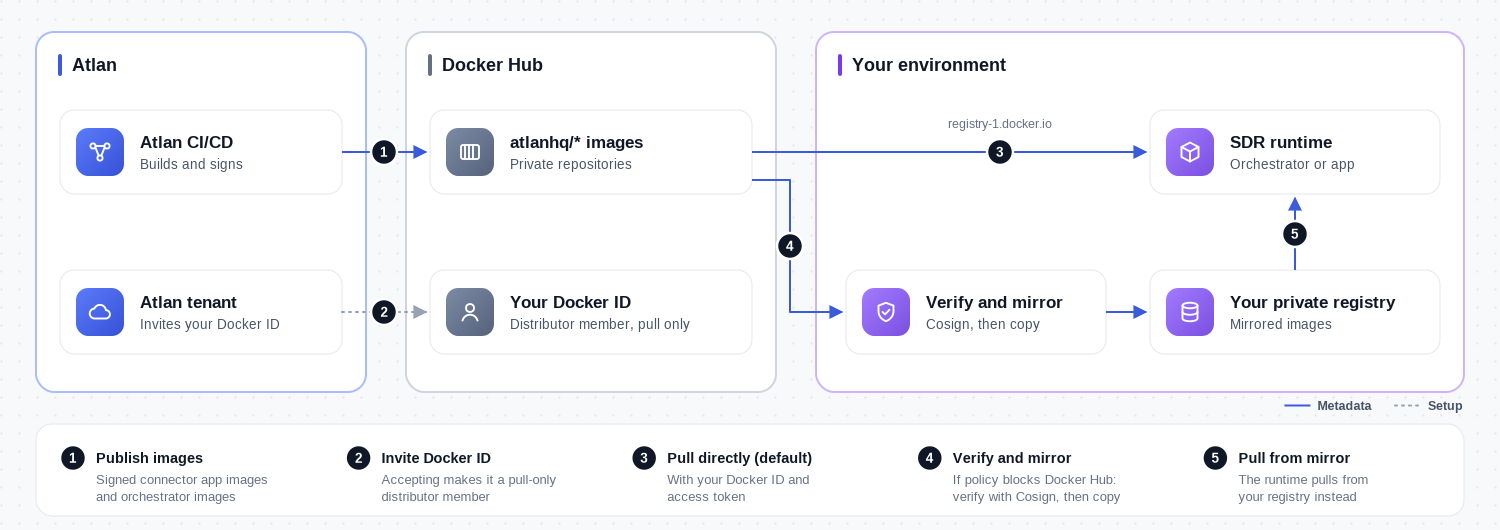
Every SDR deployment has to decide where its container images come from. This is independent of your lifecycle mode and platform—you make the same procurement decision whether you run orchestrator or single-app, on Docker/Podman or Kubernetes.
- Atlan's Docker Hub
- Your own registry
Atlan publishes every connector app—and the SDR Orchestrator itself—as OCI container images to Atlan's private organization on Docker Hub, under the atlanhq/* namespace (for example, atlanhq/atlan-oracle-app). This is the source of truth for SDR images:
- Private and authenticated. The
atlanhq/*repositories are private. To pull images, you set up Docker Hub access with your organization's own Docker ID, which gets pull-only access to Atlan app images. - Versioned per release. Each app and orchestrator release is published as an immutable, tagged image (for example,
atlanhq/atlan-oracle-app:main-ec46120). See Images and versions. - Signed. Connector app images are signed with keyless Cosign, so you can confirm each one came from Atlan's official pipeline and hasn't been modified.
Pulling directly from Docker Hub is the default and recommended path: no replication pipeline to operate, and you always get the exact published image.
Mirror Atlan images into your own registry when your organization blocks public registries or requires images to pass through an internal registry for scanning, approval, or golden images.
Verify each image's signature before you push it into your registry; see Verify image signatures. How SDR finds the mirrored image depends on your lifecycle mode and on whether your registry keeps Atlan's names and tags:
The decision (Docker Hub / mirrored-prefix / mirrored-rebuilt) is the same everywhere, but the mechanism that consumes the image differs:
| Single-app mode | Orchestrator mode | |
|---|---|---|
| Atlan's Docker Hub | Pull directly (+ pull secret) | Pull directly (default) |
| Mirrored, same names/tags | Set the image reference in your deployment file | containerRegistryBase / base prefix rewrite |
| Rebuilt / renamed | Set the exact reference yourself | Image map in object storage |
In single-app mode you write the image reference directly, so mirrored and rebuilt are handled the same way. In orchestrator mode the orchestrator pulls images dynamically (UI installs, auto update, self-update), so it must be told how to translate Atlan source references to yours—hence the prefix rewrite or image map.
For the steps, choose your image source in Install SDR.
Atlan's recommendation
-
Default to Atlan's Docker Hub. Unless a security or network policy forbids egress to Docker Hub, pull Atlan images directly. It's the least to operate—no replication pipeline, no drift, and you always get the exact published image. To authenticate, set up Docker Hub access with your organization's own Docker ID.
-
Mirror only if your policy requires it. If your organization blocks public registries or requires images to pass through an internal registry (scanning, approval, golden images), mirror Atlan images into your registry. Match how you already distribute other third-party images internally: reuse that scanning and approval pipeline rather than inventing a new one for SDR.
-
If you mirror, pick the mechanism by how much your registry changes the image:
- Same names and tags (you only change the host/prefix) → use a prefix rewrite (
containerRegistryBase/container_registry.basein orchestrator mode; set the image reference directly in single-app mode). - Rebuilt, renamed, or re-tagged (names, tags, or SHAs differ) → use an image map in object storage (orchestrator mode), or set the exact image reference yourself (single-app mode). See Install SDR.
- Same names and tags (you only change the host/prefix) → use a prefix rewrite (
-
Always verify signatures before mirroring. Atlan signs connector app images with keyless Cosign. Verify each one before pushing it into your registry.
Rule of thumb: Atlan's Docker Hub unless policy says otherwise → prefix rewrite if your mirror is a faithful copy → image map if your mirror rebuilds or renames images.
See also
- Install SDR: install for your chosen mode and platform.
- Architecture: components shared by both modes.
- Security: security considerations for deployment configurations.
- Allow outbound connections: outbound connectivity requirements.