Published-service Private Service Connect
Connect Atlan to databases and services in your Google Cloud VPC by publishing a service attachment behind an internal TCP load balancer.
Published-service Private Service Connect (PSC) connects Atlan to databases and services in your Google Cloud VPC, such as a database on a Compute Engine VM. The model mirrors AWS PrivateLink: you publish a service attachment behind an internal TCP load balancer, and Atlan creates a PSC endpoint against it.
How it works
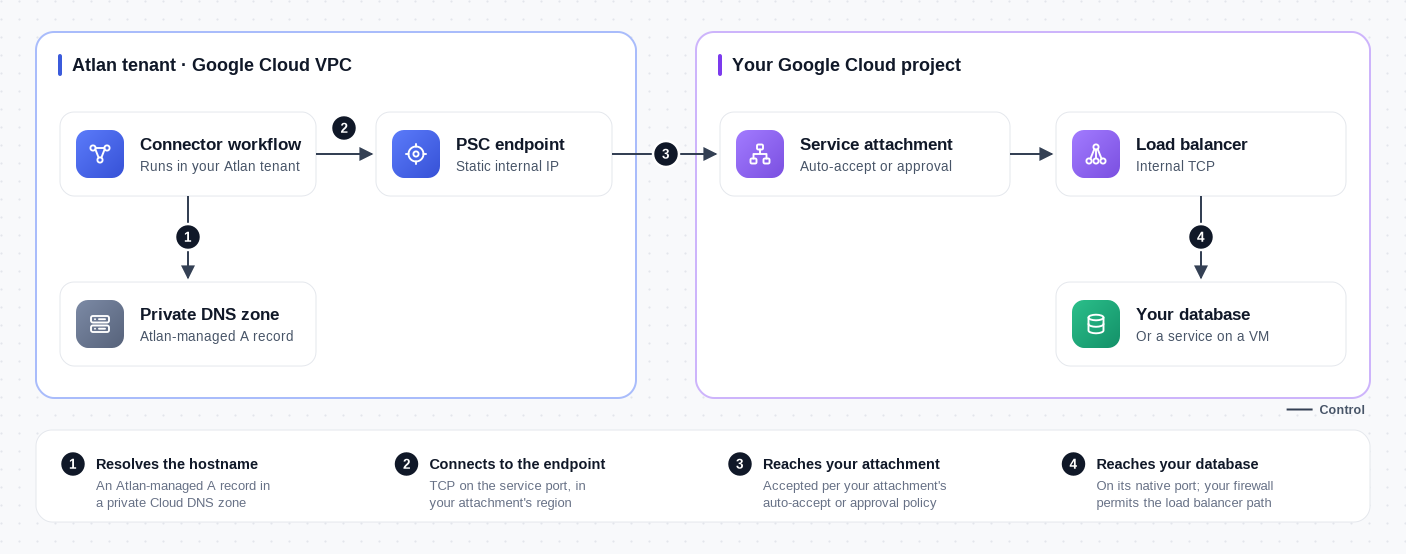
The endpoint must be in the same region as the service attachment, so your source region must match your Atlan tenant region.
Before you begin
Prerequisites
- A Google Cloud-hosted Atlan tenant. For a tenant on another cloud, see Cross-cloud connectivity.
- An internal TCP load balancer in front of the source and a service attachment targeting it, both in your tenant's region.
- On-premises and other-cloud sources: a Cloud Interconnect or VPN link between your network and your VPC. Published-service PSC delivers traffic to your load balancer, and that link carries it onward to the source.
Managed databases
Some managed database services expose a service attachment from the instance itself, for example Cloud SQL. The setup runs with Atlan support, without a load balancer on your side, and the connector's setup guide has the steps.
Information to share with Atlan
| Detail | Example / notes |
|---|---|
| Service attachment URI | projects/<project>/regions/<region>/serviceAttachments/<name> |
| Hostname to map in DNS | The hostname connectors use to reach the source |
| Service port | The source's native port |
| Region | The service attachment's region, matching your tenant's region |
| Which Atlan tenant | The tenant the connection is for |
This pattern is arranged case by case with Atlan support. Engage support at the design stage, before you create the load balancer.
Set up connection
- You place the source behind an internal TCP load balancer and create a service attachment targeting it. Set the connection preference to accept Atlan's project automatically, or accept the connection when it arrives. For Atlan's Project ID, see Atlan's private network values.
- You send Atlan support the details in Information to share with Atlan.
- Atlan creates the PSC endpoint with a static internal IP in the tenant VPC and a private Cloud DNS entry, so connectors reach the source by a stable hostname.
- Atlan validates DNS resolution and TCP reachability from the tenant, then authentication, before handing over for crawling.
Cross-region
Atlan creates the PSC endpoint in your tenant's region, and a published-service endpoint connects only to a service attachment in the same region. To reach a source in another region, publish a service attachment for it in your tenant's region. For other options, see Self-deployed runtime.
Limitations and considerations
- Connector support varies. Not every connector accepts a custom private hostname. Confirm connector support with Atlan before you provision PSC for a new source type.
- Scoped per project and VPC. A PSC setup for one Google Cloud project doesn't cover sibling projects; each producer project or service needs its own attachment and endpoint.
- One endpoint per service. Google Cloud has no equivalent of an AWS VPC Lattice service network, so connecting many published services means one attachment and endpoint each.
- TCP only. Published-service PSC carries TCP traffic from Atlan to your service.
Troubleshooting
For setup errors with Private Service Connect, see Google Cloud pattern errors.
See also
- Google Cloud private connectivity: the two PSC patterns side by side.
- Google APIs PSC: for Google-managed API services, such as BigQuery.