Private connectivity with Azure Private Link
Azure Private Link for Atlan: direct private endpoints into PaaS services, or IaaS sources behind a Standard SKU ILB and Private Link Service.
Atlan supports private network connectivity to your Azure-hosted data sources using Azure Private Link. Atlan creates a private endpoint in its own Azure virtual network that connects to your service; traffic stays on the Microsoft network, and your data sources don't need to be publicly accessible.
Azure Private Link connectivity requires your Atlan tenant to be hosted on Azure. If your Atlan tenant runs on AWS and your sources are on Azure, standard Private Link doesn't apply across the cloud boundary, Atlan offers a cross-cloud option for Single Tenant SaaS deployments where Atlan deploys an endpoint layer in Azure and tunnels back to your tenant. Contact Atlan support to confirm which applies to you. See the private connectivity overview for the full decision guide.
How it works
Atlan is always the consumer: Atlan creates the private endpoint, and you approve the connection into your service. What you build on your side depends on what kind of target you're exposing, and this distinction drives everything else in the setup:
| Your target | What you build | What you share with Atlan |
|---|---|---|
| Azure PaaS service, Azure SQL Database, SQL Managed Instance, Synapse, Data Factory, Azure Databricks | Nothing extra. Azure supports private endpoints directly on the service, no load balancer, no Private Link Service | The service's Resource ID (for example …/Microsoft.Sql/servers/<name>) |
| Vendor-managed service, Snowflake on Azure | Nothing extra, but the vendor participates: Snowflake support enables Private Link and issues the Private Link Service identifier | Snowflake's privatelink-pls-id plus a short-lived authorization token |
| IaaS / self-hosted, SQL Server on a VM, self-hosted databases, SAP HANA on VMs | A Standard SKU internal load balancer in front of the source, plus a Private Link Service (PLS) attached to it | The PLS Resource ID or alias |
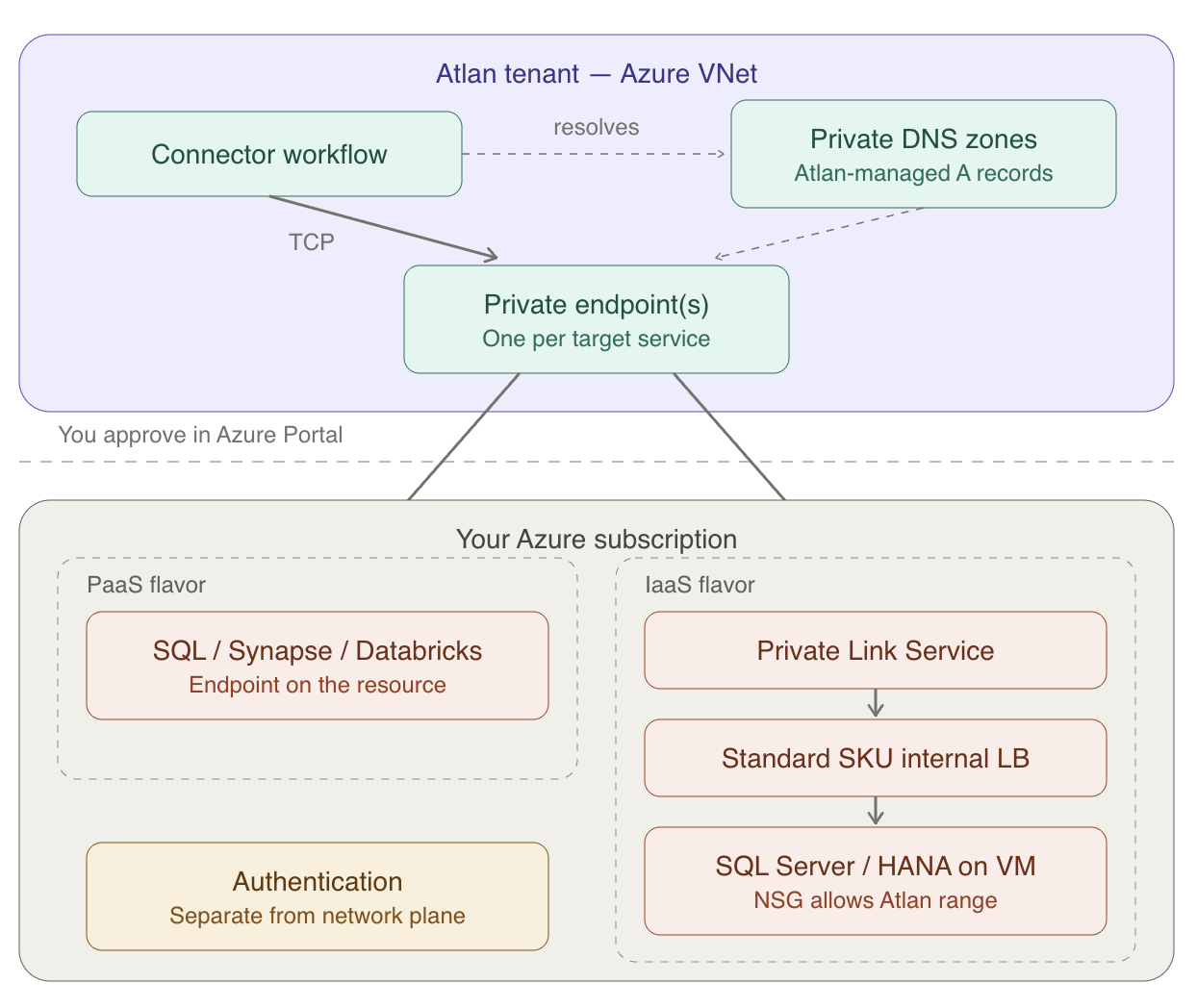
Endpoints are strictly per-resource: one per SQL logical server, one per Databricks workspace, one per PLS.
The flow:
- You prepare the target (nothing for PaaS; ILB + PLS for IaaS) and share its Resource ID with Atlan support.
- Atlan creates the private endpoint from its Azure subscription. The connection appears on your resource as Pending under Networking → Private endpoint connections, you approve it in the Azure Portal. Nothing flows before approval.
- Atlan links the service's private DNS zone (for example
privatelink.database.windows.net) to the tenant VNet and creates the A records, so connectors resolve your service's private hostname to the endpoint. You supply the hostname to map. - Connectors then connect to your service's normal hostname on its normal port; resolution and routing stay private end to end.
Two properties that repeatedly surprise teams:
- Approval is necessary but not sufficient. An endpoint can show Approved / Succeeded on both sides while traffic still fails, network security groups and subnet policies are enforced independently of the Private Link handshake. Approval opens the control plane; your NSGs open the data plane.
- Endpoints are per-resource, and narrowly so. One private endpoint serves one Azure SQL logical server, one Databricks workspace, one PLS. An approved endpoint to your dev Databricks workspace does nothing for prod, each workspace needs its own endpoint and DNS entry.
Source-specific notes
Azure SQL Database / Managed Instance. The simplest case: a private endpoint directly on the logical server or managed instance. No load balancer or PLS, if you're planning one, stop; you don't need it. Connecting many managed instances means one endpoint per instance. Cross-region Private Link isn't supported for Azure SQL, so the server must be in your tenant's region.
Azure Databricks. The workspace must be Premium tier with front-end Private Link enabled. The endpoint targets the workspace Resource ID with sub-resource (group ID) databricks_ui_api, with a wrong or missing group ID the endpoint creates successfully but never routes, which is a confusing failure to debug after the fact. Strictly same-region, strictly per-workspace.
Snowflake on Azure. Requires a Business Critical (or higher) Snowflake edition, and Snowflake support must enable Azure Private Link on the account (typically one to two business days). Authorizing Atlan's endpoint uses a Snowflake system function with an Azure access token that's valid for one hour, plan a live working session with Atlan support to execute the authorization inside the window. If your Snowflake usage involves internal stages, a second private endpoint to the associated Blob storage is required, budget for both.
SQL Server on VMs, self-hosted databases, SAP HANA. The IaaS flavor: Standard SKU internal load balancer (Basic SKU isn't supported by Private Link Service) with the VM in its backend pool, PLS on top. SAP HANA has three distinct shapes, HANA on Azure VMs uses this ILB + PLS pattern; SAP HANA Cloud uses an SAP-issued Private Link Service that SAP support must enable; and HANA Large Instances sit on dedicated hardware reached via ExpressRoute, where Private Link doesn't apply. Identify which shape you have before starting.
Multiple self-hosted databases behind one PLS. Because a Standard load balancer's backend pool can only contain VM network interfaces, not PaaS resources or arbitrary IPs, fanning one PLS out to several databases requires a NAT VM doing port mapping in the middle. This works but adds a component you own and monitor; for more than a few self-hosted sources, discuss the trade-offs with Atlan support first.
Prerequisites
- An Azure-hosted Atlan tenant (or a Single Tenant SaaS cross-cloud arrangement confirmed with Atlan support).
- The target service in the same region as your Atlan tenant. Same-region is a hard requirement for Databricks and Azure SQL; treat it as the default assumption for everything else.
- Permissions to approve private endpoint connections on the target resource, and to edit its NSGs.
- Per flavor: the resource ID (PaaS), the
privatelink-pls-idand a coordination window (Snowflake), or a Standard SKU ILB + PLS (IaaS). - Atlan's tenant network range, provided by support, your NSG on the target must permit it on the service port. Approval alone doesn't open the NSG.
Information to share with Atlan
When you raise the support ticket, provide the following. Gathering it up front turns a multi-round exchange into a single handoff.
| Detail | Example / notes |
|---|---|
| Target identifier | PaaS: the service Resource ID (…/Microsoft.Sql/servers/<name>). IaaS: the PLS Resource ID or alias. Snowflake on Azure: the privatelink-pls-id plus a short-lived authorization token |
| Service type and sub-resource (group ID) | For Databricks the group ID must be exactly databricks_ui_api |
| Private hostnames to map in DNS | <server>.database.windows.net, adb-….azuredatabricks.net |
| Service port | 1433 (Azure SQL), 443 (Databricks) |
| Region | Must match your Atlan tenant's region |
| Which Atlan tenant | Production or non-production, each needs its own endpoints |
In return, Atlan creates the private endpoint (which you approve) and provides its tenant network range to permit in your NSG on the service port, approval alone doesn't open the NSG.
Set up connection
- Prepare the target per the table earlier, and confirm its region matches your tenant.
- Raise a support ticket with everything listed in Information to share with Atlan earlier.
- Approve the connection. When Atlan creates the endpoint, approve it on the resource under Networking → Private endpoint connections. For Snowflake, this step is instead the token-based authorization executed live with Atlan support.
- Open the NSG on the target (or the ILB backend) to Atlan's tenant range on the service port.
- Validate with Atlan. Atlan confirms DNS resolution and TCP reachability from the tenant, then authentication, before handing over for crawling.
Limitations and considerations
- One-way, TCP. Atlan initiates; your network never connects into Atlan (inbound private access to Atlan's UI/API is a separate, mirror-image setup).
- Same cloud, same region as the tenant, per the notes earlier. Cross-cloud is the Single Tenant SaaS endpoint-layer offering only.
- Endpoint sprawl is real. Per-server, per-workspace, per-PLS endpoints mean a large Azure estate accumulates many endpoints, there is no Azure equivalent of AWS VPC Lattice's one-share-for-everything model. Plan the inventory with Atlan support up front rather than ticket-by-ticket.
- Encryption is the service's TLS. Private Link carries traffic privately but doesn't add its own encryption layer beyond what the target service negotiates.
- On-premises sources need connectivity into your Azure VNet first (ExpressRoute or VPN); the ILB + PLS then fronts the on-prem address.
Troubleshooting
Endpoint approved, connection still fails. The most common Azure-specific trap. Check, in order: the target's NSG permits Atlan's range on the port (approval doesn't do this); for subnets with private endpoints, whether NSG enforcement on private endpoint NICs (privateEndpointNetworkPolicies) is blocking traffic; and that DNS for this specific hostname resolves to the endpoint, a second workspace or server added later needs its own endpoint and DNS record, and reusing the first one fails quietly.
Databricks endpoint exists but doesn't route. Verify the endpoint's group ID is exactly databricks_ui_api. An endpoint created with the wrong sub-resource reports healthy and does nothing.
Snowflake authorization keeps failing. The Azure access token expires after one hour, if the back-and-forth exceeded that, generate a fresh token and re-run the authorization in one sitting. Also confirm Snowflake support has actually enabled Private Link on the account; the system function fails opaquely if not.
Setup stalled before the endpoint appears. Ask Atlan support for status, endpoint provisioning can also be blocked on Atlan's side (subscription permissions, subnet capacity), and the resolution is internal rather than anything in your subscription.
"Can't proceed, cross-cloud." If your tenant is on AWS, standard Azure Private Link is off the table regardless of configuration effort. The workable paths are the Single Tenant SaaS cross-cloud endpoint layer, a site-to-site VPN, or IP allowlisting, agree on one with Atlan support before building anything.
See also
- Private connectivity overview: Decision guide for choosing the right connectivity pattern for your cloud and source type.