AWS private connectivity
The AWS private connectivity patterns side by side, what each one asks you to create and maintain, how AWS PrivateLink works, and how Atlan reaches AWS service APIs.
On AWS, Atlan reaches your data sources over AWS PrivateLink or VPC Lattice. Three patterns differ in what you create in your AWS account, what you keep running, and how a new database is added. AWS service APIs need no infrastructure on your side.
Compare patterns
| AWS PrivateLink | Resource gateway | VPC Lattice | |
|---|---|---|---|
| How it's set up | In Atlan, in Settings > Networking, when the product supports your database; otherwise with Atlan support | With Atlan support | With Atlan support |
| What you create | NLB, listeners, target groups, and endpoint service. In Atlan, from commands Atlan generates | Resource gateway, and a resource configuration and share per database | Resource gateways, resource configurations, and one shared service network |
| What you maintain | Target group health as database IPs change | Nothing ongoing | Nothing ongoing |
| Adding a database | In Atlan, another private link in Settings > Networking. With Atlan support, a new listener and target group, coordinated with Atlan | A new share and Atlan-side endpoint, coordinated with Atlan | A new resource configuration, on your side only |
| Hostname in the connector | An endpoint hostname, or your database's hostname through private DNS | An endpoint hostname and port, or your database's hostname through private DNS | Your database's hostname |
To find the pattern for your source, see Decide how to connect. For a source in another AWS region, see AWS cross-region.
How AWS PrivateLink works
You publish your database as a VPC endpoint service backed by a Network Load Balancer (NLB), and Atlan connects to it through an interface VPC endpoint in your Atlan tenant's VPC. Both setup paths create the same resources. They differ in who drives the steps: Atlan in Settings > Networking, or Atlan support.
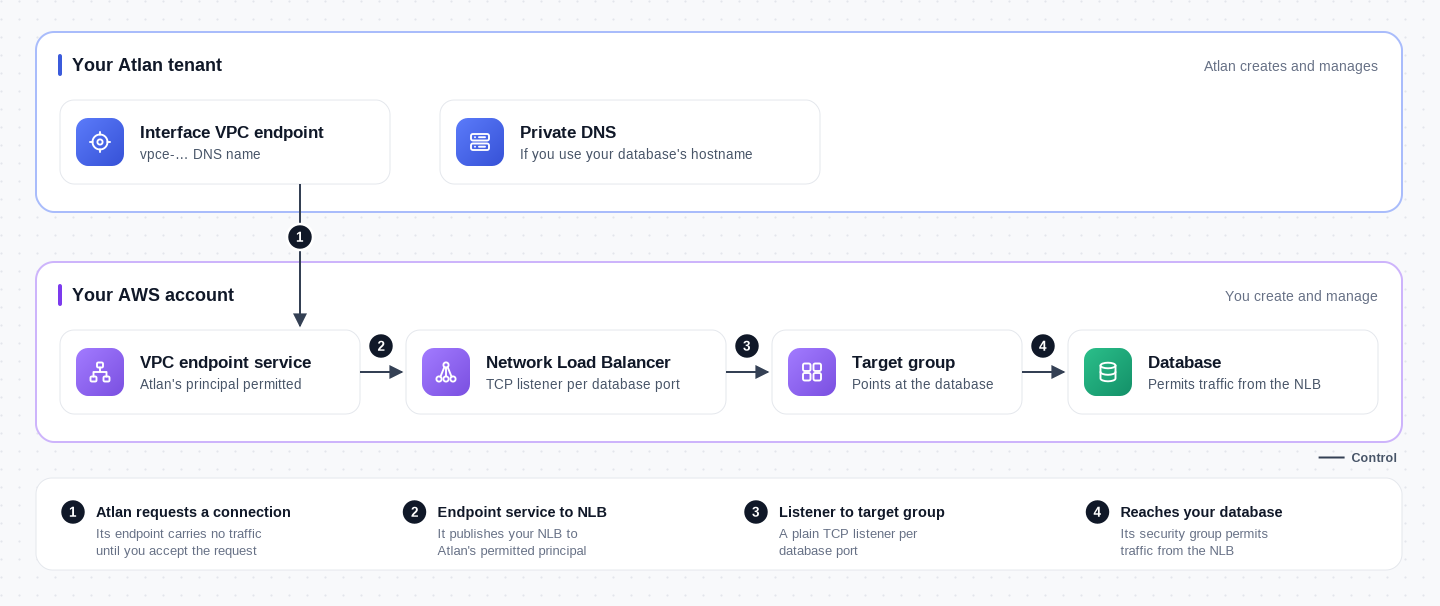
- NLB and target group. You create a Layer 4 load balancer in the same VPC as your database, or with a route to it, with a TCP listener for the database port and a target group pointing at the database. The database's security group permits traffic from the NLB.
- Endpoint service and permitted principal. The endpoint service publishes the NLB to other AWS accounts, with a service name of the form
com.amazonaws.vpce.<region>.vpce-svc-…. Its allowed principals control which AWS accounts or roles can connect, and Atlan's principal must be on the list. - Atlan's interface endpoint. Atlan creates the endpoint in your tenant's VPC against your service name. It gets a
vpce-…DNS name that connectors dial. - Acceptance. Atlan's endpoint sends a connection request to your endpoint service. With manual acceptance, the connection waits in Pending acceptance and carries no traffic until you accept it.
- DNS. Connectors use the endpoint's
vpce-…hostname, or your database's own hostname, which Atlan maps to the endpoint with private DNS in your tenant.
The connector opens each connection, and traffic follows the path connector → interface endpoint → your endpoint service → NLB listener → target group → database. Replies return on the same connection.
- The NLB is TLS-transparent. Listeners are plain TCP, so your database's own certificate handles encryption and the NLB holds no certificate. HTTPS sources fronted by an ALB behind the NLB are the exception: the hostname Atlan dials must match the certificate, which needs your database's hostname through private DNS.
- AZ IDs, not AZ names. AZ names (
us-west-2a) map to different physical zones in different AWS accounts; AZ IDs (usw2-az1) are the same everywhere. Atlan's endpoint must sit in subnets whose AZ IDs match where your endpoint service is enabled, or cross-zone load balancing must be on. - RDS IAM authentication needs the real hostname. IAM token generation validates against the genuine
*.rds.amazonaws.comname and fails against avpce-…hostname. The same applies to strict TLS hostname validation. If you use either, use your database's hostname through private DNS.
AWS service APIs
Some AWS services expose a regional API that Atlan reaches over AWS PrivateLink with no infrastructure on your side, for example Amazon QuickSight. Atlan creates and owns the interface VPC endpoint in its own AWS account. Your side is an IAM policy condition that permits calls only from Atlan's endpoint ID. The steps are on the connector's setup guide.
One path per database
Each database has one private path. When a database is reachable over two private paths, for example VPC Lattice and AWS PrivateLink, DNS inside the Atlan tenant sends traffic down only one of them, and VPC Lattice takes precedence.
Connector guides
Source-specific steps for private connectivity on AWS:
Amazon Athena · Amazon MSK · Amazon QuickSight · Amazon Redshift · Databricks · Hive · Microsoft SQL Server on Amazon EC2 · Microsoft SQL Server on Amazon RDS · MySQL · PostgreSQL · SAP BW/4HANA · SAP ECC · SAP S/4HANA · Snowflake · Tableau Server · Trino
See also
- Private connectivity: the principles every pattern shares, and Atlan's private network values.