Azure Private Link service
Connect Atlan to sources on Azure VMs or behind a load balancer with a Private Link service on a Standard SKU internal load balancer.
Azure Private Link service connects Atlan to sources on VMs or behind a load balancer, such as SQL Server on a VM, over the Microsoft network. You place a Standard SKU internal load balancer in front of the source and attach a Private Link service (PLS) to it. Atlan creates a private endpoint in its own Azure virtual network against the PLS, and you approve the connection.
How it works
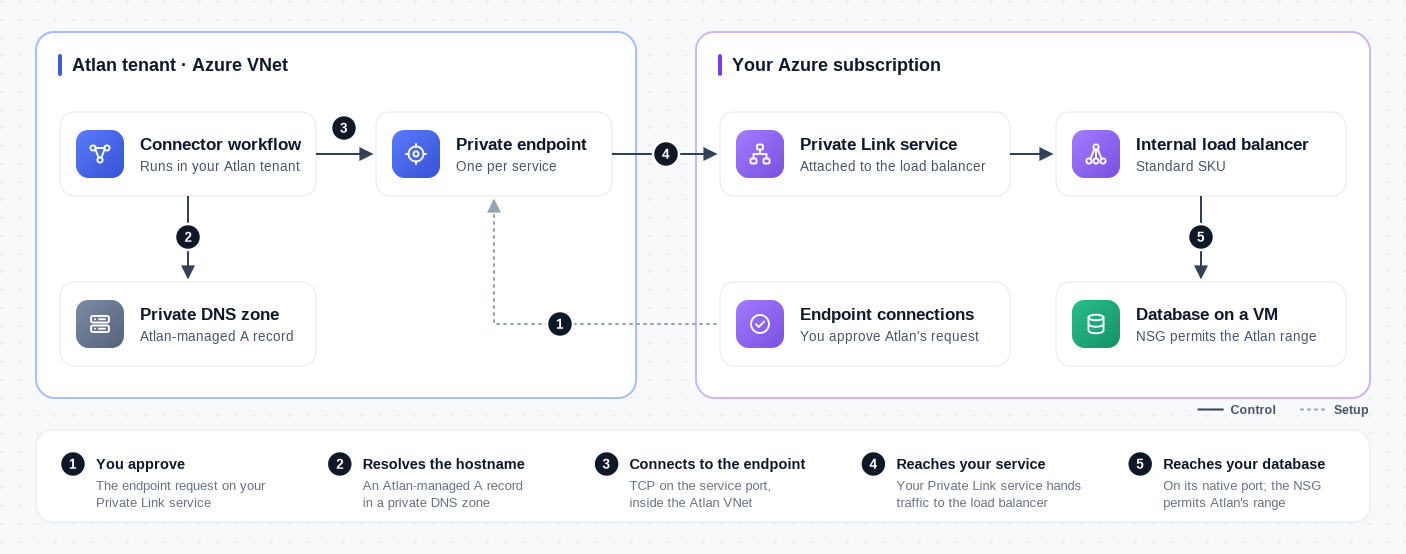
Atlan opens each connection to your source's hostname on its normal port, and replies return on it. Atlan maps the hostname in a private DNS zone linked to the tenant VNet, so resolution and routing stay private.
Endpoints are per PLS. One private endpoint serves one PLS. A development source and a production source each need their own endpoint and DNS record.
Before you begin
Prerequisites
- An Azure-hosted Atlan tenant. For a tenant on another cloud, see Cross-cloud connectivity.
- A Standard SKU internal load balancer with the VM in its backend pool. Basic SKU isn't supported by Private Link service.
- A Private Link service attached to the load balancer.
- NSG rules on the load balancer backend that permit Atlan's tenant network range, provided by Atlan support, on the service port.
- Permissions to approve private endpoint connections on the PLS, and to edit its NSGs.
- On-premises sources: an ExpressRoute or VPN link between your data center and your Azure VNet. The internal load balancer and PLS front the on-premises address.
Several databases behind one PLS
A Standard load balancer's backend pool holds only VM network interfaces, so fanning one PLS out to several databases needs a NAT VM doing port mapping in the middle. Discuss the trade-offs with Atlan support before going past a few self-hosted sources.
Vendor-managed services
For a vendor-managed service, such as Snowflake on Azure, you create nothing extra. The vendor enables Private Link on your account, issues its Private Link service identifier, and takes part in authorizing Atlan's endpoint. Plan that step with the vendor and Atlan support, and follow the connector's setup guide for the vendor's requirements.
Information to share with Atlan
| Detail | Example / notes |
|---|---|
| PLS alias or Resource ID | For a vendor-managed service, the identifier the vendor issues |
| Private hostnames to map in DNS | The hostname connectors use to reach the source |
| Service port | The source's native port |
| Region | The PLS's region. For another region, see Cross-region |
| Which Atlan tenant | Production or non-production, each needs its own endpoints |
Set up connection
- Prepare the source behind the internal load balancer and PLS, as in Prerequisites.
- Raise a support request with the details in Information to share with Atlan.
- Approve the connection. When Atlan creates the endpoint, approve it on the PLS under Networking → Private endpoint connections. For a vendor-managed service, this step is the vendor's authorization, run with Atlan support.
- Open the NSG on the load balancer backend to Atlan's tenant range on the service port.
- Validate with Atlan. Atlan confirms DNS resolution and TCP reachability from the tenant, then authentication, before handing over for crawling.
Limitations and considerations
- TCP only. Private endpoints carry TCP traffic from Atlan to your service.
- Endpoints add up. Per-PLS endpoints mean a large Azure estate accumulates many endpoints. Azure has no equivalent of an AWS VPC Lattice service network. Plan the inventory with Atlan support up front.
Troubleshooting
For setup errors with Azure Private Link, see Azure pattern errors.
See also
- Azure private connectivity: the two Azure patterns side by side.
- Private endpoints to Azure PaaS services: for PaaS services, such as Azure SQL Database.