How AlloyDB connectivity works
Learn why AlloyDB for PostgreSQL is hard to reach from outside, and what each of the three connection paths - self-deployed runtime, Private Service Connect, and public IP - actually does.
This page explains why AlloyDB is hard to reach from outside and what each of the three connection paths actually does. No prior Google Cloud knowledge is required.
For the architecture view of direct and self-deployed runtime connectivity, see How Atlan connects to AlloyDB Postgres.
Database inside a gated compound
Every AlloyDB instance lives inside a VPC - a Virtual Private Cloud, which is your organization's private, fenced-off section of Google's network. Think of the VPC as a gated compound: machines inside can talk to each other, but nothing outside can even find the address. Your AlloyDB's private IP (something like 10.52.0.7) is a room number that only means something inside the compound.
Atlan runs in its own cloud, outside your compound. To crawl your metadata it needs one of three doors:
- Move a worker inside - the self-deployed runtime: you run a small Atlan-provided service inside the compound. It reads metadata locally and mails the results out - only outbound, encrypted traffic ever leaves.
- Build a private tunnel - Private Service Connect: Google connects your compound and Atlan's network with a dedicated corridor that never touches the public street.
- Open a guarded gate - public IP + authorized networks: give the database a street address, but instruct the guard (Google's firewall) to admit visitors only from Atlan's known addresses.
Three traffic paths
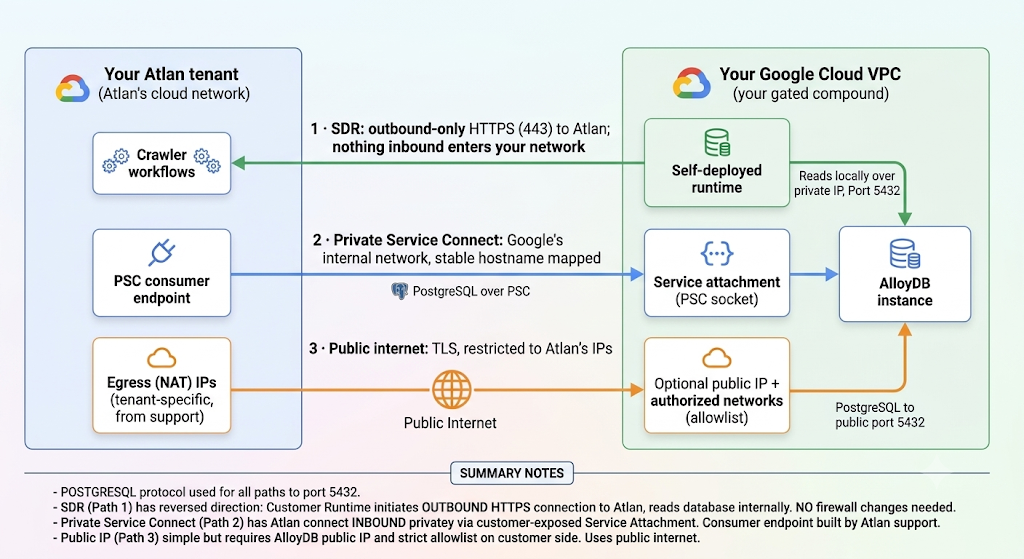
All three paths speak the PostgreSQL protocol to port 5432. Only path 3 crosses the public internet.
- Self-deployed runtime (your network → Atlan). The direction is reversed: the runtime inside your VPC connects out to Atlan Cloud over HTTPS and reads AlloyDB locally over its private IP. No inbound connection from the internet ever enters your network, and your firewall needs no inbound rules.
- Private Service Connect (Atlan → AlloyDB, privately). Your team exposes the instance as a service attachment (the socket); Atlan support builds a consumer endpoint (the plug) inside Atlan's network and maps a stable hostname to it. Both halves must be built and wired to each other - this handshake is where most setups stall.
- Public IP + authorized networks (Atlan → AlloyDB, over the internet). Simple, but the database must have a public address, and Google admits only source addresses on the authorized networks list - so you need Atlan's tenant-specific egress IPs first.
Glossary
For definitions of every term used in these guides - VPC, private IP, authorized networks, service attachment, consumer endpoint, instance URI, IAM database authentication, self-deployed runtime, and more - see the Network connectivity glossary.
See also
- Choose how Atlan connects to AlloyDB for PostgreSQL: Pick the right method before configuring anything
- Set up Private Service Connect to AlloyDB: Apply this knowledge on the private path