How Atlan connects to Tableau
Learn the two Tableau APIs Atlan uses, how sign-in works with PATs and Connected Apps, and where Tableau connections typically get blocked.
This page explains the two "doors" Atlan knocks on, how sign-in works, and where connections typically get blocked. No networking knowledge is required.
Two doors
Your Tableau environment - Cloud or Server - exposes two programmatic doors, both on the same address:
- The REST API - the general-purpose door. Atlan uses it to sign in, list projects and users, and check versions. On Tableau Cloud it's always open; on Tableau Server it exists on every install.
- The Metadata API - a specialized door for lineage: which fields feed which worksheets, which tables feed which data sources. On Tableau Cloud it's always on. On Tableau Server it is off by default and an administrator must switch it on once (one command - covered in the Server guide).
Both doors are opened with the same key. Atlan supports three kinds of key:
| Key type | What it is | Watch out for |
|---|---|---|
| Personal access token (PAT) - recommended | A named, long-lived password issued from a Tableau user's account settings. Two parts: a name and a secret value. | Tableau expires a PAT that goes unused for 15 consecutive days, and every PAT has a maximum lifetime (up to 1 year; configurable on Server). A PAT also supports only one active session at a time - two workflows sharing one PAT will knock each other offline. Expired/invalid PATs are the single most common Tableau connectivity failure. |
| Username + password (Basic) | A Tableau user's login credentials. | Doesn't work if your Tableau uses single sign-on (SSO/MFA). Breaks on every password rotation. |
| Connected App (JWT bearer) | An app registration in Tableau (client ID + secret) that signs short-lived tokens on Atlan's behalf. | Needs Tableau Cloud (Oct 2023+) or Server 2023.3+. Only Direct Trust connected apps are supported - not OAuth 2.0 trust via an external identity provider. Cannot crawl Tableau flows or populate popularity metrics. |
Traffic path
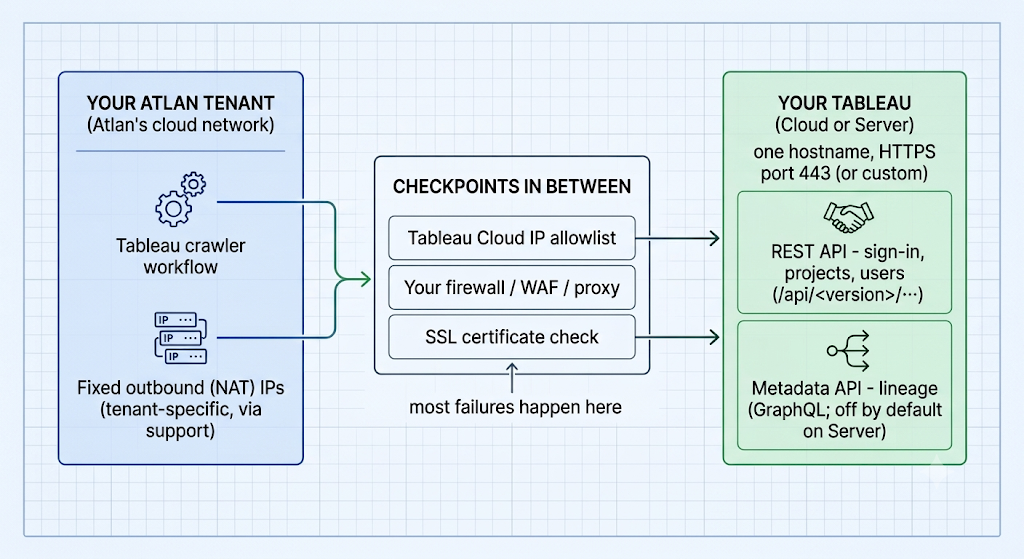
One hostname, one direction, two doors. Everything between the boxes - allowlists, firewalls, WAFs, certificates - is where connections fail.
What happens on every run
- Atlan signs in to the REST API with your credential and gets a temporary session.
- It runs preflight checks: REST API version (needs ≥ 2.4), project visibility, Metadata API enabled, and the user's site role.
- It crawls projects/workbooks over the REST API and lineage over the Metadata API, then signs out.
Because sign-in happens on every run, a credential that quietly expired between runs fails at step 1 - which is why a connection that "worked for months" can suddenly return authentication errors with no change on your side. See Troubleshooting Tableau connectivity.
Glossary
For definitions of every term used in these guides - host/server URL, site, PAT, Connected App/JWT, Site Administrator Explorer, REST API version, Metadata API, certificate chain, self-signed certificate, IP allowlist, WAF, endpoint service/NLB - see the Network connectivity glossary.
See also
- Choose how Atlan connects to Tableau: Pick the right method before configuring anything
- Connect Tableau Cloud: Apply this knowledge for Tableau Cloud
- Connect Tableau Server: Apply this knowledge for Tableau Server