How private connectivity works
Learn what a private link is, who is responsible for each part of the setup, and the three traffic paths between Atlan and Snowflake.
This page explains what a private link is, who is responsible for each part of the setup, and the three traffic paths between Atlan and Snowflake. No prior cloud networking knowledge is required.
Private line
Normally, Atlan reaches Snowflake over the public internet - encrypted, but travelling shared roads. A private link is like a dedicated line between two buildings: traffic flows over the cloud provider's internal network and never touches the internet.
A private line has two ends, owned by different parties:
- Snowflake exposes a service - think of it as a wall socket that accepts private connections. (AWS calls this an endpoint service; Azure calls it a Private Link service.)
- Atlan creates an endpoint - the plug that goes into that socket, living inside Atlan's own network.
Plugging in isn't enough. The socket's owner must approve the connection. Until then it sits in a pending state - and this approval step is where most setups stall. The private network link guides cover this approval step.
Three traffic paths
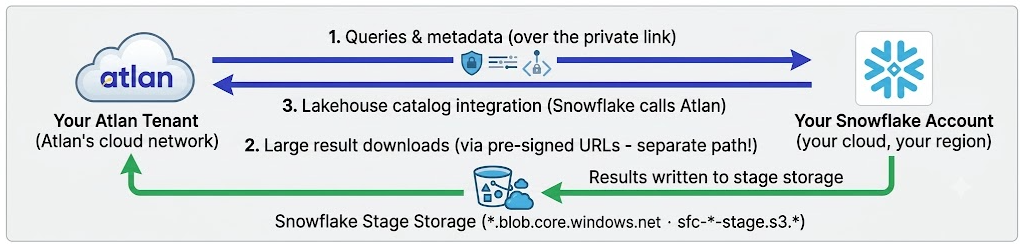
The private link secures path 1 only. Paths 2 and 3 exist regardless and need their own consideration.
- Queries and metadata (Atlan → Snowflake). The path the private link protects. This is what the AWS and Azure how-to guides configure.
- Large result downloads (Atlan → Snowflake's stage storage). When a query returns a big result, Snowflake writes it to its own cloud storage and hands Atlan temporary download links. This traffic doesn't flow over the private link. If it's blocked, authentication succeeds and small crawls work, but large crawls fail with JDBC "communication errors."
- Lakehouse catalog integration (Snowflake → Atlan). Reversed direction: Snowflake initiates connections to Atlan. Snowflake's outbound IPs must be permitted on the Atlan side.
Glossary terms
For definitions of the terms used across the private connectivity guides—endpoints, endpoint services, network policies, CIDR ranges, and more—see the network connectivity glossary.