High availability and disaster recovery (HA/DR)
Learn about high availability and disaster recovery (ha/dr).
High availability (HA)
Atlan uses Cloud Native Kubernetes Services (AKS, EKS, GKE) for high availability (HA).
Cloud Native Kubernetes Services such as Amazon EKS runs and scales the Kubernetes control plane across multiple AWS Availability Zones for high availability. It automatically scales control plane instances based on load, detects and replaces unhealthy control plane instances, and patches the control plane.
The benefits of using this concept are:
- Scalability and reliability help the system remain stable
- Promotes self-healing so that containers run in a healthy state
- Handles node failures gracefully
- Auto-scaling enables automated cluster creation
Application HA
Atlan ensures application HA through the following:
- Multiple replicas for both stateless and stateful applications
- Load balancing with services
- Rolling updates to maintain the availability threshold
- Pod-to-node distribution so that critical application pods run on dedicated nodes
- Usage of inter-Availability Zone (AZ) data transfers to avoid single-zone failure impact
Disaster recovery (DR)
Atlan follows industry best practices for disaster recovery. Atlan uses Argo Workflows for orchestration to successfully implement a disaster recovery strategy and reduce production downtime, so that business impact is minimized in the event of an outage.
If a disaster is detected, the Disaster Assessment Team - comprising key stakeholders from IT, platform, operations, and support - is promptly notified through Atlan’s established communication channels. The team conducts a thorough evaluation to determine the extent of the damage and prioritize remediation based on an internal list of critical services and applications.
In case of a disaster, a tenant is recreated, and the following actions are performed to restore the tenant:
- Onboard a new tenant with no data and a different domain.
- Use Argo Workflows to restore the data from last backup.
- Scale down the previous tenant.
- Change the domain of the new tenant to that of the previous one.
- Update the Cloudflare record with the load balancer of the newly onboarded tenant.
Atlan's team starts the recovery after the assessment. The restore steps themselves run as automated workflows. The entire process of restoring all the components of a tenant from backup can take up to 8 hours. In case of data loss for any particular component, it can also be recovered from the last backup.
Here are a few parameters that help reduce downtime and expedite the process of disaster recovery:
Infrastructure
Single-tenant SaaS is the default deployment option for most Atlan users. In this model, Atlan manages the infrastructure needs and ensures that all instances are spread across multiple zones in each Cloud Region where the user instance is deployed.
Zones are multiple, isolated locations within a single Cloud Region. Each tenant runs on a cluster whose subnets and compute nodes span multiple Availability Zones (AZs) in your cloud region, so the loss of a single node or zone doesn't take the tenant down.
Each tenant runs in a single cloud region. Active-active multi-region deployment isn't supported. Cross-region disaster recovery is available as an option. For more information, see Disaster recovery options.
Atlan service overview
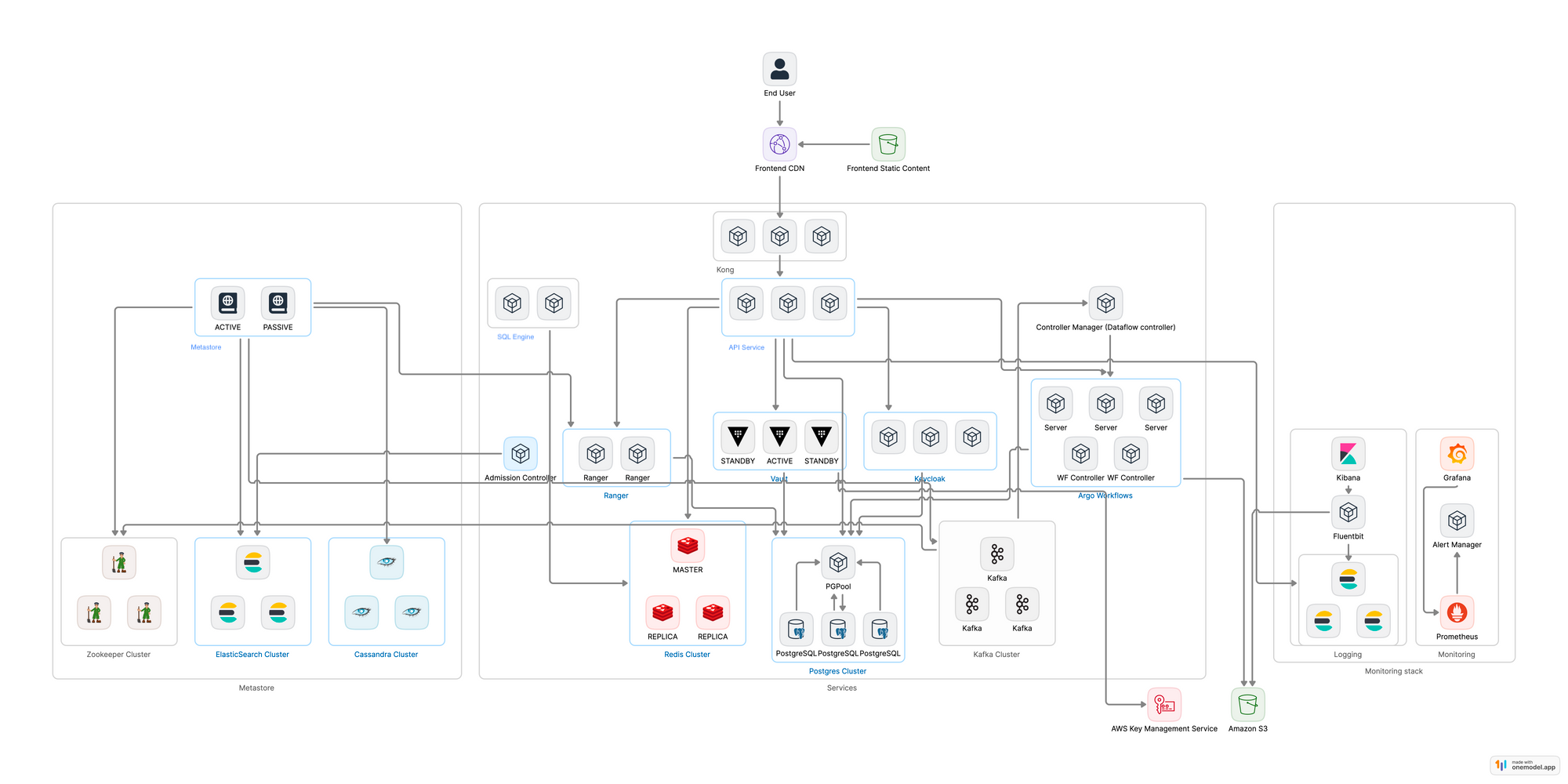
The diagram below illustrates the relationships and communication flows between each service. The bottom-most layer shows the services that are entirely independent, such as Cassandra, Postgres, and more. Most of the other services depend on these to function.
Backups and restore
Atlan runs an automated daily backup of each tenant. By default, the backup is scheduled at 3:00 AM UTC, configurable as per the requirement of an organization.
The backup of each tenant is stored in its respective cloud storage. The backups are encrypted at rest by the default cloud provider key. This key uses the Advanced Encryption Standard (AES) 256 algorithm. Since Atlan uses the cloud provider key, the key is rotated by the cloud provider.
Atlan controls access to the cloud storage where the backup is stored, and only provides access in case of troubleshooting an issue. Each backup process captures a full backup of all the data, with no incremental backups being performed. Atlan also monitors the backup so that backups aren't skipped. Alerts are generated in case a backup run fails for the support team to examine the issue.
The lifecycle policy for backups in the cloud provider is set to 15 days, which means Atlan retains backups for all the components for 15 days.
Backups of the following components are taken on a daily basis:
- Argo Workflows
- Elasticsearch
- Cassandra
- Redis
- Postgres
Together, these components hold all of your tenant metadata:
- Assets, relationships, and lineage
- Glossaries, tags, and classifications
- Users, groups, personas, and policies
- Audit history
- Workflow configuration and state
Data from your source systems isn't part of the backup, because Atlan doesn't store it. Metadata Lakehouse data is also outside the daily backup. For more information, see Metadata Lakehouse.
Atlan can restore a single component in case of data corruption for any single point of failure, such as a metastore and its components like Elasticsearch and Cassandra. It's also possible to do a full-cluster restore in case of an unintended operation or a data loss or corruption event.
Argo Workflows powers all the backup and restore packages in Atlan. It includes a retry mechanism in case of any errors while completing the steps in the workflow. It also sends alerts in case of entire package failure as part of observability.
Migration
Atlan has an easy process to migrate the application to other AWS Regions. In case of total region outage and the need for migrating an instance to another region or account, this migration activity is performed via Atlan’s backup and restore packages.
Disaster recovery options
| Standard | Cross-region DR | |
|---|---|---|
| Where backups are stored | Your tenant's primary region | Replicated to a secondary region |
| Recovery target | Tenant restored in the primary region | Pre-provisioned DR tenant in the secondary region |
| RTO / RPO | 8 hours / 24 hours | 8 hours / 24 hours |
With the standard setup, backups are stored in object storage (for example, Amazon S3) in your tenant's region. If that storage service is unavailable across the whole region, the restore can't start until the cloud provider restores it, and the 8-hour RTO can't be guaranteed. An outage of an unrelated service in the same region doesn't affect the backups. To discuss cross-region DR, contact your Atlan Customer Success Manager.
RTO, RPO, and retention
- Atlan carries out a daily backup of all critical services once every 24 hours, so in a worst case scenario provides an RPO of 24 hours.
- For Atlan tenants the RTO is 8 hours.
- Atlan retains daily backups for 15 days.
| RTO | RPO | |
|---|---|---|
| Platform | 8 hours | 24 hours |
| Metadata Lakehouse | Rebuilt after the platform restore, not included in the 8 hours | Same as the platform |
The 8-hour RTO covers:
- Restoring the tenant from the latest backup
- Validation, including SSO, connector authentication, and data checks
- DNS cutover, so your Atlan URL stays the same
The 8-hour RTO doesn't cover the Metadata Lakehouse rebuild or failback.
Metadata Lakehouse
The Metadata Lakehouse isn't part of the daily platform backup.
- Retention: Iceberg tables keep at least 7 days and 15 snapshots. On AWS, data is kept for 30 days.
- Recovery: After a DR event, the lakehouse is rebuilt from the restored platform metadata. It isn't restored from a backup. Lakehouse tables become available some time after the platform, depending on the number of assets in your tenant.
- Endpoints: The catalog endpoint is served under your tenant URL, so connection strings don't change after recovery.
Within a region, lakehouse components handle zone failures as follows:
| Component | Zone resilience |
|---|---|
| Iceberg data (object storage) | Stored across multiple AZs |
| Catalog database (PostgreSQL) | Primary and replicas on the multi-AZ cluster |
| Catalog service and lakehouse service | Single instance. If its zone fails, it's rescheduled automatically onto a node in another zone, with a short interruption. |
| Lakehouse compute database | Single AZ |
After a recovery
Your Atlan URL stays the same, because DNS points to the restored tenant. Depending on your setup, you may need to update the following.
Platform (all connectors)
- Network allowlists: Update them if the restored tenant has new egress IPs.
- Source connections: Update endpoints, credentials, and private links, unless your source systems use DR-aware or load-balanced endpoints.
Metadata Lakehouse
- Catalog credentials: Update the credentials used by your query engines and integrations if they're reissued during recovery.
Atlan tells you what needs updating as part of any DR activation.
If you run a DR exercise on your own infrastructure, see What changes on the Atlan side when I run my own DR exercise?.
Failback
Failback to the original region is a planned activity, scheduled with you after the incident. It isn't included in the RTO.
DR testing
Atlan tests disaster recovery at least once a year, as required by its Business Continuity and Disaster Recovery (BC/DR) Plan. Each test includes a full tenant restore from backup with functional validation. Atlan also runs backup restores and tenant migrations routinely as part of normal operations, which uses the same recovery runbooks.
The BC/DR Plan is available on the Atlan Trust Center after you request access. To request the most recent DR exercise report, contact Atlan support.
Post-recovery validation
The following post-recovery actions are performed:
- Post restoration, Atlan conducts data integrity checks so that the restored data is accurate and complete.
- Atlan performs system tests to confirm that all components of the tenant are functioning correctly after restoration.
During an outage, Atlan posts service status and incident updates to the Atlan status page.