How cross-account access works
Learn how Atlan reads Amazon S3 - IAM roles, trust policies, External IDs, and the four AWS doors every crawl must pass through.
This page explains IAM roles, trust policies, and the four AWS "doors" a crawl must pass through. No prior AWS knowledge is required.
Visitor badge
Your S3 buckets live in your AWS account; Atlan runs in its own AWS account. AWS accounts are like separate office buildings - nobody from one building can enter another without arrangements.
A cross-account IAM role is a visitor badge you leave at your front desk:
- The badge's trust policy is the guest list - it names exactly who may pick the badge up. You put Atlan's identity (its "Node Instance Role" - see Atlan identity details) on that list.
- The badge's permission policy says what the visitor may do once inside - which buckets they may list and read.
- An External ID is a passphrase the visitor must also say at the desk. It stops someone from tricking Atlan into picking up your badge on behalf of a different customer (AWS calls this the "confused deputy" problem). Strongly recommended for production.
When Atlan connects, it calls AWS's STS "AssumeRole" service - literally "let me borrow that badge". AWS hands back temporary credentials valid for about an hour. No permanent secret is ever created, and every borrow is logged in your CloudTrail.
When you click Test connection, the borrowed badge is used under the session name atlan-test-credential-helper. That string appearing in an error or in CloudTrail is normal - it's Atlan's test process, not an unknown user.
Four doors every crawl passes through
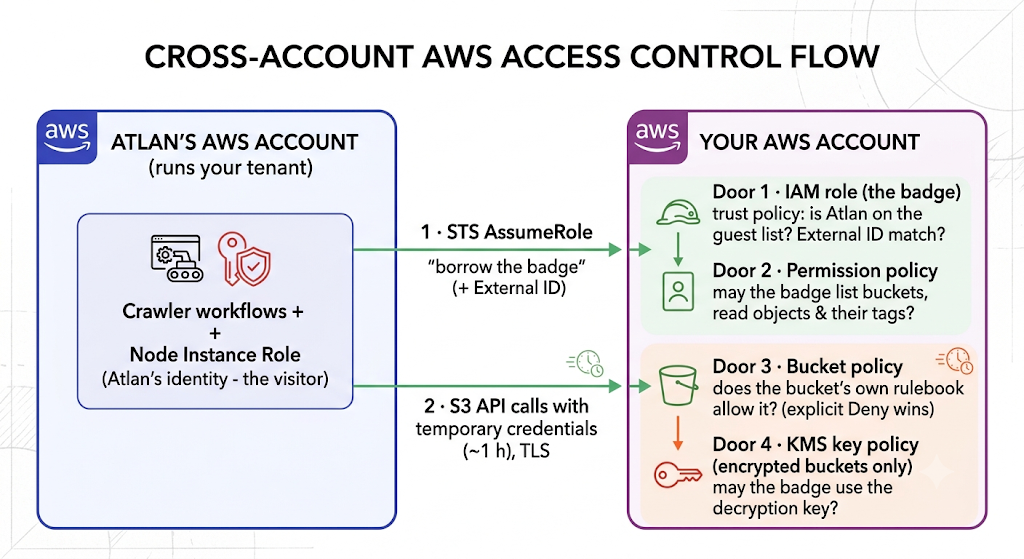
A crawl only works when all four doors open. Each door produces a different "Access Denied" - Troubleshooting S3 connectivity maps error text to door:
- The trust policy (Door 1). Fails as
AccessDenied when calling the AssumeRole operation. Atlan isn't on the guest list - or the guest list is fine but Atlan's side hasn't been configured to try (see the two-sided handshake below). - The permission policy (Door 2). Fails as
not authorized to perform: s3:Something. One missing action out of the ten the crawler uses. - The bucket policy (Door 3). A bucket can carry its own rulebook that overrides everything - one explicit Deny statement beats any number of Allows.
- The KMS key policy (Door 4). Encrypted objects need the key's permission too. Symptom: listing works, reading object details fails.
Your trust policy lets Atlan in, but Atlan's own account must also be configured to reach out to your specific role (its identity must be granted sts:AssumeRole on your role's ARN). Today that Atlan-side step is done by support when you share your role ARN on a ticket. If you skip it, nothing errors loudly - the borrow silently fails and the connection test reports a confusing AuthorizationHeaderMalformed error. This one gap drives more support requests than any AWS misconfiguration.
Glossary
For definitions of every term used in these guides - IAM, ARN, IAM role, trust policy, permission policy, bucket policy, explicit Deny, STS/AssumeRole, External ID, node instance role, atlan-test-credential-helper, SSE-KMS, prefix, PermanentRedirect - see the Network connectivity glossary.
See also
- Choose how Atlan connects to Amazon S3: Pick the right method before configuring anything
- Set up S3 access with cross-account IAM role: Apply this knowledge in the recommended setup