How Atlan connects to Apache Kafka
Understand how Atlan securely connects to your Apache Kafka cluster to extract metadata.
Atlan connects to your Apache Kafka cluster to extract technical metadata while maintaining network security and compliance. You can choose between Direct connectivity for clusters available from the internet or Self-deployed runtime for clusters that must remain behind your firewall.
Connect via direct network connection
Atlan's Apache Kafka workflow establishes a direct network connection to your cluster from the Atlan SaaS tenant. This approach works when your Apache Kafka cluster can accept connections from the internet.
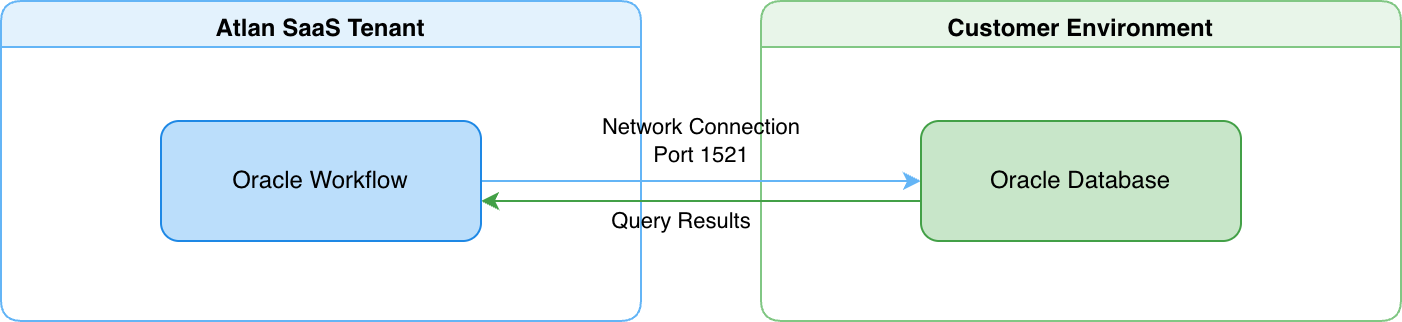
- Atlan's Apache Kafka workflow connects directly to your cluster from the Atlan SaaS tenant over port 9092 (plaintext) or port 9093 (SSL).
- You provide connection details (bootstrap servers, authentication method, security protocol) when creating a crawler workflow.
- Your Apache Kafka cluster accepts inbound network connections from Atlan's IP addresses, controlled through your firewall rules or network security groups.
For details on how direct connectivity works, see Direct connectivity.
Connect via self-deployed runtime
A runtime service deployed within your network acts as a secure bridge between Atlan Cloud and your Apache Kafka cluster. This approach works when your Apache Kafka cluster must remain fully isolated behind your firewall.
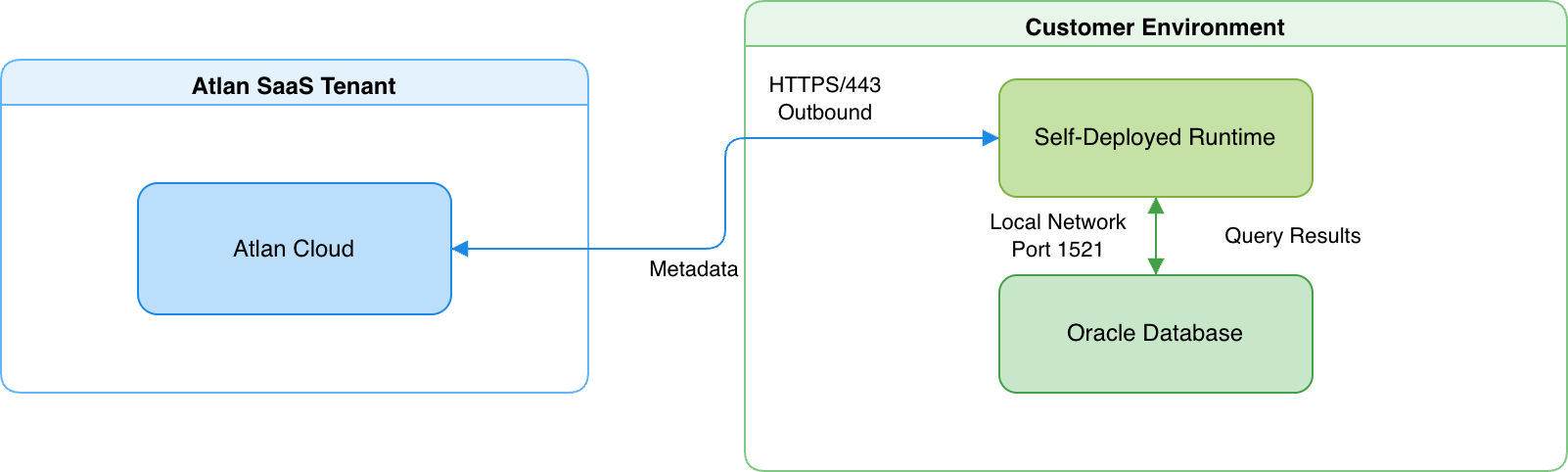
- The runtime maintains an outbound HTTPS connection to Atlan Cloud (port 443) and a local network connection to your Apache Kafka cluster (port 9092 or 9093).
- When Schema Registry is configured, the runtime also connects to the Schema Registry endpoint over HTTPS (port 443).
- The runtime translates requests into Kafka Admin API and Consumer Group API calls, executes them on your cluster, and returns the results to Atlan Cloud.
For details on how Self-Deployed Runtime works, see SDR connectivity.
Connection details
Atlan's Apache Kafka connector uses a native Python driver stack to connect to your cluster—it doesn't use JDBC or require a Java runtime.
Driver and protocol
The connector communicates with Apache Kafka using the Python confluent-kafka library (backed by librdkafka). It supports multiple authentication methods: No Auth, Basic (SASL_PLAIN), SCRAM (SASL_SCRAM-SHA-256 and SASL_SCRAM-SHA-512), and mTLS. Security protocols include Plaintext, SSL, SASL_PLAINTEXT, and SASL_SSL. The connector uses the Kafka Admin API (topics, configurations, brokers), the Consumer Group API (consumer groups and offsets), and the Schema Registry REST API (schema subjects and versions) when Schema Registry is enabled.
Connection pooling and sessions
During a metadata extraction workflow, the connector maintains a small number of connections:
- Kafka broker connection: A single admin client connection to the cluster, reused across all admin API calls (topic listing, config fetching, broker enumeration).
- Concurrent tasks: Up to five metadata extraction tasks run in parallel, each using the shared admin client connection.
- Schema Registry: When enabled, a separate HTTPS connection to the Schema Registry REST API.
The connector acquires connections on demand and releases them after extraction completes.
Security
Atlan extracts only structural metadata—topics, partitions, consumer groups, and schema definitions. For example, if you have an orders topic with event messages, Atlan discovers the topic structure, configuration, and schema, but never reads or stores the event messages themselves.
-
Read-only operations: All API calls are read-only describe and list operations. The connector can't produce or consume messages, create or delete topics, or change any cluster configuration. The ACLs you grant (Describe and DescribeConfigs on cluster, topics, and consumer groups) control exactly what the connector can access.
-
Credential encryption: Apache Kafka connection credentials are encrypted at rest and in transit. In Direct connectivity, Atlan encrypts credentials before storage. In Self-deployed runtime, credentials never leave your network perimeter—the runtime retrieves them from your enterprise-managed secret vaults (AWS Secrets Manager, Azure Key Vault, GCP Secret Manager, or HashiCorp Vault) only when needed, and Atlan Cloud never receives or stores them.
-
Network isolation with Self-deployed runtime: Your Apache Kafka cluster gains complete network isolation from the internet. The cluster only accepts connections from the runtime within your local network. The runtime itself only makes outbound HTTPS connections to Atlan Cloud, which your network team can control through firewall rules.
See also
- Direct connectivity: How Atlan connects directly to data sources
- SDR connectivity: How Self-Deployed Runtime connects to data sources
- Set up Apache Kafka: Configure authentication and permissions
- What does Atlan crawl from Apache Kafka?: Metadata extracted from Apache Kafka