How dbt connectivity works
Learn the three traffic paths between your dbt setup and Atlan - the dbt Cloud API pull, the storage-bucket read, and your own upload pipeline.
This page explains the three traffic paths between your dbt setup and Atlan and who owns each one. No prior cloud provider knowledge is required.
Pull, not push
Atlan never receives anything from dbt automatically - it pulls. On a schedule (or when you click Run), an Atlan workflow reaches out and reads your dbt metadata. Where it reaches depends on your dbt flavor:
- dbt Cloud is like a library with a front desk: Atlan walks up with a membership card (your API token) and asks for the records. If the library also checks IDs at the door (IP restrictions), Atlan's address must be on the guest list too - the card alone isn't enough.
- dbt Core has no front desk. Instead, every time your pipeline runs dbt, it drops the paperwork (
manifest.jsonand friends) into a filing cabinet (a cloud storage bucket), and Atlan is given a key to read - never write - that cabinet.
Three traffic paths
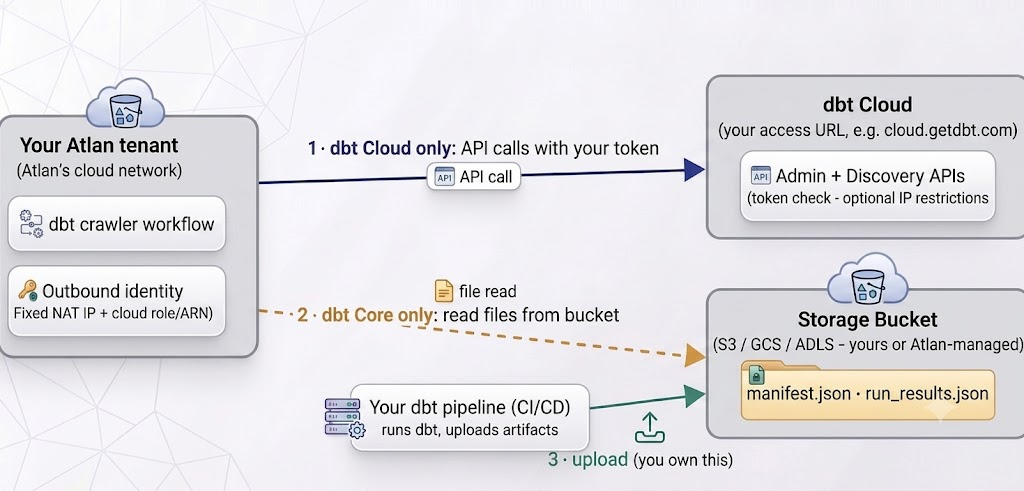
Atlan uses path 1 or path 2, never both for the same connection. Path 3 never touches Atlan - but if it breaks, Atlan sees stale or missing files.
- Atlan → dbt Cloud API (dbt Cloud connections). Encrypted HTTPS calls from your tenant's fixed outbound IP to your dbt Cloud access URL. Two things can block it: a token without the right permissions, and dbt Cloud's optional IP-restrictions feature rejecting Atlan's IP.
- Atlan → storage bucket (dbt Core connections). Atlan authenticates with your cloud provider (an IAM role on AWS, a service account key on GCP, a service principal on Azure) and reads the dbt output files. Almost every failure here is a permissions or bucket-policy issue.
- Your pipeline → the bucket (dbt Core only). Uploading fresh
manifest.jsonfiles after each dbt run is your job (your CI/CD does it). If uploads stop, the Atlan connection still "works" - it just crawls old metadata.
Glossary
For definitions of every term used in these guides - API token, service account token vs PAT, access URL, IP restrictions, NAT IP, bucket/prefix, dbt artifacts, IAM role/ARN, trust policy, external ID, KMS key, preflight checks, connection admin - see the Network connectivity glossary.
See also
- Choose how Atlan connects to dbt: Pick the right method before configuring anything
- Connect dbt Cloud with API token: Apply this knowledge for dbt Cloud
- Connect dbt Core via storage bucket: Apply this knowledge for dbt Core