How cross-account access works
Learn how Atlan reads your AWS Glue Data Catalog - the traffic path, the two ways of proving identity, and the two-key door that makes role-based access safe.
This page explains how Atlan reads your Glue Data Catalog: the traffic path, the two ways of proving identity, and the "two-key door" that makes role-based access safe - and that causes the most support issues when half-finished. No prior AWS knowledge is required.
For the architecture view of direct and self-deployed runtime connectivity, see How Atlan connects to AWS Glue.
Visitor badge
Think of your AWS account as an office building and the Glue Data Catalog as its library. Atlan needs to walk in and read the card catalog - never the books themselves (Glue crawling is metadata only).
There are two ways to let a visitor in:
- IAM access keys are like handing Atlan a permanent staff badge. Simple - but if the badge is ever reprinted (keys rotated) and you forget to give Atlan the new one, Atlan is locked out mid-crawl.
- A cross-account IAM role is like a visitor badge printed fresh at reception for every visit. Atlan shows its own government ID (its AWS identity, called the node instance role), reception checks the visitor list, and issues a badge that expires within hours. Nothing permanent ever leaves the building.
The visitor-badge system has a catch: two separate lists must both name the visitor. Your building's visitor list (the trust policy on your role) and Atlan's own outbound register (the allowlist on Atlan's side). Miss either one and the door stays shut.
Traffic path
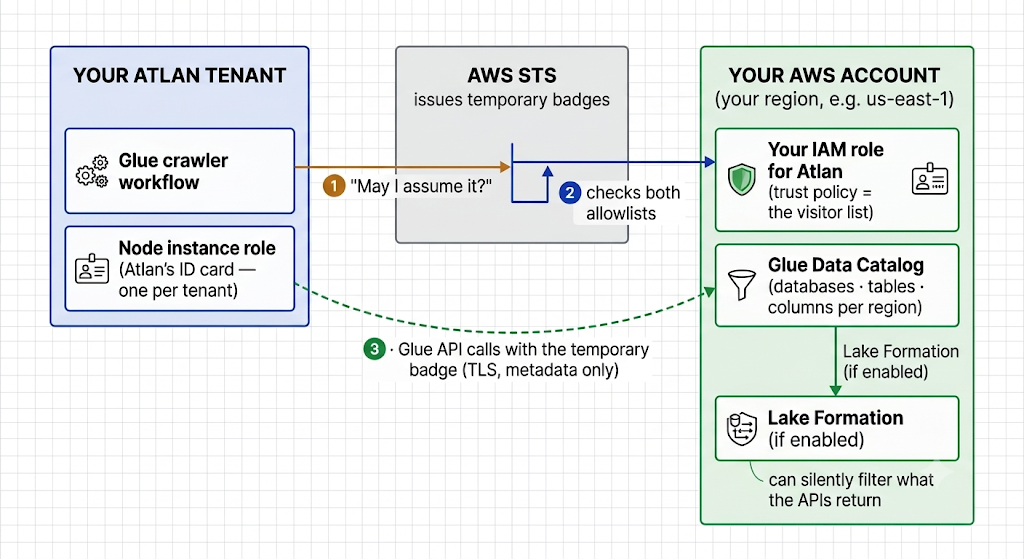
The cross-account flow. With access keys, steps 1–2 are replaced by the key pair - the Glue API path (3) and the Lake Formation filter are identical.
- Atlan asks AWS to assume your role. Atlan's node instance role calls AWS STS (the "reception desk").
- AWS checks two lists. Your role's trust policy must name Atlan's node instance role, and Atlan's node instance role must be allowed (by Atlan support) to assume your role. Both - this is the two-key door.
- Atlan reads the catalog. With the temporary credentials, Atlan calls
GetDatabases,GetTables, and related read-only APIs. If Lake Formation governs your catalog, it filters these responses silently - missing grants look like empty results, not errors. See Catalog permissions & Lake Formation.
Glossary
For definitions of every term used in these guides - IAM, IAM role, ARN, trust policy, sts:AssumeRole, node instance role, Atlan-side allowlisting, external ID, Glue Data Catalog, Catalog ID, Lake Formation, circuit breaker, preflight checks - see the Network connectivity glossary.
See also
- Choose how Atlan connects to AWS Glue: Pick the right method before configuring anything
- Connect with cross-account IAM role: Apply this knowledge in the recommended setup