How Atlan connects to SAP HANA
Understand how Atlan securely connects to your SAP HANA database to extract metadata.
Atlan connects to your SAP HANA database to extract technical metadata while maintaining network security and compliance. You can choose between Direct connectivity for databases available from the internet or Self-deployed runtime for databases that must remain behind your firewall.
Connect via direct network connection
Atlan's SAP HANA workflow establishes a direct network connection to your database from the Atlan SaaS tenant. This approach works when your SAP HANA database can accept connections from the internet.
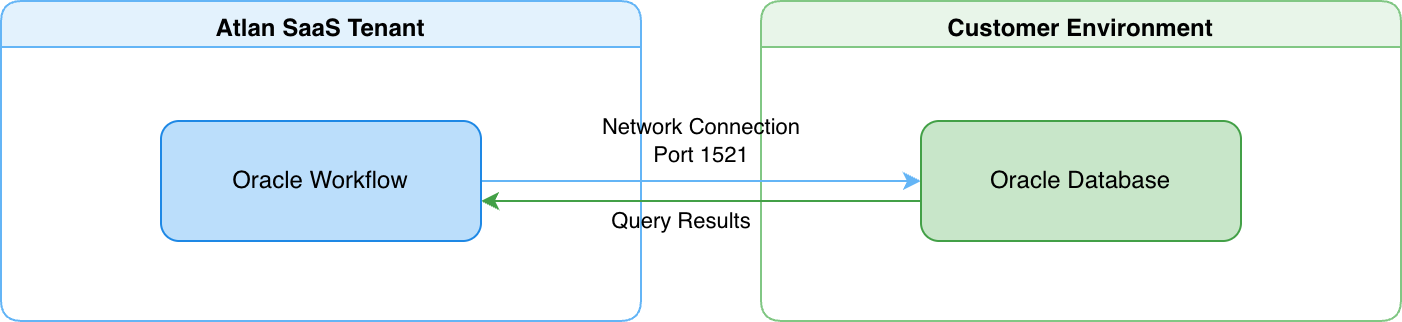
- Atlan's SAP HANA workflow connects directly to your database from the Atlan SaaS tenant over port 30015 (default).
- Your SAP HANA database accepts inbound network connections from Atlan's IP addresses, controlled through your firewall rules or network security groups.
For details on how direct connectivity works, see Direct connectivity.
Connect via self-deployed runtime
A runtime service deployed within your network acts as a secure bridge between Atlan Cloud and your SAP HANA database. This approach works when your SAP HANA database must remain fully isolated behind your firewall.
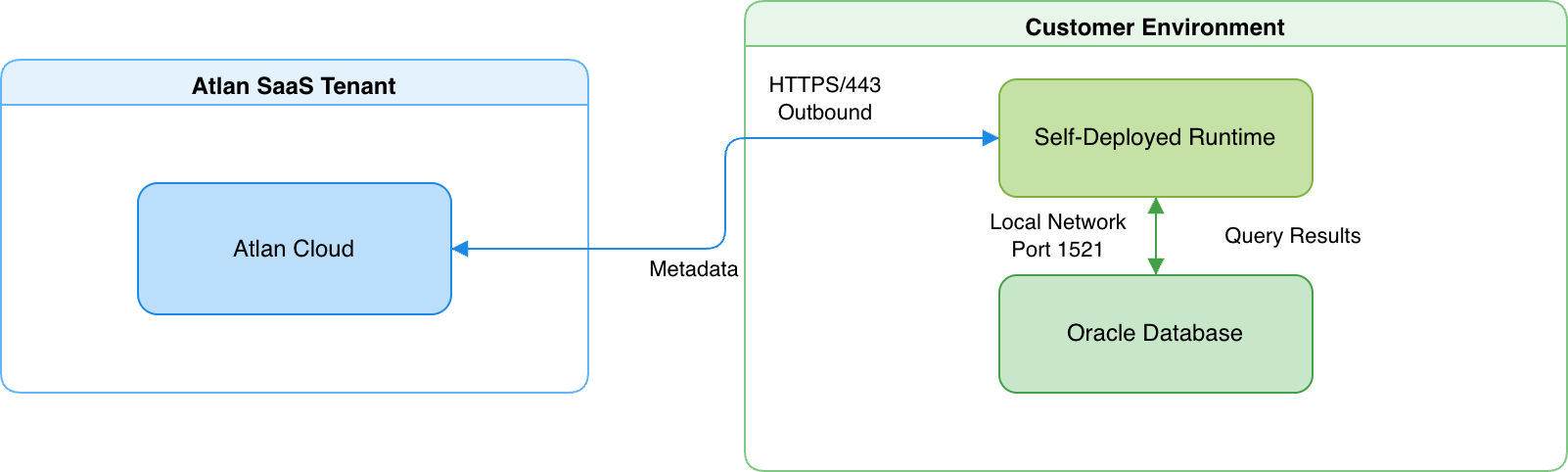
- The runtime maintains an outbound HTTPS connection to Atlan Cloud (port 443) and a local network connection to your SAP HANA database (port 30015).
- The runtime translates requests into SQL queries, executes them on your SAP HANA database, and returns the results to Atlan Cloud.
For details on how Self-Deployed Runtime works, see SDR connectivity.
Security
Atlan extracts only structural metadata—schemas, tables, and columns. For example, if you have a CUSTOMERS table with customer records, Atlan discovers the table structure and column definitions, but never queries or stores the customer records themselves.
-
Read-only operations: All database queries are read-only SELECT statements. The connector can't modify data, create or drop database objects, or change any configuration. The SAP HANA user permissions you grant control exactly what the connector can access.
-
Credential encryption: SAP HANA connection credentials are encrypted at rest and in transit. In Direct connectivity, Atlan encrypts credentials before storage. In Self-deployed runtime, credentials never leave your network perimeter—the runtime retrieves them from your enterprise-managed secret vaults (AWS Secrets Manager, Azure Key Vault, GCP Secret Manager, or HashiCorp Vault) only when needed, and Atlan Cloud never receives or stores them.
-
Network isolation with Self-deployed runtime: Your SAP HANA database gains complete network isolation from the internet. The database only accepts connections from the runtime within your local network. The runtime itself only makes outbound HTTPS connections to Atlan Cloud, which your network team can control through firewall rules.
See also
- Direct connectivity: How Atlan connects directly to data sources
- SDR connectivity: How Self-Deployed Runtime connects to data sources
- Set up SAP HANA: Configure user accounts and permissions