How Atlan connects to SAP ASE
Understand how Atlan securely connects to your SAP ASE database to extract metadata.
Atlan connects to your SAP ASE (Adaptive Server Enterprise) database to extract technical metadata while maintaining network security and compliance. You can choose between Direct connectivity for databases available from the internet or Self-Deployed Runtime for databases that must remain behind your firewall.
Connect via direct network connection
Atlan's SAP ASE workflow establishes a direct network connection to your database from the Atlan SaaS tenant. This approach works when your SAP ASE database can accept connections from the internet.
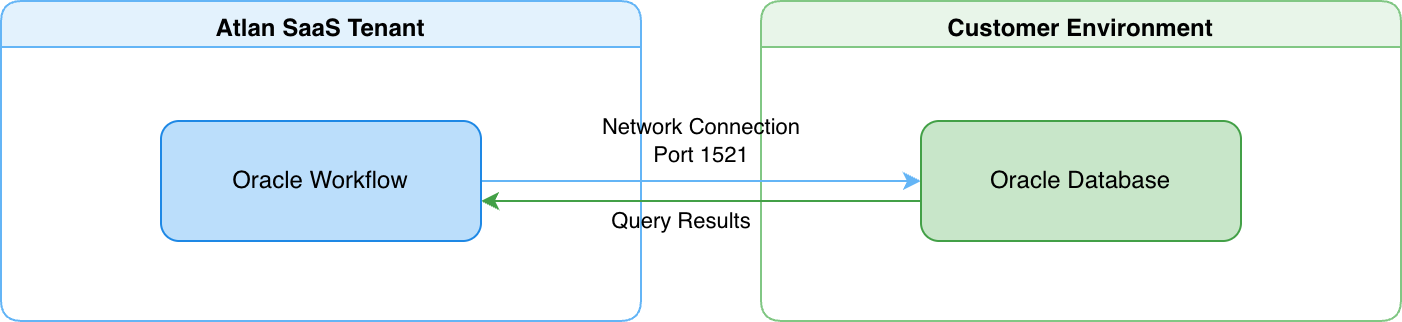
- Atlan's SAP ASE workflow connects directly to your database from the Atlan SaaS tenant over port 5000 (default), using the SAP jConnect JDBC driver.
- Your SAP ASE database accepts inbound network connections from Atlan's IP addresses, controlled through your firewall rules or network security groups.
- You can encrypt the connection with SSL/TLS by uploading a JKS or PKCS12 truststore when configuring the crawler.
For details on how direct connectivity works, see Direct connectivity.
Connect via self-deployed runtime
A runtime service deployed within your network acts as a secure bridge between Atlan Cloud and your SAP ASE database. This approach works when your SAP ASE database must remain fully isolated behind your firewall.
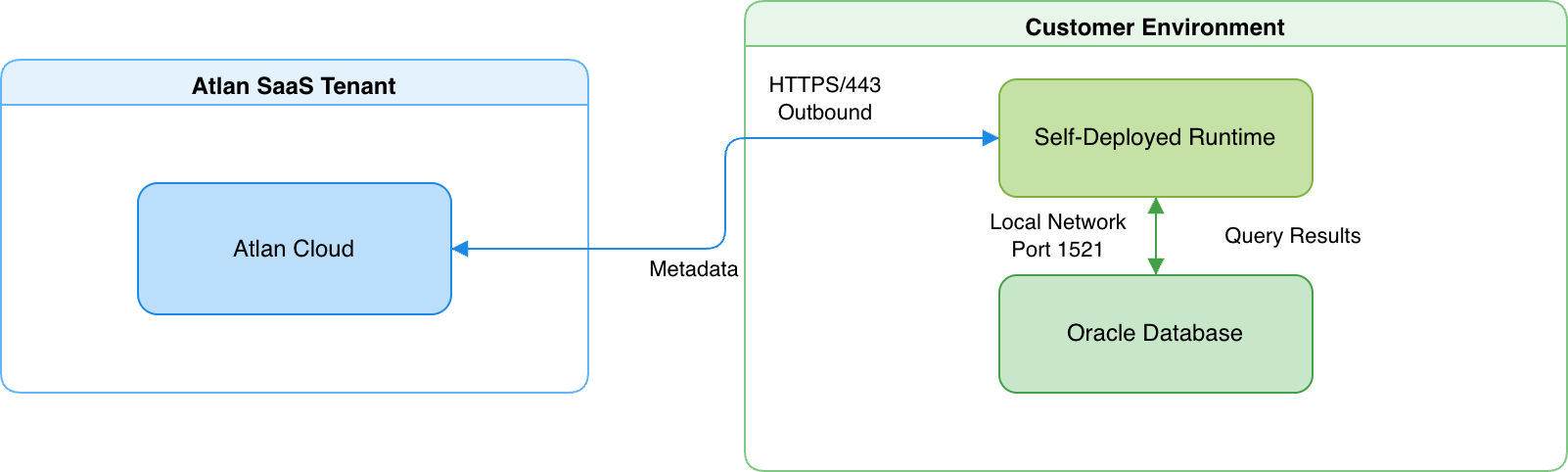
- The runtime maintains an outbound HTTPS connection to Atlan Cloud (port 443) and a local network connection to your SAP ASE database (port 5000 by default).
- The runtime translates requests into read-only SQL queries, executes them on your SAP ASE database, and returns the extracted metadata to Atlan Cloud.
For details on how Self-Deployed Runtime works, see SDR connectivity.
Connection behavior
- SAP ASE keeps its system catalogs per database, so the crawler loops through every database in scope and switches between them with
USEstatements over a single connection. The connector doesn't open parallel connections, which respects SAP ASE login limits. - Lineage is generated from view, stored procedure, and function definitions - the connector parses the SQL stored in
syscommentsto build lineage between assets. Query history mining isn't supported for SAP ASE.
Security
Atlan extracts only structural metadata - databases, schemas, tables, views, columns, and the definitions of views, stored procedures, and functions. For example, if you have a CUSTOMERS table with customer records, Atlan discovers the table structure and column definitions, but never queries or stores the customer records themselves.
-
Read-only operations: All database queries are read-only
SELECTstatements on system catalogs. The connector can't modify data, create or drop database objects, or change any configuration. The SAP ASE user permissions you grant control exactly what the connector can access. -
Credential encryption: SAP ASE connection credentials are encrypted at rest and in transit. In Direct connectivity, Atlan encrypts credentials before storage. In Self-Deployed Runtime, credentials never leave your network perimeter - the runtime retrieves them from your enterprise-managed secret store only when needed, and Atlan Cloud never receives or stores them.
-
Network isolation with Self-Deployed Runtime: Your SAP ASE database gains complete network isolation from the internet. The database only accepts connections from the runtime within your local network. The runtime itself only makes outbound HTTPS connections to Atlan Cloud, which your network team can control through firewall rules.
See also
- Direct connectivity: How Atlan connects directly to data sources
- SDR connectivity: How Self-Deployed Runtime connects to data sources
- Set up SAP ASE: Configure user accounts and permissions