How database connectivity works
A plain-language explanation of the journey a connection makes from Atlan to your PostgreSQL database - the three gates it must pass, the three paths it can take, and SSL in one minute.
A plain-language explanation of the journey a connection makes from Atlan to your PostgreSQL database, the gates it must pass, and the three paths it can take. No prior cloud or networking knowledge assumed.
How Atlan connects to PostgreSQL covers the same connection from the security and data-protection angle - what Atlan reads, how credentials are stored, and the self-deployed runtime architecture. This page covers the network journey and why connections fail.
Three gates every connection passes
Think of your database as a room inside a building inside a gated campus. A connection from Atlan has to get past three separate checkpoints, owned by different people:
- The network firewall (campus gate) - your cloud security group, on-prem firewall, or load balancer. It only checks where the connection comes from (an IP address) and which door it knocks on (a port, normally
5432). Owned by your cloud/network team. pg_hba.conf(building reception) - PostgreSQL's own access-control list. It checks the source address again, plus the username, the database name, and whether the connection is encrypted with SSL. Ahostsslrule means "SSL or nothing." Owned by your database admin (on RDS/Aurora, partly managed by AWS).- Authentication (the room key) - the password, or on AWS RDS/Aurora optionally an IAM token. Owned by your database admin.
Failures at gate 1 look like timeouts. Failures at gates 2 and 3 both look like authentication errors - even when the real problem is a missing SSL setting or an IP that reception doesn't recognize. The error FATAL: pg_hba.conf rejects connection ... SSL off is gate 2 rejecting an unencrypted connection; no password would ever have fixed it. The troubleshooting page is organized around exactly this confusion.
Three traffic paths
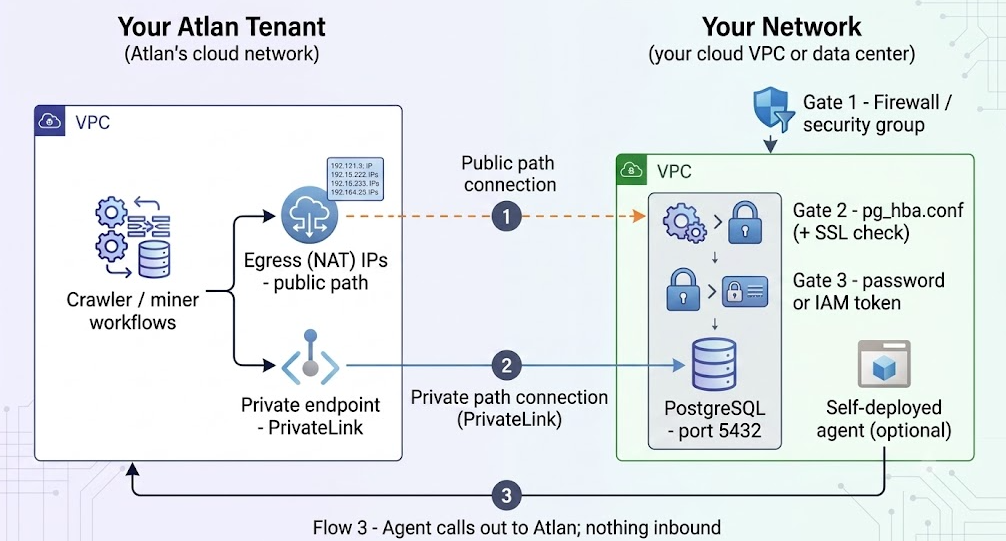
Paths 1 and 2 are "Direct extraction" - the gates apply in full. Path 3 reverses the direction: the agent inside your network initiates everything.
- Internet path. Atlan's workflows leave through fixed egress (NAT) IP addresses and arrive at your database's public endpoint. You allowlist those IPs at gates 1 and 2. Traffic is TLS-encrypted in transit.
- PrivateLink path. You expose the database through an endpoint service (a socket) inside AWS; Atlan creates a VPC endpoint (a plug) in its own network that connects to it. Traffic never touches the internet. The plug gets its own DNS name - and that name, not your database's hostname, goes into the Atlan connection form. Using the wrong one is a recurring source of mysterious timeouts.
- Agent path. A container you run inside your network does the extraction locally and pushes results to Atlan over outbound HTTPS. No inbound rule, no public endpoint, no private link required.
SSL in one minute
SSL (also called TLS) encrypts the conversation between Atlan and PostgreSQL. The client asks for it - or doesn't - via a setting called sslmode:
| sslmode | Meaning | When to use |
|---|---|---|
disable | Never encrypt | Only for isolated test setups |
prefer | Try plain first, fall back to SSL | Avoid - servers that require SSL reject the first plain attempt outright, producing the classic SSL off rejection |
require | Always encrypt (no certificate check) | The sensible default for RDS/Aurora and any server with a hostssl rule |
verify-ca / verify-full | Encrypt and verify the server's certificate | When you have the CA bundle and your policy demands it |
Server requires SSL (a hostssl rule or rds.force_ssl=1) + connection arrives without SSL = FATAL: pg_hba.conf rejects connection for host "...", user "...", database "...", SSL off, often bundled with FATAL: PAM authentication failed. It looks like a password problem. It isn't. Set the connection's SSL mode to require and it disappears. Full walkthrough in troubleshooting.
Glossary
For definitions of every term the guides use - pg_hba.conf, hostssl, sslmode, security group, egress/NAT IP, CIDR range, endpoint service, VPC endpoint / VPCE DNS name, NLB, RDS proxy, IAM database authentication, pg_stat_statements, preflight checks, self-deployed agent - see the Network connectivity glossary.
See also
- Choose how Atlan connects to PostgreSQL: Pick the right method before configuring anything
- Connect over the internet with IP allowlisting: Apply this knowledge on the fastest path