How SQL Server connectivity works
A plain-language explanation of where Atlan's crawler actually runs, the three traffic paths to your SQL Server, and how authentication rides on top of the network path.
A plain-language explanation of where Atlan's crawler actually runs, the three traffic paths to your database, and how authentication fits in. No prior networking knowledge assumed.
How Atlan connects to Microsoft SQL Server covers the same connection from the security and data-protection angle - what Atlan reads, how credentials are stored, and the deployment modes. This page covers the network journey and why connections fail.
Crawler runs in Atlan's cloud - not yours
When you click Run on a SQL Server workflow, the extraction program starts inside your Atlan tenant's cloud environment. It then has to travel across a network to reach your database. Everything on these pages is about making that journey possible:
- Your database's firewall must let Atlan in (it sees Atlan as just another internet client), or
- a private tunnel must exist between Atlan's cloud and yours, or
- the extraction program must move to your side of the wall (the self-deployed runtime).
This is why "it works from my laptop with SSMS" doesn't prove anything: your laptop is inside your network. Atlan isn't.
Three traffic paths
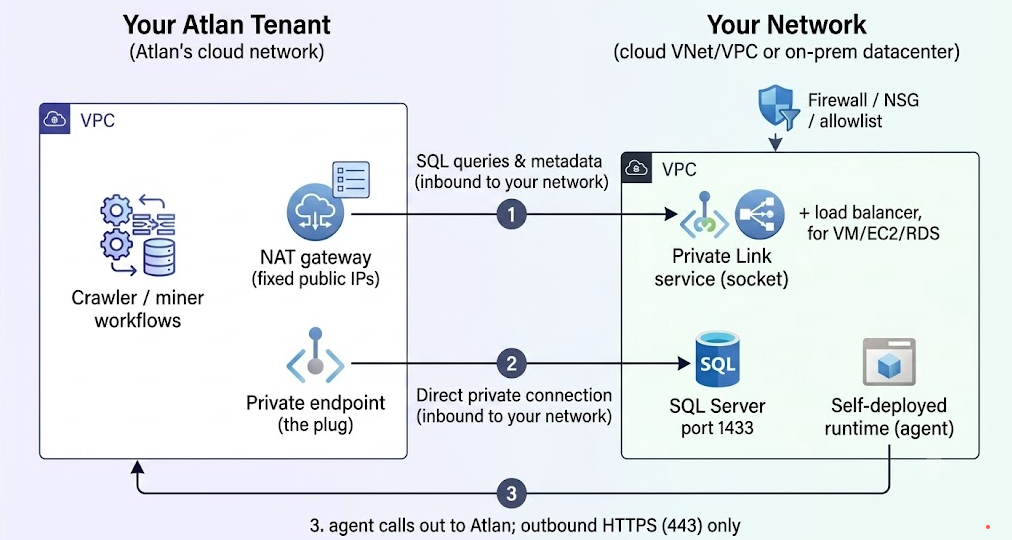
Three ways to bridge the two networks. Only one arrow needs to work - pick it on Choose how Atlan connects to SQL Server.
- Direct (Atlan → your firewall → SQL Server). Atlan's traffic leaves through a NAT gateway with fixed public IPs. Your firewall must allowlist those IPs on the SQL Server port (1433 by default). Covered in the direct guide.
- Private link (Atlan's endpoint → your socket). Atlan creates an "endpoint" (a plug) in its network; your side exposes a "service" (a socket). Traffic flows over the cloud provider's internal network. The socket's owner must approve the connection - the step most setups stall on. Covered in Private network links.
- Self-deployed runtime (your network → Atlan, outbound only). A small Kubernetes-based agent runs the extraction inside your network and pushes metadata out to Atlan over HTTPS. Nothing inbound is opened. Covered in Special cases.
Authentication rides on top of the network path
Getting the network right is step one; the connection still has to log in. Atlan supports three methods (per Set up Microsoft SQL Server): Basic (SQL Server username/password), Service principal (a Microsoft Entra ID app registration - client ID, secret, tenant ID), and Windows (NTLM) (Active Directory credentials plus a Windows Domain field). Network errors and login errors look confusingly similar in the UI - the troubleshooting page shows how to tell them apart.
Which string goes where
The three identifiers people mix up on private links:
| String | Looks like | Where it goes |
|---|---|---|
| PLS alias / endpoint service name (the socket's name) | myservice.abc123.westeurope.azure.privatelinkservice or com.amazonaws.vpce.us-east-1.vpce-svc-EXAMPLE | You share it with Atlan on the setup ticket. Never in the crawler's Host field. |
| Endpoint DNS name (the plug's name) | vpce-EXAMPLE.vpce-svc-EXAMPLE.us-east-1.vpce.amazonaws.com | Atlan sends it to you after the endpoint is approved. This goes in the crawler's Host field. |
| Server FQDN | myserver.database.windows.net or sqlprod01.corp.example-corp.local | Direct connectivity only (public names), or when support confirms they've mapped it to the endpoint in DNS - ask, don't assume. |
Glossary
For definitions of every term the guides use - port 1433, NAT/egress IP, CIDR range, private endpoint, endpoint service / Private Link service, PLS alias, endpoint DNS name, Resource ID, NLB, NSG/security group, private DNS zone, listener/redirect, Encrypt/TrustServerCertificate, NTLM/Windows Domain, Entra ID service principal, self-deployed runtime - see the Network connectivity glossary.
See also
- Choose how Atlan connects to SQL Server: Pick the right method before configuring anything
- Connect directly with IP allowlisting: Apply this knowledge on the fastest path