How Cloud SQL connectivity works
Learn the three traffic paths between Atlan and your Cloud SQL for PostgreSQL instance, who owns each piece, and why connectivity is not authentication.
This page explains the three traffic paths between Atlan and your Cloud SQL for PostgreSQL instance and who owns each piece. No prior Google Cloud knowledge is required.
For the architecture view of direct and self-deployed runtime connectivity, see How Atlan connects to Cloud SQL Postgres.
Three doors into the same building
Think of your Cloud SQL instance as an office inside a secured building (your Google Cloud network). There are three ways a visitor like Atlan can get in:
- The front door with a guest list (public IP + authorized networks). The instance gets an address on the public internet, but the door only opens for visitors whose addresses are on a list you control - Google calls this list authorized networks. You add Atlan's fixed addresses to the list. Traffic is TLS-encrypted the whole way.
- An employee who works inside (self-deployed runtime). Instead of Atlan coming in, you run a small Atlan-provided service - the self-deployed runtime, sometimes called the Secure Agent - inside your own network. It talks to the database locally (port 5432) and phones results home to Atlan over a single outbound HTTPS connection (port 443). Nothing from the internet ever connects in.
- A private corridor between two buildings (Private Service Connect). Google builds a dedicated internal walkway between Atlan's network and yours. Traffic flows over Google's own network and never touches the internet. Like any corridor between two buildings, both sides must agree: Atlan builds its end (an endpoint), and you approve the connection on your end.
Three traffic paths
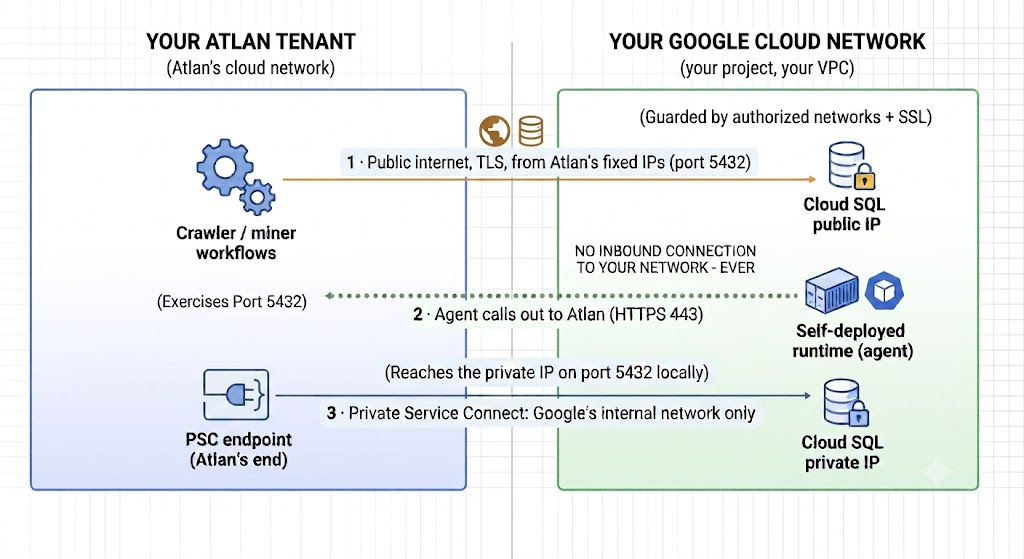
Pick exactly one path per connection. Path 2 reverses direction: your network calls Atlan, never the other way around. On path 3, you must accept the pending connection before traffic flows.
Connectivity is not authentication
Getting to the database (this page) and proving who you are (credentials) are separate steps that fail in separate ways - but Cloud SQL error messages often blur them. Two things to know:
- A network problem frequently surfaces in Atlan as
app internal error: 500or "Not able to authenticate your credentials" wrapping a connection timeout. If the error mentionsConnectionTimeout,connection refused, or an unreachable host anywhere in its text, fix the network first - your password was never even checked. See Troubleshooting Cloud SQL for PostgreSQL connectivity. - The connector supports Basic auth (database username/password) and Google IAM auth (IAM user, IAM service account key, or - agent mode only - Workload Identity Federation). IAM methods additionally need your instance connection name and a database-level login grant. Details in Special cases.
Glossary
For definitions of every term used in these guides - public/private IP, authorized networks, NAT IP, CIDR range, self-deployed runtime, secret store / Key Type, Private Service Connect, service attachment, instance connection name, SSL mode, pg_hba.conf, IAM database authentication - see the Network connectivity glossary.
See also
- Choose how Atlan connects to Cloud SQL for PostgreSQL: Pick the right method before configuring anything
- Private Service Connect to Cloud SQL: Apply this knowledge on the private path