How IAM role delegation works
Learn how Atlan borrows an identity in your AWS account for Amazon Athena, why there are two halves to set up, and the four traffic paths a healthy connection uses.
This page explains how Atlan borrows an identity in your AWS account, why there are two halves to set up, and the four traffic paths a healthy Athena connection uses. No prior AWS knowledge is required.
Visitor badge
With access keys, you hand Atlan a permanent key to your building. With role delegation, you instead leave a visitor badge at the front desk: Atlan shows its own company ID, the front desk checks it against the guest list, and issues a badge that expires after an hour and only opens the doors you chose.
In AWS terms:
- The IAM role you create is the visitor badge - a bundle of permissions with no password of its own.
- The role's trust policy is the guest list - it names exactly which outside identity (Atlan's node instance role) may pick up the badge.
- The external ID is a code word you can add to the guest list - even the right visitor is turned away without it.
- AWS STS (Security Token Service) is the front desk - it checks the guest list and issues the one-hour badge.
Two sides must agree, and this is where most setups stall: your trust policy must name Atlan's role, and Atlan's side must be configured to request your role - a manual step Atlan support performs per tenant. Either half missing produces the same error: authentication failed.
Four traffic paths
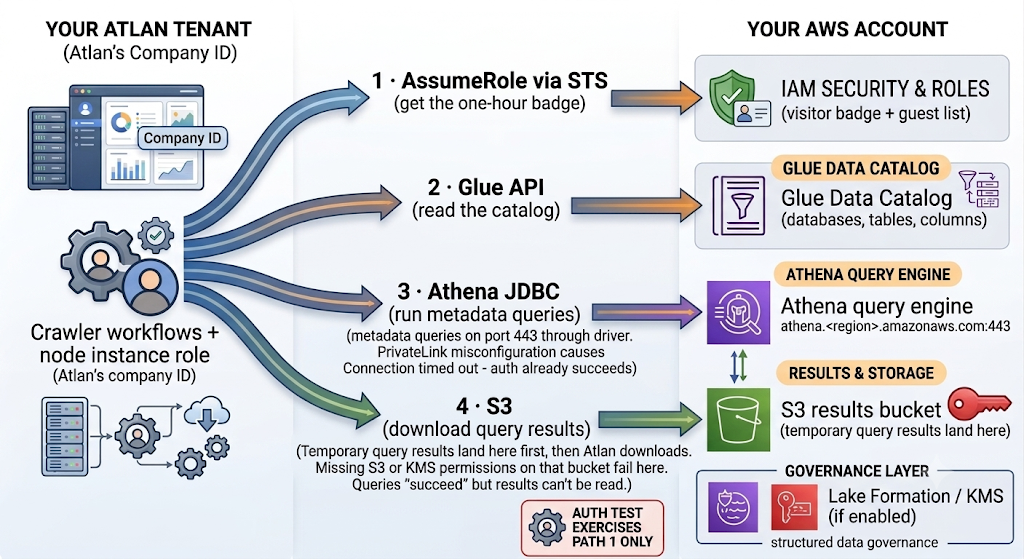
The authentication test exercises path 1 only. A crawl needs all four - which is why "test passed but crawl failed" is the single most common Athena support issue.
- AssumeRole (Atlan → STS). Atlan's node instance role asks STS for temporary credentials for your role. Fails if either half of the two-sided setup is missing, or the external ID doesn't match - error
HEKA-401-00-001. - Glue Data Catalog (Atlan → Glue). Athena stores its database/table/column definitions in Glue. Missing
glue:Get*permissions fail here withAccessDeniedException. - Athena queries (Atlan → Athena, port 443). The crawler runs metadata queries through the Athena JDBC driver. Network blocks (usually PrivateLink misconfiguration) surface here as Connection timed out - after authentication already succeeded.
- Results download (Atlan → S3). Athena writes every query result to your S3 output location first; Atlan then downloads it. Missing S3 or KMS permissions on that bucket fail here - queries "succeed" but results can't be read.
Glossary
For definitions of every term used in these guides - IAM, IAM role, trust policy, node instance role, external ID, ARN, STS, Glue Data Catalog, workgroup, S3 output location, VPC interface endpoint, Lake Formation, KMS - see the Network connectivity glossary.
See also
- Choose how Atlan connects to Amazon Athena: Pick the right method before configuring anything
- Connect with IAM role (recommended): Apply this knowledge in the recommended setup