How BigQuery connectivity works
Learn how Atlan reaches Google BigQuery, why there are no IP addresses to allowlist on the main path, and the four traffic hops that matter.
This page explains how Atlan reaches BigQuery, why there are no IP addresses to allowlist on the main path, and the four traffic hops that matter. No prior Google Cloud knowledge is required.
For the architecture view - sequence diagrams of direct connectivity, the self-deployed runtime, the WIF token exchange, and how credentials are handled - see How Atlan connects to Google BigQuery.
There is no server - only an API front door
With most databases, Atlan connects to your server, so you open your firewall to Atlan's IP addresses. BigQuery has no server you host. Your data lives inside Google, and everyone - you, your BI tools, Atlan - talks to the same Google-run front door: bigquery.googleapis.com.
That changes what "connectivity" means:
- There is usually nothing to open. The front door is reachable from anywhere; access is controlled by identity (who is calling), not by network address.
- Identity is a service account - a robot user you create in Google Cloud and grant read-only metadata permissions. Atlan signs in as that robot.
- The exception is VPC Service Controls - an optional Google security fence around your projects. If your organization uses it, the fence blocks Atlan until your security team adds a rule, no matter how correct your credentials are.
Four traffic hops
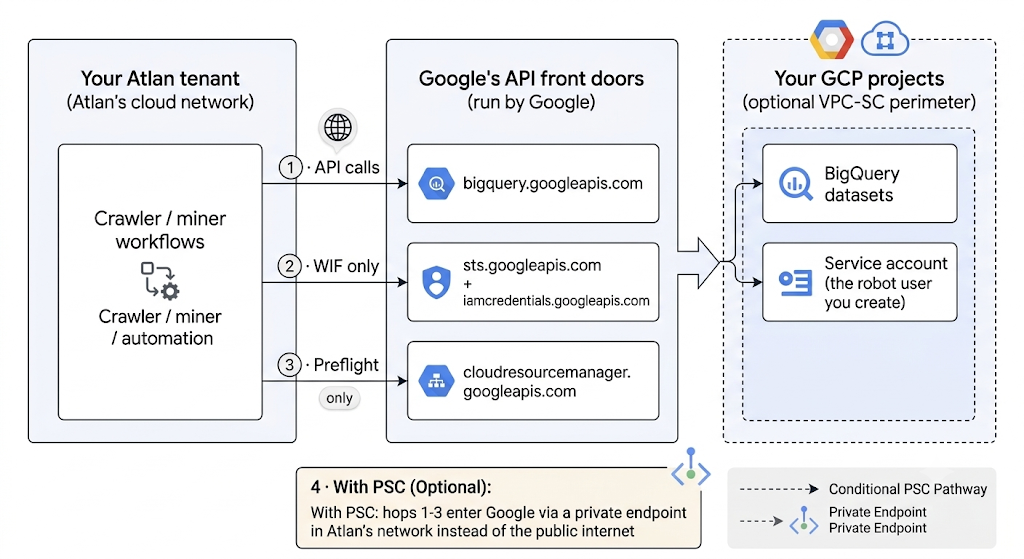
All hops are HTTPS on port 443. If a VPC Service Controls perimeter is present, it evaluates every hop that touches your projects.
- API calls (always). Metadata reads, query-history mining, and preflight permission checks all go to
bigquery.googleapis.com. This is the path Private Service Connect can make private. - Token exchange (WIF only). Before hop 1, Atlan trades a short-lived identity token at
sts.googleapis.com, then asksiamcredentials.googleapis.comto act as your service account. If you use VPC Service Controls, these two calls are judged against a different identity than hop 1 - the single most misunderstood fact in BigQuery connectivity. Details in VPC Service Controls & allowlisting. - Preflight check (setup only). Atlan's "Test connection" and preflight verify permissions via
cloudresourcemanager.googleapis.com. That API must be enabled in your project - the crawl itself doesn't need it, so a disabled API fails preflight while everything else works. A recurring source of confusion. - Private Service Connect (optional). A private on-ramp: Atlan enters Google's network through an endpoint inside Atlan's own network instead of over the internet. It changes the road, not the rules - identity and VPC-SC checks still apply.
Glossary
For definitions of every term used in these guides - service account, JSON key, Workload Identity Federation, OIDC token, STS, impersonation, Private Service Connect, VPC Service Controls, ingress/egress rules, and more - see the Network connectivity glossary.
See also
- Choose how Atlan connects to Google BigQuery: Pick the right method before configuring anything
- Set up authentication for Google BigQuery: Apply this knowledge to configure credentials