What Self-Deployed Runtime is, how it connects, which features it supports, its trade-offs, and what you need before you set it up.
Self-deployed runtime
SDR requires additional enablement and licensing. Contact your Atlan representative for details.
Self-Deployed Runtime (SDR) runs Atlan's connector apps inside your own infrastructure, so traffic between Atlan's code and your data sources stays inside your network. SDR crawls metadata there and syncs only metadata to Atlan. For who's involved and what happens during a workflow run, see How Atlan connects.

Design principles
SDR sits within your network perimeter, and every connector app follows the same principles:
- Outbound to Atlan: SDR maintains persistent outbound HTTPS and gRPC connections to Atlan. To open them in your firewall, see outbound rules.
- No ingress: every connection is initiated from your network, and your data sources never expose ports to the internet. See Outbound-only communication.
- To data sources: SDR connects to your sources over your local network, and reads source credentials from your own secret store. See Security.
Feature support
Self-Deployed Runtime supports every feature of Atlan-hosted execution except sample data preview, Data Exploration queries, and tag reverse sync:
| Feature | Atlan-hosted | Self-deployed runtime |
|---|---|---|
| Metadata extraction | ✅ Supported | ✅ Supported |
| Authentication testing | ✅ Supported | ✅ Supported |
| Preflight checks | ✅ Supported | ✅ Supported |
| Filter selection | ✅ Interactive dropdowns | ✅ Interactive dropdowns |
| Sample data preview | ✅ Supported | ❌ Not available |
| Data Exploration queries | ✅ Supported | ❌ Not available |
| Tag reverse sync | ✅ Supported | ❌ Not available |
If you need sample data preview, Data Exploration queries, or tag reverse sync for a source, use Atlan-hosted execution for that source.
Trade-offs
SDR gives you control that direct and private connectivity don't, but that control comes with responsibility. Your infrastructure team owns these:
- You deploy and maintain SDR. Infrastructure costs are yours.
- Setup requires coordination across network, security, and platform teams.
- You own observability for SDR—monitoring, logging, alerting.
What you need
- License: SDR enablement and an additional license from your Atlan representative.
- Docker Hub access: to pull Atlan's images. See Set up Docker Hub access.
- Host: a Docker or Podman host, or a Kubernetes cluster. See Decide deployment options.
- Object storage: a bucket for SDR's intermediate data and logs. See Architecture.
- Secret store: where SDR reads source credentials from. See Security.
- Outbound rules: firewall rules for SDR's connections to Atlan. See Configure outbound rules.
Next steps
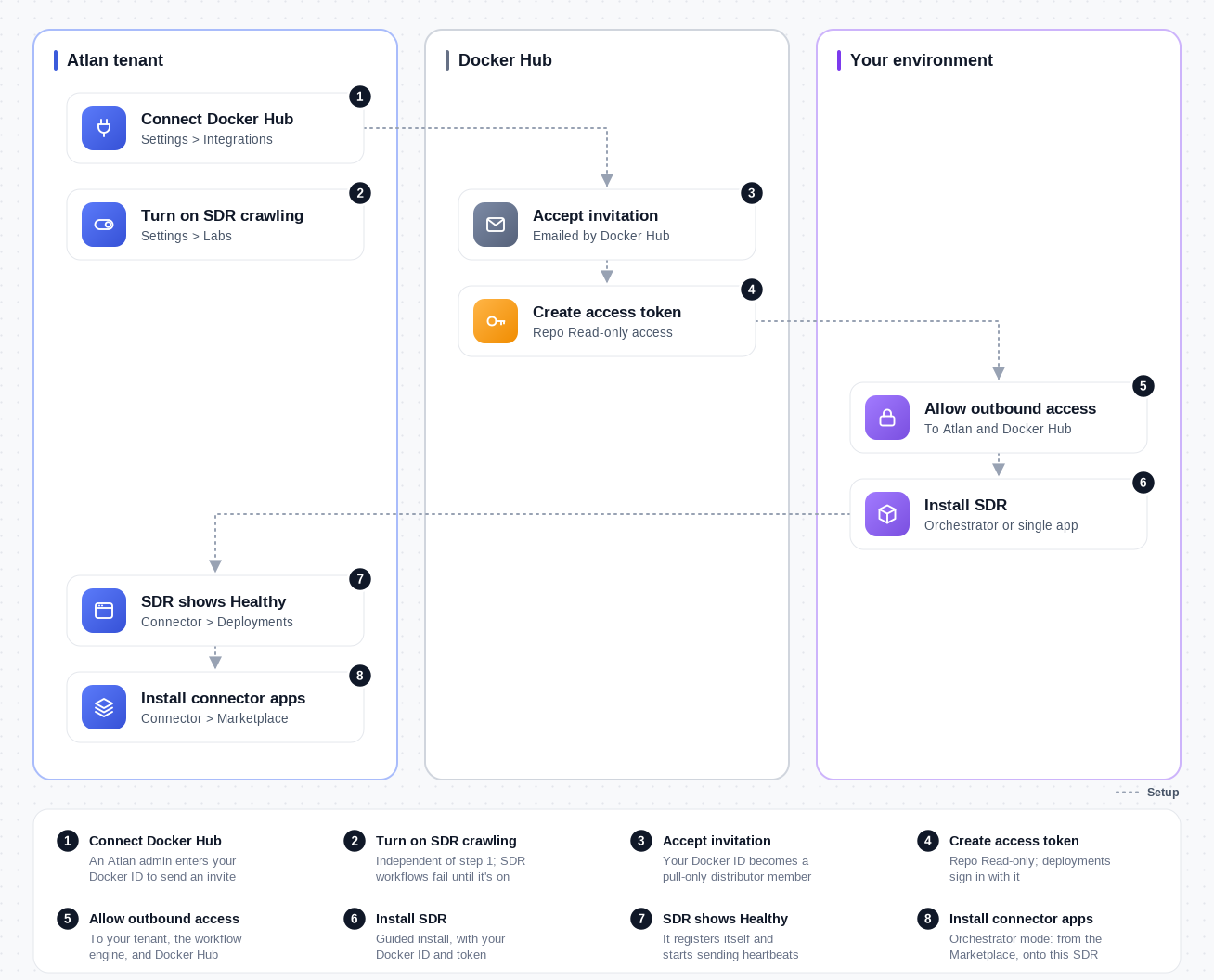
- Decide deployment options: pick a lifecycle mode, platform, and image source.
- Review Architecture and Security with your platform and security teams.
- Set up Docker Hub access and configure outbound rules.
- Install SDR.
- Run workflows on SDR.