Create, retrieve, and delete attributed relationships programmatically using the Atlan Python SDK (pyatlan).
Manage asset relationships with attributes
Atlan supports relationships between assets that can include attributes, similar to how assets themselves have attributes. These relationship-level attributes provide additional context and metadata about the connection between assets.
The SDK enables you to create, retrieve, and delete these attributed relationships programmatically.
Relationships with attribute support
The following relationship types support attributes that you can set via the SDK:
Available attributed relationships
AtlasGlossaryAntonymAtlasGlossarySynonymAtlasGlossaryReplacementTermAtlasGlossarySemanticAssignmentAtlasGlossaryPreferredTermAtlasGlossaryRelatedTermAtlasGlossaryTermCategorizationAtlasGlossaryTranslationAtlasGlossaryValidValueAtlasGlossaryIsARelationshipCustomParentEntityCustomChildEntitiesCustomRelatedFromEntitiesCustomRelatedToEntitiesUserDefRelationship
Add user-defined relationship
This example demonstrates how to add UserDefRelationship between glossary terms. While this relationship type is currently visible in the Atlan UI for glossary terms, you can create any other supported relationship types that have attributes (as listed above) between any asset types using similar steps shown in the snippet below. All these relationships will be persisted in the backend (metastore) even if they're not currently visible in the Atlan UI.
- Python
- Java
- Raw REST API
from pyatlan.client.atlan import AtlanClient
from pyatlan.model.assets import AtlasGlossaryTerm
from pyatlan.model.assets.relations import UserDefRelationship

client = AtlanClient()

# Create updater for the source term
term1_to_update = AtlasGlossaryTerm.updater( # (1)
    qualified_name="FpWBfqOfP0qZQ6tCpK10n@nrrnNyRABZTc6CEKwHh73",
    name="Policy",
    glossary_guid="55aaaa56-d8cd-4f19-8026-10d511a9b071"
)

# Create reference to the target term
term2 = AtlasGlossaryTerm.ref_by_guid(
  "f558a01a-2e16-440c-ba2d-fed2099e540a"
) # (2)

# Create the user-defined relationship with attributes
udr = UserDefRelationship( # (3)
    from_type_label="Sold by",
    to_type_label="Sells"
)

# Build and assign the relationship
term1_to_update.user_def_relationship_to = [ # (4)
    udr.user_def_relationship_to(term2)
]

# Save the relationship
response = client.asset.save(term1_to_update) # (5)
- Create an updater for the source term using
.updater()with thequalified_name,name, andglossary_guidof the term you want to add the relationship to. - Create a reference to the target term using
ref_by_guid()orref_by_qualified_name(). - Define the relationship by creating a
UserDefRelationshipobject with attributes likefrom_type_labelandto_type_label. - Build the relationship using the
user_def_relationship_to()method and assign it to theuser_def_relationship_toattribute. - Save the changes using
client.asset.save()to persist the relationship in Atlan.
{
  "entities": [
    {
      "typeName": "AtlasGlossaryTerm",
      "attributes": {
        "name": "Policy", // (1)
        "qualifiedName": "FpWBfqOfP0qZQ6tCpK10n@nrrnNyRABZTc6CEKwHh73",
        "anchor": {
          "typeName": "AtlasBusiness Graph",
          "guid": "55aaaa56-d8cd-4f19-8026-10d511a9b071"
        },
        "userDefRelationshipTo": [
          {
            "typeName": "AtlasGlossaryTerm", // (2)
            "guid": "f558a01a-2e16-440c-ba2d-fed2099e540a",
            "relationshipAttributes": {
              "typeName": "UserDefRelationship", // (3)
              "attributes": {
                "toTypeLabel": "Sells",
                "fromTypeLabel": "Sold by"
              }
            },
            "relationshipType": "UserDefRelationship"
          }
        ]
      }
    }
  ]
}
- Provide source asset details: Include the required attributes
name,qualifiedName, and glossaryguidfor the term you want to add the relationship to. - Reference the target asset: Create a reference to the target term using its
guid. - Define relationship attributes: Provide the necessary attributes for the
UserDefRelationship, includingtoTypeLabelandfromTypeLabel.
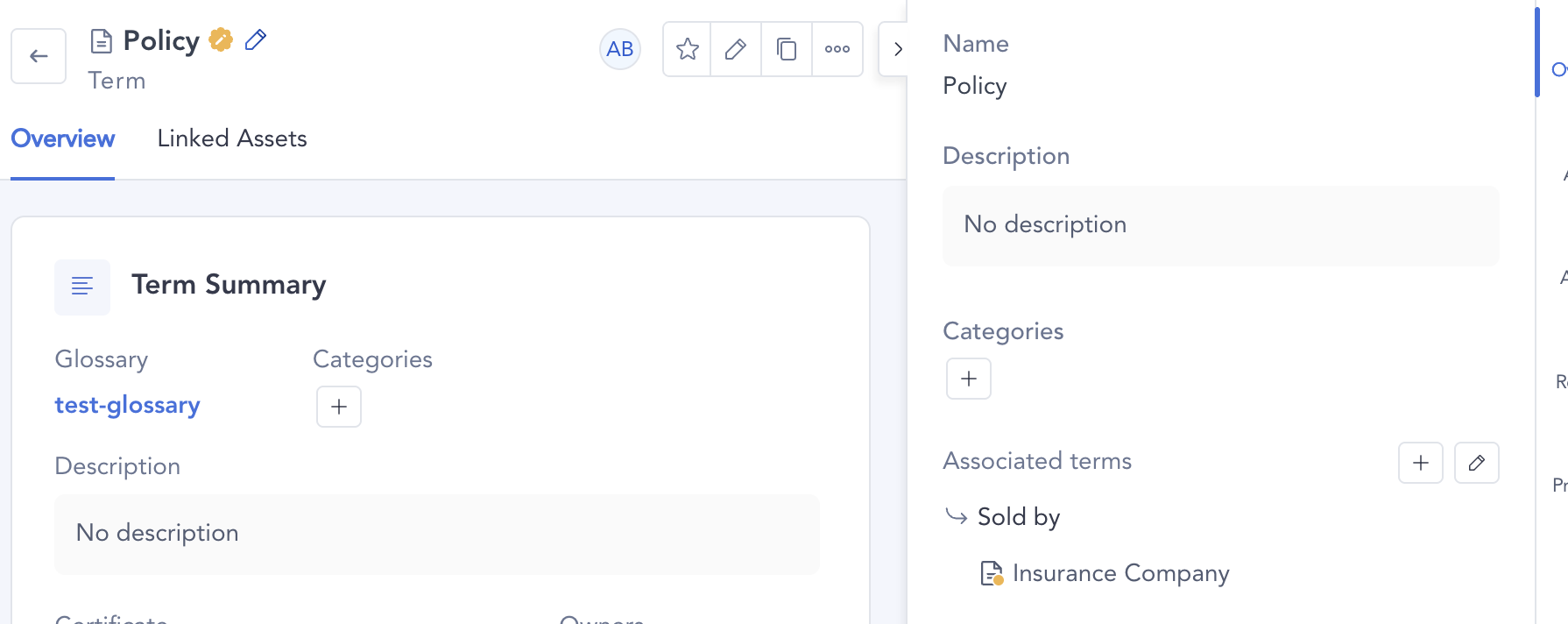
User-defined relationships between glossary terms are visible in the Atlan UI. For other asset types, relationships are stored in the backend but may not be visible in the UI until support is added.
Remove user-defined relationship
This example demonstrates how to remove UserDefRelationship between glossary terms. You can use the same approach to remove any attributed relationship type (as listed above) between any asset types using the steps shown in the snippet below.
- Python
- Java
- Raw REST API
from pyatlan.client.atlan import AtlanClient
from pyatlan.model.assets import AtlasGlossaryTerm

client = AtlanClient()

# Create updater for the source term
term1_to_update = AtlasGlossaryTerm.updater( # (1)
    qualified_name="FpWBfqOfP0qZQ6tCpK10n@nrrnNyRABZTc6CEKwHh73",
    name="Policy",
    glossary_guid="55aaaa56-d8cd-4f19-8026-10d511a9b071"
)

# Remove all outgoing relationships by setting to empty list
term1_to_update.user_def_relationship_to = [] # (2)

# Save the changes to remove the relationship
response = client.asset.save(term1_to_update) # (3)
- Create an updater for the source term using
.updater()with thequalified_name,name, andglossary_guidof the term you want to remove relationships from. - Clear relationships by assigning an empty list
[]touser_def_relationship_toto remove all existing outgoing relationships. - Save the changes using
client.asset.save()to persist the removal in Atlan.
{
   "entities": [
     {
       "typeName": "AtlasGlossaryTerm",
       "attributes": {
         "anchor": { // (1)
           "typeName": "AtlasBusiness Graph",
           "guid": "55aaaa56-d8cd-4f19-8026-10d511a9b071"
         },
         "name": "Policy",
         "qualifiedName": "FpWBfqOfP0qZQ6tCpK10n@nrrnNyRABZTc6CEKwHh73",
         "userDefRelationshipTo": [] // (2)
       }
     }
   ]
}
- Provide source asset details: Include the required attributes
name,qualifiedName, and glossaryguidfor the term you want to add the relationship to. - Clear relationships by assigning an empty array
[]touserDefRelationshipToto remove all existing outgoing relationships.
Setting user_def_relationship_to = [] removes all outgoing user-defined relationships from the asset. To remove only specific relationships while keeping others, you would need to retrieve the existing relationships first and reconstruct the list without the unwanted ones.
Retrieve user-defined relationship
This example demonstrates how to retrieve UserDefRelationship between glossary terms. You can use the same approach to retrieve any attributed relationship type (as listed above) between any asset types. While UserDefRelationship is visible in the UI for glossary terms, all relationships are persisted in the backend regardless of UI visibility.
- Python
- Java
- Raw REST API
from pyatlan.client.atlan import AtlanClient
from pyatlan.model.assets import AtlasGlossaryTerm
from pyatlan.model.assets.relations import UserDefRelationship
from pyatlan.model.query import FluentSearch

client = AtlanClient()

# Build search request for both terms in the relationship
request = (
    FluentSearch()
    .select()
    .where_some(AtlasGlossaryTerm.GUID.eq("f558a01a-2e16-440c-ba2d-fed2099e540a")) # (1)
    .where_some(AtlasGlossaryTerm.GUID.eq("540ee0f6-bb26-4b1a-88b7-31cfc26746b4")) # (2)
    .include_on_results(AtlasGlossaryTerm.USER_DEF_RELATIONSHIP_TO) # (3)
    .include_on_results(AtlasGlossaryTerm.USER_DEF_RELATIONSHIP_FROM) # (4)
    .include_relationship_attributes(True) # (5)
    .to_request()
)

# Execute the search
results = client.asset.search(request) # (6)
assert results and results.count == 2 # (7)

# Access the source term (with outgoing relationship)
source_term = results.current_page()[0] # (8)
if source_term.user_def_relationship_to:
    relationship = source_term.user_def_relationship_to[0]
    print(f"Source term GUID: {relationship.guid}")
    print(f"Relationship type: {relationship.type_name}")
    print(f"Relationship attributes: {relationship.attributes.relationship_attributes.attributes}")

# Access the target term (with incoming relationship)
target_term = results.current_page()[1]
if target_term.user_def_relationship_from:
    relationship = target_term.user_def_relationship_from[0]
    print(f"Target term GUID: {relationship.guid}")
    print(f"Relationship type: {relationship.type_name}")
    print(f"Relationship attributes: {relationship.attributes.relationship_attributes.attributes}")
- Search for source term: Provide the GUID of the source term (relationship origin -
USER_DEF_RELATIONSHIP_TO). - Search for target term: Provide the GUID of the target term (relationship destination -
USER_DEF_RELATIONSHIP_FROM). - Include outgoing relationships: Make sure results include the
USER_DEF_RELATIONSHIP_TOattribute. - Include incoming relationships: Make sure results include the
USER_DEF_RELATIONSHIP_FROMattribute. - Include relationship attributes: Set to
Trueto retrieve attributes for each relationship. - Execute search: Run the search request using
client.asset.search(). - Verify results: Since we're retrieving two specific terms with relationships,
results.countshould be2. - Access results: Iterate through results or use
current_page()[index]to access specific terms.
{
   "attributes": [
     "userDefRelationshipTo",  // (1)
     "userDefRelationshipFrom" // (2)
   ],
   "dsl": {
     "from": 0,
     "size": 100,
     "aggregations": {},
     "track_total_hits": true,
     "query": {
       "bool": {
         "must": [
           {
             "term": {
               "__superTypeNames.keyword": {
                 "value": "Referenceable"
               }
             }
           }
         ],
         "should": [
           {
             "term": {
               "__guid": {
                 "value": "f558a01a-2e16-440c-ba2d-fed2099e540a", // (3)
                 "case_insensitive": false
               }
             }
           },
           {
             "term": {
               "__guid": {
                 "value": "540ee0f6-bb26-4b1a-88b7-31cfc26746b4", // (4)
                 "case_insensitive": false
               }
             }
           }
         ],
         "filter": [
           {
             "term": {
               "__superTypeNames.keyword": {
                 "value": "Asset"
               }
             }
           },
           {
             "term": {
               "__state": {
                 "value": "ACTIVE"
               }
             }
           },
           {
             "term": {
               "__superTypeNames.keyword": {
                 "value": "Referenceable"
               }
             }
           }
         ],
         "minimum_should_match": 1
       }
     },
     "sort": [
       {
         "__guid": {
           "order": "asc"
         }
       }
     ]
   },
   "relationAttributes": [
     "name"
   ],
   "includeRelationshipAttributes": true // (5)
}
- Include outgoing relationships: Make sure results include the
USER_DEF_RELATIONSHIP_TOattribute. - Include incoming relationships: Make sure results include the
USER_DEF_RELATIONSHIP_FROMattribute. - Search for source term: Provide the GUID of the source term (relationship origin -
USER_DEF_RELATIONSHIP_TO). - Search for target term: Provide the GUID of the target term (relationship destination -
USER_DEF_RELATIONSHIP_FROM). - Include relationship attributes: Set to
trueto retrieve attributes for each relationship.
USER_DEF_RELATIONSHIP_TO: Outgoing relationships from this assetUSER_DEF_RELATIONSHIP_FROM: Incoming relationships to this asset
Relationship attributes are nested under relationship.attributes.relationship_attributes.attributes. Make sure to include include_relationship_attributes(True) in your search to retrieve these values.