Understand how Atlan securely connects to your SAP S/4HANA system to extract metadata.
How Atlan connects to SAP S/4HANA
Atlan connects to SAP S/4HANA to extract metadata from your SAP system while maintaining network security and compliance requirements. Your SAP environment remains protected behind your firewall with no inbound internet connections required.
How it works
The connection between Atlan and SAP S/4HANA involves three core components:
- Atlan Cloud: The central platform that orchestrates metadata extraction and catalogs your SAP assets
- Self-Deployed Runtime: A lightweight service deployed within your network that acts as a secure bridge
- SAP S/4HANA System: Your on-premises or private cloud SAP system containing the metadata to be cataloged
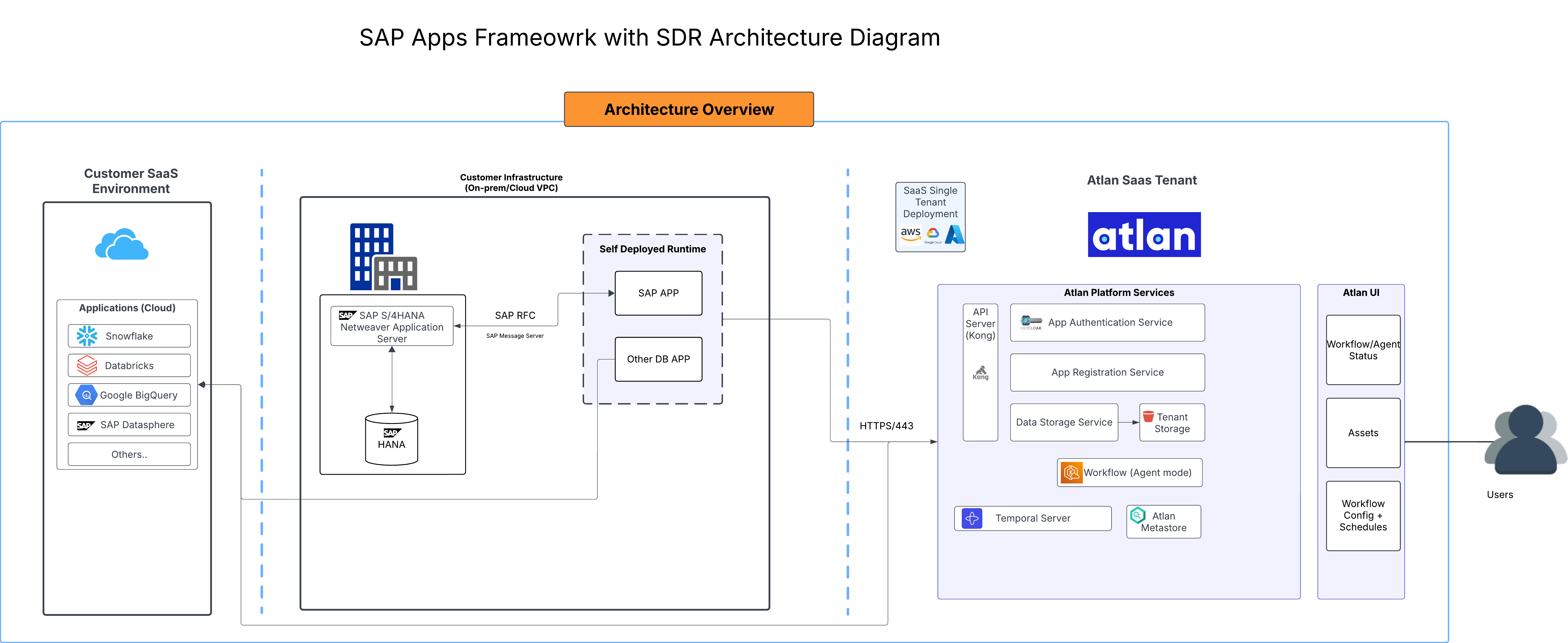
As shown in the diagram:
- Self-Deployed Runtime sits within your network perimeter, establishing an outbound HTTPS connection to Atlan Cloud while maintaining a local connection to your SAP system.
- When you configure a SAP S/4HANA connection, Self-Deployed Runtime translates Atlan's metadata extraction requests into SAP RFC (Remote Function Call) calls and returns the results securely to Atlan Cloud for processing and cataloging.
- This architecture ensures your SAP system never needs to expose ports to the internet—all connections are initiated from within your network.
How it protects your data
SAP systems contain sensitive business data and critical operational information. This connection model protects your environment by ensuring metadata extraction never requires opening your network to inbound connections or storing credentials outside your enterprise perimeter.
-
Network isolation and encrypted communication: Your SAP system remains behind your firewall with all connections initiated from within your network—never inbound. Self-Deployed Runtime requires only outbound HTTPS access to Atlan Cloud (with support for corporate proxies) and local network access to your SAP system. All data transmission uses TLS 1.2 encryption over HTTPS, protecting metadata from interception during transit.
-
Authentication and credential protection: Self-Deployed Runtime authenticates with Atlan using API keys stored in your enterprise-managed secret vaults (AWS Secrets Manager, Azure Key Vault, or Kubernetes Secrets). SAP connection credentials also remain within your enterprise security perimeter—retrieved dynamically from your secret vaults only when needed and never transmitted to or stored in Atlan Cloud. Self-Deployed Runtime only accesses metadata about your SAP data structures—such as tables, fields, CDS views, and modules. Business data from your SAP tables remains in your SAP system and is never extracted.
-
Read-only operations: All SAP RFC calls made by Self-Deployed Runtime are read-only queries that extract metadata without modifying any SAP data or configuration.
See also
- Self-Deployed Runtime: Understand Self-Deployed Runtime architecture, security, and deployment options
- Install Self-Deployed Runtime: Choose your deployment platform and install Self-Deployed Runtime
- Set up SAP S/4HANA: Configure user accounts and permissions for metadata extraction