How private connectivity works
A plain-language explanation of what a private link to Databricks is, who builds which half, and the three traffic paths between Atlan and Databricks.
Private phone line
Normally, Atlan reaches your Databricks workspace over the public internet-encrypted, but travelling shared roads. A private link is like a dedicated phone line between two buildings: traffic flows over the cloud provider's internal network and never touches the internet.
A private line has two ends, owned by different parties:
- Databricks exposes a service—think of it as a wall socket that accepts private connections to the workspace's front end (its web application and REST API). AWS calls this a VPC endpoint service; on Azure, the workspace itself is the Private Link target, addressed by its Resource ID.
- Atlan creates an endpoint—the plug that goes into that socket, living inside Atlan's own network.
Plugging in isn't enough. Two more things must happen, and they're where most setups stall:
- The socket's owner must accept the plug. On AWS you register Atlan's endpoint in your Databricks Account Console; on Azure you approve the pending private endpoint in the Azure portal. Each how-to guide covers this step.
- DNS must be re-pointed. Atlan's workflows still dial the workspace by its normal name (
your-workspace.cloud.databricks.com). Atlan creates a private DNS mapping inside its network so that name resolves to the private endpoint instead of the public internet. Atlan does this for you but it's per hostname, which is why every workspace URL must be shared explicitly.
Front-end vs back-end private link
Databricks has two kinds of Private Link, and only one involves Atlan:
| Kind | What it connects | Who sets it up |
|---|---|---|
| Front-end | Users and tools (like Atlan) → the workspace web application, REST API, and SQL warehouses | This is what these guides configure. Your Databricks account admin enables it; Atlan plugs into it. |
| Back-end | Databricks compute plane → Databricks control plane, inside your cloud account | Entirely yours. Atlan never touches it but if it enforces "no public access," front-end Private Link becomes mandatory for Atlan too. |
Three traffic paths
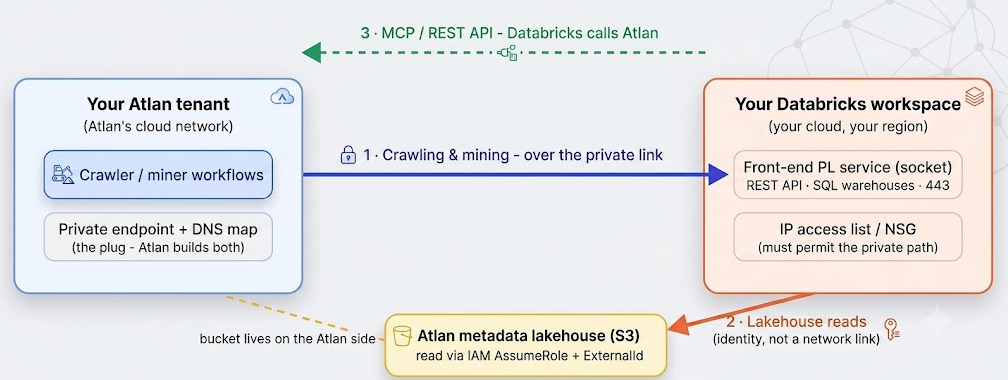
The private link secures path 1 only. Paths 2 and 3 exist independently and need their own consideration.
- Crawling and mining (Atlan → Databricks). The path the private link protects: workspace REST API and SQL warehouses, always on port 443. This is what the how-to guides configure.
- Metadata lakehouse reads (Databricks → Atlan's S3). If you use the Atlan lakehouse integration, your Databricks reads Atlan's S3 bucket by assuming an IAM role an identity handshake (role ARN + ExternalId), not a network link.
- MCP and REST API calls (Databricks → Atlan). Reversed direction: Databricks initiates connections to your Atlan tenant. If the tenant restricts inbound traffic, Databricks' outbound IPs which come from its serverless compute plane, not your cluster NAT must be permitted.
Glossary
For definitions of every term these guides use—endpoint, endpoint service, Private Access Settings, private DNS mapping, IP access list, NSG, CIDR range, and more—see the network connectivity glossary.
An endpoint showing Approved / Succeeded means the control plane accepted the connection, it doesn't guarantee packets flow. NSG rules, partial DNS mappings, and destination-side drops all happen after approval. Always finish with the connectivity verification step; "the portal says approved" is the beginning of validation, not the end.